zero trust
36 TopicsStrengthening Semiconductor Supply Chain Trust with Microsoft’s Artifact Signing and Transparency
As enterprises expand their use of Confidential Computing in the cloud and in AI infrastructure, the security of the underlying hardware is more critical than ever. Organizations and their customers need confidence not only in the software they deploy, but also in the silicon and firmware executing their most sensitive workloads. AMD and Microsoft are collaborating to demonstrate how signing and transparency can strengthen trust in the semiconductor supply chain. By combining AMD Device Provenance with Microsoft’s Artifact Signing and Signing Transparency, we are exploring how device provenance, signing, and transparency could work together to support independently verifiable hardware evidence. Why Hardware Provenance Needs Transparency Provenance evidence is most useful when it can be independently verified and evaluated alongside related supply chain evidence. Semiconductor manufacturers generate evidence across selected manufacturing and lifecycle stages, which may describe relevant device attributes, manufacturing events, and validation activities. A digitally signed record establishes who issued information and its integrity. Individual signatures alone do not provide a durable and independently verifiable record of the order in which they were issued, whether they were recorded consistently, or whether unexpected activity occurred in the interval. Transparency addresses this gap. Microsoft's Signing Transparency leverages confidential computing to create a verified, tamper-evident record of signing events, allowing customers and auditors to confirm that evidence was recorded and has not been silently changed or been removed. It applies the Zero Trust principle of “trust but Verify” by giving relying parties cryptographic proof they can evaluate directly. Extending Transparency from Software to Silicon Microsoft's Signing Transparency was designed to address software supply chain threats that traditional code signing alone cannot fully prevent. The same principles can be applied to firmware, hardware provenance, and other evidence generated across the physical supply chain. AMD Device Provenance is designed to provide visibility into the manufacturing and lifecycle of data center components. Through our collaboration, AMD and Microsoft are demonstrating how this evidence can be signed, made transparent, and independently validated. This approach provides several important benefits: Transparent provenance: Changes to signed hardware evidence can be detected rather than silently accepted. Independent validation: Customers can independently validate the integrity, signing history, and transparency records associated with provenance evidence while still applying their own trust requirements to the evidence issuer. Stronger accountability: Transparency creates a durable record of signing events, providing evidence that can help identify unexpected patterns or unauthorized signatures. Audit and compliance evidence: Verifiable records may help inform supplier assessments, regulatory inquiries, and internal due diligence. Standards-based portability: Evidence can be validated across organizational boundaries using interoperable IETF specifications, including RFC 9943, An Architecture for Trustworthy and Transparent Digital Supply Chains, RFC 9942, CBOR Object Signing and Encryption Receipts, and RFC 9995, CBOR Object Signing and Encryption Hash Envelope, rather than proprietary trust mechanisms. Together, these capabilities allow relying parties to verify the origin, integrity, registration, and device binding of manufacturer-issued provenance evidence. Learn More at OCP Global Summit At OCP Global Summit 2026, AMD and Microsoft will present a proof-of-concept demonstration that prototypes how these components could operate together. Visit the AMD (#C61) booth to see the demonstration and learn how AMD and Microsoft are advancing semiconductor supply chain security. To dive deeper into the demo details read AMD’s blog Advancing Semiconductor Supply Chain Assurance. Organizations interested in applying Artifact Signing and Signing Transparency to software, firmware, or hardware can also join the Artifact Signing with Signing Transparency preview community to learn more and help shape the future of the service.Passwordless Authentication with FIDO2 Security Key for Remote Desktop Connection
Passwordless Authentication with FIDO2 Security Key for Remote Desktop Connection Hello Everyone, in this blog, we will explore how to use a FIDO2 security key to access a device using Remote Desktop Connection (RDP)—a Zero Trust approach where passwordless authentication is enforced. Recently, a customer asked me whether they could secure their device and enforce passwordless authentication for RDP access. While some FIDO2 security keys can also be used as smart cards with Certificate-Based Authentication (CBA), I will cover that topic in my next blog. In this post, let's focus on how we can use Windows 10/11, the RDPAAD (Remote Desktop Protocol Azure AD Protocol), and WebAuthn to connect to Entra ID-joined or Hybrid-joined devices using a FIDO2 security key. If a user has never used or registered a FIDO2 security key, they should register it by visiting My Sign-Ins, clicking on Security Info, and selecting Add sign-in method. Once the FIDO2 security key is registered, complete the sign-in process and ensure the user can successfully authenticate to web applications using the security key. Configuring RDP for Entra ID-Joined Devices: For Entra ID-joined devices, follow these steps to enable RDP access using a FIDO2 security key: Ensure the user is a member of the local Remote Desktop Users group on the remote device. o Open PowerShell as Administrator and load the Microsoft Graph PowerShell module to connect to Entra ID (if needed). o Run the following command to add the user to the Remote Desktop Users group: o net localgroup "Remote Desktop Users" /add "AzureAD\user200@farooquetech.in" We can validate the configuration by opening Computer Management and checking the Local Users and Groups settings: Open Computer Management (compmgmt.msc). Navigate to Local Users and Groups → Groups. Locate and open the Remote Desktop Users group. Check if the Entra ID user we added appears in the list. This confirms that the user has been successfully added and can sign-in to remote machine using RDP. At this point, we can open Remote Desktop Connection (mstsc.exe) and attempt to connect to the remote device. Open Remote Desktop Connection (mstsc.exe). Click on the Advanced tab. Under User Authentication, ensure we select "Use a web account to sign in to the remote computer." This ensures that the RDP session leverages passwordless authentication with FIDO2 and WebAuthn for secure access. Enter the NetBIOS name of the remote computer in Remote Desktop Connection (mstsc.exe) and click Connect. On the sign-in page, enter the Entra ID account for which FIDO2 Security Key authentication is enabled. When prompted to choose a passwordless authentication method, select Security Key. Insert your FIDO2 security key, follow the prompts, and complete the authentication process. This ensures a secure, passwordless RDP connection to the remote device. Put the PIN and also touch your finger on Security Key to complete authentication. A consent is prompt to allow RDP Connection, select Yes. Post Authentication, we will see the desktop successfully loads. Remote Desktop Connection Access to Hybrid Entra ID-Joined Devices: Now, let's discuss how to establish RDP access for Hybrid Entra ID-joined devices. The process for Hybrid-joined devices differs slightly because these devices are joined to both Active Directory (AD) and Entra ID. This means authentication must be validated in both directories. To achieve this, we need to register an Active Directory Read-Only Domain Controller (RODC) object in Entra ID. This RODC object helps issue a partial Kerberos Ticket Granting Ticket (TGT) to the user after authentication with Entra ID. Note: This RODC object is not linked to any on-premises AD domain controller—it is simply an empty object in Entra ID used to enable Kerberos authentication. Enabling Entra ID Kerberos Authentication: To enable Entra ID Kerberos authentication, follow these steps: Open PowerShell as Administrator. Install the AzureADKerberos module (if not already installed): Execute below powershell commands Import-module “Import-module "C:\Program Files\Microsoft Azure Active Directory Connect\AzureADKerberos\AzureAdKerberos.psd1" $domain = $env:USERDNSDOMAIN $userPrincipalName = admin@mngenvmcapXXX.onmicrosoft.com $domainCred = Get-Credential (Enter the Active Directory credentials) Once the command executes successfully, we can verify that the AzureADKerberos account has been created in Active Directory. Open Active Directory Users and Computer and under Domain Controller, check AzureADKerberos RODC object is created. This completes the AzureADKerberos configuration, enabling the use of FIDO2 Security Keys for authentication. Now, to establish an RDP connection, follow the same steps outlined earlier for Entra ID-joined devices. Enforcing Phishing-Resistant Passwordless Authentication for RDP: To ensure that Remote Desktop Protocol (RDP) always uses phishing-resistant passwordless authentication, we can enforce this through Conditional Access Policies in Entra ID. Sign in to the Entra ID portal. Go to Security → Conditional Access and create a new policy. Under Assignments, select the users or groups that require secure RDP access. In the Cloud apps or actions section, select “Microsoft Remote Desktop” with Application ID “a4a365df-50f1-4397-bc59-1a1564b8bb9c”. Under Grant Controls, choose Require authentication strength. Select Phishing-resistant authentication, which includes FIDO2 Security Keys Save and enable the policy. Note: For Hybrid Entra Joined machine, please ensure we do not use domain admin or any other AD high privileged account to logon else partial TGT will not be issued by Entra ID. I hope you found this blog helpful! In my next blog, I will cover how FIDO2 Security Keys can also be used for on-premises Active Directory domain-joined servers. Stay tuned!Migrate Sentinel to Defender - Why It Is a Security Architecture Decision, Not Just a Portal Change
Microsoft will retire the Sentinel experience in Azure on March 31, 2027. Most of the conversation around this transition focuses on cost optimization and portal consolidation. That framing undersells what is actually happening. The unified Defender portal is not a new interface for the same capabilities. It is the platform foundation for a fundamentally different SOC operating model — one built on a 2-tier data architecture, graph-based investigation, and AI agents that can hunt, enrich, and respond at machine speed. Partners who understand this will help customers build security programs that match how attackers actually operate. This document covers four things: What the unified experience delivers — the security capabilities that do not exist in standalone Sentinel and why they matter against today’s threats. What the transition really involves - is not data migration, but it is a data architecture project that changes how telemetry flows, where it lives, and who queries it. Where the partner opportunity lives — a structured progression from professional services (transactional, transition execution, and advisory) to ongoing managed security services. Why does the unified experience win competitively — factual capability advantages that give partners a defensible position against third-party SIEM alternatives. The Bigger Picture: Preparing for the Agentic SOC Before getting into transition mechanics, partners need to understand where the industry is headed — because the platform decisions made during this transition will determine whether a customer’s SOC is ready for what comes next. The security industry is moving from human-driven, alert-centric workflows to an operating model built on three pillars: Intellectual Property — the detection logic, hunting hypotheses, response playbooks, and domain expertise that differentiate one security team from another. Human Orchestration — the judgment, context, and decision-making that humans bring to complex incidents. Humans set strategy, validate findings, and make containment decisions. They do not manually triage every alert. AI Agents - built agents that execute repeatable work: enriching incidents, hunting across months of telemetry, validating security posture, drafting response actions, and flagging anomalies for human review. The SOC of 2027 will not be scaled by hiring more analysts. It will be scaled by deploying agents that encode institutional knowledge into automated workflows — orchestrated by humans who focus on the decisions that require judgment. This transformation requires a platform that provides three things: Deep telemetry — agents need months of queryable data to analyze behavioral patterns, build baselines, and detect slow-moving threats. The Sentinel data lake provides this at a cost point that makes long-retention feasible. Relationship context — agents need to understand how entities connect. Which accounts share credentials? What is the blast radius of a compromised service principle? What is the attack path from a phished user to domain admin? Sentinel Graph provides this. Extensibility — partners and customers need to build and deploy their own agents without waiting for Microsoft to ship them. The MCP framework and Copilot agent architecture provide this. None of these exist in Azure experience for Sentinel. All three ship with the Defender experience. The urgency goes beyond the March 2027 deadline. Organizations are deploying AI agents, copilots, and autonomous workflows across their businesses — and every one of those creates a new attack surface. Prompt injection, data poisoning, agent hijacking, cross-plugin exploitation — these are not theoretical risks. They are in the wild today. Defending against AI-powered attacks requires a security platform that is itself AI Agent-ready. The new experience in Defender unlocks this experience. What Unified SIEM and XDR Actually Delivers The original framing — “single pane of glass for SIEM and XDR” — is accurate but insufficient. Here is what the unified platform delivers that standalone Sentinel does not. Cross-Domain Incident Correlation The Defender correlation engine does not just group alerts by time proximity. It builds multi-stage incident graphs that link identity compromise to lateral movement to data exfiltration across SIEM and XDR telemetry — automatically. Consider a token theft chain: an infostealer harvests browser session cookies (endpoint telemetry), the attacker replays the token from a foreign IP (Entra ID sign-in logs), creates a mailbox forwarding rule (Exchange audit logs), and begins exfiltrating data (DLP alerts). In standalone Sentinel, these are four separate alerts in four different tables. In the unified platform, they are one correlated incident with a visual attack timeline. 2-Tier Data Architecture The Sentinel data lake introduces a second storage tier that changes the economics and capabilities of security telemetry: Analytics Tier Data Lake Purpose Real-time detection rules, SOAR, alerting Hunting, forensics, behavioral analysis, AI agent queries Latency Sub-5-minute query and alerting Minutes to hours acceptable Cost ~$4.30/GB PAYG ingestion (~$2.96 at 100 GB/day commitment) ~$0.05/GB ingestion + $0.10/GB data processing (at least 20x cheaper) Retention 90 days default (expensive to extend) Up to 12 years at low cost Best for High-signal, low-volume sources High-volume, investigation-critical sources The architecture decision is not “which tier is cheaper.” It is “which tier gives me the right detection capability for each data source.” Analytics tier candidates: Entra ID sign-in logs, Azure activity, audit logs, EDR alerts, PAM events, Defender for Identity alerts, email threat detections. These need sub-5-minute alerting. Data lake candidates: Raw firewall session logs, full DNS query streams, proxy request logs, Sysmon process events, NSG flow logs. These drive hunting and forensic analysis over weeks or months. Dual-ingest sources: Some sources need both tiers. Entra ID sign-in logs are the canonical example — analytics tier for real-time password spray detection, Data Lake for graph-based blast radius analysis across months of authentication history. Implementation is straightforward: a single Data Collection Rule (DCR) transformation handles the split. One collection point, two routing destinations. The right framing: “Right data in the right tier = better detections AND lower cost.” Cost savings are a side effect of good security architecture, not the goal. Sentinel Graph Sentinel graph enables SOC teams and AI agents to answer questions that flat log queries cannot: What is the blast radius of this compromised account? Which service principals share credentials with the breached identity? What is the attack path from this phished user to domain admin? Which entities are connected to this suspicious IP across all telemetry sources? Graph-based investigation turns isolated alerts into context-rich intelligence. It is the difference between knowing “this account was compromised” and understanding “this account has access to 47 service principals, 3 of which have written access to production Key Vault.” Security Copilot Integration Security Copilot embedded in the defender portal helps analysts summarize incidents, generate hunting queries, explain attacker behavior, and draft response actions. For complex multi-stage incidents, it reduces the time from “I see an alert” to “I understand the full scope” from hours to minutes. With free SCUs available with Microsoft 365 E5, teams can apply AI to the highest-effort investigation work without adding incremental cost. MCP and the Agent Framework The Model Context Protocol (MCP) and Copilot agent architecture let partners and customers build purpose-built security agents. A concrete example: an MCP-enabled agent can automatically enrich a phishing incident by querying email metadata, checking the sender against threat intelligence, pulling the user’s recent sign-in patterns, correlating with Sentinel Graph for lateral risk, and drafting a containment recommendation — in under 60 seconds. This is where partner intellectual property becomes competitive advantage. The agent framework is the mechanism for encoding proprietary detection logic, response playbooks, and domain expertise into automated workflows that run at machine speed. Security Store Security Store allows partners to evolve from one‑time transition projects into repeatable, scalable offerings—supporting professional services, managed services, and agent‑based IP that align with the customer’s unified SecOps operating model As part of the transition, the Microsoft Security Store becomes the extension layer for the Defender —allowing partners to deliver differentiated agents, SaaS, and security services natively within Defender and Sentinel, instead of building and integrating in isolation The 4 Investigation Surfaces: A Customer Maturity Ladder The Sentinel Data Lake exposes four distinct investigation surfaces, each representing a step toward the Agentic SOC — and a partner service opportunity: Surface Capability Maturity Level Partner Opportunity KQL Query Ad-hoc hunting, forensic investigation Basic — “we can query” Hunting query libraries; KQL training Graph Analytics Blast radius, attack paths, entity relationships Intermediate — “we understand relationships” Graph investigation training; attack path workshops Notebooks (PySpark) Statistical analysis, behavioral baselines, ML models Advanced — “we predict behaviors” Custom notebook development; anomaly scoring Agent/MCP Access Autonomous hunting, triage, response at machine speed Agentic SOC — “we automate” Custom agent development; MCP integration The customer who starts with “help us hunt better” ends up at “build us agents that hunt autonomously.” That is the progression from professional services to managed services. What the Transition Actually Involves It is not a data migration — customers’ underlying log data and analytics remain in their existing Log Analytics workspaces. That is important for partners to communicate clearly. But partners should not set the expectation that nothing changes except the URL. Microsoft’s official transition guide documents significant operational changes — including automation rules and playbooks, analytics rule, RBAC restructuring to the new unified model (URBAC), API schema changes that break ServiceNow and Jira integrations, analytics rule transitions where the Fusion engine is replaced by the Defender XDR correlation engine, and data policy shifts for regulated industries. Most customers cannot navigate this complexity without professional help. Important: Transitioning to the Defender portal has no extra cost - estimate the billing with the new Sentinel Cost Estimator Optimizing the unified platform means making deliberate changes: Adding dual-ingest for critical sources that need both real-time detection and long-horizon hunting. Moving high-volume telemetry to the Data Lake — enabling hunting at scale that was previously cost-prohibitive. Retiring redundant data copies where Defender XDR already provides the investigation capability. Updating RBAC, automation, and integrations for the unified portal’s consolidated schema and permission structure. Training analysts on new investigation workflows, Sentinel Graph navigation, and Copilot-assisted triage. Threat Coverage: The Detection Gap Most Organizations Do Not Know They Have This transition is an opportunity to quantify detection maturity — and most organizations will not like what they find. Based on real-world breach analysis — infostealers, business email compromise, human-operated ransomware, cloud identity abuse, vulnerability exploitation, nation-state espionage, and other prevalent threat categories — organizations running standalone Sentinel with default configurations typically have significant detection gaps. Those gaps cluster in three areas: Cross-domain correlation gaps — attacks that span identity, endpoint, email, and cloud workloads. These require the Defender correlation engine because no single log source tells the complete story. Long-retention hunting gaps — threats like command-and-control beaconing and slow data exfiltration that unfold over weeks or months. Analytics-tier retention at 90 days is too expensive to extend and too short for historical pattern analysis. Graph-based analysis gaps — lateral movement, blast radius assessment, and attack path analysis that require understanding entity relationships rather than flat log queries. The unified platform with proper log source coverage across Microsoft-native sources can materially close these gaps — but only if the transition includes a detection coverage assessment, not just a portal cutover. Partners should use MITRE ATT&CK as the common framework for measuring detection maturity. Map existing detections to ATT&CK tactics and techniques before and after transition — a measurable, defensible improvement that justifies advisory fees and ongoing managed services. Partner Opportunity: Professional Services to Managed Services This transition creates a structured progression for all partner types — from professional services that build trust and surface findings, to managed security services that deliver ongoing value. The key insight most partners miss: do not jump from “transition assessment” to “managed services pitch.” Customers are not ready for that conversation until they have experienced the value of professional services. The bridge engagement — whether transactional, transition execution, or advisory — builds trust, demonstrates the expertise, and surfaces the findings that make the managed services conversation a logical next step. Professional Services (transactional + transition execution + advisory) → Managed Security Services (MSSP) The USX transition is the ideal professional services entry point because it combines a mandatory deadline (March 2027) with genuine technical complexity (analytics rule, automation behavioral changes, RBAC restructuring, API schema shifts) that most customers cannot navigate alone. Every engagement produces findings — detection gaps, automation fragility, staffing shortfalls — that are the most credible possible evidence for managed services. Professional Services Transactional Partners Offer Customer Value Key Deliverables Transition Readiness Assessment Risk-mitigated transition with clear scope Sentinel deployment inventory; Defender portal compatibility check; transition roadmap with timeline; MITRE ATT&CK detection coverage baseline Transition Execution and Enablement Accelerated time-to-value, minimal disruption Workspace onboarding; RBAC and automation updates; Dual-portal testing and validation; SOC team training on unified workflows Security Posture and Detection Optimization Better detections and lower cost Data ingestion and tiering strategy; Dual-ingest implementation for critical sources; Detection coverage gap analysis; Automation and Copilot/MCP recommendations Advisory Partners Offer Customer Value Key Deliverables Executive and Strategy Advisory Leadership alignment on why this transition matters Unified SecOps vision and business case; Zero Trust and SOC modernization alignment; Stakeholder alignment across security, IT, and leadership Architecture and Design Advisory Future-ready architecture optimized for the Agentic SOC Target-state 2-tier data architecture; Dual-ingest routing decisions mapped to MITRE tactics; RBAC, retention, and access model design Detection Coverage and Gap Analysis Measurable detection maturity improvement Current-state MITRE ATT&CK coverage mapping; Gap analysis against 24 threat patterns; Detection improvement roadmap with priority recommendations SOC Operating Model Advisory Smooth analyst adoption with clear ownership Redesigned SOC workflows for unified portal; Incident triage and investigation playbooks; RACI for detection engineering, hunting, and platform ops Agentic SOC Readiness Preparation for AI-driven security operations MCP and agent architecture assessment; Custom agent development roadmap; IP + Human Orchestration + Agent operating model design Cost, Licensing and Value Advisory Transparent cost impact with strong business case Current vs. future cost analysis; Data tiering optimization recommendations; TCO and ROI modeling for leadership The conversion to managed services is evidence-based. Every professional services engagement produces findings — detection gaps, automation fragility, staffing shortfalls. Those findings are the most credible possible case for ongoing managed services. Managed Security Services The unified platform changes the managed security conversation. Partners are no longer selling “we watch your alerts 24/7.” They are selling an operating model where proprietary AI agents handle the repeatable work — enrichment, hunting, posture validation, response drafting — and human experts focus on the decisions that require judgment. This is where the competitive moat forms. The formula: IP + Human Orchestration + AI Agents = differentiated managed security. The unified platform enables this through: Multi-tenancy — the built-in multitenant portal eliminates the need for third-party management layers. Sentinel Data Lake — agents can query months of customer telemetry for behavioral analysis without cost constraints. Sentinel Graph — agents can traverse entity relationships to assess blast radius and map attack paths. MCP extensibility — partners can build agents that integrate with proprietary tools and customer-specific systems. Partners who build proprietary agents encoding their detection logic into the MCP framework will differentiate from partners who rely on out-of-box capabilities. The Securing AI Opportunity Organizations are deploying AI agents, copilots, and autonomous workflows across their businesses at an accelerating pace. Every AI deployment creates a new attack surface — prompt injection, data poisoning, agent hijacking, cross-plugin exploitation, unauthorized data access through agentic workflows. These are not theoretical risks. They are in the wild today. Partners who can help customers secure their AI deployments while also using AI to strengthen their SOC will command premium positioning. This requires a security platform that is itself AI Agent-ready — one that can deploy defensive agents at the same pace organizations deploy business AI. The unified Defender portal is that platform. Partners who position USX as “preparing your SOC for AI-driven security operations” will differentiate from partners who position it as “moving to a new portal.” Cost and Operational Benefits Better security architecture also costs less. This is not a contradiction — it is the natural result of putting the right data in the right tier. Benefit How It Works Eliminate low-value ingestion Identify and remove log sources that are never used for detections, investigations, or hunting. Immediately lowers analytics-tier costs without impacting security outcomes. Right-size analytics rules Disable unused rules, consolidate overlapping detections, and remove automation that does not reduce SOC effort. Pay only for processing that delivers measurable security value. Avoid SIEM/XDR duplication Many threats can be investigated directly in Defender XDR without duplicating telemetry into Sentinel. Stop re-ingesting data that Defender already provides. Tier data by detection need Store high-volume, hunt-oriented telemetry in the Data Lake at at least 20x lower cost. Promote only high-signal sources to the analytics tier. Full data fidelity preserved in both tiers. Reduce operational overhead Unified SIEM+XDR workflows in a single portal reduce tool switching, accelerate investigations, simplify analyst onboarding, and enable SOC teams to scale without proportional headcount increases. Improve detection quality The Defender correlation engine produces higher-fidelity incidents with fewer false positives. SOC teams spend less time triaging noise and more time on real threats. Competitive Positioning Partners need defensible talking points when customers evaluate third-party SIEM alternatives. The following advantages are factual, sourced from Microsoft’s transition documentation and platform capabilities — not marketing claims. No extra cost for transitioning — even for non-E5 customers. Third-party SIEM migrations involve licensing, data migration, detection rewrite, and integration rebuild costs. Native cross-domain correlation across Sentinel + Defender products into multi-stage incident graphs. Third-party SIEMs receive Microsoft logs as flat events — they lack the internal signal context, entity resolution, and product-specific intelligence that powers cross-domain correlation. Custom detections across SIEM + XDR — query both Sentinel and Defender XDR tables without ingesting Defender data into Sentinel. Eliminates redundant ingestion cost. Alert tuning extends to Sentinel — previously Defender-only capability, now applicable to Sentinel analytics rules. Net-new noise reduction. Unified entity pages — consolidated user, device, and IP address pages with data from both Sentinel and Defender XDR, plus global search across SIEM and XDR. Third-party SIEMs provide entity views from ingested data only. Built-in multi-tenancy for MSSPs — multitenant portal manages incidents, alerts, and hunting across tenants without third-party management layers. Try out the new GDAP capabilities in Defender portal. Industry validation: Microsoft’s SIEM+XDR platform has been recognized as a Leader by both Forrester (Security Analytics Platforms, 2025) and Gartner (SIEM Magic Quadrant, 2025). Summary: What Partners Should Take Away Topic Key Message Framing USX is a security architecture transformation, not a portal transition. Lead with detection capability, not cost savings. Platform foundation Sentinel Data Lake + Sentinel Graph + MCP/Agent Framework = the platform for the Agentic SOC. 4 investigation surfaces KQL → Graph → Notebooks → Agent/MCP. A maturity ladder from “we can query” to “we automate at machine speed.” Architecture 2-tier data model (analytics + Data Lake) with dual-ingest for critical sources. Cost savings are a side effect of good architecture. Transition complexity Analytics rules and automation rules. API schema changes. RBAC restructuring. Most customers need professional help. Partner engagement model Professional Services (transactional + transition execution + advisory) → Managed Services (MSSP). Competitive positioning No extra cost. Native correlation. Cross-domain detections. Built-in multi-tenancy. Capabilities third-party SIEMs cannot replicate. Partner differentiation IP + Human Orchestration + AI Agents. Partners who build proprietary agents on MCP have competitive advantage. Timeline March 31, 2027. Start now — phased transition with one telemetry domain first, then scale.3.7KViews5likes5CommentsImplementing Zero Trust: A Guide to Securing Your Data
Data protection is critical for organizations to ensure sensitive information is always protected. Implementing a Zero Trust strategy is an effective way to protect your data. In this guide, we will walk you through the three key components of a data protection strategy and the initial deployment goals for Zero Trust. Learn about what has to be considered to ensure your data is safe at all times, from discovering and classifying your data through monitoring and cleanup.6KViews4likes0CommentsWhat is Zero Trust and is it the Future of Cybersecurity?
Zero Trust is a security architecture that assumes the network is already infiltrated and implements multi-factor authentication, least privilege access, and real-time monitoring and analytics to secure digital assets. The Zero Trust model goes beyond the traditional perimeter-based security method and focuses on protecting identities, endpoints, applications, data, infrastructure, and networks. By using a Zero Trust model, organizations can better protect themselves from cyber-attacks and data breaches while still making sure they are compliant and staying productive. Zero Trust is the future of cybersecurity because it focuses on visibility, automation, and orchestration. It is also the key to securing your digital estate.14KViews4likes2CommentsSetting up Microsoft Entra Verified ID, step by step
Are you confident who the people in your organization are interacting with online? Identity verification is fundamental in protecting your organization from impersonation. Get the knowledge you need to bring strong identity verification to your organization and improve confidence that digital interactions are safe and secure. The Microsoft Entra Verified ID team will kick off with a comprehensive understanding of how to set up Verified ID. We'll walk through key concepts, including Verified ID's significance in enhancing digital identity, security, and trust. Then we'll show you how to configure your environment, set up and issue your first credential, and use the Microsoft Entra admin center to manage credentials across your organization. This session is part of the Microsoft Entra Verified ID webinar series.4.1KViews3likes2CommentsKick Start Your Security Learning with a 7-lesson, Open-Source Course
This course is designed to teach you fundamental cyber security concepts to kick start your security learning. It is vendor agnostic and is divided into small lessons that should take around 30-60 mins to complete. Each lesson has a small quiz and links to further reading if you want to dive into the topic a bit more.3.3KViews3likes1Comment
Microsoft Leads a New Era of Software Supply Chain Transparency
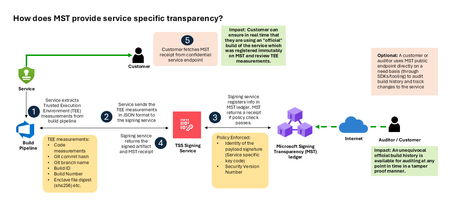
Today, Microsoft announces the general availability of Microsoft’s Signing Transparency (MST) – a first-of-its-kind capability that brings unprecedented visibility and trust to our software supply chain. With this release, Microsoft is leading the industry by recording the build of critical cloud services into a publicly readable and verifiable SCITT standard (Supply Chain Integrity, Transparency, and Trust) compliant blockchain ledger. This means every production software build for in scope services like Azure Attestation and Azure Managed HSM (Hardware Security Module), Azure confidential ledger, Microsoft Signing Transparency itself (and others over time) – is now logged in an immutable, tamper-evident record. Only builds that are in the MST ledger are deployed to production; this gives customers confidence that the supply chain for these critical services can be audited at anytime. Notably, the MST ledger is fully open source and built to align with the emerging IETF SCITT standard. By embracing SCITT’s principles and open protocols, Microsoft ensures that MST not only secures our own ecosystem but also contributes to a broader industry movement toward standardized supply chain transparency. The open-source MST ledger serves as a verifiable trust anchor that any organization or researcher can inspect, audit, or even integrate with their own tooling. MST itself meets the highest levels of transparency, backed by a tamper-proof confidential ledger, open-source, and independently verified. Specifically, we are making the foundation of our trust model transparent and accessible to everyone – reinforcing that trust must be earned through proof, not just promises. This launch marks a major milestone in our commitment to Zero Trust principles, extending “never trust, always verify” all the way into the build itself. Building on a public preview introduced late last year, MST’s general availability delivers verifiable transparency at the software level. It transforms traditional code signing with an additive trust layer that is accessible via an open verification model. Every new software update is accompanied by a publicly auditable proof of integrity, enabling security teams to proactively confirm that each update is authentic and unaltered. To help organizations get the most out of this capability, we are also introducing a free tool to explore the contents – Ledger Explorer – an offline tool that allows security teams to examine MST ledger entries, verify cryptographic proofs, and even validate the ledger’s integrity independently. This tool, combined with MST’s open design, ensures that every Microsoft customer – and the broader community – can hold us accountable in real time for the software we run on their behalf. Key Benefits of Microsoft’s Signing Transparency (MST) Verified Code Integrity – Every software release is cryptographically logged in MST’s ledgers. This makes each build tamper-evident and traceable. If an attacker attempts to inject malicious code or sign an unauthorized update, it will be evident through the well-defined validation step built into the SCITT standard. Organizations gain the assurance that code integrity can be independently confirmed at any time. Independent Verification & Zero Trust – MST enables customers and auditors to verify software authenticity on their own, without having to solely rely on vendor attestations. For each update, Microsoft provides a transparency “receipt” (proof of logging) that you can use to prove the update was officially published and unaltered. This fosters a “don’t just trust, verify” approach, empowering security teams to double-check everything running in their environment aligns with what Microsoft intended. Audit-Trail & Compliance – The transparency ledger creates a permanent, auditable timeline of code deployments. Every entry is a record of what was released and when, backed by cryptographic proofs. This simplifies compliance reporting and accelerates forensic analysis. In the event of an incident, you can quickly audit the ledger to see if any unexpected code was introduced. For highly regulated industries, MST offers concrete evidence of software integrity and policy compliance over time. Leadership & Open Standards – We are delivering real transparency now, encouraging a future where all critical software is released with verifiable integrity. MST’s open source implementation and SCITT-compliant design exemplify our commitment to openness and collaboration. We believe widespread adoption of these standards will strengthen supply chain security for everyone, making trust verification a universal practice. Next Steps Microsoft’s Signing Transparency is more than a new security feature and shapes the advances in trust technology. As threats grow more sophisticated, we must evolve the way we assure our customers about the software they depend on. With MST now generally available, we are leading by example: proving that it is possible to open up the traditionally opaque process of software deployment and turn it into a source of strength and trust, i.e., empowering each person with verifiable transparency. We invite the industry to join us on this journey and get started by reading the documentation and exploring Ledger Explorer today! Together, by embracing transparency and open standards, we can turn “trust but verify” from a slogan into an everyday reality for digital infrastructure.2.9KViews2likes3Comments