yammer
28 TopicsOffice 365 Groups (aka Microsoft 365 Groups) Recap from Microsoft Ignite 2019
As we come to the close of the month of May, which would have normally rounded out Microsoft Ignite the Tour, I just wanted to share the link to our Office 365 Groups (aka Microsoft 365 Groups) recap from Ignite 2019 in Orlando. This post has several useful links which cover the new innovations and feature improvements announced this year. https://techcommunity.microsoft.com/t5/office-365-blog/office-365-groups-ignite-recap/ba-p/1036796 Looking forward to another year of innovation with Microsoft 365 Groups! Mike McLean Principal Program Manager Microsoft 365 Groups710Views1like0CommentsOffice 365 Groups Deletion Needs Fixing
The experience deleting Office 365 Groups varies widely depending on each tool/end-point. Some thoughts on this disconnected experience and samples for how each tool does it. https://www.linkedin.com/pulse/office-365-groups-deletion-needs-fixing-kevin-crossman/767Views3likes0Comments
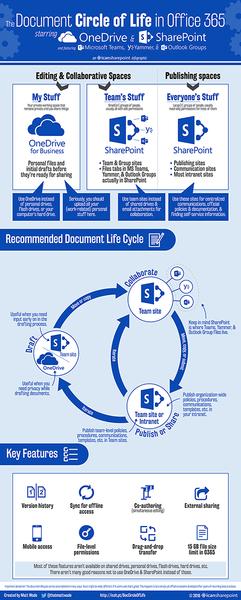
New infographic: document circle of life
"Where should I store my files?" and "What's the difference between SharePoint and OneDrive?" If you get these questions a lot, this infographic could seriously help build a standard lifecycle for files and documents. Also applicable to Teams, Outlook Groups, and Yammer, since they use SharePoint in the background. Link below for full-size version. http://icsh.pt/DocCircleOfLife http://icsh.pt/DocCircleOfLife3KViews2likes1CommentPeriodic Table of Office 365 is now dynamic and web-based
The Periodic Table of Office 365 is now web-based, clickable with app descriptions, available in seven languages, and embeddable. That's right, you can have a live version right in your intranet or website -- just like what you see below! Check it out and make sure to give us feedback. (Just remember, it's in BETA.) Never heard of it? This graphic is a popular resource for explaining WHAT Office 365 is to IT, users, management, you name it. You can't talk about something if you can't define it, right? [http://icsh.pt/DynamicTable | https://periodictableofoffice365.azureedge.net | http://icsh.pt/O365groups]1.2KViews2likes0Comments
Convert O365 group with Exchange conversations to Yammer
We have created an O365 Group, and it defaulted to Exchange based conversations. Now that the users have been exposed to the Group, they want to use Yammer as their conversation tool instead of the exchange mailbox. Is there any way to convert an existing group from exchange to Yammer conversations? We do not need to move the conversation content. If you're about to tell me I need to create an entirely new O365 Group from Yammer, I'd like to hear how to migrate content. The group already has built a SharePoint site and uploaded a lot of documents.1.4KViews0likes2CommentsOffice 365 Groups with IDN e-mail addresess
When the user starts creating new Office 365 Group (Microsoft Teams/Yammer) and he chooses international display name of this group in Yammer or Teams app, the group e-mail address is created in international IDN format. For example, we are in Czech and user choose "Žlutí koníci", it does not offer creating "zluti-konici@tenant" like that, but it create "xn--lutkonci-e2ad10n@tenant" which is not really usable address for external members and to write down and some clients does not support IDN yet. We can renemae the group, but users creating this and it starts broking naming convention. Is there some option to disable creating names and e-mail address in IDN format for Groups/Teams?3.2KViews0likes8CommentsO365 groups naming policy extension to other O365 Apps
Hello Everyone, Do anyone has information when will be Microsoft extending groups naming policy to planner, teams and Yammer by implementing it at Azure AD level? As of now if we implement prefix or suffix, it is only affecting through outlook. Is it still in the road map?Solved1.4KViews0likes4CommentsO365 Group Team site and hashtags
I'm so confused about these new offerings from O365, and users are starting to ask me questions I can't answer. First of all, I find it VERY confusing that there's something called "Teams" in the app launcher, I don't even understand what that is or when it should be used. Then there's O365 Groups, these come with a SharePoint team site, but that's different from "Teams" (I think). And we've always had SharePoint teamsites, that's what we've been calling them for years, why do they all have similar names?? Am I just using the incorrect terminology?? Anyway, my actual question came from a user, who has an O365 group SharePoint site, and wants to be able to use hashtags. His team has been posting News items and they're trying to use hashtags. That appears to be the wrong application for using hashtags, as far as I know, they only work with Yammer and SharePoint newsfeeds. I suggested they create a Yammer group and add the feed to their team's home page, is that the appropriate response?2.7KViews1like2CommentsWhat is the approximate time between a Yammer Group creation and O365 resources syncing?
Hello, Initially I was under the impression that when a new Yammer group was created the O365 Groups would immediately sync. A few users have reported that they have created Yammer groups and they are not seeing the O365 Groups resources show up. I wanted to check if there is a time delay between both before I proceed to opening an MS ticket. In the attached screenshot I can see that they are showing as "preparing" but it's been well over a few hours since the group created. Thanks!1.3KViews1like1CommentHow I would "fix" O365 Groups
Been chewing on this stuff for a while, and I know Groups is not technically broken, but mentally it is, given all of the posts and confusion. If I were Microsoft, here is my list of things that I would do to "fix" and simplify the entire Groups concept in O365. Caveat: These are just my opinions and taking into account nothing "technical" that could go into making any of this a reality. When I say Group, I mean any Group created regardless of where When I say Service, I mean any potential Group workflow, like SharePoint, Planner, PowerBI, Outlook, Yammer, and I am including Teams as a Service (1) Consider and start selling Groups as an actual product offering, and not merely an underlying service. While I can agree Groups itself is not a tool, what Groups gives you and how it is perceived by business users is a collaboration unified set of tools. It is easier to think of the different Group services as an outcome of the Group than the Group being an outcome of the service. Too much time is spent explaining Groups away... This would be helped by doing what is in bullet #2 (2) Create a SharePoint-home-esque equivalent Groups home page Would be web based, but use the same concepts for what it shown in the Groups app, or Outlook for joining other groups Show all Groups the current user is a part of Make recommendations of Groups for a user to join Allow users to filter Yammer Groups, versus Outlook Groups, versus Team groups, keywords, members, etc Once you found a group, the entry should have quick links to each Group service that is enabled. (3) All Groups should technically have the all of the same services available to them, regardless where they are created. Meaning if I create a Group, I could technically have a Yammer, Outlook Inbox/Calendar, and Team if I wanted, in addition to Planner, SharePoint, Files, Notebook, PowerBI, etc. At the end of the day, a Group is a Group is a Group More details on what this ultimately means in bullets 4 and 5 (4) Give Group Admins the ability to "turn on" and "turn off" Group services as they want. I would envision this as a list of checkboxes underneath the Group settings Maybe technically everything gets provisioned, but at least hidden from the interfaces as to not clutter things up all the time. If I go to Planner, I see tons of unused Plans because they are being provisioning for tons of Groups that have no need to use Planner Maybe I started out with a Yammer group, but I want to shut off Yammer and start using the Outlook Inbox/Calendar instead later. At the end of the day, make the products available, but don't force them to be present and used if the team doesnt want to use them. Even more details on what this ultimately means in bullet 5 (5) In line with Points 2 and 3, give O365 Admins the ability to create Group service creation policies based on where a Group is created from A group can now technically be provisioned from Outlook, SharePoint, Yammer, Dynamics, Stream, Teams, and probably a few more that I am leaving off A group admin could configure for example: A group created in Stream will receive only Stream and no other services. A group created in Yammer will by default receive Yammer, SharePoint, Notebook, Files, but no Planner, Outlook, PowerBI, and Teams A group created in Dynamics will by default receive SharePoint, Files, Notebook, but nothing else (6) Make Yammer not necessarily tied to the Group membership, but a tool of the Group Group could use it for internal Group-based conversations Or Group could extend it out to other non-Group members without granted access to the other Group services. E.g. a Learning and Performance Group could use the Yammer as a company-facing discussion interface without allow members to access their own Group tools (7) Revert back to the old Groups Mobile App Icon, or at least something a little less visually pointless. I'm also including don't do away with the Groups Mobile App, many have danced around this subject, but it is better to have the one app for all of the services then eventually make you go to a Service, then find a Group that you want to access for that Service. e.g. incorporating Groups Conv/Calendar into Outlook, incorporating Groups Files into OneDrive, incorporating Groups Notebook into OneNote Those are nice to have, but don't make that the only entry point to get to the services. (8) The Group should be able to be used anywhere in O365 as a Security container This is mostly true today, but some services dont let you share to O365 Groups e.g. O365 Video, PowerBI, Stream Group Writeback to AD should create elements as email-enabled security groups so that they could be re-used on-prem2.3KViews7likes2Comments