xdr
12 Topics
Introducing a Unified Security Operations Platform with Microsoft Sentinel and Defender XDR
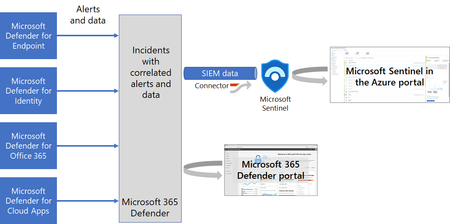
Read about our announcement of an exciting private preview that represents the next step in the SOC protection and efficiency journey by bringing together the power of Microsoft Sentinel, Microsoft Defender XDR and Microsoft Security Copilot into a unified security operations platform.83KViews17likes12CommentsTurn Complexity into Clarity: Introducing the New UEBA Behaviors Layer in Microsoft Sentinel
Security teams today face an overwhelming challenge: every data point is now a potential security signal, and SOCs are drowning in fragmented, high-volume logs from countless sources - firewalls, cloud platforms, identity systems, and more. Analysts spend precious time translating between schemas, manually correlating events, and piecing together timelines across disparate data sources. For custom detections, it’s no different. What if you could transform this noisy complexity into clear, actionable security intelligence? Today, we're thrilled to announce the release of the UEBA Behaviors layer - a breakthrough AI-based UEBA capability in Microsoft Sentinel that fundamentally changes how SOC teams understand and respond to security events. The Behaviors layer translates low-level, noisy telemetry into human-readable behavioral insights that answer the critical question: "Who did what to whom, and why does it matter?" Instead of sifting through thousands of raw CloudTrail events or firewall logs, you get enriched, normalized behaviors - each one mapped to MITRE ATT&CK tactics and techniques, tagged with entity roles, and presented with a clear, natural-language explanation. All behaviors are aggregated and sequenced within a time window or specific trigger, to give you the security story that resides in the logs. What Makes the Behaviors Layer Different? Unlike alerts - which signal potential threats - or anomalies - which flag unusual activity - behaviors are neutral, descriptive observations. They don't decide if something is malicious; they simply describe meaningful actions in a consistent, security-focused way. The Behaviors layer bridges the gap between alerts (work items for the SOC, indicating a breach) and raw logs, providing an abstraction layer that makes sense of what happened without requiring deep familiarity with every log source. While existing UEBA capabilities provide insights and anomalies for a specific event (raw log), behaviors turn clusters of related events – based on time windows or triggers – into security data. The technology behind it: Generative AI powers the Behaviors layer to create and scale the insights it provides. AI is used to develop behavior logic, map entities, perform MITRE mapping, and ensure explainability - all while maintaining quality guardrails. Each behavior is mapped back to raw logs, so you can always trace which events contributed to it. Real-World Impact: We've been working closely with enterprise customers during private preview, and their feedback speaks volumes about the transformative potential of the Behaviors layer: "We're constantly exploring innovative ways to detect anomalous behavior for our detection engineering and incident enrichment. Behaviors adds a powerful new layer that also covers third-party data sources in a multi-cloud environment - seamlessly integrable and packed with rich insights, including MITRE mapping and detailed context for deeper correlation and context-driven investigation." (Glueckkanja) "Microsoft's new AI-powered extension for UEBA enhances behavioral capabilities for PaloAlto logs. By intelligently aggregating and sequencing low-level security events, it elevates them into high-fidelity 'behaviors' - powerful, actionable signals. This enhanced behavioral intelligence significantly can improve your security operations. During investigations, these behaviors are immediately pointing to unusual or suspicious activities and providing a rich, contextual understanding of an entity's actions. They serve as a stable starting point for the analysts, instead of sifting through millions of logs." (BlueVoyant) How It Works: Aggregation and Sequencing The Behaviors layer operates using two powerful patterns: Aggregation Behaviors detect volume-based patterns. For example: "User accessed 50+ AWS resources in 1 hour." These are invaluable for spotting unusual activity levels and turning high-volume logs into actionable security insights. Sequencing Behaviors detect multi-step patterns that surface complex chains invisible in individual events. For example: "Access key created → used from new IP → privileged API calls." This helps you spot sophisticated tactics and procedures across sources. Once enabled, behaviors are aggregated and sequenced based on time windows and triggers tailored to each logic. When the time window closes or a pattern is identified, the behavior log is created immediately - providing near real-time availability. The behaviors are stored as records in Log Analytics. This means each behavior record contributes to your data volume and will be billed according to your Sentinel/Log Analytics data ingestion rates. Use Cases: Empowering Every SOC Persona The new Behaviors layer in Microsoft Sentinel enhances the daily workflows of SOC analysts, threat hunters, and detection engineers by providing a unified, contextual view of security activity across diverse data sources. SOC analysts can now investigate incidents faster by querying behaviors tied to the entities involved in an incident. For example, instead of reviewing 20 separate AWS API calls, a single behavior like “Suspicious mass secret access via AWS IAM” provides immediate clarity and context, with or without filtering on specific MITRE ATT&CK mapping. Simply use the following query (choose the entity you’re investigating): let targetTechniques = dynamic ("Password Guessing (T1110.001)"); // to filter on MITRE ATT&CK let behaviorInfoFiltered = BehaviorInfo | where TimeGenerated > ago(1d) | where AttackTechniques has_any (targetTechniques) | project BehaviorId, AttackTechniques; BehaviorEntities | where TimeGenerated > ago(1d) | where AccountUpn == ("user@domain.com") | join kind=inner (behaviorInfoFiltered) on BehaviorId Threat hunters benefit from the ability to proactively search for behaviors mapped to MITRE tactics or specific patterns, uncovering stealthy activity such as credential enumeration or lateral movement without complex queries. Another use case, is looking for specific entities that move across the MITRE ATT&CK chain within a specific time window, for example: let behaviorInfo = BehaviorInfo | where TimeGenerated > ago(12h) | where Categories has "Persistance" or Categories has "Discovery" // Replace with actual tactics | project BehaviorId, Categories, Title, TimeGenerated; BehaviorEntities | where TimeGenerated > ago(12h) | extend EntityName = coalesce(AccountUpn, DeviceName, CloudResourceId) // Replace with actual entity types | join kind=inner (behaviorInfo) on BehaviorId | summarize BehaviorTypes = make_set(Title), AffectedEntities = dcount(EntityName) by bin(TimeGenerated, 5m) | where AffectedEntities > 5 Detection engineers can build simpler, more explainable rules using normalized, high-fidelity behaviors as building blocks. This enables faster deployment of detections and more reliable automation triggers, such as correlating a new AWS access key creation with privilege escalation within a defined time window. Another example is joining the rarest behaviors with other signals that include the organization’s highest value assets: BehaviorInfo | where TimeGenerated > ago(5d) | summarize Occurrences = dcount(behaviorId), FirstSeen = min(TimeGenerated), LastSeen = max(TimeGenerated) by Title | order by Occurrences asc Supported Data Sources & Coverage This release focuses on most common non-Microsoft data sources that traditionally lack easy behavioral context in Sentinel. Coverage of more behaviors will expand over time - both within each data source and across new sources. Initial supported sources include: CommonSecurityLog - Specific vendors and logs: o Cyber Ark Vault o Palo Alto Threats AWS CloudTrail - Coverage for several AWS services like EC2, IAM, S3, EKS, Secrets Manager (common AWS management activities) GCPAuditLogs Once enabled, two new tables (BehaviorInfo and BehaviorEntities) will populate in your Log Analytics workspace. You can query these tables in Advanced Hunting, use them in detection rules, or view them alongside incidents - just like any other Sentinel data. If you already benefit from Defender behaviors (such as Microsoft Defender for Cloud Apps), the same query will show results for all sources. Ready to Experience the Power of Behaviors? The future of security operations is here. Don't wait to modernize your SOC workflows. Enable the Behaviors layer in Microsoft Sentinel today and start transforming raw telemetry into clear, contextual insights that accelerate detection, investigation, and response. Get started now: Understand pre-requisites, limitations, pricing, and use of AI in Documentation. Navigate to your Sentinel workspace settings, enable the Behaviors layer (a new tab under the UEBA settings) and connect the data sources. This is currently supported for a single workspace per tenant (best chosen by the ingestion of the supported data sources). Once enabled, explore the BehaviorInfo and BehaviorEntities tables in Advanced Hunting. If you already benefit from behaviors in XDR, querying the tables will show results from both XDR and UEBA. Start building detection rules, hunting queries, and automation workflows using the behaviors as building blocks. Share your feedback to help us improve and expand coverage.4.9KViews7likes0CommentsIntroducing Threat Intelligence Ingestion Rules
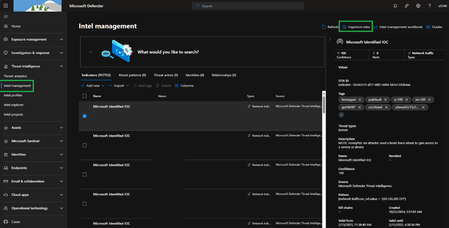
Microsoft Sentinel just rolled out a powerful new public preview feature: Ingestion Rules. This feature lets you fine-tune your threat intelligence (TI) feeds before they are ingested to Microsoft Sentinel. You can now set custom conditions and actions on Indicators of Compromise (IoCs), Threat Actors, Attack Patterns, Identities, and their Relationships. Use cases include: Filter Out False Positives: Suppress IoCs from feeds known to generate frequent false positives, ensuring only relevant intel reaches your analysts. Extending IoC validity periods for feeds that need longer lifespans. Tagging TI objects to match your organization's terminology and workflows Get Started Today with Ingestion Rules To create new “Ingestion rule”, navigate to “Intel Management” and Click on “Ingestion rules” With the new Ingestion rules feature, you have the power to modify or remove indicators even before they are integrated into Sentinel. These rules allow you to act on indicators currently in the ingestion pipeline. > Click on “Ingestion rules” Note: It can take up to 15 minutes for the rule to take effect Use Case #1: Delete IOC’s with less confidence score while ingesting When ingesting IOC's from TAXII/Upload API/File Upload, indicators are imported continuously. With pre-ingestion rules, you can filter out indicators that do not meet a certain confidence threshold. Specifically, you can set a rule to drop all indicators in the pipeline with a confidence score of 0, ensuring that only reliable data makes it through. Use Case #2: Extending IOC’s The following rule can be created to automatically extend the expiration date for all indicators in the pipeline where the confidence score is greater than 75. This ensures that these high-value indicators remain active and usable for a longer duration, enhancing the overall effectiveness of threat detection and response. Use Case #3: Bulk Tagging Bulk tagging is an efficient way to manage and categorize large volumes of indicators based on their confidence scores. With pre-ingestion rules, you can set up a rule to tag all indicators in the pipeline where the confidence score is greater than 75. This automated tagging process helps in organizing indicators, making it easier to search, filter, and analyze them based on their tags. It streamlines the workflow and improves the overall management of indicators within Sentinel. Managing Ingestion rules In addition to the specific use cases mentioned, managing ingestion rules gives you control over the entire ingestion process. 1. Reorder Rules You can reorder rules to prioritize certain actions over others, ensuring that the most critical rules are applied first. This flexibility allows for a tailored approach to data ingestion, optimizing the system's performance and accuracy. 2. Create From Creating new ingestion rules from existing ones can save you a significant amount of time and offer the flexibility to incorporate additional logic or remove unnecessary elements. Effectively duplicating these rules ensures you can quickly adapt to new requirements, streamline operations, and maintain a high level of efficiency in managing your data ingestion process. 3. Delete Ingestion Rules Over time, certain rules may become obsolete or redundant as your organizational needs and security strategies evolve. It's important to note that each workspace is limited to a maximum of 25 ingestion rules. Having a clean and relevant set of rules ensures that your data ingestion process remains streamlined and efficient, minimizing unnecessary processing and potential conflicts. Deleting outdated or unnecessary rules allows for a more focused approach to threat detection and response. It reduces clutter, which can significantly enhance the performance. By regularly reviewing and purging obsolete rules, you maintain a high level of operational efficiency and ensure that only the most critical and up-to-date rules are in place. Conclusion By leveraging these pre-ingestion rules effectively, you can enhance the quality and reliability of the IOC’s ingested into Sentinel, leading to more accurate threat detection and an improved security posture for your organization.5.9KViews4likes2CommentsWhat's New: View Microsoft Sentinel Workbooks Directly from Unified SOC Operations Platform
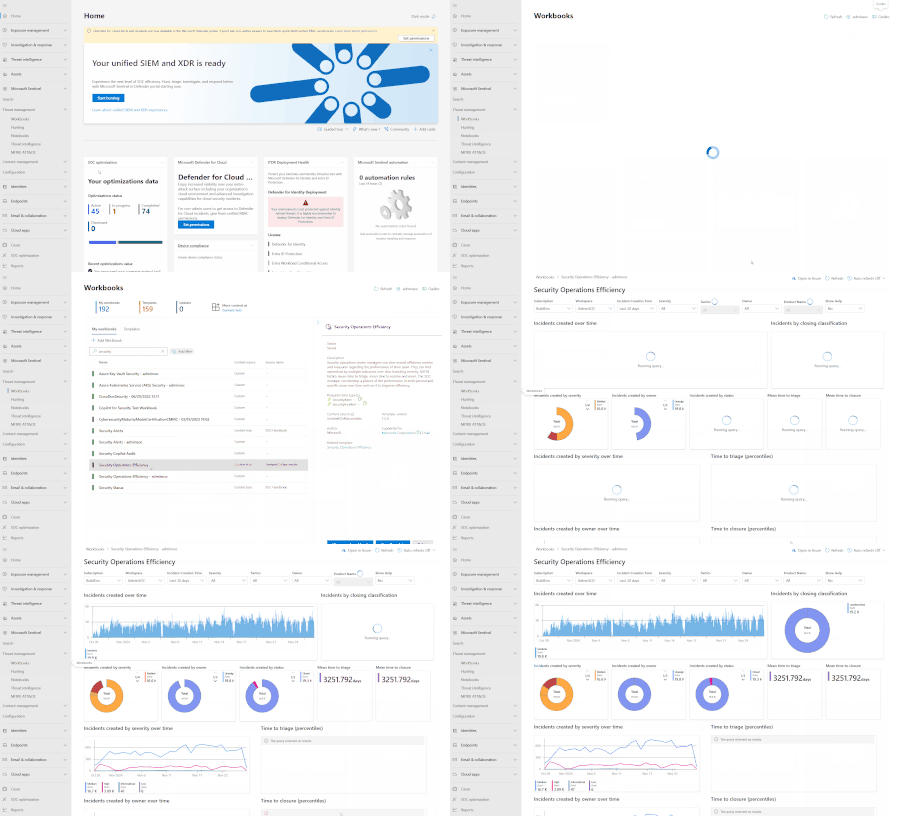
*This blog was posted on behalf of the original author, Aman Kaur. Thank you Aman for preparing this content for the community.* Key Benefits Unified Viewing Experience: Microsoft Sentinel workbook templates and saved workbooks can now be accessed directly within the Defender XDR portal. This eliminates the need to switch between different portals, providing a seamless experience. Increased Efficiency and Time Saving: The ability to view workbooks within the Defender XDR portal cuts down on the time spent navigating between portals, leading to faster access to critical information. Improved User Experience: This integration simplifies the process of referencing important data and insights, making it easier for security professionals to monitor security events, analyze trends, and review historical data. Important Note While viewing capabilities have been integrated into the Defender XDR portal, editing or creating workbooks will still require you to navigate to the Azure portal. This ensures that you have access to the full suite of editing tools and functionalities available in Azure. How to Get Started Getting started with viewing Microsoft Sentinel workbooks in the Defender XDR portal is simple: Access the Microsoft Defender XDR Portal: Log in to the Microsoft Defender XDR portal using your credentials. Navigate to Microsoft Sentinel > Threat Management > Workbooks : Select any workbook. View Workbooks: Access and view the templates and saved workbooks directly within the portal. Moving Forward with Sentinel Workbooks in Defender XDR Portal With the ability to view Microsoft Sentinel workbooks directly within the Microsoft Defender XDR portal, organizations can significantly enhance their security operations. This feature empowers security teams with the tools they need to efficiently monitor, investigate, and respond to threats—all from a single interface. By bringing together a unified viewing experience across incidents, alerts, users, devices, and files, this enhancement streamlines threat hunting, investigation, and response workflows. This ultimately helps organizations stay ahead of evolving threats and ensures they have the necessary context to protect their environment effectively. Get started with workbooks in the unified portal today!1.9KViews3likes0CommentsIntroducing SOC Optimization Recommendations Based on Similar Organizations
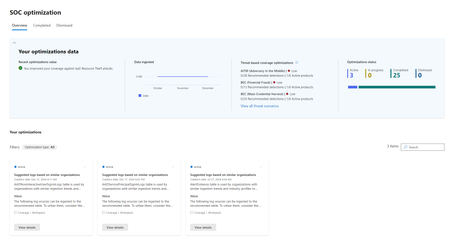
One of the key challenges that security teams in modern SOCs regularly face is determining which new data sources to onboard and which detections to activate. This ongoing process takes time and requires constant evaluation of the organization’s assets and the value that the data brings to the SOC. "…determining which logs to ingest for better threat coverage is time-consuming and requires significant effort. I need to spend a long time identifying the appropriate logs..." Elie El Karkafi, Senior Solutions Architect, ampiO Solutions Today, we’re excited to announce the public preview of recommendations based on similar organizations - a first-of-its-kind capability for SOC optimizations. Recommendations based on similar organizations use peer-based insights to guide and accelerate your decision-making process. We believe that applying insights learned from the actions of organizations with similar profiles can provide great value. Recommendations based on similar organizations use advanced machine learning to suggest which data to ingest, based on organizations with similar ingestion patterns. The recommendations also highlight the security value you can gain by adding the data. They list out-of-the-box rules that are provided by Microsoft research, which you can activate to enhance your coverage. Use the new recommendations to swiftly pinpoint the next recommended data source for ingestion and determine the appropriate detections to apply. This can significantly reduce the time and costs typically associated with research or consulting external experts to gain the insights you need. Recommendations based on similar organizations are now available in the SOC optimization page, in both the Azure portal and the unified security operations platform: - unified security operations platform Use cases Let’s take a tour of the unified security operations platform, stepping into the shoes of a small tech company that benefited from recommendations based on similar organizations during its private preview phase. In the following image, the new recommendation identifies that the AADNonInteractiveUserSignInLogs table is used by organizations similar to theirs: Selecting View details button on the recommendation card allowed them to explore how other organizations use the recommended table. This includes insights into the percentage of organizations using the table for detection and investigation purposes. By selecting See details hyperlink, the SOC engineer was able to explore how coverage could be improved with respect to the MITRE ATT&CK framework, using Microsoft’s out-of-the box rules: By selecting Go to Content hub, the SOC engineer was able to view all the essential data connectors needed to start ingesting the recommended tables. This page also includes a detailed list of out of the box, recommended analytics rules, which can provide immediate value and enhanced protection for your environment: Finally, by following the recommendation, which uses the security practices of similar organizations as a benchmark, the tech company quickly ingested the AADNonInteractiveUserSignInLogs table and activated several recommended analytics rules. Overall, this resulted in improved security coverage, corresponding to the company's specific characteristics and needs. Feedback from private preview: “I think this is a great addition. Like being able to identify tables not being used, it is useful to understand what tables other organizations are utilizing which could reveal things that so far haven't been considered or missed...” Chris Hoard, infinigate.cloud "In my view, those free recommendations are always welcomed and we can justify cost saving and empowering SOC analysts (that we know are more and more difficult to find)." Cyrus Irandoust, IBM “These recommendations will help us to take a look at the left out stuffs” Emmanuel Karunya, KPMG “Nice overview and insights! Love the interface too - nice and easy overview!” Michael Morten Sonne, Microsoft MVP Q&A: Q1: Why don’t I see these recommendations? A: Not all workspaces are eligible for recommendations based on similar organizations. Workspaces only receive these recommendations if the machine learning model identifies significant similarities between your organization and others, and discovers tables that they have but you don’t. If no such similarities are identified, no extra recommendations are provided. You’re more likely to see these recommendations if your SOC is still in its onboarding process, rather than a more mature SOC. Q2: What makes an organization similar to mine? A: Similarity is determined based on ingestion trends, as well as your organization's industry and vertical, when available in our databases. Q3: Is any of my PII being used to make recommendations to other customers? A: No. The recommendations are generated using machine learning models that rely solely on Organizational Identifiable Information (OII) and system metadata. Customer log content is never accessed or analyzed, and no customer data, content, or End User Identifiable Information (EUII) is exposed during the analysis process. Microsoft prioritizes customer privacy and ensures that all processes comply with the highest standards of data protection. Looking forward Microsoft continues to use artificial intelligence and machine learning to help our customers defend against evolving threats and provide enhanced protection against cyberattacks. This ongoing innovation is a key part of SOC optimization’s commitment to help you maximize your value from your SIEM & XDR. Learn More: SOC optimization documentation: SOC optimization overview ; Recommendation's logic Short overview and demo: SOC optimization Ninja show In depth webinar: Manage your data, costs and protections with SOC optimization SOC optimization API: Introducing SOC Optimization API | Microsoft Community Hub3.4KViews2likes1CommentManage cases from across tenants in one place
Are you managing the security needs of a large organization or a managed security service provider (MSSP)? Would you like a unified view of all the cases you are managing across these tenants? We are pleased to announce the latest addition to our case management solution, multi-tenant support, is now generally available (GA). This is the latest step in our journey towards providing a native, security-focused case management system that spans all SecOps workloads in the Microsoft Defender portal, removing customer reliance on third-party SIEM/XDR and ticketing systems. This capability is available for all Microsoft Sentinel customers that have onboarded to the Defender portal.1.2KViews1like0CommentsMulti Workspace for Single tenant is now in Public Preview in Microsoft’s unified SecOps platform
We are excited to continue to expand the use cases addressed with our unified SecOps platform, which brings the capabilities of Microsoft Sentinel, Defender XDR, Security Copilot, Threat Intelligence and more into a single experience with new and more robust functionality. Now, customers can onboard and manage multiple workspaces across Microsoft Sentinel and Defender in one place. Key Benefits of Multi Workspace Experience The multi-workspace experience offers several key benefits that enhance security operations: Unified Entity View: Customers can view all relevant entity data from multiple workspaces in a single entity page, facilitating comprehensive investigations. Workspace Filtering: Users can filter data by workspace when needed, ensuring flexibility in investigations. Enhanced Context: Aggregates alerts, incidents, and timeline events from all workspaces, providing deeper insights into entity behavior. Introducing the Primary Workspace Concept A new concept in the unified SecOps platform is Primary Workspace, which acts as a central hub where Microsoft Sentinel alerts are correlated with XDR data, resulting in incidents that include both Microsoft Sentinel’s primary workspace and XDR alerts. All XDR alerts and incidents are synced back to this workspace, ensuring a cohesive and comprehensive view of security events. The XDR connector is automatically connected to the Primary Workspace upon onboarding and can be switched if necessary. One Primary Workspace must always be connected to use the unified platform effectively. Other onboarded workspaces are considered “Secondary” workspaces, with incidents created based on their individual data. We respect and protect your data boundaries- each workspace’s data will be synced with its own alerts only. Learn more: https://aka.ms/primaryWorkspace Multi Workspace Experience- Key Scenarios Onboarding multiple workspaces to the unified SecOps platform: Open the security portal: https://security.microsoft.com/ There are two options to connect workspaces, you can select either one: Option A: Connecting the workspace through the main home page: Click on” Connect a workspace” in the banner Select the workspaces you wish to onboard and click on “Next”. Select primary workspace Review the text and click on “Connect” After completing the connection, click on “Close”. Option B: Connecting the workspaces through the Settings page: Navigate to Settings and choose “Microsoft Sentinel” Click on "Connect workspace" Follow the same steps as Option A. Switching Primary Workspaces Navigate to Settings and choose "Microsoft Sentinel" On the workspace you wish to assign as Primary, click on the "3 dots" and choose "Set as primary" Confirm and proceed. Incidents and Alerts The incident queue is a single place for a SOC analyst to manage and investigate incidents. The alert queue centralized all your workspaces’ alert in the same place and provides the ability to see the alert page. In the unified queues, you are able now to view all incidents and alerts from all workloads and all workspaces and also filter by workspace. Each alert and incident are related to a single workspace to keep data boundaries. Bi-directional sync: Any change in the unified secOps portal is reflected to Sentinel portal and vice versa. Unified Entities The multi workspace aggregated view enhances entity pages in the unified portal by consolidating data from all relevant Sentinel workspaces into a single, unified experience. This feature enables security teams to gain a complete view of entity-related data without switching between workspaces, improving investigation efficiency and data accessibility. The unified entity page grants you with: Unified Entity View: Customers can see all relevant entity data from multiple workspaces in a single entity page. Workspace Filtering: Users can filter data by workspace when needed, ensuring flexibility in investigations. Enhanced Context: Aggregates alerts, incidents, and timeline events from all workspaces, providing deeper insights into entity behavior. Aggregated view: Provides a unified view of entity data across all workspaces. Supports a predefined logic to display key entity values across components. Introduces workspace filtering in Timeline, Incidents & Alerts, and Insights tabs. Entity Page Enhancements: Overview Section: Displays entity metadata aggregated from all workspaces. Timeline View: Supports events from all workspaces with workspace-based filtering. Incidents & Alerts: Aggregates incidents and alerts from multiple workspaces. Sentinel Tab: Defaults to the primary workspace but allows workspace filtering. Side Pane: Provides a summary view, dynamically updating based on workspace data. Advanced Hunting In Advanced Hunting, you'll be able to explore all your security data in a single place. For hunting and investigation purposes, you'll be able to: Query all Microsoft Sentinel workspaces data. Run queries across multiple workspaces using workspace operator. Access all Logs content of the workspace, including queries and functions, for read/ query Create custom detections on primary workspace Create Analytic rule with workspace operator on a secondary workspace. Microsoft Sentinel features + Using Workspace selector After you connect your workspace to the unified portal, Microsoft Sentinel is on the left-hand side navigation pane. Many of the existing Microsoft Sentinel features are integrated into the unified portal and are similar. Workspace selector: for users with permissions to multiple workspaces, in each Sentinel page, a workspace selector is added to the toolbox. User can easily switch between workspaces using the selector by clicking on “Select a workspace”. SOC Optimization The SOC Optimization feature is also available in the unified portal and contains data and recommendations for multiple workspaces. FAQ Who can onboard multiple workspaces? To onboard a primary workspace, user must be: Global admin/ Security admin AND Owner of subscription OR Global admin/ Security admin AND User access admin AND Microsoft Sentinel contributor To onboard secondary workspaces, user must be Owner of subscription OR User access admin and Microsoft Sentinel contributor. Who can change the primary workspace? Global admin or security admin can change workspace type (Primary/ Secondary) Do I need to onboard all my workspaces? You don’t need to onboard all your workspaces to use this feature, although we highly recommend you to, to ensure full coverage across all your environment. Will all users in my organization have access to all workspaces in the unified security operations portal? No - we respect the permissions granted for each user. Users can see only the data from the workspace they have permissions to. Will data from one workspace be synced to a second workspace? No, we keep the data boundaries between workspaces and ensure that each workspace will only be synced with its own data. When will multi-tenancy be available? Multi-tenancy in the unified SecOps platform for single workspace is already in GA. Multi-tenancy for multiple workspaces is released to public preview with this capability as well. Can I still access my environment in Azure? Yes, all experiences remain the same. We provide bi-directional sync to make sure all changes are up to date. Conclusion Microsoft’s unified SecOps platform support for multi workspace customers represents a significant leap forward in cybersecurity management. By centralizing operations and providing robust tools for detection, investigation, and automation, it empowers organizations to maintain a vigilant and responsive security posture. The platform’s flexibility and comprehensive view of security data make it an invaluable asset for modern security operations. With the public preview now available, organizations can experience firsthand the transformative impact of the Unified Security Operations Platform. Join us in pioneering a new era of cybersecurity excellence. Learn More Please visit our documentation to learn more on the scenarios supported and how to onboard multiple workspaces to the unified platform: https://aka.ms/OnboardMultiWS1.9KViews1like1Comment