xdr
138 Topics
Finding the Elusive MDE PUA Audit Events on Linux
Potentially Unwanted Applications, or PUA, they aren't necessarily malware, but they are applications you probably don't want running across your environment either. Microsoft defines potentially unwanted applications as software that can adversely affect endpoint performance or use. Examples include advertising software, software bundlers, and applications that use behaviors intended to evade security products. Microsoft Defender can also consider an application's reputation when determining whether software qualifies as potentially unwanted. That sounds straightforward. On Windows, it generally is. On Linux, finding the resulting audit events requires knowing exactly where to look. And that is where things get interesting. PUA, PUP… Same Neighborhood, Slightly Different Address Before going further, it is worth clearing up some terminology. Across the security industry, you will commonly encounter both PUP, or Potentially Unwanted Program, and PUA, or Potentially Unwanted Application. The terms are frequently used for software that isn't necessarily malicious but has characteristics that make its presence undesirable, such as intrusive advertising, bundling additional software, or other behavior the user might not have knowingly requested. Microsoft uses Potentially Unwanted Application (PUA) as its product and detection terminology. Microsoft specifically distinguishes PUA from malware. A PUA might cause poor system performance, display unexpected advertisements, install other software, or have a poor reputation because of undesirable behavior, but those characteristics don't automatically make the application malware. Microsoft's classification criteria include examples such as: Advertising software that displays advertisements or promotions, including injecting advertisements into webpages. Bundling software that offers to install additional software that isn't digitally signed by the same entity, or that itself qualifies as PUA. Evasion software that actively attempts to avoid detection by security products or behaves differently when security software is present. Applications that have developed a poor reputation based on undesirable behavior. Microsoft's broader software-classification model also distinguishes between unknown software, malware, unwanted software, and other classifications. Software can therefore be legitimate and functional while still meeting Microsoft's criteria for classification as potentially unwanted. For the rest of this article, we'll use PUA, because that is the terminology used by Microsoft Defender and, more importantly for our investigation, the Linux product logs identify these detections explicitly as: potentially_unwanted_application That string is going to become very useful once we start looking for the supposedly elusive audit events. PUA Audit and Block on Windows On Windows, PUA protection is part of Microsoft Defender Antivirus. Administrators can configure Defender to identify applications that Microsoft considers potentially unwanted and determine how those applications should be handled. Microsoft documents PUA protection and provides the AMTSO Potentially Unwanted Application test file (Feature Settings Check - Potentially Unwanted Applications - AMTSO) as its standard demonstration scenario. Microsoft's demonstration documentation identifies Windows, Windows Server, macOS, and Linux among the supported operating systems for the PUA demonstration. The two operating modes we're interested in are conceptually simple: Audit Defender identifies the PUA but doesn't block it. This is useful when you want to understand the potential impact of enabling PUA protection before enforcing it. Block Defender identifies the PUA and takes the configured protection action. On Windows, for a device onboarded to Microsoft Defender for Endpoint – that telemetry and audit information is available in the XDR Security portal. You can find PUA detections in the Additional Fields of the AntivirusDetection action type in the DeviceEvents table – and an alert will fire when in PUA is in block mode: DeviceEvents | where ActionType == "AntivirusDetection" | extend x = parse_json(AdditionalFields) | project Timestamp, DeviceName, FolderPath, FileName, SHA256, ThreatName = tostring(x.ThreatName), WasExecutingWhileDetected = tostring(x.WasExecutingWhileDetected), WasRemediated = tostring(x.WasRemediated) | where ThreatName startswith_cs 'PUA:' Microsoft Defender Antivirus events can be investigated through: Applications and Services Logs > Microsoft > Windows > Windows Defender > Operational Defender detection events can provide information such as the threat name, threat ID, category, path, detection origin, detection type, and detection source. That makes auditing and troubleshooting reasonably familiar territory for Windows administrators. The experience on Linux, however, is different. PUA Protection on Linux Microsoft Defender for Endpoint on Linux also supports PUA protection. Microsoft documents three PUA actions: Off: PUA protection is disabled. Audit: PUA files are reported in the product logs, but no remediation is performed. Block: PUA files are reported and action is taken against them. The distinction between Audit and Block is particularly important. In PUA Audit mode: PUA files are reported in the product logs. They aren't reported in the Defender portal through this PUA mechanism. No infection record is stored in threat history. No action is taken against the file. In Block mode: The detection is reported in the product logs. It is reported in the Defender portal. A record is stored in threat history. Defender takes action on the PUA. PUA behavior can be configured locally with mdatp. To configure Audit: sudo mdatp threat policy set --type potentially_unwanted_application --action audit To configure Block: sudo mdatp threat policy set --type potentially_unwanted_application --action block There is one important distinction worth calling out here: PUA Audit mode isn't the same thing as the broader Microsoft Defender for Endpoint Antivirus Passive Mode on Linux. PUA Audit is specifically the handling policy for applications that are detected and classified as potentially unwanted. For this article, we're testing and focusing on PUA Audit. A Windows PUA on Linux? Yes. Here's where the test gets more interesting. The AMTSO PUA test artifact is a Windows executable. At first glance, that doesn't seem particularly useful when we're trying to validate PUA protection on Linux. After all, we're testing on Linux. But Defender's file inspection isn't limited to applications that can execute natively on the operating system. A Windows PE file sitting on a Linux filesystem can still be inspected and classified. And we can demonstrate that directly. Microsoft's PUA demonstration directs administrators to the AMTSO Potentially Unwanted Application test file, and Microsoft's current demonstration documentation includes Linux among the supported operating systems. On our Linux test machine, we downloaded: PotentiallyUnwanted.exe The important point is that we don't need to execute the Windows executable on Linux. In our testing, simply causing filesystem activity against the file was sufficient to make Defender inspect it. The file initially resided in: /home/ritter/Downloads/PotentiallyUnwanted.exe We then used the Linux graphical file manager to move it into: /home/ritter/Music/PotentiallyUnwanted.exe That was enough to generate another PUA Audit observation. The Defender record showed: "scan_reason":"move" And, more importantly, Defender classified the file as: "name":"PUA:Win32/EICAR_Test_File" with: "type":"potentially_unwanted_application" and: "status":"infected" The event also recorded information about the process responsible for the filesystem operation. In our test, moving the file graphically resulted in the process being recorded as: /usr/bin/nautilus So although the test artifact is a Windows executable, MDE running on Linux still inspected and classified it as PUA:Win32/EICAR_Test_File. That's exactly what we needed. So Where Is the Audit Event? This is the elusive part. If you immediately start looking in the Defender portal or expect PUA Audit to behave like PUA Block, you're likely to come away wondering whether anything happened. Microsoft's Linux documentation tells us that Audit-mode PUA files are reported in the product logs and that no infection record is stored in threat history. Fair enough. But that naturally leads to another question: Which product log? Instead of guessing, we asked Linux. A recursive grep across the MDE log directory provides a simple way to find anything containing the PUA classification string: sudo grep -RniH 'potentially_unwanted' /var/log/microsoft/mdatp/ Where: R searches recursively. n displays the matching line number. i makes the search case-insensitive. H forces grep to display the filename. And there it was. On our test system, the PUA Audit records were located in: /var/log/microsoft/mdatp/microsoft_defender_core_err.log If you only want to determine which log files contain PUA records: sudo grep -Rli 'potentially_unwanted' /var/log/microsoft/mdatp/ Once you've identified the log, you can search it directly: sudo grep -ni 'potentially_unwanted' /var/log/microsoft/mdatp/microsoft_defender_core_err.log Or include surrounding lines for additional context: sudo grep -ni -B5 -A10 'potentially_unwanted' /var/log/microsoft/mdatp/microsoft_defender_core_err.log Our test produced records containing information similar to: [Audit]: Source: { "$type":"real_time", "scan_reason":"move", "process":{ "path":"/usr/bin/nautilus" } }, File: /home/ritter/Music/PotentiallyUnwanted.exe, Threat: { "name":"PUA:Win32/EICAR_Test_File", "type":"potentially_unwanted_application", "status":"infected" } And there it is. The PUA audit event exists. You just have to go spelunking through the local Defender product logs to find it. The Microsoft documentation is technically correct: PUA Audit detections are written to the product logs. Knowing what string to search for and which log actually contained the events on our test system makes that guidance considerably more actionable. That's Fine for One Server. What About 1,000? Running grep on a test machine is easy. Running grep individually across hundreds or thousands of Linux servers obviously isn't the operational model we want. Once we know where the information resides, however, the problem changes from a Defender problem into a log collection problem. And that's a much easier problem to solve. One option is Azure Monitor Agent (AMA). AMA supports collecting custom text logs from Linux systems through an Azure Monitor Data Collection Rule (DCR) and sending those records to a Log Analytics workspace. Conceptually: A DCR can be configured to collect the Defender text log identified during testing. Azure Monitor supports Linux custom-text-log file patterns and wildcards for appropriate log-file collection scenarios. Azure Monitor Custom Text Logs also supports ingestion-time transformations, allowing records to be filtered or formatted before they're written to the destination table. That creates an interesting opportunity. Rather than collecting every line from a verbose Defender diagnostic log, a collection strategy could focus on the records containing: potentially_unwanted_application Once centralized in Log Analytics, those records become queryable with KQL. For example, if the records were ingested into a custom table called MDEPUAAudit_CL, an initial investigation could start with: MDEPUAAudit_CL | where RawData contains "potentially_unwanted" From there, the raw records could be parsed for useful reporting fields including: Host Timestamp File path Detection name PUA classification Scan reason Initiating process First occurrence Last occurrence Number of observations Turning Audit Mode into a Deployment Tool This is ultimately where the exercise becomes useful. PUA Audit doesn't have to be merely a configuration checkbox. It can become a pre-enforcement assessment mechanism. The workflow looks something like this: Instead of asking: "What happens if we turn PUA Block on?" we can start answering a much better question: "What has Defender already identified as PUA while we've been running in Audit?" And now we know where the answer is hiding. Reference Live link Detect and block potentially unwanted applications with Microsoft Defender for Endpoint on Linux https://learn.microsoft.com/en-us/defender-endpoint/linux-pua Detect and block potentially unwanted applications with Microsoft Defender Antivirus https://learn.microsoft.com/en-us/defender-endpoint/detect-block-potentially-unwanted-apps-microsoft-defender-antivirus How Microsoft identifies malware and potentially unwanted applications https://learn.microsoft.com/en-us/unified-secops/criteria Potentially unwanted applications (PUA) demonstration https://learn.microsoft.com/en-us/defender-endpoint/defender-endpoint-demonstration-potentially-unwanted-applications AMTSO Feature Settings Check: Potentially Unwanted Applications https://www.amtso.org/feature-settings-check-potentially-unwanted-applications/ Microsoft Defender Antivirus event IDs and error codes https://learn.microsoft.com/en-us/defender-endpoint/troubleshoot-microsoft-defender-antivirus Microsoft Defender for Endpoint on Linux resources https://learn.microsoft.com/en-us/defender-endpoint/linux-resources Collect text file from virtual machine with Azure Monitor https://learn.microsoft.com/en-us/azure/azure-monitor/vm/data-collection-log-text Collect logs from text files with Azure Monitor Agent and ingest to Microsoft Sentinel https://learn.microsoft.com/en-us/azure/sentinel/connect-custom-logs-ama Collect guest log data from virtual machines with Azure Monitor https://learn.microsoft.com/en-us/azure/azure-monitor/vm/data-collection DeviceEvents table in the Advanced Hunting schema https://learn.microsoft.com/en-us/defender-xdr/advanced-hunting-deviceevents-table Microsoft Defender XDR Advanced Hunting schema tables https://learn.microsoft.com/en-us/defender-xdr/advanced-hunting-schema-tablesReimagining Case Management in Microsoft Defender
Security work extends beyond the signal Identifying a threat, exposure, or data risk is only the start. Security teams still need to assign ownership, bring together the right context, coordinate investigation and response, document decisions, track actions, and maintain accountability through resolution. That work is not identical across organizations. Each team has its own responsibilities, processes, service-level commitments, and automation. Security teams need a work model they can adapt to how their organization operates, rather than forcing every security matter through a fixed workflow. The operating model is also changing as AI agents take on more investigation and response work. Analysts, automation, and agents need a shared workspace where work can be delegated, reviewed, and advanced with the right context and human oversight. Introducing the Case: the operational unit that brings together security context, people, process, automation, and actions to manage security work through resolution. Introducing Case Management in Microsoft Defender We are introducing Case Management in Microsoft Defender, starting with Incident Cases, your new home for incident response. Incident Cases bring together the familiar incident experience with powerful new case capabilities, combining alert correlation, response actions, workflow management, collaboration, automation, and lifecycle tracking in a single working experience. Incident Cases become the primary working entity for incident response in Microsoft Defender. They bring the context analysts rely on, including the attack story, alerts, affected assets, evidence, and response information, into the same workspace used to assign work, coordinate the response, track progress, and maintain the operational record. Incident Cases build on the Defender Incident experience and the customer investments around it. The result is not a separate ticket layered on top of an investigation. It is one place to understand the security matter and drive the work required to resolve it. One workspace for the complete response Case Management expands the incident response experience around the work security teams need to perform, not only the information they need to review. Adapt the workflow to how your organization operates Security teams can shape Case records and lifecycle management around their operating model. Custom fields and custom statuses allow teams to capture organization-specific information and reflect their processes. SLA policies track targets such as acknowledgement, escalation, and resolution times based on attributes such as status, severity, and team. Investigate, collaborate, and act in context The Incident Case keeps the investigation context and operational workflow together. Analysts can work with the attack story, alerts, assets, and evidence while managing ownership, status, findings, comments, attachments and tasks from the same Case. Case creation and updates can also trigger automation and playbooks, helping teams apply consistent handling as work progresses. Maintain accountability from creation through closure Case activity provides a record of changes and actions throughout the lifecycle. Case data can also support reports and dashboards across lifecycle, ownership, status, severity, classification, and other Case attributes, giving security leaders greater visibility into how work moves through the organization. VIDEO: https://aka.ms/casedemovideo Video 1. Analysts manage the Case lifecycle while retaining Defender investigation context. Bringing protection and operations closer together Case Management is part of Defender’s Integrated Security Operations Center (ISOC) experience, which unifies security operations across protection, investigation, and response. By bringing key SIEM capabilities like cases, workbooks, automation, and reporting together in one platform, Defender helps organizations strengthen security, improve operational efficiency, and build the foundation for agentic security. Learn more in the [ISOC announcement]. Designed for work shared by people and agents Project Perception introduced Microsoft's direction for an agentic security system designed for the realities of AI. Case Management is a foundational component of that vision, providing a shared operational workspace where analysts and AI agents collaborate on the same security matter, with agent work connected directly to investigation context, workflow, and human oversight. The first integration links agentic sessions to Incident Cases for the Investigation Agent workflow. From the Case, analysts can connect relevant agentic work to the investigation and see when a session requires human attention. The direction is to expand this approach to additional agentic playbooks and Case types over time. As analysts delegate more work to agents, the Case can provide the shared context in which people, automation, and agents contribute to the same security outcome, with human review remaining part of the workflow. Looking ahead, this foundation can extend to additional agentic playbooks and Case types—from exposure remediation to threat intelligence—while preserving the context, participants, and processes each workflow requires. Built for a smooth transition from Incidents Incident Cases are designed to preserve existing customer workflows and investments while introducing the Case experience. Existing Incident-based workbooks, workflows, automations, playbooks (logic apps), and integrations continue to function with Incident Cases. Existing Incident APIs continue to work on top of the Case schema. New Case-only properties are available through the Case API. Incident Cases use the existing Incident role-based access control model, with Incident permissions and scoping carried over to Cases. Each Incident Case has a one-to-one mapping with an Incident during this phase, and no manual migration or reconfiguration is required to begin using the Case experience. Detailed compatibility and transition guidance are available in Microsoft Learn, including information for APIs, automation, reporting, permissions, and integrations. Availability and get started Incident Cases in Microsoft Defender will be available in public preview beginning September 23,2026. To learn more and start using Case Management: Microsoft Learn: Case Management in Microsoft Defender Watch the Case Management demo Read the Integrated Security Operations Center (ISOC) announcement Read the Project Perception announcement2.2KViews1like0CommentsStop identity attacks before they start with Microsoft ISPM recommendations
Many major breaches involve compromised identities, excessive privileges, or misconfigured access. Long before ransomware detonates or data leaves the building, adversaries are quietly abusing valid accounts, excessive privileges or other misconfigurations to move deeper into the environment. Identity has become one of the most important attack surfaces you defend. That is why Microsoft has a dedicated team of researchers who study how identity attacks actually happen. Just as important, we turn what they learn into action. Real attacker behavior becomes concrete recommendations you can use to harden your environment before an attack begins. With Microsoft Defender, that research reaches you as Identity Security Posture Management (ISPM) recommendations: prioritized guidance that tells you what to fix, why it matters, and how to remediate it. What are identity security posture recommendations? Identity security posture recommendations are prioritized, attack-driven recommendations that address the weaknesses attackers exploit most, from overprivileged accounts to weak credentials and risky permissions. Rather than handing you a long hygiene checklist, ISPM recommendations tie each recommendation to a real attack technique. That shifts the question from "what setting do I need to change?" to "what attack am I going to prevent today?" That framing also changes how you prioritize. You can start with the fixes that close the most dangerous attack paths first, not just the ones that are quickest to clear. It gives identity admins and the SOC and others shared view of the same risk, and as our researchers uncover new techniques, the recommendations evolve, so your posture keeps pace with the threat. New recommendations We are excited to announce five new ISPM recommendations geared toward emerging attack patterns you need to be aware of: Ensure no privileged SaaS app accounts exist outside of IdP control Most SaaS platforms let you create admin accounts directly inside the app, separate from your corporate identity provider (IdP). Those local admins are convenient, but they sit outside the protections every other identity relies on: No outside centrally managed identity controls as Conditional Access, and little to no monitoring. Attackers know it. We’ve seen a rise in SaaS data-exfiltration campaigns that specifically hunt for these app-native admin accounts, because once they find one they can sign in and operate without tripping any of your usual defenses. This recommendation surfaces those accounts so you can bring them under your identity provider, where you can manage them with single sign-on, multifactor authentication, Conditional Access, and lifecycle governance apply automatically and where your SOC can finally see them. This attack pattern aligns with MITRE ATT&CK techniques including Valid Cloud Accounts (T1078.004) and Account Manipulation (T1098). Ensure service accounts are not assigned Domain Admin or Global Admin roles Service accounts run your apps and integrations, and because they are not tied to a person, they are easy to over-provision and easy to forget. When one is assigned Domain Admin or Global Admin, it becomes a quiet path to the top of your environment. Supply-chain intrusions like SolarWinds showed how attackers ride a trusted service identity straight into the highest levels of access, often without anyone noticing, because no one watches a service account the way they watch a user. This recommendation flags service accounts holding those top-tier roles so you can right-size them. It shrinks the blast radius if one is ever compromised and keeps a non-human account from becoming a hidden administrative backdoor. This attack pattern aligns with MITRE ATT&CK techniques including Valid Accounts: Domain Accounts (T1078.002) and Cloud Accounts (T1078.004) Ensure non-admin accounts cannot reset passwords for sensitive groups Sometimes a standard user account quietly holds the ability to reset passwords for members of a sensitive group, a leftover of delegated permissions no one revisited. On paper that user is low privilege. In practice they are one password reset away from becoming an administrator. Attackers look for exactly this kind of shadow admin: compromise an unremarkable account, reset a privileged password, and walk in through the front door, no exploit required. This recommendation finds those unintended password-reset rights over sensitive groups and helps you remove them, closing a direct path from ordinary user to full administrator. This attack pattern aligns with MITRE ATT&CK techniques as Account Manipulation (T1098) Ensure non-admin identities cannot have WriteDACL permissions on sensitive groups Deep in Active Directory, some permissions can be abused to grant additional rights and gain control of a sensitive group. One of them, the right to modify an object's access control list (known as WriteDACL), is especially dangerous in the wrong hands. If a non-admin identity holds it over a sensitive group, that identity can simply rewrite the group's permissions and grant itself privileged control. It is one of the most reliable escalation paths attackers use. This recommendation identifies non-admin identities with that permission over sensitive groups so you can strip it, eliminating a well-worn route from a regular account to Domain Admin. This attack pattern aligns with MITRE ATT&CK techniques as Account Manipulation (T1098) Ensure external and guest accounts are not granted privileged roles Guest and external accounts make collaboration easy, but they live partly outside your control. Their security depends on another organization's hygiene, and they blend in, which makes them an attractive target. When one of these accounts is also granted a privileged role, a single compromise on the other side of that relationship becomes a privileged foothold inside your tenant. This recommendation highlights external and guest identities holding sensitive roles so you can remove that access, preventing an outside account from being used for persistence, escalation, or reaching your data. This attack pattern aligns with MITRE ATT&CK techniques as Valid Cloud Accounts (T1078.004) and Account Manipulation Cloud Roles (T1098.003) Additional high-impact identity posture recommendations In addition to the five new recommendations, several existing ISPM recommendations remain especially important. We continue to see attackers exploit the weaknesses they address, which makes them high-value fixes for strengthening your identity posture. Here is why each one still earns priority. Remove dormant accounts from sensitive groups A privileged account no one uses is a gift to an attacker. It still carries powerful access, but because nobody signs into it, nobody notices when someone else does. Ransomware crews and intrusion groups seek out these forgotten admin accounts precisely because they can operate from one for weeks without raising suspicion. Removing dormant privileged accounts takes that stealthy, high-impact option off the table before it is ever used. Reduce lateral movement path risk to sensitive entities Reduce lateral movement path risk to sensitive entities helps close one of the most common ways identity attacks become domain-wide compromises: an attacker starts with a non-sensitive account, then follows permissions, group memberships, local admin rights, active sessions, or other identity relationships until they can reach highly sensitive credentials. This maps to well-known lateral movement and privilege escalation techniques, where adversaries abuse excessive permissions or exposed credential paths to move from an initial foothold toward Domain Admin or another high-value identity. This recommendation highlights exposed entities with risky lateral movement paths and provides remediation guidance to reduce the number of non-sensitive accounts on each path. By removing unnecessary privileges and memberships, teams can shrink the attack graph around sensitive entities and prevent a small compromise from becoming a privileged identity breach Use least privileged administrative role Use least privileged administrative roles in Microsoft Entra ID reduces the blast radius of a compromised admin account. In many identity attacks, adversaries first gain access through phishing, password spray, or stolen credentials, then abuse valid cloud accounts to escalate privileges, create persistence, or access sensitive data. This maps to the known attack technique Valid Accounts where an attacker uses a legitimate account’s assigned permissions instead of malware or exploits. Assigning narrow, task-specific admin roles instead of broad roles like Global Administrator limits what an attacker can do if that account is compromised and makes privilege escalation harder. Ensure Sign-in frequency is enabled and browser sessions are not persistent for Administrative users Ensure Sign-in frequency is enabled and browser sessions are not persistent for Administrative users reduces the window of opportunity after an admin session is stolen. This maps to known session-theft techniques such as Steal Web Session Cookie and Web Session Cookie, where adversaries use stolen authentication cookies to access cloud services as an already-authenticated user, sometimes bypassing MFA because the session was established before the theft. By requiring admins to reauthenticate more often and preventing persistent browser sessions, organizations make stolen sessions expire sooner and reduce the chance that a compromised admin browser session becomes long-lived access to sensitive systems. Stay ahead of attackers Attackers keep evolving, so your identity posture has to evolve with them. The strongest defense is not a one-time cleanup, it is continuously closing the gaps attackers depend on, from stolen credentials to excessive privilege and lateral movement. That is exactly what ISPM recommendations are built to help you do, turning live attacker research into clear actions you can take today. In the Microsoft Defender portal, review your ISPM recommendations, start with the five new proactive exposures, and prioritize the highest-risk attack paths first. Every path you close is one an attacker cannot take. Next steps Start by reviewing your identity security posture recommendations in the Microsoft Defender portal under Exposure management > Recommendations. Prioritize recommendations that expose privileged identities, sensitive groups, service accounts, or attack paths to critical assets, then remediate unnecessary privileges, delegated permissions, and unmanaged identity access. To explore your Microsoft Identity Security Posture Management (ISPM) recommendations, see: https://security.microsoft.com/exposure-secure-scores Documentation For more details as licensing and prerequisites, see: Microsoft Defender for Identity security posture assessments - Microsoft Defender for Identity | Microsoft Learn2.1KViews0likes0CommentsMonthly News-August 2026
Microsoft Defender Monthly news - August 2026 Edition This is our monthly "What's new" blog post, summarizing product updates and various new assets we released over the past month across our Defender products. In this edition, we are looking at all the goodness from July 2026. We are now including news related to Defender for Cloud in the Defender portal. For all other Defender for Cloud news, have a look at the dedicated Defender for Cloud Monthly News here. 🚀 New Virtual Ninja Show episode: Redefining identity security for the modern enterprise One policy engine to govern them all: Securing agentic AI with Microsoft Purview Building a modern detection pipeline with ContentOps Securing local AI agents with Microsoft Defender Microsoft Defender: Extending critical protection for emerging threats in Team Actionable threat insights (find all of them here) Email threat landscape: Q2 2026 trends and insights Enhancing AI security through global AI red teaming Least privilege for AI agents: Identity, access, and tool binding Microsoft Defender (Public Preview) Microsoft Defender now assesses posture risk for AI agents, including enterprise agents and local agents discovered on endpoint devices. Risk levels are based on active risk indicators, such as configuration, access, runtime activity, endpoint and user context, and active alerts. Security teams can use posture risk and recommendations to prioritize risky agents and improve agent security posture. For more information, see AI agent posture risk in Microsoft Defender. (Generally available) The Domain investigation page allows you to investigate an Active Directory domain. It shows Active Directory domain security, including domain properties, deployment health, identity summary, service account breakdown, sensitive entities, active recommendations, group policies, and trust relationships. For more information, see Investigate a domain . (Generally available) With a Microsoft Agent 365 license, Microsoft Defender provides discovery, security posture, threat detection and investigation, and real-time protection for the AI agents in your tenant. Onboarding includes enabling data collection, connecting the Microsoft 365 app connector, and connecting Copilot Studio for real-time protection of Copilot Studio agents. For more information, see Protect AI agents using Microsoft Defender. (Generally available) Improved access to Playbook Generator: Following the GA release of Playbook Generator May 31st, the team focused on streamlining the onboarding experience and reducing friction related to Security Copilot wallet provisioning. Playbook Generator remains included with Microsoft Sentinel and does not consume SCUs for generating, testing, or running playbooks, yet customer feedback highlighted friction around Security Copilot wallet provisioning and initial setup requirements. The team worked on simplifying access and reducing onboarding barriers so organizations can more quickly take advantage of AI-assisted playbook creation, testing, and automation capabilities. For all other Sentinel News, have a look at the "What's new in Microsoft Sentinel blog post - July edition" Identity Security (Generally available) Migration of Defender for Identity sensors from v2.x to v3.x is now generally available. For more information, see Migrate to Defender for Identity sensor v3.x. Migration readiness reasons on the Sensors page: When a server is marked Not ready for migration on the Sensors page, you can now hover over the status to see a tooltip that lists the specific reasons the server doesn't meet the migration prerequisites. For more information, see Troubleshoot "Not ready for migration" status. (Public Preview) Expanded SaaS app support in Password protection. The Password protection page now includes password risks from SaaS apps connected through Defender for Cloud Apps, in addition to Active Directory, Microsoft Entra ID, and Okta. SaaS apps that support SaaS Security Posture Management (SSPM), such as Salesforce and ServiceNow, appear on the Password Hygiene and Password Policies tabs. Each SaaS app requires a Defender for Cloud Apps app connector. For more information, see Investigate identity password protection. Automatic RPC auditing on domain controllers: Defender for Identity now automatically enables RPC auditing on domain controllers when you upgrade to sensor version 3.0.8 or later. You no longer need to apply a tag manually to enable RPC auditing. For more information, see Configure RPC auditing. Microsoft Defender Experts MDR General Availability of Microsoft Defender Experts MDR P2: Microsoft Defender Experts MDR (formerly Microsoft Defender Experts for XDR) is expanding with new third-party and multi-cloud coverage powered by Microsoft Sentinel, with the launch of Defender Experts MDR P2 service. Defender Experts MDR provides a 24/7 managed detection and response service that reduces noise, adds expert context, and drives action. In addition to the Microsoft Defender products, this new service supports key non-Microsoft sources across cloud (AWS), identity (Okta), email (Proofpoint), network (Palo Alto Networks, Cisco, Fortinet, ZScaler), and endpoint (CrowdStrike) that are ingested in Microsoft Sentinel, providing E2E visibility and protection for customers operating heterogenous environments. Defender Experts will continue expanding our scope to other non-Microsoft products to deliver on this promise. For more information, see the Microsoft Defender Experts MDR documentation. Microsoft Security Exposure Management / Defender Vulnerability Management (Private Preview) Codename MDASH - Agentic code scanner is now available in private preview in Microsoft Security Exposure Management. Codename MDASH uses a multi-model agentic AI system to detect code vulnerabilities with greater depth and accuracy than traditional static analysis. Security teams can run scans from Defender CLI or through a GitHub connector, review findings in the Defender portal, and use results to help prioritize code security risks. For more information, see Agentic code security overview. (Private Preview) Codename MDASH - MAI-Augmented scan profile private preview. The MAI-Augmented scan profile is now available in preview as part of Codename MDASH. The MAI-Augmented profile can be used when triggering a scan through the Defender CLI. It includes MAI-Cyber-1-Flash, a new cyber-specialized model that extends the current agentic scanner in addition to the existing required models. Security teams can choose this profile when triggering a scan from Defender CLI or continue using a scan profile based on the existing models. For more information, see Scan with a scan profile. OT data connectors in Microsoft Security Exposure Management: Microsoft Security Exposure Management now supports operational technology (OT) data connectors for Armis, Dragos, and Forescout. OT data connectors bring OT asset and vulnerability data from supported third-party OT platforms into the Defender portal. This helps security teams view OT devices alongside other assets, enrich device inventory with OT context, and investigate vulnerabilities across IT and OT environments. For more information, see OT data connectors. Microsoft Defender for Endpoint (Public Preview) AI agent runtime protection includes these enhancements: - Vendor-supported agent event interfaces now work with standard platform and engine update channels, so no Beta channel configuration is required. Agent-native event inspection now supports Codex CLI and the GitHub Copilot app. - Network inspection is now supported for agents that don't expose vendor-supported event interfaces, including OpenClaw and similar Node.js-based Claw agents. For more information, see AI agent runtime protection with Defender for Endpoint. (Generally available) Available from Defender for Endpoint on Linux version 101.26042.0011 and later. The Defender Deployment Tool for Linux simplifies deployment by combining installation, onboarding, upgrades, and uninstallation into a single workflow. The tool automates prerequisite validation, supports custom installation paths, enables deployment of specific Defender versions from preferred update channels, and works seamlessly in environments that use local repositories. In addition to a simplified deployment experience, customers can now gain complete visibility into deployment progress through Device Timeline integration, providing step-by-step installation, upgrade, and onboarding status, Advanced Hunting queries for fleet-wide deployment monitoring, and detailed error reporting, including deployment stage, status, exit code, and failure reason to simplify troubleshooting. These capabilities help administrators quickly identify deployment issues, track onboarding progress, and understand deployment outcomes across their Linux estate. Microsoft Defender for Office 365 Unified RBAC is the default permission model for new Defender for Office 365 Plan 2 organizations. Starting July 2026, new Defender for Office 365 Plan 2 organizations use the Microsoft Defender unified role-based access control (Unified RBAC) model by default. For more information, see Configure Unified RBAC for Defender for Office 365 and MC1246006. Microsoft 365 E3 now includes Microsoft Defender for Office 365 Plan 1. For more information about what's included in each plan, see Microsoft Defender for Office 365 Plan 1 vs. Plan 2 cheat sheet. Prompt injection protection: Defender for Office 365 now detects prompt injection attacks hidden in inbound email. For more information, see Prompt injection protection in Defender for Office 365.3.2KViews1like0CommentsMonthly news - July 2026
Microsoft Defender Monthly news - July 2026 Edition This is our monthly "What's new" blog post, summarizing product updates and various new assets we released over the past month across our Defender products. In this edition, we are looking at all the goodness from June 2026. We are now including news related to Defender for Cloud in the Defender portal. For all other Defender for Cloud news, have a look at the dedicated Defender for Cloud Monthly News here. 🚀 New Virtual Ninja Show episode: Redefining identity security for the modern enterprise One policy engine to govern them all: Securing agentic AI with Microsoft Purview Building a modern detection pipeline with ContentOps Securing local AI agents with Microsoft Defender Microsoft Defender: Extending critical protection for emerging threats in Team Weekly Security News: We publish a short 1ish minute video every week with updates across our Microsoft Security stack. Subscribe to our YouTube channel, so you don't miss the next episode. Actionable threat insights (find all of them here) Securing AI agents: When AI tools move from reading to acting Chromium extension uses AI‑related branding to redirect browser search Photo ZIP campaign targeting hospitality industry delivers Node.js implant for persistent access Microsoft Defender Two Workbooks capabilities in the unified Microsoft Defender portal moved to GA: Advanced Hunting connector - build custom dashboards directly on top of Advanced Hunting (XDR) dat. Query XDR tables and visualize them in Workbooks for richer investigations and reports. Workspace filter / multi-workspace experience - scope and filter workbooks by workspace, with workspace selection integrated into the workbook itself rather than relying on the global selector. MTO Tenant Groups let MSSPs and large enterprises organize their multitenant view in Microsoft Defender by grouping tenants logically (e.g., by region, business unit, or customer cohort). Learn more here. Custom Detections support in Microsoft Sentinel Repositories. Custom Detections can now be managed as code in Microsoft Sentinel Repositories, the same way customers already manage analytic rules, playbooks, parsers and workbooks. Detection engineers connect a GitHub or Azure DevOps repo to their workspace; Custom Detections placed in the repo are reconciled on every commit. A standalone Bicep path via the Microsoft Security Bicep extension lets teams deploy from any CI/CD pipeline (ADO Pipelines, GitHub Actions, custom runners). (General Availability) The following advanced hunting schema tables are now generally available: The CloudAuditEvents table contains information about cloud audit events for various cloud platforms protected by the organization's Defender for Cloud. The CloudDnsEvents table contains information about DNS activity events from cloud infrastructure environments. The CloudProcessEvents table contains information about process events in multicloud hosted environments. (Public Preview) The AgentsInfo table in advanced hunting is now available in preview. The AIAgentsInfo table is transitioning to this new table, which provides a unified schema that supports agent inventory and governance for all agent types, including Copilot Studio, Microsoft Foundry, Microsoft 365 Copilot, third-party, and endpoint-discovered agents. Microsoft Agent 365 customers should use the AgentsInfo table today. The AIAgentsInfo table remains accessible until July 1, 2026. Update your queries to use AgentsInfo before this date. For more information, see Advanced hunting schema - Naming changes. For all other Sentinel News, have a look at the "What's new in Microsoft Sentinel blog post - June edition" Identity Security (Public Preview) The Identity Security dashboard now includes a new Human identities card that shows your human identities by source (Entra ID, SaaS, and on-premises), giving you a single view of where your human identities live. For more information, see Identity Security dashboard. (Public Preview) On the Coverage and maturity page, the Review and improve coverage side panel for SaaS Identities now includes an Observed column and a Show Only Observed Applications toggle. By default, the panel shows only SaaS applications detected in your environment. Turn off the toggle to see other supported SaaS applications you can onboard to expand your identity coverage. For more information, see Coverage and maturity. New alerts were added to the Defender for Identity security alerts related to Microsoft Entra ID, Active Directory as well as other identity providers. For a full list of those new alerts, check out our documentation. Recent ShinyHunters attacks on Salesforce show how OAuth tokens and connected apps are being weaponized to bypass MFA at scale. The upgraded Salesforce connector for Defender for Cloud Apps helps detect these attacks faster, with richer connected-app context and investigation-ready signals. Customers already using the connector are advised to enable the additional events in the Salesforce console for tighter protection, and eligible customers not yet using it are advised to connect Salesforce. Learn more. Microsoft Defender for Endpoint / Microsoft Defender Vulnerability Management (Public Preview) Local AI agent discovery: as part of the Defender AI agents experience, Microsoft Defender now automatically discovers supported local AI agents running on onboarded Windows & macOS devices. Discovered agents appear as assets in the AI agent inventory, exposure map, and advanced hunting, giving security teams visibility into local AI agent usage across the organization. For more information, see Discover local AI agents. (Preview) Local AI agent runtime protection on Windows endpoints is now available in public preview. Microsoft Defender inspects the agent loop (user prompts, tool calls, and tool responses) and can block risky activity before it executes, helping stop prompt injection and unsafe agent actions at the device level. Blocked and audited events appear as alerts in Microsoft Defender to support incident correlation and investigation workflows. The new version of the Defender deployment tool for Windows streamlines onboarding and enhances security by: Bundling the onboarding package directly into the tool's executable. Generating a key during deployment package creation that is required for running the tool. Enabling users to configure an expiry date for the package to reduce the risk of unauthorized use. In addition: You have the option of downloading the package as either an .exe or a .zip file, whichever best suits your organization's needs. A new Deployment packages page in the Defender portal facilitates management of downloaded packages by providing centralized visibility into all the packages and their current status. Now generally available: Selective Response Actions enables organizations to tailor high-impact security operations on devices during onboarding. It provides precise control over how response actions are applied on Tier-0 systems and other high-value assets, helping maintain operational stability while delivering strong protection. The new exposure score model in Defender Vulnerability Management is now generally available. This model improves risk prioritization and recommendation impact accuracy by incorporating exploit prediction data (EPSS) and asset context factors such as internet-facing status and criticality. More details here. Microsoft Secure Score now includes the Reduce unnecessary inbound internet exposure on internet-facing devices recommendation, which helps identify devices that are accessible from the public internet and may represent unnecessary attack surface. This recommendation provides centralized visibility into internet-facing devices across the environment. Many predefined SaaS application classification rules were added to the critical assets list. Have a look at our documentation for the full list. These classifications require onboarding to Microsoft Defender for Cloud Apps.2.3KViews2likes6CommentsEmpowering SOC Analysts: Investigating Identity Threats with Microsoft Defender XDR
Identities have been a top threat vector forever. However, the rise of cloud identity attacks and an ever increasingly complex digital estate has made a tough problem even harder. Securing identities has always required a close partnership between two different functional teams – the identity and access management teams that are responsible for managing, authenticating, and authorizing user access to protected systems and data; and the security teams that detect and respond to threats across the entire digital estate. Nowhere is this more apparent than during a security incident. Let’s take a look at a common attack type like this phishing email example below: While this is a straightforward scenario, it’s still extremely effective as many organizations aren’t equipped to protect against it. The 2024 Verizon Data Breach Investigation report detailed how the median time for an attacker to access data from phishing is now just 60 seconds, giving the security team little time to triage alerts across email, identity, and endpoints, coordinate with the IAM team to disable the user and reset the password, and clean up any affected devices and inboxes. This is where implementing an integrated Identity Threat Detection and Response (ITDR) solution comes in. Our solution breaks down the existing silos between your identity and security teams by natively integrating our IAM solution, Microsoft Entra ID, and our identity threat protection solution, Microsoft Defender for Identity into our Extended Detection and Response (XDR) platform. Our ITDR offering is unique in that it delivers robust ITDR capabilities where your teams already work today. This means empowering the SOC to investigate identity alerts directly within Defender while also surfacing necessary insights from those investigations for Identity Admins directly within the Entra experience. Enhancing XDR with ITDR Identity is a core pillar of our XDR solution. Capitalizing on Microsoft’s leadership in both Identity and Access Management (IAM) and security, Defender correlates identity data and insights with Endpoint, Cloud, SaaS app and collaboration alerts to help security professionals better understand the full scope of security threats without spending hours triaging and correlating alerts. Customers benefit from the following within the Defender experience: 1. Enriched visibility across the identity fabric The ITDR dashboard provides the SOC with a single, prioritized view of Identity-specific security information and recommendations. Pulling relevant alerts and insights from across their identity footprint, this pane helps SOC teams better understand their identity posture and quickly manage potential identity-related security risks. Additionally, the recently updated identity inventory provides visibility into all the identities within their fabric including human and non-human, on-premises or in the cloud, from Microsoft or another provider. Each one of those identities also has a corresponding identity page which offers even more insights into the identity itself and allows the SOC to take action on that identity, right from the experience. 2. Proactive Identity posture and prevention The robust posture recommendations within Microsoft Security Exposure Management include Identity-specific posture recommendations (ISPM’s) that range from spotting common misconfigurations to helping customers address vulnerabilities across Active Directory, Entra ID and other common identity fabric elements, before they can be exploited. This is further enriched with attack path modeling, which provides a prioritized queue of possible attack paths that could be exploited by a threat actor. This helps the SOC and identity teams understand the entire scope of vulnerabilities—from initial access to reach critical data—and work together to prioritize the highest priority exposures. Again, because of the native integration between Entra ID and Defender the recommendations surfaced to identity admins and SOC professionals are consistent, helping the two teams work in unison to strengthen their overall identity. Defender for Identity provides dedicated sensors for Domain Controllers, Active Directory Federation Services (ADFS), Active Directory Certificate Services (AD CS) and Entra ID Connect to provide comprehensive visibility into on-premises identity environments while Entra ID does the same for cloud identities. 3. Incident-level visibility Microsoft Defender uses XDR-level detections to automatically correlate all related alerts into prioritized incidents – making it easy for analysts to see which alerts are tied to a broader incident and need to be addressed first. Incidents are automatically updated if new related alerts are triggered, so analysts can be confident they’re always looking at the latest info. Incidents are also automatically enriched with identity-related insights – like recently logged on users on an endpoint, recent activity, MFA type, open incidents, Entra ID risk level, and more—so the SOC team can quickly understand the full context of a user without needing to go hunting. All of this information is synced automatically with Microsoft Entra, ensuring both the identity and SOC teams are looking at the same data. This context is also showcased within the hunting experience. Customers can hunt for emerging threats across identity and other domains right from the same pane. 4. Automated Threats Response With attackers moving laterally in just minutes, even the best security teams will be challenged to respond in time with manual processes. Microsoft Defender utilizes AI to automatically take action on in-progress attacks and prevent lateral movement. This built-in, self-defense capability uses the correlated signals in XDR, the latest threat intelligence, and machine learning backed models to accurately predict the attack path used and block an attacker’s next move before it happens with above 99% confidence. Disruption attacks only take the minimum action necessary to stop the attacker – like disabling a compromise user or containing an affected endpoint – limiting the impact on the organization and leaving the SOC and identity teams in control to complete the investigation and bring assets back online. Security professionals can take direct action on identities right from the XDR experience through actions like “Confirm user as compromised” or “Disable user,” to mitigate an active threat. These updates are reflected automatically in the Entra portal, so they work in conjunction with Entra’s risk based conditional access. That way, when an identity is confirmed as compromised by the SOC, the risk level within Entra will automatically be raised and the relevant conditional access policies will be triggered at the next login to prevent future attacks. This signal loop protects customers both proactively through continuous monitoring and zero-trust policy engine , and reactively through real-time alerts and response from both Entra ID and Defender XDR. Conclusion In today's dynamic cyber landscape and with the complexity of modern identity environments, SOC analysts require a single pane of glass view into and the ability to effectively combat identity threats. Microsoft XDR, with its integration of Microsoft Defender for Identity and Microsoft Entra ID, provides a unified platform that enhances identity threat detection, investigation, and response capabilities, across on-prem and cloud. The seamless flow of data, alerts and workflows between IAM and Security teams created by this integration closes the loop between reactive and preventative identity protection helping organizations stay ahead of adversaries and ensure the security and integrity of their systems and data.2.7KViews2likes1CommentClosing the loop on container security: From code to runtime in the AI era
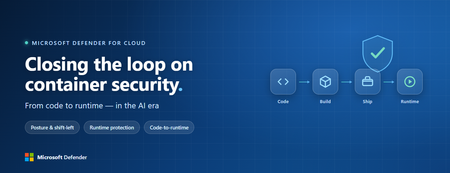
Containers are the backbone of modern cloud-native apps — and increasingly, the infrastructure powering AI, from AI assistants to a new wave of intelligent agents. They also blur the line between build, deploy, and runtime: a single code change can become a running workload in minutes. A misconfiguration committed in the morning can be deployed in minutes and exploited before noon. At that speed, container security can no longer be a point-in-time check, it has to work as one continuous loop. The numbers back this up. For the first time, 31% of breaches now begin with an attacker exploiting a software vulnerability — overtaking stolen credentials as the most common way in — and 15% of attack techniques are now accelerated by generative AI, with adversaries using it to find gaps and write malware faster at every stage. Source: Verizon 2026 Data Breach Investigations Report (incidents Nov 2024–Oct 2025). Over the last few quarters, Microsoft Defender for Cloud has been evolving to offer you this continuous security, end to end. Explore container security’s new capabilities across posture, shift-left, runtime, multicloud coverage, and operations. Collectively they form a more comprehensive approach to container security — one that offers security right during developing a code to a running pod across Azure, AWS, and GCP. There is a second reason why container security matters more in 2026: containers are increasingly where AI runs. Many AI workloads — from model-serving APIs to retrieval systems and intelligent agents — now live as pods on AKS, EKS, and GKE (the managed Kubernetes services from Azure, AWS, and Google), often connected to some of an organization’s most sensitive models and data. As those crown jewels move into the cluster, the same posture, code‑to‑runtime, and runtime protections described in this post extend to AI workloads. The contest is increasingly AI against AI: attackers use it to find and reach the cluster faster, while defenders use it to push back — surfacing the risks that matter most and turning runtime findings into AI‑assisted code fixes. One platform, code to runtime A container finding is not treated as an isolated issue; it is connected to the identity it runs under, the registry and code repository it came from, and the cluster where it is running - all unified under one Microsoft Defender platform. Container posture and shift-left security are now redesigned for least vulnerabilities in production Conventional container security posture offered challenges to scale: a single grouped recommendation could stack thousands of findings under one bucket, making ownership, exemptions, and risk scoring too coarse to act on. That experience is now evolved. We have rebuilt the experience so that each finding is its own recommendation — per software, per image, per container. If two CVEs in the same image belong to two different teams, they can now be triaged, exempted, and reported separately. The grouped recommendations are deprecated and will be removed on July 30, 2026, We suggest updating any automation, export rules, and ServiceNow integrations to target the new per-finding recommendations before that date. That per-finding precision becomes even more powerful once you connect each finding to its source code and to the runtime resources it impacts. Defender for Cloud — part of Microsoft Defender suite — connects this code-to-runtime chain end-to-end. For example, an image built through Azure DevOps or GitHub, pushed to ACR, ECR, Google Artifact Registry, Docker Hub, or JFrog, and pulled by AKS, EKS, or GKE is one continuous evidence chain — traceable from a running container back to the pull request (PR) and line of code that introduced the risk. With GitHub Advanced Security integrated (GA), secrets, code, and dependency findings join the same attack story. The developer-first Defender for Cloud CLI runs the same scanner locally or in any CI/CD pipeline, with consistent exit codes for gating. In this diagram, you can see how we have embedded container security at every stage of the software development lifecycle (SDLC), not just the endpoints. At Code, GitHub Advanced Security and the Defender for Cloud CLI catch secrets, vulnerable dependencies, and insecure code before commit. At Build, the same scanner runs as a CI/CD gate — in GitHub Actions, Azure DevOps, Jenkins, or Bitbucket — failing the pipeline on critical findings. At Ship, registry scanning and Gated Deployment block risky or misconfigured images at the cluster door. And at Runtime, the sensor enforces anti-malware and binary-drift policy on the live workload. No stage is left as a blind spot, and a finding can be traced forward to the running pod or backward to the developer who introduced it. Visibility without enforcement only creates backlog. Gated Deployment — a Kubernetes admission controller — uses the same vulnerability signal, you trust, to block risky images at the cluster level. It supports phased rollout (audit, then deny), targets rules by cluster, namespace, pod, image, or label, and runs across AKS (including AKS Automatic), EKS, and GKE. A newer extension gates on Kubernetes misconfigurations too. Posture practitioners also get KSPM at container granularity — Kubernetes security posture management, available through both Defender for Containers and Defender CSPM — and, on Azure, a new actionable recommendation, Upgrade Azure Kubernetes Service Version (preview), that helps you remediate vulnerabilities in AKS-managed system pods. Coverage that matches containers’ evolution Historically, many container security programs concentrated on managed Kubernetes clusters in AKS, EKS, and GKE. The 2026 reality is broader: a growing share of production runs on serverless container platforms that abstract the cluster away, many sensitive workloads sit behind private, network-isolated clusters, and platform teams increasingly standardize on hardened or distroless base images. The surfaces that were blind spots are now part of the same posture graph as everything else. Serverless compute posture is now generally available across AWS Lambda, Azure Functions, and Web Apps, while Serverless containers posture (preview) takes the same idea to Azure Container Apps, ACI, and AWS Fargate. Together, they bring more of today’s cloud-native production footprint into the same posture graph. Coverage also improves where platform teams are standardizing on locked-down environments. The long-standing gap around private EKS and GKE clusters is closed, bringing some of the hardest-to-reach environments into the same security model. Scanning now works on hardened images from Docker Hardened or Minimus, and runtime protection supports BottleRocket on EKS — with the full feature set also available in Azure Government, which matters for teams running regulated workloads. Runtime threat protection that prevents, not just detects Posture closes the door on attackers; runtime threat protection guards the room if they still succeed. The key shift is that the Defender for Containers sensor now adds prevention on top of detection. The goal is simple: stop malicious code before it runs. Anti-malware detection and prevention (GA) scans container workloads and Kubernetes nodes and, based on the policies you define, blocks malicious execution instead of only alerting. Those alerts then flow into Microsoft Defender XDR’s unified incident model. The second is binary drift detection and prevention (preview). Containers are meant to be immutable. When a process starts from a binary that was not part of the original image, that is drift — and one of the highest-signal indicators of compromise in cloud-native workloads. Defender detects drifts and, with policy enabled, can now also block the drifted process before it executes. Anti-malware and Drift policies can be scoped by cloud, cluster, namespace, image, or label, with allow-lists for legitimate cases. Anti-malware policies can alert, block, or ignore — scoped to clusters, namespaces, pods, labels, or images. Rounding out runtime protection, DNS-based threat detection (GA) catches command-and-control beaconing, DGA traffic, and exfiltration over DNS. A unified approach to container security Step back, and the bigger picture is simple. The same platform that secured your VMs and identities now extends across AKS, EKS, GKE, private clusters, serverless containers, and serverless compute. The same Code-to-Runtime chain that once tied Infrastructure as Code (IaC) findings to running infrastructure now connects Dockerfile commits — through CI/CD and any major registry — to the running pod. Admission control turns posture findings into prevention at deploy time, and runtime protection actively blocks. That is a continuous container security loop living inside Microsoft Defender — not a checklist bolted onto Kubernetes. And it rebalances the fight: as attackers use AI to find and exploit gaps faster, the durable answer is security teams using AI of their own — protecting and triaging at machine speed. If you’ve already enabled container security with Microsoft, the clearest next step is to strengthen the core lifecycle stages first: Code + build: connect GitHub Advanced Security and integrate the Defender for Cloud CLI into your pipelines so findings are caught early and CI/CD gates can fail builds before an image is pushed. Ship: stand up Gated Deployment in audit mode on a non-production cluster, tune it, then flip to deny; extend it to Kubernetes misconfigurations. Run: enable the Defender for Containers sensor, extend it to private EKS and GKE clusters, then tune anti-malware and binary-drift rules in Block mode — starting with your crown-jewel namespaces. Extend protection: turn on serverless compute posture for Lambda, Functions, and Web Apps, and enable serverless container posture for Container Apps, ACI, or Fargate.1.2KViews3likes2Comments
Security Copilot RBAC for Embedded Experience in Unified Security Platform
Introduction The evolution of Security Operations Centers (SOC) is increasingly driven by AI-powered capabilities that improve efficiency, accuracy, and response time. Microsoft Security Copilot represents a significant advancement in this space by embedding AI-driven assistance directly within security platforms such as Microsoft Defender XDR, Microsoft Sentinel, and Microsoft Entra. The concept of embedded experience is central to this transformation. Rather than operating as a standalone interface, Security Copilot is integrated within existing security tools, allowing analysts to invoke AI-generated insights directly during investigations. This reduces the need for tool switching and accelerates decision-making. The purpose of this document is to define and explain the Role-Based Access Control (RBAC) model required to securely enable this embedded experience. It provides a structured understanding of how access is governed across multiple layers, how these layers interact, and how organizations can align permissions with SOC workflows while maintaining a least-privilege security posture. Understanding Embedded Experience Security Copilot in embedded mode operates within the context of the host platform. When invoked from Defender or Sentinel, it does not function independently but instead consumes data already accessible to the user. This model ensures that Copilot enhances visibility without expanding access boundaries. This behavior is governed by an On-Behalf-Of (OBO) model, where Security Copilot leverages the permissions of the authenticated user. It does not introduce new entitlements or override existing RBAC configurations. As a result, the insights generated by Copilot are always limited to what the user is already authorized to see, reinforcing Zero Trust principles and preventing unauthorized data exposure. Prerequisites for Embedded Experience To enable Security Copilot in an embedded environment, organizations must establish foundational prerequisites that ensure seamless and secure operation. First, access to underlying platforms such as Microsoft Defender XDR, Microsoft Sentinel, and Microsoft Entra must already be provisioned. Since Copilot is not a standalone data source, it cannot function without these integrations. Second, RBAC alignment across identity, platform, and service layers must be configured correctly. Misalignment can lead to incomplete results, restricted functionality, or inconsistent analyst experiences. Finally, governance processes such as access review, monitoring, and adherence to least privilege principles should be implemented. These controls ensure that Copilot usage remains compliant, auditable, and aligned with organizational security policies. RBAC Framework for Security Copilot Security Copilot adopts a multi-layer RBAC model consisting of three tightly integrated layers. These layers collectively determine whether a user can access Copilot features and what data they can retrieve. RBAC Layer Mapping RBAC Layer Role Type Purpose Example Roles Access Impact Security Copilot Platform Feature access control Determines who can use Copilot capabilities Security Copilot Owner, Security Copilot Contributor Enables use of Copilot features but does not grant data access Microsoft Entra ID Identity and directory governance Controls access to identity data and reports Security Reader, Reports Reader, Security Administrator Governs identity insights and directory visibility Service-Specific RBAC Data access control Defines access to security data within services Defender Security Reader, Sentinel Reader Determines what Copilot can retrieve and present This layered approach ensures that no single role grants full access. All three layers must align for complete functionality. Security Copilot Platform Roles Security Copilot platform roles control who can interact with the Copilot interface and execute AI-driven workflows. The Security Copilot Owner role provides administrative control over Copilot configuration, including access management and platform-level settings. This role is typically assigned to administrators responsible for governance and operational enablement. The Security Copilot Contributor role enables analysts to run prompts, perform investigations, and interact with Copilot features during daily SOC operations. However, this role does not grant visibility into security data by itself. This clear separation ensures that Copilot remains a controlled interface layer rather than a source of privilege escalation. Microsoft Entra ID Roles Microsoft Entra roles govern access to identity-related data, which is critical for security operations involving user behavior, sign-in logs, and directory insights. Roles such as Security Reader provide read-only visibility into security data, while Reports Reader enables access to reporting and analytics capabilities. In certain advanced cases, the Security Administrator role may be required for configuration-level actions. The document emphasizes avoiding excessive privilege assignment, particularly the use of Global Administrator roles for daily operations, as this conflicts with least privilege principles. Service-Specific RBAC Roles Service-level roles determine the data sources that Security Copilot can access when embedded in platforms. In Microsoft Defender XDR, roles such as Security Reader allow access to alerts, incidents, and endpoint data. In Microsoft Sentinel, Sentinel Reader provides access to log data, analytics, and incidents. In Microsoft Entra, roles like Reports Reader provide access to identity insights. Copilot cannot retrieve or analyze data beyond what these roles permit. The output it generates is always constrained to the user’s effective permissions across these services. Unified RBAC Behavior in Embedded Experience In an embedded scenario, all three RBAC layers are evaluated simultaneously. When a SOC analyst invokes Copilot in Defender, the system validates whether the user has permission to use Copilot, access identity data, and retrieve Defender-specific insights. Only when all these conditions are satisfied does Copilot provide a comprehensive output. This ensures that Copilot responses are both contextually rich and access-compliant, eliminating the risk of unauthorized data exposure while maintaining operational efficiency. Security Copilot Core Use Cases Security Copilot enables a layered set of capabilities that span both analyst interaction patterns and agent-driven execution models. These use cases collectively enhance SOC efficiency, decision-making, and operational scalability. Use Case Mapping Table Use Case Description Embedded / Agent Example Value to SOC Summarization Transforms complex alerts, incidents, and telemetry into structured, human-readable insights by correlating signals across multiple sources Summarizing a Defender XDR incident involving endpoint, identity, and cloud alerts into a unified attack narrative Reduces analyst fatigue and significantly accelerates triage by eliminating manual data aggregation Guided Response Provides contextual, step-by-step investigative guidance and recommended remediation actions based on observed patterns and threat intelligence Suggesting investigation paths in Sentinel, including pivoting to identity logs, device timeline, and lateral movement indicators Improves consistency in investigations and enables less experienced analysts to operate effectively Script Analysis Evaluates scripts, queries, and command-line activities to identify malicious patterns, errors, or optimization opportunities Analyzing PowerShell scripts or KQL queries used in threat hunting scenarios to detect obfuscation or suspicious logic Enhances detection accuracy and reduces the risk of missing critical indicators Reporting Generates structured incident summaries, executive reports, and compliance-ready documentation with contextual insights Producing incident summaries for leadership or compliance teams with both technical and business context Improves communication, supports audit readiness, and reduces manual reporting overhead Agent-Driven SOC Use Cases (Expanded Capabilities) With the introduction of Security Copilot agents, the platform extends beyond assistance into orchestrated, intelligence-driven operations across SOC workflows. Agent-Based Use Case Description Real Agent Example SOC Impact Dynamic Threat Detection Continuously analyzes telemetry to identify previously undetected or weak signals across the attack surface Dynamic Threat Detection Agent correlates signals across Defender workload telemetry to surface hidden threats Improves detection coverage and reduces the likelihood of missed attacks Threat Intelligence Correlation & Briefing Aggregates internal and external intelligence sources to generate contextual threat insights aligned to organizational risk Threat Intelligence Briefing Agent produces structured intelligence reports based on attack patterns and exposure context Enhances situational awareness and supports proactive defense strategies Advanced Threat Hunting Enables hypothesis-driven and AI-assisted threat hunting by generating queries, exploring telemetry, and correlating historical data Advanced Threat Hunting Agent builds and executes queries across Defender and Sentinel datasets for proactive investigation and telemetry exploration Accelerates threat discovery and reduces reliance on manual query development Security Analysis & Threat Prioritization Performs AI-driven analysis of security telemetry to identify high-risk patterns, prioritize threats, assess risk exposure, and recommend investigative actions Security Analyst Agent analyses password spray attacks, ransomware activity, malware campaigns, identity abuse, and other security risks by generating telemetry-driven assessments and recommendations Improves analyst productivity, prioritizes high-impact threats, and enables faster decision making Security Triage Automation Automates alert prioritization and classification by adding contextual enrichment and reducing noise Security Triage Agent / Phishing Triage Agent evaluates alerts and distinguishes between real threats and false positives Reduces alert fatigue and improves prioritization accuracy in high-volume environments End-to-End Investigation Orchestration Performs multi-step investigation by gathering signals, correlating activity, and building attack timelines Security Analyst Agent investigates incidents across identity, endpoint, email, cloud, and data signals to produce a consolidated incident narrative Reduces Mean Time to Investigate (MTTI) and ensures consistent investigation outcomes Cross-Domain Threat Correlation Connects signals across identity, endpoint, cloud, email, and data domains to identify multi-stage attack chains Agents operating across Defender, Entra, Sentinel, and Security Copilot correlate activities such as phishing leading to identity compromise and lateral movement Breaks down silos and enables holistic threat visibility across the environment Remediation & Response Enablement Identifies vulnerable assets and supports remediation workflows through contextual recommendations Agents integrated with endpoint and policy systems suggest patching actions, containment actions, and configuration changes based on detected risks Improves response effectiveness and strengthens overall security posture Each of these use cases operates within the RBAC boundaries defined earlier, ensuring secure and context-aware outputs. Mapping Use Cases to SOC Processes The four core use cases align directly with SOC operational stages, enabling a consistent and repeatable analysis model. Summarization plays a significant role during the detection and triage phase, where analysts need quick clarity on incoming alerts. Instead of manually analyzing raw data, Copilot provides a structured overview, helping analysts determine priority and relevance. Guided response becomes critical during the investigation and response phase, where decision-making speed is essential. By suggesting next steps and correlating data points, Copilot assists analysts in navigating complex attack scenarios. Script analysis supports both threat hunting and investigation, allowing analysts to validate scripts, queries, or automation logic. This reduces the risk of overlooking malicious behavior embedded in scripts. Reporting aligns with the post-incident and compliance phase, where structured documentation is required. Copilot generates summaries that can be shared with leadership or compliance teams, ensuring clarity and consistency. Together, these use cases create a continuous cycle of detection, investigation, response, and reporting, fully integrated with SOC workflows. Summary Security Copilot’s embedded experience represents a transformative shift in how AI is integrated into security operations. By embedding intelligence directly within platforms such as Defender and Sentinel, it enhances analyst productivity while maintaining strict governance controls. The three-layer RBAC model, consisting of Security Copilot roles, Microsoft Entra roles, and service-specific roles, ensures that access is both secure and compliant with least privilege principles. The On-Behalf-Of model further guarantees that Copilot does not expand access beyond existing permissions. The inclusion of structured use cases such as summarization, guided response, script analysis, and reporting enables organizations to operationalize Copilot effectively across SOC processes. When RBAC is properly aligned and integrated with SOC workflows, Security Copilot becomes a powerful enabler of faster investigations, improved accuracy, and enhanced security posture—all while maintaining strict control over data access and governance.Ignite 2025: What's new in Microsoft Defender?
This Ignite we are focused on giving security teams the edge they need to meet adversaries head on in the era of AI. The modern Security Operations Center (SOC) is undergoing a fundamental transformation, placing AI at the forefront of innovation - not just as an added feature, but as a driving force at every layer of the stack. While much attention is rightly focused on the development of security agents, we fundamentally believe that AI must also evolve the very foundation of our security solutions. This means building solutions that more effectively uncover novel threats, act dynamically to defend the organization during attacks, and reduce the workload for the security team. As organizations adopt AI at an unprecedented speed, we also want to make sure they can do so securely. To meet these security needs of the AI era, we are excited to announce a series of innovations that will help organizations shift to an autonomous defense and an agentic SOC. New agents to help scale and accelerate security operations Evolving Microsoft Defender’s autonomous defense capabilities for better protection Secure your low-code and pro-code AI agents with Microsoft Defender Today, we are taking the first step in shifting security operations from static controls to autonomous defense and from manual toil to agentic operations. But we have an ambitious vision to augment and evolve these AI capabilities and agents across the entire SOC lifecycle and are excited to share some of that vision, as shown in the below graphic, with you at Microsoft Ignite. The Agentic SOC: Scaling expertise and accelerating defense We are excited to introduce four new Security Copilot agents in Microsoft Defender that bring autonomous intelligence across different stages of the SOC lifecycle. These agents combine context, reasoning, and complex workflows to help defenders anticipate attacks sooner, detect smarter, and investigate faster than ever before. Security Alert Triage Agent: In March 2025, we introduced the Security Alert Triage Agent, built to autonomously handle user-submitted phishing reports at scale. The agent reviews and classifies incoming alerts, resolves false positives and escalates only the malicious cases that require human expertise. Early data shows that analysts working with the agent caught up to 6.5x more malicious emails compared to professional graders. Today, we’re excited to announce that the agent’s triage capabilities will soon extend beyond phishing to cover identity and cloud alerts. Secondly, we are also improving our phish admin reporting process with a new agentic email grading system. It replaces a manual review process with advanced large language models and agentic workflows to deliver rapid, transparent verdicts and clear explanations to customers for every reported email. Learn more about the agentic email grading system. Threat Hunting Agent – this agent reimagines the investigation process. Instead of requiring analysts to master complex query languages or sift through mountains of data, the Threat Hunting Agent enables natural language investigations with contextual insight. Analysts can vibe with the agent by asking questions in plain English, receive direct answers, and be guided through comprehensive hunting sessions. This levels up the current NL2KQL experience by enabling analysts to explore patterns, pivot intuitively and uncover hidden signals in real time for a fluid, context-aware experience. This not only accelerates investigations but makes advanced threat hunting accessible to every member of the SOC, regardless of experience level. Dynamic Threat Detection Agent – One of the hardest challenges in detection engineering is finding and fixing false negatives. The Dynamic Threat Detection Agent proactively hunts for false negatives and blind spots that traditional alerting might miss. When a critical incident happens, Copilot will kick off an automated hunt to uncover undetected threats—like unusual residual activity around a sensitive identity. This agent turns ‘probably fine’ into proven secure—hunting the quiet persistence that slips past alerts and closing the gap before it becomes tomorrow’s breach. Threat Intelligence (TI) Briefing Agent – Now native in the Defender portal. Generate tailored, AI‑authored threat briefings in minutes—synthesizing global intel with your environment’s context—without leaving the incident pane. Figure 1. The Threat Hunting Agent showing insights on an incident that contained a high risk binary To make the agents easily accessible and help security teams get started more quickly, we are excited to announce that Security Copilot will be available to all Microsoft 365 E5 customers. Rollout starts today for existing Security Copilot customers with Microsoft 365 E5 and will continue in the upcoming months for all Microsoft 365 E5 customers. Customers will receive 30-day advanced notification before activation. Learn more. Autonomous Defense at Platform Scale Threat actors are automating everything. Ransomware campaigns can encrypt an entire environment in under an hour. Adversaries evade detection and pivot across identities, endpoints, and cloud resources faster than human teams can triage alerts. Traditional SOC models—built on manual workflows and fragmented tools—simply can’t keep pace. Every second of delay gives attackers an advantage. Microsoft Defender now counters that speed by delivering autonomous defense at scale. Defender shifts security from reactive firefighting to proactive protection, embedding AI into the foundation of our protection solutions for instant detection, disruption, and containment—before threats escalate. In 2023, we introduced automatic attack disruption, which autonomously stops attacks in progress—like ransomware or business email compromise—with policy-bound actions that isolate endpoints, disable compromised accounts, and block malicious IPs at machine speed. Today, we’re taking the next step. New capabilities show how AI and agentic technology are transforming security to better protect customers: Unleash automatic attack disruption across your SIEM data: We are expanding the disruption capabilities of Microsoft Defender to some of the most critical data sources customer connect via Microsoft Sentinel including AWS, Proofpoint and Okta. This enables real-time detection and automatic containment of threats like phishing and identity compromise on top of your log data, fundamentally turning your SIEM into a threat protection solution. While these capabilities leverage the power of our platform, Defender is not a requirement for customers to realize this value in Microsoft Sentinel. Figure 2. Attack disruption initiated on an AWS attack Predictive shielding – This brand-new automatic attack disruption capability activates immediately after an attack is first contained. Our first of its kind capability combines graph insights, AI, and threat intelligence to predict potential attack paths for where the adversary might go next. It then applies just-in-time hardening techniques that proactively block the attacker from pivoting. Some of the hardening tactics that will automatically be applied by Microsoft Defender include disabling SafeBoot and enforcing Group Policy Objects, putting a hard stop to the attacker’s movements and ability to execute common techniques for compromise. Learn more about predictive shielding and other endpoint security news. Protect your low-code and pro-code AI agents Generative AI and agents are rapidly transforming how we work, but these powerful new tools also introduce new risks. And with the democratization of agent creation across pro-code, low-code, and no-code building platforms, building agents is now accessible to everyone, many without extensive developer or security knowledge. To help security teams better manage these risks we are excited to announce that we are extending the capabilities and experiences in Microsoft Defender to the protection of agents. From agent security posture management, to attack path analysis, and threat protection for Copilot Studio, Azure Foundry, and agents built and connected via the Microsoft Agent 365 SDK. Learn more about how Microsoft Defender can help protect your agents against threats like prompt injections and more. There is so much more innovation we are introducing in Microsoft Defender today, including expanded endpoint security coverage for legacy systems, improvements to how you can investigate identity-centric threats, and we are bringing cloud security posture management into the Defender portal. Check out the other Defender news blogs for more details. Join us in San Francisco, November 17–21, or online, November 18–20, for deep dives and practical labs to help you maximize your Microsoft Defender investments and to get more from the Microsoft capabilities you already use. Featured sessions: Microsoft Defender: Building the agentic SOC with guest Allie Mellen Blueprint for building the SOC of the future Empowering the SOC: Security Copilot and the rise of agentic defense Identity Under Siege: Modern ITDR from Microsoft AI vs AI: Protect email and collaboration tools with Microsoft Defender AI-powered defense for cloud workloads Endpoint security in the AI era: What's new in Defender14KViews2likes0Comments