xdr
22 TopicsUncover the latest cloud data security capabilities from Microsoft Defender for Cloud
Learn about the latest multicloud data security capabilities from Microsoft Defender for Cloud to strengthen your data security posture and protect your cloud data estate against data breaches and malware distribution.6.7KViews9likes0CommentsAnnouncing new CNAPP capabilities in Defender for Cloud
At Ignite 2023, we are excited to announce new innovations in Microsoft Defender for Cloud that will help security admins strengthen their CNAPP deployment, improve the cloud security posture through additional code to cloud insights, and protect cloud-native applications across multicloud environments in a unified solution.Unveiling Kubernetes lateral movement and attack paths with Microsoft Defender for Cloud
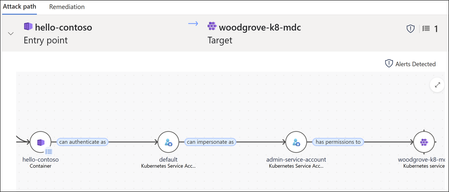
The cloud security landscape is constantly evolving and securing containerized environments including Kubernetes is a critical piece of the puzzle. Kubernetes environments provide exceptional flexibility and scalability, which are key advantages for modern infrastructure. However, the complex and intricate permissions structure of Kubernetes, combined with the dynamic, ephemeral nature of containers, introduces significant security challenges. Misconfigurations in permissions can easily go unnoticed, creating opportunities for unauthorized access or privilege escalation. The rapid lifecycle of resources in Kubernetes adds to the complexity of this issue, making it harder to maintain visibility and enforce a consistent security posture. Traditional security tools often lack the depth needed to map and analyze Kubernetes permissions effectively, leaving organizations vulnerable to security gaps. In this blog we will explore how Microsoft Defender for Cloud provides visibility to address these challenges with the recent addition of Kubernetes role-based access control (RBAC) into the cloud security graph. We'll analyze potential techniques attackers use to move laterally in Kubernetes environments and demonstrate how Microsoft Defender for Cloud provides visibility to these threats as attack paths. Finally, we will demonstrate how this advanced feature allows customers to identify Kubernetes RBAC bindings that don't follow security best practices with the security explorer capabilities. Enhancing Security with Kubernetes RBAC Integration into the cloud security graph Defender for Cloud uses a cloud security graph to represent the data of your multicloud environment. This graph-based engine analyzes data on your cloud assets and their security posture, providing contextual analysis, attack path insights, and identify security risks with queries in the cloud security explorer. The introduction of Kubernetes RBAC into the cloud security graph addresses the visibility and security challenges posed by Kubernetes' complex permissions structure and dynamic workloads. By ingesting Kubernetes RBAC objects into the graph as nodes and edges, we create a more comprehensive picture of Kubernetes environment’s security posture. The cloud security graph leverages Kubernetes RBAC to map relationships between Kubernetes identities, Kubernetes objects, and cloud identities. This functionality uncovers additional attack paths and equips customers to proactively identify and mitigate threats in their cloud environments. Revealing attackers techniques Visualizing potential lateral movement within a Kubernetes cluster can be challenging. Attackers who establish an initial foothold in the cluster may exploit various techniques to move laterally, accessing sensitive resources within the cluster and even extending to other cloud resources in the victim's environment. Let’s examine the techniques attackers use for lateral movement in Kubernetes environments and explore how identifying new attack paths, along with the factors enabling such movement, can support proactive threat remediation. Inner cluster lateral movement In Kubernetes, each pod is attached to a Kubernetes service account that determines the permissions of the pod in the cluster. By default, the service account associated with a pod allows it to interact with the Kubernetes API with minimal permissions, but it is often granted more privileges than required for its specific function. Attackers who compromise a container can exploit the container pod’s service account RBAC permissions to move laterally within the cluster and access sensitive resources. For instance, if the compromised service account has impersonation privileges, attackers can use them to act as a more privileged service account by leveraging impersonation headers, potentially leading to a full cluster takeover. Cluster to cloud lateral movement In addition to lateral movement inside Kubernetes clusters, attackers could also use additional techniques to move laterally from the managed Kubernetes clusters to the cloud. Using the Instance Metadata Service (IMDS) In managed Kubernetes environments, each worker node is assigned a specific cloud identity or IAM role that gives it the necessary permissions to interact with the cloud provider's API to perform tasks that maintain cluster operations (such as autoscaling). To do this, the worker node can access the Instance Metadata Service (IMDS), which provides important details like configurations, settings, and the identity credentials of the node. The IMDS is accessible through a special IPv4 link-local address (169.254.169.254), allowing the worker node to securely retrieve its credentials and perform its tasks. If attackers gains control of a container in a managed Kubernetes cluster, they may attempt to query the IMDS endpoint to assume the IAM role or identity credentials associated with the worker node hosting the container. These credentials can then be exploited to access cloud resources, such as databases or compute instances outside the cluster. The potential damage caused by such an attack depends on the permissions of the worker node identity. 2. Using the workload identity Workload identity in Azure, Google Cloud, and AWS as IAM Roles for Service Accounts (IRSA) or EKS Pod Identity, allows Kubernetes pods to authenticate to cloud services using cloud-native identity mechanisms without needing to manage long-lived credentials like API keys. In this setup, a pod is associated with a Kubernetes service account that is linked to a cloud identity (e.g., a GCP service account, Managed identity for Azure resources, or AWS IAM role), enabling the pod to access cloud resources securely. While this integration enhances security, if attackers compromise a pod that is using workload identity, they could exploit the cloud identity associated with that pod to access cloud resources. Depending on the permissions granted to the cloud identity or IAM role, the attackers could perform actions like reading sensitive data from cloud storage, interacting with databases, or even modifying infrastructure—potentially escalating the attack beyond the Kubernetes environment into the cloud platform itself. Cloud to cluster lateral movement In cloud environments, managing access to Kubernetes clusters is critical to maintaining security. Cloud identities who are granted high-level permissions over Kubernetes clusters pose a potential security risk. If these identities have elevated permissions—such as the ability to create or modify resources within the cluster—an attacker who compromises their credentials can leverage these permissions to take full control of the cluster. Once attackers gain access to a privileged cloud account, they could manipulate Kubernetes configurations, create malicious workloads, or access sensitive data. This scenario could lead to a complete cluster takeover. Using Defender for Cloud to prevent lateral movement Defender for Cloud provides organizations with instant visibility into potential attack paths that attackers could exploit to move laterally within their cluster, enabling them to take preventive actions before an attack occurs. In the example shown in figure 1, an attack path is being generated to highlight how a vulnerable container can be exploited by an attacker to move laterally within the cluster and eventually achieve a full cluster takeover. This involves remotely compromising the vulnerable container, leveraging the Kubernetes service account linked to the pod, and impersonating a more privileged service account to gain control over the cluster. In another example, as shown in figure 2, the attack path illustrates how an attacker can exploit a vulnerable container to move laterally from the cluster to cloud resources outside of it by leveraging the pod service account's associated cloud identity. With the visibility provided by these attack paths, security teams can take actions prior to an attack taking place i.e. block external access to the container unless absolutely required, ensure the vulnerability is addressed and verify if the pod service account permissions are indeed required. Kubernetes risk hunting with the cloud security explorer In addition to the attack paths capabilities, Defender for Cloud's contextual security capabilities assist security teams in reducing the risk of Kubernetes RBAC misconfigurations. By executing graph-based queries on the cloud security graph using the cloud security explorer, security teams can proactively identify risks within a multicloud Kubernetes environments. By utilizing the query builder, teams can search for and locate risks associated with Kubernetes identities and workloads, enabling them to preemptively address potential threats. The cloud security explorer provides you with the ability to perform proactive exploration, along with built-in query templates that are dedicated to Kubernetes RBAC risks. Kubernetes query templates Beyond cloud security As the cloud security graph is part of Microsoft enterprise exposure graph, customers can gain further visibility beyond the cloud boundary. By using Microsoft enterprise exposure management, customers will be able to see not only the lateral movement from K8s to the cloud and vice versa, but also how the identities used by the attacker can be further used to move laterally to additional assets in the organization, and how breach of an on-prem asset can lead to lateral movement to Kubernetes assets in the cloud. In the example shown in figure 4, we have an attack path that highlights how a vulnerable device can be exploited by an attacker to move laterally from an on-prem environment to Kubernetes cluster located in the cloud. This process includes remotely compromising the vulnerable device, extracting the browser cookie stored on it, and using that cookie to authenticate as a cloud identity with elevated permissions to access a Kubernetes cluster in the cloud. Conclusion - A brighter future for Kubernetes security The introduction of Kubernetes RBAC into the cloud security graph represents a significant advancement in securing Kubernetes’ environments. By providing comprehensive visibility into the complex permissions structure and dynamic workloads of Kubernetes, Microsoft Defender for Cloud enables organizations to proactively identify and mitigate potential security risks. This enhanced visibility not only helps in uncovering new attack paths and lateral movement threats but also supports the enforcement of security best practices within Kubernetes clusters. To start leveraging these new features in Microsoft Defender for Cloud, ensure either Defender for Container or Defender CSPM is enabled in your cloud environments. For additional guidance or support, visit our deployment guide. Learn more If you haven’t already, check out our previous blog post that introduced this journey: Elevate Your Container Posture: From Agentless Discovery to Risk Prioritization.All Key Vaults Are Critical, But Some Are More Critical Than Others: Finding the Crown Jewels
Introduction A critical asset is one of substantial value, whose compromise or disruption would result in significant adverse effects on the organization. This definition lays the foundation for understanding why Azure Key Vaults often fall into this category. Azure Key Vaults are integral to cloud environments as they manage sensitive data like cryptographic keys, passwords, and certificates. Their frequent use in securing applications, managing secrets, and enabling secure operations makes them highly valuable. Given this importance, identifying which Key Vaults are critical becomes essential. Approach Our approach to identifying critical Key Vaults is based on operational activity. We classify Key Vaults using the top n percentile of operations within each tenant, ensuring that only the most active and essential Key Vaults are flagged as critical. This approach provides a fair evaluation across varying tenant sizes and ensures that thresholds dynamically adjust with data size and distribution, making the classification resilient to outliers and representative of actual operational importance. Why Focus on Key Vaults with High Operation Counts? Increased Usage Indicates High Dependency: A high volume of operations suggests that the Key Vault is heavily utilized, meaning it plays a central role in the security and operational processes within the environment. For example, it might be frequently accessed to retrieve secrets, keys, or certificates, which are essential for the functioning of various applications and services. Sensitive Data Storage: Key Vaults typically store sensitive data, such as cryptographic keys, passwords, and other secrets. A Key Vault with many operations is likely to store and manage a significant amount of this sensitive data, making it a high-value target for potential attacks. Operational Impact: If a heavily used Key Vault were compromised or became unavailable, it could disrupt multiple critical processes across the organization. This could include application outages, security breaches, or other operational failures, making the Key Vault critical to overall business continuity. Security Implications: Frequent access to a Key Vault might indicate its role in automated processes or scripts that require secure handling of credentials and keys. The more a Key Vault is accessed, the higher the potential risk if its security is breached, hence making it essential to protect and monitor it closely. Benefits of Using Percentiles in Criticality Classification In critical asset classification, the use of percentiles offers several distinct advantages over percentage-based methods: Resilience to Outliers: Percentiles rank Key Vaults without being influenced by extreme values. For instance, even if one Key Vault has an unusually high operation count, the percentile method ensures that the classification threshold remains stable. Dynamic Adaptation to Dataset Size: As the number of Key Vaults grows, percentile thresholds adjust dynamically, maintaining consistency and accuracy over time. Fair Evaluation Across Tenants: Different tenants have varying numbers of Key Vaults. Percentiles allow for a fair assessment by ensuring that each tenant’s Key Vaults are evaluated within that tenant’s dataset. This means that even smaller tenants with fewer Key Vaults can have their most active Key Vaults identified as critical without being overshadowed by the larger operation counts of bigger tenants. Percentiles rank within each tenant individually, making the classification equitable across different scales. Mathematical Rigor: Percentiles provide a statistically sound method for ranking Key Vaults, offering a reliable framework for criticality classification. Operational Relevance: By using percentiles, the classification highlights Key Vaults that are truly operationally significant within their own environment, enhancing security monitoring and response efforts. This approach ensures that critical assets are identified accurately, without the distortions caused by outliers, dataset size, or operational scale variations, making it ideal for cloud environments. Findings from Research Overall Critical Assets: Around 0.5% of total KVs were identified as critical Tenant-wise Analysis: Percentile thresholds adjusted dynamically across tenant sizes. Large tenants saw a minimal increase in critical assets, validating accuracy. Smaller tenants benefited from nuanced classification. Percentile-based classification ensures that Key Vaults with relatively high operation counts are identified, regardless of tenant size, providing a balanced approach. Figure 1: Tenant-wise Analysis Finding the Optimal Percentile Threshold The reverse elbow curve method is a data-driven approach to determine the optimal percentile threshold. Figure 2 illustrates this concept by plotting the percentage of Key Vaults classified as critical against various percentile values. As the percentile value increases from 90 to 99, the percentage of critical Key Vaults decreases, forming a clear reverse elbow shape. In this graph, the curve starts to flatten around the 95th percentile, marked as the 'Optimal Percentile Threshold.' This point represents where the rate of decrease in critical Key Vaults slows down significantly. Selecting this threshold ensures that we capture the most critical Key Vaults without unnecessarily including too many lower-priority assets. Before this point, too many Key Vaults are classified as critical, while after this point, too few Key Vaults are included. Figure 2: Identifying the optimal percentile threshold This visual example demonstrates why the reverse elbow curve method is essential for balancing coverage and precision in critical asset classification, ensuring that the most operationally significant Key Vaults are identified efficiently. Conclusion In conclusion, identifying critical Azure Key Vaults is essential for maintaining the security, availability, and operational integrity of cloud environments. By leveraging a percentile-based classification approach, we ensure that only the most active and essential Key Vaults are recognized as critical assets. The use of the reverse elbow curve method further strengthens this classification by selecting an optimal percentile threshold that balances coverage and precision. This methodology not only minimizes noise from less active Key Vaults but also ensures that highly utilized and sensitive Key Vaults receive the attention they deserve. As cloud operations continue to scale, such data-driven classification approaches are vital for effective security management and risk mitigation.1.6KViews5likes0CommentsBreaking down security silos: Microsoft Defender for Cloud Expands into the Defender Portal
Picture this: You’re managing security across Azure, AWS, and GCP. Alerts are coming from every direction, dashboards are scattered and your team spends more time switching portals than mitigating threats. Sound familiar? That’s the reality for many organizations today. Now imagine a different world—where visibility, control and response converge into one unified experience, where posture management, vulnerability insights and incident response live side by side. That world is no longer a dream: Microsoft Defender for Cloud (MDC) is now integrated into Defender XDR in public preview. The expansion of MDC into the Defender portal isn’t just a facelift. It’s a strategic leap forward toward a Cloud-Native Application Protection Platform (CNAPP) that scales with your business. With Microsoft Defender for Cloud’s deep integration into the unified portal, we eliminate security silos and bring a modern, streamlined experience that is more intuitive and purpose-built for today’s security teams, while delivering a single pane of glass for hybrid and multi-cloud security. Here’s what makes this release a game-changer: Unified dashboard See everything with a single pane of glass—security posture, coverage, trends—across Azure, AWS and GCP. No more blind spots. Risk-based recommendations Prioritize by exploitability and business impact. Focus on what matters most, not just noise. Attack path analysis across all Defenders Visualize potential breach paths and cut them off before attackers can exploit them. Unified cloud assets inventory A consolidated view of assets, health data and onboarding state—so you know exactly where you stand. Cloud scopes & unified RBAC Create boundaries between teams, ensure each persona has access to the right level of data in the Defender portal. The enhanced in-portal experience includes all familiar Defender for Cloud capabilities and adds powerful new cloud-native workflows — now accessible directly within the Defender portal. Over time, additional features will be rolled out so that security teams can rely on a single pane of glass for all their pre- and post-breach operations. Unified cloud security dashboard A brand-new “Cloud Security→ Overview” page in Defender portal gives you a central place to assess your cloud posture across all connected clouds and environments (Azure, AWS, GCP, on-prem and onboarded environments such as Azure DevOps, Github, Gitlab, DockerHub, Jfrog). The unified dashboard displays the new Cloud Security Score, Threat Detection alerts and Defender coverage statistics. Amongst the high-level metrics, you can find the number of assessed resources, count of active recommendations, security alerts and more, giving you at-a-glance insight into your environment’s health. From here, you can drill into individual areas: Security posture, Exposure Management bringing visibility over Recommendations and Vulnerability Management, a unified asset inventory, workload specific insights and historical security posture data going back up to 6 months. Cloud Assets Inventory The cloud asset inventory view provides a unified, contextual inventory of all resources you have connected to Defender for Cloud — across cloud environments or on-premises. Assets are categorized by workload type, criticality, Defender coverage status, with integrated health data, risk signals, associated exposure management data, recommendations and related attack paths. Resources with unresolved security recommendations or alerts are clearly flagged — helping you quickly prioritize on risky or non-compliant assets. While you will get a complete list of cloud assets under "All assets", the rest of the tabs show you the complete view into each workload, with detailed and specific insights on each workload (VMs, Data, Containers, AI, API, DevOps, Identity and Serverless). Posture & Risk Management: From Secure Score to risk-based recommendations The traditional posture-management and CSPM capabilities of Defender for Cloud expand into the Defender portal under “Exposure Management.” A key upgrade is the new Cloud Secure Score — a risk-based model that factors in asset criticality and risk factors (e.g. internet exposure, data sensitivity) to give a more accurate, prioritized view of cloud security posture. The score ranges from 0 to 100, where 100 means perfect posture. It aggregates across all assets, weighting each asset by its criticality and the risk of its open recommendations. You can view the Cloud Secure Score overall, by subscription, cloud environment or workload type. This allows security teams to quickly understand which parts of their estate require urgent attention, and track posture improvements over time. Defender for Cloud continues to generate security recommendations based on assessments against built-in (or custom) security standards. When you have the Defender CSPM plan enabled in the Defender portal, these recommendations are surfaced with risk-based prioritization, where recommendations are tied to high-risk or critical assets show up first — helping you remediate what matters most. Each recommendation shows risk level, number of attack paths, MITRE ATT&CK tactics and techniques. For each recommendation you will see the remediation steps, attack map and the initiatives it contributes to - such as the Cloud Secure score. Continued remediation — across all subscriptions and environments — is the path toward a hardened cloud estate. Proactive Attack Surface Management: Attack path analysis A powerful addition is the "Attack paths" overview, which helps you visualize potential paths attackers could use — from external exposure zones to your most critical business assets to infiltrate your environment and access sensitive data. Defender’s algorithm models your network, resource interactions, vulnerabilities and external exposures to surface realistic, exploitable attack paths, rather than generic threat scenarios, while putting focus on the top targets, entry points and choke points involved in attack paths. The Attack Paths page organizes findings by risk level and correlates data across all Defender solutions, allowing users to rapidly detect high-impact attack paths and focus remediation on the most vulnerable assets. For some workloads, for example container-based or runtime workloads, additional prerequisites may apply (e.g. enabling agentless scanning or relevant Defender plans) to get full visualization. Governance, Visibility and Access: Cloud Scopes and Unified RBAC The expansion into the Defender portal doesn’t just bring new dashboards — it also brings unified access and governance using a single identity and RBAC model for the Defender solutions. Now you can manage cloud security permissions alongside identity, device and app permissions. Cloud Scopes ensure that teams with appropriate roles within the defined permission groups (e.g. Security operations, Security posture) can access the assets and features they need, scoped to specific subscriptions and environments. This unified scope system simplifies operations, reduces privilege sprawl and enforces consistent governance across cloud environments and across security domains. The expansion of Defender for Cloud into the Defender portal is more than a consolidation—it’s a strategic shift toward a truly integrated security ecosystem. Cloud security is no longer an isolated discipline. It is intertwined with exposure management, threat detection, identity protection and organizational governance. To conclude, this new experience empowers security teams to: Understand cloud risk in full context Prioritize remediation that reduces real-world threats Investigate attacks holistically across cloud and non-cloud systems Govern access and configurations with greater consistency Predict and prevent attack paths before they happen In this new era, cloud security becomes a continuous, intelligent and unified journey. The Defender portal is now the command center for that journey—one where insights, context and action converge to help organizations secure the present while anticipating the future. Ready to Explore? Defender for Cloud in the Defender portal Integration FAQ Enable Preview Features Azure portal vs Defender portal feature comparison What’s New in Defender for Cloud
Protecting Azure AI Workloads using Threat Protection for AI in Defender for Cloud
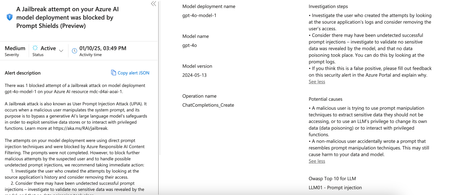
Understanding Jailbreak attacks Evasion attacks involve subtly modifying inputs (images, audio files, documents, etc.) to mislead models at inference time, making them a stealthy and effective means of bypassing inherent security controls in the AI Service. Jailbreak can be considered a type of evasion attack. The attack involves crafting inputs that cause the AI model to bypass its safety mechanisms and produce unintended or harmful outputs. Attackers can use techniques like crescendo to bypass security filters for example creating a recipe for Molotov Cocktail. Due to the nature of working with human language, generative capabilities, and the data used in training the models, AI models are non-deterministic, i.e., the same input will not always produce the same outputs. A “classic” jailbreak happens when an authorized operator of the system crafts jailbreak inputs in order to extend their own powers over the system. Indirect prompt injection happens when a system processes data controlled by a third party (e.g., analyzing incoming emails or documents editable by someone other than the operator) who inserts a malicious payload into that data, which then leads to a jailbreak of the system. There are various types of jailbreak-like attacks. Some, like DAN, involve adding instructions to a single user input, while others, like Crescendo, operate over multiple turns, gradually steering the conversation towards a specific outcome. Therefore, jailbreaks should be seen not as a single technique but as a collection of methods where a guardrail can be circumvented by a carefully crafted input. Understanding Native protections against Jailbreak Defender for Cloud’s AI Threat Protection (https://learn.microsoft.com/en-us/azure/defender-for-cloud/ai-threat-protection) feature integrates with Azure Open AI and reviews the prompt and response for suspicious behavior (https://learn.microsoft.com/en-us/azure/defender-for-cloud/alerts-ai-workloads) In case of Jailbreak, the solution integrates with Azure Open AI’s Content Filter Prompt Shields (https://learn.microsoft.com/en-us/azure/ai-services/openai/concepts/content-filter), which uses an ensemble of multi-class classification models to detect four categories of harmful content (violence, hate, sexual, and self-harm) at four severity levels respectively (safe, low, medium, and high), and optional binary classifiers for detecting jailbreak risk, existing text, and code in public repositories. When Prompt Shield detects a Jailbreak attempt, it filters / annotate the user’s prompt. Defender for Cloud then picks up this information and makes it available to the security teams. Note that User Prompts are protected from Direct Attacks like Jailbreak by default. As a result, once you enable Threat Protection for AI in Defender for Cloud your security teams will have complete visibility on these. Fig 1. Threat Protection for AI alert Tangible benefits for your Security Teams Since the Defender for Cloud is doing the undifferentiated heavy lifting here your Security Governance, Architecture, and Operations all benefit like so, Governance Content is available out of the box and is enabled by default in several critical risk scenarios. This helps meet your AI security controls like OWASP LLM 01: Prompt Injection (https://genai.owasp.org/llmrisk/llm01-prompt-injection/) You can further refine the Content Filter levels for each model running in AI Foundry depending on the risk such as the data model accesses (RAG), public exposure, etc. The application of the control is enabled by default The Control reporting is available out of the box and can/will follow the existing workflow that you have set up for remainder of your cloud workloads Defender for Cloud provides Governance Framework Architecture Threat Protection for AI can be enabled at subscription level so the service scales with your workloads and provides coverage for any new deployments There is native integration with Azure Open AI so you do not need to write and manage custom patterns unlike a third party service The service is not in-line so you do not have to worry about downstream impact on the workload Since Threat Protection for AI is a capability within Defender for Cloud, you do not need to define specific RBAC permissions for users or service The alerts from the capability will automatically follow the export flow you have set up for the rest of the Defender for Cloud capabilities. Operations The alerts are already ingested in the Microsoft XDR portal so you can continue threat hunting without learning new tools there by maximizing your existing skills You can set up Workflow Automation to respond to AI alerts much like alerts from other capabilities like Defender for Storage. So, your overall logic app patterns can be reused with small tweaks Since your SOC analyst might still be learning Gen AI threats and your playbooks might not be up to date, the alerts (see Fig 1 above) contain steps that they should take to resolve The alerts are available in XDR portal, which you might already be familiar with so won’t have to learn a new solution Fig 2. Alerts in XDR Portal The alerts contain the prompt as an evidence in addition to other relevant attributes like IP, user details, targeted resource. This helps you quickly triage the alerts Fig 3. Prompt Evidence captured as part of the alert You can train the model using the detected prompts to block any future responses on similar user prompts Summary Threat Protection for AI: Provides holistic coverage of your Gen AI workloads Helps you maximize the investment in Microsoft Solutions Reduces the need for learning another solution to protect another new workloads Drives overall cost, time, and operational efficiencies Enroll in the preview https://learn.microsoft.com/en-us/azure/defender-for-cloud/ai-onboarding#enroll-in-the-limited-preview5.4KViews2likes0Comments
Prevent malware from spreading by scanning cloud storage accounts on-demand
What’s new? On-demand malware scanning now in public preview We’re excited to announce the public preview of on-demand malware scanning. Previously, customers could get malware scanning results when uploading files to Azure blob storage. Now, customers can scan existing files in storage accounts on-demand, which helps customers to gain finer control and customization for critical storage assets. On-demand scanning allows you to scan existing files directly from Azure storage accounts What’s the relationship between Defender for Storage and Malware Scanning? Defender for Storage is the storage security plan under Microsoft Defender for Cloud, a Cloud Native Application Protection Platform (CNAPP). It helps Security Operations Center (SOC) analysts to monitor and react to threats in near real-time, prioritize threat protection for sensitive data and keep cloud storage malware-free. Malware Scanning is a paid add-on of Defender for Storage that helps customers to prevent malware from spreading in storage. It helps SOC analysts and security admins to prevent malware from spreading by scanning stored or newly uploaded data. What is coming next? In the coming weeks, we’ll expand file size support to 50 GB—a 25x increase from the current 2 GB limit. Additionally, new filtering options for on-upload scanning will allow you to exclude files based on prefixes, suffixes, and size, providing more precise control over scanning scope and costs. Why Malware Scanning? 1)Shadow data is a hidden security risk untracked data in cloud storage, introduces security and compliance risks even without active downstream consumers. Misconfigurations, weak access controls, or lack of encryption can make these hidden data stores attractive targets for attackers. They also complicate compliance by potentially violating data governance policies. Legacy security tools often focus on administrative actions, overlooking risks tied to unmanaged data. This gap leaves shadow data vulnerable to exploitation and compliance failures. Effective solutions must provide visibility into shadow data, enforce robust controls, and reduce these risks without adding operational complexity. 2)AI boom amplifies cloud storage risks The rapid growth of AI and Large Language Models (LLMs) is driving massive demands on cloud storage, with training and operational use generating and accessing terabytes of sensitive data. This surge in storage usage introduces unique security challenges. AI datasets, often proprietary and distributed, are attractive targets for cyber threats like ransomware, data breaches, and adversarial attacks, requiring a re-evaluation of storage security strategies. Why us? 1)Easy maintenance, and better accuracy Microsoft Defender for Storage addresses these challenges with a comprehensive, cloud-native malware scanning solution powered by Defender Antivirus and Microsoft Threat Intelligence. Traditional malware scanning solutions for cloud storage often require extensive infrastructure, such as proxies, compute resources, or third-party integrations, adding latency, increasing security gaps, and escalating maintenance costs. Defender for Storage overcomes these challenges with a fully cloud-native design that directly embeds malware scanning within Azure, requiring no additional agent. By analyzing storage logs, it delivers accurate, proactive threat detection with minimal impact on storage performance, using Microsoft’s industry-leading threat intelligence and machine learning (ML) detection algorithms. This built-in design makes Defender for Storage particularly well-suited for dynamic cloud environments, where it provides comprehensive, scalable protection without altering existing architecture. 2) Flexibility in scanning options to streamline security operations Malware scanning supports both scanning on-upload of storage files and scanning of existing files within storage accounts. Multiple entry points of scanning capabilities give security admins the flexibility to operationalize malware scanning based on their organizational needs. Similarly, for flexibility and customization, the to-be-released up-to 50 GB scanning capacity caters to large file scanning scenarios. How to use Malware Scanning? When to use on-upload vs. on-demand malware scanning Each type of malware scanning in Defender for Storage serves distinct scenarios, tailored to meet different security needs and operational contexts: On-Upload Scanning: Designed for immediate, proactive protection at the point of entry, on-upload scanning inspects files as they’re uploaded or modified in real time. This type of scanning is ideal for scenarios where immediate data integrity is crucial, such as in collaborative platforms, file-sharing applications, and web applications that regularly receive external content. Additionally, regulated industries like finance and healthcare benefit from on-upload scanning because it provides near real-time defenses for incoming data, helping maintain compliance and prevent malware from embedding in critical workflows. By scanning files upon entry, organizations can prevent malicious content from reaching end users or impacting downstream processes, ensuring data security in high-upload environments. On-Demand Scanning: On-demand scanning provides retrospective, flexible protection for files already stored in the cloud, making it especially useful for incident response, audits, and compliance checks. This mode is ideal when organizations need to inspect older data against updated threat definitions or when scanning is triggered by security events flagged in Microsoft Sentinel or other monitoring tools. On-demand scanning works well for organizations with archival data, where periodic assessments are necessary to meet evolving compliance and security standards. It’s also valuable for checking files after a potential breach or suspicious activity to confirm there’s no lingering malware in the environment. With scheduled or API-triggered scans, on-demand scanning allows organizations to proactively review their storage environment without constant manual intervention. Key capabilities of Defender for Storage Malware Scanning Microsoft Defender for Storage’s malware scanning provides advanced features tailored to modern storage environments, with unique benefits that distinguish it from traditional solutions: Cloud-Native Integration: Embedded fully within Azure, Defender for Storage eliminates the need for third-party setups, allowing for streamlined deployment and ongoing maintenance without modifying architecture or application code. Comprehensive Threat Detection: Defender for Storage leverages Microsoft Defender Antivirus and global threat intelligence to detect a wide range of threats, including polymorphic and metamorphic malware, supporting both standard and archive file types (e.g., ZIP, RAR). Upcoming updates will expand support to scan files up to 50GB, meeting larger storage needs. Flexible Scanning Options: By offering both on-upload and on-demand scanning, Defender for Storage provides adaptable security to cover both immediate and ongoing protection needs across new and existing data. Automated Response Capabilities: Defender for Storage enables automated actions based on scan results, such as quarantining or deleting flagged files and moving clean files to secure storage locations. This capability is enhanced by attribute-based access control (ABAC), which can restrict access to flagged files, ensuring that only safe, scanned files are accessible. Incident Response Playbooks: Organizations can configure playbooks for on-demand scanning that trigger scans in response to suspicious activity, enabling rapid, automated investigation and containment of potential threats. Scheduled Scanning for Continuous Protection: Using Logic Apps, Automation Runbooks, or PowerShell scripts, organizations can schedule recurring scans of high-risk resources based on tags or names, allowing for proactive monitoring and enhancing security posture over time. Cost Control and Management: Defender for Storage includes flexible cost management features, allowing customers to set monthly caps on on-upload scanning to control expenses. For on-demand scanning, cost estimates are provided before scans begin, supporting budget-conscious decision-making. Usecases of Malware Scanning in Defender for Storage Defender for Storage’s malware scanning addresses a variety of real-world use cases across different industries: Incident Response and Threat Hunting: When Microsoft Defender XDR and Sentinel detects unusual access, on-demand scanning can be triggered to inspect impacted files, helping security teams respond to potential threats effectively. Compliance in Regulated Sectors: Sectors like finance, healthcare, and government rely on Defender for Storage’s on-upload and on-demand scanning to meet strict data integrity and compliance requirements, with auditable records for regulatory standards. Securing Archived Data: On-demand scanning ensures that files stored for extended periods are inspected against the latest threat definitions, protecting data integrity before archived files are used or shared. Preventing Malware Distribution: By scanning all uploads, on-upload malware scanning blocks malicious files as they enter storage, while on-demand scanning secures existing data. Together, these modes provide layered protection against malware propagation within and outside the organization. Case studies The following scenarios illustrate how Microsoft Defender for Storage’s capabilities are applied to real-world challenges that enterprises face in securing cloud storage. These examples demonstrate how different organizations might leverage features such as malware scanning, sensitive data threat detection, and activity monitoring to protect critical data and maintain compliance: Case Study 1: Large Enterprise Secures AI-Driven Workflows with On-Upload and On-Demand Malware Scanning A large enterprise implementing AI-driven workflows across departments needed to secure the vast datasets stored in Azure Blob Storage against malware without disrupting critical business operations. By adopting Microsoft Defender for Storage’s on-upload malware scanning, the organization ensured that all files uploaded for AI and machine learning processes were scanned at the point of entry, preventing malicious content from embedding within key datasets. Additionally, on-demand malware scanning allowed them to periodically assess legacy files against updated threat intelligence, proactively mitigating risks across both newly added and older data. This approach provided robust, low-maintenance protection that scaled across the organization, helping ensure data integrity without impacting performance or requiring significant architectural changes. Case Study 2: Financial Institution Detects and Mitigates Misconfigured SAS Tokens to Protect Sensitive Data A financial institution with strict policies for secure cloud storage access recently encountered an incident involving a misconfigured shared access signature (SAS) token. Although their organizational policy mandated access through identities only, a configuration drift allowed a storage account with sensitive data to be accessed via an overly permissive SAS token with a long expiration period. The compromised token was detected by Microsoft Defender for Storage’s data-plane activity monitoring, which flagged unusual access patterns, generating a security alert about the potential misuse. In response, the institution immediately rotated the key, effectively revoking the compromised SAS token, and then traced the owner of the impacted Infrastructure as Code (IaC) template to update the configuration to enforce keyless access. This detection and corrective action improved their security posture, reinforcing adherence to internal policies and reducing the risk of unauthorized data access. Case Study 3: Global Manufacturer Uses Automated Workflows to Prevent Malware Distribution to Partners A global manufacturing company that shares design and media files across Azure Blob Storage with external partners needed a solution to prevent malware from spreading through shared resources. By enabling Defender for Storage’s on-upload malware scanning, the company ensured that any files uploaded to shared storage accounts were scanned for malicious content before being accessible to internal teams and external collaborators. They integrated automated workflows using Event Grid and Function Apps to quarantine flagged files immediately and route clean files to designated storage locations. This seamless, automated approach minimized manual intervention, providing an efficient way to prevent malware distribution while supporting uninterrupted collaboration with partners and maintaining secure shared storage environments. Explore additional resources to protect your cloud storage: Get started: 📖 On-Demand Malware Scanning Docs https://lnkd.in/gYfyDG4Q 📚 GitHub Lab for a hands-on walkthrough via UI and API https://lnkd.in/g37YJMbx 🛠️ PowerShell script that lets you automate on-demand malware scans on Storage Accounts tagged with specific key-value pairs https://lnkd.in/gGq8N23s Learn more about storage security in Defender for Cloud. Test out Defender for Storage and Malware Scanning with Defender for Cloud Labs. Ready to protect your cloud data? Explore Microsoft Defender for Storage today: Start a Free Trial. Learn about our recent Ignite releases. Learn how you can unlock business value with Defender for Cloud.1.8KViews2likes2CommentsCloud security innovations: strengthening defenses against modern cloud and AI threats
In today’s fast-paced digital world, attackers are more relentless than ever, exploiting vulnerabilities and targeting cloud environments with unprecedented speed and sophistication. They are taking advantage of the dynamic nature of cloud environments and silos across security tools to strike opportunistically and bypass boundaries between endpoints, on-premises and cloud environments. With the rise of Gen AI, security complexities are only growing, further testing the limits of traditional cloud security measures and strategies. Protecting multicloud environments requires vigilance not only within each cloud instance but also across interconnected networks and systems. For defenders, the challenge lies in keeping pace with attackers who operate with lightning speed. To stay ahead, they need tools that enable rapid risk prioritization and targeted remediation, reducing unnecessary toil and aligning security efforts with business objectives. The key to defending today’s cloud landscapes is a risk-driven approach and a unified security platform that spans all domains across their organization. This approach integrates automation to streamline security operations, allowing teams to focus on critical threats. With these capabilities, defenders can protect dynamic multicloud environments with the agility and insight needed to counter the sophisticated and evolving tactics of modern attackers. Our integrated cloud-native application platform (CNAPP) provides complete security and compliance from code to runtime. Enhanced by generative AI and threat intelligence, it helps protect your hybrid and multicloud environments. Organizations can enable secure development, minimize risks with contextual posture management, and protect workloads and applications from modern threats in Microsoft’s unified security operations platform. Today, we’re thrilled to announce new innovations in Defender for Cloud to accelerate comprehensive protection with a multi-layered risk-driven approach allowing security teams to focus on the most critical threats. We’re also excited to introduce new features that make SecOps teams more efficient, allowing them to detect and respond to cloud threats in near real-time with the enhanced Defender XDR integration. Unlock advanced risk prioritization with true code-to-runtime reachability As we continue to expand our existing partner ecosystem, Microsoft Defender for Cloud’s integration with Endor Labs brings code reachability analysis directly to the Defender for Cloud portal, advancing code-to-runtime context and risk prioritization efforts significantly. Traditional AppSec tools generate hundreds to thousands of vulnerability findings, while less than 9.5% are truly exploitable within an application’s context, according to a recent study conducted by Endor Labs. These vulnerabilities belong to parts of the code that can be accessed and executed in runtime – aka reachable code vulnerabilities. Without this precise context of what is reachable, teams face an unsustainable choice: spend extensive time researching each finding or attempt to fix all vulnerabilities, leading to inefficiencies. Endor Labs provides a reachability-based Software Composition Analysis (SCA), and with the Defender for Cloud integration, deploying and configuring this SCA is streamlined. Once active, security engineers gain access to code-level reachability analysis for every vulnerability, from build to production, including visibility into reachable findings where an attack path exists from the developer’s code through open-source dependencies to a vulnerable library or function. With these insights, security teams can accurately identify true threats, prioritizing remediation based on the likelihood and impact of exploitation. Defender for Cloud already has robust risk prioritization based on multiple risk factors including internet exposure, sensitive data exposure, access and identity privileges, business risk and more. Endor Lab’s code reachability adds another robust layer of risk prioritization to reduce noise and productivity tax associated with maintaining multiple security platforms, offering streamlined and efficient protection for today’s complex multicloud environments. Figure 1: Risk prioritization with an additional layer of code reachability analysis New enhancements to cloud security posture management with additional API, Containers, and AI grounding data insights Defender for Cloud has made a series of enhancements to its cloud security posture management (CSPM) capabilities, starting with the general availability of AI Security Posture Management (AI-SPM). AI-SPM capabilities help identify vulnerabilities and misconfigurations in generative AI applications using Azure OpenAI, Azure Machine Learning, and Amazon Bedrock. We have also added expanded support for AWS AI technologies, new recommendations, and detailed attack paths, enhancing the discovery and mitigation of AI-related risks. Additionally, enriched AI grounding data insights provide context to data in AI applications, helping prioritize risks to datastores through tailored recommendations and attack paths. We have also included API security posture management in Defender CSPM at no additional cost. With these new capabilities, security teams can automatically map APIs to their backend compute hosts, helping organizations to visualize their API topology and understand the flow of data through APIs to identify sensitive data exposure risks. This allows security teams to see full API-led attack paths and take proactive measures against potential threats such as lateral movement and data exfiltration risks. Additionally, expanded sensitive data classification now includes API URL paths and query parameters, enhancing the ability to track and mitigate data-in-transit risks. Alongside API security enhancements, Defender for Cloud has also bolstered its container security posture capabilities. These advancements ensure continuous visibility into vulnerabilities and compliance from development through deployment. Security teams can shift left by scanning container images for vulnerabilities early in the CI/CD pipeline across multicloud and private registries, including Docker Hub and JFrog Artifactory. Additionally, the public preview of full multicloud regulatory compliance assessment for CIS Kubernetes Benchmarks across Amazon EKS, Azure Kubernetes Service, and Google Kubernetes Engine provides a robust framework for securing Kubernetes environments. Elevate cloud detection and response capabilities with enhanced monitoring, forensics, and cloud-native response actions The latest advancements in the integration between Defender for Cloud and Defender XDR bring a new level of protection against sophisticated threats. One notable feature is the near real-time detection for containers, which provides a detailed view of every step an attacker takes before initiating malicious activities like crypto mining or sensitive data exfiltration. Additionally, the Microsoft Kubernetes threat matrix, developed by Microsoft security researchers, provides valuable insights into specific attack techniques, enhancing the overall security incident triaging. To complement real-time detection, we are introducing a new threat analytics report that offers a comprehensive investigation of container-related incidents, helping security teams understand the potential attack methods that attackers could leverage to infiltrate containers. It also contains threat remediation suggestions and advanced hunting techniques. Figure 2. Cloud detection and response with Defender for Cloud and Defender XDR integration The introduction of new cloud-native response actions significantly aids in putting the investigation results into action or remediation. With a single click, analysts can isolate or terminate compromised Kubernetes pods, with all actions tracked in the Investigation Action Center for transparency and accountability. The new Security Copilot assisted triage and response actions helps analysts make informed decisions faster during an investigation. In all, these advancements, coupled with the seamless integration of cloud process events for threat hunting, empower security teams to respond quickly and effectively to threats, ensuring robust protection for their digital environments. Empowering defenders to stay ahead Defender for Cloud empowers security teams to stay ahead of attackers with a comprehensive code to runtime protection. With a focus on speed, efficiency, and efficacy, defenders can keep their cloud environments secure and resilient in the face of evolving threats. To learn more about Defender for Cloud and our new innovations, you can: Check out our cloud security solution page. Join us at Ignite. Learn how you can unlock business value with Defender for Cloud. See it in action with a cloud detection and response use-case. Start a 30-day free trial.3.6KViews2likes0Comments