windows11
66 TopicsI want to be able to group app icons on Start menu - Windows 11
for example I want to put PWAs icons in one group, put Photo related app/software icons in another group and so on. Ideally I want to do this by dragging an icon on start menu and dropping it on another icon to form a group - Windows 11 insider Upvote in feedback hub: https://aka.ms/AAdps2r28KViews27likes22CommentsWindows 11: Turn the "Show more options" context menu into a slide down menu
Turn the "Show more options" context menu into a slide down menu and show those extra options in modern style Change the Windows 11 context menu so that when user clicks/taps on "show more options", the context menu expands and the rest of the options become visible in the same modern style with a sliding down animation, possibility with the ability for user to scroll up/down through the options (with mouse wheel or touch). Upvote this feedback in feedback hub: https://aka.ms/AAd53qz17KViews5likes4Comments
Windows 11 not updating to Windows 11 Insider Preview Feature Update (26220.7051)
Respected Madams/Sirs, I am facing a very unexpected problem while updating to Windows 11 Insider Preview Feature Update (26220.7051), which encounters an error and says, "couldn't extend system reserved partition". My disk has a lot of free space available, but the EFI, of course, was full with 6mb left, so I had to extend its capacity. To fix this, I tried numerous methods, but they eventually proved fruitless. Tried extending the EFI size (currently 100 MB) using GParted, but couldn't, so created a new EFI with a 500 MB size. Executed the necessary steps and commands to make sure the computer used the new EFI as its primary EFI. The computer boots using the new EFI, but the update error hasn't gone. Tried clearing unnecessary files from the original EFI. Nothing worked. Tried cleaning my hard disk, which of course might not be the key for this since the error is related to EFI, not the hard disk itself. Still, nothing worked. To put it short, I may have tried every method possible, but nothing has worked. I urgently require assistance. My current Windows version is Windows 11 Home, version 24H2, OS build is 26120.6982, on a Dell Inspiron Laptop Please help. Thanks!2.2KViews4likes7CommentsBring back the ability to hold Shift + click on pinned icons on Taskbar to open multiple instances
Bring back the ability to hold Shift + click on pinned icons on Taskbar to open multiple instances of the app Windows 10 has this useful feature but it's missing in Windows 11, where you could hold Shift and then click (left-click) on a pinned app icon on taskbar that is already open, in order to open another instance of the app. for example the file explorer, browser, media player, text editor, calculator and so on. Upvote in feedback hub: https://aka.ms/AAdps2n3.3KViews4likes1Comment
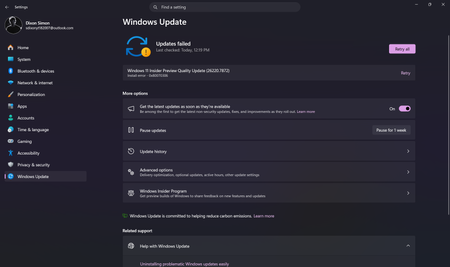
Unable to install the Windows Preview Update
I am unable to install the Windows Insider Preview update for the beta channel and I do not know how to fix it. I have retried around 5 or 6 times and still same error persists, It shows the following error. Windows 11 Insider Preview Quality Update (26220.7872) Install error - 0x80070306 Please help me fix this issue, Thank you.2KViews2likes9CommentsWindows 11: Show us a notification when built-in VPN in Windows 11 suddenly disconnects
it's important for security and privacy reasons, when the built in VPN connection in Windows 11 suddenly disconnects and its connection drops, we should receive a notification and be warned. right now, nothing happens and VPN silently disconnects without warning user. Upvote this suggestion in Feedback hub: https://aka.ms/AAd56mm2.5KViews2likes0Comments
Notice that my version of Windows 11 Pro Insiders Edition going away keeps appearing
I started getting the notice that my version of Windows will expire on August 11 three or four weeks ago. I would go to the Windows update under Settings/System and it would say NO updates are available. About a week ago It finally stated that update 25H2 was available. I would do the update numerous times since and each time I get an error code of 0xc1900101. looking that error code up on the internet said my EFI partition may need to be enlarged. When trying there sequence of steps, my system would not allow for the increasing of the partition. I Chatted with an individual today Aug 6, and she tried to run a couple of diagnostics and neither produced any meaningful results. She then gave a link to this site where she assured me the issue would be resolved. Oh and also she tried to download a new OS but it stopped before the entire MSI file downloaded. Any help/suggestions?261Views1like3Comments