windows updates
15 Topics
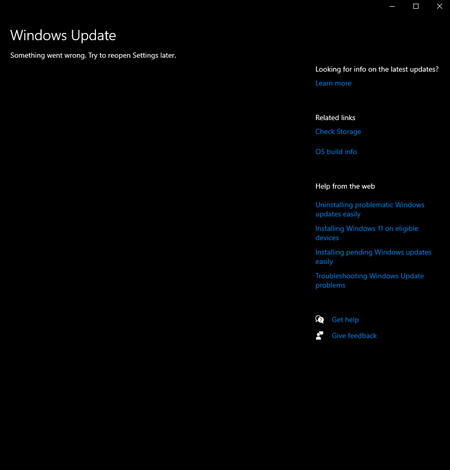
Windows update in settings not showing up (something went wrong. Try open settings later)
i've had this problem a while now but didnt think much of it until i needed newer versions of windows to run apps. tried many ways like resetting settings to refresh. tried pc health check, troubleshoots which gave results that the problem was no identifiable. im not sure what i should do. i am trying to update to the lastest win 10 version as my pc does not support win 11.316Views0likes2CommentsThe New Activation Portal Is Partly Broken But It Is a MAJOR Inconvenience For Me & Others.
I Run Windows 7 Ultimate x64 And I need to Activate Windows, I am used to the new aka.ms/aoh replacing the phone line. But I Have Activated Windows XP & Vista Without Any Problems Multiple Times, I Tested It Too, Tried 7, Starter, Home, Pro, Ultimate, Even x32 & x64. Though, No matter what, everything BUT Windows 7 Works. This Is Clearly a Server Sided Issue And I've Had This problem for the past months maybe even about a year. (The Product Key I Am Using Is Not Public on The Internet So It's Not Blocked/Used Publicly By Everyone, it is the same product key that came with the CD) And I Can Say For Certain This is a Server Sided Issue. Please Help. And Thank You For Your Time.323Views0likes0Comments
I need help!!!!
I'm trying to update to windows insider preview feature update (26220.7271) (repair version) and everytime i try to update I get the error installation failed in the SAFE_OS phase with an error during BOOT operation! I talked to Microsoft support about it and They tried to help me fix a repair version of windows 11 by having me do a repair install but it failed after restarting and it still says the installation failed in the SAFE_OS phase with an error during BOOT operation! Any help would be greatly appreciated!205Views0likes2Comments[On demand] AMA: Managing Windows updates
Tune in to Tech Community Live on demand. Get tips on how to easily manage updates for your Windows devices. And, don’t worry if you missed the live stream. Q&A is open through Friday (12/5) at 12:00 p.m. PST so keep those questions coming! Go to https://aka.ms/AMA/WindowsUpdate to post your questions.170Views1like0Comments
What Happens Outside "Active Hours?"
While looking at the features and functionality of autopatch, I'm being asked for more detailed information on behaviors related to "Active Hours", but more specifically what happens outside of active hours. (Please let me know if additional information is required to answer this) Example: It's 21:30p, the device active hours are being automatically set (05:00a to 20:00p) and a quality update is discovered and installed that requires a reboot to complete. if I'm still interacting with the host, will it try and reboot because its technically outside of active hours? Will it provide a warning or option to pause, reschedule, etc? What is the expected behavior? Does the windows host recognize that activity is occurring and wait until a specific point in time outside of active hours? How best can I explain what happens outside of active hours to the rest of the team so they will better understand expected behaviors? Thank you in advance,112Views0likes0Comments
windows updates not working
This morning when I opened my laptop it sent me to Bitlocker recovery. Since then several apps aren't working properly or won't open and when I try to Do my windows updates, the system acts like it's going to do it it shuts down and turns right back on and the box comes up that says do you want to do your updates now it's just a continuous process that never stops. I contacted Windows help chat and they did nothing for me besides the fact they were super slow and told me I needed to request help through the windows insider program. Can someone help me please turn my laptop off.359Views0likes4CommentsDefine Patch Approvals in WSUS but pull patches from Windows Update (Internet)
We currently use WSUS to distribute Microsoft patches and also use Solarwinds Patch Manager to push 3rd party patches into WSUS. This allows us to fully patch an endpoint with all MS and 3rd party software patches via Windows Update Agent/WSUS. We now have a fleet of laptops connected back to our Datacenter via a VPN and they are consuming a lot of bandwith during patching cycles. We have the following challanges: We do use some throttling on BITS/Delivery opitmization but have had mixed results We have MECM but don't use Cloud Management gatway as was deemed too expensive. we have not moved patching to MECM yet. If we use Windows Update for Business we cannot patch 3rd party updates and loose some control around pilot groups and reporting in our estimation Q: So is there a way for us to continue to define the approved patches/metadata via WSUS but have the system pull the patches files from the internet (Windows Update) source? Perhaps this is possible with MECM?615Views0likes2Comments"Windows Update" settings page is missing and everything is greyed out.
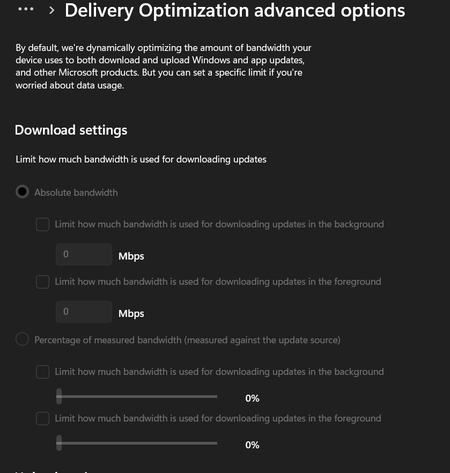
>Delivery Optimization it looks like this, i was fixing my bits cuz it won't start & wuauserv service missing by downloading new windows .iso 23H2 (22631.2361), last thing i did was running DISM before installing with .iso , after that every services related to update (wuauserv, bits, cryptsvc, & appidsvc) is fixed but it came with new problems like i listed above.1.8KViews0likes1Comment
Problems with surface go 1st gen
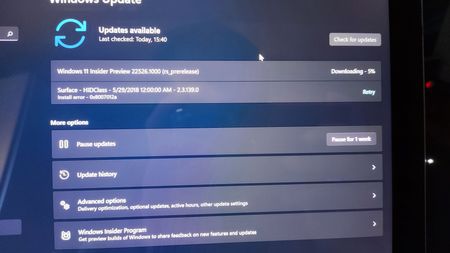
I was normally trying to update my beautiful surface go 1st gen when other than the insider previews of Windows 11 there is a failed attempt to update the "Surface HIDClass-5/29/2018-2.3.139.0" driver that delivers an install error " 0x8007012a", I tried retrying the update and using the windows update troubleshoot but nothing worked, does anyone have a fix for this?1.2KViews0likes1Comment