windows update
49 Topics
I want to ask Microsoft, why are there abnormal in the file history logs after these two updates?
This past month has been very frustrating for me. It's not that I like to ramble, but I've genuinely encountered problems after updating. I want to ask Microsoft: after updating my laptop and desktop to KB5101684 and KB5120249, I'm experiencing issues with file history: Files can still be backed up to the D drive normally. The "Last Backup" time in "File History" is not updating correctly. Newly created or saved Word documents, images, videos, etc., still show "No previous version available" in "Content → Previous Versions". I haven't modified some folders; please change the modification dates yourself. Both updates state, "This update fixes an issue that affects File History automatic backups to network shares using Server Message Block (SMB). Backups did not work because Windows showed a false 'invalid credentials' error when connecting to SMB shares." I didn't expect the update to cause this problem; dozens of users have reported the same issue. Microsoft, please investigate and fix this. When will it be fixed? If you have the same problem as me, please leave a comment below.438Views0likes3Comments
26H2 → 26220 → 25H2 upgrade failures and Insider enrollment reverting
Ok, so I moved from the Beta Channel to the Experimental Channel to pick up 26H2 early, following the guidance in the Insider email and the support article. After receiving 26H2, I switched back to Beta, which the same guidance said was fine. After that, Windows tried to install build 26220, and that upgrade failed twice. I tried leaving the Insider Program to return to the base build, planning to re‑enter Beta afterward. The staging phase completed normally, but on reboot the system skipped the usual update screens and went straight to the desktop without applying anything. When I tried re‑entering Insider Beta, the system reverted the change on reboot and left me unenrolled again. I’ve paused the attempt to install 25H2 because it keeps trying to stage and uses a large amount of disk space. The upgrade failures all behave the same way. The “Preparing updates” part at restart completes, the offline portion completes, but the online configuration phase never runs. The system just rolls back to the desktop with no visible error. The error code I’ve seen is 0x8007000D, and the failure happens during the SECOND_BOOT / MIGRATE_DATA phase. I also tried getting help through support. One rep said she would remote in to troubleshoot, but that session never happened. The next rep did remote in, but only cleared temporary files and ran a basic step. During that conversation I was told the case was waiting for escalation, then that there was no escalation team, and then that it had been forwarded to the correct team. The case was closed before I had time to reply or ask anything. There seems to be a servicing stack mismatch as well. DISM reports version 10.0.26100.8772, while the image version shows 10.0.26300.8772. The same mismatch appears across other command‑line tools I used while trying to clear space and repair the servicing environment. I’ve been working on this for days now and I’m really hoping someone can help. Thank you in advance.381Views1like4Comments
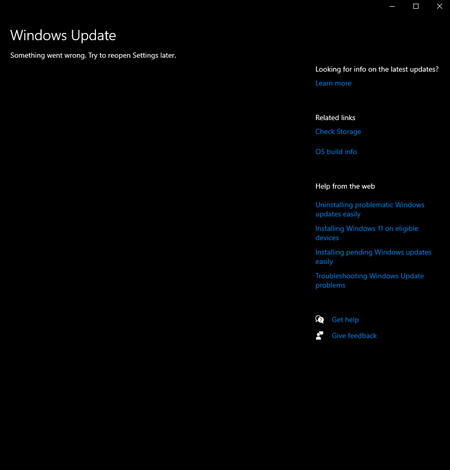
Windows update in settings not showing up (something went wrong. Try open settings later)
i've had this problem a while now but didnt think much of it until i needed newer versions of windows to run apps. tried many ways like resetting settings to refresh. tried pc health check, troubleshoots which gave results that the problem was no identifiable. im not sure what i should do. i am trying to update to the lastest win 10 version as my pc does not support win 11.314Views0likes2Comments
KB5089573 forced install + Lenovo network stack degradation (HTTPS latency, build 26200.8524)
KB5089573 installed automatically on a Lenovo system despite updates being paused and no preview updates enabled. After installation, the system jumped to build 26200.8524 and the network stack degraded severely. Heavy HTTPS sites (LinkedIn, Google Finance, YouTube) take 20–60 seconds to load across all browsers. Speedtest is normal, other devices on the same network are unaffected, and both Edge and Chrome show identical latency. DISM shows no package for KB5089573 and the update cannot be uninstalled. Looking for correlation data from other Lenovo users.254Views0likes3Comments
probleme windows update
Bonjour a tous Jai windows 11 64 bits familiale avec windows update canary J ai cette mise a jour qui mes proposee Windows 11 Insider Preview 29576.1000 (rs_prerelease) Mais windows update ne peux l installer Que puis je faire Merci pour vos reponses et bon week end103Views0likes0CommentsWindows Update took too long to finish
Hello. As of now I'm updating my PC and it's still not finish yet, it's stuck on the loading screen. I don't know how many times I experienced this but I can't install the latest updates on my PC these past few weeks because of this, it's always stuck on loading screen after restarting. Please help, what should I do? The "orange" on the Windows Update symbol is now "red".628Views0likes3CommentsCrowdStrike Secure Boot Lifecycle Management Content Pack
CrowdStrike has recently released the Secure Boot Lifecycle Management Content Pack. This new feature helps Falcon for IT module users manage Windows Secure Boot certificate updates ahead of these certificates’ expiration beginning in late June 2026. The dashboard provides an at‑a‑glance view of Secure Boot–enabled devices, showing which systems are already compliant with the updated 2023 Secure Boot certificate, which are in progress, and which are blocked or require opt‑in to a managed rollout. It also highlights certificate update failures that may require investigation. In addition, overall readiness is summarized through a compliance gauge, while a 30‑day trend shows how pass and fail counts change as remediation progresses. Filters by operating system, server edition, hostname, and update status help administrators quickly identify devices that need action to help ensure systems remain secure after the certificates expire. The feature also provides management options to opt devices into Microsoft's managed rollout for gradual, tested deployment, and to block updates on hardware with known compatibility issues to prevent boot failures. Note that this feature is available as part of CrowdStrike's Falcon for IT module. CrowdStrike Endpoint Detection and Response (EDR) customers who are not licensed for this module can enable a free trial from the CrowdStrike Store. To learn more about this feature, please see the content pack tutorial video.420Views1like1CommentThe New Activation Portal Is Partly Broken But It Is a MAJOR Inconvenience For Me & Others.
I Run Windows 7 Ultimate x64 And I need to Activate Windows, I am used to the new aka.ms/aoh replacing the phone line. But I Have Activated Windows XP & Vista Without Any Problems Multiple Times, I Tested It Too, Tried 7, Starter, Home, Pro, Ultimate, Even x32 & x64. Though, No matter what, everything BUT Windows 7 Works. This Is Clearly a Server Sided Issue And I've Had This problem for the past months maybe even about a year. (The Product Key I Am Using Is Not Public on The Internet So It's Not Blocked/Used Publicly By Everyone, it is the same product key that came with the CD) And I Can Say For Certain This is a Server Sided Issue. Please Help. And Thank You For Your Time.322Views0likes0CommentsWindows Update fails with “Something went wrong – Undoing changes” unless installed via ISO
Hi everyone, I'm facing a strange issue with Windows Update on my laptop and I wanted to know if anyone else experienced something similar. Problem: When I install updates through Windows Update, the update downloads normally and during restart it goes up to 100%, but then I get the message: Something went wrong. Undoing changes. After that, Windows rolls back the update. Observation: Interestingly, updates that start directly from the “You're there” stage sometimes install correctly. Policy change I made: Previously Windows would automatically download and install updates and frequently ask for restarts. Because of that behavior, I changed the policy to manual download and install so updates would not start installing automatically. Thermal precaution I tried: Since my laptop has a faulty CPU fan, I also limited the maximum CPU state to 99% in Power Options to prevent aggressive turbo boosting and reduce potential thermal throttling during the update process. Another important observation: If I install the same update using a Windows ISO (in-place upgrade / repair install), the update installs successfully and does not fail at 100%. Possible hardware issue: My laptop currently has: A broken battery A faulty CPU fan So I'm wondering if the update process might be failing due to power or thermal issues during the installation phase. System info: OS: Windows 11 Pro Insider Preview Channel: Release Preview Current build: 26200.7840 Update that fails: KB5077241 (Build 26200.7922) Questions: Can hardware issues like a damaged battery or faulty CPU fan cause Windows Update installation failures? Why would updates succeed when installing from an ISO but fail through Windows Update? Which logs should I check to identify the exact cause? (CBS.log, WindowsUpdate.log, etc.) Any suggestions, troubleshooting steps, or similar experiences would be appreciated. Thanks!1.4KViews0likes4Comments
Windows 10 ESU – Registrierungsbutton erscheint nicht trotz 22H2 (Rollout-Basis)
Hallo zusammen, ich möchte mein Windows 10 Pro-System für die Extended Security Updates (ESU) registrieren. Alle Voraussetzungen sind erfüllt (Version 22H2, Build 19045.6396, aktuelle Updates installiert, Microsoft-Konto aktiv). Trotzdem erscheint in Windows Update keine Schaltfläche „Jetzt registrieren“. Der Microsoft-Support hat mir heute bestätigt, dass der ESU-Rollout phasenweise fortgesetzt wird, auch nach dem 14. Oktober, nur Geräte unter 22H2 vom Supportende betroffen sind, und dass mein System automatisch berücksichtigt wird. Da ich mein Gerät gern rechtzeitig registrieren möchte, um Sicherheitsupdates nahtlos zu erhalten, meine Frage an das Entwicklerteam: Gibt es einen bekannten Zeitrahmen für den weiteren Rollout der ESU-Registrierung an 22H2-Geräte, oder spezifische Regionen- bzw. Kontoabhängigkeiten? Vielen Dank und viele Grüße Matthias317Views0likes5Comments