windows server 2019
23 Topics
windows 2019 KB5066586 & KB5070883 both have error 0x800f0985
Stuck and need suggestions, I have tried SFC & DISM recovery commands, Resetting the Windows Update subsystem Manually downloading the patches Trying to patch though power shell get-windwosupdatelog doesn't provide any insight. cbs.log & dism.log don't provide any insight Tried to update the Servicing Stack Update (SSU) for Windows Server with KB070883 that came out on Oct 23 2025, but it won't install either I get 0x800f0985. Suggestions other than in Place upgrade?966Views0likes1Comment
2025-10 Cumulative Update for Windows Server 2019 (KB5066586) Undoes Update on Reboot
We have a Windows Server 2019 Standard which will not install the 2025-10 Cumulative Update for Windows Server 2019 (KB5066586) update. The installation part goes fine, but when the server is rebooted to finalize the update, it goes into "Undoing changes". Then it reboots again, and I am back where I started. The error code is 0x8007000d. I have done the following to debug this: Ran System File Checker sfc /scannow. No errors found. DISM /Online /Cleanup-Image /ScanHealth. No errors found. Ran Windows Update Troubleshooter. No errors found. Shut down Windows Update services. Renamed SoftwareDistribution and Catroot2 folders. Restarted services. No change. Ran ScanDisk. No errors found. Disabled antivirus. No change. Ran Disk Cleanup and manually deleted additional temp files. No change. Checked Event Viewer. Only error is Event 20 which is a failure of the Windows Update Agent. I am out of ideas. If anyone has some, I would much appreciate the help. I am out of ideas.Solved1.9KViews0likes10Comments2025-01 Cumulative Update for Windows Server 2019 KB5050008 Causing Slow Performance and Freezing
We had this same problem back in August with the 2024-08 Cumulative Update for Windows Server 2019 KB5041578, slow performance and freezing. Here we go again with KB5050008. Remote Desktop does not respond. It freezes up for minutes. We have SQL Server and Terminal Server on this Windows Server 2019 and people can't access it through Remote Desktop. I had to uninstall KB5050008. The server went back to normal. I don't a repeat of this with every Windows Server update. Please advise.3.1KViews0likes2CommentsInstallation of Freshservice probe fails at starting service
BLUF: My background is desktop administration. New job and trying to learn as I go in regard to servers. According to inventory reports from our Freshservice ticketing system, the Freshservice probe was installed on one of our DCs and reporting back in November of last year. No real evidence of it now. When trying to install the probe on Windows Server 2019, it gets all the way to starting services and it fails. Message saying to verify that you have sufficient privileges.372Views0likes0Comments
Partly english terms in german Windows Server 2019 - Update 2024-06
Hi folks, Since the latest cumulative update (KB5039217), English terms have been appearing in the dialogs on our German-language Windows Server 2019 servers. Uninstalling this update fixes the problem, but in my opinion it is not a solution as it leads to security problems. Are there other solutions to this? Thanks in advance Frank409Views0likes0Comments
Problems with a shared local printer through remote desktop windows server 2019
We have a computer outside premises that uses a remote application installed in our server with an rdp file, they access the app and print with their local printer (not instaled in server because this is outside our intranet, they conect to our intranet via VPN etc) So, randomly the printer stops getting shared when connecting to the remote app and the only thing we can do is reboot the entire server. We still haven't located if it's related to a stopped service and which one. EDIT: i found an event around the day we were notified the printer isn't visible is related with the register Microsoft-Windows-TerminalServices-PnPDevices/Administrador and it just says "Redirection of additional supported devices is disabled by policy " I don't know if it has anything to do.1KViews0likes0CommentsCannot Sign into Edge on Domain Controllers running Windows Server 2019 Standard
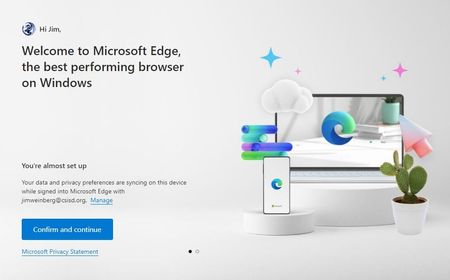
I know this is more of an Edge issue than a Server issue, but it's specific to Server 2019 Standard running as a domain controller, so I'm starting here. Edge version: 108.0.1462.76 (Official build) (64-bit) OS: Windows Server 2019 Standard (Build 17763.3770) When I launch Edge on any of my 23 Domain Controllers running Windows Server 2019, I am unable to sign into Edge with my "work or school" account (my AD/AAD credentials). I have no issues signing into Edge on Server 2019 member servers. When I first launch Edge on a member server, it automatically logs me in and gives me the below screen: However, when I launch Edge on a domain controller I get this: After clicking "Sign in to sync data", I get an MS login window: Then, upon typing in my AD/AAD credentials, I get a popup window with the below message: We can't sign you in right now The Microsoft Edge team has been notified of this issue. Please try again later. Error code: 3, 15, -2146893039 edge://signin-error/ Any suggestions?2.1KViews0likes1Comment
Issues with Remote Desktop Web Client (HTML5)
Hey all, I'm having a strange issue after implementing the Remote Desktop HTML 5 Client for one of our RDS instances. Everything is working up until the actual act of opening an application which we then receive the following error: We have performed all of the verification steps to ensure that the set up is configured correctly and haven't had any issues out of other RDS instances with the same set up. Below is a list of everything that we have verified: The RDS server (singular server, running all RDS roles) is Server 2019 and is entirely up to date with Windows Updates. The public trusted certificates are configured correctly. Licensing is set to per-user client access, not device level. Verified that the RDS server's NPS is registered with Active Directory. Reviewed all appropriate connection and authorization access policies, verified that these are looking great. We receive this error when attempting to access locally using the FQDN as well as externally over the internet as well. When performing a log capture we can see the following error: 2022-12-22T20:01:12.622Z WebSocketTransport(ERR): WebSocket error received for url=wss://removed.for.confidentiality:443/remoteDesktopGateway?CorId=%7B9ca382bc-96b8-444e-b22c-3e5cbc370000%7D&ConId=%7B299f9980-d47f-44e9-86e7-479750c95ab4%7D&ClGen=HTML%3D1&ClBld=Type%3DRdClient%3B%20Build%3Dprivate&AuthS=SSPI_NTLM websockettransport.cpp(304): OnErrorFromJS() Does anyone have any ideas or have ran into this issue before? The results online are very scarce and every recommendation that has worked for other doesn't appear to work in our case. Assistance would be greatly appreciated!7KViews0likes5Comments
Outlook 2021 Phänomen in Verbindung mit Server 2019 und FSLogix
Guten Tag Liebe Community, ich habe hier aktuell einen Fall der mich Haare verlieren lässt. Zur Umgebung: RDS-Umgebung mit FSLogix (Funktioniert an sich Super!) FSLogix: Aktuelle Version (2.9.8171.14983) Windows Server 2019 komplett durchgepatcht (Komplette Umgebung ist WS2019) 3x Terminalserver Office LTSC 2021 aktueller Patch (16.0.14332.20279) 32bit (32bit wird benötigt wegen DATEV) Exchange Online User Arbeiten ausschließlich auf den RDS Hosts -> Client Computer sind Intel NUCs und ThinClients (Alles Win10) Zum Problem: Haben letztens ein Upgrade von Office 2016 auf 2021 bekommen. Ich also: Office 2016 mittels OffScrub Tool deinstalliert und Office 2021 installiert mithilfe des Office Bereitstellungstools. Office funktioniert, nur Outlook nicht zu 100%. Hier haben wir folgendes Problem: Viele User bekommen keine Verbindung zu ihrem Postfach -> Outlook versucht die Moderne Auth. zu öffnen und bekommt das nicht hin, das Fenster schließt sich direkt. Ich habe schon etliches Versucht: EnabelADAL 1/0 WAMOverride... etc., div. Tools seitens MS ausgeführt und und und. Bei der Basis Auth. kommt man sogar in einen Login-Loop. Wenn man ein neues Outlook Profil anlegt, schafft Outlook es nicht mal in die Cloud zu verbinden. "Es konnte keine Sichere Verbindung hergestellt werden" Witzig: wenn man die @x.onmicrosoft.com Adresse nimmt, geht das ganze -> man kann sich da einiges hintricksen -> Ist aber absolut nicht Sinn der Sache und führt letztendlich wieder in die selbe Problematik. Ich habe dann die Userprofile Neuangelegt -> Outlook läuft -> Aber nur auf einem der 3 Terminalservern, auf welchem Outlook aktuell Funktioniert ist reines Glück. Hat hier wer Erfahrung, eventuell sogar das selbe Problem gehabt oder hat mir einen Tipp welche Einstellungen ich noch Prüfen kann? Ich danke Vorab!!! Ich habe hier schon etliche Zeit verbracht und sehe vor lauter Bäumen den Wald nicht mehr.3.4KViews0likes4Comments