windows insider build
4 Topics
Can't upgrade to Windows 11 Build 26340.9354
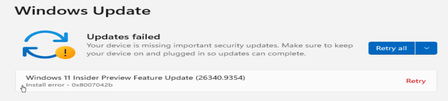
So on 8th of Sept Microsoft release the preview build on the windows insider program for the experimental channel build 26340.9354 but no matter what I can't upgrade to this build no matter what I tried to via windows update and it would download and install and ask me to reboot but when I did and the upgrade process start it would always fail and roll back so then I tried running sfc /scannow 3 times and dism to fix any corruptions but still it kept failing then I said well might try with uup dump but the download links are broken on uup dump for this build so then I did a fresh install of windows 11 joined windows insider program and tried to upgrade but it keeps failing with different error codes for example - 0x8007042b I am just now out of ideas what to do next maybe wait for a feature build or something idk I would highly appreciate if you guys leave your comments down bellow272Views0likes1Commentwindows updates not working
This morning when I opened my laptop it sent me to Bitlocker recovery. Since then several apps aren't working properly or won't open and when I try to Do my windows updates, the system acts like it's going to do it it shuts down and turns right back on and the box comes up that says do you want to do your updates now it's just a continuous process that never stops. I contacted Windows help chat and they did nothing for me besides the fact they were super slow and told me I needed to request help through the windows insider program. Can someone help me please turn my laptop off.313Views0likes4Comments
Does anyone know why I'm getting Windows Insider error 0xc1900209?
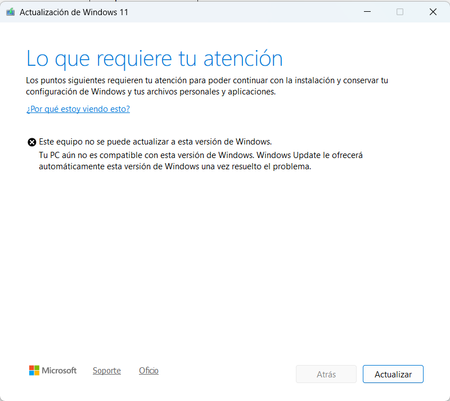
I download the update, during the installation process a small window opens and after a while it says: "This requires your attention. This computer cannot be upgraded to Windows. Your PC is not yet compatible with this version of Windows. Windows Update will automatically offer you this version of Windows once the problem is resolved." I have Windows 11 Pro 23H2 and want to upgrade to 24H2. I ran the Windows ADK to see if there are any incompatibility issues and nothing, if anyone could help me I would appreciate it.928Views0likes2Comments*Some settings are managed by your organization
this has been ongoing issue i have 2 pcs side by side on my desk , both had that message then the other one lost that message on last update but mine still has this message yet theres nothing being controlled by any organization . when do you plan on fixing this i am on build 17074.rs_prerelease_flt.180116-1539 plus ive noticed my pc restarted itself today and got it saying several events that where strange that windows had updated during my set work hours when i am on it, i was checking messages and it just said windows was rebooting not right at all. this has to be fixed soon.1.9KViews1like1Comment