windows forms
73 Topics
Next-Gen Suite Modernization & Legacy Lifecycle Strategy
Hi Microsoft team As Microsoft continues to evolve its ecosystem, balancing the introduction of modern capabilities with long-term enterprise sustainability offers a compelling product architecture challenge. From a product lifecycle and system design perspective, a two-tier strategy could bridge this gap effectively: 1-Controlled Internal Penetration Testing During Next-Gen Development: While engineering and building the new suite, the primary focus should be on controlled internal penetration testing (red teaming) and controlled exploitation. This proactive auditing ensures identifying and patching structural security vulnerabilities at the root level before release, preventing post-launch patching cycles. 2-Next-Generation Modern Suite: Re-building modern iterations of the core Microsoft suite from the ground up, featuring advanced security architectures and embedded AI capabilities, while preserving the familiar user interface. Once this new version is fully launched and stabilized, feature updates for the legacy suite can be formally discontinued. 3-Legacy Suite Lifecycle & Sunset Strategy: Maintaining the classic suite for users and organizations attached to the legacy experience. After transitioning to the Next-Gen platform, support for the legacy suite will shift strictly to critical security patches until it reaches its end-of-life. 4-Strategic Go-To-Market Pricing: Leveraging the legacy suite through aggressive discounting or a freemium model to drive massive user acquisition and retain legacy-bound clients within the Microsoft ecosystem, while positioning the Next-Gen suite as the flagship solution. I’d be very interested to hear how the product strategy team evaluates the trade-offs between legacy maintenance costs and freemium/discounted user acquisition models. 5-Refactoring Legacy Code Dynamics: Legacy architectures often suffer from excessive code verbosity, deeply entangled logic, and inherent structural limitations that cannot natively support modern parallel processing or AI workloads. Continuing to append features onto these bloated codebases only increases system overhead and latency. Freezing new feature development on legacy suites—while re-engineering the Next-Gen platform with clean, modern, and concise frameworks—ensures optimal performance without carrying decades of technical debt forward. Best regards55Views0likes0Comments
Sway Crashing
Microsoft sway keeps crashing and resetting and it makes me very upset. I am trying to work on a newsletter and I keep losing work. I know it is not a browser side issue, I have used 3 different browsers and multiple devices on different Wi-Fi's. Others are also experiencing this same issue.130Views0likes1Comment
Outlook Attachment Organization
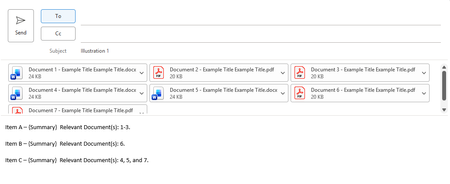
My organization sends out daily emails with long lists of separate items submitted by each team member, with related documents corresponding to each individual item. The current accessibility options for organizing attachments in either Outlook or Outlook (classic)--I use the latter--often make this somewhat of a challenge. The protocol for sending these emails is not going to change within my organization, and I'm not in a position to suggest any kind of third-party subscription (e.g., NetDocuments) to help organize attachments or even to ask my team members to all download a plugin, regardless of the price. So, I've come here to ask for help. The default, of course, is for all documents included in an email to be held within an attachments pane above the message. See Illustration 1. This, however, does not lend itself well to the daily emails. For instance, take Illustration 1 but instead of just seven attachments, imagine 30. Now also imagine 10 items instead of 3, with lengthy paragraphs included in the {Summary} placeholders. This may give you an idea of the issue I am trying to solve. One workaround is to send messages in rich text format. See Illustration 2. This allows each of the documents to appear under the corresponding items and, overall, is much more efficient at organizing attachments for the task at hand. However, the workaround presents several of its own issues. First, my team is not an altogether tech-savvy bunch. The thought of trying to get everyone to remember to send their daily email updates--and only these emails in particular--in rich text format is somewhat of a nonstarter. Second, and more importantly, the appearance of the attachments using this method does not allow for the full document title to be displayed to the reader, which defeats the entire purpose of my endeavor: to make it easy to identify and access documents corresponding to each item in a list without having to open multiple documents at once or sift through a sea of attachments to find the one you're looking for. What I'm hoping for is something akin to what is shown in Illustrations 3a (above) and 3b (below). (Note: I've prepared these illustrations by inserting screenshots of the attachment pane icons below the placeholder text. Clearly, this is not something I've composed using existing features, otherwise I wouldn't be posting this query.) Ideally, one would have the option to choose between a layout akin to either Illustration 3a or Illustration 3b. Thank you!130Views0likes0Comments
Windows insider's glitches
I'm unable to start Valorant since I switched to the windows insider program, it was stopping the vanguard to run. Vanguard is anti-cheat program which was run with the Valorant. I'm using latest windows insider experimental and I'm unable to uninstall it. How would I will solve this problem.137Views0likes0Comments.NET
Hi everyone! 👋 I’m new to this community and currently learning .NET App Development. I’m really excited to join and connect with developers here. I believe the discussions and knowledge shared in this community are very valuable, especially for beginners like me. I’m looking forward to learning from your experiences and improving my development skills. If you have any tips, recommended resources, or advice for someone starting with .NET, I would really appreciate it. Happy to be part of this community! 😊502Views3likes2Comments
Configure registry permissions
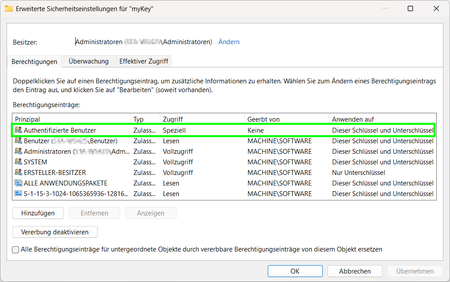
Hi I have strange problem to set specific permission to a registry key. According to Microsoft's https://learn.microsoft.com/en-us/dotnet/api/system.security.accesscontrol.registrysecurity?view=net-10.0, it should work like this: private static RegistryKey CreateRegistryKey(RegistryKey parentPath) { RegistryKey childKey = parentPath.CreateSubKey("myKey"); RegistryAccessRule rule = new RegistryAccessRule( new SecurityIdentifier(WellKnownSidType.AuthenticatedUserSid, null), RegistryRights.ReadKey | RegistryRights.Delete, InheritanceFlags.ContainerInherit, PropagationFlags.None, AccessControlType.Allow); RegistrySecurity childACL = childKey.GetAccessControl(); childACL.AddAccessRule(rule); ShowSecurity(childACL); childKey.SetAccessControl(childACL); return childKey; } But if the code is executed in a windows service, I missing my permission!? How can this be? Am I doing something wrong? Have I overlooked something?417Views0likes1Comment
Windows Forms user control layout issues at runtime
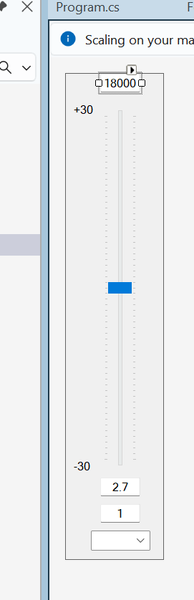
I'm hoping the good folls of this community can help me figure out what's going on with a Windows Forms user control that I created and am trying to use. I created a user control that represents a single band of a parametric equalizer. In the designer, the control looks like this: When I debug the control in the Test Container, things look good: If we take a look at the actual PEQ application that will use the control, things still look OK in the designer: It's only when I fire up the application that things go... awry: What happened to all the TextBoxes? And the ComboBoxes? I''ve got a feeling that the fix for this is something really simple, and I'm going to feel like a complete idiot for not figuring out the obvious. Can anyone tell me what my dumb self did wrong?205Views0likes0Comments