windows autopilot
15 TopicsHybrid Autopilot as a Transition Strategy Toward Cloud-Native Endpoint Deployment
Hybrid Autopilot sometimes gets labeled as “legacy.” But in large enterprise environments, it can be a very practical transition architecture toward full cloud-native endpoint deployment. In one global rollout scenario I supported across multiple regions in a large enterprise environment, Hybrid Autopilot played exactly that role — helping modernize deployment while maintaining alignment with existing identity and infrastructure dependencies. Instead of treating Hybrid Autopilot as a long-term destination, we approached it as a controlled stepping stone toward Entra ID–only deployment. The challenge Many multinational environments still rely on: on-prem Active Directory legacy application dependencies region-specific provisioning constraints existing device naming standards network-dependent enrollment scenarios Moving directly to cloud-only join is often the goal - but not always realistic. Hybrid Autopilot helped bridge the gap. What worked well for us Several design decisions helped make Hybrid Autopilot scalable and predictable across regions. Machine-level secure connectivity before user sign-in One important enabler for Hybrid Autopilot in internet-based deployment scenarios was establishing machine-level secure connectivity before user authentication. Allowing devices to reach domain services during provisioning made it possible for offline domain join steps to complete successfully even when devices were deployed outside the corporate network. This supported direct-to-user deployment models without requiring traditional on-premises connectivity during setup, which becomes especially important in large enterprise global rollout scenarios. OEM hardware hash integration enabling deployment tagging and Zero Trust alignment Leveraging OEM-provided hardware hashes allowed devices to be pre-registered into Autopilot before shipment and associated with deployment group tags aligned to regional rollout logic. This enabled a consistent enrollment pipeline across distributed device shipments and created the foundation for automated targeting and naming alignment during provisioning. It also supported a stronger Zero Trust posture by ensuring that only officially procured and pre-registered corporate devices were allowed to enroll through the managed provisioning workflow. This helped reinforce device trust at the enrollment stage and reduced the risk of unauthorized or unmanaged endpoints entering the environment. Country-based deployment tagging Country group tagging then allowed hostname naming alignment to remain consistent with regional standards while enabling policy targeting and configuration logic to scale globally. This helped maintain predictable deployment behavior across regions while supporting large enterprise rollout consistency. Maintaining identity continuity during transition Hybrid join allowed compatibility with existing identity-dependent workflows to remain intact while preparing the environment for future Entra-native deployment approaches. Rather than forcing architectural change everywhere at once, this allowed transformation to proceed in controlled phases across regions. Why Hybrid Autopilot still matters? In large enterprise environments, endpoint modernization rarely happens in a single step. Hybrid Autopilot can support: modernization without disruption phased identity transition planning global rollout consistency alignment with existing provisioning standards preparation for cloud-native endpoint strategies When positioned correctly, it becomes part of the transition journey rather than technical debt. Curious how others are approaching this I’m interested to hear how others in large enterprise environments are using Hybrid Autopilot today. Are you treating it as a long-term deployment model, a transition architecture, or actively moving toward Entra ID–only deployment? It would be great to compare approaches and lessons learned across different enterprise rollout scenarios.686Views0likes4CommentsAutopilot V1 vs “Device Preparation” (V2): Great direction — but is it enterprise-ready yet?
We evaluated Autopilot v2 but decided to stay on Autopilot v1 for large‑enterprise scale. Group Tags + dynamic groups are still essential for our device naming, segmentation, and governance model. We intentionally limit apps in EAS to speed up provisioning, so EAS‑based app deployment in v2 isn’t a compelling advantage for us. v2 looks promising, but until there’s stronger parity for enterprise‑scale targeting and naming, v1 remains the better fit. Curious how others at scale are balancing provisioning speed vs. segmentation without Group Tags.390Views0likes2Comments
Clarity on Self-Service Experience, User-Driven Mode and OOBE
HI All, I need clarification on this subject please, as I have checked multiple Microsoft Learn pages to get an understanding. I'm still not 100% sure on this. My question is: Self-Service Experience is the user-driven portion of OOBE? Or are these three items different?74Views0likes0Comments
User flow is failing after Technician flow completes successfully (Device is already enrolled error)
Hello! Just finished setting up a new O365 tenant with an Autopilot deployment profile and I am running into this issue. I managed to get the Technician (pre-provision) flow to complete successfully, but when a user signs in to initiate the User flow, an error appears saying the device is already enrolled (error 8018000a). Well, the device is already enrolled because going through the pre-provisioning process enrolls the device, but there is no Primary user and the 'Enrolled by' field is blank on the Intune object. The weird thing is, when the user receives this error, if they wait 10 minutes and try again it will succeed. What seems to be happening is that the error triggers Intune to delete the object associated with that device. Once it is deleted, the user can sign in and the User flow can be completed. I know a potential work around may be assigning the device to a user ahead of time, but I want to have the devices configured so they can be handed out to any user and the first one to sign-in enrolls the device. Any help on how to resolve this issue when the Technician and User flow are separated would be greatly appreciated. TL;DR: When technician flow and user flow are separated, user receives 'Device already enrolled' error when signing in.473Views0likes0CommentsThird party MFA challenge when enrolling device with Windows Autopilot
Hi everybody, Last week I encountered a challenge while enrolling a device with Windows Autopilot. The issue was that our customer uses a third-party MFA/Federation solution that's having issues during enrollment (white screen during authentication problem). I've worked out a solution with Temporary Access Pass and Windows Hello for Business and wrote it down in this blog. Maybe it can be useful in the future, in case you encounter a similar issue. Third-Party MFA Challenge: Seamless Device Enrollment and Authentication with Microsoft Intune (nickydewestelinck.be) Any feedback or remarks are welcome! Thanks!333Views1like0Comments
How To Remotely Autopilot Laptops via -Online switch
I have existing remote laptops that I want to autopilot but how do I submit HWID using the -online which requires intune admin credentials? Is there a Just-in-time permission and/or single use password protected with MFA that can allow user to submit HWID on behalf of company? My understanding was that "convert all targeted devices to Autopilot" meant the HWID would be submitted automatically for these existing devices. If this is not the case my only roadblock is not having physical access to laptop to enter my intune admin credentials. I would run sysprep application to trigger oobe660Views0likes3CommentsUAC during OOBE (after switching from Admin to Standard user in Windows Autopilot)
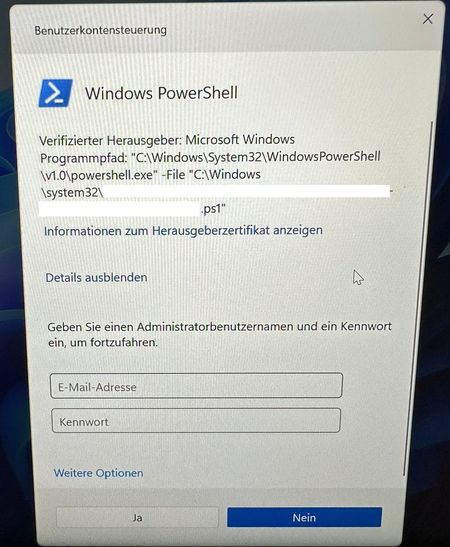
We switched settings in Windows Autopilot to make the user a standard user instead of an admin. Now, during OOBE I am asked multiple times to execute a PowerShell script as an admin. What causes this behavior and how to prevent?Solved1.3KViews0likes10CommentsAutopilot requires three logins
Hi all, during the project phase for setting up our AutoPilot process, I noticed that Autopilot requires three (!)logins. The first one at the welcome screen The second at the local login The third when connecting to the Azure AD We expect our users to log in, walk away, and come back a few minutes later to find their computers ready to use. After all, that's supposed to be the big advantage and point of AutoPilot. Now it looks like they have to log in again when they come back to complete the account setup. Are these steps intentional or is there a configuration anomaly in my setup as this causes additional difficulty for the user. Is there a way to resolve this issue?3KViews0likes4Comments
Windows Autopilot device(s) could not be imported
I ran the Get-WindowsAutopilotInfo.ps1 on two computers, one was a VMware VM and the other was a Dell Laptop. The VMware VM .csv file imported with no problems, but the Dell laptop stopped with the error in the subject. Any ideas why? I checked the headers of both files and they are correct along with the comma's in the right place. No other characters in the hash like "".1.9KViews0likes2Comments
Windows Autopilot and selecting the right application type
Hi All, I was told that Win32 apps are better for the enrollment and deployment of Windows Autopilot Devices, and also the Out of Box Experience in general actually. Alot of applications are now available as Microsoft Store App (new). Would it be better to switch to that for a smoother enrollment?Solved1.1KViews0likes2Comments