windows 10
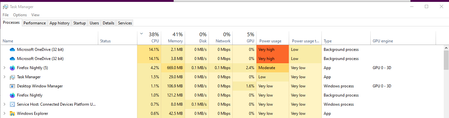
128 Topics[FIXED] Anyone else having OneDrive high CPU usage problem after upgrading to build 19564?
Feedback on Feedback hub app: https://aka.ms/AA7bbm6 please add more details to it. thank you Tried restarting my computer 2 times already with 5/6 hours intervals. I let it run like that for hours, hoping it will finish whatever it is doing but nope, it always stays like that. anyone else having this issue on the same exact build?Solved108KViews4likes37CommentsShow available digital licenses in our Microsoft account in Windows 10 settings, activation
There needs to be a way to view available digital licenses inside our Microsoft account, I think in Windows settings => update and security => Activation would be the most suitable place. it has benefits, the most important one is so user can see their available licenses in their Microsoft account and make a wise decision based on that info. please upvote this feedback in feedback hub: https://aka.ms/AAbdhft50KViews4likes2Comments
Cannot access anonymous file shares after updating to Insider Preview 2004
The screen shot of my problem and specific build are attached. I updated my desktop pc to the Insider pre-release for Windows 10 2004 and now I cannot access anonymous file shares any more. Before the update, I enabled the option in the Local Group Policy at: Computer configuration\administrative templates\network\Lanman Workstation "Enable insecure guest logons" Before the update everything worked fine but now I cannot access the share. I can still access the share with my Mac (10.15.4) and my Windows 10 laptop which is on the current normal build and is fully updated as of 4/22/2020. Please fix this for the Windows 10 2004 full release.Solved27KViews1like19CommentsOptimize Windows 10 PC reset using the cloud
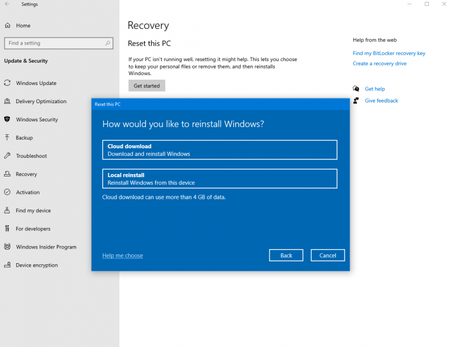
Cloud download You can use the new cloud download option to get Windows from the cloud to reinstall instead of reusing the existing Windows files to construct a fresh copy. This can be a more reliable way to reinstall Windows and, depending on internet speed, can be a faster as well. To achieve a similar result previously you would have to download Windows and create a USB stick, but because this is built-in to Windows it doesn’t require the extra steps of creating a USB stick to do the installation. How to use this feature For Windows 10 builds 18970 and newer you can initiate Reset this PC and select the cloud download option through Settings: Select the Start button, then select Settings > Update & Security > Recovery After selecting Keep my files or Remove everything you will see Cloud download or Local reinstall. The Cloud download option will connect to Windows Update over your current network connection. How this all works While all of this looks easy there are quite a few phases and operations to get through, they can be summarized as the following (Keep my files performs 2 additional steps in the second phase): Preparation phase While you are selecting options in the interface, in the background we are preparing and checking requirements Ensure the device is not on battery power Check that Windows Recovery Environment (Windows RE) is present and enabled Scan to see what optional features and languages are installed Check connectivity with the Windows Update and determine download size When you click “Reset” (see Figure 1: Final confirmation) the download begins. After this everything will continue without any interaction. When the download completes the offline phase will begin by rebooting into Windows RE (if the reset was initiated from Windows RE the system will not reboot and just continue) Offline phase Boot to Windows RE Apply image from the downloaded payload (Keep my files) Gather user profile from the previous OS and apply to the new OS Gather drivers from the previous OS Apply optional features and languages to the new OS Switch OS root folder from the previous OS to the new OS Delete downloaded payload Reboot into the new OS Apply drivers to the new OS Apply OEM customizations including preinstalled Windows apps Reboot to the Out-Of-Box-Experience (OOBE) (Keep my files) Skip OOBE and proceed to login screen What you can do if you can’t boot into Windows If the device isn’t able to boot into Windows you can initiate Reset this PC with the cloud download in the Windows Recovery Environment (Windows RE). If Windows is unable to boot after two consecutive failed attempts the device should boot into Windows RE automatically. Select Troubleshoot > Reset this PC, then select Keep my files or Remove everything, if you have a wired internet connection you can then select Cloud download (Connecting over wireless networking in Windows RE may be available depending on drivers loaded by the PC manufacturer) This new cloud download option will continue to enable you to reinstall Windows and get your device back to a healthy state. Whether it is initiated through Windows 10 Settings or Windows RE troubleshooting the phases and operations are nearly identical. As we continue to improve we are always interested in your ideas, please share them in Feedback Hub. https://insider.windows.com/en-us/articles/optimize-windows-10-pc-reset-using-the-cloud/14KViews3likes5CommentsWhat is an "Organizer" account?
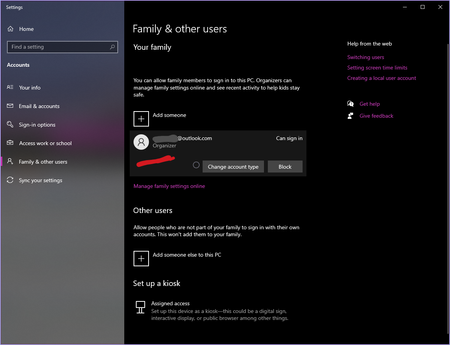
Refreshed my Windows 10 insider fast ring build 19592 using Cloud download and after it was done I noticed the other Microsoft account in my family group (adult account) is called "organizer" What does it mean to be "Organizer" ? why did it happen?13KViews0likes4Comments
A Vision for Windows 12: Familiar Power Meets Modern Innovation
Dear Microsoft Windows Development Team and Community Hub, With the inevitable speculation around Windows 12, I wanted to share a comprehensive vision for the next iteration of Windows. The goal is to blend the best elements of past versions with modern needs, creating a truly powerful and personalizable operating system. Here’s what many users like myself are hoping to see: 1. A Revitalized Start Menu & Screen Fresh, Resizable Layout: A clearly divided Start Menu with dedicated zones: Account Area (top-left), Shortcut Area (far left for common folders), List Area (pinned, most-used, and suggested apps), and a Pinned Tiles Area (right side, four-column layout). It should be resizable by dragging its edges. Full-Screen Start Screen Option: A return of the full-screen Start that combines the easy-to-browse list from Windows 7 with the dynamic Windows 8.1-style Live Tiles, supporting both horizontal and vertical arrangements. Enhanced Tile Flexibility: Tiles in five sizes (small, medium, long, wide, large, tall) with smooth resizing animations. New customization options should include colorful, gradient, light, dark, transparent, and semi-transparent tones. Migration Friendly: When upgrading from Windows 7, 8.1, 10, or 11, all pinned apps and websites should automatically migrate. Copilot Integration: A dedicated, prominent Copilot Tile to highlight the AI assistant's role, perhaps with a new rainbow effect for visual flair. 2. A More Functional Taskbar & Search Comprehensive Taskbar: Featuring the Cortana icon, mobile devices, Start, Search, Task View, Chat, applications, and the system tray. Prominent Search Box: The search box should be more prominent, changing from a circle to a rectangular shape, serving as a stronger entry point. Flexible Search Menu: The search interface should be highly adjustable and consistent with the new Start menu's style. 3. Personalized User Experience Lock Screen Customization: Options for left or center-aligned date and time. New photo effects that highlight the main subject, allowing it to overlay the time. Windows Hello: Facial recognition that works while wearing a mask. Enhanced Widgets: Desktop Pinning: Widgets should be pinnable anywhere on the desktop, not just in a sidebar. Full-Screen Widgets Board: A full-screen mode with a widget panel on the left and news/feeds on the right, supporting up to six columns. New Widgets: Introduction of a 'Calendar', 'People', 'Microsoft Edge', 'Cortana Suggestions', and a dedicated 'Microsoft Store' widget. 4. Peak Productivity & Multitasking Task View & Virtual Desktops: A return to the mature Windows 10 experience, allowing windows to be dragged directly to other desktops in Task View. Timeline Returns: The Timeline feature should come back, including cross-device history. Classic Alt+Tab: The Windows 10 Alt+Tab window switcher experience should be restored. Supercharged Snap Assist: Enhanced Snap Layouts supporting up to 8 segments for large screens, with specific, intelligent layouts for ultrawide (21:9, 32:9) monitors. 5. Application & Ecosystem Evolution App Updates: New versions of Mail, Calendar, and People. The new Outlook app should fully support popular third-party email services like QQ, 163, and 126. A New Cortana: Multilingual support with the return of consumer skills (music control, smart home, third-party skills). It could be offered in two visual forms and power the 'Cortana Suggestions' widget. Screenshot Tool Upgrade: Should support full-screen recording. Media Player: The return of an appearance selector and support for live tiles. Microsoft Store Revamp: UWP Return: High-quality UWP and classic Metro apps should return to the store, with PWAs transitioning to UWP. Gaming Expansion: Addition of dedicated PlayStation and Nintendo Switch apps, including a Nintendo game section. 6. Visual & Nostalgic Enhancements Refined Aesthetics: Improved window transparency with a new glass effect, rounded rectangle system avatars, and a new top bar (weather, system tray, time). Dynamic wallpaper effects would be a welcome addition. Keep the Win11 Sound: The Windows 11 startup sound is great and should be retained. The "Bold Strategy" – Legacy Feature Return: To satisfy power users and nostalgia, consider the large-scale return of beloved features like MSN apps, Windows 7 Desktop Gadgets, Windows Media Center, Groove Music, HomeGroup, a significantly enhanced Tablet Mode, and Windows Ink Workspace. 7. Hardware, Compatibility & Core System Broad Controller Support: Native compatibility with DualShock 4/5, Joy-Con, and others. Android Subsystem (WSA) Return: WSA should return with a focus on fixing previous pain points, especially full-screen landscape app support. Separated Notification Center: The Notification Center and Calendar quick actions should be separated for a cleaner interface. "Next-Gen PC" Promise: Windows 12 should deliver on larger storage, longer battery life, more power, and enhanced security/stability. Enhanced Backup & Transfer: Windows Backup should expand to more regions and add support for backing up personal files and apps to external drives, including migration from old PCs or to new hard drives. 8. Core Versioning & Hardware Requirements A Fresh Start: Version 26H1, with an internal OS version reset to 12.0.0.0. Tiered Editions: Windows 12e (for education, 2GB RAM), Windows 12 (mainstream, 4GB RAM, removing strict TPM restrictions), and Windows 12 Ultra (flagship, 8GB RAM, unlocking all AI and performance features). Extensive Free Upgrade Path: A critical strategy, offering free upgrades from Windows 11 (including SE), Windows 10 (including S), Windows 8/8.1 (including RT), and Windows 7. Doubled Support Lifecycle: Home/Pro/Workstation: 24 months → 48 months. Enterprise/Education/IoT: 36 months → 72 months. In summary, we envision a Windows 12 that isn't afraid to learn from its rich history while pushing forward with modern innovation. It should be a system that respects user choice, empowers productivity, and welcomes everyone from legacy users to those with the latest hardware. If you like this vision and want to support it, you can upvote it here: https://aka.ms/AAylqhw Thank you for considering this feedback. Sincerely, A Passionate Windows User10KViews1like10CommentsAllow Call feature on Your Phone app to work WITHOUT Bluetooth. use it over INTERNET or WIFI
Allow Call feature on Your Phone app to work WITHOUT Bluetooth. use it over INTERNET or WIFI my PC has no Bluetooth, majority of PCs don't, only laptops have it. it shouldn't be necessary to use Bluetooth to use call functionality in the Your Phone app. please let us answer or initiate calls over Internet/4G/WiFi/Local network. Thank you. Please Upvote this feedback if you want the same: https://aka.ms/AA863fj10KViews6likes0Commentsimprove telemetry feature in windows 10 to be able to detect problems better
Currently the Telemetry, Error reporting and diagnostics services inside Windows 10 (Insider or not) are not good enough to catch the problems and bugs. specially those bugs that don't cause system crashes or bugs that cause some thing in Windows not to work. for these type of bugs and problems, Microsoft relies on people to report them but most of the time either people don't report them or they fail to specify how to produce that problem/bug. Windows 10 needs such a robust Telemetry and diagnostics services that would do its job regardless of people reporting a problem or not. this Telemetry and diagnostics services must be even more thorough in Insider builds, they'd have to be so deep into Insider builds so that they produce very clear and thorough reports for Microsoft to identify the problems and things that don't work. Upvote this Feedback: https://aka.ms/AA65fmf9.3KViews1like4Comments