windows 10 update (kb5001716)
1 Topic
Windows 10 Update (KB5001716) Broke My OneDrive on Windows 10 22H2
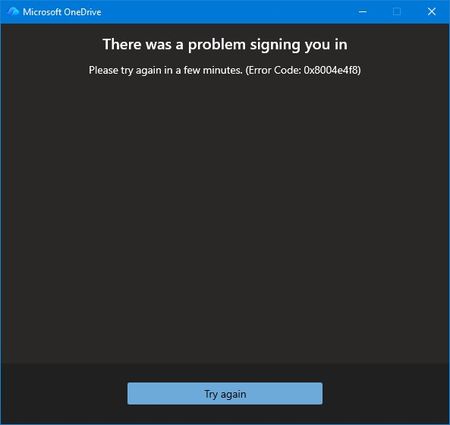
Prior to the August update all was well. I couldn't log into OneDrive from my desktop. No issues through my phone or online. Login screen fades away with no error just ghost One Drives filling my taskbar because multiple instances of OneDrive appear in Task Manager. At first, I thought maybe the update exposed some file corruption. A quick uninstall of OneDrive and re-install. Of course nothing is easy. I thought this would be the perfect opportunity to use AI to assist my troubleshooting. The AI found multiple issues with Windows Update Cleanup & WebView2 Runtime. I was all in the registry and services application. In the end, nothing worked and I threw the bomb at the desktop. Clean Windows install from a USB. Reinstalled Microsoft 365 and thought all would be well. Nothing is ever easy. The exact same issue. Microsoft validates my login but the hand-off to OneDrive fails. I got an actual error message for the first time from OneDrive. I reached out to tech support. AI seemed to think it's not a desktop issue because of the clean install. Because I'm on a Windows 10 machine my support person disclaimed limited support. I understood and was gracious. I had the opportunity to relay to my support person that I may have a backend issue and specifically error 0x8004e4f8 after a full clean install is the smoking gun. This error does not come from Windows. It comes from Microsoft’s cloud identity backend rejecting your OneDrive token request. I also performed these actions prior to reaching out: Full clean install All Windows updates Fresh OneDrive install Fresh Microsoft 365 install Fresh WebView2 Fresh Edge New password New recovery email Removal of old identity methods Device reboot Device registration reset I also relayed to my support person that AI thought Microsoft needed to perform these actions due to the error code: It requires a Microsoft engineer to: Reset your OneDrive service flags Rebuild your OneDrive tenant metadata Regenerate your OneDrive provisioning state Clear corrupted backend identity tokens Re‑provision your account on the OneDrive service My support person disagreed because my online OneDrive still works. He proved it using Quick Assist. We even tried using a new profile to see if OneDrive would work. No. Same issue. Window accepts me through authentication but when logging into OneDrive I receive the error message, try again later, or fades away. That was the end of my official Microsoft technical support. They suggested I post on here so here I am. Anyone else?387Views0likes2Comments