window11
9 Topics
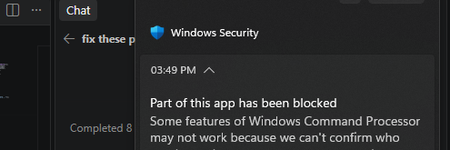
windows security smart control is blocking my cpp and exe files and how to fix these?
I own this Windows PC and Smart App Control is on. It blocks my locally built C++ app, Rose. Code Integrity events 3077 and 3033 show that firoseeyyy.exe and firoseeyyy-console.exe were blocked by code-integrity policy. I want to keep Smart App Control enabled. What signing or distribution options would let Windows trust my app, and would signing with a trusted code-signing certificate satisfy this policy? Please confirm whether Smart App Control can be turned back on after being disabled on my Windows version.184Views0likes1CommentError after downgrading from windows 11
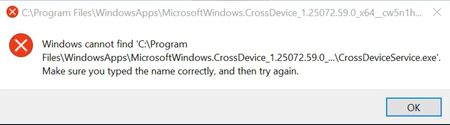
I have been getting this error for a few days now after i had upgraded to windows 11 and then downgraded back to 10 after it was very laggy. I checked the path it's asking but there are no folders with this name(no hidden ones either). Any solutions?261Views0likes2Comments
Windows 11 system tray on second monitor
can we have the system tray on second monitor option back in Windows11? I never understand why they remove this in the first place. This function has been in the older windows OS and its impactful and useful it comes in handy as well its annoying when I try to reach to the corner and cannot find the system tray on second monitor1.3KViews0likes1CommentWindows 11, version 24H2 known issues and notifications
Find information on known issues and the status of the Windows 11, version 24H2 rollout. For immediate help with Windows update issues, click here if you are using a Windows device to open the Get Help app or go to support.microsoft.com. Follow @WindowsUpdate on X for Windows release health updates. If you are an IT administrator and want to programmatically get information from this page, use the Windows Updates API in Microsoft Graph.306Views0likes1Comment
Window10, Update in Setting dont work correctly
The PC Health Check tool showed that my system meets the requirements. However, the Windows 11 Installation Assistant says I need to update to Windows 10 version 2004 or higher before I can upgrade to Windows 11. But when I open Windows Update, the window doesn’t display anything. What should I do to upgrade to Windows 11? I want to keep my software and data, so I don’t want to install from an ISO file.263Views0likes2Comments[BUG]Desktop Icon Order and File Explorer Window Size Not Saved
After updating to Build 26200.5661, I found two major issues: 1. The desktop icon order is not retained after reboot or shutdown. Every time the system restarts, icons are randomly rearranged. 2. The File Explorer window size is not remembered. It always resets to the default size after closing and reopening. These issues did not occur in the previous build. Expected behavior: - Desktop icons should retain their order and position. - Explorer windows should remember their last size and position404Views1like2Comments