what's new
24 TopicsWhat's New: Tags column is now available in Azure Sentinel incidents page!
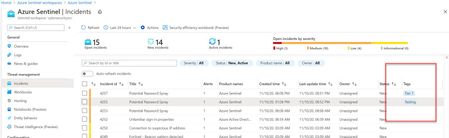
Hello everyone, We are happy to share with you a small but important improvement we added to our incidents blade – a new tag column is now available as part of the Incidents list! Tags are an integral part of the triaging process so we are now exposing them in a new column of the incident list. This improvement allows users to get informed about the tags that are related to the incidents without having to pivot to the incident preview page or full details. Every second counts, right?10KViews2likes7Comments
Microsoft sentinel custom parsers
Dear All, There are charges as per the Microsoft website for creating custom coloumns during parsing. Please let me know the following:- What is the charge exactly? How much i will charge if i do parsing and create a single custom coloumns? What is i do the parsing and use the already existing coloumns for example "Account", is there any charges for it? Kindly share any supporting documents or links from Microsoft for support. Regards Sammy. https://techcommunity.microsoft.com/t5/microsoft-sentinel/latest-costing-billing-changes/m-p/36795681.9KViews0likes2Comments
New Blog Post | Microsoft Sentinel this Week – Issue #75
https://rodtrent.com/g1n We have one YAMS (yet another Microsoft survey) this week to give you some small way in contributing to the success of Microsoft Sentinel. Utilizing Network Data for Security Needs in Microsoft Sentinel The Microsoft Sentinel engineering team is exploring ways of expanding security coverage to customers by analyzing network flows, metadata, and patterns that can be collected from various network elements and service elements in estate. We ask for your help in understanding your security needs, practices, network infrastructure and current network telemetry collection methods to help us in this effort. To do so, simply complete this survey. Link to survey: https://rodtrent.com/ug5?utm_campaign=Microsoft%20Sentinel%20this%20Week&utm_medium=email&utm_source=Revue%20newsletter … In less than a year, the https://www.linkedin.com/groups/8768381/?utm_campaign=Microsoft%20Sentinel%20this%20Week&utm_medium=email&utm_source=Revue%20newsletter has grown to over 6,000 members. That in itself is pretty phenomenal. But the bigger number is the level of engagement. According to LinkedIn stats the level of engagement equals the following on monthly averages: 339,000 post views 165 comments 3,800 reactions We recently posted a survey to get a feel for where folks are most comfortable participating in community for Microsoft Sentinel and not surprisingly LinkedIn led the way. But some of the other areas may surprise some. Take a look at the survey results: https://rodtrent.com/bi8?utm_campaign=Microsoft%20Sentinel%20this%20Week&utm_medium=email&utm_source=Revue%20newsletter1.4KViews0likes0CommentsMonitor the utilization of log analytics workspace and Microsoft sentinel
Dear All, We wanted to monitor the underlying utilization of Log analytics workspace and microft sentinel? Both the services should be running on some underlying VM's or something is there any way I can monitor the cpu/memory/ram utlization of LA workspace and sentinel? Regards, Sharukh1.3KViews0likes1Comment
Unified Security Operation Sentinel Vs Defender Tables
I have a question regarding the Unified SOC portal. In the session below, they highlighted one advantage: the ability to use Defender and Sentinel Tables together. However, both the SignInLogs and DeviceLogonEvents tables are already accessible in Sentinel through the Defender connector. Am I missing something, or did they use an incorrect example to demonstrate an advantage that Sentinel already provides? https://www.youtube.com/live/ndAKk8l5VMo?si=ZvUh21DaknXRYgXr&t=12231.2KViews0likes4CommentsSentinel Foundry - MCP Server (Github Community Release)
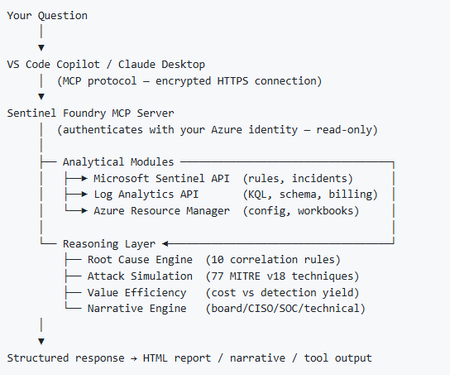
I’ve been cooking something that a lot of people in SOC have been struggling with — especially on the engineering side of Microsoft Sentinel. Thanks to the Microsoft Security team for shaping the capabilities of Sentinel even better with Sentinel Data Lake & Modern SecOps. Today’s the day I can finally share it. Note: This is not an official Microsoft product, but it is designed to make the Sentinel Build even better (complement) with much more intelligence. 🚀 Sentinel Foundry is now in public preview with 43 tools. (Sentinel Foundry - MCP Server) It’s an MCP server built to act like the brain of a strong Sentinel engineer — helping make building, improving, and operating Sentinel far more practical, faster, and honestly more enjoyable. For a lot of teams, the challenge is not understanding what Sentinel can do. The hard part is the engineering work around it: -> Deciding what data should actually be ingested -> Building a clean, scalable Sentinel foundation -> Writing useful detections instead of noisy ones -> Balancing security value with cost -> Turning ideas into deployable engineering outputs That is exactly why I built Sentinel Foundry to help communities grow stronger. It helps with the real engineering tasks behind Sentinel — from architecture thinking to detection design, deployment planning, ingestion strategy, automation ideas, and many of the workflows outlined in the GitHub project. How does it work? Here’s one of the flagship prompts I ran with it: “Give me a complete security posture report for our workspace. Score each pillar and tell me what to prioritise.” And within seconds, it produced a structured engineering blueprint that would normally take a lot longer to pull together manually. You can see the example prompts here in what it can do: https://github.com/prabhukiranveesam/Sentinel-Foundry#what-can-it-do I want building Sentinel to feel less like repetitive engineering overhead — and more like real security engineering that is fast, creative, and enjoyable. If you work with Sentinel as a SOC L2 analyst, engineer, detection engineer, consultant, or architect, I’d genuinely love for you to try it and tell me what you think. 🔗 Public Preview: https://github.com/prabhukiranveesam/Sentinel-Foundry This is just the start of an AI era — and I’m excited to keep shaping it with more powerful features over the coming days. This is very easy to set up and will be available to all of you at no cost during this month as part of the public preview, and your feedback is extremely valuable to shape this as a powerful solution.1.2KViews0likes2CommentsNew Blog Post | Anomali Limo Feeds for Microsoft Sentinel to Expire for Good
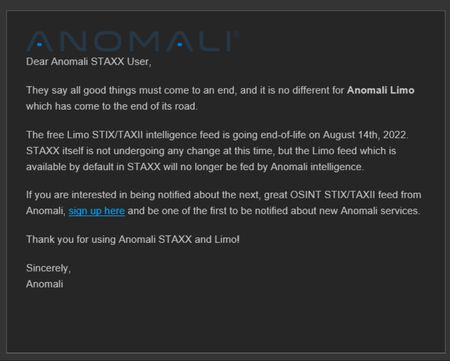
https://rodtrent.com/8bh I’m sure there’s some organizational reason why Anomali wants to detach itself from maintaining these feeds. If you use these feeds for Microsoft Sentinel demos, consider querying the ThreatIntelligenceIndicator table for the Limo feeds and exporting the results to save them for later for when the active feed dries up. ThreatIntelligenceIndicator | where SourceSystem contains "Limo" You can then use our new functionality to import flat files into ThreatIntelligence and reuse the continually stale indicators.1KViews0likes0CommentsYour Sentinel AMA Logs & Queries Are Public by Default - AMPLS Architectures to Fix That
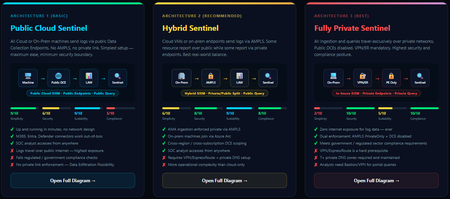
When you deploy Microsoft Sentinel, security log ingestion travels over public Azure Data Collection Endpoints by default. The connection is encrypted, and the data arrives correctly — but the endpoint is publicly reachable, and so is the workspace itself, queryable from any browser on any network. For many organisations, that trade-off is fine. For others — regulated industries, healthcare, financial services, critical infrastructure — it is the exact problem they need to solve. Azure Monitor Private Link Scope (AMPLS) is how you solve it. What AMPLS Actually Does AMPLS is a single Azure resource that wraps your monitoring pipeline and controls two settings: Where logs are allowed to go (ingestion mode: Open or PrivateOnly) Where analysts are allowed to query from (query mode: Open or PrivateOnly) Change those two settings and you fundamentally change the security posture — not as a policy recommendation, but as a hard platform enforcement. Set ingestion to PrivateOnly and the public endpoint stops working. It does not fall back gracefully. It returns an error. That is the point. It is not a firewall rule someone can bypass or a policy someone can override. Control is baked in at the infrastructure level. Three Patterns — One Spectrum There is no universally correct answer. The right architecture depends on your organisation's risk appetite, existing network infrastructure, and how much operational complexity your team can realistically manage. These three patterns cover the full range: Architecture 1 — Open / Public (Basic) No AMPLS. Logs travel to public Data Collection Endpoints over the internet. The workspace is open to queries from anywhere. This is the default — operational in minutes with zero network setup. Cloud service connectors (Microsoft 365, Defender, third-party) work immediately because they are server-side/API/Graph pulls and are unaffected by AMPLS. Azure Monitor Agents and Azure Arc agents handle ingestion from cloud or on-prem machines via public network. Simplicity: 9/10 | Security: 6/10 Good for: Dev environments, teams getting started, low-sensitivity workloads Architecture 2 — Hybrid: Private Ingestion, Open Queries (Recommended for most) AMPLS is in place. Ingestion is locked to PrivateOnly — logs from virtual machines travel through a Private Endpoint inside your own network, never touching a public route. On-premises or hybrid machines connect through Azure Arc over VPN or a dedicated circuit and feed into the same private pipeline. Query access stays open, so analysts can work from anywhere without needing a VPN/Jumpbox to reach the Sentinel portal — the investigation workflow stays flexible, but the log ingestion path is fully ring-fenced. You can also split ingestion mode per DCE if you need some sources public and some private. This is the architecture most organisations land on as their steady state. Simplicity: 6/10 | Security: 8/10 Good for: Organisations with mixed cloud and on-premises estates that need private ingestion without restricting analyst access Architecture 3 — Fully Private (Maximum Control) Infrastructure is essentially identical to Architecture 2 — AMPLS, Private Endpoints, Private DNS zones, VPN or dedicated circuit, Azure Arc for on-premises machines. The single difference: query mode is also set to PrivateOnly. Analysts can only reach Sentinel from inside the private network. VPN or Jumpbox required to access the portal. Both the pipe that carries logs in and the channel analysts use to read them are fully contained within the defined boundary. This is the right choice when your organisation needs to demonstrate — not just claim — that security data never moves outside a defined network perimeter. Simplicity: 2/10 | Security: 10/10 Good for: Organisations with strict data boundary requirements (regulated industries, audit, compliance mandates) Quick Reference — Which Pattern Fits? Scenario Architecture Getting started / low-sensitivity workloads Arch 1 — No network setup, public endpoints accepted Private log ingestion, analysts work anywhere Arch 2 — AMPLS PrivateOnly ingestion, query mode open Both ingestion and queries must be fully private Arch 3 — Same as Arch 2 + query mode set to PrivateOnly One thing all three share: Microsoft 365, Entra ID, and Defender connectors work in every pattern — they are server-side pulls by Sentinel and are not affected by your network posture. Please feel free to reach out if you have any questions regarding the information provided.999Views3likes2CommentsNew Blog Post | Microsoft Sentinel this Week – Issue #76
https://rodtrent.com/4t2 Many of you are already familiar with the https://microsoftsecurityinsights.com/?utm_campaign=Microsoft%20Sentinel%20this%20Week&utm_medium=email&utm_source=Revue%20newsletter that is hosted each Wednesday evening. For those not familiar, the hour-long dialog show introduces guests from various areas within Microsoft and some of our partners. It delivers live starting at 5pm EST every Wednesday. For those that miss the live event and miss asking live questions, the replay is available immediately after and the audio is delivered as a podcast the week after. As an example, the next episode (117) is on August 31st, and features https://www.linkedin.com/in/kara-cole-80aa424/?utm_campaign=Microsoft%20Sentinel%20this%20Week&utm_medium=email&utm_source=Revue%20newsletter (CxE Program Manager) and https://www.linkedin.com/in/kimberlygriffiths/?utm_campaign=Microsoft%20Sentinel%20this%20Week&utm_medium=email&utm_source=Revue%20newsletter (Program Manager for CxE and CAT). You can subscribe to the YouTube channel or set a notification to be reminded here: https://youtu.be/zkxgKQPUqsg?utm_campaign=Microsoft%20Sentinel%20this%20Week&utm_medium=email&utm_source=Revue%20newsletter This one will be extra interesting as a recent guest, https://www.linkedin.com/in/gary-bushey/?utm_campaign=Microsoft%20Sentinel%20this%20Week&utm_medium=email&utm_source=Revue%20newsletter, will be guest hosting. Kara is Gary’s manager. Imagine trying to interview your own boss on a podcast. We’ve recently changed our streaming platform to deliver to more people at once and begun to delve deeper into other engagement areas. This is in preparation for a Microsoft Security Insights conference we’re planning in February 2023. More to come on that and, if this interests you, you can keep tabs on the updates in our just christened LinkedIn page: https://www.linkedin.com/company/microsoft-security-insights-show/?utm_campaign=Microsoft%20Sentinel%20this%20Week&utm_medium=email&utm_source=Revue%20newsletter935Views0likes0Comments