well-architected
35 TopicsMicrosoft Azure scales Hollow Core Fiber (HCF) production through outsourced manufacturing
Introduction As cloud and AI workloads surge, the pressure on datacenter (DC), Metro and Wide Area Network (WAN) networks has never been greater. Microsoft is tackling the physical limits of traditional networking head-on. From pioneering research in microLED technologies to deploying Hollow Core Fiber (HCF) at global scale, Microsoft is reimagining connectivity to power the next era of cloud networking. Azure’s HCF journey has been one of relentless innovation, collaboration, and a vision to redefine the physical layer of the cloud. Microsoft’s HCF, based on the proprietary Double Nested Antiresonant Nodeless Fiber (DNANF) design, delivers up to 47% faster data transmission and approximately 33% lower latency compared to conventional Single Mode Fiber (SMF), bringing significant advantages to the network that powers Azure. Today, Microsoft is announcing a major milestone: the industrial scale-up of HCF production, powered by new strategic manufacturing collaborations with Corning Incorporated (Corning) and Heraeus Covantics (Heraeus). These collaborations will enable Azure to increase the global fiber production of HCF to meet the demands of the growing network infrastructure, advancing the performance and reliability customers expect for cloud and AI workloads. Real-world benefits for Azure customers Since 2023, Microsoft has deployed HCF across multiple Azure regions, with production links meeting performance and reliability targets. As manufacturing scales, Azure plans to expand deployment of the full end-to-end HCF network solution to help increase capacity, resiliency, and speed for customers, with the potential to set new benchmarks for latency and efficiency in fiber infrastructure. Why it matters Microsoft’s proprietary HCF design brings the following improvements for Azure customers: Increased data transmission speeds with up to 33% lower latency. Enhanced signal performance that improves data transmission quality for customers. Improved optical efficiency resulting in higher bandwidth rates compared to conventional fiber. How Microsoft is making it possible To operationalize HCF across Azure with production grade performance, Microsoft is: Deploying a standardized HCF solution with end-to-end systems and components for operational efficiency, streamlined network management, and reliable connectivity across Azure’s infrastructure. Ensuring interoperability with standard SMF environments, enabling seamless integration with existing optical infrastructure in the network for faster deployment and scalable growth. Creating a multinational production supply chain to scale next generation fiber production, ensuring the volumes and speed to market needed for widespread HCF deployment across the Azure network. Scaling up and out With Corning and Heraeus as Microsoft’s first HCF manufacturing collaborators, Azure plans to accelerate deployment to meet surging demand for high-performance connectivity. These collaborations underscore Microsoft’s commitment to enhancing its global infrastructure and delivering a reliable customer experience. They also reinforce Azure’s continued investment in deploying HCF, with a vision for this technology to potentially set the global benchmark for high-capacity fiber innovation. “This milestone marks a new chapter in reimagining the cloud’s physical layer. Our collaborations with Corning and Heraeus establish a resilient, global HCF supply chain so Azure can deliver a standardized, world-class customer experience with ultra-low latency and high reliability for modern AI and cloud workloads.” - Jamie Gaudette, Partner Cloud Network Engineering Manager at Microsoft To scale HCF production, Microsoft will utilize Corning’s established U.S. facilities, while Heraeus will produce out of its sites in both Europe and the U.S. "Corning is excited to expand our longtime collaboration with Microsoft, leveraging Corning’s fiber and cable manufacturing facilities in North Carolina to accelerate the production of Microsoft's Hollow Core Fiber. This collaboration not only strengthens our existing relationship but also underscores our commitment to advancing U.S. leadership in AI innovation and infrastructure. By working closely with Microsoft, we are poised to deliver solutions that meet the demands of AI workloads, setting new benchmarks for speed and efficiency in fiber infrastructure." - Mike O'Day, Senior Vice President and General Manager, Corning Optical Communications “We started our work on HCF a decade ago, teamed up with the Optoelectronics Research Centre (ORC) at the University of Southampton and then with Lumenisity prior to its acquisition. Now, we are excited to continue working with Microsoft on shaping the datacom industry. With leading solutions in glass, tube, preform, and fiber manufacturing, we are ready to scale this disruptive HCF technology to significant volumes. We’ll leverage our proven track record of taking glass and fiber innovations from the lab to widespread adoption, just as we did in the telecom industry, where approximately 2 billion kilometers of fiber are made using Heraeus products.” - Dr. Jan Vydra, Executive Vice President Fiber Optics, Heraeus Covantics Azure engineers are working alongside Corning and Heraeus to operationalize Microsoft manufacturing process intellectual property (IP), deliver targeted training programs, and drive the yield, metrology, and reliability improvements required for scaled production. The collaborations are foundational to a growing standardized, global ecosystem that supports: Glass preform/tubing supply Fiber production at scale Cable and connectivity for deployment into carrier‑grade environments Building on a foundation of innovation: Microsoft’s HCF program In 2022, Microsoft acquired Lumenisity, a spin‑out from the Optoelectronics Research Centre (ORC) at the University of Southampton, UK. That same year, Microsoft launched the world’s first state‑of‑the‑art HCF fabrication facility in the UK to expand production and drive innovation. This purpose-built site continues to support long‑term HCF research, prototyping, and testing, ensuring that Azure remains at the forefront of HCF technology. Working with industry leaders, Microsoft has developed a proven end‑to‑end ecosystem of components, equipment, and HCF‑specific hardware necessary and successfully proven in production deployments and operations. Pushing the boundaries: recent breakthrough research Today, the University of Southampton announced a landmark achievement in optical communications: in collaboration with Azure Fiber researchers, they have demonstrated the lowest signal loss ever recorded for optical fibers (<0.1 dB/km) using research-grade DNANF HCF technology (see figure 4). This breakthrough, detailed in a research paper published in Nature Photonics earlier this month, paves the way for a potential revolution in the field, enabling unprecedented data transmission capacities and longer unamplified spans. ecords at around 1550nm [1] 2002 Nagayama et al. 1 [2] 2025 Sato et al. 2 [3] 2025 research-grade DNANF HCF Petrovich et al. 3 This breakthrough highlights the potential for this technology to transform global internet infrastructure and DC connectivity. Expected benefits include: Faster: Approximately 47% faster, reducing latency, powering real-time AI inference, cloud gaming and other interactive workloads. More capacity: A wider optical spectrum window enabling exponentially greater bandwidth. Future-ready: Lays the groundwork for quantum-safe links, quantum computing infrastructure, advanced sensing, and remote laser delivery. Looking ahead: Unlocking the future of cloud networking The future of cloud networking is being built today! With record-breaking [3] fiber innovations, a rapidly expanding collaborative ecosystem, and the industrialized scale to deliver next-generation performance, Azure continues to evolve to meet the demands for speed, reliability, and connectivity. As we accelerate the deployment of HCF across our global network, we’re not just keeping pace with the demands of AI and cloud, we’re redefining what’s possible. References: [1] Nagayama, K., Kakui, M., Matsui, M., Saitoh, T. & Chigusa, Y. Ultra-low-loss (0.1484 dB/km) pure silica core fibre and extension of transmission distance. Electron. Lett. 38, 1168–1169 (2002). [2] Sato, S., Kawaguchi, Y., Sakuma, H., Haruna, T. & Hasegawa, T. Record low loss optical fiber with 0.1397 dB/km. In Proc. Optical Fiber Communication Conference (OFC) 2024 Tu2E.1 (Optica Publishing Group, 2024). [3] Petrovich, M., Numkam Fokoua, E., Chen, Y., Sakr, H., Isa Adamu, A., Hassan, R., Wu, D., Fatobene Ando, R., Papadimopoulos, A., Sandoghchi, S., Jasion, G., & Poletti, F. Broadband optical fibre with an attenuation lower than 0.1 decibel per kilometre. Nat. Photon. (2025). https://doi.org/10.1038/s41566-025-01747-5 Useful Links: The Deployment of Hollow Core Fiber (HCF) in Azure’s Network How hollow core fiber is accelerating AI | Microsoft Azure Blog Learn more about Microsoft global infrastructure14KViews6likes0CommentsUnderstanding ExpressRoute private peering to address ExpressRoute resiliency
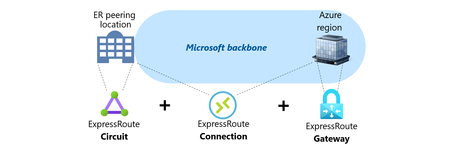
This article provides an overview of Microsoft ExpressRoute, including its various components such as the Circuit, the Gateway and the Connection, and different connectivity models like ExpressRoute Service Provider and ExpressRoute Direct. It also covers the resilience and failure scenarios related to ExpressRoute, including geo-redundancy, Availability Zones, and route advertisement limits. If you're looking to learn more about ExpressRoute and its implementation, this article is a great resource.12KViews7likes3CommentsOptimizing Azure Application Gateway with the Well-Architected Framework
Azure Application Gateway is a web traffic load balancer that works on Layer 7 of the OSI model and enables you to manage traffic for your web applications. It can make routing decisions based on attributes of an HTTP request such as URI path or host headers. The service also offers great app development features like autoscaling, SSL termination, support for Web Application Firewall, and the ability to dynamically modify request and response headers and request URL. The Microsoft Azure Well-Architected Framework provides a set of architecture best practices to help you build and deliver great solutions. The framework is divided into five pillars of architectural best practices: cost management, operational excellence, performance efficiency, reliability, and security. These pillars help you effectively and consistently optimize your workloads against Azure best practices and the specific business priorities that are relevant to you or your customers' cloud journey. In addition to the general architectural guidance organized per-pillar in the Well-Architected Framework documentation, we are now publishing service-centered guidance in the form of service review guides that enable you to systematically validate and optimize individual components in your solution. The service review guides are concise and comprehensive guides with actionable recommendations for each Well-Architected pillar, derived from real-life experience. They include a checklist of design topics to pay attention to for each pillar, as well as configuration recommendations and Azure Policies you should enable. Azure Well-Architected Framework review for Application Gateway v2 gives you simple and direct advice to optimize Azure Application Gateway implementations. It includes service-centered design checklists for each framework pillar. And recommendations that go from practical advice of things to take into consideration to avoid common pitfalls, like avoid removing backend servers too fast after making routing changes to give the service enough time to drain existing connections, to a formula you can use during capacity planning to estimate the number of instances needed to support a given load. Jose Varela Principal Software Engineer, Azure Architecture Center Jose is an experienced software developer and solution architect with over 30 years of industry experience. Jose spent 20 years in various roles in Consulting and Architect roles in the Microsoft Services organization in North America before joining the Architecture Center, building custom solutions and providing architecture advice to Microsoft’s enterprise customers.9.6KViews3likes1CommentManaged SD-WAN in vWAN: throughput considerations and underlay options
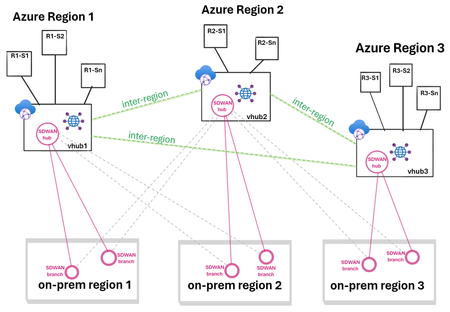
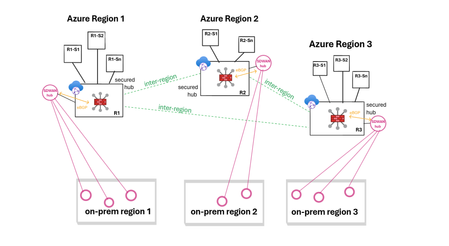
Discover how to simplify large-scale branch connectivity by leveraging the power of SD-WAN and vWAN to create a cloud-oriented network that delivers optimized inter-region performance and resiliency. Get insights on the deployment process for managed SD-WAN in vWAN, as well as on throughput considerations and scaling options. Finally, explore the various underlay options available for managed SD-WAN in vWAN deployments.8.7KViews5likes1CommentSimpler, private connectivity between Azure and AWS with Azure Multicloud Interconnect
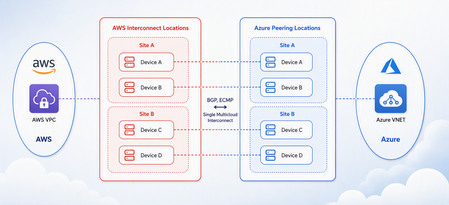
Multicloud is no longer the exception — it is how most enterprises operate. Teams run analytics in one cloud and applications in another, place workloads to meet data-residency requirements, and increasingly move large volumes of data between clouds to train and serve AI models. Yet the network that connects these environments has remained one of the hardest parts of a multicloud strategy to get right. Connecting Azure and AWS privately has traditionally meant stitching together Azure ExpressRoute, AWS Direct Connect, a connectivity provider or colocation footprint, customer-managed routers, BGP sessions, and link-layer encryption — then owning the resiliency design and day-to-day operations across all of it. The result is often slow to deliver, difficult to troubleshoot, and inconsistent in performance. Today, Microsoft and AWS are together introducing Azure Multicloud Interconnect, a jointly engineered, fully managed service that delivers private, high-throughput connectivity between Azure and AWS through a single logical resource. Both clouds coordinate provisioning, resiliency, encryption, and lifecycle operations, so the connection between your environments simply works — end to end. The challenge with connecting clouds today For most organizations, cross-cloud connectivity has been a build-it-yourself exercise. Establishing a private link between Azure and AWS typically requires provisioning an ExpressRoute circuit on one side and a Direct Connect circuit on the other, engaging a connectivity provider or securing space in a colocation facility to bridge them, and then configuring and maintaining the routers, BGP peering, and encryption that tie the two clouds together. Each of those pieces is owned by a different team or vendor, which makes the end-to-end path only as reliable as its least-managed component. When something breaks, isolating the root cause means coordinating across Microsoft, AWS, a network provider, and your own operations team — and mean time to resolution suffers as a result. Capacity planning is equally difficult: bandwidth is often provisioned for peak demand and left underused, while scaling up to meet a new AI or data initiative can take weeks. The outcome is a connectivity layer that is slow to stand up, expensive to operate, and hard to reason about — exactly the opposite of what a multicloud strategy is meant to deliver. Azure Multicloud Interconnect removes that complexity by turning cross-cloud connectivity into a managed service. What is Azure Multicloud Interconnect? Azure Multicloud Interconnect is a provider-managed, private intercloud connectivity service built on the proven foundations of Azure ExpressRoute and AWS Direct Connect. Instead of assembling and operating the underlying components yourself, you establish one interconnect resource and consume a private, dedicated path between your Azure and AWS environments. Under the covers, Microsoft and AWS coordinate the circuits, routing, and encryption on your behalf. You get the outcome you want — a reliable private connection between clouds — without becoming the systems integrator for it. Because the service builds on ExpressRoute and Direct Connect, it fits naturally into the connectivity models, tooling, and operational practices your teams already use in each cloud. One managed resource replaces a stack of circuits, routers, BGP sessions, and encryption you would otherwise build and operate yourself. Figure 1. Azure Multicloud Interconnect provides a single, managed private path between Azure and AWS, built on ExpressRoute and Direct Connect with a quad-redundant, 400G-class design and MACsec encryption. How it works Azure Multicloud Interconnect is engineered for the performance and availability that production and AI-scale workloads demand: A single logical connection. You provision and manage one interconnect resource. There are no customer-owned routers to rack, configure, or patch between the clouds. Quad-redundant, multi-site design. The data path is built across redundant devices and diverse sites — four Azure Microsoft Enterprise Edge (MSEE) routers and four AWS routers — so there is no single point of failure. High bandwidth backbone. A high-capacity LAG-based design provides the headroom needed for large-scale data movement and distributed AI traffic. Elastic bandwidth. Scale capacity up or down as demand changes, rather than provisioning for peak and paying for it year-round. Encryption by default. MACsec link-layer encryption is enabled automatically, so traffic between clouds is protected without extra configuration. Enterprise-ready networking. The service is IPv6-ready, supports APIPA addressing, and targets a 99.99% availability SLA. Routing and provisioning are coordinated by the platform, which removes the most common sources of cross-cloud connectivity errors — mismatched BGP configuration, inconsistent encryption settings, and asymmetric or fragile failover paths. A foundation you can trust Azure Multicloud Interconnect is not a new, unproven path — it extends two connectivity services that enterprises already rely on: Azure ExpressRoute and AWS Direct Connect. Both are private connectivity backbones trusted for mission-critical hybrid and cloud workloads, and the interconnect inherits their carrier-grade capacity, global edge presence, and operational maturity from day one. It also means your teams do not have to learn a separate model. The interconnect appears as a first-class resource governed by the identity, access, and monitoring controls each cloud already provides, and it can be automated with the tooling you use today. Extending trusted services, rather than introducing a parallel one, is what allows Microsoft and AWS to offer intercloud connectivity as a managed experience with confidence. Why this matters for your team Azure Multicloud Interconnect is designed to change the economics and the experience of running across clouds. Taken together, these benefits shift cross-cloud networking from a specialized, high-effort project to a repeatable, on-demand capability. Instead of dedicating senior engineers to build and babysit intercloud links, your team can direct that expertise toward the applications and data platforms that differentiate your business — while trusting that the connective tissue between clouds is reliable, secure, and ready to scale. Faster time to value. Turn up private Azure–AWS connectivity through a guided, managed workflow instead of a multi-week integration project spanning several vendors. Lower operational burden. Microsoft manages the infrastructure, resiliency, and lifecycle, so your networking team is freed from patching routers and diagnosing cross-cloud faults. Predictable, high performance. A dedicated, private path with high capacity that delivers the consistent throughput and low latency that public-internet or VPN paths cannot guarantee. Security you don’t have to assemble. Private connectivity plus default MACsec encryption keeps intercloud traffic off the public internet and protected in transit. A consistent experience in both clouds. Provision, monitor, and manage the interconnect using the native constructs and tooling your teams already rely on in Azure and AWS alike. Built for the way enterprises use multicloud “I've heard a very consistent message across many years of customer engagements - we are multi-cloud enterprise by design. With this announcement we are taking a burden on connecting clouds away from the customers." Igor Sakhnov, CVP Azure Networking Customers have told us where dedicated, managed intercloud connectivity makes the biggest difference. Azure Multicloud Interconnect is designed for scenarios such as: Distributed AI workloads. Move training data and model outputs between clouds at high throughput to feed pipelines wherever the compute lives. Large-scale data movement. Replicate datasets, back up across clouds, and support analytics that span Azure and AWS. Cross-cloud disaster recovery. Use a second cloud as a resilient recovery target over a private, reliable link. Hybrid and best-of-breed architectures. Run each application on the cloud that suits it best while keeping the connection between them private and performant. Regulated and sovereign workloads. Keep intercloud traffic on a private path to help meet data-residency and compliance requirements. Workload migration. Rehost or rebalance workloads between clouds without re-engineering connectivity for each move. Availability and what’s next Azure Multicloud Interconnect is launching first for Azure and AWS connectivity, the pairing customers ask about most often. Microsoft and AWS are starting with a preview so that you can validate the experience against your own architectures, with general availability to follow. This is the beginning of a broader journey. Building on existing multicloud connectivity capabilities, we plan to extend the managed interconnect model to additional clouds — including Google Cloud (coming soon)— so that a consistent, provider-managed experience can span your entire multicloud estate. As always, the roadmap will be guided by customer demand and real-world use. Our shared goal is simple: make the network the easiest part of your multicloud strategy, not the hardest. By delivering intercloud connectivity as a managed service, Microsoft and AWS want every organization — from a team moving its first dataset between clouds to an enterprise operating at AI scale — to connect Azure and AWS privately, securely, and with confidence, and to do it in minutes rather than months. Get started Learn more about Azure Multicloud Interconnect, Azure ExpressRoute, and AWS Direct Connect from Microsoft and AWS documentation, talk with your Microsoft or AWS account team about joining the preview, and tell us which cloud pairings and scenarios matter most for your organization. We are building this with your feedback. Azure Multicloud Interconnect is jointly delivered by Microsoft and AWS, built on Azure ExpressRoute and AWS Direct Connect. Feature availability, performance targets, and timelines may evolve as the service moves from preview to general availability.6.5KViews3likes0CommentsCombining firewall protection and SD-WAN connectivity in Azure virtual WAN
Virtual WAN (vWAN) introduces new security and connectivity features in Azure, including the ability to operate managed third-party firewalls and SD-WAN virtual appliances, integrated natively within a virtual WAN hub (vhub). This article will discuss updated network designs resulting from these integrations and examine how to combine firewall protection and SD-WAN connectivity when using vWAN. The objective is not to delve into the specifics of the security or SD-WAN connectivity solutions, but to provide an overview of the possibilities. Firewall protection in vWAN In a vWAN environment, the firewall solution is deployed either automatically inside the vhub (Routing Intent) or manually in a transit VNet (VM-series deployment). Routing Intent (managed firewall) Routing Intent refers to the concept of implementing a managed firewall solution within the vhub for internet protection or private traffic protection (VNet-to-VNet, Branch-to-VNet, Branch-to-Branch), or both. The firewall could be either an Azure Firewall or a third-party firewall, deployed within the vhub as Network Virtual Appliances or a SaaS solution. A vhub containing a managed firewall is called a secured hub. For an updated list of Routing Intent supported third-party solutions please refer to the following links: managed NVAs SaaS solution Transit VNet (unmanaged firewall) Another way to provide inspection in vWAN is to manually deploy the firewall solution in a spoke of the vhub and to cascade the actual spokes behind that transit firewall VNet (aka indirect spoke model or tiered-VNet design). In this discussion, the primary reasons for choosing unmanaged deployments are: either the firewall solution lacks an integrated vWAN offer, or it has an integrated offer but falls short in horizontal scalability or specific features compared to the VM-based version. For a detailed analysis on the pros and cons of each design please refer to this article. SD-WAN connectivity in vWAN Similar to the firewall deployment options, there are two main methods for extending an SDWAN overlay into an Azure vWAN environment: a managed deployment within the vhub, or a standard VM-series deployment in a spoke of the vhub. More options here. SD-WAN in vWAN deployment (managed) In this scenario, a pair of virtual SD-WAN appliances are automatically deployed and integrated in the vhub using dynamic routing (BGP) with the vhub router. Deployment and management processes are streamlined as these appliances are seamlessly provisioned in Azure and set up for a simple import into the partner portal (SD-WAN orchestrator). For an updated list of supported SDWAN partners please refer to this link. For more information on SD-WAN in vWAN deployments please refer to this article. VM-series deployment (unmanaged) This solution requires manual deployment of the virtual SD-WAN appliances in a spoke of the vhub. The underlying VMs and the horizontal scaling are managed by the customer. Dynamic route exchange with the vWAN environment is achieved leveraging BGP peering with the vhub. Alternatively, and depending on the complexity of your addressing plan, static routing may also be possible. Firewall protection and SD-WAN in vWAN THE CHALLENGE! Currently, it is only possible to chain managed third-party SD-WAN connectivity with Azure Firewall in the same vhub, or to use dual-role SD-WAN connectivity and security appliances. Routing Intent provided by third-party firewalls combined with another managed SD-WAN solution inside the same vhub is not yet supported. But how can firewall protection and SD-WAN connectivity be integrated together within vWAN? Solution 1: Routing Intent with Azure Firewall and managed SD-WAN (same vhub) Firewall solution: managed. SD-WAN solution: managed. This design is only compatible with Routing Intent using Azure Firewall, as it is the sole firewall solution that can be combined with a managed SD-WAN in vWAN deployment in that same vhub. With the private traffic protection policy enabled in Routing Intent, all East-West flows (VNet-to-VNet, Branch-to-VNet, Branch-to-Branch) are inspected. Solution 2: Routing Intent with a third-party firewall and managed SD-WAN (2 vhubs) Firewall solution: managed. SD-WAN solution: managed. To have both a third-party firewall managed solution in vWAN and an SD-WAN managed solution in vWAN in the same region, the only option is to have a vhub dedicated to the security solution deployment and another vhub dedicated to the SD-WAN solution deployment. In each region, spoke VNets are connected to the secured vhub, while SD-WAN branches are connected to the vhub containing the SD-WAN deployment. In this design, Routing Intent private traffic protection provides VNet-to-VNet and Branch-to-VNet inspection. However, Branch-to-Branch traffic will not be inspected. Solution 3: Routing Intent and SD-WAN spoke VNet (same vhub) Firewall solution: managed. SD-WAN solution: unmanaged. This design is compatible with any Routing Intent supported firewall solution (Azure Firewall or third-party) and with any SD-WAN solution. With Routing Intent private traffic protection enabled, all East-West flows (VNet-to-VNet, Branch-to-VNet, Branch-to-Branch) are inspected. Solution 4: Transit firewall VNet and managed SDWAN (same vhub) Firewall solution: unmanaged. SD-WAN solution: managed. This design utilizes the indirect spoke model, enabling the deployment of managed SD-WAN in vWAN appliances. This design provides VNet-to-VNet and Branch-to-VNet inspection. But because the firewall solution is not hosted in the hub, Branch-to-Branch traffic will not be inspected. Solution 5 - Transit firewall VNet and SD-WAN spoke VNet (same vhub) Firewall solution: unmanaged. SD-WAN solution: unmanaged. This design integrates both the security and the SD-WAN connectivity as unmanaged solutions, placing the responsibility for deploying and managing the firewall and the SD-WAN hub on the customer. Just like in solution #4, only VNet-to-VNet and Branch-to-VNet traffic is inspected. Conclusion Although it is currently not possible to combine a managed third-party firewall solution with a managed SDWAN deployment within the same vhub, numerous design options are still available to meet various needs, whether managed or unmanaged approaches are preferred.5.8KViews6likes2Comments