vulnerability assessment
6 TopicsAnnouncing Microsoft Defender Vulnerability Management in public preview
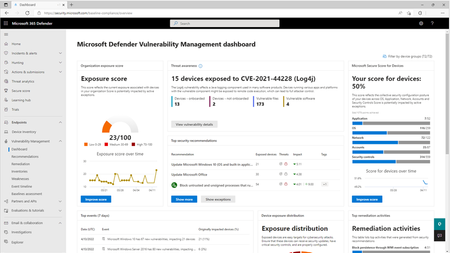
Today, we are thrilled to announce the public preview of Microsoft Defender Vulnerability Management, a single solution offering the full set of Microsoft’s vulnerability management capabilities to help take your threat protection to the next level.
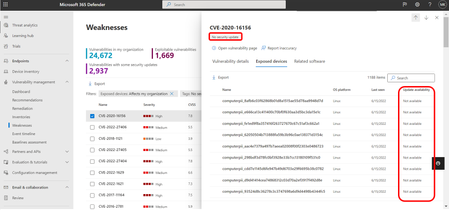
Support for Common Vulnerabilities and Exposures (CVEs) without a security update in public preview
Support and reporting on the availability of security updates for CVEs is now in public preview in Microsoft Defender Vulnerability Management. This new feature will show security update availability information for each CVE and actively exclude software lacking updates from the recommendations tab.
Help vulnearbility Birthday attacks against TLS ciphers with 64bit block size vulnerability
Hi everyone My windows server 2016 DataCenter have this issue, Birthday attacks against TLS ciphers with 64bit block size vulnerability (Sweet32), I already have followed some steps but I can't remedy it. The security team always detected it. Please some suggestion about that? I applied this script without success https://gallery.technet.microsoft.com/scriptcenter/Solve-SWEET32-Birthday-d2df9cf1 Share the images6.7KViews1like3Comments
"Invalid Managed Identity" error in vulnerability assessments for SQL Managed Instance
On a recent case, a customer received the error "Invalid Managed Identity" when trying to scan a database. The error suggests that there is an issue with the managed identity or the RBAC permissions required, but the same error occurs when there is a connectivity issue between SQL Managed Instance and the storage account selected. Checking RBAC permissions The RBAC permissions can be manually checked in Azure Portal, or you can use the below script in Azure CLI, providing the resource details. #SQL Managed Instance Details $serverResourceGroup = '' $serverName = '' #Storage Account Details $storageAccountResourceGroup = '' $storageAccount = '' ############################################################################################################################## $sqlIdentity = ((az sql mi show -g $serverResourceGroup -n $serverName | ConvertFrom-Json).Identity).principalId $storageId = (az storage account show -g $storageAccountResourceGroup -n $storageAccount | ConvertFrom-Json).id $permissions = $NULL $permissions = az role assignment list --all --assignee $sqlIdentity | ConvertFrom-Json | Where-Object {$_.scope -eq $storageId -and $_.roleDefinitionName -eq 'Storage Blob Data Contributor'} if ($permissions -eq $NULL) {Write-Host "RBAC permissions do not exist"} else {Write-Host "RBAC Permissions exist"} It will return a simple message to confirm if the permissions exist. Connectivity issues If the permissions do exist, then it may be due to connectivity issues between SQL Managed Instance and the storage account. Listed below are ways to check this. Storage account networking configuration The storage account can be configured to allow the following access: Public - All Public - Selected networks Private If the access is set to Selected Networks, make sure the SQL Managed Instance subnet is in the list. If the access is private only, then the SQL Managed Instance would need to be able to resolve the Private IP in DNS. NSG/Firewall rules and routing Check that there are no rules blocking connections between each resource and that the routing is configured correctly. DNS settings If the DNS settings are custom or a private endpoint is being used, the DNS configuration for the SQL Managed Instance virtual network may need to be configured, for example, adding a private DNS zone. Network Peering If the connectivity is through a private endpoint in a different virtual network, check that there is communication between them, such as network peering. Disclaimer Please note that products and options presented in this article are subject to change. This article reflects the documentation in January 2026. I hope this article was helpful for you, please feel free to share your feedback in the comments section.313Views0likes0Comments