vs code
4 TopicsAnnouncing a new IDE for PostgreSQL in VS Code from Microsoft
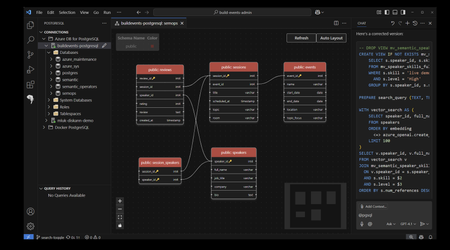
We are excited to announce the public preview of the brand-new PostgreSQL extension for Visual Studio Code (VS Code), designed to simplify PostgreSQL database management and development workflows. With this extension, you can now manage database objects, draft queries with intelligent assistance from context-aware IntelliSense and our ‘@pgsql’ GitHub Copilot agent—all without ever leaving your favorite code editor. Addressing Developer Challenges Many of you face hurdles in managing time effectively, with 41% of developers struggling with task-switching, according to the 2024 StackOverflow Developer Survey. Additionally, the 2024 Stripe Developer Coefficient Report reveals that developers spend up to 50% of their time debugging and troubleshooting code and databases. These inefficiencies are further compounded by the absence of integrated tools that unify database management and application development. The PostgreSQL extension for VS Code addresses these challenges head-on by integrating Postgres database tools and the @pgsql GitHub Copilot agent, providing a unified application development and database management experience. By integrating robust features such as Entra ID authentication for centralized identity management and deep Azure Database for PostgreSQL integration, this extension empowers you to focus on building innovative applications rather than wrestling with fragmented workflows. Key Features The public preview release of the PostgreSQL extension for VS Code introduces a suite of powerful new capabilities that enhance productivity and streamline development for application developers working with Postgres. Schema Visualization Schema visualization is a breeze with our ‘right-click’ context menu options. o Right-click on the database entry in the Object Explorer and select “Visualize Schema” Single click to expand. Database aware GitHub Copilot AI assistance directly within VS Code providing PostgreSQL database context reduces the PostgreSQL learning curve and improves developer productivity. Simplified interaction with PostgreSQL databases and development tools using natural language. Commands such as "@pgsql" enable you to query databases, optimize schemas, and execute SQL operations with ease. Context menus, such as “Rewrite Query”, “Explain Query”, “Analyze Query Performance” provide AI Intelligence inside the query editor window. Real-time, expert-level guidance to help keep PostgreSQL databases performant and secure and improve code quality. PostgreSQL Copilot Context Menu Options Single click to expand. Using the PostgreSQL Copilot Context Menu, Single click to expand. GitHub Copilot Chat Agent Mode GitHub Copilot Chat agent mode provides a database context aware intelligent assistant that can perform multi-stage tasks, moving beyond the question-and-answer chat experience. Agent mode allows the Copilot to bring in additional context from your workspace and, with permission, it can write and debug code on its own. Agent mode transforms PostgreSQL development by providing real-time, AI-driven guidance that simplifies complex tasks like app prototyping, debugging, schema optimization, and performance tuning. In this example, we’ll ask the agent to create a new database on a specific server in my Saved Connections and enable the PostGIS extension. Single click to expand. The @pgsql agent begins by listing the server connections, connecting to the server ‘postgis’, drafts the script to modify the database and waits for permission to continue before making changes. Database modifications require explicit permission from the user. Add Database Connections with Ease Simplified connection management for local and cloud-hosted PostgreSQL instances. Support for multiple connection profiles and connection string parsing for easy setup. Direct browsing and filtering of Azure Database for PostgreSQL deployments. Integration with Entra ID for centralized security and identity management. Connect with ease to your existing Azure Database for PostgreSQL deployments with the “Browse Azure” option in the “Add New Connection” menu. Single click to expand. Connect to local Docker deployments with the Parameters or Connection String option. Single click to expand. Password-less authentication with Entra Id Streamlined Authentication: Eliminates the need for manual login, offering a seamless integration experience for you. Automatic Token Refresh: Ensures uninterrupted connectivity and minimizes the risk of authentication timeouts during development. Enhanced Security: Provides robust protection by leveraging Entra-ID's secure authentication protocols. Time Efficiency: Reduces overhead by automating token management, allowing you to focus on coding rather than administrative tasks. Enterprise Compatibility: Aligns with corporate security standards and simplifies access to PostgreSQL databases in enterprise environments. User Consistency: You can use your existing Entra-ID credentials, avoiding the need to manage separate accounts. Database Explorer Provides a structured view of database objects such as schemas, tables, and functions. Enables creation, modification, and deletion of database objects. Single click to expand. Query History Session query history is available below the Object Explorer. This allows you to quickly review previously run queries for reuse. Single click to expand. Query Editing with Context-aware IntelliSense Context-aware IntelliSense for auto-completion of SQL keywords, table names, and functions. Syntax highlighting and auto-formatting for improved query readability. Query history tracking for reusing previously executed queries. Single click to expand. What Sets the PostgreSQL Extension for VS Code Apart? The PostgreSQL extension for VS Code stands out in the crowded landscape of developer database management tools due to its unparalleled functionality and intuitive design. Here’s what makes it special: Enhanced Productivity: Features like context-aware IntelliSense and SQL formatting save time and minimize errors. pgsql GitHub Copilot Chat agent: Database and workspace context awareness, enabling smarter and more contextually relevant assistance for developers – combined with the ability to perform multi-step tasks. Streamlined Onboarding: The Connection Manager ensures you can get started within minutes. Improved Security: Entra ID integration provides robust access control and centralized identity management, including the ability to browse your Azure Database for PostgreSQL instances. Comprehensive Toolset: You can manage database objects, execute queries, and deploy instances all within VS Code. Seamless Cloud Integration: Deep integration with Azure Database for PostgreSQL simplifies cloud database management. Getting Started with the PostgreSQL extension for Visual Studio Code Installing the PostgreSQL extension for VS Code is simple: Open the Extensions view in VS Code. Search for "PostgreSQL" in the Extensions Marketplace. Select and install the Preview PostgreSQL extension with the blue elephant seen in the screenshot below. xtension ID: (ms-ossdata.vscode-pgsql) Also available in the online Visual Studio Code Marketplace. Enabling the PostgreSQL GitHub Copilot Chat You will need the GitHub Copilot and GitHub Copilot chat extensions installed in VS Code to be able to log into their GitHub Account and use "@pgsql" in the chat interface to interact with their PostgreSQL database. Feedback and Support We value your insights. Use the built-in feedback tool in VS Code to share your thoughts and report issues. Your feedback will help us refine the extension and ensure it meets the needs of the developer community. Regarding the standard preview license language included in this first release - Our goal is to ensure this extension is widely available and consumable by all Postgres users equally. We’re going to update the license. Stay tuned for updates. Get Started The PostgreSQL extension for VS Code offers significant enhancements to development efficiency and productivity. We encourage you to explore the public preview today and experience improved workflows with PostgreSQL databases. To learn more and get started, visit: https://aka.ms/pg-vscode-docs Special thanks to Jonathon Frost, Principal PM for all of his work on the @pgsql GitHub Copilot.173KViews34likes16CommentsAzure HorizonDB: Enterprise-Ready Postgres, Engineered for the AI Era
Affan Dar, Vice President of Engineering, PostgreSQL at Microsoft Charles Feddersen, Partner Director of Program Management, PostgreSQL at Microsoft Today at Microsoft Build, we’re pleased to announce the public preview of Azure HorizonDB, a new enterprise-ready Postgres-compatible database service designed to meet the needs of modern AI applications, alongside a set of enhancements to our PostgreSQL tooling in Visual Studio Code to further streamline the developer experience. Postgres is rapidly solidifying its role as a foundational layer in modern data architectures, with accelerating adoption across industries. For developers, it has become the preferred platform for new application development, driven by its extensible architecture, mature extension ecosystem, and adherence to open standards and APIs. At the same time, enterprises are choosing Postgres to re-platform and modernize existing systems, taking advantage of its ability to support a broad range of operational workloads while enabling advanced capabilities such as vector-based data access all within a single, interoperable platform. A Postgres Platform Grounded in Security, Resilience, Scale, and Performance Azure HorizonDB is purpose-built to meet these demands, combining the flexibility developers expect from Postgres with the operational rigor enterprises require. It extends the core Postgres engine with cloud-native capabilities such as integrated identity, fine-grained network and security controls, and seamless lifecycle management, while preserving full compatibility with the open ecosystem of extensions and tools. At the same time, HorizonDB introduces advanced, natively integrated capabilities like vector data support and AI model management, enabling new classes of intelligent applications without sacrificing transactional integrity or developer productivity. These capabilities are backed by a platform designed for enterprise performance and scale. HorizonDB supports databases up to 128 TB, scales out with up to 15 read replicas for high-throughput workloads, and delivers sub-millisecond commit latency across availability zones for low-latency transactions and high availability. This combination is critical for modern applications that require consistent performance under load, including high-concurrency transactional systems, real-time AI-driven interactions, and globally distributed services. The result is a unified platform that scales from the first line of code to globally distributed, mission-critical systems. Enterprise adoption ultimately depends on trust in the platform itself. Azure HorizonDB delivers this with native integration into Microsoft Entra ID for centralized identity and access control, private endpoints for network isolation, and built-in encryption to protect data at rest and in transit. These capabilities are essential for meeting compliance requirements and enabling organizations to run mission-critical workloads with confidence, without added complexity. This foundation is critical for any application, but it becomes indispensable for AI, where secure access to data and controlled model interaction underpin every intelligent experience. Building on this, HorizonDB introduces a set of integrated AI capabilities designed to bring intelligence directly into the database. Run Fast, Memory-Efficient Vector Search with DiskANN HorizonDB brings high-performance vector search directly into Postgres through DiskANN with spherical quantization. This enables efficient, low-latency similarity search at scale while significantly reducing memory and storage overhead. Spherical quantization works by normalizing vectors and encoding them into compact representations that preserve angular distance, allowing the system to compare vectors efficiently with minimal loss in accuracy. The result is the ability to index and query large embedding datasets within the transactional engine itself, making vector search a first-class capability rather than an external dependency. "HorizonDB is compelling because it brings a PostgreSQL-compatible foundation, AI-native capabilities and enterprise-grade controls closer to the operational data layer." Jennings Balavari, Founder, Opsen AI Build Smarter Apps with Hybrid Search in Postgres HorizonDB supports hybrid search by combining vector similarity through pgvector with full-text search enabled via the pg_textsearch extension, allowing applications to match both semantic meaning and precise keyword relevance in a single query. This enables more accurate, context-aware results, such as blending intent-driven retrieval with exact term matching for search, recommendations, or RAG scenarios. By unifying these capabilities within Postgres, HorizonDB improves result quality while simplifying application design without the need for external search systems. Operationalize AI with Built-In AI Model Management Working with vectors requires models to generate, interpret, and evolve embeddings, making model lifecycle a core part of the application stack. HorizonDB introduces integrated AI model management to simplify how models are registered, versioned, and governed alongside data, including built-in support for generative GPT models and ranking models. For example, GPT models can be used to generate summaries, responses, or structured outputs directly from application data, while ranking models enable relevance scoring for search results or recommendations over vector results. By managing these models alongside the data they operate on, HorizonDB ensures consistency, traceability, and control, creating a unified environment where models and data evolve together. “As we build a multi-tenant, AI-driven commerce platform, HorizonDB has been particularly compelling in two areas: scale and how close AI capabilities are to the data itself. Running vector search, filtering, and model-driven workflows directly inside the database removes a lot of the complexity we’d normally manage across separate services." James Frawley, CIAO, ReFiBuy Bring AI into SQL with AI Functions With models managed in place, AI Functions provide a direct way to invoke them from within SQL and application logic. These functions are implemented through the azure_ai extension, which brings model invocation directly into the Postgres engine. This allows developers to embed inference into queries and transactions, eliminating the need for external orchestration. By bringing model execution closer to the data, AI Functions reduce latency, simplify application design, and make intelligent behavior a natural extension of existing Postgres workloads. "What stood out with HorizonDB is that it aligns closely with how we already think about the problem. Instead of stitching together multiple components, it brings transactional data, vector search, and AI capabilities into a single platform, which simplifies the architecture without forcing a complete rethink." Mohsin Shafqat, Director Software Engineering for Nasdaq Boardvantage®, Nasdaq Run Reliable, Event-Driven Workflows with AI Pipelines Finally, AI Pipelines operationalize these capabilities through reliable, event-driven workflows for model execution and data processing. Pipelines execute on data changes, enabling real-time asynchronous reactions without external orchestration and ensuring consistent, repeatable behavior as data evolves. Combined with model management and AI Functions, they turn embedded intelligence into something that can be run, scaled, and trusted in production, while inheriting the database’s high availability and failover characteristics for resilience. Pipelines can also be visualized and observed in real time through the Visual Studio Code extension for PostgreSQL, giving developers and operators immediate visibility into execution flow, state, and outcomes Modern Unified Experience for Data, AI, and Operations in VS Code As intelligence becomes a core part of the data platform, the developer and operator experience becomes equally critical. HorizonDB extends seamlessly into Visual Studio Code with enhanced PostgreSQL tooling that works across any Postgres deployment, not just HorizonDB. Features like AI-assisted query plans and integrated monitoring enable faster debugging and optimization, helping teams understand both database performance and AI-driven behaviors. At the same time, for Azure-based deployments, the experience is deeply integrated with platform capabilities, enabling management of networking configuration, server parameters, and server logs directly from the development environment, streamlining operations across application and infrastructure layers. Azure HorizonDB brings together enterprise-grade security, deep Postgres compatibility, and a modern AI-native data platform, all engineered for developers. It scales efficiently across workloads, from transactional systems to intelligent applications, while delivering a world-class, Azure-integrated experience in Visual Studio Code for both developers and operators. Ready to get started with Azure HorizonDB? Azure HorizonDB is now available in public preview in Australia East, Central US, Sweden Central, West US 2, and West US 3 regions. Additionally, East US, Canada Central, Indonesia Central, Italy North, Japan East, Korea Central, and Poland Central will be available in the coming weeks. You can get started today by creating a new HorizonDB instance using the Azure portal, API’s, or the Visual Studio Code extension for PostgreSQL to begin exploring these capabilities firsthand. To learn more, dive deeper into our documentation and sign-up today to try AI model management in a limited preview.Upgrade performance, availability and security with new features in Azure Database for PostgreSQL
At Microsoft Build 2025 the Postgres on Azure team is announcing an exciting set of improvements and features for Azure Database for PostgreSQL. One area we are always focused on is the enterprise. This week we are delighted to announce improvements across the enterprise pillars of Performance, Availability and Security. In addition, we're improving Integration of Postgres workloads with services like ADF and Fabric. Here's a quick tour of the enterprise enhancements to Azure Database for PostgreSQL being announced this week. Performance and scale SSD v2 with HA support - Public Preview The public preview of zone-redundant high availability (HA) support for the Premium SSD v2 storage tier with Azure Database for PostgreSQL flexible server is now available. You can now enable High Availability with zone redundancy using Azure Premium SSD v2 when deploying flexible server, helping you achieve a Recovery Point Objective (RPO) of zero for mission-critical workloads. Premium SSD v2 offers sub-millisecond latency and outstanding performance at a low cost, making it ideal for IO-intensive, enterprise-grade workloads. With this update, you can significantly boost the price-performance of your PostgreSQL deployments on Azure and improve availability with reduced downtime during HA failover. The key benefits of SSD v2 include: Flexible disk sizing from 1 GiB to 64 TiB, with 1-GiB increment support Independent performance configuration: scale up to 80,000 IOPS and 1,200 MBps throughput without needing to provision larger disks To learn more about how to upgrade and best practices, visit: Premium SSDv2 PostgreSQL 17 Major Version Upgrade – Public Preview PostgreSQL version 17 brings a host of performance improvements, including a more efficient VACUUM process, faster sequential scans via streaming IO, and optimized query execution. Now, with the public preview of in-place major version upgrades to PostgreSQL 17 there is an easier path to v17 for your existing flexible server workloads. With this release, you can upgrade from earlier versions (14, 15, or 16) to PostgreSQL 17 without the need to migrate data or change server endpoints, simplifying the upgrade process and minimizing downtime. Azure’s in-place upgrade capability offers a native, low-disruption upgrade path directly from the Azure Portal or CLI. For upgrade steps and best practices, check out our detailed blog post. Availability Long-Term Backup (LTR) for Azure Database for PostgreSQL flexible server - Generally Available Long-term backups are essential for organizations with regulatory, compliance, and audit-driven requirements, especially in industries like finance and healthcare. Certifications such as HIPAA often mandate data retention periods up to 10 years, far exceeding the default 35-day retention limit provided by point-in-time restore (PITR) capabilities. Long-term backup for Azure Database for PostgreSQL flexible server, powered by Azure Backup is now generally available. With this release, you can now benefit from: Policy-driven, one-click enablement of long-term backups Resilient data retention across Azure Storage tiers Consumption-based pricing with no egress charges Support for restoring backups well beyond community-supported PostgreSQL versions This LTR capability uses a logical backup approach based on pg_dump and pg_restore, offering a flexible, open-source format that enhances portability and ensures your data can be restored across a variety of environments including Azure VMs, on-premises, or even other cloud providers. Learn more about long term retention: Backup and restore - Azure Database for PostgreSQL flexible server Azure Databases for PostgreSQL flexible server Resiliency Solution accelerator When it comes to ensuring business continuity, your database infrastructure is the most critical component. In addition to product documentation, it is important to have access to opinionated solution architecture, industry-proven recommended practices, and deployable infra-as-code that you can learn and customize to ensure an automated production-ready resilient infrastructure for your data. The Azure Database for PostgreSQL Resiliency Solution Accelerator is now available, providing a set of deployable architectures to ensure business continuity, minimize downtime, and protect data integrity during planned and unplanned events. In additional to architecture and recommended practices, a customizable Terraform deployment workflow is provided. Learn more: Azure Database for PostgreSQL Resiliency Solution Accelerator Security Automatic Customer Managed Key (CMK) version updates - Generally Available Azure Database for PostgreSQL flexible server data is fully encrypted, supporting both Service Managed and Customer Managed encryption keys (CMK). Automatic version updates for CMK (also known as “versionless keys”) is now generally available. This change simplifies the key lifecycle management by allowing PostgreSQL to automatically adopt new keys without needing manual updates. Combined with Azure Key Vault's auto-rotation feature this significantly reduces the management overhead of encryption key maintenance. Learn more about automatic CMK version updates. Azure confidential computing SKUs for flexible server - Public Preview Azure confidential computing enables secure sensitive and regulated data, preventing unwanted access of data in-use, by cloud providers, administrators, or external users. With the public preview of Azure confidential SKUs for Azure Database for PostgreSQL flexible server you can now select from a range of Confidential Computing VM sizes to run your PostgreSQL workloads in a hardware-based trusted execution environment (TEE). Azure confidential computing encrypts data in TEE, processing data in a verified environment, enabling you to securely process workloads while meeting compliance and regulatory demands. Learn more about confidential computing with the Azure Database for flexible server. Integration Entra Authentication for Azure Data Factory & Azure Synapse - Generally Available In an era of bring-your-own-device and cloud-enabled apps it is increasingly important for enterprises to maintain central control an identity-based security perimeter. With integrated Entra ID support, Azure Database for PostgreSQL flexible server allows you to bring your database workloads within this perimeter. But how do you securely connect to other services? Entra ID authentication is now supported in the Azure Data Factory and Azure Synapse connectors for Azure Database for PostgreSQL. This feature enables seamless, secure connectivity using Service Principal (key or certificate) and both User-Assigned and System-Assigned Managed Identities, streamlining access to your data pipelines and analytics workloads. Learn more about How to Connect from Azure Data Factory and Synapse Analytics to Azure Database for PostgreSQL. Fabric Data Factory – Upsert Method & Script Activity - Generally Available The Microsoft Fabric has become to go-to data analytics platform with services and tools for every data lifecycle state. To improve customization and fine-grained control over processing of PostgreSQL data, the Upsert Method and custom Script Activity are now generally available in Fabric Data Factory when using Azure Database for PostgreSQL as a source or sink. Upsert Method enables intelligent insert-or-update logic for PostgreSQL, making it easier to handle incremental data loads and change data capture (CDC) scenarios without complex workarounds. Script Activity allows you to embed and execute your own SQL scripts directly within pipelines—ideal for advanced transformations, procedural logic, and fine-grained control over data operations. These capabilities offer enhanced flexibility for building robust, enterprise-grade data workflows, simplifying your ETL processes. Connect to VS Code from the Azure Portal - Public Preview With the exciting announcement of a revamped VS Code PostgreSQL extension preview this week, we're adding a new connection option to the Azure Portal to connect to your flexible server with VS Code, creating a more unified and efficient developer experience. Here's why it matters: One Click Connectivity: No manual connection strings or configuration needed. Faster Onboarding: Go from provisioning a database in Azure to exploring and managing it in VS Code within seconds. Integrated Workflow: Manage infrastructure and development from a single, cohesive environment. Productivity: Connect directly from the Portal to leverage VS Code extension features like query editing, result views, and schema browsing. Where to learn more The Build 2025 announcements this week are just the latest in a compelling set of features delivered by the Azure Database for PostgreSQL team and build on our latest set of monthly feature updates (see: April 2025 Recap: Azure Database for PostgreSQL Flexible Server). Follow the Azure Database for PostgreSQL Blog where you'll see many of the latest updates from Build, including What's New with PostgreSQL @Build, and New Generative AI Features in Azure Database for PostgreSQL.744Views4likes0Comments