visual studio
6 Topics
Blazor App No Longer Compiles
I just updated MS Visual Studio 2022 Community Edition to version 18.11.0. After the update, Blazor apps no longer compile in for the release version, they still work for the debug version of the project. This is true with existing projects and new Blazor App projects created with C#. I get this error message: ===================== 10/16/2026 4:16:12 AM Project: BillByrnes.csproj Recoverable System.AggregateException: One or more errors occurred. ---> (Inner Exception #0) Microsoft.Assumes+InternalErrorException: No pending webSession for web server 1 at Microsoft.Assumes.Fail(String message) at Microsoft.WebTools.ProjectSystem.HotReload.WebHotReloadAgent.StartSession(IWebServer webServer) at Microsoft.WebTools.ProjectSystem.Debugger.BaseDebugTargetsProvider.<OnAfterLaunchAsync>d__84.MoveNext() <--- (Inner Exception #0) =================== Any help would be appreciated. Thanks, Bill Byrnes email address removed for privacy reasons200Views0likes2Comments
VS bugs in 2026 impacting average users
I am one of those people who never sees bugs in long-time major products. My browsers don't crash, OneDrive backups work, my car radio turns on when I push the button. I am just an average developer/user. But I installed Visual Studio 2026 (community) in April. I immediately experienced a catastrophic publishing bug that others had just reported in the previous few days. Now in October, after the recent update, Github Copilot (free) chat doesn't work, and dragging the execution point in the debugger works only if Hot Reload is disabled. These are monumentally annoying bugs that impact huge numbers of users, even infrequent users. They are things that everyone does. It is shameful that the newest version of VS is regularly being updated with bugs that cause such massive impacts.100Views0likes0Comments- 100Views0likes0Comments
How to Create a PDF with proper tags for accessibility
Using Visual Studio 1 solution 3 projects A front end, using react for external users to submit (react) A front end for internal users for approvals (razor) A backend used by both (C#) We are presently creating PDFs. The PDFs are not Accessibility compliant. We need to avoid licensing or service fees. How can we create PDFs (ideally in the c# backed) that allows for tagging to ensure that the PDF's are accessibility standards compliant (e.g. WCAG) Thank you!99Views0likes1Comment
Feature messages keep popping up in Visual Studio Community 2026
Good day, I am trying to fix/get rid of these annoying messages that keeps popping up in my IDE. Microsoft.ServiceHub.Framework.ServiceActivationFailedException : Activating the "Microsoft.VisualStudio.LanguageServices.AssetSynchronizationCore64" service failed. ---> StreamJsonRpc.ConnectionLostException : The JSON-RPC connection with the remote party was lost before the request could complete. Microsoft.ServiceHub.Framework.ServiceActivationFailedException : Activating the "Microsoft.VisualStudio.LanguageServices.DocumentHighlightsCore64" service failed. ---> StreamJsonRpc.ConnectionLostException : The JSON-RPC connection with the remote party was lost before the request could complete. Microsoft.ServiceHub.Framework.ServiceActivationFailedException : Activating the "Microsoft.VisualStudio.LanguageServices.NavigationBarItemCore64" service failed. ---> StreamJsonRpc.ConnectionLostException : The JSON-RPC connection with the remote party was lost before the request could complete. Any idea how I can get rid / fix 'em Tried: Repairing VS Clearing MEF & component cache Environment reset Manually Add CET Features via XML Setup: Windows 11 (OS Build 21996.1) on KVM/QEMU Thank you all!99Views0likes1CommentWant to stop the mouse wheel from accidentally changing dropdown values in VS Project Properties
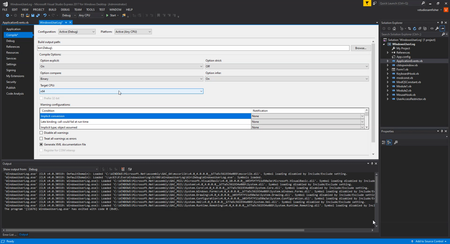
Hi, I am using Visual Studio Express 2017 for Windows Desktop. On the Project Properties Compile page, scrolling while the pointer is over the Target CPU setting changes its value. You can see In the attached image, it changes the value just by hovering and scrolling. Sometimes I am only trying to scroll through the page and dontt notice the setting changed... this is very annoying to keep track of. I have noticed the same thing with dropdown settings in other applications too. Is there a Visual Studio or Windows setting that can stop the scroll wheel from changing a value just because the pointer is over it, while keeping normal scrolling elsewhere?? Ive already checked for Regedit settings and the only applicable one i saw was setting the "WheelScrollLines" and "WheelScrollChars" to 0 which just completely blovks the mouse wheel from scrollling...NOT ideal at all. Ive not found any Visual Studio option except “Disable touch scrolling” which is ofcourse for touch input. I also tried "X-Mouse Button Control" to block the scroll wheel for Visual Studio specifically, but could not get it to work. if anyone has found a workaround or a thirdparty app that actually works please tell me.47Views0likes1Comment