virtualization
292 TopicsStep-By-Step: Enabling Hyper-V for Use on Windows 11
Want to use Hyper-V on Windows 11? Hyper-V is a virtualization technology that is valuable not only for developers and IT Professionals, but also for college and university students. This step-by-step guide will show you how to enable Hyper-V on your Windows 11 machine.1.3MViews12likes36CommentsAsk the Perf Guy: How big is too BIG?
We’ve seen an increasing amount of interest lately in deployment of Exchange 2013 on “large” servers. By large, I mean servers that contain significantly more CPU or memory resources than what the product was designed to utilize. I thought it might be time for a reminder of our scalability recommendations and some of the details behind those recommendations. Note that this guidance is specific to Exchange 2013 – there are many architectural differences in prior releases of the product that will impact scalability guidance. In a nutshell, we recommend not exceeding the following sizing characteristics for Exchange 2013 servers, whether single-role or multi-role (and you are running multi-role, right?). Recommended Maximum Processor Core Count 24 Recommended Maximum Memory 96 GB Note: Version 7.5 and later of the Exchange Server 2013 Role Requirements Calculator aligns with this guidance and will flag server configurations that exceed these guidelines. As we have mentioned in various places like TechNet and our Preferred Architecture, commodity-class 2U servers with 2 processor sockets are our recommended server type for deployment of Exchange 2013. The reason for this is quite simple: we utilize massive quantities of these servers for deployment in Exchange Online, and as a result this is the platform that we architect for and have the best visibility into when evaluating performance and scalability. You might now be asking the fairly obvious follow up question: what happens if I ignore this recommendation and scale up? It’s hard, if not impossible, to provide a great answer to this question, because there are so many things that could go wrong. We have certainly seen a number of issues raised through support related to scale-up deployments of Exchange in recent months. An example of this class of issue appears in the “Oversizing” section of Marc Nivens’ recent blog article on troubleshooting high CPU issues in Exchange 2013. Many of the issues we see are in some way related to concurrency and reduced throughput due to excessive contention amongst threads. This essentially means that the server is trying to do so much work (believing that it has the capability to do so given the massive amount of hardware available to it) that it is running into architectural bottlenecks and actually spending a great deal of time dealing with locks and thread scheduling instead of handling transactions associated with Exchange workloads. Because we architect and tune the product for mid-range server hardware as described above, no tuning has been done to get the most out of this larger hardware and avoid this class of issues. We have also seen some cases in which the patterns of requests being serviced by Exchange, the number of CPU cores, and the amount of physical memory deployed on the server resulted in far more time being spent in the .NET Garbage Collection process than we would expect, given our production observations and tuning of memory allocation patterns within Exchange code. In some of these cases, Microsoft support engineers may determine that the best short-term workaround is to switch one or more Exchange services from the Workstation Garbage Collection mode to Server Garbage Collection mode. This allows the .NET Garbage Collector to manage memory more efficiently but with some significant tradeoffs, like a dramatic increase in physical memory consumption. In general, each individual service that makes up the Exchange server product has been tuned as carefully as possible to be a good consumer of memory resources, and wherever possible, we utilize the Workstation Garbage Collector to avoid a dramatic and typically unnecessary increase in memory consumption. While it’s possible that adjusting a service to use Server GC rather than Workstation GC might temporarily mitigate an issue, it’s not a long-term fix that the product group recommends. When it comes to .NET Garbage Collector settings, our advice is to ensure that you are running with default settings and the only time these settings should be adjusted is with the advice and consent of Microsoft Support. As we make changes to Exchange through our normal servicing rhythm, we may change these defaults to ensure that Exchange continues to perform as efficiently as possible, and as a result, manual overrides could result in a less optimal configuration. As server and processor technology changes, you can expect that we will make adjustments to our production deployments in Exchange Online to ensure that we are getting the highest performance possible at the lowest cost for the users of our service. As a result, we anticipate updating our scalability guidance based on our experience running Exchange on these updated hardware configurations. We don’t expect these updates to be very frequent, but change to hardware configurations is absolutely a given when running a rapidly growing service. It’s a fact that many of you have various constraints on the hardware that you can deploy in your datacenters, and often those constraints are driven by a desire to reduce server count, increase server density, etc. Within those constraints, it can be very challenging to design an Exchange implementation that follows our scalability guidance and the Preferred Architecture. Keep in mind that in this case, virtualization may be a feasible option rather than a risky attempt to circumvent scalability guidance and operate extremely large Exchange servers. Virtualization of Exchange is a well understood, fairly common solution to this problem, and while it does add complexity (and therefore some additional cost and risk) to your deployment, it can also allow you to take advantage of large hardware while ensuring that Exchange gets the resources it needs to operate as effectively as possible. If you do decide to virtualize Exchange, remember to follow our sizing guidance within the Exchange virtual machines. Scale out rather than scale up (the virtual core count and memory size should not exceed the guidelines mentioned above) and try to align as closely as possible to the Preferred Architecture. When evaluating these scalability limits, it’s really most important to remember that Exchange high availability comes from staying as close to the product group’s guidance and Preferred Architecture as possible. We want you to have the very best possible experience with Exchange, and we know that the best way to achieve that is to deploy like we do. Jeff Mealiffe Principal PM Manager Office 365 Customer Experience123KViews0likes2CommentsAsk The Perf Guy: What’s The Story With Hyperthreading and Virtualization?
There’s been a fair amount of confusion amongst customers and partners lately about the right way to think about hyperthreading when virtualizing Exchange. Hopefully I can clear up that confusion very quickly. We’ve had relatively strong guidance in recent versions of Exchange that hyperthreading should be disabled. This guidance is specific to physical server deployments, not virtualized deployments. The reasoning for strongly recommending that hyperthreading be disabled on physical deployments can really be summarized in 2 different points: The increase in logical processor count at the OS level due to enabling hyperthreading results in increased memory consumption (due to various algorithms that allocate memory heaps based on core count), and in some cases also results in increased CPU consumption or other scalability issues due to high thread counts and lock contention. The increased CPU throughput associated with hyperthreading is non-deterministic and difficult to measure, leading to capacity planning challenges. The first point is really the largest concern, and in a virtual deployment, it is a non-issue with regard to configuration of hyperthreading. The guest VMs do not see the logical processors presented to the host, so they see no difference in processor count when hyperthreading is turned on or off. Where this concern can become an issue for guest VMs is in the number of virtual CPUs presented to the VM. Don’t allocate more virtual CPUs to your Exchange server VMs that are necessary based on sizing calculations. If you allocate extra virtual CPUs, you can run into the same class of issues associated with hyperthreading on physical deployments. In summary: If you have a physical deployment, turn off hyperthreading. If you have a virtual deployment, you can enable hyperthreading (best to follow the recommendation of your hypervisor vendor), and: Don’t allocate extra virtual CPUs to Exchange server guest VMs. Don’t use the extra logical CPUs exposed to the host for sizing/capacity calculations (see the hyperthreading guidance at https://aka.ms/e2013sizing for further details on this). Jeff Mealiffe Principal PM Manager Office 365 Customer Experience42KViews1like4CommentsOpenHCL: the new, open source paravisor
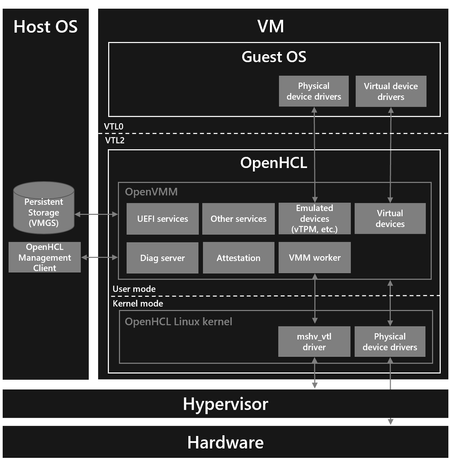
Intro From the beginning of the cloud computing era, virtualization technology has enabled compute workloads to run as virtual machines (VMs) in a server environment. As hardware has evolved, and new functionality has become available, the software stack has kept VMs running seamlessly, thanks to sophisticated advances in the hypervisor and virtualization software. Confidential Computing is a powerful technology for significantly improving the security of VMs running in the cloud. However, the trust boundary of a Confidential VM imposes a barrier that prevents the hypervisor from offering the rich virtualization services that VMs normally expect. Customers desiring the benefits of Confidential VMs are therefore forced to update the operating systems of their VMs to newer versions, which must be continually revised as Confidential VM technology maintains its path of rapid evolution. Microsoft has embraced a different approach that offers much more flexibility to customers through the use of a “paravisor”. A paravisor executes within the confidential trust boundary and provides the virtualization and device services needed by a general-purpose operating system (OS), enabling existing VM workloads to execute securely without requiring continual update of the OS to take advantage of innovative advances in Confidential Computing. As Confidential Computing evolves, the software stack can keep VMs running seamlessly thanks to the paravisor, in much the same way other advances in virtualization software kept VMs running seamlessly on ever evolving hardware. Microsoft developed the first paravisor in the industry, and for years, we have been enhancing the paravisor offered to Azure customers. This effort now culminates in the release of a new, open source paravisor, called OpenHCL. We plan to develop OpenHCL in the open here: microsoft/openvmm: Home of OpenVMM and OpenHCL (github.com). OpenHCL Capabilities A paravisor is essentially an execution environment that runs within the guest VM - at a higher privilege level than the guest OS - and provides various services to the guest. A paravisor can run in both confidential environments and traditional (non-confidential) environments. We use VBS to run a paravisor on Microsoft’s virtualization stack. When running in a confidential environment, these privilege levels must be enforced by the confidential hardware platform, and our architecture allows VBS to be appropriately enforced in a hardware platform-agnostic manner. Today, OpenHCL can run on both x86-64 and ARM64 platforms, and it has support for Intel TDX and AMD SEV-SNP confidential hardware platforms. OpenHCL runs in the L1 VMM of a TDX Confidential VM and in the VMPL0 of an SEV-SNP Confidential VM. See the OpenHCL user guide for step-by-step instructions to use it. OpenHCL offers a rich set of powerful services to both Confidential and traditional VMs alike: Device emulation via standard device interfaces, essentially offering a set of emulated devices. Device translation via standard device interfaces, such as NVMe to para-virtualized SCSI, allowing assignment of hardware devices directly to VMs (accelerated IO) without requiring guest OS changes - enabling VMs to take advantage of the performance of cutting-edge devices. Diagnostics support (particularly useful for debugging Confidential VMs where it is difficult to use traditional debugging methods). (To Confidential VMs specifically) Support for guests that are not fully enlightened - such as Windows and older versions of Linux - to run on confidential hardware platforms via standard architectural interfaces. For Confidential VMs, even though OpenHCL provides value to guests that are not fully enlightened (by enabling them), OpenHCL can also provide a lot of value to fully enlightened guests by offering them any of its other services as different scenarios require it. OpenHCL is used in Azure in new Azure Boost SKUs, and it will be used in future Azure Confidential VM SKUs. In the past month alone, over 1.5 Million VMs were running with OpenHCL in Azure [1] . OpenHCL Architecture OpenHCL is composed of several open source components, the most important one being OpenVMM, the modular, cross-platform, virtual machine monitor (VMM) written in Rust. This VMM runs several user mode processes that power OpenHCL. Running a VMM inside OpenHCL allows us to support guests with assigned devices and provide device translation support. Additionally, it allows us to share confidential and non-confidential architecture. We run the same VMM in the same environment for both Confidential and traditional VMs, and the VMM provides the same services tailored to their requirements. This avoids fragmented virtualization solutions among Confidential and traditional VMs. The other components of OpenHCL are a boot loader and a small, customized Linux kernel built to support the VMM, with min. Kconfig to minimize binary size and runtime RAM usage. Running a kernel to support our environment allows the VMM code to be mostly standard Rust, making the VMM much more powerful by enabling it to use the broadly supported and stable Rust toolchains and crate ecosystem. The Two Approaches to Running Confidential VMs There are two approaches to running a guest OS inside a Confidential VM: either the guest must be fully enlightened (modified to understand and manage all aspects of running as a Confidential VM), or it can rely on a paravisor to implement the Confidential Computing enlightenments on its behalf. In Azure, all IaaS Confidential VMs leverage a paravisor today. The paravisor enabled Azure to support the widest variety of guests, including Windows versions released almost a decade ago [2] and Linux versions using kernels as old as the 5.19 kernel [3] (and versions using even older kernels that had a small set of patches backported, such as some Ubuntu and RHEL distro versions). This provides customers with an easier lift-and-shift as well as the flexibility to gain future Confidential Computing advances without needing to upgrade their workloads. Customers’ legacy solutions are safe with Azure because of the approach we embraced. Why is Windows not fully enlightened? When we developed support for the first Confidential VM in Azure on the confidential hardware platforms available at the time, it was not possible to fully enlighten Windows for those platforms because Windows required APIC emulation to be done in a paravisor. APIC emulation, traditionally done by the hypervisor, must be done by another entity for Confidential VMs, where the hypervisor is outside the trust boundary. It can be done by the paravisor or by the hardware platform if it supports APIC virtualization. Early confidential hardware platforms (like 3rd Gen AMD EPYC™ processors) did not support APIC virtualization, so APIC emulation had to be done in a paravisor for Windows guests. This had to be so for Windows guests, but not necessarily for Linux guests, because the architecture of Windows relies directly on the APIC for interrupt management whereas the architecture of Linux does not. Some aspects of Windows interrupt management do not flow through the kernel and are inlined in drivers, so Windows drivers rely on the interrupt management behavior offered by the APIC. Linux offers kernel service routines for handling interrupt state, so Linux drivers rely on these routines. In addition to this, Windows relies on the presence of a TPM for security features, and one cannot implement a vTPM for a Confidential VM with enlightenments alone. We chose to implement a vTPM in a paravisor. Given all the functionality we have built into the paravisor, our plan is not to fully enlighten Windows and continue supporting Windows guests via a paravisor in Azure. For future versions of Linux, we’re evaluating both approaches – fully enlightened and relying on a paravisor – and we will aim to do what is best for customers. OpenHCL and COCONUT-SVSM An SVSM like COCONUT-SVSM plays a very valuable role for Confidential Computing; it can store secrets and provide virtualization services to improve the usability of fully enlightened guests. OpenHCL solves a different problem than COCONUT-SVSM. COCONUT-SVSM aims to provide services to Confidential VMs with fully enlightened guests using new interfaces. OpenHCL aims to provide services to Confidential VMs using existing standard architectural interfaces. COCONUT-SVSM provides device emulation, but OpenHCL uniquely provides this via existing standard interfaces. When running with an SVSM (like COCONUT-SVSM), the guest must establish a specific relationship with the SVSM by discovering its presence and then interact with the SVSM using a custom calling convention. Essentially, a guest needs to be specifically modified to be able to take advantage of SVSM services, including devices. With OpenHCL, existing device interfaces just work, so the guest does not need any custom calling contract modifications to consume them. OpenHCL enables devices to be discovered over standard enumeration mechanisms, like PCI virtualization or existing vTPM device contracts. COCONUT-SVSM could potentially be leveraged by OpenHCL in the future. OpenHCL's VMM component is Rust based, which has strong memory safety properties; evolving OpenHCL's kernel component to also be Rust based would improve the memory safety of OpenHCL. During the development of OpenHCL, we chose the Linux kernel because it was a familiar OS platform for contributors and provided the capabilities needed. Now that Rust-based COCONUT-SVSM exists, we are interested in moving to that in the future and building OpenHCL support for it if it gains the features that OpenHCL needs. Open for Collaboration In this blog we described the existing capabilities and the value of OpenHCL for the future of computing, but we have much more we plan to do with OpenHCL. We track the roadmap of OpenHCL in the open; below are some of its future milestones. As we develop new functionality in the open, we would love to collaborate with you. Please reach out to us if you have ideas you’d like to add to the roadmap or any other feedback; you can open a GitHub issue and even contribute to the project! You can learn more about this project on: https://openvmm.dev. Milestone: OpenHCL support for Intel TDX (Trust Domain Extensions) in Azure Intel and Microsoft collaborated on and co-developed the TDX partitioning architecture so that it could be leveraged by a paravisor. The first ever TDX module with TD partitioning was an amazing co-engineering project between Intel and Microsoft. Intel released TD partitioning as part of the TDX Module that accompanied the general availability of 5th Generation Xeon, and this has also been backported to 4th Generation Xeon. Using this TDX module, Azure launched the first generation of Azure TDX Confidential VMs, being the first cloud service provider to offer TDX in public preview as well as the first cloud service provider to offer Windows guest support for TDX. Intel has been contributing to OpenHCL for the past 6+ months, and we’re close to feature completeness in OpenHCL for the next generation of Azure TDX Confidential VMs! Milestone: OpenHCL support for AMD SEV-SNP (Secure Encrypted Virtualization-Secure Nested Paging) in Azure Microsoft and AMD have a long history of collaboration with multiple Azure Confidential VM offerings, powered by AMD Infinity Guard's SEV-SNP. We have been engaging with AMD to ensure OpenHCL and AMD’s platform can best work together to provide great performance and security for customers in the future. Virtual Machine Privilege Levels (VMPLs) provide hardware isolated abstraction layers within a VM for additional security controls, as well as assistance with managing communication with the hypervisor. Microsoft used AMD’s VMPLs to build the first paravisor for Confidential VMs in Azure, and we continue to develop support in OpenHCL to reach feature completeness for future generations of AMD Azure SEV-SNP Confidential VMs. Milestone: OpenHCL support for Arm CCA (Confidential Compute Architecture) Arm Confidential Compute Architecture (CCA) comprises a collection of open source software, firmware, specifications, and hardware support to bring Confidential Computing to the Arm architecture. CCA provides protected environments called Realms that can be used to host Confidential VMs. Microsoft started engaging with Arm almost two years ago to make sure CCA is well equipped to support paravisor stacks like OpenHCL, and our collaboration lead to the creation of the Planes feature, which enables multiple of levels of privilege to coexist inside a Realm. Planes provide the ability to host a paravisor and a guest VM in the same Realm, with the paravisor providing security and compatibility services to the guest. We are excited to collaborate further with Arm to build OpenHCL support for CCA in the open. Milestone: OpenHCL support for KVM as host Today OpenHCL runs only on MSHV. We are looking forward to developing OpenHCL support for KVM as host in collaboration with other cloud service providers and the Linux and KVM community to enable others to leverage OpenHCL in their virtualization stacks. We recently began engaging with Red Hat to discuss the value of OpenHCL and how it has the potential to open the door for significant cross-OS interoperability in the confidential virtualization world. We are excited to collaborate with Red Hat to build an open and collaborative confidential computing ecosystem. - Core OS Team. [1] This number is from when this blog was published, Oct 2024, but this number keeps growing every month. [2] Specifically, older versions include Windows Client 10 (released almost a decade ago) and Windows Server 2019. [3] Specifically, older versions include Linux versions using the kernel 5.19 (for SNP) and 6.6 (for both SNP and TDX).36KViews7likes2CommentsAccelerate your RDS and VDI migration to Windows Virtual Desktop
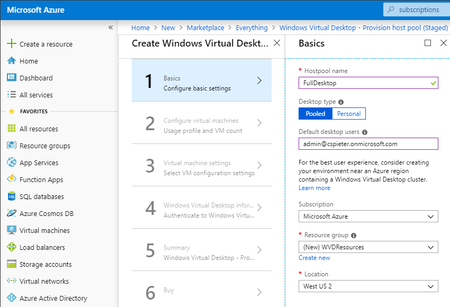
https://docs.microsoft.com/en-us/azure/virtual-desktop/virtual-desktop-fall-2019/create-host-pools-powershell-2019 Learn about Azure tools to help migrate Remote Desktop Services (RDS) and Virtual Desktop Infrastructure (VDI) environments.33KViews9likes7Comments