virtual machines
77 Topics
Azure announces new AI optimized VM series featuring AMD’s flagship MI300X GPU
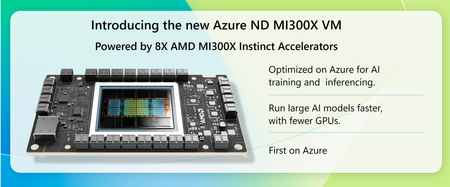
In our relentless pursuit of pushing the boundaries of artificial intelligence, we understand that cutting-edge infrastructure and expertise is needed to harness the full potential of advanced AI. At Microsoft, we've amassed a decade of experience in supercomputing and have consistently supported the most demanding AI training and generative inferencing workloads. Today, we're excited to announce the latest milestone in our journey. We’ve created a virtual machine (VM) with an unprecedented 1.5 TB of high bandwidth memory (HBM) that leverages the power of AMD’s flagship MI300X GPU. Our Azure VMs powered with the MI300X GPU give customers even more choices for AI optimized VMs.Microsoft at NVIDIA GTC 2026
Microsoft returns to NVIDIA GTC 2026 in San Jose with a strong presence across conference sessions, in‑booth theater talks, live demos, and executive‑level ancillary events. Together with NVIDIA and our partner ecosystem, Microsoft is showcasing how Azure AI infrastructure enables AI training, inference, and production at global scale. Visit us at Booth #521 to see the latest innovations in action and connect with Azure and NVIDIA experts. Exclusive GTC Experiences LEGO® Datacenter Model Explore Azure AI infrastructure at the Park Container. Candy Lounge Visit the high-traffic candy wall for co-branded treats all day long. Networking Lounge Relax and recharge with comfy seating and vital charging options. Outdoor Juice Truck Free, refreshing beverages served during outdoor park hours. Sponsored Breakout Sessions Microsoft Featured Reinventing Semiconductor Design with Microsoft Discovery S82398 · Mon, Mar 16 · 4:00 PM Prashant Varshney Microsoft · Semiconductor & AI Engineering Abstract: Semiconductor teams face exploding design complexity and shrinking verification windows. This session shows how the Microsoft Discovery AI for Science platform, combined with Synopsys Agent Engineers, introduces an agentic approach to EDA that automates routine steps and accelerates expert decision-making on Azure. Microsoft Featured Operationalizing Agentic AI at Hyperscale S82399 · Tue, Mar 17 · 1:00 PM Nitin Nagarkatte Microsoft · Azure AI Infrastructure Anand Raman Microsoft · Azure AI Vipul Modi Microsoft · AI Systems Abstract: As enterprises move to agentic systems, the challenge shifts to operating intelligent agents reliably at scale. This session demonstrates how Microsoft builds AI Factories on Azure using NVIDIA technology and explores Microsoft Foundry as the control plane for deploying and operating coordinated AI agents. Live from GTC: AI Podcast Dayan Rodriguez Corporate Vice President Global Manufacturing and Mobility Alistair Spiers General Manager Azure Infrastructure Live Special Feature A conversation with Microsoft Azure Listen & Subscribe: aka.ms/GTC2026Podcast Scan to Listen Earned Conference Sessions Don't miss these high-impact sessions where Microsoft and NVIDIA leaders discuss the future of AI factories and infrastructure. Mon · Mar 16 5:00 PM Drive Optimal Tokens per Watt on AI Infrastructure Using Benchmarking Recipes Speakers: Paul Edwards, Emily Potyraj Microsoft, NVIDIA Tue · Mar 17 9:00 AM Autonomous AI Factories: Technical Preview of Agent-Native Production Speakers: JP Vasseur, César Martinez Spessot NVIDIA, Microsoft Research Tue · Mar 17 4:00 PM The Road to Intelligent Mobility: Vehicle GenAI Speakers: Raj Paul, Thomas Evans, Bryan Goodman Microsoft, NVIDIA, Bosch Wed · Mar 18 9:00 AM Supercharging AI with Multi-Gigawatt AI Factories Speakers: Gilad Shainer, Peter Salanki, Evan Burness NVIDIA, CoreWeave, Meta, Microsoft Daily Booth Theater Schedule Visit the Microsoft Theater for lightning talks from engineering leaders and partners. Monday, March 16 2:00 PM BTH208 · NVIDIA Accelerate AI Innovation on Azure with NVIDIA Run:ai — Rob Magno 2:30 PM BTH202 · General Robotics Models to Machines: Deploying Agentic AI in Real-World Robotics — Dinesh Narayanan 3:00 PM BTH200 · Fractal Analytics From Generalist to Enterprise-Ready: Fractal Builds Domain AI — C. Chaudhuri 3:30 PM BTH109 · Microsoft Agentic cloud ops - Smarter Operations with Azure Copilot — Jyoti Sharma 4:00 PM BTH103 · Microsoft Build a Deep Research Agent for Enterprise Data — D. Casati, A. Slutsky, H. Alkemade 4:30 PM BTH205 · NetApp Azure NetApp Files: Powering Your Data for AI Capabilities — Andy Chan 5:00 PM BTH207 · NVIDIA The Agentic Commerce Stack: Open Models on Azure — Antonio Martinez 5:30 PM BTH217 · OPAQUE Confidential AI on Azure Unlocks Sovereign AI at Scale — Aaron Fulkerson 6:00 PM BTH218 · Simplismart Making BYOC work at scale with modular inference — Amritanshu Jain 6:30 PM Expo Reception Tuesday, March 17 1:30 PM BTH100 · Microsoft From Open Weights to Enterprise Scale: Open-Source Models — Sharmila Chockalingam 2:00 PM BTH212 · Personal AI Unlocking the power of memory in Teams with Personal AI — Sam Harkness 2:30 PM BTH111 · Microsoft / NVIDIA Scalable LLM Inference on AKS Using NVIDIA Dynamo — Mohamad Al jazaery, Anton Slutsky 3:00 PM BTH204 · Mistral AI Innovate with Mistral AI on Microsoft Foundry — Ian Mathew 3:30 PM BTH104 · Microsoft GPU-Accelerated CFD at Scale: Star-CCM+ on Azure — Jason Scheffelmaer 4:00 PM BTH206 · NeuBird AI Agentic AI for Incident Response on Microsoft Azure — Grant Griffiths 4:30 PM BTH101 · GitHub Agentic DevOps: Evolving software with GitHub Copilot — Glenn Wester 5:00 PM BTH209 · Rescale Real-World AI Physics: GM & NVIDIA on Rescale — Dinal Perera 5:30 PM BTH107 · Microsoft Intro to LoRA Fine-Tuning on Azure — Christin Pohl 6:30 PM Raffle Wednesday, March 18 1:00 PM BTH219 · VAST Data Scaling AI Infrastructure on Azure with VAST Data — Jason Vallery 1:30 PM BTH110 · Microsoft Physical AI and Robotics: The Next Frontier — F. Miller, C. Souche, D. Narayanan 2:00 PM BTH105 · Microsoft Sovereign AI options with Azure Local — Kim Lam 2:30 PM BTH108 · Microsoft Automating HPC Workflows with Copilot Agents — Param Shah 3:00 PM BTH102 · Microsoft Trustworthy Multi-Agent Workflows with Microsoft Foundry — Brian Benz 4:00 PM BTH106 · Microsoft Scaling Enterprise AI on ARO with NVIDIA H100 & H200 — Lachie Evenson 4:30 PM BTH211 · WEKA Hybrid AI Data Orchestration with WEKA NeuralMesh™ — Desiree Campbell 5:00 PM BTH202 · Hammerspace NVIDIA AI Enterprise Software with NIM — Mike Bloom 5:30 PM BTH203 · Kinaxis Reimagining Global Supply Planning with Azure — Dane Henshall 6:00 PM BTH214 · AT&T Connected AI on Azure for Manufacturing — Brad Pritchett 6:30 PM Raffle Thursday, March 19 11:00 AM BTH210 · Wandelbots Physical AI: Powering Software-Defined Automation in Robotics — Marwin Kunz, Martin George 11:30 AM Raffle Explore Our Demo Pods Visit the Microsoft booth to see our technology in action with live demonstrations across four dedicated pod areas. POD 1 Azure AI Infrastructure End‑to‑end AI infrastructure for training and inference at scale, featuring the latest NVIDIA GPU integrations on Azure. POD 2 Microsoft Foundry Our comprehensive platform for building, deploying, and operating agentic AI systems with enterprise reliability. POD 3 Building AI Together Showcasing joint Microsoft and NVIDIA solutions across diverse industries, from manufacturing to retail. POD 4 Startups Powering AI Discover how innovative startups are running next‑generation AI workloads on the Azure platform. Ancillary Events & Networking Join Microsoft leadership and our partner ecosystem at these curated networking experiences. Click the location to view on Bing Maps. Sun · Mar 15 6:00 PM Microsoft for Startups Executive Leadership Dinner 📍 Morton’s Steakhouse, San Jose Exclusive gathering for startup leaders and Microsoft executives. Mon · Mar 16 1:30 PM Microsoft × NVIDIA Open Meet 📍 Signia by Hilton · International Suite Strategic alignment session for Microsoft and NVIDIA executives. Mon · Mar 16 7:30 PM Microsoft + NVIDIA Executive Dinner 📍 Il Fornaio, San Jose Executive dinner for key customers and leadership teams. Tue · Mar 17 11:00 AM to 1:00 PM Microsoft AI Luncheon: Research, Robotics, & Real‑World AI 📍 Signia by Hilton · International Suite Invite-only: A curated executive lunch exploring the journey from AI research to physical enterprise deployments in robotics and manufacturing. Tue · Mar 17 7:30 PM Networking in AI & Tech 📍 San Pedro Square Market Community networking mixer for Microsoft teams, partners, and customers. Wed · Mar 18 10:00 AM to 1:00 PM AI Innovator’s Circle Brunch: Powering Intelligent Systems Across the Ecosystem 📍 Il Fornaio, San Jose Hosted by Microsoft & NVIDIA at GTC. Join us for an exclusive brunch and discussion on the intelligent ecosystem.
Breaking the Million-Token Barrier: The Technical Achievement of Azure ND GB300 v6
Azure ND GB300 v6 Virtual Machines with NVIDIA GB300 NVL72 rack-scale systems achieve unprecedented performance of 1,100,000 tokens/s on Llama2 70B Inference, beating the previous Azure ND GB200 v6 record of 865,000 tokens/s by 27%.
Performance considerations for large scale deep learning training on Azure NDv4 (A100) series
Modern DL training jobs require large Clusters of multi-GPUs with high floating-point performance connected with high bandwidth, low latency networks. The Azure NDv4 VM series is designed specifically for these types of workloads. We will be focusing on HPC+AI Clusters built with the ND96asr_v4 virtual machine type and providing specific optimization recommendations to get the best performance.
Introducing Azure NC H100 v5 VMs for mid-range AI and HPC workloads
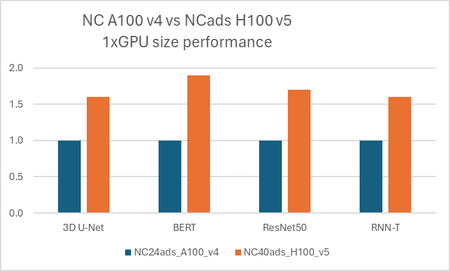
Today at Ignite, Microsoft is announcing the public preview of the NC H100 v5 Virtual Machine Series, the latest addition to our portfolio of purpose-built infrastructure for High Performance Computing (HPC) and Artificial Intelligence (AI) workloads.Announcing Azure HBv5 Virtual Machines: A Breakthrough in Memory Bandwidth for HPC
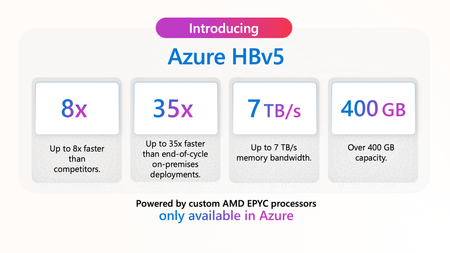
Discover the new Azure HBv5 Virtual Machines, unveiled at Microsoft Ignite, designed for high-performance computing applications. With up to 7 TB/s of memory bandwidth and custom 4th Generation EPYC processors, these VMs are optimized for the most memory-intensive HPC workloads. Sign up for the preview starting in the first half of 2025 and see them in action at Supercomputing 2024 in Atlanta
Performance & Scalability of HBv4 and HX-Series VMs with Genoa-X CPUs
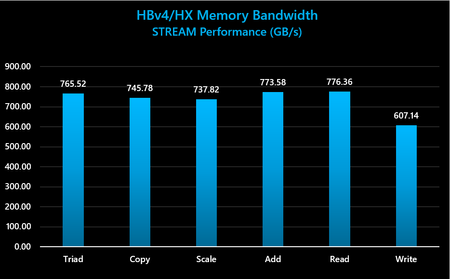
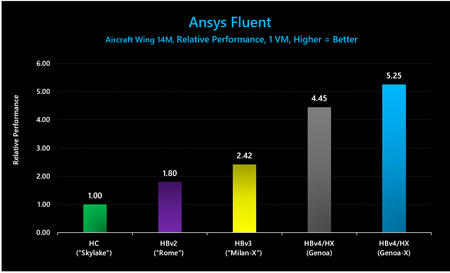
Azure has announced the general availability of Azure HBv4-series and HX-series virtual machines (VMs) for high performance computing (HPC). This blog provides in-depth technical and performance information about these HPC-optimized VMs.Running DeepSeek-R1 on a single NDv5 MI300X VM
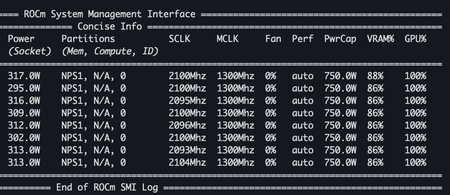
Contributors: Davide Vanzo, Yuval Mazor, Jesse Lopez DeepSeek-R1 is an open-weights reasoning model built on DeepSeek-V3, designed for conversational AI, coding, and complex problem-solving. It has gained significant attention beyond the AI/ML community due to its strong reasoning capabilities, often competing with OpenAI’s models. One of its key advantages is that it can be run locally, giving users full control over their data. The NDv5 MI300X VM features 8x AMD Instinct MI300X GPUs, each equipped with 192GB of HBM3 and interconnected via Infinity Fabric 3.0. With up to 5.2 TB/s of memory bandwidth per GPU, the MI300X provides the necessary capacity and speed to process large models efficiently - enabling users to run DeepSeek-R1 at full precision on a single VM. In this blog post, we’ll walk you through the steps to provision an NDv5 MI300X instance on Azure and run DeepSeek-R1 for inference using the SGLang inference framework. Launching an NDv5 MI300X VM Prerequisites Check that your subscription has sufficient vCPU quota for the VM family “StandardNDI Sv 5MI300X” (see Quota documentation). If needed, contact your Microsoft account representative to request quota increase. A Bash terminal with Azure CLI installed and logged into the appropriate tenant. Alternatively, Azure Cloud Shell can also be employed. Provision the VM 1. Using Azure CLI, create an Ubuntu-22.04 VM on ND_MI300x_v5: az group create --location <REGION> -n <RESOURCE_GROUP_NAME> az vm create --name mi300x --resource-group <RESOURCE_GROUP_NAME> --location <REGION> --image microsoft-dsvm:ubuntu-hpc:2204-rocm:22.04.2025030701 --size Standard_ND96isr_MI300X_v5 --security-type Standard --os-disk-size-gb 256 --os-disk-delete-option Delete --admin-username azureadmin --ssh-key-values <PUBLIC_SSH_PATH> Optionally, the deployment can utilize the cloud-init.yaml file specified as --custom-data <CLOUD_INIT_FILE_PATH> to automate the additional preparation described below: az vm create --name mi300x --resource-group <RESOURCE_GROUP_NAME> --location <REGION> --image microsoft-dsvm:ubuntu-hpc:2204-rocm:22.04.2025030701 --size Standard_ND96isr_MI300X_v5 --security-type Standard --os-disk-size-gb 256 --os-disk-delete-option Delete --admin-username azureadmin --ssh-key-values <PUBLIC_SSH_PATH> --custom-data <CLOUD_INIT_FILE_PATH> Note: The GPU drivers may take a couple of mintues to completely load after the VM has been initially created. Additional preparation Beyond provisioning the VM, there are additional steps to prepare the environment to optimally run DeepSeed, or other AI workloads including setting-up the 8 NVMe disks on the node in a RAID-0 configuration to act as the cache location for Docker and Hugging Face. The following steps assume you have connected to the VM and working in a Bash shell. 1. Prepare the NVMe disks in a RAID-0 configuration mkdir -p /mnt/resource_nvme/ sudo mdadm --create /dev/md128 -f --run --level 0 --raid-devices 8 $(ls /dev/nvme*n1) sudo mkfs.xfs -f /dev/md128 sudo mount /dev/md128 /mnt/resource_nvme sudo chmod 1777 /mnt/resource_nvme 2. Configure Hugging Face to use the RAID-0. This environmental variable should also be propagated to any containers pulling images or data from Hugging Face. mkdir –p /mnt/resource_nvme/hf_cache export HF_HOME=/mnt/resource_nvme/hf_cache 3. Configure Docker to use the RAID-0 mkdir -p /mnt/resource_nvme/docker sudo tee /etc/docker/daemon.json > /dev/null <<EOF { "data-root": "/mnt/resource_nvme/docker" } EOF sudo chmod 0644 /etc/docker/daemon.json sudo systemctl restart docker All of these additional preperation steps can be automated in VM creation using cloud-init. The example cloud-init.yaml file can be used in provisioning the VM as described above. #cloud-config package_update: true write_files: - path: /opt/setup_nvme.sh permissions: '0755' owner: root:root content: | #!/bin/bash NVME_DISKS_NAME=`ls /dev/nvme*n1` NVME_DISKS=`ls -latr /dev/nvme*n1 | wc -l` echo "Number of NVMe Disks: $NVME_DISKS" if [ "$NVME_DISKS" == "0" ] then exit 0 else mkdir -p /mnt/resource_nvme # Needed incase something did not unmount as expected. This will delete any data that may be left behind mdadm --stop /dev/md* mdadm --create /dev/md128 -f --run --level 0 --raid-devices $NVME_DISKS $NVME_DISKS_NAME mkfs.xfs -f /dev/md128 mount /dev/md128 /mnt/resource_nvme fi chmod 1777 /mnt/resource_nvme - path: /etc/profile.d/hf_home.sh permissions: '0755' content: | export HF_HOME=/mnt/resource_nvme/hf_cache - path: /etc/docker/daemon.json permissions: '0644' content: | { "data-root": "/mnt/resource_nvme/docker" } runcmd: - ["/bin/bash", "/opt/setup_nvme.sh"] - mkdir -p /mnt/resource_nvme/docker - mkdir -p /mnt/resource_nvme/hf_cache # PAM group not working for docker group, so this will add all users to docker group - bash -c 'for USER in $(ls /home); do usermod -aG docker $USER; done' - systemctl restart docker Using MI300X If you are familiar with Nvidia and CUDA tools and environment, AMD provides equivalents as part of the ROCm stack. MI300X + ROCm Nvidia + CUDA Description rocm-smi nvidia-smi CLI for monitoring the system and making changes rccl nccl Library for communication between GPUs Running DeepSeek-R1 1. Pull the container image. It is O(10) GB in size, so it may take a few minutes to download. docker pull rocm/sgl-dev:upstream_20250312_v1 2. Start the SGLang server. The model (~642 GB) is downloaded the first time it is launched and will take at least a few minutes to download. Once the application outputs “The server is fired up and ready to roll!”, you can begin making queries to the model. docker run \ --device=/dev/kfd \ --device=/dev/dri \ --security-opt seccomp=unconfined \ --cap-add=SYS_PTRACE \ --group-add video \ --privileged \ --shm-size 32g \ --ipc=host \ -p 30000:30000 \ -v /mnt/resource_nvme:/mnt/resource_nvme \ -e HF_HOME=/mnt/resource_nvme/hf_cache \ -e HSA_NO_SCRATCH_RECLAIM=1 \ -e GPU_FORCE_BLIT_COPY_SIZE=64 \ -e DEBUG_HIP_BLOCK_SYN=1024 \ rocm/sgl-dev:upstream_20250312_v1 \ python3 -m sglang.launch_server --model deepseek-ai/DeepSeek-R1 --tp 8 --trust-remote-code --chunked-prefill-size 131072 --enable-torch-compile --torch-compile-max-bs 256 --host 0.0.0.0 3. You can now make queries to DeepSeek-R1. For example, these requests to the model from another shell on same host provide model data and will generate a sample response. curl http://localhost:30000/get_model_info {"model_path":"deepseek-ai/DeepSeek-R1","tokenizer_path":"deepseek-ai/DeepSeek-R1","is_generation":true} curl http://localhost:30000/generate -H "Content-Type: application/json" -d '{ "text": "Once upon a time,", "sampling_params": { "max_new_tokens": 16, "temperature": 0.6 } }' Conclusion In this post, we detail how to run the full-size 671B DeepSeek-R1 model on a single Azure NDv5 MI300X instance. This includes setting up the machine, installing the necessary drivers, and executing the model. Happy inferencing! References https://github.com/deepseek-ai/DeepSeek-R1 https://github.com/deepseek-ai/DeepSeek-V3 https://www.amd.com/en/developer/resources/technical-articles/amd-instinct-gpus-power-deepseek-v3-revolutionizing-ai-development-with-sglang.html https://techcommunity.microsoft.com/blog/azurehighperformancecomputingblog/azure-announces-new-ai-optimized-vm-series-featuring-amd%e2%80%99s-flagship-mi300x-gpu/3980770 https://docs.sglang.ai/index.html https://rocm.blogs.amd.com/artificial-intelligence/DeepSeekR1-Part2/README.html