virtual machine
2 Topics
Cannot Connect to VMs in Windows Admin Center
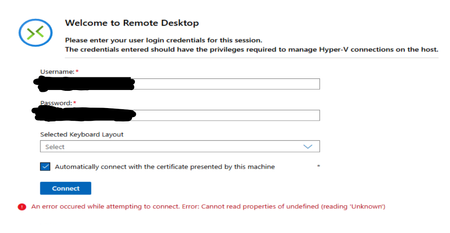
Hi all, I have 1 Server Cluster made up of 3 Server 2022 Hosts on which there is a large number of VMs running on Hyper-V. The typical process for accessing the VMs has been through Windows Admin Center, which is hosted on one of the VMs in the cluster. Around 1 week ago, it was no longer possible to connect to the VMs through Windows Admin Center as an infinite loading screen was presented. Sometimes, the following error shows up in VMConnect: The cluster and servers are still connected to WAC and all the VMs that are expected are present on WAC. Since then, the following things have been attempted: - Restart all servers - Rebuild WAC on Current VM - Build WAC on Fresh VM with the same and different network configuration, using current (2606) and previous (2511) versions of WAC - Build WAC on one of the hosts All these attempts result in the same error as seen before. Has anyone experienced this issue before? Or does anyone have any advice? Thank you in advance!Solved1.4KViews2likes13CommentsDeploy and Install Windows Admin Center in an Azure VM
The great thing about Windows Admin Center (WAC) you manage every Windows Server doesn't matter where it is running. You can manage Windows Servers on-prem, in Azure or running at other cloud providers. Now if you want to use Windows Admin Center to manage your virtual machines running in Azure, you can use either an on-prem WAC installation and connecting it using a public IP address or a VPN connection, or you can deploy and install Windows Admin Center in Azure. This blog post will show you how you can deploy and install Windows Admin Center in an Azure virtual machine (VM). Check out my blog post to read more: https://www.thomasmaurer.ch/2019/10/deploy-and-install-windows-admin-center-in-an-azure-vm/3.8KViews1like1Comment