virtual machine
224 TopicsAzure Update Management Centre (Preview) - Security Intelligence Update for Microsoft Defender AV
Afternoon all, We are exploring using Update Management Centre and scheduling the update of our fleet of IaaS servers. Monthly patching is fairly easy to understand and deploy. Our dev machines are successfully patching. However, what is the implementation pattern for updating Defender AV signatures? In a WSUS deployment, this would likely be a separate job that runs hourly. However, UMC doesn't allow that level of frequency, nor does the maintenance Window accept anything less than 1 hour. Many thanks Paul550Views1like1CommentXXX virtual machines should enable Azure Disk Encryption or EncryptionAtHost.
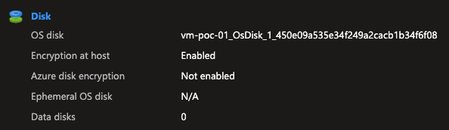
Hello everyone, I'm facing issues related to a policy: Linux virtual machines should enable Azure Disk Encryption or EncryptionAtHost. Windows virtual machines should enable Azure Disk Encryption or EncryptionAtHost. After enabling EncryptionAtHost, it appears as encrypted in the portal. However, the policy does not recognize that it is encrypted and shows it as non-compliant. The same happens when enabling Azure Disk Encryption (ADE): the policy still indicates that it is non-compliant. Has anyone else experienced this?1.3KViews0likes3Comments
Partial script not running while deployment
Hi All, I am deploying a windows VM in Azure using terraform and want to install some software while deployment so I thought about PS script extension. Things are working fine for me however ENV variables is not getting added though If I will run this script in the system after deployment then everything is right. Can anyone suggest me why only ENV variable is not getting set. you can read the script here, https://raw.githubusercontent.com/INGourav/Azure-Resources/master/azbastionsetup01.ps1 <# Script to install chocolatey on the windows system and install some apps that is needed for Azure Author : - Gourav Kumar Reach Me : - email address removed for privacy reasons Version : - 1.0.1 #> Set-ExecutionPolicy Bypass -Scope Process -Force; New-Item -Path 'C:\Temp\terraform_1.2.4_windows_amd64' -ItemType Directory # setting env vars $path = (Get-Item -Path Env:\Path).Value Start-Sleep -Seconds 5; $newpath = $path + 'C:\Temp\terraform_1.2.4_windows_amd64' Start-Sleep -Seconds 5; Set-Item -Path Env:\Path -Value $newpath # Installation of Terraform on the machine Invoke-WebRequest 'https://releases.hashicorp.com/terraform/1.2.4/terraform_1.2.4_windows_amd64.zip' -OutFile C:\temp\terraform_1.2.4_windows_amd64.zip -Verbose Start-Sleep -Seconds 5; Expand-Archive C:\temp\terraform_1.2.4_windows_amd64.zip C:\temp\terraform_1.2.4_windows_amd64 -Verbose -Force Start-Sleep -Seconds 5; [System.Net.ServicePointManager]::SecurityProtocol = [System.Net.ServicePointManager]::SecurityProtocol -bor 3072; Invoke-Expression ((New-Object System.Net.WebClient).DownloadString('https://community.chocolatey.org/install.ps1')) -Verbose Start-Sleep -Seconds 5; # Installation of apps (Pycharm, vscode, git, and drwaio) choco install pycharm -y --force; Start-Sleep -Seconds 5; choco install vscode -y --force; Start-Sleep -Seconds 5; choco install git -y --force; Start-Sleep -Seconds 5; choco install drawio -y --force; Start-Sleep -Seconds 5; The code that I am using to deploy resources is as follows, provider "azurerm" { features {} } data "azurerm_subnet" "vmsnet" { name = "vm_subnet" virtual_network_name = "az_test" resource_group_name = "poc" } resource "azurerm_resource_group" "vmrg" { name = "tfvmtestrg" location = "uk south" } resource "azurerm_network_interface" "az_vm_nic" { location = "uk south" name = "tfvmtestnic" resource_group_name = azurerm_resource_group.vmrg.name ip_configuration { name = "internal" private_ip_address_allocation = "Dynamic" subnet_id = data.azurerm_subnet.vmsnet.id } } resource "azurerm_windows_virtual_machine" "az_vm_win" { admin_password = "tfvmtestrgrtetghcgh" admin_username = "tfvmtestrg" location = "uk south" name = "tfvmtestvm" network_interface_ids = [azurerm_network_interface.az_vm_nic.id] resource_group_name = azurerm_resource_group.vmrg.name size = "Standard_D2s_v3" os_disk { caching = "ReadWrite" storage_account_type = "Standard_LRS" } source_image_reference { publisher = "MicrosoftWindowsServer" offer = "WindowsServer" sku = "2022-Datacenter" version = "latest" } } resource "azurerm_virtual_machine_extension" "vmext" { name = azurerm_windows_virtual_machine.az_vm_win.name virtual_machine_id = azurerm_windows_virtual_machine.az_vm_win.id publisher = "Microsoft.Compute" type = "CustomScriptExtension" type_handler_version = "1.10" ### THIS PART IS ALL NEEDED, INCLUDING THE WEIRD SETTINGS BIT. settings = <<SETTINGS { "commandToExecute": "powershell -ExecutionPolicy Unrestricted -File azbastionsetup01.ps1", "fileUris": ["https://raw.githubusercontent.com/INGourav/Azure-Resources/master/azbastionsetup01.ps1"] } SETTINGS }954Views1like1CommentBoosting Performance with the Latest Generations of Virtual Machines in Azure
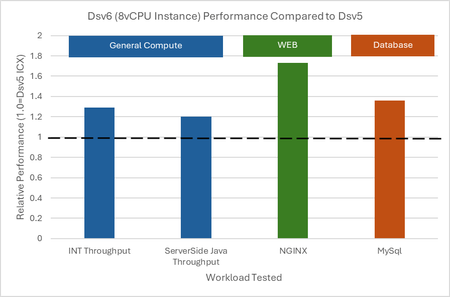
Microsoft Azure recently announced the availability of the new generation of VMs (v6)—including the Dl/Dv6 (general purpose) and El/Ev6 (memory-optimized) series. These VMs are powered by the latest Intel Xeon processors and are engineered to deliver: Up to 30% higher per-core performance compared to previous generations. Greater scalability, with options of up to 128 vCPUs (Dv6) and 192 vCPUs (Ev6). Significant enhancements in CPU cache (up to 5× larger), memory bandwidth, and NVMe-enabled storage. Improved security with features like Intel® Total Memory Encryption (TME) and enhanced networking via the new Microsoft Azure Network Adaptor (MANA). By Microsoft Evaluated Virtual Machines and Geekbench Results The table below summarizes the configuration and Geekbench results for the two VMs we tested. VM1 represents a previous-generation machine with more vCPUs and memory, while VM2 is from the new Dld e6 series, showing superior performance despite having fewer vCPUs. VM1 features VM1 - D16S V5 (16 Vcpus - 64GB RAM) VM1 - D16S V5 (16 Vcpus - 64GB RAM) VM2 features VM2 - D16ls v6 (16 Vcpus - 32GB RAM) VM2 - D16ls v6 (16 Vcpus - 32GB RAM) Key Observations: Single-Core Performance: VM2 scores 2013 compared to VM1’s 1570, a 28.2% improvement. This demonstrates that even with half the vCPUs, the new Dld e6 series provides significantly better performance per core. Multi-Core Performance: Despite having fewer cores, VM2 achieves a multi-core score of 12,566 versus 9,454 for VM1, showing a 32.9% increase in performance. VM 1 VM 2 Enhanced Throughput in Specific Workloads: File Compression: 1909 MB/s (VM2) vs. 1654 MB/s (VM1) – a 15.4% improvement. Object Detection: 2851 images/s (VM2) vs. 1592 images/s (VM1) – a remarkable 79.2% improvement. Ray Tracing: 1798 Kpixels/s (VM2) vs. 1512 Kpixels/s (VM1) – an 18.9% boost. These results reflect the significant advancements enabled by the new generation of Intel processors. Score VM 1 VM 1 VM 1 Score VM 2 VM 2 VM 2 Evolution of Hardware in Azure: From Ice Lake-SP to Emerald Rapids Technical Specifications of the Processors Evaluated Understanding the dramatic performance improvements begins with a look at the processor specifications: Intel Xeon Platinum 8370C (Ice Lake-SP) Architecture: Ice Lake-SP Base Frequency: 2.79 GHz Max Frequency: 3.5 GHz L3 Cache: 48 MB Supported Instructions: AVX-512, VNNI, DL Boost VM 1 Intel Xeon Platinum 8573C (Emerald Rapids) Architecture: Emerald Rapids Base Frequency: 2.3 GHz Max Frequency: 4.2 GHz L3 Cache: 260 MB Supported Instructions: AVX-512, AMX, VNNI, DL Boost VM 2 Impact on Performance Cache Size Increase: The jump from 48 MB to 260 MB of L3 cache is a key factor. A larger cache reduces dependency on RAM accesses, thereby lowering latency and significantly boosting performance in memory-intensive workloads such as AI, big data, and scientific simulations. Enhanced Frequency Dynamics: While the base frequency of the Emerald Rapids processor is slightly lower, its higher maximum frequency (4.2 GHz vs. 3.5 GHz) means that under load, performance-critical tasks can benefit from this burst capability. Advanced Instruction Support: The introduction of AMX (Advanced Matrix Extensions) in Emerald Rapids, along with the robust AVX-512 support, optimizes the execution of complex mathematical and AI workloads. Efficiency Gains: These processors also offer improved energy efficiency, reducing the energy consumed per compute unit. This efficiency translates into lower operational costs and a more sustainable cloud environment. Beyond Our Tests: Overview of the New v6 Series While our tests focused on the Dld e6 series, Azure’s new v6 generation includes several families designed for different workloads: 1. Dlsv6 and Dldsv6-series Segment: General purpose with NVMe local storage (where applicable) vCPUs Range: 2 – 128 Memory: 4 – 256 GiB Local Disk: Up to 7,040 GiB (Dldsv6) Highlights: 5× increased CPU cache (up to 300 MB) and higher network bandwidth (up to 54 Gbps) 2. Dsv6 and Ddsv6-series Segment: General purpose vCPUs Range: 2 – 128 Memory: Up to 512 GiB Local Disk: Up to 7,040 GiB in Ddsv6 Highlights: Up to 30% improved performance over the previous Dv5 generation and Azure Boost for enhanced IOPS and network performance 3. Esv6 and Edsv6-series Segment: Memory-optimized vCPUs Range: 2 – 192* (with larger sizes available in Q2) Memory: Up to 1.8 TiB (1832 GiB) Local Disk: Up to 10,560 GiB in Edsv6 Highlights: Ideal for in-memory analytics, relational databases, and enterprise applications requiring vast amounts of RAM Note: Sizes with higher vCPUs and memory (e.g., E128/E192) will be generally available in Q2 of this year. Key Innovations in the v6 Generation Increased CPU Cache: Up to 5× more cache (from 60 MB to 300 MB) dramatically improves data access speeds. NVMe for Storage: Enhanced local and remote storage performance, with up to 3× more IOPS locally and the capability to reach 400k IOPS remotely via Azure Boost. Azure Boost: Delivers higher throughput (up to 12 GB/s remote disk throughput) and improved network bandwidth (up to 200 Gbps for larger sizes). Microsoft Azure Network Adaptor (MANA): Provides improved network stability and performance for both Windows and Linux environments. Intel® Total Memory Encryption (TME): Enhances data security by encrypting the system memory. Scalability: Options ranging from 128 vCPUs/512 GiB RAM in the Dv6 family to 192 vCPUs/1.8 TiB RAM in the Ev6 family. Performance Gains: Benchmarks and internal tests (such as SPEC CPU Integer) indicate improvements of 15%–30% across various workloads including web applications, databases, analytics, and generative AI tasks. My personal perspective and point of view The new Azure v6 VMs mark a significant advancement in cloud computing performance, scalability, and security. Our Geekbench tests clearly show that the Dld e6 series—powered by the latest Intel Xeon Platinum 8573C (Emerald Rapids)—delivers up to 30% better performance than previous-generation machines with more resources. Coupled with the hardware evolution from Ice Lake-SP to Emerald Rapids—which brings a dramatic increase in cache size, improved frequency dynamics, and advanced instruction support—the new v6 generation sets a new standard for high-performance workloads. Whether you’re running critical enterprise applications, data-intensive analytics, or next-generation AI models, the enhanced capabilities of these VMs offer significant benefits in performance, efficiency, and cost-effectiveness. References and Further Reading: Microsoft’s official announcement: Azure Dld e6 VMs Internal tests performed with Geekbench 6.4.0 (AVX2) in the Germany West Central Azure region.1.6KViews0likes3CommentsExperience with Automanage Machine Configuration
Hi, I am experimenting with Automanage Machine Configuration and find the overall experience and documentation very poor. I am wondering if there are others who have experience with automanage and can point me towards additional documentation. I have built an example implementation which I am using as my lab setup: https://github.com/JelleBroekhuijsen/azure-automanage-example What I am experiencing is that the compliance-state reporting seems to be very inconsistent. Sometimes these sample configurations reports everything being compliant while maybe 30 minutes later the same configuration is marked as incompliant (while the VM is observably in a compliant state). Additionally, there seems to be no option to get support or report issues with the GuestConfiguration-extension (for Windows) or the GuestConfiguration PowerShell module. For instance, in my experimenting with the module I found that calling the PackageManagement DSC resource from within a configuration leads to a conflict with the embedded PackageManagement module in the windows extension. I found a workaround for this, but I have no way to report this issue.872Views0likes1CommentBase Azure VM instance that supports nested virtualization
Hi folks, I need to know what baseline Azure VMs are available that supports virtualization technology (nested virtualization) as customer wants to run Proxmox on it. Looking forward to some guidance please. Thanks, Pradeep848Views1like3Comments
Determining sizing requirements for GPU enabled Azure VM
Greetings, We are trying to determine the correct VM sizing requirement for our AI workload, which is used for NLP processing. This workload does not require any training, but will only be used for inference. We have the following software configuration: a C# application that is heavily multithreaded using a lot of socket I/O. The application has concentrated bursts where 10-20 threads are fired concurrently to perform tasks (mostly socket I/O). This app communicates via dedicated sockets to: a Python application which performs various NLP tasks. This app is also multithreaded to handle multiple incoming requests from the .NET app. This app sends queries to a local LLM (model size will vary based on query type). We estimate we will need to support sub-second performance (at the very least) on a 7B parameter model. Ultimately, we may need to go to larger model sizes if accuracy is insufficient. The amount of text passed to the LLM will range from 300-3000 tokens. In short, we need: a) a CPU with sufficient cores to handle multiple concurrent threads on the .NET side. The app will have 5 or 6 background threads running continuously, and sudden bursts of activity which will require a minimum of 10-20 threads to run shorter-lived tasks. b) a GPU with sufficient VRAM to handle at the very least, a 7B parameter model. Ultimately, we may need to support larger models to perform the same task due to insufficient accuracy. We need the ideal configuration of GPU/VRAM and CPU/RAM to handle these tasks, and also, potentially, larger LLM sizes of up to 14B or 70B parameters. We are looking at the NC-series VMs, with a budget of about $1,000/month (see https://learn.microsoft.com/en-us/answers/questions/2150959/determining-sizing-requirements-for-gpu-enabled-az?comment=question). Any feedback on the optimal configuration in terms of CPU/GPU would be greatly appreciated. Thank you in advance.1.5KViews0likes2Comments