users
26 Topics
M365 Admin Center Global Administrator Lockout
Hello Microsoft Community, I am seeking urgent assistance and guidance regarding a critical Microsoft 365 tenant lockout that has been ongoing for several days without a resolution or proper communication from the support team. Our organization manages Microsoft 365 services for a business with more than 200 active users who depend on Microsoft 365 for their daily operations. Issue Description We have been locked out of our Microsoft 365 tenant's administrator account. This prevents us from properly managing our Microsoft 365 environment and restoring normal access to essential business services. Our business-critical data, including important documents and operational information, is stored in SharePoint. The inability to access and manage these services has significantly disrupted our business operations. Microsoft Support Ticket References We have raised multiple support tickets and followed up repeatedly, but the issue remains unresolved. Tracking ID: 2610050040001149 Tracking ID: 2610090010001066 Tracking ID: 2610050040001222 Despite these support cases and repeated follow-ups, we have not received a satisfactory resolution or a clear recovery timeline. Support Experience So Far Following a discussion with the support team, we were expecting a call to assist with unlocking the administrator account and providing a temporary password through the appropriate recovery process. However, we have not received the expected call or a meaningful update. Our main concerns are: Complete loss of access to the Microsoft 365 tenant administrator account. More than 200 users affected by the ongoing incident. Critical business data and documents stored in SharePoint. Multiple support tickets without a concrete resolution. Lack of clear communication regarding the root cause and recovery timeline. No clear escalation path or confirmation of the next recovery steps. Our Concerns We understand that technical issues can occur, but leaving a business-critical environment inaccessible for an extended period without meaningful updates is extremely concerning. We purchase Microsoft 365 licenses through a partner and expect appropriate technical support and escalation assistance when critical incidents occur. Our organization previously used Google Workspace and recommended migrating to Microsoft 365 because of its enterprise capabilities. This incident has seriously affected user confidence and business continuity. If access cannot be restored promptly, we may have to consider alternative email hosting arrangements to minimize further disruption. Request for Assistance I would appreciate guidance from Microsoft engineers, Microsoft 365 administrators, and community members who have experienced similar situations. What is the appropriate escalation process when all available tenant administrator accounts are inaccessible? How can we expedite tenant ownership verification and administrator account recovery? Is there a dedicated Microsoft team that handles critical tenant lockout incidents affecting business operations? What is the recommended recovery process when the administrator cannot access the Microsoft 365 Admin Center? How can we obtain urgent assistance when multiple support tickets and repeated follow-ups have not resulted in a clear resolution? Can the three referenced support tickets be escalated for urgent review by the appropriate Microsoft support team? We are not looking for workarounds that compromise tenant security. We need Microsoft's official recovery process to restore authorized administrative access safely. Microsoft Support Team: If any Microsoft support representatives are monitoring this community, we would appreciate your guidance on the appropriate escalation channel for this incident. We can provide additional information privately through the appropriate official channels. Thank you for your time and assistance. Any guidance that helps us restore our services and protect business continuity would be greatly appreciated. Best regards, Microsoft 365 Tenant Administrator7Views0likes0Comments
Changing Microsoft 365 billing frequency from monthly to yearly unexpectedly increased the price
Hello everyone, I would like to raise an issue with Microsoft 365 Business Standard that I find very difficult to understand and even harder to explain to my customer. I manage two Microsoft 365 Business Standard licenses for a customer. The pricing history was as follows: Until May 2026: €23.40/month total for 2 users From June 2026: €21.66/month total for 2 users This means the annual cost at the latest monthly rate was €259.92/year On September 28, 2026, I changed only the billing frequency from monthly to yearly. During this process, I was not shown any clear warning that the actual subscription price would increase. After the change, Microsoft created a new annual subscription with: €145.56 per user/year €291.12/year for 2 users So simply changing from monthly billing to yearly billing increased the annual subscription price from the equivalent of €259.92 to €291.12. This is particularly confusing because the Microsoft website normally presents annual billing as the cheaper option. I contacted Microsoft Support today. According to the support agent: this behavior is the same worldwide the billing change cannot be reverted the agent cannot revert it it cannot be escalated to a supervisor who could revert it there is apparently no email address or written complaint channel where I can formally dispute the change What concerns me most is not only the price increase itself, but the fact that I was apparently moved to a higher price simply by changing the billing frequency, without a clear indication during the process that the subscription price itself would change. I now also have to explain to my customer why their Microsoft 365 costs suddenly increased, even though no additional licenses or services were requested. From my perspective, changing how often a subscription is billed should not silently result in a different commercial price without a very clear confirmation beforehand. Has anyone else experienced this? I would especially like to know: Is this expected Microsoft behavior? Why does changing the billing frequency trigger a new, higher price? Is there any official escalation or written complaint process for Microsoft 365 billing issues? Is there really no way to revert such a billing-frequency change shortly after it was made? I would appreciate clarification from Microsoft, because at the moment this leaves both the reseller/admin and the customer in a very poor position. Regards117Views0likes0Comments
File Sharing between licensed account holders
From a starting point of this year, we have been finding that any to most file shares that happened between licensed MS account users are being flagged and quarantined by the anti-malware policy. This should be, we are looking to resolve this issue. Has anyone else experienced this issue and what was your resolve. At the moment we have to monitor the quarantines and manually go in to release the share notifications.499Views0likes4Comments
Microsoft Feedback Portal account issue
I changed my Microsoft email a year ago, and it updated everywhere other than the Feedback Portal. As a result, I get an error when I try to login, or do anything on the page. Microsoft account support's suggestion was to login to the Feedback Portal which is insane given I'm having issues accessing it. How can I get this issue resolved? I've got three separate support tickets now and they keep asking me to wait 24 hours to get the issue resolved. Can someone from the Feedback Portal team please contact me to resolve this? This is what Microsoft Support have said: "understand your frustration, and yes—this is an account‑related issue because the Feedback Portal is still tied to your old alias, which causes login conflicts and forces you out. Your Microsoft account itself signs in correctly, but the Feedback Portal is pulling outdated identity data that you cannot update on your own. Since you cannot access the Portal to submit feedback, directing you back there is not a workable solution. What you need is for Support to escalate this to the internal Identity/Feedback Platform engineering team so they can manually correct the outdated alias mapping on the backend. In this situation, the Feedback Portal and Tech Community teams are the ones who manage and maintain that specific platform. Because the issue appears on the Feedback Portal side—even though your Microsoft account is working normally—only their dedicated team can make the necessary corrections on their end. That’s why we are guiding you to connect with them through the links provided: https://techcommunity.microsoft.com/ or https://feedbackportal.microsoft.com/feedback. They will be able to review the portal‑specific account data and assist you further. I understand why this is frustrating. Since you’re unable to stay signed in to the Feedback Portal, I completely see why posting there isn’t possible for you. However, I do need to be transparent: I’m not able to escalate this issue directly to the Feedback Portal team, as they don’t provide internal escalation channels for us and only accept requests through their own platform."361Views0likes2CommentsOneDrive for Business Offline folder issue
I have a series of left over OneDrive business offline folders from the companies that I were associated with before. My access were removed and I do not need them now. Yet I am not able to remove them off from my PC. My respective company ITs do not know what they need to do to allow me the deletion on my PC. The problems of these folders have componded to an extent that it started to conflict with my personal OneDrive. Now I cannot open any file or folder on my offline folder using explorer. Something terrible must have happened to that Cloud module that appears on the top ribbon of File explorer. On taking this issue with L1 they did a W10 update. after which other cloud services as dropbox have started to malfunction the same way as OneDrive. Later from the OneDrive forum, https://answers.microsoft.com/en-us/msoffice/forum/all/onedrive-offline-file-explorer-window-hangs/ed575ad0-54b1-45c5-8318-9ff943e2f819?page=2 I found that by creating a new profile that is an escape. Only I notice that is short lived. As there are differences in the folders synched to offline. I am trying out with the admin center for a solution other than having to format my hard disk and reinstall everything.542Views0likes1CommentInterface Views in Microsoft 365 Admin Center
1. Simplified View Purpose: Designed for small businesses or organizations with limited IT resources. Features: Streamlined dashboard with essential tasks like user management, license assignment, and password resets. Minimal configuration options to reduce complexity. Quick access to support and basic service health info. Use Case: Ideal for admins who need to perform routine tasks without diving into advanced settings. 2. Dashboard View (Advanced View) Purpose: Tailored for medium to large enterprises with complex IT environments. Features: Full access to all admin centers (Exchange, SharePoint, Teams, etc.). Advanced analytics, reporting, and configuration tools. Role-based access control and security management. Customizable widgets and navigation for personalized workflows. Use Case: Suitable for IT teams managing multiple services, users, and compliance requirements. Customization Needs Are there specific tasks we perform frequently that can be automated in the dashboard?636Views0likes2Comments
Org Explorer - Issues
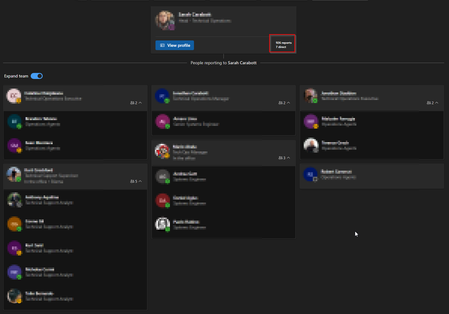
Hi, I have a weird issue, We have a user that has gone crazy on Org Explorer. Basically this person is showing that she has 926 Reports, and 7 Direct. Our company only has 120 Users. Also a every couple of seconds this users Reports keeps increasing :s I have checked on Exchange, this user has only 1 Manager and 7 Direct, same data is also showing on Entra. Anyone have a clue ?337Views0likes1CommentCan't change PasswordExpirationPolicy of all users with Update-MgUser
Hello, Ive got into a problem where we disabled Password expiration in the GUI but some account keep having it enabled when you look with Powershell. Microsoft provides a guide where they explain hot to set all users policy to never expire, sadly it doesn't work, I've tried it in several Tenants already. Here is the link to the guide: https://learn.microsoft.com/en-us/microsoft-365/admin/add-users/set-password-to-never-expire?view=o365-worldwide The command: Get-MGuser -All | Update-MgUser -PasswordPolicies DisablePasswordExpiration The error when the command is used: Update-MgUser_UpdateViaIdentityExpanded: The pipeline has been stopped. Exception: InputObject has null value for InputObject.UserId I know that you should set a UserID as a scope for it to work, but this isn't possible as far as I know on update-mguser. Please help me find a solution to update everyone's PasswordExpirationPolicy to never expire. I was thinking about creating a script that goes through every userid and performs the action, but my knowledge isn't as advanced to create it.Solved1.2KViews0likes1Comment
Where's my display name?!
Hey everyone, I just set up my entire team with an Outlook account. Each person has their own display name (First, Last) and other personal information attached via the 'Identity' tab in the admin center. My issue is that when a team member sends an email it arrives the in the recipients inbox as 'email address removed for privacy reasons' instead of the display name of 'Joe Montana.' How and what do I change to ensure the recipient of the email sees the name of the sender rather than their whole email address. It's affecting our deliverability because it looks spammy. Any help would be appreciated!737Views0likes1Comment