updates
769 TopicsSecurity Review for Microsoft Edge version 144
We have reviewed the new settings in Microsoft Edge version 144 and determined that there are no additional security settings that require enforcement. The Microsoft Edge version 139 security baseline continues to be our recommended configuration which can be downloaded from the Microsoft Security Compliance Toolkit. Microsoft Edge version 144 introduced 2 new Computer and User settings; we have included a spreadsheet listing the new settings to make it easier for you to find. As a friendly reminder, all available settings for Microsoft Edge are documented here, and all available settings for Microsoft Edge Update are documented here. Please continue to give us feedback through the Security Baselines Discussion site or this post.
Introducing Administration Client Support for the Azure Service Bus Emulator
We’re excited to announce administration client support for the Azure Service Bus emulator, extending the emulator beyond messaging operations to include management capabilities such as creating, updating, and deleting entities locally. Azure Service Bus is a fully managed enterprise message broker that supports reliable messaging through queues and publish‑subscribe topics. Since the introduction of the local emulator, developers have been able to develop and test message flows locally. With this update, the emulator now supports a broader set of workflows that depend on management operations as part of application startup or deployment. Why Administration Client support? Until now, the Service Bus emulator supported declarative entity configuration through a configuration file, allowing developers to define entities before starting the emulator. While this worked well for static setups, it limited workflows that require dynamic, runtime entity creation or management. Administration Client support unlocks on‑the‑fly entity creation and management, enabling developers to create, update, or delete entities while the emulator is running. This removes the need to restart the emulator for common management operations and brings the local development experience closer to real‑world Azure Service Bus usage. How it works By default, the emulator uses port 5300 for management operations. When performing management tasks with the Service Bus Administration Client, be sure to add the port number to the emulator connection string. Declarative configuration using the emulator’s configuration file remains supported and continues to serve as the source of truth during emulator initialization. Any configuration defined in the file is reapplied when the emulator is initialized and overrides entities created through the Administration Client, making it easy to reset or standardize local environments. For the Service Bus emulator, management operations using the Service Bus Administration Client are natively supported in .NET. Language‑specific reference samples are available to help you get started. Getting started The Azure Service Bus emulator is available as a Docker image and runs on Windows, macOS, and Linux. You can interact with the emulator using the latest Service Bus client SDKs for messaging operations, and use the Service Bus Administration Client to manage entities locally during development and testing. To explore administration scenarios, including creating and deleting queues or topics, refer to the Service Bus emulator reference samples. For more details about the emulator and supported features, visit aka.ms/servicebusemulator Share your feedback We appreciate your feedback as we continue to improve the Service Bus emulator. Please share issues, suggestions, or feature requests through the GitHub repository to help us refine the local development experience. Happy building—and may all your local tests pass! 😊136Views0likes0Comments
Introducing the Azure Maps Geocode Autocomplete API
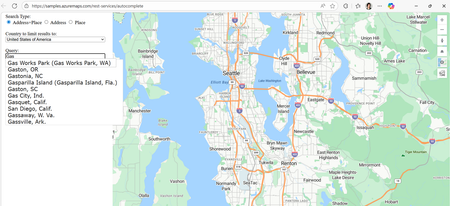
We’re thrilled to unveil the public preview of Azure Maps Geocode Autocomplete API, a powerful REST service designed to modernize and elevate autocomplete capabilities across Microsoft’s mapping platforms. If you’ve ever started typing an address into a search bar and immediately seen a list of relevant suggestions—whether it’s for a landmark, or your own home—you’ve already experienced the convenience of autocomplete. What’s less obvious is just how complex it is to deliver those suggestions quickly, accurately, and in a format that modern applications can use. That’s exactly the challenge this new API is designed to solve. Why Autocomplete Matters More Than Ever The Azure Maps Geocode Autocomplete API is the natural successor to the Bing Maps Autosuggest REST API, designed to meet the growing demand for intelligent, real-time location suggestions across a wide range of applications. It’s an ideal solution for developers who need reliable and scalable autocomplete functionality—whether for small business websites or large-scale enterprise systems. Key use cases include: Store locators: When a customer starts typing “New Yo…” into store locator, autocomplete instantly suggests “New York, N.Y.” With just a click, the map centers on the right location—making it fast and effortless to find the nearest branch. Rideshare or dispatching platforms: A rideshare driver needs to pick up a passenger at “One Microsoft Way.” Instead of typing out the full address, the driver starts entering “One Micro…” and the app instantly offers the correct road segment in Redmond, Washington. Delivery services: A delivery app can limit suggestions to postal codes within a specific region, ensuring the addresses customers choose are deliverable and reducing the risk of failed shipments Any Web UIs requiring location input: From real estate search to form autofill, autocomplete enhances the user experience wherever accurate location entry is needed. What the API Can Do The Geocode Autocomplete API is designed to deliver fast, relevant, and structured suggestions as users type. Key capabilities include: Entity Suggestions: Supports both Place (e.g., administrative districts, populated places, landmarks, postal codes) and Address (e.g., roads, point addresses) entities. Ranking: Results can be ranked based on entity popularity, user location (coordinates), and bounding box (bbox). Structured Output: Returns suggestions with structured address formats, making integration seamless. Multilingual Support: Set up query language preferences via the Accept-Language parameter. Flexible Filtering: You can filter suggestions by specifying a country or region using countryRegion, or by targeting a specific entity subtype using resultType. This allows you to extract entities with precise categorization—for example, you can filter results to return only postal codes to match the needs of a location-based selection input in your web application. How It Works The Geocode Autocomplete API is accessed via the following endpoint: https://atlas.microsoft.com/geocode:autocomplete?api-version=2025-06-01-preview This endpoint provides autocomplete-style suggestions for addresses and places. With just a few parameters, like your Azure Maps subscription key, a query string, and optionally user coordinates or a bounding box, you can start returning structured suggestions instantly. Developers can further issue geocode service with the selected/ideal entity as query to locate the entity on map, which is a common scenario for producing interactive mapping experiences. Let’s look at below examples: Example 1: Place Entity Autocomplete GET https://atlas.microsoft.com/geocode:autocomplete?api-version=2025-06-01-preview &subscription-key={YourAzureMapsKey} &coordinates={coordinates} &query=new yo &top=3 A user starts typing “new yo.” The API quickly returns results like “New York City” and “New York State,” each complete with structured metadata you can plug directly into your app. { "type": "FeatureCollection", "features": [ { "type": "Feature", "properties": { "typeGroup": "Place", "type": "PopulatedPlace", "geometry": null, "address": { "locality": "New York", "adminDistricts": [ { "name": "New York", "shortName": "N.Y." } ], "countryRegions": { "ISO": "US", "name": "United States" }, "formattedAddress": "New York, N.Y." } } }, { "type": "Feature", "properties": { "typeGroup": "Place", "type": "AdminDivision1", "geometry": null, "address": { "locality": "", "adminDistricts": [ { "name": "New York", "shortName": "N.Y." } ], "countryRegions": { "ISO": "US", "name": "United States" }, "formattedAddress": "New York" } } }, { "type": "Feature", "properties": { "typeGroup": "Place", "type": "AdminDivision2", "geometry": null, "address": { "locality": "", "adminDistricts": [ { "name": "New York", "shortName": "N.Y." }, { "name": "New York County" } ], "countryRegions": { "ISO": "US", "name": "United States" }, "formattedAddress": "New York County" } } } ] } Example 2: Address Entity Autocomplete GET https://atlas.microsoft.com/geocode:autocomplete?api-version=2025-06-01-preview &subscription-key={YourAzureMapsKey} &bbox={bbox} &query=One Micro &top=3 &countryRegion=US A query for “One Micro” scoped to the U.S. yields “NE One Microsoft Way, Redmond, WA 98052, United States.” That’s a complete, structured address ready to be mapped, dispatched, or stored. { "type": "FeatureCollection", "features": [ { "type": "Feature", "properties": { "typeGroup": "Address", "type": "RoadBlock", "geometry": null, "address": { "locality": "Redmond", "adminDistricts": [ { "name": "Washington", "shortName": "WA" }, { "name": "King County" } ], "countryRegions": { "ISO": "US", "name": "United States" }, "postalCode": "98052", "streetName": "NE One Microsoft Way", "addressLine": "", "formattedAddress": "NE One Microsoft Way, Redmond, WA 98052, United States" } } } ] } Example 3: Integration with Web Application Below sample shows user enter query and autocomplete service provide a series of suggestions based on user query and location. Pricing and Billing The Geocode Autocomplete API uses the same metering model as the Azure Maps Search service. For billing purposes, every 10 Geocode Autocomplete API requests are counted as one billable transaction. This approach keeps usage and costs consistent with what developers are already familiar with in Azure Maps. Ready to Build Smarter Location Experiences? Whether you're powering a store locator, enhancing address entry, or building a dynamic dispatch system, the new Geocode Autocomplete API gives you the precision, flexibility, and performance needed to deliver seamless location intelligence. With real-world use cases already proving its value, now is the perfect time to integrate this service into your applications and unlock richer, more interactive mapping experiences. Let’s build what’s next—faster, smarter, and more intuitive. Resources to Get Started Geocode Autocomplete REST API Documentation Geocode Autocomplete Samples Migrate from Bing Maps to Azure Maps How to use Azure Maps APIs826Views1like0CommentsSecure Unique Default Hostnames Now GA for Functions and Logic Apps
We are pleased to announce that Secure Unique Default Hostnames are now generally available (GA) for Azure Functions and Logic Apps (Standard). This expands the security model previously available for Web Apps to the entire App Service ecosystem and provides customers with stronger, more secure, and standardized hostname behavior across all workloads. Why This Feature Matters Historically, App Service resources have used default hostname format such as: <SiteName>.azurewebsites.net While straightforward, this pattern introduced potential security risks, particularly in scenarios where DNS records were left behind after deleting a resource. In those situations, a different user could create a new resource with the same name and unintentionally receive traffic or bindings associated with the old DNS configuration, creating opportunities for issues such as subdomain takeover. Secure Unique Default Hostnames address this by assigning a unique, randomized, region‑scoped hostname to each resource, for example: <SiteName>-<Hash>.<Region>.azurewebsites.net This change ensures that: No other customer can recreate the same default hostname. Apps inherently avoid risks associated with dangling DNS entries. Customers gain a more secure, reliable baseline behavior across App Service. Adopting this model now helps organizations prepare for the long‑term direction of the platform while improving security posture today. What’s New: GA Support for Functions and Logic Apps With this release, both Azure Functions and Logic Apps (Standard) fully support the Secure Unique Default Hostname capability. This brings these services in line with Web Apps and ensures customers across all App Service workloads benefit from the same secure and consistent default hostname model. Azure CLI Support The Azure CLI for Web Apps and Function Apps now includes support for the “--domain-name-scope” parameter. This allows customers to explicitly specify the scope used when generating a unique default hostname during resource creation. Examples: az webapp create --domain-name-scope {NoReuse, ResourceGroupReuse, SubscriptionReuse, TenantReuse} az functionapp create --domain-name-scope {NoReuse, ResourceGroupReuse, SubscriptionReuse, TenantReuse} Including this parameter ensures that deployments consistently use the intended hostname scope and helps teams prepare their automation and provisioning workflows for the secure unique default hostname model. Why Customers Should Adopt This Now While existing resources will continue to function normally, customers are strongly encouraged to adopt Secure Unique Default Hostnames for all new deployments. Early adoption provides several important benefits: A significantly stronger security posture. Protection against dangling DNS and subdomain takeover scenarios. Consistent default hostname behavior as the platform evolves. Alignment with recommended deployment practices and modern DNS hygiene. This feature represents the current best practice for hostname management on App Service and adopting it now helps ensure that new deployments follow the most secure and consistent model available. Recommended Next Steps Enable Secure Unique Default Hostnames for all new Web Apps, Function Apps, and Logic Apps. Update automation and CLI scripts to include the --domain-name-scope parameter when creating new resources. Begin updating internal documentation and operational processes to reflect the new hostname pattern. Additional Resources For readers who want to explore the technical background and earlier announcements in more detail, the following articles offer deeper coverage of unique default hostnames: Public Preview: Creating Web App with a Unique Default Hostname This article introduces the foundational concepts behind unique default hostnames. It explains why the feature was created, how the hostname format works, and provides examples and guidance for enabling the feature when creating new resources. Secure Unique Default Hostnames: GA on App Service Web Apps and Public Preview on Functions This article provides the initial GA announcement for Web Apps and early preview details for Functions. It covers the security benefits, recommended usage patterns, and guidance on how to handle existing resources that were created without unique default hostnames. Conclusion Secure Unique Default Hostnames now provide a more secure and consistent default hostname model across Web Apps, Function Apps, and Logic Apps. This enhancement reduces DNS‑related risks and strengthens application security, and organizations are encouraged to adopt this feature as the standard for new deployments.220Views0likes0CommentsAnnouncing new hybrid deployment options for Azure Virtual Desktop
Today, we’re excited to announce the limited preview of Azure Virtual Desktop for hybrid environments, a new platform for bringing the power of cloud-native desktop virtualization to on-premises infrastructure.19KViews10likes30CommentsAnnouncing Azure CycleCloud Workspace for Slurm: Version 2025.12.01 Release
The Azure CycleCloud Workspace for Slurm 2025.12.01 release introduces major upgrades that strengthen performance, monitoring, authentication, and platform flexibility for HPC environments. This update integrates Prometheus self‑agent monitoring and Azure Managed Grafana, giving teams real‑time visibility into node metrics, Slurm jobs, and cluster health through ready‑to‑use dashboards. The release also adds Entra ID Single Sign‑On (SSO) to streamline secure access across CycleCloud and Open OnDemand. With centralized identity management and support for MFA, organizations can simplify user onboarding while improving security. Additionally, the update expands platform support with ARM64 compute nodes and compatibility for Ubuntu 24.04 and AlmaLinux 9, enabling more flexible and efficient HPC cluster deployments. Overall, this version focuses on improved observability, stronger security, and broader infrastructure options for technical and scientific HPC teams.Black Forest Labs FLUX.2 Visual Intelligence for Enterprise Creative now on Microsoft Foundry
Black Forest Labs’ (BFL) FLUX.2 is now available on Microsoft Foundry. Building on FLUX1.1 [pro] and FLUX.1 Kontext [pro], we’re excited to introduce FLUX.2 [pro] which continues to push the frontier for visual intelligence. FLUX.2 [pro] delivers state-of-the-art quality with pre-optimized settings, matching the best closed models for prompt adherence and visual fidelity while generating faster at lower cost. Prompt: "Cinematic film still of a woman walking alone through a narrow Madrid street at night, warm street lamps, cool blue shadows, light rain reflecting on cobblestones, moody and atmospheric, shallow depth of field, natural skin texture, subtle film grain and introspective mood" This prompt shines because it taps into FLUX.2 [pro]'s cinematic‑lighting engine, letting the model fuse warm street‑lamp glow and cool shadows into a visually striking, film‑grade composition. What’s game-changing about FLUX.2 [pro]? FLUX.2 is designed for real-world creative workflows where consistency, accuracy, and iteration speed determine whether AI generation can replace traditional production pipelines. The model understands lighting, perspective, materials, and spatial relationships. It maintains characters and products consistent across up to 10 reference images simultaneously. It adheres to brand constraints like exact hex colors and legible text. The result: production-ready assets with fewer touchups and stronger brand fidelity. What’s New: Production‑grade quality up to 4MP: High‑fidelity, coherent scenes with realistic lighting, spatial logic, and fine detail suitable for product photography and commercial use cases. Multi‑reference consistency: Reference up to 10 images simultaneously with the best character, product, and style consistency available today. Generate dozens of brand-compliant assets where identity stays perfectly aligned shot to shot. Brand‑accurate results: Exact hex‑color matching, reliable typography, and structured controls (JSON, pose guidance) mean fewer manual fixes and stronger brand compliance. Strong prompt fidelity for complex directions: Improved adherence to complex, structured instructions including multi-part prompts, compositional constraints, and JSON-based controls. 32K token context supports long, detailed workflows with exact positioning specifications, physics-aware lighting, and precise compositional requirements in a single prompt. Optimized inference: FLUX.2 [pro] delivers state-of-the-art quality with pre-optimized inference settings, generating faster at lower cost than competing closed models. FLUX.2 transforms creative production economics by enabling workflows that weren't possible with earlier systems. Teams ship complete campaigns in days instead of weeks, with fewer manual touchups and stronger brand fidelity at scale. This performance stems from FLUX.2's unified architecture, which combines generation and editing in a single latent flow matching model. How it Works FLUX.2 combines image generation and editing in a single latent flow matching architecture, coupling a Mistral‑3 24B vision‑language model (VLM) with a rectified flow transformer. The VLM brings real‑world knowledge and contextual understanding, while the flow transformer models spatial relationships, material properties, and compositional logic that earlier architectures struggled to render. FLUX.2’s architecture unifies visual generation and editing, fuses language‑grounded understanding with flow‑based spatial modeling, and delivers production‑ready, brand‑safe images with predictable control especially when you need consistent identity, exact colors, and legible typography at high resolution. Technical details can be found in the FLUX.2 VAE blog post. Top enterprise scenarios & patterns to try with FLUX.2 [pro] The addition of FLUX.2 [pro] is the next step in the evolution for delivering faster, richer, and more controllable generation unlocking a new wave of creative potential for enterprises. Bring FLUX.2 [pro] into your workflow and transform your creative pipeline from concept to production by trying out these patterns: Enterprise scenarios Patterns to try E‑commerce hero shots Start with a small set of references (product front, material/texture, logo). Prompt for a studio hero shot on a white seamless background, three‑quarter view, softbox key + subtle rim light. Include exact hex for brand accents and specify logo placement. Output at 4MP. Product variants at scale Reuse the hero references; ask for specific colorway, angle, and background variants (e.g., “Create {COLOR} variant, {ANGLE} view, {BG} background”). Keep brand hex and logo position constant across variants. Campaign consistency (character/product identity) Provide 5–10 reference images for the character/product (faces, outfits, mood boards). Request the same identity across scenes with consistent lighting/style (e.g., cinematic warm daylight) and defined environments (e.g., urban rooftop). Marketing templates & localization Define a template (e.g., 3‑column grid: left image, right text). Set headline/body sizes (e.g., 24pt/14pt), contrast ≥ 4.5:1, and brand font. Swap localized copy per locale while keeping layout and spacing consistent. Best practices to get to production readiness with Microsoft Foundry FLUX.2 [pro] brings state-of-the-art image quality to your fingertips. In Microsoft Foundry, you can turn those capabilities into predictable, governed outcomes by standardizing templates, managing references, enforcing brand rules, and controlling spend. These practices below leverage FLUX.2 [pro]’s visual intelligence and turn them into repeatable recipes, auditable artifacts, and cost‑controlled processes within a governed Foundry pipeline. Best Practice What to do Foundry tip Approved templates Create 3–5 templates (e.g., hero shot, variant gallery, packaging, social card) with sections for Composition (camera, lighting, environment), Brand (hex colors, logo placement), Typography (font, sizes, contrast), and Output (resolution, format). Store templates in Foundry as approved artifacts; version them and restrict edits via RBAC. Versioned reference sets Keep 3–10 references per subject (product: front/side/texture; talent: face/outfit/mood) and link them to templates. Save references in governed Foundry storage; reference IDs travel with the job metadata. Resolution staging Use a three‑stage plan: Concept (1–2MP) → Review (2–3MP) → Final (4MP). Leverage FLUX.1 [pro] and FLUX1.1 Kontext [pro] before the Final stage for fast iteration and cost control Enforce stage‑based quotas and cap max resolution per job; require approval to move to 4MP. Automated QA & approvals Run post‑generation checks for color match, text legibility, and safe‑area compliance; gate final renders behind a review step. Use Foundry workflows to require sign‑off at the Review stage before Final stage. Telemetry & feedback Track latency, success rate, usage, and cost per render; collect reviewer notes and refine templates. Dashboards in Foundry: monitor job health, cost, and template performance. Foundry Models continues to grow with cutting-edge additions to meet every enterprise need—including models from Black Forest Labs, OpenAI, and more. From models like GPT‑image‑1, FLUX.2 [pro], and Sora 2, Microsoft Foundry has become the place where creators push the boundaries of what’s possible. Watch how Foundry transforms creative workflows with this demo: Customer Stories As seen at Ignite 2025, real‑world customers like Sinyi Realty have already demonstrated the efficiency of Black Forest Lab’s models on Microsoft Foundry by choosing FLUX.1 Kontext [pro] for its superior performance and selective editing. For their new 'Clear All' feature, they preferred a model that preserves the original room structure and simply removes clutter, rather than generating a new space from scratch, saving time and money. Read the story to learn more. “We wanted to stay in the same workspace rather than having to maintain different platforms,” explains TeWei Hsieh, who works in data engineering and data architecture. “By keeping FLUX Kontext model in Foundry, our data scientists and data engineers can work in the same environment.” As customers like Sinyi Realty have already shown, BFL FLUX models raise the bar for speed, precision, and operational efficiency. With FLUX.2 now on Microsoft Foundry, organizations can bring that same competitive edge directly into their own production pipelines. FLUX.2 [pro] Pricing Foundry Models are fully hosted and managed on Azure. FLUX.2 [pro] is available through pay-as-you-go and on Global Standard deployment type with the following pricing: Generated image: The first generated megapixel (MP) is charged $0.03. Each subsequent megapixel is charged $0.015. Reference image(s): We charge $0.015 for each megapixel. Important Notes: For pricing, resolution is always rounded up to the next megapixel, separately for each reference image and for the generated image. 1 megapixel is counted as 1024x1024 pixels For multiple reference images, each reference image is counted as 1 megapixel Images exceeding 4 megapixels are resized to 4 megapixels Reference the Foundry Models pricing page for pricing. Build Trustworthy AI Solutions Black Forest Labs models in Foundry Models are delivered under the Microsoft Product Terms, giving you enterprise-grade security and compliance out of the box. Each FLUX endpoint offers Content Safety controls and guardrails. Runtime protections include built-in content-safety filters, role-based access control, virtual-network isolation, and automatic Azure Monitor logging. Governance signals stream directly into Azure Policy, Purview, and Microsoft Sentinel, giving security and compliance teams real-time visibility. Together, Microsoft's capabilities let you create with more confidence, knowing that privacy, security, and safety are woven into every Black Forest Labs deployment from day one. Getting Started with FLUX.2 in Microsoft Foundry If you don’t have an Azure subscription, you can sign up for an Azure account here. Search for the model name in the model catalog in Foundry under “Build.” FLUX.2-pro Open the model card in the model catalog. Click on deploy to obtain the inference API and key. View your deployment under Build > Models. You should land on the deployment page that shows you the API and key in less than a minute. You can try out your prompts in the playground. You can use the API and key with various clients. Learn More ▶️ RSVP for the next Model Monday LIVE on YouTube or On-Demand 👩💻 Explore FLUX.2 Documentation on Microsoft Learn 👋 Continue the conversation on Discord1.3KViews0likes2Comments
Upcoming Changes to Azure Relay IP Addresses and DNS Support
Azure Relay is an integral part of modern hybrid cloud architectures, enabling seamless connectivity between on-premises and cloud resources. To ensure continued reliability and security, Microsoft is implementing important updates to the IP addresses and DNS naming conventions used by Azure Relay services. What’s Changing? As detailed in the changes to IP-addresses for Azure Relay and Azure Relay WCF and Hybrid Connections DNS Support reference blogs, customers should be aware of two primary changes: IP and Name Transitions: The IP addresses and corresponding DNS names for Azure Relay endpoints will change during the transition period. For example, g0-prod-bn-vaz0001-sb.servicebus.windows.net can change to gv0-prod-bn-vaz0001-sb.servicebus.windows.net DNS Support Enhancements: Improved DNS support will enhance reliability and future-proof connectivity for both WCF Relay and Hybrid Connections users. Recommended Actions for Customers To minimize disruption, it is crucial for users to update their network configurations and firewall rules to accommodate these new IP addresses and DNS names as soon as possible. These will be made available using the below PS1 script - Update Allow Lists: Ensure that your firewalls and network security groups permit traffic to the new IP ranges and DNS endpoints as specified in the official documentation. Monitor Transition Phases: Be prepared for two rounds of changes. Apply updates promptly during both the initial and final transitions. Automating Namespace Information Retrieval To assist with this transition, Microsoft has updated the PowerShell script for retrieving namespace information, which now reflects the planned changes. You can access the latest script here: GetNamespaceInfo.ps1 (azure-relay-dotnet/tools) (Instructions on how to use the ps1 script is available in the README) This script allows you to efficiently check the current configuration of your Azure Relay namespaces and validate connectivity against the updated endpoints. Sample output PS D:\AzureVMSSEssentials\Tools\GetNamespaceInfoWithIpRanges> .\GetNamespaceInfo.ps1 <your-relay-namespace>.servicebus.windows.net Namespace : <your-relay-namespace>.servicebus.windows.net Deployment : PROD-BN-VAZ0001 ClusterDNS : ns-prod-bn-vaz0001.eastus2.cloudapp.azure.com ClusterRegion : eastus2 ClusterVIP : 40.84.75.3 GatewayDnsFormat : g{0}-bn-vaz0001-sb.servicebus.windows.net or gv{0}-bn-vaz0001-sb.servicebus.windows.net Notes : Entries with 'FUTURE' IPAddress may be added at a later time as needed Current IP Ranges Name IPAddress ---- --------- g0-bn-vaz0001-sb.servicebus.windows.net 20.36.144.8 g1-bn-vaz0001-sb.servicebus.windows.net 20.36.144.1 g2-bn-vaz0001-sb.servicebus.windows.net 20.36.144.2 g3-bn-vaz0001-sb.servicebus.windows.net 20.36.144.11 g4-bn-vaz0001-sb.servicebus.windows.net 20.36.144.3 g5-bn-vaz0001-sb.servicebus.windows.net FUTURE g6-bn-vaz0001-sb.servicebus.windows.net FUTURE ... g98-bn-vaz0001-sb.servicebus.windows.net FUTURE g99-bn-vaz0001-sb.servicebus.windows.net FUTURE Future IP Ranges for Region:eastus2 addressPrefixes --------------- 135.18.130.0/23 135.18.132.0/26 135.18.132.64/27312Views1like1Comment