updates
26 TopicsYour target end-state: Azure landing zones conceptual architecture
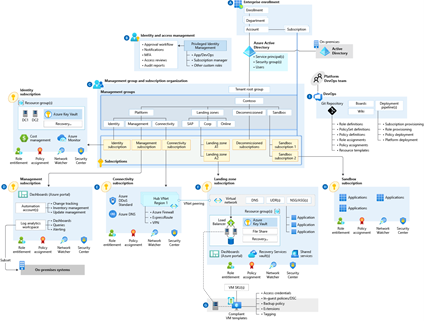
By: DomAllen, Senior Program Manager and Jeff_Mitchell_MSFT, Principal Cloud Solution Architect Customers today recognize the cloud enables digital transformation for the enterprise, while consistently meeting unique requirements for business growth. Cloud services are deployed at hyperscale, allowing you to consistently manage and optimize governance and operations management controls beyond on-premises environments—extending unified management across any infrastructure to multicloud and the edge. To help you prepare for your cloud adoption journey, we are excited to announce the availability of Azure landing zone conceptual architecture—your environment's strategic design path and target technical state. It represents scale and maturity decisions based on experiences and feedback from customers who have successfully adopted Azure. To realize the value of the agility the cloud can provide, we recommend that environments be implemented to enable consistent scale—while meeting your business needs by creating consistent ways to govern and manage resources, not just by type, but also by organization, cost, and security. Besides designing an architectural platform, you must implement and maintain the platform and design a systematic architectural and technical delivery approach to building patterns for success on the platform. We recommend developing a continuous engineering loop to ensure that environment lifecycles align with the Azure roadmap. Your process should validate new services in the context of enterprise controls—and it should deliver its learnings back to the platform, inputs for future iterations. Azure landing zone conceptual architecture Through a landing zone accelerator approach and a reference implementation, you enable the effective construction and operationalization of landing zones on Azure—at scale, aligned with the Azure roadmap and Microsoft Cloud Adoption Framework for Azure. Landing zone accelerator architecture represents the strategic design path and target technical state of your Azure environment. The architecture will continue evolving with the Azure platform, ultimately shaped by design decisions that are aligned with the architectural implementation best practices to safeguard your Azure journey. Not all organizations adopt Azure in the same way. Enterprise-scale landing zone architectures, (as illustrated in Figure 1 below) might vary between customers, depending on enterprise requirements. Varied design considerations and recommendations might yield different trade-offs, depending on your organization's cloud adoption path. Variation along your path is expected—but if you follow core recommendations, the target architecture that results will set you on a path to sustainable scale on Azure. Figure 1 You can download PDF files of the Azure landing zone conceptual architecture diagrams with: Virtual WAN (PDF) network topology Traditional Azure network topology based on hub-and-spoke (PDF) architecture or download a Visio diagram (VSDX) file with a diagram of both Virtual WAN and hub-and-spoke architectures. Getting your environment ready, faster: Azure landing zone accelerator Azure landing zone accelerator enables your organization to make templatized landing zone deployments, with baked-in, repeatable best practices for governance, security, and compliance and it comes with a set of design principles for managing the platform at scale. These principles serve as a compass for subsequent design decisions across critical technical domains. Deploy the Azure landing zone accelerator (see Figure 2, below) directly within the Azure portal to speed up your implementation—allowing you to customize environment configurations for compliance, security, and operations management controls. GitHub integration will help your team to set up CI/CD pipelines—if your cloud operating model includes Infrastructure as Code (IaC) DevOps practices for infrastructure management. Figure 2 While your organization may have already adopted third party automation toolchain products, you may need to start with a smaller implementation of the Azure landing zone conceptual architecture. Explore more open source and partner landing zone implementation options. Start, align, and enhance your landing zone Our conversations with customers and partners help us recognize that organizations may be at different stages along their cloud journey when reviewing landing zone implementation options. The deployment recommendations that advance your specific, strategic design path and target technical state will match the stage you're in along your cloud path. Get started with the best next steps for your own cloud adoption path, and review your journey to the target architecture. Some organizations with a conceptual architecture matching the operating model and resource structure they plan to use can launch the ready-to-deploy experience with the Azure landing zone accelerator. Picture Azure landing zone guidance as a large highway that leads to the cloud (your target architecture). You're whizzing down this long and spacious-laned highway, and you see on-ramps and exits flashing by. Your highway will have several onramps feeding into its large asphalt path towards cloud adoption. Three points reflect the most common customer journeys—customer experiences centering on three landing zone implementation stages: Start, Align, and Enhance. Start is for those beginning their cloud adoption journey—who wish to develop a new cloud environment, without dependencies—where no production workloads are deployed. Perhaps, to begin with—your organization might have a blank sheet of paper, and you're looking for the best route to get to your target end-state— the target technical state and strategic design path that guides the very beginning of your cloud adoption—always in alignment with the conceptual architecture. Launch the ready-to-deploy experience with the Azure landing zone accelerator, explore various other design area topics that help you determine where you need to customize, and explore other implementation options within Azure landing zones. Align is for those who have already implemented services in Azure. Perhaps your organization is looking for ways to change your environment to more closely resemble the conceptual architecture. We see a growing trend of organizations that might undergo requirements to introduce controls or design patterns because of a new workload being deployed. This would require specific environment configurations able to meet business or compliance requirements. We recognize cloud environments are never static implementations. As your unique business requirements change (or your team's capabilities expand), configurations of landing zones may need to iterate. For example, as your organization begins its cloud journey, it may choose to run with a baseline security configuration (made necessary by business requirements) to run a workload in the cloud. This may expand over time to require more sophisticated security services like Azure Sentinel to address more detailed security requirements. Enhance represents the cusp of the Ready methodological approach and the continuous deployment of consistent, unified security, governance, and operational management controls supported by the methodologies of Secure, Manage, and Govern within the Microsoft Cloud Adoption Framework for Azure. We’re excited about new updates to our Azure landing zone guidance in the Cloud Adoption Framework—about its potential to prepare for, and unlock, your successful and balanced digital transformation. Some organizations with conceptual architectures matching the operating model and resource structure they plan to use will launch the ready-to-deploy Azure landing zone accelerator experience—with baked in governance, compliance, and security. Other organizations, already in line with best practices—looking to add additional controls or features, may forge ahead and enhance guidance for management, governance, or security. These technical considerations are part of maturing key ongoing processes for cloud environments, like management, governance, and security. Learn more about Azure landing zone conceptual architecture—or get started deploying the Azure landing zone accelerator (see Figure 2, above) directly within the Azure portal to accelerate your implementation, and customize environment configurations for compliance, security, and operations management controls. Or, simply benefit from deployments providing a full implementation of the conceptual architecture, with ready-to-deploy configurations for key components such as management groups and policies. Check out our Channel 9 episodes on Azure landing zones today, on IT Ops Talk and the Azure Enablement Show!Azure VMware Solution - March 2023 - What's New Update
We are thrilled to announce the March 2023 release for Azure VMware Solution. A variety of new and highly anticipated features such as SQL Azure Hybrid Benefit is now GA, AVS Gov is in Preview and Customer Managed Keys are now available. Read on to explore more.VMware Site Recovery Manager is now Available for Azure VMware Solution
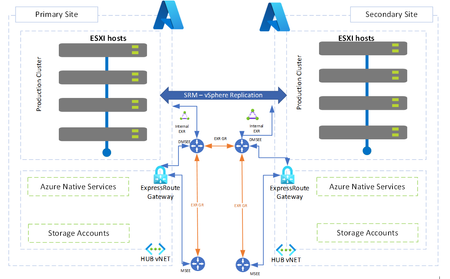
Azure VMware Solution (AVS) customers are now able to take advantage of VMware Site Recovery Manager (SRM) for disaster recovery scenarios including on-premise VMware to AVS, and Primary AVS to Secondary AVS private cloud environments.
Announcing new enhancements for Azure VMware Solution
Announcing new enhancements for Azure VMware Solution I’m writing to you today from VMware Explore in Las Vegas, where my team and I are excited to meet with customers and partners in person! Most organizations recognize that by running workloads in the cloud, they can achieve more resilience and security while setting themselves up for agility and innovation to meet any business challenge or opportunity. Azure VMware Solution allows customers to migrate to the cloud more quickly, leveraging existing skillsets and little need for refactoring. “We’ve become 100 percent based in Azure in three and a half years, gaining a modern technology footprint and performance improvements using Azure VMware Solution and a modern application stack.” — Doug Caldwell, Vice President of IT Infrastructure Home Trust Company “When we got these applications over and employees could see the ease of use and access and how we can scale it up and down, everyone started clamoring to get their application into Azure VMware Solution or Azure data.“ — Torri Martin: Senior Vice President and Chief Information Officer, Washington Metropolitan Area Transit Authority Check out what’s new in Azure VMware Solution Today I am excited to share some of the recent updates we’ve made to Azure VMware Solution. Azure VMware Solution is now in 30 regions. Since the launch of Azure VMware Solution three years ago, we’ve been working to support customers globally with geographic expansion and I am pleased to report that it is now available in 30 Azure regions, more than any other cloud provider. Check out the Azure products by region web page to find a region near you. Azure VMware Solution AV64 node size is coming in October 2023, with early access available now in limited regions. The AV64 node is built on Intel Xeon Platinum 8370C CPUs with a total of 64 physical cores, 1 TB of memory and 15.4 TB of total storage. AV64 can be used for extending existing Azure VMware Solution private clouds built on AV36, AV36P, or AV52 node sizes. Check with your sales representative for early access opportunities. Pure Cloud Block Store for Azure VMware Solution is now in public preview. Now customers can use Pure Cloud Block Store from Pure Storage to scale compute and storage independently for storage heavy workloads. With Pure Cloud Block Store, customers can right size their storage and achieve sizeable savings in the process. Learn more Azure Arc-enabled VMware vSphere has a new refresh for the public preview. Now customers can start their onboarding with Azure Arc-enabled VMware vSphere, install agents at-scale, and enable Azure management, observability, and security solutions, while benefitting from the existing lifecycle management capabilities. Azure Arc-enabled VMware vSphere VMs will now show up alongside other Azure Arc-enabled servers under ‘Machines’ view in the Azure portal Learn more VMware Cloud Director service for Azure VMware Solution is now available for enterprise. VMware Cloud Director service provides a multi-cloud control plane for managing multi-tenancy on infrastructure ranging from on-premises customer data centers, managed service provider facilities, and in the cloud. Learn more Stretched Clusters for Azure VMware Solution is now available and provides 99.99 percent uptime for mission critical applications that require the highest availability. In times of availability zone failure, your virtual machines (VMs) and applications automatically failover to an unaffected availability zone with no application impact. Learn more Azure VMware Solution Well-Architected Assessment Tool is now available. Based on the Microsoft Azure Well-Architected Framework, the assessment tool methodically checks how your workloads align with best practices for resiliency, security, efficiency, and cost optimization. Learn more Customer-Managed Keys for Azure VMware Solution is now available, supporting higher security for customers’ mission-critical workloads and providing control over your encrypted vSAN data on Azure VMware Solution. Learn more Azure VMware Solution in Azure Government is now available in Virginia and Arizona, with the FedRAMP HIGH accreditation pending JAB approval estimated in Q4 2023. Learn more VMware Cloud Universal now includes Azure VMware Solution. Learn more If you would like to stay up to date with the latest releases from Azure VMware Solution, please follow Azure updates. Learn more This week we are offering a special opportunity to take the Azure VMware Solution Cloud Skills Challenge. Compete in this free, self-paced, Microsoft learning path and advance your technical skills at the same time! Register for the Challenge. As always, you can visit the Azure VMware Solution website or documentation for more information. And if you are here at VMware Explore, stop by Microsoft booth #403 and say hello. We are excited to see you in person! VMware vSphere and Cloud Universals are registered trademarks of VMware, Inc. or its subsidiaries in the United States and other jurisdictions.Unified, at-scale discovery and assessment of SQL Servers with Azure Migrate
Leverage Azure Migrate to discover SQL Server deployments running in VMware, Microsoft Hyper-V, or Physical/ Bare-metal environments as well as IaaS services of public clouds such as AWS EC2, Azure VM, etc., and assess them for migration/ modernization to Azure SQL Managed Instance, SQL Server on Azure VM, and Azure SQL Database.