updates
16 Topics
Introducing the Azure Maps Geocode Autocomplete API
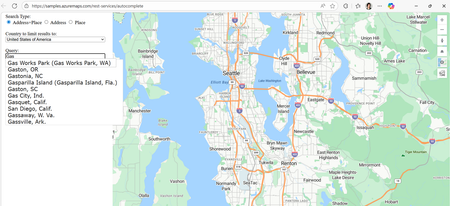
We’re thrilled to unveil the public preview of Azure Maps Geocode Autocomplete API, a powerful REST service designed to modernize and elevate autocomplete capabilities across Microsoft’s mapping platforms. If you’ve ever started typing an address into a search bar and immediately seen a list of relevant suggestions—whether it’s for a landmark, or your own home—you’ve already experienced the convenience of autocomplete. What’s less obvious is just how complex it is to deliver those suggestions quickly, accurately, and in a format that modern applications can use. That’s exactly the challenge this new API is designed to solve. Why Autocomplete Matters More Than Ever The Azure Maps Geocode Autocomplete API is the natural successor to the Bing Maps Autosuggest REST API, designed to meet the growing demand for intelligent, real-time location suggestions across a wide range of applications. It’s an ideal solution for developers who need reliable and scalable autocomplete functionality—whether for small business websites or large-scale enterprise systems. Key use cases include: Store locators: When a customer starts typing “New Yo…” into store locator, autocomplete instantly suggests “New York, N.Y.” With just a click, the map centers on the right location—making it fast and effortless to find the nearest branch. Rideshare or dispatching platforms: A rideshare driver needs to pick up a passenger at “One Microsoft Way.” Instead of typing out the full address, the driver starts entering “One Micro…” and the app instantly offers the correct road segment in Redmond, Washington. Delivery services: A delivery app can limit suggestions to postal codes within a specific region, ensuring the addresses customers choose are deliverable and reducing the risk of failed shipments Any Web UIs requiring location input: From real estate search to form autofill, autocomplete enhances the user experience wherever accurate location entry is needed. What the API Can Do The Geocode Autocomplete API is designed to deliver fast, relevant, and structured suggestions as users type. Key capabilities include: Entity Suggestions: Supports both Place (e.g., administrative districts, populated places, landmarks, postal codes) and Address (e.g., roads, point addresses) entities. Ranking: Results can be ranked based on entity popularity, user location (coordinates), and bounding box (bbox). Structured Output: Returns suggestions with structured address formats, making integration seamless. Multilingual Support: Set up query language preferences via the Accept-Language parameter. Flexible Filtering: You can filter suggestions by specifying a country or region using countryRegion, or by targeting a specific entity subtype using resultType. This allows you to extract entities with precise categorization—for example, you can filter results to return only postal codes to match the needs of a location-based selection input in your web application. How It Works The Geocode Autocomplete API is accessed via the following endpoint: https://atlas.microsoft.com/geocode:autocomplete?api-version=2025-06-01-preview This endpoint provides autocomplete-style suggestions for addresses and places. With just a few parameters, like your Azure Maps subscription key, a query string, and optionally user coordinates or a bounding box, you can start returning structured suggestions instantly. Developers can further issue geocode service with the selected/ideal entity as query to locate the entity on map, which is a common scenario for producing interactive mapping experiences. Let’s look at below examples: Example 1: Place Entity Autocomplete GET https://atlas.microsoft.com/geocode:autocomplete?api-version=2025-06-01-preview &subscription-key={YourAzureMapsKey} &coordinates={coordinates} &query=new yo &top=3 A user starts typing “new yo.” The API quickly returns results like “New York City” and “New York State,” each complete with structured metadata you can plug directly into your app. { "type": "FeatureCollection", "features": [ { "type": "Feature", "properties": { "typeGroup": "Place", "type": "PopulatedPlace", "geometry": null, "address": { "locality": "New York", "adminDistricts": [ { "name": "New York", "shortName": "N.Y." } ], "countryRegions": { "ISO": "US", "name": "United States" }, "formattedAddress": "New York, N.Y." } } }, { "type": "Feature", "properties": { "typeGroup": "Place", "type": "AdminDivision1", "geometry": null, "address": { "locality": "", "adminDistricts": [ { "name": "New York", "shortName": "N.Y." } ], "countryRegions": { "ISO": "US", "name": "United States" }, "formattedAddress": "New York" } } }, { "type": "Feature", "properties": { "typeGroup": "Place", "type": "AdminDivision2", "geometry": null, "address": { "locality": "", "adminDistricts": [ { "name": "New York", "shortName": "N.Y." }, { "name": "New York County" } ], "countryRegions": { "ISO": "US", "name": "United States" }, "formattedAddress": "New York County" } } } ] } Example 2: Address Entity Autocomplete GET https://atlas.microsoft.com/geocode:autocomplete?api-version=2025-06-01-preview &subscription-key={YourAzureMapsKey} &bbox={bbox} &query=One Micro &top=3 &countryRegion=US A query for “One Micro” scoped to the U.S. yields “NE One Microsoft Way, Redmond, WA 98052, United States.” That’s a complete, structured address ready to be mapped, dispatched, or stored. { "type": "FeatureCollection", "features": [ { "type": "Feature", "properties": { "typeGroup": "Address", "type": "RoadBlock", "geometry": null, "address": { "locality": "Redmond", "adminDistricts": [ { "name": "Washington", "shortName": "WA" }, { "name": "King County" } ], "countryRegions": { "ISO": "US", "name": "United States" }, "postalCode": "98052", "streetName": "NE One Microsoft Way", "addressLine": "", "formattedAddress": "NE One Microsoft Way, Redmond, WA 98052, United States" } } } ] } Example 3: Integration with Web Application Below sample shows user enter query and autocomplete service provide a series of suggestions based on user query and location. Pricing and Billing The Geocode Autocomplete API uses the same metering model as the Azure Maps Search service. For billing purposes, every 10 Geocode Autocomplete API requests are counted as one billable transaction. This approach keeps usage and costs consistent with what developers are already familiar with in Azure Maps. Ready to Build Smarter Location Experiences? Whether you're powering a store locator, enhancing address entry, or building a dynamic dispatch system, the new Geocode Autocomplete API gives you the precision, flexibility, and performance needed to deliver seamless location intelligence. With real-world use cases already proving its value, now is the perfect time to integrate this service into your applications and unlock richer, more interactive mapping experiences. Let’s build what’s next—faster, smarter, and more intuitive. Resources to Get Started Geocode Autocomplete REST API Documentation Geocode Autocomplete Samples Migrate from Bing Maps to Azure Maps How to use Azure Maps APIs4.1KViews1like1CommentAnnouncing the General Availability of the Azure Maps Geocode Autocomplete API
It was just last September that we were Introducing the Azure Maps Geocode Autocomplete API but now we’re excited to announce the general availability (GA) of the Azure Maps Geocode Autocomplete API, a production‑ready REST service that delivers fast, intelligent, and structured location suggestions. After a successful public preview, we have integrated your feedback and this API is now fully supported for mission‑critical workloads, providing a modern, scalable successor to the Bing Maps Autosuggest REST API and empowering developers to deliver high‑quality, responsive location experiences. Why This API Matters Today’s applications increasingly rely on smart, real‑time location suggestions, whether for store locators, delivery routing, rideshare dispatch, address entry, or dynamic search UIs. The Azure Maps Geocode Autocomplete API brings: Instant, relevant, typed‑ahead suggestions Granular result type filtering for Place or Address categories or even subtypes of Place category Structured, developer‑friendly outputs Support for multilingual experiences and localized ranking Proximity‑aware and popularity‑aware results Whether you are modernizing an existing solution or building something new, this API gives you precision, flexibility, and performance at scale. From Preview to GA: What’s New ✔ Stable GA API version The service is now available on the 2026‑01‑01 GA version, offering a reliable, long‑term contract for production workloads. ✔ Improved suggestion ranking and language handling This version introduces refined ranking logic and improved language handling, enabling more accurate, geo‑aware, and language‑appropriate suggestions across global markets. ✔ Updated documentation and samples The GA release includes new and refreshed REST API documentation, updated samples, and improved how-to-guide to help developers build complete geocoding workflows and migrate from Bing Maps more easily. What It Can Do The Geocode Autocomplete API is purpose‑built to deliver accurate, structured suggestions as users type. Core capabilities include: Entity suggestions: Places (e.g., administrative divisions, populated places, landmarks, postal codes) and Address (e.g., roads, point addresses) entities Structured output: Consistent address components for easy downstream integration Relevance‑based ranking: Popularity, proximity, and bounding‑box awareness Multilingual support: Honor language preferences via Accept-Language Flexible filtering: Target specific countries or entity types These capabilities help you create intuitive, high‑quality user experiences across global applications. How to Use It Use the GA version of Geocode Autocomplete with the following endpoint: https://atlas.microsoft.com/search/geocode:autocomplete?api-version=2026-01-01&query={query} Common optional parameters include: coordinates – Bias suggestions near the provided location bbox – Biases suggestions to entities that fall within the specified bounding box of the visible map area top – Limit the number of returned suggestions resultTypeGroups / resultTypes – Filter for Places or Addresses or its subtypes countryRegion – Restrict to specific country/Region A typical workflow: Call Autocomplete as the user types Use the selected suggestion with Azure Maps Geocoding service to retrieve coordinates and complete the interaction (e.g., map display, routing, address validation) Example: Autocomplete for Place Entity Query GET https://atlas.microsoft.com/search/geocode:autocomplete?api-version=2026-01-01 &subscription-key={YourAzureMapsKey} &coordinates={coordinates} &query=new yo &top=3 This request returns structured top 3 suggestions for the partial input “new yo,” helping users quickly find places like New York city or New York state based on user location. { "type": "FeatureCollection", "features": [ { "type": "Feature", "properties": { "typeGroup": "Place", "type": "PopulatedPlace", "geometry": null, "address": { "locality": "New York", "adminDistricts": [ { "name": "New York", "shortName": "N.Y." } ], "countryRegions": { "ISO": "US", "name": "United States" }, "formattedAddress": "New York, N.Y." } } }, { "type": "Feature", "properties": { "typeGroup": "Place", "type": "AdminDivision1", "geometry": null, "address": { "locality": "", "adminDistricts": [ { "name": "New York", "shortName": "N.Y." } ], "countryRegions": { "ISO": "US", "name": "United States" }, "formattedAddress": "New York" } } }, { "type": "Feature", "properties": { "typeGroup": "Place", "type": "AdminDivision2", "geometry": null, "address": { "locality": "", "adminDistricts": [ { "name": "New York", "shortName": "N.Y." }, { "name": "New York County" } ], "countryRegions": { "ISO": "US", "name": "United States" }, "formattedAddress": "New York County" } } } ] } Example: Autocomplete for an Address Entity Query GET https://atlas.microsoft.com/search/geocode:autocomplete?api-version=2026-01-01 &subscription-key={YourAzureMapsKey} &bbox={bbox} &query=One Micro &top=3 &countryRegion=US This request returns structured address suggestion for NE One Microsoft Way, categorized as an Address entity. { "type": "FeatureCollection", "features": [ { "type": "Feature", "properties": { "typeGroup": "Address", "type": "RoadBlock", "geometry": null, "address": { "locality": "Redmond", "adminDistricts": [ { "name": "Washington", "shortName": "WA" }, { "name": "King County" } ], "countryRegions": { "ISO": "US", "name": "United States" }, "postalCode": "98052", "streetName": "NE One Microsoft Way", "addressLine": "", "formattedAddress": "NE One Microsoft Way, Redmond, WA 98052, United States" } } } ] } Example: Integrate with Web Application Below sample shows user enter query and autocomplete service provide a series of suggestions based on user query and user location. Ready to Bring Autocomplete to Production? The Azure Maps Geocode Autocomplete API is now fully production‑ready, giving you the stability, performance, and flexibility needed to power fast, intuitive location‑driven experiences. Whether you're migrating from Bing Maps Autosuggest or enhancing your existing address or search workflows, the GA release makes it easier to deliver high‑quality suggestions at scale. If you're ready to upgrade your location experiences, now’s the perfect time to start. Explore the updated Azure Maps Autocomplete documentation, try the new endpoint, and let us know how it works for you. We’d love to hear your feedback. Let’s keep building great location intelligence experiences together. Resources to Get Started Geocode Autocomplete REST API Documentation How-to-Guide for Azure Maps Search Service Geocode Autocomplete Samples Migrate from Bing Maps to Azure Maps How to Use Azure Maps APIs831Views0likes0CommentsIntroducing the Data-Bound Reference Layer in Azure Maps Visual for Power BI
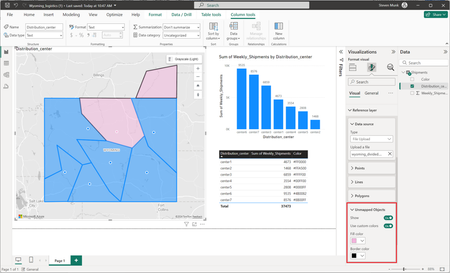
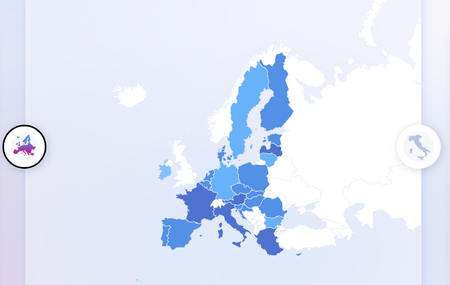
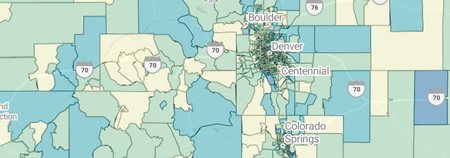
The Data-Bound Reference Layer in Azure Maps for Power BI elevates map-based reporting by allowing users to visually explore, understand, and act on their data. This feature enables new possibilities for data analysts, business leaders, and decision-makers reliant on spatial insights.2.8KViews1like8CommentsAzure Maps Visual in Power BI Now Supports Publish to Web
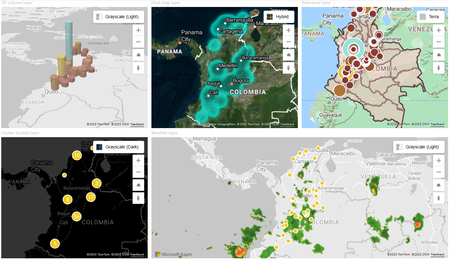
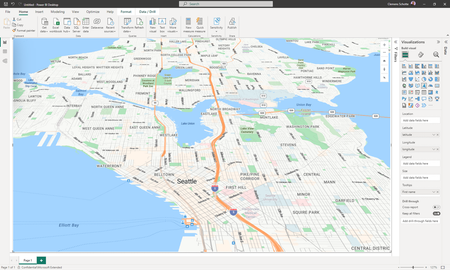
We’re excited to announce that the Azure Maps visual in Power BI now supports Publish to Web, making it easier than ever to share interactive geospatial insights with a wider audience. This update enables Power BI users to embed Azure Maps-powered visualizations in public websites, blogs, and other online platforms, unlocking new possibilities for data storytelling and geographic analysis. With this enhancement, users can now share interactive maps publicly, embedding Azure Maps visualizations in web pages without requiring viewers to have a Power BI license. This improvement allows for a more engaging way to present geospatial data, making it accessible to decision-makers and the public alike. By incorporating interactive maps into websites, users can bring geospatial insights to life, offering a dynamic way to explore trends, patterns, and location-based data. Using this feature is straightforward. First, create a Power BI report and add an Azure Maps visual, configuring it with your data. Then, enable Publish to Web by navigating to the “File” menu and selecting the appropriate option, which generates an embed code. Finally, copy and paste this code into your website, blog, or online document to make the visualization available to anyone. The Azure Maps visual in Power BI offers a range of powerful mapping capabilities. Users can customize map styles, selecting from road, satellite, grayscale, and other visual themes to fit their needs. The visual supports multiple layers, allowing for the integration of bubble layers, choropleth maps, and reference layers to enhance data analysis. Real-time data integration ensures that the maps stay up to date, while advanced geospatial data analysis capabilities, including geocoding, spatial operations, and clustering, provide deeper insights into location-based data. If you haven’t explored the Azure Maps visual in Power BI yet, now is a great time to get started. The addition of Publish to Web makes it easier than ever to share geospatial insights with a broader audience. Try it today and discover new ways to make your location-based data more accessible and impactful. For more information, check out the Azure Maps Visual in Power BI documentation or learn more about Publish to Web in Power BI.1KViews2likes0CommentsPower BI Azure Maps visual - reference layer & Power BI Embedded support
The latest update for the Azure Maps visual in Power BI introduces enhanced functionality. Now, the reference layer supports a broader range of formats including KML (Keyhole Markup Language), WKT (Well-Known Text), and SHP (Shapefile). Additionally, there's now support for Power BI Embedded and Data Residency.4.4KViews1like3Comments