updates
75 TopicsConnect Azure Functions to more services with managed connectors
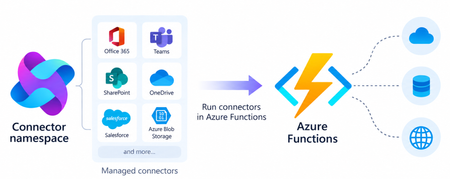
Azure Functions can already connect to many Azure services through triggers and bindings. With managed connectors, your functions can access about 1,700 connectors across services such as Microsoft 365, Microsoft Teams, Dataverse, SharePoint, OneDrive, and third-party systems. Connector triggers deliver events from these services to your function, while typed connector clients let your code take actions against them. You get this broader integration surface without writing the webhook registration code or managing the OAuth tokens required to connect to each service. Focus on your function's business logic and let Azure Connector Namespace handles the connection. Azure Functions integration with Connector Namespace is currently in public preview. It supports .NET isolated, Python, and Node.js. Review the managed connectors overview for current language, hosting plan, and regional availability. To demonstrate how connector triggers and actions work together, this article follows a .NET sample that automates RFP intake across SharePoint, Azure Content Understanding, and Teams. From an uploaded RFP to Teams notification Consider an organization that receives requests for proposals (RFPs) in a shared SharePoint document library. Someone must read each document, identify the requested capabilities, determine which subject-matter experts should respond, and notify the right team. The automated RFP intake sample turns that process into an event-driven workflow: A customer uploads an RFP to a SharePoint document library. A SharePoint connector trigger invokes an Azure Function when the file is created. The function uses a typed SharePoint connector client to retrieve the file contents. Azure Content Understanding extracts the document’s text and layout. The function applies deterministic rules to identify the customer, required capabilities, and recommended subject-matter experts. The function uses a typed Teams connector client to post the results as an Adaptive Card in a channel. Connector Namespace manages the SharePoint and Teams connections. The function controls file processing, document analysis, routing rules, error handling, and notification content How the sample works The .NET sample demonstrates both parts of the connector programming model: a connector trigger receives an event from SharePoint, and typed connector clients provided by the Connector SDKs to perform actions against SharePoint and Teams. The function starts when the SharePoint When a file is created trigger detects a new RFP. It declares the trigger using the ConnectorTrigger attribute and receives a typed payload containing the file’s properties: [Function("OnNewFile")] public async Task OnNewFile( [ConnectorTrigger] SharePointOnlineOnNewFileItemsTriggerPayload payload, CancellationToken cancellationToken) { // Process the newly uploaded file. } Because the trigger provides file properties rather than its contents, the function uses a typed SharePoint client to retrieve the document: byte[] response = await _sharePoint.GetFileContentAsync( Uri.EscapeDataString(siteAddress), fileIdentifier, cancellationToken: cancellationToken); byte[] document = SharePointFileContent.Decode(response); The SharePoint and Teams clients are registered through dependency injection. Each client uses the runtime URL of its Connector Namespace connection and authenticates with DefaultAzureCredential: services.AddSingleton( new SharePointOnlineClient( new Uri(sharePointRuntimeUrl), credential)); services.AddSingleton( new TeamsClient( new Uri(teamsRuntimeUrl), credential)); The function sends the document to Content Understanding’s prebuilt-layout analyzer, which extracts its text and structure. It then applies deterministic C# rules to identify the customer and required capabilities and map those capabilities to predefined subject-matter expert roles. Finally, the function creates an Adaptive Card containing the results and posts it to the configured Teams channel with the typed Teams client: await _teams.PostCardToConversationAsync( postAs, postIn, request, cancellationToken); Connector Namespace handles the SharePoint and Teams connections, while the function controls the document analysis, routing logic, error handling, and notification content. Try the sample The RFP intake sample includes the function code, Bicep infrastructure, Azure Developer CLI configuration, and supporting scripts. Its README explains how to test the workflow locally and deploy it to Azure. Common connector patterns Managed connectors are useful when a function must react to events or perform operations in external systems. Common patterns include: Event to action: React to an event in one service and take an action in another. Event to enrich to action: Retrieve additional information related to an event before acting. Event to document analysis to action: Extract text and structure from a document, apply application rules, and send the result through another connector. Event to AI to action: Analyze event data with an AI service and write the result back through a connector. Extend an existing function app: Add connector-based integrations alongside HTTP, timer, queue, Service Bus, Event Grid, or Durable Functions workloads. The RFP sample combines several of these patterns. A SharePoint event starts the workflow, a SharePoint action retrieves the document, Content Understanding extracts its contents, application code enriches the result, and a Teams action sends the notification. Closing thoughts Managed connectors extend the external systems that can trigger your functions and the services your function code can act on. This brings services such as SharePoint, Teams, Microsoft 365, and many third-party systems into the Azure Functions programming model without requiring you to build the underlying webhook and OAuth infrastructure. Choose Azure Functions with managed connectors when you want this broader integration surface in a code-first application and need custom branching, application libraries and SDKs, other Functions bindings, document or AI processing, or application-specific logic between the trigger and action. If the workload primarily orchestrates connector operations, involves little custom code, and would benefit from a visual designer, Azure Logic Apps is usually the simpler choice. Resources Documentations Overview of managed connectors in Azure Functions Azure Functions connector samples Azure Connector Namespace overview Content Understanding prebuilt-layout analyzer Connector SDK GitHub repos .NET SDK Python SDK Node.js SDK194Views0likes0CommentsIntroducing a Guided Copilot Experience for Building Azure Apps in VS Code
Today we're previewing a new way to build cloud apps with GitHub Copilot in VS Code: a guided Copilot experience that takes you from idea to a deployed Azure app through a structured, predictable workflow instead of a free-form chat session that may or may not land where you need it to. The problem: Copilot is powerful, but unpredictable Ask Copilot to "build me a Node.js API on Azure Functions with a Postgres database" today, and you might get a working project, or you might not. Sometimes Copilot scaffolds the app but skips infrastructure. Sometimes it generates a deployment script that fails halfway through. Sometimes it forgets what you were building three prompts later. The underlying model is capable. The problem is the shape of the experience: an open-ended chat with no checkpoints, no guardrails, and no consistent path from "I have an idea" to "it's running in Azure." How it works The guided Copilot experience adds to that open-ended flow with three clear, explicit stages: 1. Project scaffolding: Describe your app in plain language. Copilot proposes an architecture and asks for anything that is missing (e.g., language, app type, Azure services) through simple forms and pickers, not more back-and-forth chat. You review and approve the plan before any code is written. 2. Local development: Your project is scaffolded then Copilot checks for the runtimes, emulators, and tools you'll need and helps you install what's missing, so the project runs locally from the very first launch. Debug configurations are wired up automatically, so you can test and iterate on your app before it ever touches Azure. 3. Deployment: Copilot shows the tools that will be used for deployment along with a summary of all resources that will be created and a cost estimate so you can be confident in what you're getting. Infrastructure files are created for your app to ensure a consistent and reproducible deployment environment for testing and staging before going to production. Deployment runs through the same reliable tooling used across Azure (az and azd), so if something goes wrong, you get a clear explanation and a concrete next step instead of a wall of CLI output. Once your app is live, the guided experience doesn't disappear, Copilot retains context about your project's architecture, so coming back later to add a service or make a change picks up right where you left off. 🎉 What this means for how you work Determinism over guesswork. The same input reliably produces the same kind of outcome, so no more wondering which "mode" Copilot is going to be in. First try success. Projects are built to run and deploy on the first attempt, not after several rounds of manual repair. Structure over chat walls. Decisions that matter such as architecture choices, missing configuration, and deployment targets are surfaced through real UI, so you're not parsing paragraphs of text to figure out what Copilot needs from you. Stay in VS Code. The entire journey, from planning through deployment, happens without leaving your editor. What's in the initial preview The first version focuses on JavaScript and TypeScript projects, including web apps, Azure Functions, Container Apps, and Static Web Apps, with support for PostgreSQL, Azure Storage, Azure Key Vault, and Azure OpenAI. .NET and Python support are on the roadmap for a future release. Nothing about your existing Copilot workflows changes, the guided experience is an additional, opinionated path alongside the free form chat you already know, for when you want a reliable, structured way to go from zero to deployed. What's next This is an early look at a broader shift in how we think about AI-assisted development on Azure: less "ask and hope," more structured collaboration with clear checkpoints and real UI where it counts. We're continuing to expand language support, refine the deployment experience, and incorporate feedback from developers using it in the wild. Install the Azure Tools extension pack and open an empty folder to try the guided Copilot experience and let us know what you think. File issues or share feedback on the GitHub repo.881Views2likes0CommentsAzure App Service is now a trigger destination for Azure Managed Connectors
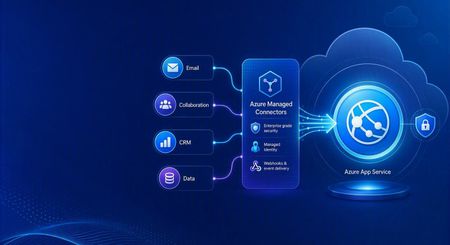
Azure Managed Connectors, currently in public preview, now lets you choose Azure App Service as a trigger destination. Connector events can be delivered directly to applications running on App Service, including ASP.NET Core, Java, Node.js, and Python applications. This is a new capability in the Managed Connectors public preview. It is not the announcement of a separate App Service preview. What's new When you create a trigger in the Managed Connectors portal, App Service now appears as a first-class destination alongside Azure Functions and the generic HTTP endpoint option. After selecting an existing App Service app, you configure: The application route that receives the event. New triggers default to POST /api/webhook , and the route can be edited. The Connector Namespace managed identity used to authenticate the callback. The Microsoft Entra audience expected by the receiving application. Managed Connectors then records the selected App Service resource, route, managed identity, and audience as part of the trigger configuration. You no longer need to select the generic HTTP destination and manually assemble the App Service callback URL. What are managed connectors? Managed connectors provide a consistent way for applications to integrate with services such as Office 365, SharePoint, Teams, Dataverse, and Salesforce. A Connector Namespace manages connections and connector operations so developers do not need to build a separate OAuth flow and service-specific client for every integration. Managed connectors support both directions: Triggers deliver events to your application, such as a new Outlook email or a file added to SharePoint. Actions let your application call operations such as posting a Teams message, flagging an email, or creating a list item. The App Service destination makes the trigger side a first-class option for existing web applications and APIs. How it works In the Managed Connectors portal, create a trigger and select App Service as its destination. Select the web app, callback route, Connector Namespace managed identity, and Microsoft Entra audience. When the source event occurs, Managed Connectors requests a token using the selected managed identity and sends the event to the App Service route. App Service built-in authentication validates the token before the request reaches application code. The application processes the event and can use Managed Connectors actions to continue the workflow. The callback is an ordinary authenticated HTTP request, so the application can use its normal framework, routing, dependency injection, logging, monitoring, and deployment practices. Configure receiving-app authentication The App Service destination configures the Managed Connectors side of the callback. The receiving application must still be configured to trust it. The reference sample uses App Service built-in authentication, also known as Easy Auth, with: A Microsoft Entra application that identifies the receiving application and its audience. A secretless federated credential configuration. The Connector Namespace managed identity pinned as an allowed principal. Authentication required for requests reaching the application. This configuration rejects unauthenticated requests and allows callbacks carrying the expected managed-identity token. The Managed Connectors trigger wizard does not currently create or update the App Service authentication configuration automatically. Try the end-to-end sample The Managed Connectors on Azure App Service email-triage sample demonstrates a complete workflow: An Office 365 Outlook trigger delivers a new email to an ASP.NET Core application on App Service. App Service built-in authentication validates the managed-identity callback. The application classifies the message and enriches the sender through the Office 365 Users connector. Important mail produces a Microsoft Teams triage card. The application flags the source email in Outlook. The repository includes the application, Bicep infrastructure, App Service authentication configuration, Connector Namespace connections, and an Azure Developer CLI deployment flow. We validated the complete workflow end to end: the authenticated callback reached POST /api/webhook , the application processed the event, a Teams card was posted, and the source Outlook message was flagged. Current limitations The capability is configured through the Managed Connectors portal, not the App Service portal. The wizard configures the Managed Connectors trigger but does not configure App Service built-in authentication on the selected web app. The current sample authentication setup requires a Microsoft Entra application, audience configuration, federated credential, and allowed-principal configuration. Depending on the application's Easy Auth configuration, authentication can apply to the whole application rather than only the connector callback route. The reference sample validates one push-trigger scenario; it is not a compatibility statement for every connector and operation. What's next The first-class App Service destination removes the generic callback URL step and provides an App Service-aware trigger experience in Azure Managed Connectors. We are also exploring ways to simplify receiving-side authentication so applications can establish connector-scoped trust without manually assembling the App Service authentication configuration. Try the reference sample and share feedback on the connectors and App Service scenarios you want to use.422Views0likes0CommentsAnnouncing Grafana 13 Support in Azure Managed Grafana
Enhanced Dashboarding and Visualization Experience Grafana 13 introduces a number of improvements that make dashboards easier to build, reuse, and manage at scale. Teams can create richer observability experiences while reducing duplication and improving consistency across environments. These improvements include Dynamic Dashboards, Saved Queries, enhanced filtering and grouping experiences, dashboard templates, and additional usability enhancements that streamline dashboard authoring and discovery. From enhanced dashboard authoring experiences and reusable queries to Git-based dashboard lifecycle management, Grafana 13 helps teams build and operate observability solutions more efficiently at scale. Git Sync: Manage Dashboards as Code One of the most anticipated capabilities associated with Grafana 13 is Git Sync: enabling organizations to manage Grafana dashboards using Git-based workflows. Dashboards can be stored as JSON files in a Git repository, making it easier to version, review, and automate dashboard changes using existing engineering practices. With Git Sync, teams can: Track dashboard changes through source control. Review updates through pull requests. Integrate dashboard deployments into CI/CD pipelines. Collaborate on dashboard development using familiar Git workflows. Git Sync supports bidirectional synchronization. Changes made in Grafana can be committed back to a repository, while changes committed to the repository are automatically synchronized to Grafana. Configuration is managed directly from the Grafana UI, with authentication supported through either a GitHub App or a Personal Access Token. For customers managing large observability estates, Git Sync helps bring dashboards into existing infrastructure-as-code and platform engineering workflows. Visit MSLearn to check out Git Sync on Azure Managed Grafana. Prometheus Authentication Changes in Grafana 13 One of the most important changes in Grafana 13: using Prometheus with Azure authentication. Starting with Grafana 13, Azure authentication is no longer supported in the standard open-source Prometheus data source. Instead, Azure authentication is exclusively available through the Azure Monitor Managed Service for Prometheus plugin. This change aligns with Grafana Labs' updated Prometheus data source strategy and deprecation guidance. Customers do not need to modify existing dashboards as part of this transition. Dashboards remain compatible across both plugin versions, and existing visualizations, imports, exports, and dashboard definitions continue to work as expected. Connectivity and query execution against Azure Monitor Workspaces and Azure Monitor Managed Service for Prometheus endpoints will use the Azure-specific plugin that now owns Azure authentication support. Prometheus data sources configured with non-Azure authentication methods are unaffected by this change and continue to operate without modification. We Recommend: You can start using Grafana 13 today by creating a new Azure Managed Grafana workspace and selecting Grafana 13. We encourage customers to explore the new dashboarding experiences introduced in Grafana 13 and review their Prometheus configurations to understand how Azure-authenticated data sources are transitioned to the Azure Monitor Managed Service for Prometheus plugin. Existing dashboards continue to work without changes. Customers do not need to: Recreate dashboards. Update visualizations. Modify dashboard JSON definitions. Reconfigure imports or exports. For additional guidance, see the Azure Managed Grafana documentation: Configure Bundled Prometheus (preview) in Azure Managed Grafana | Microsoft Learn Add an Azure Monitor workspace to Azure Managed Grafana | Microsoft Learn How to manage data sources for Azure Managed Grafana | Microsoft Learn Connect Grafana to Azure Monitor managed service for Prometheus - Azure Monitor | Microsoft Learn For additional details about Grafana 13, refer to the official Grafana Labs release announcement and release notes.731Views2likes2CommentsBring Your Own Orchestrator to Azure Container Apps Jobs
Azure Container Apps Jobs are a good fit for batch processing, ETL, machine learning, reports, and other tasks that run to completion. But when those tasks have dependencies, retries, or fan-out, you still need an orchestrator. Many teams already have one. The community-maintained Bring Your Own Orchestrator collection provides 13 templates that connect existing workflow engines to Azure Container Apps Jobs. The collection is also listed in the Microsoft Azure Container Apps template index. The idea is simple: Your orchestrator manages schedules, dependencies, retries, and workflow history. Azure Container Apps Jobs runs each containerized task and reports the result. You keep the control plane your team knows while ACA Jobs provides the execution layer. How it works Each integration follows the same flow: The orchestrator authenticates to Azure. It starts an ACA Job execution. It waits for that execution to succeed or fail. It uses the result to continue, retry, or stop the workflow. Your orchestrator ---> Azure Container Apps Job ^ | +---- execution result ---+ The templates package this flow in the native model of each platform: an Airflow operator, a Temporal Activity, an Argo workflow template, a Camunda service task, or visual actions in Logic Apps and n8n. The workload container stays independent of the orchestrator that launched it. Choose the orchestrator that fits the workflow There is no single best orchestrator for every workload. The useful question is which control plane matches the way your team models work. When this describes your team Start with Why You already operate Airflow Airflow on ACA Jobs Adds an ACA Jobs operator without replacing your Airflow deployment You need a complete Airflow environment Airflow hosted on ACA Deploys the Airflow control plane and the ACA Jobs integration Your workflows are Kubernetes-native and run from AKS Argo Workflows Uses Argo workflow templates and AKS workload identity You model long-running business processes in BPMN Camunda 8 Connects Camunda service tasks to ACA Job executions You use JSON-defined microservice workflows Conductor Uses Conductor workers and native FORK_JOIN workflows You need durable replay, heartbeats, and resilient retries Temporal Keeps Temporal as the durable control plane while ACA Jobs runs the workload You build asset-centric Python data pipelines Dagster Uses Dagster resources, ops, and dynamic mapping You build general Python flows and task automation Prefect Uses Prefect tasks, flows, and mapped execution You prefer visual automation and SaaS integrations n8n Provides visual workflows for starting and observing ACA Jobs You use Azure-native data pipelines Azure Data Factory and Fabric Provides pipeline definitions for Azure data integration workflows You need connector-rich application integration Logic Apps Standard Uses stateful workflows, connectors, and native control flow You want Azure-native, code-first durable orchestration Durable Functions Uses durable orchestrations, activities, retries, and fan-out/fan-in You already operate a Dapr-enabled workflow host Dapr Workflow Demonstrates Dapr Workflow directing external ACA Job workloads The Bring Your Own Orchestrator catalog keeps this comparison current and links to deployment instructions for every option. Before production The existing-orchestrator templates are designed around managed identity, scoped Azure RBAC, failure handling, and native fan-out/fan-in examples. Their fan-out samples default to five shards and accept configurations from 1 to 50. Treat higher shard counts as configuration support, not a throughput guarantee. Test them against your Azure quotas, orchestrator limits, and downstream systems. Two template-specific boundaries are worth calling out: Dapr Workflow is a preview architecture Azure Container Apps Jobs do not host Dapr sidecars. The Dapr workflow runtime must run in a separate Dapr-enabled host and start ACA Jobs through Azure Resource Manager. The template is therefore labeled preview architecture. Fabric still needs a native workspace run The Azure Data Factory path has live validation. The included Fabric pipeline is structurally validated but still needs a native run in a Fabric workspace. Each repository README documents its validation scope and limitations. Get started Open the template catalog. Choose the orchestrator your team already uses. Review that template's prerequisites and validation notes. Deploy the sample ACA Job with azd up . Run the single-job example, then test fan-out and failure behavior. For example, if Airflow is already your standard: git clone https://github.com/hetvip2/airflow-on-aca-jobs cd airflow-on-aca-jobs azd up The exact setup differs by orchestrator, but the target remains ACA Jobs. Try the templates Compare all 13 orchestrator templates and choose the control plane that matches your team. Review the Azure Container Apps Jobs documentation for triggers, permissions, and platform limits. Browse the ACA community template collections to find the collection in the Microsoft Azure Container Apps repository. Closing thoughts Using Azure Container Apps Jobs should not require an orchestrator migration. Keep the workflow engine your team already trusts and use ACA Jobs for containerized task execution. Explore all 13 options in the Bring Your Own Orchestrator to Azure Container Apps Jobs collection. References Azure Container Apps Jobs overview Azure Container Apps Jobs management API Managed identities in Azure Container Apps Azure Developer CLI documentation Bring Your Own Orchestrator template catalog Azure Container Apps community template collections692Views1like0CommentsIPv6 Dual-Stack Endpoints for Azure Container Registry (Public Preview)
By Johnson Shi, Aviral Takkar, Bin Du Introduction Two of the most common networking questions we hear from teams running Azure Container Registry (ACR) are: "Can my registry serve clients on IPv6 networks?" — Teams operating IPv6-only or dual-stack networks need their container registry reachable over IPv6. "How do we start moving registry traffic toward IPv6 without breaking anything?" — Organizations guarding against IPv4 address exhaustion, or operating under IPv6 transition mandates, want a migration path that doesn't disrupt existing IPv4 clients. Today, we're announcing the public preview of IPv6 dual-stack endpoints for Azure Container Registry for public endpoints and firewall rules, with IPv6 over private endpoints planned for GA. Set your registry's endpoint protocol to IPv4AndIPv6 , and its endpoints become reachable over both IPv4 and IPv6 — so IPv4-only, dual-stack, and IPv6-capable clients all connect to the same registry, each over whichever protocol their network stack selects. Key Takeaways ACR registries now support an endpointProtocol setting with two values: IPv4 (default) and IPv4AndIPv6 (dual stack, preview). Dual stack is additive — your registry continues serving IPv4 clients exactly as before. There is no IPv6-only mode. Dual stack requires dedicated data endpoints to be enabled ( --data-endpoint-enabled true ), and dedicated data endpoints require the Premium SKU. The service enforces this requirement. You can enable it today with Azure CLI 2.87.0 via az acr update --endpoint-protocol IPv4AndIPv6 . FQDN-based client firewall rules keep working unchanged; IP-based allowlists need to account for IPv6 traffic. Limitation: This public preview covers IPv6 for the registry's public endpoints and firewall rules only. IPv6 over private endpoints is planned for a future release. Limitation: ACR Tasks isn't supported on a registry that has IPv6 dual-stack enabled. Tasks does not work when the endpoint protocol isIPv6 dual-stack, including quick builds (with az acr build) and quick task runs (with az acr run). Support is planned for a future release. How to enable it On an existing registry (Azure CLI 2.87.0 or later) Dual stack requires dedicated data endpoints, so enable both in a single update: az acr update --name <your-registry> --data-endpoint-enabled true --endpoint-protocol IPv4AndIPv6 If dedicated data endpoints are already enabled, set the endpoint protocol on its own: az acr update --name <your-registry> --endpoint-protocol IPv4AndIPv6 Verify the configuration: az acr show --name <your-registry> --query "{endpointProtocol:endpointProtocol, dataEndpointEnabled:dataEndpointEnabled}" { "dataEndpointEnabled": true, "endpointProtocol": "IPv4AndIPv6" } Note: If your clients sit behind a firewall and you're enabling dedicated data endpoints for the first time, add firewall rules for <your-registry>.<region>.data.azurecr.io before enabling — switching from *.blob.core.windows.net to dedicated data endpoints changes where layer blobs are downloaded from. See Dedicated data endpoints for details. Reverting to IPv4 Dual stack is reversible at any time: az acr update --name <your-registry> --endpoint-protocol IPv4 Reverting the endpoint protocol leaves dedicated data endpoints enabled; disable them separately if desired. Scope of this preview This public preview enables IPv6 for the registry's public endpoints — the login server, dedicated data endpoints, and regional endpoints (if enabled). IPv6 over private endpoints isn't part of this preview. Support is planned for a future release. Until then, registries reached through a private endpoint continue to use IPv4. Additionally, IPv6 dual-stack support for ACR Tasks, including support for `az acr build` and `az acr run`, are not supported in the public preview. Support is planned for a future release. Requirements and how features compose Requirement Why Premium SKU Dedicated data endpoints are a Premium feature. Dedicated data endpoints enabled IPv4AndIPv6 requires dataEndpointEnabled: true ; the service rejects the setting otherwise. Azure CLI 2.87.0+ Adds --endpoint-protocol to az acr update . For geo-replicated registries, the endpoint protocol is a registry-level setting, and dedicated data endpoints exist in every replica region. Firewall guidance: rules based on registry FQDNs — the login server, dedicated data endpoints, and regional endpoints (if enabled) — continue to work unchanged for dual-stack registries; only IP-address-based allowlists need updating for IPv6. To learn more, see IPv6 dual-stack endpoints in Azure Container Registry (preview) and the ACR endpoint reference. If you have further questions about IPv6 dual-stack endpoints or dedicated data endpoints, reach out to us on the Azure Container Registry GitHub repository or file feedback through the Azure portal.296Views1like0CommentsVNet integration for Azure SRE Agent (preview)
For many production systems, the logs, databases, private endpoints, repositories, and runbooks an SRE Agent needs to do its job are behind network boundaries your security team already governs. VNet integration for Azure SRE Agent, now in preview, puts the agent's outbound traffic under those same controls - your virtual network, your NSG rules, your private DNS - so it reaches only what your network allows. The principle is one your security team already applies to every other workload: a component's network access shouldn't depend on the component behaving correctly. Identity governs what the agent can reach. Permissions and hooks shape what it does within reach. The network sits beneath both: it blocks any request to a destination you haven't allowed no matter what the agent decides. Why egress control matters Two reasons. First, the agent reads sensitive things by design. Inspecting logs, code, configuration, and internal systems is the whole point during an incident, which means you have to decide where that data can go. Open egress gives that data a path out of your network - a risk you wouldn't accept for any other production-adjacent workload. Second, it reasons over text it didn't write - logs, issue descriptions, tool output — which is how prompt injection gets in. Handling that is partly model safety, and Azure SRE Agent runs under Microsoft's Responsible AI standard with safety work from OpenAI and Anthropic. Network controls add another layer: an instruction that tries to reach a destination you haven't allowed can't run, because the network blocks it. For example, an agent investigating an outage might query Log Analytics, read deployment configuration, and call an internal runbook - all private resources. With VNet integration, those calls follow the routes, DNS, and firewall rules your workloads already use. A request to an external endpoint you haven't allowed fails at the network boundary. It doesn't depend on the model recognizing the risk and refusing; the network stops it either way. Choose an egress mode Azure SRE Agent has three egress modes, and you don't have to start at the strongest. Unrestricted - all outbound traffic allowed Limited - deny all outbound, allow an explicit list of hosts. Gives you host-level control without setting up a full VNet Azure VNet - outbound traffic goes through a delegated subnet in your network, with your NSG rules and private DNS applied. The recommended mode for production and regulated workloads. How Azure VNet mode works Outbound traffic takes one of two paths, and every call takes exactly one. Your VNet. Everything not placed on the managed path goes through a delegated subnet in your own network, where your NSG rules, private DNS, and firewall all apply. The agent is just another workload on that subnet, so it can reach what the subnet can reach: databases behind private endpoints, internal services, monitoring stores, and key vaults -the parts of production that aren't reachable from the public internet. The resources that matter most during an incident are usually the private ones. If your network connects to on-premises over ExpressRoute or VPN, the agent can reach those systems too, as long as your existing routes and rules allow it. The managed infra path. Some destinations go through Azure SRE Agent's managed infrastructure network instead - platform services the agent needs, plus optional categories you turn on: package registries, code repositories, and remote MCP servers. This path skips your VNet, so your NSG rules and Firewall Policies don't apply to it. Treat it as a deliberate exception, used only where you need it. Why public services start on the managed path Public services are hard to allow by IP address. GitHub, PyPI, npm, NuGet, apt, and the container registries run on large, changing IP ranges, and they don't map to a single Azure service tag. If your NSG filters by IP and port, keeping those lists up to date is constant work, and when a list falls behind, the agent can't pull a package or read a repository - and an investigation stalls on a networking problem that has nothing to do with the incident. Each category has a toggle: package registries (PyPI, npm, NuGet, apt), code repositories (GitHub, GitHub Enterprise, Azure DevOps), remote MCP servers, and a list of additional hostnames. Starting with these on the managed path keeps the agent working reliably without maintaining an IP allowlist. For build-time dependencies, that's usually fine. If you want this traffic inspected too, the next step is name-based (FQDN) egress filtering in your own network. Once your firewall can allow github.com and pypi.org by name, you can move these categories off the managed path and route them through your VNet instead Configure it Two decisions: the subnet, and what (if anything) uses the bypass. Navigate to Settings > Workspace Configuration > Network Choose Azure VNet as the egress mode. Select a subnet that is /27 or larger and delegated to `Microsoft.App/environments`. Decide which categories, if any, use the bypass. Restrict who can change the egress mode and bypass toggles. These settings widen or narrow the agent's reach, so govern them like any production network control. Test the outbound behavior before using the agent with production data. A reasonable setup for most enterprises during preview: use Azure VNet mode, keep package registries and code repositories on the bypass if you need reliable access to them, and route everything else through your VNet. Stricter environments can turn those categories off and rely on their own name-based firewall rules. What it doesn't cover yet VNet integration is in preview, with two limitations to know. It covers outbound traffic only - reaching the agent privately from inside your network isn't part of this preview. And connector traffic still routes over the public internet; the governance and credential isolation in Connectors V2 still apply. Use VNet integration for outbound control of the agent workspace, and combine it with identity, RBAC, tool permissions, hooks, and connector governance for a complete set of controls. Where it fits VNet integration doesn't replace identity, RBAC, tool permissions, or connector governance. It controls where traffic can go. The agent still needs the right identity and permissions to access a resource in the first place. Identity is the foundation: your RBAC assignments decide what the agent can reach. Permissions and hooks shape what it does within reach: allow/ask/deny rules control what runs, and hooks let you inspect or change a tool call before it runs. VNet integration sits underneath, controlling where traffic can go no matter what the agent tries to do. You want the agent to be capable. You also want a boundary that holds whether or not it is. Get started Create an SRE Agent - https://aka.ms/sreagent Documentation - https://aka.ms/sreagent/newdocs Recipes - https://aka.ms/sreagent/recipes Build 2026 Announcement - https://aka.ms/Build26/blog/SREAgent1.4KViews1like0CommentsPrivate Plugins with Azure SRE Agent
SRE's and platform teams are building operational skills specific to their infrastructure: investigation runbooks, compliance checks, cost analysis playbooks, deployment verification procedures. The next step is making that work reusable across every agent in the organization without exposing it publicly. Today, SRE Agent supports plugin marketplaces hosted in private GitHub repositories, including GitHub Enterprise. This is part of the Azure SRE Agent announcements at Build 2026. You can now point SRE Agent at a private repo when adding a marketplace or installing a plugin. Authentication is handled per-marketplace, and supports OAuth, GitHub PATs, and GitHub Apps for GHE tenants. From one agent to an organization’s plugin catalog Most teams start with a single SRE Agent connected to their services. The agent learns their infrastructure, runs their runbooks, and handles their incidents. It works well. Then adoption grows. A second team stands up their own agent. Then a third. Platform engineering wants every agent to run the same compliance checks. Security needs approval hooks enforced consistently. FinOps has cost governance skills that should be standard across the organization. Suddenly the question isn’t “how do I set up my agent,” it’s “how do we share operational knowledge across all of them.” Without a distribution model, teams end up copying skill files between agents manually. A platform team writes a runbook, shares it over email or a wiki link, and each service team pastes it into their agent individually. When the runbook improves, some agents get updated, some don’t. There’s no version tracking, no central catalog, and no way to know which agent is running which version of which skill. Private marketplace support solves this. How Private Plugin marketplace meet enterprise needs A platform team publishes once, every agent installs. Codify best practices as plugins in a private GitHub repo. Service teams add that repo as a marketplace in their agents and install what they need. Compliance checks, cost governance thresholds, incident playbooks, deployment verification procedures all distributed through versioned plugins. Each team retains ownership. Security controls which plugins enforce approval hooks. FinOps locks cost thresholds into parameter values. Platform engineering governs infrastructure investigation patterns. The marketplace is the distribution layer for organizational standards. Versions are pinned, updates are explicit. Each installation locks to the commit at install time. A merged PR upstream does not change any agent’s behavior. Teams promote new versions on their own schedule: validate in dev, promote to staging, then production. Different agents can run different versions simultaneously. Reuse across environments and tools. The same plugin works across dev, staging, and production agents, and can be reused by local coding agents and other services that support plugins. One source of truth, not separate copies per environment. Accessing Private Plugin marketplaces Private repo support adds authentication to the SRE Agent's plugin workflow so your agent can clone and install from repos that require credentials. Authentication is configured once per marketplace. Every plugin within it inherits the credentials. Auth method When to use Setup OAuth github.com repos your agent can already access Uses your existing GitHub connection. One click. Personal access token Private repos in other orgs on github.com Per-marketplace PAT. Scoped to just that marketplace. GitHub App GitHub Enterprise (*.ghe.com) BYO App with private key in Azure Key Vault. Short-lived tokens minted at runtime. Getting started In SRE Agent, navigate to Builder > Plugins, then click Add Marketplace and enter the URL of the private marketplace you want to connect to. Then click Connect to GitHub to complete the OAuth sign-in. Click Add and you will see the plugins available from your connected marketplace. Click on the plugin to install and in the detail view you can browse the skills packaged with the plugin. click Install to install this plugin. You can now see the skills imported from plugins from Capabilities > Skills > Custom Skills The bottom line Private repo support turns the Plugin Marketplace from a public skill catalog into your organization’s internal distribution platform for operational automation. Your team writes the plugins. Your agents install them. Your GitHub permissions control who has access. Try it yourself: create a private repo with a marketplace.json and a few skills, add it as a marketplace in your agent, and install a plugin. Resources SRE Agent documentation — https://aka.ms/sreagent/newdocs SRE Agent overview — https://aka.ms/sreagent/newdocsoverview Plugin Marketplace capability page — https://aka.ms/sreagent/newdocs/capabilities/plugin-marketplace Build 2026 SRE Agent announcements - https://aka.ms/Build26/blog/SREAgent502Views0likes0Comments