updates
24 TopicsThe Deployment of Hollow Core Fiber (HCF) in Azure’s Network
Co-authors: Jamie Gaudette, Frank Rey, Tony Pearson, Russell Ellis, Chris Badgley and Arsalan Saljoghei In the evolving Cloud and AI landscape, Microsoft is deploying state-of-the-art Hollow Core Fiber (HCF) technology in Azure’s network to optimize infrastructure and enhance performance for customers. By deploying cabled HCF technology together with HCF-supportable datacenter (DC) equipment, this solution creates ultra-low latency traffic routes with faster data transmission to meet the demands of Cloud & AI workloads. The successful adoption of HCF technology in Azure’s network relies on developing a new ecosystem to take full advantage of the solution, including new cables, field splicing, installation and testing… and Microsoft has done exactly that. Azure has collaborated with industry leaders to deliver components and equipment, cable manufacturing and installation. These efforts, along with advancements in HCF technology, have paved the way for its deployment in-field. HCF is now operational and carrying live customer traffic in multiple Microsoft Azure regions, proving it is as reliable as conventional fiber with no field failures or outages. This article will explore the installation activities, testing, and link performance of a recent HCF deployment, showcasing the benefits that Azure customers can leverage from HCF technology. HCF connected Azure DCs are ready for service The latest HCF cable deployment connects two Azure DCs in a major city, with two metro routes each over 20km long. The hybrid cables both include 32 HCF and 48 single mode fiber (SMF) strands, with HCFs delivering high-capacity Dense Wavelength Division Multiplexing (DWDM) transmission comparable to SMF. The cables are installed over two diverse paths (the red and blue lines shown in image 1), each with different entry points into the DC. Route diversity at the physical layer enhances network resilience and reliability by allowing traffic to be rerouted through alternate paths, minimizing the risk of network outage should there be a disruption. It also allows for increased capacity by distributing network traffic more evenly, improving overall network performance and operational efficiency. Image 1: Satellite image of two Azure DC sites (A & Z) within a metro region interconnected with new ultra-low latency HCF technology, using two diverse paths (blue & red) Image 2 shows the optical routing that the deployed HCF cables take through both Inside Plant (ISP) and Outside Plant (OSP), for interconnecting terminal equipment within key sites in the region (comprised of DCs, Network Gateways and PoPs). Image 2: Optical connectivity at the physical layer between DCA and DCZ The HCF OSP cables have been developed for outdoor use in harsh environments without degrading the propagation properties of the fiber. The cable technology is smaller, faster, and easier to install (using a blown installation method). Alongside cables, various other technologies have been developed and integrated to provide a reliable end-to-end HCF network solution. This includes dedicated HCF-compatible equipment (shown in image 3), such as custom cable joint enclosures, fusion splicing technology, HCF patch tails for cable termination in the DC, and a HCF custom-designed Optical Time Domain Reflectometer (OTDR) to locate faults in the link. These solutions work with commercially available transponders and DWDM technologies to deliver multi-Tb/s capacities for Azure customers. Looking more closely at a HCF cable installation, in image 4 the cable is installed by passing it through a blowing-head (1) and inserting it into pre-installed conduit in segments underground along the route. As with traditional installations with conventional cable, the conduit, cable entry/exit, and cable joints are accessible through pre-installed access chambers, typically a few hundred meters apart. The blowing head uses high-pressure air from a compressor to push the cable into the conduit. A single drum-length of cable can be re-fleeted above ground (2) at multiple access points and re-jetted (3) over several kilometers. After the cables are installed inside the conduit, they are jointed at pre-designated access chamber locations. These house the purpose designed cable joint enclosures. Image 4: Cable preparation and installation during in-field deployment Image 5 shows a custom HCF cable joint enclosure in the field, tailored to protect HCFs for reliable data transmission. These enclosures organize the many HCF splices inside and are placed in underground chambers across the link. Image 5: 1) HCF joint enclosure in a chamber in-field 2) Open enclosure showing fiber loop storage protected by colored tubes at the rear-side of the joint 3) Open enclosure showing HCF spliced on multiple splice tray layers Inside the DC, connectorized ‘plug-and-play’ HCF-specific patch tails have been developed and installed for use with existing DWDM solutions. The patch tails interface between the HCF transmission and SMF active and passive equipment, each containing two SMF compatible connectors, coupled to the ISP HCF cable. In image 6, this has been terminated to a patch panel and mated with existing DWDM equipment inside the DC. Image 6: HCF patch tail solution connected to DWDM equipment Testing To validate the end-to-end quality of the installed HCF links (post deployment and during its operation), field deployable solutions have been developed and integrated to ensure all required transmission metrics are met and to identify and restore any faults before the link is ready for customer traffic. One such solution is Microsoft’s custom-designed HCF-specific OTDR, which helps measure individual splice losses and verify attenuation in all cable sections. This is checked against rigorous Azure HCF specification requirements. The OTDR tool is invaluable for locating high splice losses or faults that need to be reworked before the link can be brought into service. The diagram below shows an OTDR trace detecting splice locations and splice loss levels (dB) across a single strand of installed HCF. The OTDR can also continuously monitor HCF links and quickly locate faults, such as cable cuts, for quick recovery and remediation. For this deployment, a mean splice loss of 0.16dB was achieved, with some splices as low as 0.04dB, comparable to conventional fiber. Low attenuation and splice loss helps to maintain higher signal integrity, supporting longer transmission reach and higher traffic capacity. There are ongoing Azure HCF roadmap programs to continually improve this. Performance Before running customer traffic on the link, the fiber is tested to ensure reliable, error-free data transmission across the operating spectrum by counting lost or error bits. Once confirmed, the link is moved into production, allowing customer traffic to flow on the route. These optical tests, tailored to HCF, are carried out by the installer to meet Azure’s acceptance requirements. Image 8 illustrates the flow of traffic across a HCF link, dictated by changing demand on capacity and routing protocols in the region, which fluctuate throughout the day. The HCF span supports varying levels of customer traffic from the point the link was made live, without incurring any outages or link flaps. A critical metric for measuring transmission performance over each HCF path is the instantaneous Pre-Forward Error Correction (FEC) Bit Error Rate (BER) level. Pre-FEC BERs measure errors in a digital data stream at the receiver before any error correction is applied. This is crucial for transmission quality when the link carries data traffic; lower levels mean fewer errors and higher signal quality, essential for reliable data transmission. The following graph (image 9) shows the evolution of the Pre-FEC BER level on a HCF span once the link is live. A single strand of HCF is represented by a color, with all showing minimal fluctuation. This demonstrates very stable Pre-FEC BER levels, well below < -3.4 (log 10 ), across all 400G optical transponders, operating over all channels during a 24-day period. This indicates the network can handle high-data transmission efficiently with no Post-FEC errors, leading to high customer traffic performance and reliability. Image 9: Very stable Pre-FEC BER levels across the HCF span over 20 days The graph below demonstrates the optical loss stability over one entire span which is comprised of two HCF strands. It was monitored continuously over 20 days using the inbuilt line system and measured in both directions to assess the optical health of the HCF link. The new HCF cable paths are live and carrying customer traffic across multiple Azure regions. Having demonstrated the end-to-end deployment capabilities and network compatibility of the HCF solution, it is possible to take full advantage of the ultra-stable, high performance and reliable connectivity HCF delivers to Azure customers. What’s next? Unlocking the full potential of HCF requires compatible, end-to-end solutions. This blog outlines the holistic and deployable HCF systems we have developed to better serve our customers. While we further integrate HCF into more Azure Regions, our development roadmap continues. Smaller cables with more fibers and enhanced systems components to further increase the capacity of our solutions, standardized and simplified deployment and operations, as well as extending the deployable distance of HCF long haul transmission solutions. Creating a more stable, higher capacity, faster network will allow Azure to better serve all its customers. Learn more about how hollow core fiber is accelerating AI. Recently published HCF research papers: Ultra high resolution and long range OFDRs for characterizing and monitoring HCF DNANFs Unrepeated HCF transmission over spans up to 301.7km15KViews10likes1CommentMicrosoft Azure scales Hollow Core Fiber (HCF) production through outsourced manufacturing
Introduction As cloud and AI workloads surge, the pressure on datacenter (DC), Metro and Wide Area Network (WAN) networks has never been greater. Microsoft is tackling the physical limits of traditional networking head-on. From pioneering research in microLED technologies to deploying Hollow Core Fiber (HCF) at global scale, Microsoft is reimagining connectivity to power the next era of cloud networking. Azure’s HCF journey has been one of relentless innovation, collaboration, and a vision to redefine the physical layer of the cloud. Microsoft’s HCF, based on the proprietary Double Nested Antiresonant Nodeless Fiber (DNANF) design, delivers up to 47% faster data transmission and approximately 33% lower latency compared to conventional Single Mode Fiber (SMF), bringing significant advantages to the network that powers Azure. Today, Microsoft is announcing a major milestone: the industrial scale-up of HCF production, powered by new strategic manufacturing collaborations with Corning Incorporated (Corning) and Heraeus Covantics (Heraeus). These collaborations will enable Azure to increase the global fiber production of HCF to meet the demands of the growing network infrastructure, advancing the performance and reliability customers expect for cloud and AI workloads. Real-world benefits for Azure customers Since 2023, Microsoft has deployed HCF across multiple Azure regions, with production links meeting performance and reliability targets. As manufacturing scales, Azure plans to expand deployment of the full end-to-end HCF network solution to help increase capacity, resiliency, and speed for customers, with the potential to set new benchmarks for latency and efficiency in fiber infrastructure. Why it matters Microsoft’s proprietary HCF design brings the following improvements for Azure customers: Increased data transmission speeds with up to 33% lower latency. Enhanced signal performance that improves data transmission quality for customers. Improved optical efficiency resulting in higher bandwidth rates compared to conventional fiber. How Microsoft is making it possible To operationalize HCF across Azure with production grade performance, Microsoft is: Deploying a standardized HCF solution with end-to-end systems and components for operational efficiency, streamlined network management, and reliable connectivity across Azure’s infrastructure. Ensuring interoperability with standard SMF environments, enabling seamless integration with existing optical infrastructure in the network for faster deployment and scalable growth. Creating a multinational production supply chain to scale next generation fiber production, ensuring the volumes and speed to market needed for widespread HCF deployment across the Azure network. Scaling up and out With Corning and Heraeus as Microsoft’s first HCF manufacturing collaborators, Azure plans to accelerate deployment to meet surging demand for high-performance connectivity. These collaborations underscore Microsoft’s commitment to enhancing its global infrastructure and delivering a reliable customer experience. They also reinforce Azure’s continued investment in deploying HCF, with a vision for this technology to potentially set the global benchmark for high-capacity fiber innovation. “This milestone marks a new chapter in reimagining the cloud’s physical layer. Our collaborations with Corning and Heraeus establish a resilient, global HCF supply chain so Azure can deliver a standardized, world-class customer experience with ultra-low latency and high reliability for modern AI and cloud workloads.” - Jamie Gaudette, Partner Cloud Network Engineering Manager at Microsoft To scale HCF production, Microsoft will utilize Corning’s established U.S. facilities, while Heraeus will produce out of its sites in both Europe and the U.S. "Corning is excited to expand our longtime collaboration with Microsoft, leveraging Corning’s fiber and cable manufacturing facilities in North Carolina to accelerate the production of Microsoft's Hollow Core Fiber. This collaboration not only strengthens our existing relationship but also underscores our commitment to advancing U.S. leadership in AI innovation and infrastructure. By working closely with Microsoft, we are poised to deliver solutions that meet the demands of AI workloads, setting new benchmarks for speed and efficiency in fiber infrastructure." - Mike O'Day, Senior Vice President and General Manager, Corning Optical Communications “We started our work on HCF a decade ago, teamed up with the Optoelectronics Research Centre (ORC) at the University of Southampton and then with Lumenisity prior to its acquisition. Now, we are excited to continue working with Microsoft on shaping the datacom industry. With leading solutions in glass, tube, preform, and fiber manufacturing, we are ready to scale this disruptive HCF technology to significant volumes. We’ll leverage our proven track record of taking glass and fiber innovations from the lab to widespread adoption, just as we did in the telecom industry, where approximately 2 billion kilometers of fiber are made using Heraeus products.” - Dr. Jan Vydra, Executive Vice President Fiber Optics, Heraeus Covantics Azure engineers are working alongside Corning and Heraeus to operationalize Microsoft manufacturing process intellectual property (IP), deliver targeted training programs, and drive the yield, metrology, and reliability improvements required for scaled production. The collaborations are foundational to a growing standardized, global ecosystem that supports: Glass preform/tubing supply Fiber production at scale Cable and connectivity for deployment into carrier‑grade environments Building on a foundation of innovation: Microsoft’s HCF program In 2022, Microsoft acquired Lumenisity, a spin‑out from the Optoelectronics Research Centre (ORC) at the University of Southampton, UK. That same year, Microsoft launched the world’s first state‑of‑the‑art HCF fabrication facility in the UK to expand production and drive innovation. This purpose-built site continues to support long‑term HCF research, prototyping, and testing, ensuring that Azure remains at the forefront of HCF technology. Working with industry leaders, Microsoft has developed a proven end‑to‑end ecosystem of components, equipment, and HCF‑specific hardware necessary and successfully proven in production deployments and operations. Pushing the boundaries: recent breakthrough research Today, the University of Southampton announced a landmark achievement in optical communications: in collaboration with Azure Fiber researchers, they have demonstrated the lowest signal loss ever recorded for optical fibers (<0.1 dB/km) using research-grade DNANF HCF technology (see figure 4). This breakthrough, detailed in a research paper published in Nature Photonics earlier this month, paves the way for a potential revolution in the field, enabling unprecedented data transmission capacities and longer unamplified spans. ecords at around 1550nm [1] 2002 Nagayama et al. 1 [2] 2025 Sato et al. 2 [3] 2025 research-grade DNANF HCF Petrovich et al. 3 This breakthrough highlights the potential for this technology to transform global internet infrastructure and DC connectivity. Expected benefits include: Faster: Approximately 47% faster, reducing latency, powering real-time AI inference, cloud gaming and other interactive workloads. More capacity: A wider optical spectrum window enabling exponentially greater bandwidth. Future-ready: Lays the groundwork for quantum-safe links, quantum computing infrastructure, advanced sensing, and remote laser delivery. Looking ahead: Unlocking the future of cloud networking The future of cloud networking is being built today! With record-breaking [3] fiber innovations, a rapidly expanding collaborative ecosystem, and the industrialized scale to deliver next-generation performance, Azure continues to evolve to meet the demands for speed, reliability, and connectivity. As we accelerate the deployment of HCF across our global network, we’re not just keeping pace with the demands of AI and cloud, we’re redefining what’s possible. References: [1] Nagayama, K., Kakui, M., Matsui, M., Saitoh, T. & Chigusa, Y. Ultra-low-loss (0.1484 dB/km) pure silica core fibre and extension of transmission distance. Electron. Lett. 38, 1168–1169 (2002). [2] Sato, S., Kawaguchi, Y., Sakuma, H., Haruna, T. & Hasegawa, T. Record low loss optical fiber with 0.1397 dB/km. In Proc. Optical Fiber Communication Conference (OFC) 2024 Tu2E.1 (Optica Publishing Group, 2024). [3] Petrovich, M., Numkam Fokoua, E., Chen, Y., Sakr, H., Isa Adamu, A., Hassan, R., Wu, D., Fatobene Ando, R., Papadimopoulos, A., Sandoghchi, S., Jasion, G., & Poletti, F. Broadband optical fibre with an attenuation lower than 0.1 decibel per kilometre. Nat. Photon. (2025). https://doi.org/10.1038/s41566-025-01747-5 Useful Links: The Deployment of Hollow Core Fiber (HCF) in Azure’s Network How hollow core fiber is accelerating AI | Microsoft Azure Blog Learn more about Microsoft global infrastructure14KViews6likes0CommentsCombining firewall protection and SD-WAN connectivity in Azure virtual WAN
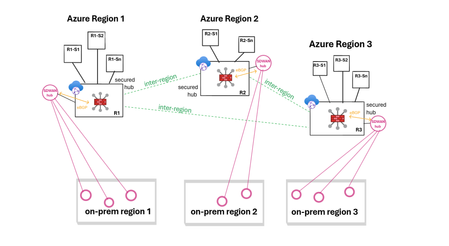
Virtual WAN (vWAN) introduces new security and connectivity features in Azure, including the ability to operate managed third-party firewalls and SD-WAN virtual appliances, integrated natively within a virtual WAN hub (vhub). This article will discuss updated network designs resulting from these integrations and examine how to combine firewall protection and SD-WAN connectivity when using vWAN. The objective is not to delve into the specifics of the security or SD-WAN connectivity solutions, but to provide an overview of the possibilities. Firewall protection in vWAN In a vWAN environment, the firewall solution is deployed either automatically inside the vhub (Routing Intent) or manually in a transit VNet (VM-series deployment). Routing Intent (managed firewall) Routing Intent refers to the concept of implementing a managed firewall solution within the vhub for internet protection or private traffic protection (VNet-to-VNet, Branch-to-VNet, Branch-to-Branch), or both. The firewall could be either an Azure Firewall or a third-party firewall, deployed within the vhub as Network Virtual Appliances or a SaaS solution. A vhub containing a managed firewall is called a secured hub. For an updated list of Routing Intent supported third-party solutions please refer to the following links: managed NVAs SaaS solution Transit VNet (unmanaged firewall) Another way to provide inspection in vWAN is to manually deploy the firewall solution in a spoke of the vhub and to cascade the actual spokes behind that transit firewall VNet (aka indirect spoke model or tiered-VNet design). In this discussion, the primary reasons for choosing unmanaged deployments are: either the firewall solution lacks an integrated vWAN offer, or it has an integrated offer but falls short in horizontal scalability or specific features compared to the VM-based version. For a detailed analysis on the pros and cons of each design please refer to this article. SD-WAN connectivity in vWAN Similar to the firewall deployment options, there are two main methods for extending an SDWAN overlay into an Azure vWAN environment: a managed deployment within the vhub, or a standard VM-series deployment in a spoke of the vhub. More options here. SD-WAN in vWAN deployment (managed) In this scenario, a pair of virtual SD-WAN appliances are automatically deployed and integrated in the vhub using dynamic routing (BGP) with the vhub router. Deployment and management processes are streamlined as these appliances are seamlessly provisioned in Azure and set up for a simple import into the partner portal (SD-WAN orchestrator). For an updated list of supported SDWAN partners please refer to this link. For more information on SD-WAN in vWAN deployments please refer to this article. VM-series deployment (unmanaged) This solution requires manual deployment of the virtual SD-WAN appliances in a spoke of the vhub. The underlying VMs and the horizontal scaling are managed by the customer. Dynamic route exchange with the vWAN environment is achieved leveraging BGP peering with the vhub. Alternatively, and depending on the complexity of your addressing plan, static routing may also be possible. Firewall protection and SD-WAN in vWAN THE CHALLENGE! Currently, it is only possible to chain managed third-party SD-WAN connectivity with Azure Firewall in the same vhub, or to use dual-role SD-WAN connectivity and security appliances. Routing Intent provided by third-party firewalls combined with another managed SD-WAN solution inside the same vhub is not yet supported. But how can firewall protection and SD-WAN connectivity be integrated together within vWAN? Solution 1: Routing Intent with Azure Firewall and managed SD-WAN (same vhub) Firewall solution: managed. SD-WAN solution: managed. This design is only compatible with Routing Intent using Azure Firewall, as it is the sole firewall solution that can be combined with a managed SD-WAN in vWAN deployment in that same vhub. With the private traffic protection policy enabled in Routing Intent, all East-West flows (VNet-to-VNet, Branch-to-VNet, Branch-to-Branch) are inspected. Solution 2: Routing Intent with a third-party firewall and managed SD-WAN (2 vhubs) Firewall solution: managed. SD-WAN solution: managed. To have both a third-party firewall managed solution in vWAN and an SD-WAN managed solution in vWAN in the same region, the only option is to have a vhub dedicated to the security solution deployment and another vhub dedicated to the SD-WAN solution deployment. In each region, spoke VNets are connected to the secured vhub, while SD-WAN branches are connected to the vhub containing the SD-WAN deployment. In this design, Routing Intent private traffic protection provides VNet-to-VNet and Branch-to-VNet inspection. However, Branch-to-Branch traffic will not be inspected. Solution 3: Routing Intent and SD-WAN spoke VNet (same vhub) Firewall solution: managed. SD-WAN solution: unmanaged. This design is compatible with any Routing Intent supported firewall solution (Azure Firewall or third-party) and with any SD-WAN solution. With Routing Intent private traffic protection enabled, all East-West flows (VNet-to-VNet, Branch-to-VNet, Branch-to-Branch) are inspected. Solution 4: Transit firewall VNet and managed SDWAN (same vhub) Firewall solution: unmanaged. SD-WAN solution: managed. This design utilizes the indirect spoke model, enabling the deployment of managed SD-WAN in vWAN appliances. This design provides VNet-to-VNet and Branch-to-VNet inspection. But because the firewall solution is not hosted in the hub, Branch-to-Branch traffic will not be inspected. Solution 5 - Transit firewall VNet and SD-WAN spoke VNet (same vhub) Firewall solution: unmanaged. SD-WAN solution: unmanaged. This design integrates both the security and the SD-WAN connectivity as unmanaged solutions, placing the responsibility for deploying and managing the firewall and the SD-WAN hub on the customer. Just like in solution #4, only VNet-to-VNet and Branch-to-VNet traffic is inspected. Conclusion Although it is currently not possible to combine a managed third-party firewall solution with a managed SDWAN deployment within the same vhub, numerous design options are still available to meet various needs, whether managed or unmanaged approaches are preferred.6KViews6likes2Comments
Announcing Azure DNS security policy with Threat Intelligence feed general availability
Azure DNS security policy with Threat Intelligence feed allows early detection and prevention of security incidents on customer Virtual Networks where known malicious domains sourced by Microsoft’s Security Response Center (MSRC) can be blocked from name resolution. Azure DNS security policy with Threat Intelligence feed is being announced to all customers and will have regional availability in all public regions.3.2KViews3likes0Comments
Azure virtual network terminal access point (TAP) public preview announcement
What is virtual network TAP? Virtual network TAP allows customers continuously stream virtual machine network traffic to a network packet collector or analytics tool. Many security and performance monitoring tools rely on packet-level insights that are difficult to access in cloud environments. Virtual network TAP bridges this gap by integrating with our industry partners to offer: Enhanced security and threat detection: Security teams can inspect full packet data in real-time to detect and respond to potential threats. Performance monitoring and troubleshooting: Operations teams can analyze live traffic patterns to identify bottlenecks, troubleshoot latency issues, and optimize application performance. Regulatory compliance: Organizations subject to compliance frameworks such as Health Insurance Portability and Accountability Act (HIPAA), and General Data Protection Regulation (GDPR) can use virtual network TAP to capture network activity for auditing and forensic investigations. Why use virtual network TAP? Unlike traditional packet capture solutions that require deploying additional agents or network appliances, virtual network TAP leverages Azure's native infrastructure to enable seamless traffic mirroring without complex configurations and without impacting the performance of the virtual machine. A key advantage is that mirrored traffic does not count towards virtual machine’s network limits, ensuring complete visibility without compromising application performance. Additionally, virtual network TAP supports all Azure virtual machine SKU. Deploying virtual network TAP The portal is a convenient way to get started with Azure virtual network TAP. However, if you have a lot of Azure resources and want to automate the setup you may want to use a PowerShell, CLI, or REST API. Add a TAP configuration on a network interface that is attached to a virtual machine deployed in your virtual network. The destination is a virtual network IP address in the same virtual network as the monitored network interface or a peered virtual network. The collector solution for virtual network TAP can be deployed behind an Azure Internal Load balancer for high availability. You can use the same virtual network TAP resource to aggregate traffic from multiple network interfaces in the same or different subscriptions. If the monitored network interfaces are in different subscriptions, the subscriptions must be associated to the same Microsoft Entra tenant. Additionally, the monitored network interfaces and the destination endpoint for aggregating the TAP traffic can be in peered virtual networks in the same region. Partnering with industry leaders to enhance network monitoring in Azure To maximize the value of virtual network TAP, we are proud to collaborate with industry-leading security and network visibility partners. Our partners provide deep packet inspection, analytics, threat detection, and monitoring solutions that seamlessly integrate with virtual network TAP: Network packet brokers Partner Product Gigamon GigaVUE Cloud Suite for Azure Keysight CloudLens Security analytics, network/application performance management Partner Product Darktrace Darktrace /NETWORK Netscout Omnis Cyber Intelligence NDR Corelight Corelight Open NDR Platform LinkShadow LinkShadow NDR Fortinet FortiNDR Cloud FortiGate VM cPacket cPacket Cloud Suite TrendMicro Trend Vision One™ Network Security Extrahop RevealX Bitdefender GravityZone Extended Detection and Response for Network eSentire eSentire MDR Vectra Vectra NDR AttackFence AttackFence NDR Arista Networks Arista NDR See our partner blogs: Bitdefender + Microsoft Virtual Network TAP: Deepening Visibility, Strengthening Security Streamline Traffic Mirroring in the Cloud with Azure Virtual Network Terminal Access Point (TAP) and Keysight Visibility | Keysight Blogs eSentire | Unlocking New Possibilities for Network Monitoring and… LinkShadow Unified Identity, Data, and Network Platform Integrated with Microsoft Virtual Network TAP Extrahop and Microsoft Extend Coverage for Azure Workloads Resources | Announcing cPacket Partnership with Azure virtual network terminal access point (TAP) Gain Network Traffic Visibility with FortiGate and Azure virtual network TAP Get started with virtual network TAP To learn more and get started, visit our website. We look forward to seeing how you leverage virtual network TAP to enhance security, performance, and compliance in your cloud environment. Stay tuned for more updates as we continue to refine and expand on our feature set! If you have any questions please reach out to us at azurevnettap@microsoft.com.3.5KViews3likes8CommentsIntroducing Azure Gateway Load Balancer: Deploy and scale network virtual appliances with ease
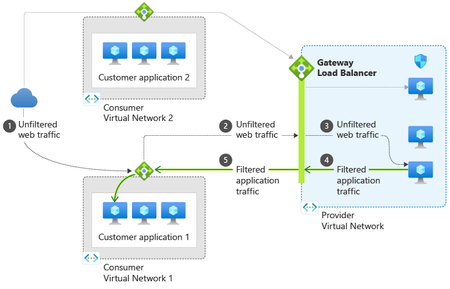
Today, we are pleased to announce the preview of Gateway Load Balancer, a fully managed service enabling you to deploy, scale, and enhance the availability of third party NVAs in Azure. You can add your favorite third party appliance whether it is a firewall, inline DDoS appliance, deep packet inspection system, or even your own custom appliance into the network path transparently – all with a single click.20KViews3likes0Comments
What’s new in Azure Firewall: Recent innovations
Organizations are modernizing their networks while managing a growing mix of applications, protocols, and security requirements. Recent Azure Firewall releases strengthen this journey with simpler traffic routing, expanded protocol support, more flexible application controls, improved health visibility, and higher intrusion-detection performance. This roundup highlights five recent capabilities now available in general availability or public preview. In this update: Explicit proxy, IPv6 support, HTTP header insertion, auto-learn SNAT routes, and IDPS performance improvements. Explicit proxy is now generally available Explicit proxy enables clients and applications to send HTTP and HTTPS traffic directly to Azure Firewall by configuring the firewall as their proxy. Instead of relying only on route-based traffic steering, organizations can use familiar proxy settings to centralize outbound web access through Azure Firewall. This release provides a simpler way to use Azure Firewall as a managed forward proxy. It can help teams consolidate web egress controls, support workloads that natively understand proxy configuration, and transition from traditional proxy appliances without introducing another infrastructure layer. Direct proxy configuration: Configure supported clients and applications to use Azure Firewall for HTTP and HTTPS traffic. Centralized web controls: Apply Azure Firewall policy and application rules to proxied traffic. Operational simplicity: Use a managed Azure service instead of deploying and maintaining separate proxy infrastructure. Migration flexibility: Support environments that already use proxy-aware applications or proxy auto-configuration workflows. For more details, visit - Azure Firewall explicit proxy | Microsoft Learn IPv6 support is now in public preview As address requirements grow and organizations adopt dual-stack architectures, IPv6 support is becoming an important part of cloud network design. Azure Firewall IPv6 support, now in public preview, extends centralized traffic filtering to IPv6 scenarios and helps customers protect applications and networks as they introduce IPv6 connectivity. With this preview, teams can evolve IPv4-only environments toward dual-stack networking while continuing to use Azure Firewall as a central enforcement point. This reduces the need to maintain separate security architectures for IPv4 and IPv6 traffic and provides a more consistent policy and operational model. Secure IPv6 traffic across hybrid environments: Filter east-west and hybrid IPv6 traffic across Azure and on-premises networks. Works seamlessly with IPv6-enabled Azure services: Integrate Azure Firewall into end-to-end IPv6 architectures alongside services like ExpressRoute and Virtual Network. Prepare for the future of networking: Build and secure dual-stack environments today while accelerating your IPv6 adoption journey. For more details, visit -Deploy Azure Firewall in dual stack mode (preview) | Microsoft Learn HTTP header insertion is now generally available HTTP header insertion enables Azure Firewall to add configured headers to HTTP requests that match application rules. This gives security and network teams an additional policy control for communicating trusted context to downstream services without requiring every client or application to add the header itself. The capability can support scenarios where applications use headers to enforce organization-specific access requirements, identify traffic handled by a trusted network path, or apply downstream controls. Because configuration is centralized in Azure Firewall policy, teams can apply the behavior consistently across matching traffic and reduce application-side changes. Tenant restriction enforcement: Organizations can inject tenant restriction headers into traffic destined for Microsoft Entra ID, helping prevent users from authenticating unauthorized tenants and strengthening identity governance controls. Secure egress for AVD and enterprise workloads: Support AVD, VDI, and enterprise egress scenarios where organizations need web traffic to carry approved tenant or context headers. Security and Compliance Enforcement: Administrators can add organization-specific headers to web traffic to support security policies, compliance requirements, and backend validation workflows. This helps ensure that only approved applications, tenants, or services are accessed through corporate environments. Operational Efficiency: Customers no longer need dedicated proxy devices solely for HTTP header injection. Azure Firewall can now perform header insertion natively as part of the application rule, reducing operational complexity and infrastructure costs. For more details, visit - Azure Firewall HTTP Header Insertion Configuration | Microsoft Learn Auto-learn SNAT routes is now generally available Source network address translation behavior depends on whether Azure Firewall treats a destination as private or public. In complex enterprise and hybrid networks, manually maintaining the private address ranges that should not be source-NATed can become time-consuming and error-prone as the environment changes. Auto-learn SNAT routes simplifies this process by dynamically learning relevant routes through Azure Route Server and using them to update the firewall’s private IP range configuration. This helps Azure Firewall preserve original source addresses for traffic destined to learned private networks while reducing ongoing configuration maintenance. Reduce manual SNAT management : Automatically learn private and registered routes through Azure Route Server, eliminating the need to manually maintain large No-SNAT prefix lists. Preserve source IPs across hybrid networks : Automatically apply learned routes as No-SNAT destinations, helping maintain source IP visibility and predictable routing for internal traffic. For more details, visit- Azure Firewall SNAT private IP address ranges | Microsoft Learn IDPS performance improvements are now generally available Azure Firewall Premium includes signature-based intrusion detection and prevention to identify and block malicious network activity. The latest IDPS performance improvements increase the amount of protected traffic that Azure Firewall Premium can process, helping organizations apply advanced inspection to demanding production workloads. Azure Firewall Premium now supports up to 22 Gbps with TLS inspection and IDPS in Deny mode, and up to 600 Mbps for a single TCP connection when IDPS is enabled in Alert or Deny mode. Actual performance depends on traffic characteristics, rule configuration, enabled features, and deployment conditions. Higher aggregate throughput: Protect larger traffic volumes while using advanced inspection capabilities. Improved single-flow performance: Better support applications that rely on high-throughput TCP connections. Strong prevention posture: Use IDPS Deny mode to actively block matching malicious traffic. Premium-scale security: Apply TLS inspection and IDPS to more bandwidth-intensive enterprise workloads For more details, visit - Azure Firewall performance | Microsoft Learn Building an advanced, more capable cloud firewall Together, these releases expand how Azure Firewall can protect modern networks. Explicit proxy and HTTP header insertion provide more flexible application-layer controls; IPv6 support helps customers evolve toward dual-stack architectures; Auto-learn SNAT routes reduces operational overhead in dynamic and hybrid environments; and IDPS performance improvements extend advanced threat prevention to higher-throughput workloads. Explore these capabilities in Azure Firewall and review the applicable Azure documentation for configuration requirements, supported scenarios, regional availability, and preview terms before enabling them in production environments.1.5KViews1like1CommentAzure Firewall explicit proxy is now generally available
We are excited to announce the general availability of explicit proxy in Azure Firewall. This capability brings the familiar explicit proxy configuration model natively to Azure Firewall, enabling applications and browsers to send outbound HTTP and HTTPS traffic directly to the firewall through standard proxy settings. Customers can now gain centralized policy enforcement and visibility while reducing their dependence on self-managed forward proxy appliances. Proxy the traffic you choose—not the entire subnet Traditional route-based steering can require all traffic from a subnet to traverse a firewall. Explicit proxy offers a more targeted model: configure selected applications or browsers to use the Azure Firewall private IP and proxy port, while other traffic continues on its existing route. This application-level control can simplify migrations, reduce unnecessary routing changes, and help teams apply inspection where it matters most. What’s new for general availability A simpler single-port experience: Serve both HTTP and HTTPS destinations through one HTTP explicit proxy endpoint port, reducing client configuration complexity. More secure PAC file access: Retrieve customer-owned proxy auto-configuration files from Azure Blob Storage using a managed identity. PAC files can be up to 256 KB. A streamlined portal workflow: Enable Explicit proxy when creating a Firewall Policy, with added guidance and validation to help prevent common configuration errors. Built for real-world modernization Modernize legacy proxy infrastructure. Use Azure Firewall as the forward proxy endpoint while retaining the explicit proxy model already configured in applications and browsers. This can help organizations consolidate infrastructure and reduce operational overhead associated with self-hosted proxy appliances. Apply selective application-level steering. Direct only the workloads that require centralized inspection through Azure Firewall, without forcing every flow on a subnet through the same path. Secure Azure Arc connectivity in hybrid environments. Organizations using ExpressRoute or VPN can configure Azure Firewall as a forward proxy for Azure Arc-enabled servers, providing an inspected, policy-controlled outbound path to required Azure services without opening direct internet access from corporate networks. How it works Enable explicit proxy in the Azure Firewall Policy and choose the HTTP proxy port used for both HTTP and HTTPS destinations. Configure applications manually with the firewall’s private IP and proxy port or enable proxy auto-configuration. If you use a PAC file, store it in Azure Blob Storage and configure the required managed identity and access permissions. Create an application rule in the Firewall Policy to allow the intended outbound destinations. Get started today Ready to simplify outbound web traffic steering? Explore the Azure Firewall explicit proxy documentation for prerequisites, portal and API configuration steps, PAC file guidance, and supported scenarios. With explicit proxy now generally available, Azure Firewall gives organizations another flexible path to modernize secure egress—combining a familiar proxy model with the simplicity, scale, and centralized management of a cloud-native service.928Views1like0Comments