ui
47 Topics
New Planner UI - What problem is actually being resolved?
This new UI is a step backwards. I get that people naturally resist change at first, but Microsoft keeps making interfaces more spaced out and less information-dense, which is frustrating in a business environment where efficiency matters. I can now only see about half of what fit on screen before. Even my Planner board headers are cut off because the font sizes and spacing have been increased unnecessarily. Microsoft has a bad habit of redesigning UIs without solving an actual problem. A lot of these changes feel like they’re being made by people who don’t actively use the tools day to day in real working environments.486Views7likes1CommentAI Career Navigator — Empowering Job Seekers with Azure OpenAI
AI Career Navigator is more than just a project — it’s a mission to make career growth accessible, intelligent, and human. Powered by Azure OpenAI, it transforms uncertainty into direction and effort into achievement. Author: Aryan Jaiswal — Gold Microsoft Learn Student Ambassador Reviewer: Julia Muiruri (Microsoft)704Views2likes0Comments
[Feature Request] Please allow hiding the Extensions button in Edge toolbar
I am using Microsoft Edge version 140.0.3485.66 on macOS. In this version, the Extensions menu button (the puzzle icon) is forced to stay visible on the toolbar, and the toggle in Appearance / Customize toolbar settings to hide this button has disappeared. I use some extensions, but I don't want the extension (puzzle) icon to show on the browser interface. You just need to roll back this feature to the state it was in the previous version. Keeping the Edge interface clean is a very good reason why I prefer Edge. I like using Edge instead of Google Chrome, and this is an important reason! I don't want you to make it more and more like Chrome!125Views0likes0Comments[MS Edge Android] UI Glitch: Suggestions Misaligned in Bottom Search Bar Mode
Hi everyone! I'm experiencing a strange issue with the search suggestions when using bottom bar mode. In Microsoft Edge, there's a blank space between the input bar and the suggestions above it, as shown in the attached image (see the red line). Is anyone else seeing this bug? Any idea how to fix it? Thanks in advance364Views0likes1CommentFont size and formating changes between Chrome and Edge based on Chromium
The app loaded on Chrome looks ok, The app loaded on Edge based on Chromium, certain fonts and space etc. formatting changes automatically. Please guide us about the reason for such automatic changes or effects. Thank you,3.2KViews0likes4Comments
"New" Teams meet now defaults to audio call not video call
Hello all, Just been updated to Teams version 23285.3607.2525.937 and in this version, calling other users behaviour in the UI has been changed to instead of having two distinct buttons for either an Audio or Video call, there is now a "Meet Now" button with a drop down where the main click option defaults to an audio call. This is a poor change to the UI design and I also cannot see an option to set video calls to be the default meet now option, is there an option to change the default behaviour and where is it?Inconsistency with JSON Formatted Floating Cards in SharePoint Lists Modern UI
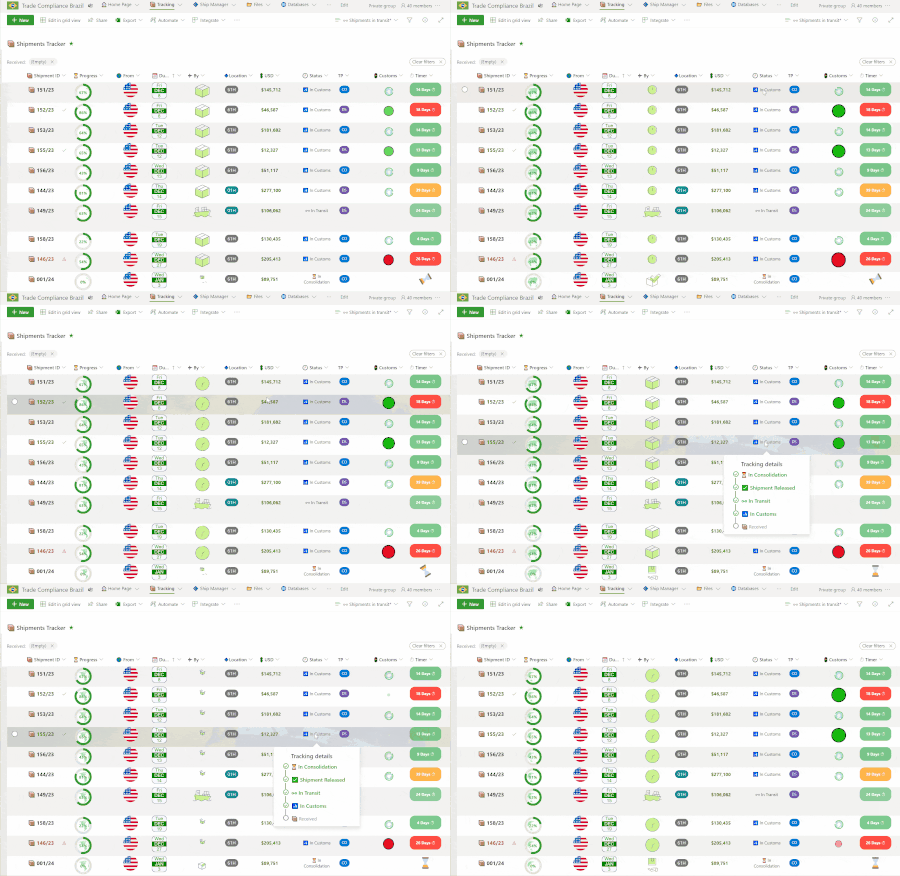
Dear Microsoft Tech Community, I'm reaching out to seek assistance with a crucial aspect of our SharePoint List used for shipment tracking that seems to be adversely affected by the modern UI (when the list is opened with Microsoft Lists). Main Issue: JSON Formatting of Floating Status Cards We employ JSON formatting to display floating status cards within our SharePoint List, offering a quick overview of various shipment statuses. This feature functions flawlessly within the traditional SharePoint site interface, with the card expanding beyond the column width to display content as intended. However, when using Microsoft Lists' modern UI, the card is incorrectly resized to the width of the column. This resizing causes the content to wrap, disrupt the layout, and significantly reduce the card's readability and usefulness. See attached animations below: Animation 01: shows the floating card in the SharePoint site interface, displaying the content in full without any wrapping, allowing for a complete and clear view. Animation 02: demonstrates the problematic behavior in the modern UI, where the same card is squeezed into the column width, causing an unwelcome wrap of text and icons. Additional Note: Absence of a 💾 'Save' Button in Modern UI Additionally, we've noticed that the modern UI lacks a 'Save' button when editing items. This automatic saving of every change is not conducive to our workflow as it prematurely triggers our Power Automate flows, intended to run only after a user finalizes their edits. While this issue is secondary to the JSON formatting concern, it still represents a significant deviation from the expected functionality. The complete JSON code used in this specific column to generate the floating card can be found in the link below. ➔ https://replit.com/@AlissonBorges2/Shipment-Tracker-Floating-Card#index.js Request for Guidance and Resolution: I am looking for solutions or workarounds that can help us: Preserve the floating card's full visibility as experienced in the traditional interface. Potentially reintroduce a 💾 'Save' button or delay the trigger of Power Automate flows until all edits are complete. Technical Details: Browser: Microsoft Edge for Business Version 119.0.2151.97 (Official build) (64-bit) SharePoint Version: SharePoint Online While I am aware that reverting to the classic UI is a temporary workaround by modifying the list's URL, it is not a sustainable or forward-looking solution. The modern UI offers a range of enhancements that significantly improve user experience and productivity. It's faster, more visually appealing, and reduces the need for manual adjustments, such as column width resizing. Therefore, I am keen on having these issues addressed within the new UI itself. Thanks!1.1KViews1like0Comments
Revolutionizing Accessibility: The Power of Facial Navigation Technology
Imagine that one of your colleagues lost arm mobility due to an accident, and now they are wondering how they will go back to their work. What if I could tell you that they will be able to use Teams and much more as they did before… 1.6KViews2likes0Comments
I want to be able to group app icons on Start menu - Windows 11
for example I want to put PWAs icons in one group, put Photo related app/software icons in another group and so on. Ideally I want to do this by dragging an icon on start menu and dropping it on another icon to form a group - Windows 11 insider Upvote in feedback hub: https://aka.ms/AAdps2r28KViews27likes22Comments