threat protection
395 TopicsPlanning your move to Microsoft Defender portal for all Microsoft Sentinel customers
In November 2023, Microsoft announced our strategy to unify security operations by bringing the best of XDR and SIEM together. Our first step was bringing Microsoft Sentinel into the Microsoft Defender portal, giving teams a single, comprehensive view of incidents, reducing queue management, enriching threat intel, streamlining response and enabling SOC teams to take advantage of Gen AI in their day-to-day workflow. Since then, considerable progress has been made with thousands of customers using this new unified experience; to enhance the value customers gain when using Sentinel in the Defender portal, multi-tenancy and multi-workspace support was added to help customers with more sophisticated deployments. Our mission is to unify security operations by bringing all your data, workflows, and people together to unlock new capabilities and drive better security outcomes. As a strong example of this, last year we added extended posture management, delivering powerful posture insights to the SOC team. This integration helps build a closed-loop feedback system between your pre- and post-breach efforts. Exposure Management is just one example. By bringing everything together, we can take full advantage of AI and automation to shift from a reactive to predictive SOC that anticipates threats and proactively takes action to defend against them. Beyond Exposure Management, Microsoft has been constantly innovating in the Defender experience, adding not just SIEM but also Security Copilot. The Sentinel experience within the Defender portal is the focus of our innovation energy and where we will continue to add advanced Sentinel capabilities going forward. Onboarding to the new unified experience is easy and doesn’t require a typical migration. Just a few clicks and permissions. Customers can continue to use Sentinel in the Azure portal while it is available even after choosing to transition. Today, we’re announcing that we are moving to the next phase of the transition with a target to retire the Azure portal for Microsoft Sentinel by July 1, 2026. Customers not yet using the Defender portal should plan their transition accordingly. “Really amazing to see that coming, because cross querying with tables in one UI is really cool! Amazing, big step forward to the unified [Defender] portal.” Glueckkanja AG “The biggest benefit of a unified security operations solution (Microsoft Sentinel + Microsoft Defender XDR) has been the ability to combine data in Defender XDR with logs from third party security tools. Another advantage developed has been to eliminate the need to switch between Defender XDR and Microsoft Sentinel portals, now having a single pane of glass, which the team has been wanting for some years.” Robel Kidane, Group Information Security Manager, Renishaw PLC Delivering the SOC of the future Unifying threat protection, exposure management and security analytics capabilities in one pane of glass not only streamlines the user experience, but also enables Sentinel customers to realize security outcomes more efficiently: Analyst efficiency: A single portal reduces context switching, simplifies workflows, reduces training overhead, and improves team agility. Integrated insights: SOC-focused case management, threat intelligence, incident correlation, advanced hunting, exposure management, and a prioritized incident queue enriched with business and sensitivity context—enabling faster, more informed detection and response across all products. SOC optimization: Security controls that can be adjusted as threats and business priorities change to control costs and provide better coverage and utilization of data, thus maximizing ROI from the SIEM. Accelerated response: AI-driven detection and response which reduces mean time to respond (MTTR) by 30%, increases security response efficiency by 60%, and enables embedded Gen AI and agentic workflows. What’s next: Preparing for the retirement of the Sentinel Experience in the Azure Portal Microsoft is committed to supporting every single customer in making that transition over the next 12 months. Beginning July 1, 2026, Sentinel users will be automatically redirected to the Defender portal. After helping thousands of customers smoothly make the transition, we recommend that security teams begin planning their migration and change management now to ensure continuity and avoid disruption. While the technical process is very straightforward, we have found that early preparation allows time for workflow validation, training, and process alignment to take full advantage of the new capabilities and experience. Tips for a Successful Migration to Microsoft Defender 1. Leverage Microsoft’s help: Leverage Microsoft documentation, instructional videos, guidance, and in-product support to help you be successful. A good starting point is the documentation on Microsoft Learn. 2. Plan early: Engage stakeholders early including SOC and IT Security leads, MSSPs, and compliance teams to align on timing, training and organizational needs. Make sure you have an actionable timeline and agreement in the organization around when you can prioritize this transition to ensure access to the full potential of the new experience. 3. Prepare your environment: Plan and design your environment thoroughly. This includes understanding the prerequisites for onboarding Microsoft Sentinel workspaces, reviewing and deciding on access controls, and planning the architecture of your tenant and workspace. Proper planning will ensure a smooth transition and help avoid any disruptions to your security operations. 4. Leverage Advanced Threat Detection: The Defender portal offers enhanced threat detection capabilities with advanced AI and machine learning for Microsoft Sentinel. Make sure to leverage these features for faster and more accurate threat detection and response. This will help you identify and address critical threats promptly, improving your overall security posture. 5. Utilize Unified Hunting and Incident Management: Take advantage of the enhanced hunting, incident, and investigation capabilities in Microsoft Defender. This provides a comprehensive view for more efficient threat detection and response. By consolidating all security incidents, alerts, and investigations into a single unified interface, you can streamline your operations and improve efficiency. 6. Optimize Cost and Data Management The Defender portal offers cost and data optimization features, such as SOC Optimization and Summary Rules. Make sure to utilize these features to optimize your data management, reduce costs, and increase coverage and SIEM ROI. This will help you manage your security operations more effectively and efficiently. Unleash the full potential of your Security team The unified SecOps experience available in the Defender portal is designed to support the evolving needs of modern SOCs. The Defender portal is not just a new home for Microsoft Sentinel - it’s a foundation for integrated, AI-driven security operations. We’re committed to helping you make this transition smoothly and confidently. If you haven’t already joined the thousands of security organizations that have done so, now is the time to begin. Resources AI-Powered Security Operations Platform | Microsoft Security Microsoft Sentinel in the Microsoft Defender portal | Microsoft Learn Shifting your Microsoft Sentinel Environment to the Defender Portal | Microsoft Learn Microsoft Sentinel is now in Defender | YouTube48KViews9likes22CommentsMigrate Sentinel to Defender - Why It Is a Security Architecture Decision, Not Just a Portal Change
Microsoft will retire the Sentinel experience in Azure on March 31, 2027. Most of the conversation around this transition focuses on cost optimization and portal consolidation. That framing undersells what is actually happening. The unified Defender portal is not a new interface for the same capabilities. It is the platform foundation for a fundamentally different SOC operating model — one built on a 2-tier data architecture, graph-based investigation, and AI agents that can hunt, enrich, and respond at machine speed. Partners who understand this will help customers build security programs that match how attackers actually operate. This document covers four things: What the unified experience delivers — the security capabilities that do not exist in standalone Sentinel and why they matter against today’s threats. What the transition really involves - is not data migration, but it is a data architecture project that changes how telemetry flows, where it lives, and who queries it. Where the partner opportunity lives — a structured progression from professional services (transactional, transition execution, and advisory) to ongoing managed security services. Why does the unified experience win competitively — factual capability advantages that give partners a defensible position against third-party SIEM alternatives. The Bigger Picture: Preparing for the Agentic SOC Before getting into transition mechanics, partners need to understand where the industry is headed — because the platform decisions made during this transition will determine whether a customer’s SOC is ready for what comes next. The security industry is moving from human-driven, alert-centric workflows to an operating model built on three pillars: Intellectual Property — the detection logic, hunting hypotheses, response playbooks, and domain expertise that differentiate one security team from another. Human Orchestration — the judgment, context, and decision-making that humans bring to complex incidents. Humans set strategy, validate findings, and make containment decisions. They do not manually triage every alert. AI Agents - built agents that execute repeatable work: enriching incidents, hunting across months of telemetry, validating security posture, drafting response actions, and flagging anomalies for human review. The SOC of 2027 will not be scaled by hiring more analysts. It will be scaled by deploying agents that encode institutional knowledge into automated workflows — orchestrated by humans who focus on the decisions that require judgment. This transformation requires a platform that provides three things: Deep telemetry — agents need months of queryable data to analyze behavioral patterns, build baselines, and detect slow-moving threats. The Sentinel data lake provides this at a cost point that makes long-retention feasible. Relationship context — agents need to understand how entities connect. Which accounts share credentials? What is the blast radius of a compromised service principle? What is the attack path from a phished user to domain admin? Sentinel Graph provides this. Extensibility — partners and customers need to build and deploy their own agents without waiting for Microsoft to ship them. The MCP framework and Copilot agent architecture provide this. None of these exist in Azure experience for Sentinel. All three ship with the Defender experience. The urgency goes beyond the March 2027 deadline. Organizations are deploying AI agents, copilots, and autonomous workflows across their businesses — and every one of those creates a new attack surface. Prompt injection, data poisoning, agent hijacking, cross-plugin exploitation — these are not theoretical risks. They are in the wild today. Defending against AI-powered attacks requires a security platform that is itself AI Agent-ready. The new experience in Defender unlocks this experience. What Unified SIEM and XDR Actually Delivers The original framing — “single pane of glass for SIEM and XDR” — is accurate but insufficient. Here is what the unified platform delivers that standalone Sentinel does not. Cross-Domain Incident Correlation The Defender correlation engine does not just group alerts by time proximity. It builds multi-stage incident graphs that link identity compromise to lateral movement to data exfiltration across SIEM and XDR telemetry — automatically. Consider a token theft chain: an infostealer harvests browser session cookies (endpoint telemetry), the attacker replays the token from a foreign IP (Entra ID sign-in logs), creates a mailbox forwarding rule (Exchange audit logs), and begins exfiltrating data (DLP alerts). In standalone Sentinel, these are four separate alerts in four different tables. In the unified platform, they are one correlated incident with a visual attack timeline. 2-Tier Data Architecture The Sentinel data lake introduces a second storage tier that changes the economics and capabilities of security telemetry: Analytics Tier Data Lake Purpose Real-time detection rules, SOAR, alerting Hunting, forensics, behavioral analysis, AI agent queries Latency Sub-5-minute query and alerting Minutes to hours acceptable Cost ~$4.30/GB PAYG ingestion (~$2.96 at 100 GB/day commitment) ~$0.05/GB ingestion + $0.10/GB data processing (at least 20x cheaper) Retention 90 days default (expensive to extend) Up to 12 years at low cost Best for High-signal, low-volume sources High-volume, investigation-critical sources The architecture decision is not “which tier is cheaper.” It is “which tier gives me the right detection capability for each data source.” Analytics tier candidates: Entra ID sign-in logs, Azure activity, audit logs, EDR alerts, PAM events, Defender for Identity alerts, email threat detections. These need sub-5-minute alerting. Data lake candidates: Raw firewall session logs, full DNS query streams, proxy request logs, Sysmon process events, NSG flow logs. These drive hunting and forensic analysis over weeks or months. Dual-ingest sources: Some sources need both tiers. Entra ID sign-in logs are the canonical example — analytics tier for real-time password spray detection, Data Lake for graph-based blast radius analysis across months of authentication history. Implementation is straightforward: a single Data Collection Rule (DCR) transformation handles the split. One collection point, two routing destinations. The right framing: “Right data in the right tier = better detections AND lower cost.” Cost savings are a side effect of good security architecture, not the goal. Sentinel Graph Sentinel graph enables SOC teams and AI agents to answer questions that flat log queries cannot: What is the blast radius of this compromised account? Which service principals share credentials with the breached identity? What is the attack path from this phished user to domain admin? Which entities are connected to this suspicious IP across all telemetry sources? Graph-based investigation turns isolated alerts into context-rich intelligence. It is the difference between knowing “this account was compromised” and understanding “this account has access to 47 service principals, 3 of which have written access to production Key Vault.” Security Copilot Integration Security Copilot embedded in the defender portal helps analysts summarize incidents, generate hunting queries, explain attacker behavior, and draft response actions. For complex multi-stage incidents, it reduces the time from “I see an alert” to “I understand the full scope” from hours to minutes. With free SCUs available with Microsoft 365 E5, teams can apply AI to the highest-effort investigation work without adding incremental cost. MCP and the Agent Framework The Model Context Protocol (MCP) and Copilot agent architecture let partners and customers build purpose-built security agents. A concrete example: an MCP-enabled agent can automatically enrich a phishing incident by querying email metadata, checking the sender against threat intelligence, pulling the user’s recent sign-in patterns, correlating with Sentinel Graph for lateral risk, and drafting a containment recommendation — in under 60 seconds. This is where partner intellectual property becomes competitive advantage. The agent framework is the mechanism for encoding proprietary detection logic, response playbooks, and domain expertise into automated workflows that run at machine speed. Security Store Security Store allows partners to evolve from one‑time transition projects into repeatable, scalable offerings—supporting professional services, managed services, and agent‑based IP that align with the customer’s unified SecOps operating model As part of the transition, the Microsoft Security Store becomes the extension layer for the Defender —allowing partners to deliver differentiated agents, SaaS, and security services natively within Defender and Sentinel, instead of building and integrating in isolation The 4 Investigation Surfaces: A Customer Maturity Ladder The Sentinel Data Lake exposes four distinct investigation surfaces, each representing a step toward the Agentic SOC — and a partner service opportunity: Surface Capability Maturity Level Partner Opportunity KQL Query Ad-hoc hunting, forensic investigation Basic — “we can query” Hunting query libraries; KQL training Graph Analytics Blast radius, attack paths, entity relationships Intermediate — “we understand relationships” Graph investigation training; attack path workshops Notebooks (PySpark) Statistical analysis, behavioral baselines, ML models Advanced — “we predict behaviors” Custom notebook development; anomaly scoring Agent/MCP Access Autonomous hunting, triage, response at machine speed Agentic SOC — “we automate” Custom agent development; MCP integration The customer who starts with “help us hunt better” ends up at “build us agents that hunt autonomously.” That is the progression from professional services to managed services. What the Transition Actually Involves It is not a data migration — customers’ underlying log data and analytics remain in their existing Log Analytics workspaces. That is important for partners to communicate clearly. But partners should not set the expectation that nothing changes except the URL. Microsoft’s official transition guide documents significant operational changes — including automation rules and playbooks, analytics rule, RBAC restructuring to the new unified model (URBAC), API schema changes that break ServiceNow and Jira integrations, analytics rule transitions where the Fusion engine is replaced by the Defender XDR correlation engine, and data policy shifts for regulated industries. Most customers cannot navigate this complexity without professional help. Important: Transitioning to the Defender portal has no extra cost - estimate the billing with the new Sentinel Cost Estimator Optimizing the unified platform means making deliberate changes: Adding dual-ingest for critical sources that need both real-time detection and long-horizon hunting. Moving high-volume telemetry to the Data Lake — enabling hunting at scale that was previously cost-prohibitive. Retiring redundant data copies where Defender XDR already provides the investigation capability. Updating RBAC, automation, and integrations for the unified portal’s consolidated schema and permission structure. Training analysts on new investigation workflows, Sentinel Graph navigation, and Copilot-assisted triage. Threat Coverage: The Detection Gap Most Organizations Do Not Know They Have This transition is an opportunity to quantify detection maturity — and most organizations will not like what they find. Based on real-world breach analysis — infostealers, business email compromise, human-operated ransomware, cloud identity abuse, vulnerability exploitation, nation-state espionage, and other prevalent threat categories — organizations running standalone Sentinel with default configurations typically have significant detection gaps. Those gaps cluster in three areas: Cross-domain correlation gaps — attacks that span identity, endpoint, email, and cloud workloads. These require the Defender correlation engine because no single log source tells the complete story. Long-retention hunting gaps — threats like command-and-control beaconing and slow data exfiltration that unfold over weeks or months. Analytics-tier retention at 90 days is too expensive to extend and too short for historical pattern analysis. Graph-based analysis gaps — lateral movement, blast radius assessment, and attack path analysis that require understanding entity relationships rather than flat log queries. The unified platform with proper log source coverage across Microsoft-native sources can materially close these gaps — but only if the transition includes a detection coverage assessment, not just a portal cutover. Partners should use MITRE ATT&CK as the common framework for measuring detection maturity. Map existing detections to ATT&CK tactics and techniques before and after transition — a measurable, defensible improvement that justifies advisory fees and ongoing managed services. Partner Opportunity: Professional Services to Managed Services This transition creates a structured progression for all partner types — from professional services that build trust and surface findings, to managed security services that deliver ongoing value. The key insight most partners miss: do not jump from “transition assessment” to “managed services pitch.” Customers are not ready for that conversation until they have experienced the value of professional services. The bridge engagement — whether transactional, transition execution, or advisory — builds trust, demonstrates the expertise, and surfaces the findings that make the managed services conversation a logical next step. Professional Services (transactional + transition execution + advisory) → Managed Security Services (MSSP) The USX transition is the ideal professional services entry point because it combines a mandatory deadline (March 2027) with genuine technical complexity (analytics rule, automation behavioral changes, RBAC restructuring, API schema shifts) that most customers cannot navigate alone. Every engagement produces findings — detection gaps, automation fragility, staffing shortfalls — that are the most credible possible evidence for managed services. Professional Services Transactional Partners Offer Customer Value Key Deliverables Transition Readiness Assessment Risk-mitigated transition with clear scope Sentinel deployment inventory; Defender portal compatibility check; transition roadmap with timeline; MITRE ATT&CK detection coverage baseline Transition Execution and Enablement Accelerated time-to-value, minimal disruption Workspace onboarding; RBAC and automation updates; Dual-portal testing and validation; SOC team training on unified workflows Security Posture and Detection Optimization Better detections and lower cost Data ingestion and tiering strategy; Dual-ingest implementation for critical sources; Detection coverage gap analysis; Automation and Copilot/MCP recommendations Advisory Partners Offer Customer Value Key Deliverables Executive and Strategy Advisory Leadership alignment on why this transition matters Unified SecOps vision and business case; Zero Trust and SOC modernization alignment; Stakeholder alignment across security, IT, and leadership Architecture and Design Advisory Future-ready architecture optimized for the Agentic SOC Target-state 2-tier data architecture; Dual-ingest routing decisions mapped to MITRE tactics; RBAC, retention, and access model design Detection Coverage and Gap Analysis Measurable detection maturity improvement Current-state MITRE ATT&CK coverage mapping; Gap analysis against 24 threat patterns; Detection improvement roadmap with priority recommendations SOC Operating Model Advisory Smooth analyst adoption with clear ownership Redesigned SOC workflows for unified portal; Incident triage and investigation playbooks; RACI for detection engineering, hunting, and platform ops Agentic SOC Readiness Preparation for AI-driven security operations MCP and agent architecture assessment; Custom agent development roadmap; IP + Human Orchestration + Agent operating model design Cost, Licensing and Value Advisory Transparent cost impact with strong business case Current vs. future cost analysis; Data tiering optimization recommendations; TCO and ROI modeling for leadership The conversion to managed services is evidence-based. Every professional services engagement produces findings — detection gaps, automation fragility, staffing shortfalls. Those findings are the most credible possible case for ongoing managed services. Managed Security Services The unified platform changes the managed security conversation. Partners are no longer selling “we watch your alerts 24/7.” They are selling an operating model where proprietary AI agents handle the repeatable work — enrichment, hunting, posture validation, response drafting — and human experts focus on the decisions that require judgment. This is where the competitive moat forms. The formula: IP + Human Orchestration + AI Agents = differentiated managed security. The unified platform enables this through: Multi-tenancy — the built-in multitenant portal eliminates the need for third-party management layers. Sentinel Data Lake — agents can query months of customer telemetry for behavioral analysis without cost constraints. Sentinel Graph — agents can traverse entity relationships to assess blast radius and map attack paths. MCP extensibility — partners can build agents that integrate with proprietary tools and customer-specific systems. Partners who build proprietary agents encoding their detection logic into the MCP framework will differentiate from partners who rely on out-of-box capabilities. The Securing AI Opportunity Organizations are deploying AI agents, copilots, and autonomous workflows across their businesses at an accelerating pace. Every AI deployment creates a new attack surface — prompt injection, data poisoning, agent hijacking, cross-plugin exploitation, unauthorized data access through agentic workflows. These are not theoretical risks. They are in the wild today. Partners who can help customers secure their AI deployments while also using AI to strengthen their SOC will command premium positioning. This requires a security platform that is itself AI Agent-ready — one that can deploy defensive agents at the same pace organizations deploy business AI. The unified Defender portal is that platform. Partners who position USX as “preparing your SOC for AI-driven security operations” will differentiate from partners who position it as “moving to a new portal.” Cost and Operational Benefits Better security architecture also costs less. This is not a contradiction — it is the natural result of putting the right data in the right tier. Benefit How It Works Eliminate low-value ingestion Identify and remove log sources that are never used for detections, investigations, or hunting. Immediately lowers analytics-tier costs without impacting security outcomes. Right-size analytics rules Disable unused rules, consolidate overlapping detections, and remove automation that does not reduce SOC effort. Pay only for processing that delivers measurable security value. Avoid SIEM/XDR duplication Many threats can be investigated directly in Defender XDR without duplicating telemetry into Sentinel. Stop re-ingesting data that Defender already provides. Tier data by detection need Store high-volume, hunt-oriented telemetry in the Data Lake at at least 20x lower cost. Promote only high-signal sources to the analytics tier. Full data fidelity preserved in both tiers. Reduce operational overhead Unified SIEM+XDR workflows in a single portal reduce tool switching, accelerate investigations, simplify analyst onboarding, and enable SOC teams to scale without proportional headcount increases. Improve detection quality The Defender correlation engine produces higher-fidelity incidents with fewer false positives. SOC teams spend less time triaging noise and more time on real threats. Competitive Positioning Partners need defensible talking points when customers evaluate third-party SIEM alternatives. The following advantages are factual, sourced from Microsoft’s transition documentation and platform capabilities — not marketing claims. No extra cost for transitioning — even for non-E5 customers. Third-party SIEM migrations involve licensing, data migration, detection rewrite, and integration rebuild costs. Native cross-domain correlation across Sentinel + Defender products into multi-stage incident graphs. Third-party SIEMs receive Microsoft logs as flat events — they lack the internal signal context, entity resolution, and product-specific intelligence that powers cross-domain correlation. Custom detections across SIEM + XDR — query both Sentinel and Defender XDR tables without ingesting Defender data into Sentinel. Eliminates redundant ingestion cost. Alert tuning extends to Sentinel — previously Defender-only capability, now applicable to Sentinel analytics rules. Net-new noise reduction. Unified entity pages — consolidated user, device, and IP address pages with data from both Sentinel and Defender XDR, plus global search across SIEM and XDR. Third-party SIEMs provide entity views from ingested data only. Built-in multi-tenancy for MSSPs — multitenant portal manages incidents, alerts, and hunting across tenants without third-party management layers. Try out the new GDAP capabilities in Defender portal. Industry validation: Microsoft’s SIEM+XDR platform has been recognized as a Leader by both Forrester (Security Analytics Platforms, 2025) and Gartner (SIEM Magic Quadrant, 2025). Summary: What Partners Should Take Away Topic Key Message Framing USX is a security architecture transformation, not a portal transition. Lead with detection capability, not cost savings. Platform foundation Sentinel Data Lake + Sentinel Graph + MCP/Agent Framework = the platform for the Agentic SOC. 4 investigation surfaces KQL → Graph → Notebooks → Agent/MCP. A maturity ladder from “we can query” to “we automate at machine speed.” Architecture 2-tier data model (analytics + Data Lake) with dual-ingest for critical sources. Cost savings are a side effect of good architecture. Transition complexity Analytics rules and automation rules. API schema changes. RBAC restructuring. Most customers need professional help. Partner engagement model Professional Services (transactional + transition execution + advisory) → Managed Services (MSSP). Competitive positioning No extra cost. Native correlation. Cross-domain detections. Built-in multi-tenancy. Capabilities third-party SIEMs cannot replicate. Partner differentiation IP + Human Orchestration + AI Agents. Partners who build proprietary agents on MCP have competitive advantage. Timeline March 31, 2027. Start now — phased transition with one telemetry domain first, then scale.3.6KViews5likes5Comments
One SOC, Many Tenants: Centralizing Microsoft Sentinel with Azure Lighthouse
Most large organizations don’t live in a single Microsoft Entra ID tenant. Acquisitions, regulatory separation, sovereignty mandates, and mission boundaries all multiply tenants over time. For a security operations team, that sprawl creates one hard question: how do you run a single security operations center (SOC) with one pane of glass, without copying every tenant’s logs into a central bucket and inheriting the compliance risk that comes with it? Azure Lighthouse provides delegated resource management for this scenario. It lets authorized operators in a central hub tenant work with scoped resources in spoke tenants from their own tenant. Paired with Microsoft Sentinel, it supports cross-tenant visibility while source logs remain stored in each spoke workspace. Group-based RBAC and Privileged Identity Management (PIM) can help govern privileged access. This practical blueprint applies least privilege to that pattern: one Sentinel deployment in the hub, delegated read access to the Log Analytics workspaces in each spoke, and RBAC and PIM controls that support auditability. The delegation is scoped to the workspaces the SOC needs. Before you begin: prerequisites Gather the identifiers and identity groups below before you touch any tenant. The consistency you establish here is what makes the per-spoke procedure repeatable across an entire estate. Collect tenant and workspace identifiers Hub CSOC tenant ID and hub Sentinel workspace resource ID. For each spoke: tenant ID, subscription ID, workspace resource group, and workspace resource ID. Create hub security groups in Microsoft Entra ID SOC-Readers, the required core query-access group. SOC-Responders, an optional group for response-specific actions. SOC-Admins, an optional and tightly controlled group. Define the minimum RBAC baseline Assign Log Analytics Reader to SOC-Readers at the spoke workspace or resource-group scope. Add elevated roles only when a documented use case requires them. Register the required resource providers Lighthouse and Sentinel both depend on resource providers being registered before delegation will work. In every spoke subscription, register Microsoft.ManagedServices so the delegation can be created. And because Sentinel lives only in the hub, register Microsoft.SecurityInsights and Microsoft.OperationalInsights on at least one subscription in the hub tenant. That last step is easy to overlook, and skipping it quietly blocks cross-tenant operations. What you’ll find here The architecture, and why data residency makes hub-and-spoke the right call. Prerequisites, including the resource providers teams most often forget to register. A repeatable, per-spoke delegation procedure. Validation queries that prove the access path actually works. A complete RBAC assignment matrix and PIM activation policy. Troubleshooting for the errors you’ll actually hit. Why hub-and-spoke for a cross-tenant SOC In this model, Microsoft Sentinel is deployed once, in the hub (CSOC) tenant. Each spoke tenant keeps its own Log Analytics workspace, where its logs are collected and retained. Azure Lighthouse connects the two: the spoke delegates scoped access to the hub, and authorized hub analysts query spoke workspaces from their own tenant. The source logs remain stored in the spoke workspace, while query results are returned across tenant boundaries to authorized users and services. Figure 1. The hub runs Sentinel and queries each spoke’s Log Analytics workspace through a scoped Azure Lighthouse delegation; logs never leave the spoke tenant. That separation is the entire point, and it lines up with the advantages Microsoft calls out for centralized cross-tenant management: Workspace ownership and source-log storage remain with each spoke tenant. Source telemetry remains stored in the configured spoke workspace and region, subject to the service configuration and authorized query access. Separate workspaces help maintain tenant isolation between spokes. Cross-tenant detection and hunting can query spoke workspaces without centralizing the underlying source logs; authorized query results are returned across tenant boundaries. Ingestion and retention costs are billed to the tenant that generates the data, not to the hub. What this runbook delivers The objective is a centralized CSOC with scoped, governed access across spoke tenants from a single Sentinel instance. Hub SOC teams query spoke Log Analytics workspaces through delegation, run cross-tenant analytics, and create and manage incidents centrally, while spoke logs stay in spoke workspaces and tenant isolation is preserved. Just as important is how that access is granted. The target state is least-privilege by construction: RBAC assignments carry only the permissions the SOC needs, privileged roles are PIM-governed rather than standing, and every delegation is scoped to the specific resources in play. When the build is complete, the operating model is both active and auditable. Configuring the delegation (per spoke tenant) Repeat the three steps below for each spoke. For fleets larger than a handful of tenants, capture the same authorization in an Azure Lighthouse ARM template and deploy it per spoke, so the scope and role assignments stay identical across the estate. Step 1: Register the provider in the spoke subscription Register Microsoft.ManagedServices in the spoke subscription. Confirm the provider registration state is Registered before continuing. Step 2: Create the Lighthouse delegation from spoke to hub Open Azure Lighthouse in the spoke tenant. Create a delegation, or offer, and set the managing tenant to the hub CSOC tenant ID. Add an authorization with the principal set to the hub SOC-Readers group and the role set to Log Analytics Reader. Set the scope to the workspace resource group (preferred) or to the individual workspace. Prefer group-based assignments and avoid direct user assignments. Step 3: Repeat across all spoke tenants Apply the same pattern and naming convention every time. Document any scope or role exceptions for security review. Validating the delegation Three checks confirm the delegation is wired correctly: visibility, query access, and incident generation. Run them in order, because each one depends on the check before it. Figure 2. The three validation checks run in sequence — visibility, then cross-tenant query, then incident generation — each building on the one before. Confirm delegated visibility From the hub context, verify that each spoke appears under Azure Lighthouse delegated resources. Confirm that the expected principals and scopes are listed. Run a cross-tenant query from hub Sentinel Run a simple take query to verify that the access path resolves. Run a data query against a known active table to confirm you can see ingestion. Confirm the access path resolves: workspace("/subscriptions/<spoke-sub-id>/resourceGroups/<spoke-rg>/providers/Microsoft.OperationalInsights/workspaces/<spoke-ws>") | take 1 Check that a known table is receiving data: workspace("/subscriptions/<spoke-sub-id>/resourceGroups/<spoke-rg>/providers/Microsoft.OperationalInsights/workspaces/<spoke-ws>").Heartbeat | where TimeGenerated > ago(24h) | summarize Events = count() Verify incident generation in hub Sentinel Create a temporary scheduled analytics rule that uses cross-tenant query logic. Trigger the test condition and confirm that the incident is created in the hub. Standardizing new-spoke onboarding Turn the procedure into a checklist so every new spoke is onboarded the same way and nothing slips. Resource provider registered. Delegation deployed with the hub as managing tenant. Roles assigned to hub SOC groups. Cross-tenant query test passed. Hub incident-generation test passed. Access-review owner assigned. Security and governance Delegation connects the hub to scoped spoke resources; governance helps control that access. Three controls do most of the work. Enforce privileged identity controls Make privileged groups PIM-eligible rather than permanently assigned. Require MFA, approval, justification, and time-bound activation. Maintain separation of duties Keep SOC monitoring, content engineering, and platform administration in separate roles. Review delegated access on a recurring governance cadence. Manage exceptions with formal controls Document every elevated-access and broad-scope delegation exception. Require security-architecture approval for any non-standard scope. Role and RBAC assignment matrix The tables below translate those principles into concrete assignments: first the hub-local roles, then the delegated spoke roles, and finally the PIM activation policy that governs both. Hub (CSOC) tenant: local assignments Spoke (service) tenant: delegated via Azure Lighthouse PIM activation requirements Key design rules Minimum privilege governs spoke delegation. Log Analytics Reader covers every cross-tenant detection and query operation, so Owner and broad Contributor at subscription scope have no place in a SOC delegation. Sentinel Responder in a spoke is rarely needed. It matters only when analysts must acknowledge, close, or act on spoke-level resources directly, and in a hub-only Sentinel model spoke incidents don’t exist, so the role usually isn’t required. Separation of duties is strict. Content engineers don’t get responder rights, responders don’t get content-deployment rights, and platform admins sit apart from both monitoring and detection engineering. Routine privileged roles are eligible and time-bound. SOC responders, hunters, content engineers, and platform admins use PIM rather than permanent assignment. Emergency-access accounts are the exception and should follow Microsoft Entra emergency-access guidance, including monitoring and regular validation. Troubleshooting common issues Most problems fall into three buckets, and each has a short diagnostic path. Design notes and what’s next By default, Sentinel stays enabled in the hub only, unless a spoke-specific requirement is approved. Spoke tenants remain data-source focused and don’t generate local Sentinel incidents; detection, incident management, and automation all live in hub Sentinel, giving you one place to build content and one place to respond. A centralized SOC does not require centralizing every source workspace. With scoped Azure Lighthouse delegation and PIM-governed access, a CSOC can query a multitenant estate while source logs remain stored in their spoke workspaces. Further reading Manage Microsoft Sentinel workspaces at scale (Azure Lighthouse) Manage multiple tenants in Microsoft Sentinel as an MSSP Extend Microsoft Sentinel across workspaces and tenantsKerberos and the End of RC4: Protocol Hardening and Preparing for CVE‑2026‑20833
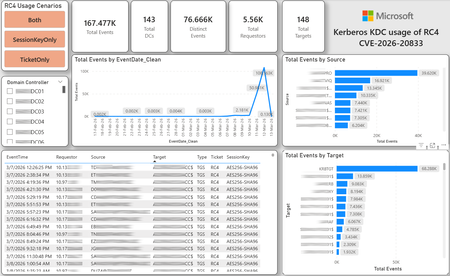
CVE-2026-20833 addresses the continued use of the RC4‑HMAC algorithm within the Kerberos protocol in Active Directory environments. Although RC4 has been retained for many years for compatibility with legacy systems, it is now considered cryptographically weak and unsuitable for modern authentication scenarios. As part of the security evolution of Kerberos, Microsoft has initiated a process of progressive protocol hardening, whose objective is to eliminate RC4 as an implicit fallback, establishing AES128 and AES256 as the default and recommended algorithms. This change should not be treated as optional or merely preventive. It represents a structural change in Kerberos behavior that will be progressively enforced through Windows security updates, culminating in a model where RC4 will no longer be implicitly accepted by the KDC. If Active Directory environments maintain service accounts, applications, or systems dependent on RC4, authentication failures may occur after the application of the updates planned for 2026, especially during the enforcement phases introduced starting in April and finalized in July 2026. For this reason, it is essential that organizations proactively identify and eliminate RC4 dependencies, ensuring that accounts, services, and applications are properly configured to use AES128 or AES256 before the definitive changes to Kerberos protocol behavior take effect. Official Microsoft References CVE-2026-25177 - Security Update Guide - Microsoft - Active Directory Domain Services Elevation of Privilege Vulnerability Microsoft Support – How to manage Kerberos KDC usage of RC4 for service account ticket issuance changes related to CVE-2026-20833 (KB 5073381) Microsoft Learn – Detect and Remediate RC4 Usage in Kerberos AskDS – What is going on with RC4 in Kerberos? Beyond RC4 for Windows authentication | Microsoft Windows Server Blog So, you think you’re ready for enforcing AES for Kerberos? | Microsoft Community Hub Risk Associated with the Vulnerability When RC4 is used in Kerberos tickets, an authenticated attacker can request Service Tickets (TGS) for valid SPNs, capture these tickets, and perform offline brute-force attacks, particularly Kerberoasting scenarios, with the goal of recovering service account passwords. Compared to AES, RC4 allows significantly faster cracking, especially for older accounts or accounts with weak passwords. Technical Overview of the Exploitation In simplified terms, the exploitation flow occurs as follows: The attacker requests a TGS for a valid SPN. The KDC issues the ticket using RC4, when that algorithm is still accepted. The ticket is captured and analyzed offline. The service account password is recovered. The compromised account is used for lateral movement or privilege escalation. Official Timeline Defined by Microsoft Important clarification on enforcement behavior Explicit account encryption type configurations continue to be honored even during enforcement mode. The Kerberos hardening associated with CVE‑2026‑20833 focuses on changing the default behavior of the KDC, enforcing AES-only encryption for TGS ticket issuance when no explicit configuration exists. This approach follows the same enforcement model previously applied to Kerberos session keys in earlier security updates (for example, KB5021131 related to CVE‑2022‑37966), representing another step in the progressive removal of RC4 as an implicit fallback. January 2026 – Audit Phase Starting in January 2026, Microsoft initiated the Audit Phase related to changes in RC4 usage within Kerberos, as described in the official guidance associated with CVE-2026-20833. The primary objective of this phase is to allow organizations to identify existing RC4 dependencies before enforcement changes are applied in later phases. During this phase, no functional breakage is expected, as RC4 is still permitted by the KDC. However, additional auditing mechanisms were introduced, providing greater visibility into how Kerberos tickets are issued in the environment. Analysis is primarily based on the following events recorded in the Security Log of Domain Controllers: Event ID 4768 – Kerberos Authentication Service (AS request / Ticket Granting Ticket) Event ID 4769 – Kerberos Service Ticket Operations (Ticket Granting Service – TGS) Additional events related to the KDCSVC service These events allow identification of: the account that requested authentication the requested service or SPN the source host of the request the encryption algorithm used for the ticket and session key This information is critical for detecting scenarios where RC4 is still being implicitly used, enabling operations teams to plan remediation ahead of the enforcement phase. If these events are not being logged on Domain Controllers, it is necessary to verify whether Kerberos auditing is properly enabled. For Kerberos authentication events to be recorded in the Security Log, the corresponding audit policies must be configured. The minimum recommended configuration is to enable Success auditing for the following subcategories: Kerberos Authentication Service Kerberos Service Ticket Operations Verification can be performed directly on a Domain Controller using the following commands: auditpol /get /subcategory:"Kerberos Service Ticket Operations" auditpol /get /subcategory:"Kerberos Authentication Service" In enterprise environments, the recommended approach is to apply this configuration via Group Policy, ensuring consistency across all Domain Controllers. The corresponding policy can be found at: Computer Configuration - Policies - Windows Settings - Security Settings - Advanced Audit Policy Configuration - Audit Policies - Account Logon Once enabled, these audits record events 4768 and 4769 in the Domain Controllers’ Security Log, allowing analysis tools—such as inventory scripts or SIEM/Log Analytics queries—to accurately identify where RC4 is still present in the Kerberos authentication flow. April 2026 – Enforcement with Manual Rollback With the April 2026 update, the KDC begins operating in AES-only mode (0x18) when the msDS-SupportedEncryptionTypes attribute is not defined. This means RC4 is no longer accepted as an implicit fallback. During this phase, applications, accounts, or computers that still implicitly depend on RC4 may start failing. Manual rollback remains possible via explicit configuration of the attribute in Active Directory. July 2026 – Final Enforcement Starting in July 2026, audit mode and rollback options are removed. RC4 will only function if explicitly configured—a practice that is strongly discouraged. This represents the point of no return in the hardening process. Official Monitoring Approach Microsoft provides official scripts in the repository: https://github.com/microsoft/Kerberos-Crypto/tree/main/scripts The two primary scripts used in this analysis are: Get-KerbEncryptionUsage.ps1 The Get-KerbEncryptionUsage.ps1 script, provided by Microsoft in the Kerberos‑Crypto repository, is designed to identify how Kerberos tickets are issued in the environment by analyzing authentication events recorded on Domain Controllers. Data collection is primarily based on: Event ID 4768 – Kerberos Authentication Service (AS‑REQ / TGT issuance) Event ID 4769 – Kerberos Service Ticket Operations (TGS issuance) From these events, the script extracts and consolidates several relevant fields for authentication flow analysis: Time – when the authentication occurred Requestor – IP address or host that initiated the request Source – account that requested the ticket Target – requested service or SPN Type – operation type (AS or TGS) Ticket – algorithm used to encrypt the ticket SessionKey – algorithm used to protect the session key Based on these fields, it becomes possible to objectively identify which algorithms are being used in the environment, both for ticket issuance and session establishment. This visibility is essential for detecting RC4 dependencies in the Kerberos authentication flow, enabling precise identification of which clients, services, or accounts still rely on this legacy algorithm. Example usage: .\Get-KerbEncryptionUsage.ps1 -Encryption RC4 -Searchscope AllKdcs | Export-Csv -Path .\KerbUsage_RC4_All_ThisDC.csv -NoTypeInformation -Encoding UTF8 Data Consolidation and Analysis In enterprise environments, where event volumes may be high, it is recommended to consolidate script results into analytical tools such as Power BI to facilitate visualization and investigation. The presented image illustrates an example dashboard built from collected results, enabling visibility into: Total events analyzed Number of Domain Controllers involved Number of requesting clients (Requestors) Most frequently involved services or SPNs (Targets) Temporal distribution of events RC4 usage scenarios (Ticket, SessionKey, or both) This type of visualization enables rapid identification of RC4 usage patterns, remediation prioritization, and progress tracking as dependencies are eliminated. Additionally, dashboards help answer key operational questions, such as: Which services still depend on RC4 Which clients are negotiating RC4 for sessions Which Domain Controllers are issuing these tickets Whether RC4 usage is decreasing over time This combined automated collection + analytical visualization approach is the recommended strategy to prepare environments for the Microsoft changes related to CVE‑2026‑20833 and the progressive removal of RC4 in Kerberos. Visualizing Results with Power BI To facilitate analysis and monitoring of RC4 usage in Kerberos, it is recommended to consolidate script results into a Power BI analytical dashboard. 1. Install Power BI Desktop Download and install Power BI Desktop from the official Microsoft website 2. Execute data collection After running the Get-KerbEncryptionUsage.ps1 script, save the generated CSV file to the following directory: C:\Temp\Kerberos_KDC_usage_of_RC4_Logs\KerbEncryptionUsage_RC4.csv 3. Open the dashboard in Power BI Open the file RC4-KerbEncryptionUsage-Dashboards.pbix using Power BI Desktop. If you are interested, please leave a comment on this post with your email address, and I will be happy to share with you. 4. Update the data source If the CSV file is located in a different directory, it will be necessary to adjust the data source path in Power BI. As illustrated, the dashboard uses a parameter named CsvFilePath, which defines the path to the collected CSV file. To adjust it: Open Transform Data in Power BI. Locate the CsvFilePath parameter in the list of Queries. Update the value to the directory where the CSV file was saved. Click Refresh Preview or Refresh to update the data. Click Home → Close & Apply. This approach allows rapid identification of RC4 dependencies, prioritization of remediation actions, and tracking of progress throughout the elimination process. List-AccountKeys.ps1 This script is used to identify which long-term keys are present on user, computer, and service accounts, enabling verification of whether RC4 is still required or whether AES128/AES256 keys are already available. Interpreting Observed Scenarios Microsoft recommends analyzing RC4 usage by jointly considering two key fields present in Kerberos events: Ticket Encryption Type Session Encryption Type Each combination represents a distinct Kerberos behavior, indicating the source of the issue, risk level, and remediation point in the environment. In addition to events 4768 and 4769, updates released starting January 13, 2026, introduce new Kdcsvc events in the System Event Log that assist in identifying RC4 dependencies ahead of enforcement. These events include: Event ID 201 – RC4 usage detected because the client advertises only RC4 and the service does not have msDS-SupportedEncryptionTypes defined. Event ID 202 – RC4 usage detected because the service account does not have AES keys and the msDS-SupportedEncryptionTypes attribute is not defined. Event ID 203 – RC4 usage blocked (enforcement phase) because the client advertises only RC4 and the service does not have msDS-SupportedEncryptionTypes defined. Event ID 204 – RC4 usage blocked (enforcement phase) because the service account does not have AES keys and msDS-SupportedEncryptionTypes is not defined. Event ID 205 – Detection of explicit enablement of insecure algorithms (such as RC4) in the domain policy DefaultDomainSupportedEncTypes. Event ID 206 – RC4 usage detected because the service accepts only AES, but the client does not advertise AES support. Event ID 207 – RC4 usage detected because the service is configured for AES, but the service account does not have AES keys. Event ID 208 – RC4 usage blocked (enforcement phase) because the service accepts only AES and the client does not advertise AES support. Event ID 209 – RC4 usage blocked (enforcement phase) because the service accepts only AES, but the service account does not have AES keys. https://support.microsoft.com/en-gb/topic/how-to-manage-kerberos-kdc-usage-of-rc4-for-service-account-ticket-issuance-changes-related-to-cve-2026-20833-1ebcda33-720a-4da8-93c1-b0496e1910dc They indicate situations where RC4 usage will be blocked in future phases, allowing early detection of configuration issues in clients, services, or accounts. These events are logged under: Log: System Source: Kdcsvc Below are the primary scenarios observed during the analysis of Kerberos authentication behavior, highlighting how RC4 usage manifests across different ticket and session encryption combinations. Each scenario represents a distinct risk profile and indicates specific remediation actions required to ensure compliance with the upcoming enforcement phases. Scenario A – RC4 / RC4 In this scenario, both the Kerberos ticket and the session key are issued using RC4. This is the worst possible scenario from a security and compatibility perspective, as it indicates full and explicit dependence on RC4 in the authentication flow. This condition significantly increases exposure to Kerberoasting attacks, since RC4‑encrypted tickets can be subjected to offline brute-force attacks to recover service account passwords. In addition, environments remaining in this state have a high probability of authentication failure after the April 2026 updates, when RC4 will no longer be accepted as an implicit fallback by the KDC. Events Associated with This Scenario During the Audit Phase, this scenario is typically associated with: Event ID 201 – Kdcsvc Indicates that: the client advertises only RC4 the service does not have msDS-SupportedEncryptionTypes defined the Domain Controller does not have DefaultDomainSupportedEncTypes defined This means RC4 is being used implicitly. This event indicates that the authentication will fail during the enforcement phase. Event ID 202 – Kdcsvc Indicates that: the service account does not have AES keys the service does not have msDS-SupportedEncryptionTypes defined This typically occurs when: legacy accounts have never had their passwords reset only RC4 keys exist in Active Directory Possible Causes Common causes include: the originating client (Requestor) advertises only RC4 the target service (Target) is not explicitly configured to support AES the account has only legacy RC4 keys the msDS-SupportedEncryptionTypes attribute is not defined Recommended Actions To remediate this scenario: Correctly identify the object involved in the authentication flow, typically: a service account (SPN) a computer account or a Domain Controller computer object Verify whether the object has AES keys available using analysis tools or scripts such as List-AccountKeys.ps1. If AES keys are not present, reset the account password, forcing generation of modern cryptographic keys (AES128 and AES256). Explicitly define the msDS-SupportedEncryptionTypes attribute to enable AES support. Recommended value for modern environments: 0x18 (AES128 + AES256) = 24 As illustrated below, this configuration can be applied directly to the msDS-SupportedEncryptionTypes attribute in Active Directory. AES can also be enabled via Active Directory Users and Computers by explicitly selecting: This account supports Kerberos AES 128 bit encryption This account supports Kerberos AES 256 bit encryption These options ensure that new Kerberos tickets are issued using AES algorithms instead of RC4. Temporary RC4 Usage (Controlled Rollback) In transitional scenarios—during migration or troubleshooting—it may be acceptable to temporarily use: 0x1C (RC4 + AES) = 28 This configuration allows the object to accept both RC4 and AES simultaneously, functioning as a controlled rollback while legacy dependencies are identified and corrected. However, the final objective must be to fully eliminate RC4 before the final enforcement phase in July 2026, ensuring the environment operates exclusively with AES128 and AES256. Scenario B – AES / RC4 In this case, the ticket is protected with AES, but the session is still negotiated using RC4. This typically indicates a client limitation, legacy configuration, or restricted advertisement of supported algorithms. Events Associated with This Scenario During the Audit Phase, this scenario may generate: Event ID 206 Indicates that: the service accepts only AES the client does not advertise AES in the Advertised Etypes In this case, the client is the issue. Recommended Action Investigate the Requestor Validate operating system, client type, and advertised algorithms Review legacy GPOs, hardening configurations, or settings that still force RC4 For Linux clients or third‑party applications, review krb5.conf, keytabs, and Kerberos libraries Scenario C – RC4 / AES Here, the session already uses AES, but the ticket is still issued using RC4. This indicates an implicit RC4 dependency on the Target or KDC side, and the environment may fail once enforcement begins. Events Associated with This Scenario This scenario may generate: Event ID 205 Indicates that the domain has explicit insecure algorithm configuration in: DefaultDomainSupportedEncTypes This means RC4 is explicitly allowed at the domain level. Recommended Action Correct the Target object Explicitly define msDS-SupportedEncryptionTypes with 0x18 = 24 Revalidate new ticket issuance to confirm full migration to AES / AES Conclusion CVE‑2026‑20833 represents a structural change in Kerberos behavior within Active Directory environments. Proper monitoring is essential before April 2026, and the msDS-SupportedEncryptionTypes attribute becomes the primary control point for service accounts, computer accounts, and Domain Controllers. July 2026 represents the final enforcement point, after which there will be no implicit rollback to RC4.35KViews4likes16CommentsMCP safety & evaluation with the Agent 365 CLI & Agent Governance Toolkit
Co Author: JiteshThakur AI agents are useful because they can act. They call tools, query databases, send messages, and hand work to other agents. That same freedom creates a problem: access control can tell you which service an agent may reach, but it does not always tell you whether a particular action is sensible, safe, or permitted. MCP is how most agents now act. Two Control Points: This post examines two control points that address different parts of the MCP lifecycle. Agent 365 CLI evaluates the MCP server before an agent uses it. Agent Governance Toolkit (AGT) governs sensitive tool calls while the agent runs. One improves what the agent sees. The other governs what the agent does. The Agent 365 CLI is a cross-platform command-line tool for Agent 365 applications on Azure. Its evaluation command examines MCP tool definitions and scores their quality. AGT evaluates actions against policy and records each decision. Together, these tools support a practical model: evaluate the server first, then provide proper scaffolding for the developer to test this in a dry run. Agent 365 CLI: Score an MCP server from the command line: The Agent 365 CLI can evaluate an MCP server against research-based practices for production readiness. The result is more useful than a simple pass or fail. The evaluation gives you: A score for each tool name, description, and parameter schema; A prioritized list of improvements; An overall maturity score for the server; and Local output that you can use early in development. This report turns a vague question, "Is this MCP server ready?", into a concrete list of work. The evaluate command a365 develop-mcp evaluate --server-url <server-url> [--auth-token <auth-token>] [options] The command reads the tool schemas from the server. It then produces guidance for names, descriptions, parameters, and schema structure. A local coding-agent CLI scores the semantic checks. You can use GitHub Copilot CLI or Claude Code under your account and AI subscription. The command does not send tool-schema data to Microsoft. Prerequisites: Install the following software: Agent 365 CLI; Node.js 18 or later for GitHub Copilot CLI; and A supported coding-agent CLI for semantic scoring. For example, install GitHub Copilot CLI with this command: powershell npm install -g @github/copilot This bring-your-own-LLM model keeps the scoring step in your local development environment. It is useful when model calls must remain inside an approved deployment. How the evaluation works The command runs a five-step pipeline and logs progress as it goes. Fig 1: MCP Evaluation using Agent 365 Cli Connect to the MCP server and collect its tool schemas. Generate an evaluation checklist in the output directory. Score the semantic checks with the selected coding agent. Calculate the maturity level and action priorities. Write the JSON and HTML reports. The evaluation contains two types of checks: Deterministic checks use exact rules in the CLI. For example, a tool name cannot be empty. Semantic checks use a coding agent to score clarity and meaning. Each result includes a reason for the score. Examples Set the authentication token in an environment variable. Then evaluate an authenticated server and write the artifacts to a subfolder. powershell $env:A365_MCP_AUTH_TOKEN = "<bearer-token>" a365 develop-mcp evaluate --server-url "https://my-mcp-server.contoso.com/mcp" --output-dir "./eval" Use a specific scoring engine with the `--eval-engine` option: powershell a365 develop-mcp evaluate --server-url "http://localhost:5000/mcp" --eval-engine claude-code Scenario: Evaluate a malicious MCP server For this demonstration, we hosted a deliberately malicious MCP server at `http://127.0.0.1:8124/`. It exposes tools that demonstrate tool poisoning, credential leakage, prompt injection, schema mismatch, sandbox escape, and other attacks. The server is intentionally unsafe and is for demonstration only. Fig 2: Setting up a test MCP server for evaluation We ran the evaluation in two steps. First, we generated the checklist without automatic semantic scoring: a365 develop-mcp evaluate --server-url "http://127.0.0.1:8124/" --eval-engine none Fig 3: Agent365CLI MCP Evaluation The command wrote the checklist and a semantic-evaluation prompt to the output directory. It also displayed the next steps. Second, we gave the prompt and checklist to a coding agent. The agent completed each unscored semantic check with a Boolean score and a short reason. After we saved the completed checklist, we ran the command again to generate the report: a365 develop-mcp evaluate --server-url "http://127.0.0.1:8124/" --output-dir "C:\temp\MaliciousMCP" Fig 4: Creating the report with Agent365 CLI MCP Evaluate command Understanding the evaluation report Open `<server-name>_eval_report.html` from the output directory. The report contains: The overall score from 0 to 100; The maturity level from 0 to 4; Scores for each tool and quality category; and A prioritized action list for the next maturity level. Fig 5: MCP Evaluation Report In our demonstration, the server scored 86.0 and reached Level 3: Optimized for AI. That strong overall score did not mean that every tool was safe or clear. The report found 58 action items, including one critical item and 33 high-priority items. That contrast matters. A server can have valid schemas and consistent names while still exposing misleading or dangerous tools. Fig 6: MCP Evaluation Report - Tool-By-Tool Detail What to look for Read the per-tool results before the overall score. A single weak tool can create more risk than the server average suggests. Focus on these report sections: Tool names: Can an agent select the correct tool from its name? Tool descriptions: Does each description explain the purpose and correct use? Parameter names: Do the names identify the data that the tool requires? Parameter descriptions: Do they explain the format, type, and constraints? Schema structure: Are the schemas valid and processable? Action items: Which changes have the highest effect on tool selection and use? The command processes static tool schemas from `tools/list`. It does not process runtime payloads, end-user data, or personal data. The command keeps the `--auth-token` value in memory. It sends the value only in the HTTP `Authorization` header. It does not write the token to disk or give it to the coding agent. AGT: Put governance in the execution path: Microsoft's open-source Agent Governance Toolkit (AGT) evaluates an action before execution. It adds identity and policy context, records the decision, and can send risky work for approval. This can be used by developers during the build time for dynamic evaluation of the MCP server. AGT lets developers put part of that intent into the execution path. Remote tools still need secure implementations, sandboxes need hard boundaries, and audit records need appropriate storage and access controls. You do not need to replace your agent framework to use it. What sits in the decision path? AGT wraps the tools that an agent already uses. You can start to govern a tool with two lines of Python: python from agentmesh.governance import govern safe_tool = govern(my_tool, policy="policy.yaml") On each call, `safe_tool` evaluates the configured policy. An allowed action reaches the original tool. A denied action raises `GovernanceDenied` and creates a decision record. This wrapper model reduces the cost of adoption. Teams can add governance to an existing agent stack without rebuilding it. AGT supports Python, TypeScript, .NET, Rust, and Go. Its documented integrations include popular agent frameworks, MCP, and A2A. Teams can also adopt AGT in stages. A team can begin with policy checks and audit records. It can add identity, approvals, sandboxing, and operational controls as risk increases. Each control answers a different question: Policy: Is this action allowed? Identity and trust: Which agent made the request? Runtime controls: What limits apply to execution? Audit evidence: Why did AGT allow or deny the action? A low-risk assistant can need only a deny rule and basic logging. An agent that moves money or changes production systems needs stronger controls. Fig 7: AGT Architecture Scenario: Govern the same malicious MCP server For this scenario demonstration, we used AGT Python packages as an MCP gateway. The gateway sat between an agent and the same malicious server from the earlier evaluation. This setup let us examine both control points against one target. The Agent 365 CLI examined the server's static tool definitions. The AGT gateway examined real requests and responses for the developer during its testing. Fig 8: AGT findings at runtime In the policy interface, a developer can edit runtime limits and detection rules. The developer can also validate the policy against sample tool metadata, save a revision, and activate it with a recorded reason. Fig 9: AGT control coverage The control-coverage view shows which AGT capabilities are active in the gateway. It also links each capability to package checks and end-to-end evidence. In our demonstration, we included the following controls: Tool metadata poisoning detection; Tool change and rug-pull detection; Dangerous argument blocking; Tool-response content scanning; Per-client tool-call budgets; and A redacted decision audit trail. You can build your detection & input security by reading more about it here. The gateway detected malicious content. For one blocked `tools/list` request, it recorded the findings. The important result was not only that AGT blocked the request. It also preserved the matched evidence, affected tool locations, policy modes, and request context. Fig 10: Example detection via AGT The dashboard then summarized block-mode findings, leading risk drivers, and tools that required review. This evidence can help a team prioritize policy changes and investigate repeated attacks. Fig 11: Sample AGT metrics AGT does not require this UI, gateway, or architecture. Its structured decisions can feed an admin console, SIEM, incident workflow, or approval queue. AGT also includes an Agent Compliance package with mappings for OWASP and other controls. These mappings give developers and governance teams a common record of applied controls. Teams do not need to reconstruct the agent's behavior after an incident. Check Compliance - Agent Governance Toolkit for more information. Conclusion: MCP safety needs controls before and during execution. The Agent 365 CLI improves the MCP interface before deployment. It exposes unclear tool definitions, scores server maturity, and turns quality gaps into prioritized work. While AGT is implemented at the build phase, it provides developers the ability to test policy, identity, execution context & preserve evidence for allowed or denied decisions. Neither tool replaces secure server code, strong sandbox boundaries, or protected audit storage. Instead, they make those controls easier to evaluate and explain. Start with one MCP server and one consequential tool call. Evaluate the server with the Agent 365 CLI. Then put an AGT policy around the action that carries the most risk. While these controls help secure the build phase of an agent, once agents move into production, runtime controls become essential. Agent365 provides those controls at runtime. With thanks to Ashik Kuppil for his inputs and collaboration on this post.Closing the loop on container security: From code to runtime in the AI era
Containers are the backbone of modern cloud-native apps — and increasingly, the infrastructure powering AI, from AI assistants to a new wave of intelligent agents. They also blur the line between build, deploy, and runtime: a single code change can become a running workload in minutes. A misconfiguration committed in the morning can be deployed in minutes and exploited before noon. At that speed, container security can no longer be a point-in-time check, it has to work as one continuous loop. The numbers back this up. For the first time, 31% of breaches now begin with an attacker exploiting a software vulnerability — overtaking stolen credentials as the most common way in — and 15% of attack techniques are now accelerated by generative AI, with adversaries using it to find gaps and write malware faster at every stage. Source: Verizon 2026 Data Breach Investigations Report (incidents Nov 2024–Oct 2025). Over the last few quarters, Microsoft Defender for Cloud has been evolving to offer you this continuous security, end to end. Explore container security’s new capabilities across posture, shift-left, runtime, multicloud coverage, and operations. Collectively they form a more comprehensive approach to container security — one that offers security right during developing a code to a running pod across Azure, AWS, and GCP. There is a second reason why container security matters more in 2026: containers are increasingly where AI runs. Many AI workloads — from model-serving APIs to retrieval systems and intelligent agents — now live as pods on AKS, EKS, and GKE (the managed Kubernetes services from Azure, AWS, and Google), often connected to some of an organization’s most sensitive models and data. As those crown jewels move into the cluster, the same posture, code‑to‑runtime, and runtime protections described in this post extend to AI workloads. The contest is increasingly AI against AI: attackers use it to find and reach the cluster faster, while defenders use it to push back — surfacing the risks that matter most and turning runtime findings into AI‑assisted code fixes. One platform, code to runtime A container finding is not treated as an isolated issue; it is connected to the identity it runs under, the registry and code repository it came from, and the cluster where it is running - all unified under one Microsoft Defender platform. Container posture and shift-left security are now redesigned for least vulnerabilities in production Conventional container security posture offered challenges to scale: a single grouped recommendation could stack thousands of findings under one bucket, making ownership, exemptions, and risk scoring too coarse to act on. That experience is now evolved. We have rebuilt the experience so that each finding is its own recommendation — per software, per image, per container. If two CVEs in the same image belong to two different teams, they can now be triaged, exempted, and reported separately. The grouped recommendations are deprecated and will be removed on July 30, 2026, We suggest updating any automation, export rules, and ServiceNow integrations to target the new per-finding recommendations before that date. That per-finding precision becomes even more powerful once you connect each finding to its source code and to the runtime resources it impacts. Defender for Cloud — part of Microsoft Defender suite — connects this code-to-runtime chain end-to-end. For example, an image built through Azure DevOps or GitHub, pushed to ACR, ECR, Google Artifact Registry, Docker Hub, or JFrog, and pulled by AKS, EKS, or GKE is one continuous evidence chain — traceable from a running container back to the pull request (PR) and line of code that introduced the risk. With GitHub Advanced Security integrated (GA), secrets, code, and dependency findings join the same attack story. The developer-first Defender for Cloud CLI runs the same scanner locally or in any CI/CD pipeline, with consistent exit codes for gating. In this diagram, you can see how we have embedded container security at every stage of the software development lifecycle (SDLC), not just the endpoints. At Code, GitHub Advanced Security and the Defender for Cloud CLI catch secrets, vulnerable dependencies, and insecure code before commit. At Build, the same scanner runs as a CI/CD gate — in GitHub Actions, Azure DevOps, Jenkins, or Bitbucket — failing the pipeline on critical findings. At Ship, registry scanning and Gated Deployment block risky or misconfigured images at the cluster door. And at Runtime, the sensor enforces anti-malware and binary-drift policy on the live workload. No stage is left as a blind spot, and a finding can be traced forward to the running pod or backward to the developer who introduced it. Visibility without enforcement only creates backlog. Gated Deployment — a Kubernetes admission controller — uses the same vulnerability signal, you trust, to block risky images at the cluster level. It supports phased rollout (audit, then deny), targets rules by cluster, namespace, pod, image, or label, and runs across AKS (including AKS Automatic), EKS, and GKE. A newer extension gates on Kubernetes misconfigurations too. Posture practitioners also get KSPM at container granularity — Kubernetes security posture management, available through both Defender for Containers and Defender CSPM — and, on Azure, a new actionable recommendation, Upgrade Azure Kubernetes Service Version (preview), that helps you remediate vulnerabilities in AKS-managed system pods. Coverage that matches containers’ evolution Historically, many container security programs concentrated on managed Kubernetes clusters in AKS, EKS, and GKE. The 2026 reality is broader: a growing share of production runs on serverless container platforms that abstract the cluster away, many sensitive workloads sit behind private, network-isolated clusters, and platform teams increasingly standardize on hardened or distroless base images. The surfaces that were blind spots are now part of the same posture graph as everything else. Serverless compute posture is now generally available across AWS Lambda, Azure Functions, and Web Apps, while Serverless containers posture (preview) takes the same idea to Azure Container Apps, ACI, and AWS Fargate. Together, they bring more of today’s cloud-native production footprint into the same posture graph. Coverage also improves where platform teams are standardizing on locked-down environments. The long-standing gap around private EKS and GKE clusters is closed, bringing some of the hardest-to-reach environments into the same security model. Scanning now works on hardened images from Docker Hardened or Minimus, and runtime protection supports BottleRocket on EKS — with the full feature set also available in Azure Government, which matters for teams running regulated workloads. Runtime threat protection that prevents, not just detects Posture closes the door on attackers; runtime threat protection guards the room if they still succeed. The key shift is that the Defender for Containers sensor now adds prevention on top of detection. The goal is simple: stop malicious code before it runs. Anti-malware detection and prevention (GA) scans container workloads and Kubernetes nodes and, based on the policies you define, blocks malicious execution instead of only alerting. Those alerts then flow into Microsoft Defender XDR’s unified incident model. The second is binary drift detection and prevention (preview). Containers are meant to be immutable. When a process starts from a binary that was not part of the original image, that is drift — and one of the highest-signal indicators of compromise in cloud-native workloads. Defender detects drifts and, with policy enabled, can now also block the drifted process before it executes. Anti-malware and Drift policies can be scoped by cloud, cluster, namespace, image, or label, with allow-lists for legitimate cases. Anti-malware policies can alert, block, or ignore — scoped to clusters, namespaces, pods, labels, or images. Rounding out runtime protection, DNS-based threat detection (GA) catches command-and-control beaconing, DGA traffic, and exfiltration over DNS. A unified approach to container security Step back, and the bigger picture is simple. The same platform that secured your VMs and identities now extends across AKS, EKS, GKE, private clusters, serverless containers, and serverless compute. The same Code-to-Runtime chain that once tied Infrastructure as Code (IaC) findings to running infrastructure now connects Dockerfile commits — through CI/CD and any major registry — to the running pod. Admission control turns posture findings into prevention at deploy time, and runtime protection actively blocks. That is a continuous container security loop living inside Microsoft Defender — not a checklist bolted onto Kubernetes. And it rebalances the fight: as attackers use AI to find and exploit gaps faster, the durable answer is security teams using AI of their own — protecting and triaging at machine speed. If you’ve already enabled container security with Microsoft, the clearest next step is to strengthen the core lifecycle stages first: Code + build: connect GitHub Advanced Security and integrate the Defender for Cloud CLI into your pipelines so findings are caught early and CI/CD gates can fail builds before an image is pushed. Ship: stand up Gated Deployment in audit mode on a non-production cluster, tune it, then flip to deny; extend it to Kubernetes misconfigurations. Run: enable the Defender for Containers sensor, extend it to private EKS and GKE clusters, then tune anti-malware and binary-drift rules in Block mode — starting with your crown-jewel namespaces. Extend protection: turn on serverless compute posture for Lambda, Functions, and Web Apps, and enable serverless container posture for Container Apps, ACI, or Fargate.1.2KViews3likes2CommentsAutomating Daily MDE Compliance Monitoring Across Azure VMs
The Problem We’re Solving Most security teams have no automated way to know when a VM silently falls out of MDE coverage, whether because the agent stopped, the VM was newly provisioned without onboarding, or the device stopped reporting. This Logic App closes that gap and puts the right information in front of the right people every day. Disclaimer: This solution is designed for Azure Virtual Machines only. For non-Azure VMs onboarded to Microsoft Defender for Endpoint through Azure Arc, a separate companion blog will be published soon to cover that scenario. What changes once you deploy this Challenge Without This Logic App How This Logic App Helps Security gaps go undetected for days or weeks Any VM that is not onboarded or has stopped reporting is caught within 24 hours of the daily run No automated owner notification The VM's ServerOwner tag is read automatically, and the owner is emailed directly with full compliance details VMs with no owner fall through the cracks Flagged explicitly in the IT summary report with instructions for how to assign the tag Manual compliance reporting is time-consuming Full CSV report auto-attached to every daily IT summary; no manual extraction needed Agents silently stop reporting after onboarding Detects "Onboarded, Not Reporting" as a distinct status, separate from "Not Onboarded" Large multi-subscription environments are hard to cover Paginated queries across all enabled subscriptions; every running VM is checked Compliance States Detected Compliance Status Priority What It Means Not Onboarded P2, High The VM is running in Azure but has never appeared in MDE. There is zero security telemetry for this machine. Onboarded, Not Reporting P3, Medium The VM was previously enrolled but has not checked in within the configured window. The MDE agent may be stopped or the VM may have lost network connectivity to MDE. Compliant No alert VM is onboarded and checked in within the required time window. It is excluded from all notifications. Running VMs Only: This workflow queries Azure Resource Graph with a filter of powerState == "VM running". Deallocated, stopped, and powered-off VMs are intentionally excluded — they are not expected to report to MDE while offline. Only machines that are turned on are evaluated. Workflow Architecture The workflow runs as a sequential daily pipeline. All Azure VM data and MDE device data are collected into memory first, then each VM is evaluated in a single For Each loop. Execution Pipeline Recurrence trigger fires daily at 08:00 IST. CONFIG compose action reads MDE_LASTSEEN_HOURS (default 24). This defines the compliance window: how recently a VM must have reported to MDE to be considered Compliant. Init-varITTeamEmail and Init-varSenderEmail load the configurable email addresses used for sending and receiving notifications. Get-AllSubscriptions calls the Azure Management API to discover all subscriptions in the tenant. ForEach-Subscription runs a paginated Azure Resource Graph query per enabled subscription, collecting all running VMs along with Private IP, OS Type, Location, ServerOwner tag, and VM UUID. Init-MDEVariables then Paginate-MDEDevices call the MDE Security Center API in pages of 10,000 to load every enrolled device into the AllMDEDevices array. ForEach-AzureVM looks each Azure VM up in AllMDEDevices and determines compliance status and priority. Non-compliant handling builds HTML and CSV rows. If the VM has a ServerOwner tag, a compliance alert email goes to the owner with the IT Team CC'd. If there's no owner, the VM is appended to NoOwnerList. IT Summary email is sent once all VMs are processed. If any non-compliant VMs were found, the consolidated IT report is sent with the CSV attachment. Otherwise an All Clear email is sent. How Azure VM Data is Matched to MDE Data Each Azure VM is matched against the MDE device list using a two-level strategy. Both checks run for every VM on every run. Match Method How It Works Primary: Azure VM ID Compares azureVmId from the MDE device record (lowercase) against the VmId captured from Azure Resource Graph (lowercase). Immune to hostname changes; this is the preferred match. Fallback: Hostname + IP Checks that MDE computerDnsName starts with the Azure VM name (case-insensitive) AND lastIpAddress matches the Azure Private IP. Both conditions must be true. Not Found A synthetic MDE record with onboardingStatus: "NotFound" is created. The VM is treated as Not Onboarded and a P2 High alert is raised. Pagination Design The workflow handles large environments through two independent pagination mechanisms that run before any compliance evaluation begins. Data Source Page Size Mechanism Azure Resource Graph 1,000 VMs per page Uses $skipToken from the response. The Until loop re-queries with the token until no token is returned (last page). Variables VMSkipToken and VMFetchComplete manage loop state per subscription. Supports up to 50,000 VMs (50 pages). MDE Security Center API 10,000 devices per page Uses the $skip offset parameter. MDESkip is incremented by 10,000 each iteration. The loop stops when a page returns fewer than 10,000 records. Supports up to 500,000 MDE devices (50 pages × 10,000). Prerequisites Azure Resources Resource Requirement Notes Azure Logic App Standard plan, Stateful workflow Consumption plan also supported Managed Identity System-assigned on the Logic App Enable under Logic App > Identity Sender mailbox (varSenderEmail) Licensed Microsoft 365 account Emails are sent FROM this address IT Team email (varITTeamEmail) Valid email address or distribution list Receives all reports; CC'd on owner alerts Azure VMs Running, with ServerOwner tag (recommended) Tag value must be a valid email address MDE licensing Microsoft Defender for Endpoint P1 or P2 Tenant must be enrolled in MDE The ServerOwner Tag Server owner notifications rely on a VM-level Azure tag. Without it, the VM is included in the IT summary, but no individual alert is sent to an owner. Tag Name Expected Value Effect ServerOwner Valid email, e.g. john@yourcompany.com Compliance alert sent TO this address; IT Team CC'd If the tag is missing or empty, the VM is flagged in the Action Required: No Owner Tag Found section of the IT summary email, with step-by-step instructions for tagging it in the Azure Portal. Required Permissions & Why The Logic App's Managed Identity must be granted three API permissions. These are Application permissions that cannot be assigned through the Azure Portal UI, so the PowerShell script in Section 4.3 must be used. Admin consent is required. Permission Summary Permission API / Service AppId Why It Is Required user_impersonation Azure Management 797f4846-ba00-4fd7-ba43-dac1f8f63013 Allows the Managed Identity to call the Azure Resource Graph API to query VM inventory across all subscriptions. Without this, the workflow cannot discover VMs. WindowsDefenderATP.Read.All MDE Security Center fc780465-2017-40d4-a0c5-307022471b92 Allows reading all device records from the MDE API (/api/machines). This returns onboarding status, last seen time, and health status — the core compliance data. Mail.Send Microsoft Graph 00000003-0000-0000-c000-000000000000 Allows sending emails via the Graph /sendMail endpoint on behalf of the varSenderEmail mailbox. Without this, no alerts or reports can be sent. Important: The Azure Management and MDE permissions belong to separate service principals — they are NOT part of Microsoft Graph. Each permission must be assigned to its own service principal using the AppId shown above. The script in Section 4.2 handles this correctly. Where to find the required values Parameter Where to find it in Azure Portal $tenantID Azure Portal > Microsoft Entra ID > Overview > Tenant ID $managedIdentityObjectId Logic App > Settings > Identity > System assigned tab > Object (principal) ID Permission Assignment Script Run this in Azure Cloud Shell or any terminal with the Microsoft.Graph PowerShell module installed. Update $tenantID and $managedIdentityObjectId before running. # PowerShell # ── Update these two values before running ─────────────────────────── $tenantID = "<tenantID>" # Your Tenant ID $managedIdentityObjectId = "<objectID>" # MI Object ID # Install Microsoft.Graph if not already present if (!(Get-Module -ListAvailable -Name Microsoft.Graph)) { Install-Module -Name Microsoft.Graph -Scope CurrentUser -Force } # Connect to Microsoft Graph Connect-MgGraph -TenantId $tenantID ` -Scopes "AppRoleAssignment.ReadWrite.All","Application.Read.All" # MDE Compliance Logic App needs 3 permissions across 3 different service principals $permissions = @( @{ Permission="user_impersonation"; AppId="797f4846-ba00-4fd7-ba43-dac1f8f63013" }, @{ Permission="WindowsDefenderATP.Read.All"; AppId="fc780465-2017-40d4-a0c5-307022471b92" }, @{ Permission="Mail.Send"; AppId="00000003-0000-0000-c000-000000000000" } ) foreach ($entry in $permissions) { $sp = Get-MgServicePrincipal -Filter "AppId eq '$($entry.AppId)'" $appRole = $sp.AppRoles | Where-Object { $_.Value -eq $entry.Permission } if ($appRole -ne $null) { New-MgServicePrincipalAppRoleAssignment ` -ServicePrincipalId $sp.Id ` -PrincipalId $managedIdentityObjectId ` -ResourceId $sp.Id ` -AppRoleId $appRole.Id Write-Host "Assigned: $($entry.Permission)" -ForegroundColor Green } else { Write-Host "Not found: $($entry.Permission)" -ForegroundColor Yellow } } Write-Host "All permissions assigned." -ForegroundColor Green Verify Permissions Assigned # PowerShell # Run after the assignment script to verify all 3 permissions are present Get-MgServicePrincipalAppRoleAssignment ` -ServicePrincipalId $managedIdentityObjectId | Select-Object AppRoleId, PrincipalDisplayName | Format-Table -AutoSize Note: You should see three assignment rows in the output — one for each permission. If any are missing, re-run the assignment script. An error saying the assignment already exists is normal and can be safely ignored. Creating the Logic App Create the resource Azure Portal > search Logic Apps > + Create. Select your Subscription and Resource Group. Logic App name: la-mde-compliance-monitor. Plan type: Standard > Windows > select or create a Hosting Plan > Review + Create > Create. Once deployed, click Go to resource. Enable System-assigned Managed Identity Open the Logic App > left menu: Settings > Identity. On the System assigned tab, toggle Status to On. Click Save > Yes on the confirmation dialog. The Object (principal) ID appears. Copy this value for the PowerShell script. Run the Permissions Assignment script to assign all three permissions to this identity. Why Managed Identity: A System-assigned Managed Identity is automatically scoped to this Logic App and deleted when the Logic App is deleted. It authenticates to Azure Management API, MDE API, and Microsoft Graph without any stored passwords or client secrets. Create the workflow and import the JSON Logic App > left menu: Workflows > + Add. Workflow name: MDEComplianceMonitor. State type: Stateful. Click Create. Click the workflow name > left menu: Code. Press Ctrl + A > Delete to clear the editor completely. Paste the complete workflow JSON from the companion file (see Appendix A). Click Save. It should succeed with no validation errors. Important: Always use Stateful. Stateless workflows do not support run history, have a 5-minute timeout, and do not retain intermediate state — all of which are required by this workflow's pagination loops. Configuration: What You Can Change After importing the JSON, update only the values described below. Everything else runs automatically. Email Address Variables Variable Description Where to Update varITTeamEmail The IT Team email address. All IT Summary reports are sent TO this address. All per-VM owner emails CC this address. 3000 varSenderEmail The Microsoft 365 licensed account that emails are sent FROM via Graph API. Must have Mail.Send permission granted to the Managed Identity. 3000 Compliance look-up window: MDE_LASTSEEN_HOURS This setting in the CONFIG compose action defines how recently a VM must have reported to MDE to count as Compliant. Default is 24 hours. Value Behaviour 24 (default) Compliant if the VM checked in with MDE within the last 24 hours. Recommended starting point. 12 Stricter check; suitable for high-security environments requiring near-real-time coverage. 48 More relaxed; suitable for environments with scheduled maintenance windows or intermittent connectivity. Running VMs Only The Azure Resource Graph query includes a filter for powerState == "VM running". This means: Deallocated VMs are excluded (not expected to report to MDE while offline). Stopped (allocated) VMs are excluded. Newly started VMs are included and checked on the next daily run. To Change the Filter: To change the power state filter, locate the "query" string inside the Build-VMQuery-Paged action and modify the | where powerState == clause. For example, removing the filter entirely will check all VMs regardless of state. Sample Email Notifications The screenshots below show actual emails generated by this workflow. All sensitive data (email addresses, VM names, subscription IDs, IP addresses) has been redacted. Per-VM owner alert Sent to the server owner (ServerOwner tag) when their VM is non-compliant. The IT Team is CC'd. The email contains full server details, compliance status, priority, last MDE check-in time, and resolution SLA. Note: If no ServerOwner tag is set the VM is skipped here and included in the "No Owner Tag Found" section of the IT summary instead. IT Team Daily Summary Report Sent once per day to the IT Team after all owner emails are dispatched. Shows up to 20 VMs inline with a full CSV attachment containing the complete list, plus a dedicated section for VMs with no owner tag. Note: The CSV attachment always contains the complete list of all non-compliant VMs regardless of count. The inline HTML table is limited to 20 rows to keep the email size manageable. All Compliant VMs: If all VMs are compliant, you’ll see email like this: Post-Deployment Checklist Before you leave the workflow running unattended, walk through this checklist once. # Item 1 Logic App resource created (Standard plan, Stateful workflow) 2 System-assigned Managed Identity enabled; Object ID copied 3 PowerShell script run; user_impersonation, WindowsDefenderATP.Read.All, and Mail.Send assigned 4 Permissions verified using Get-MgServicePrincipalAppRoleAssignment (3 rows expected) 5 Workflow JSON pasted into Code view; saved without validation errors 6 varITTeamEmail updated to your IT security team or distribution list address 7 varSenderEmail updated to a licensed Microsoft 365 mailbox 8 MDE_LASTSEEN_HOURS reviewed (default 24, adjust if needed) 9 At least one Azure VM has the ServerOwner tag set with a valid email 10 Manual run triggered: Logic App > Overview > Run Trigger > Run 11 Run history shows Succeeded; no 401 or 403 errors on any HTTP action 12 IT Team received the daily summary email with CSV attachment 13 Server owner received a per-VM alert with the IT Team CC'd 14 Recurrence trigger confirmed running daily at 08:00 IST Wrapping Up What I love about this is how much it accomplishes with so little: a Logic App, a Managed Identity, and three permissions. No connectors, no secrets to rotate, no third-party services. Yet every morning, your security team starts the day knowing exactly which VMs are out of MDE coverage and which owners have already been notified. If you adopt this pattern, here are a few natural next steps to consider: Hook into Microsoft Sentinel by writing non-compliant VMs to a custom table for trend analysis. Auto-create ServiceNow or Jira tickets for VMs that remain non-compliant for more than 48 hours. Extend the match logic to include Arc-enabled servers, not just Azure VMs. Add a Teams adaptive card notification alongside email for faster response. I'd love to hear how you're solving MDE coverage gaps in your environment. Appendix A: Workflow JSON The complete Logic App workflow definition is provided below. To import it: open the Logic App in Azure Portal, navigate to the workflow, click Code view, press Ctrl + A to clear the existing content, paste the entire JSON, then click Save. { "definition": { "$schema": "https://schema.management.azure.com/providers/Microsoft.Logic/schemas/2016-06-01/workflowdefinition.json#", "contentVersion": "1.0.0.0", "triggers": { "Recurrence": { "recurrence": { "frequency": "Day", "interval": 1, "schedule": { "hours": [ "8" ], "minutes": [ 0 ] }, "timeZone": "India Standard Time" }, "evaluatedRecurrence": { "frequency": "Day", "interval": 1, "schedule": { "hours": [ "8" ], "minutes": [ 0 ] }, "timeZone": "India Standard Time" }, "type": "Recurrence" } }, "actions": { "CONFIG": { "runAfter": {}, "type": "Compose", "inputs": { "MDE_LASTSEEN_HOURS": 24 } }, "Set-ExcludedSubscriptions": { "runAfter": { "CONFIG": [ "Succeeded" ] }, "type": "Compose", "inputs": [] }, "Init-varITTeamEmail": { "runAfter": { "Set-ExcludedSubscriptions": [ "Succeeded" ] }, "type": "InitializeVariable", "inputs": { "variables": [ { "name": "varITTeamEmail", "type": "string", "value": "admin@contoso.onmicrosoft.com" } ] } }, "Init-varSenderEmail": { "runAfter": { "Init-varITTeamEmail": [ "Succeeded" ] }, "type": "InitializeVariable", "inputs": { "variables": [ { "name": "varSenderEmail", "type": "string", "value": "admin@contoso.onmicrosoft.com" } ] } }, "Get-AllSubscriptions": { "runAfter": { "Init-varSenderEmail": [ "Succeeded" ] }, "type": "Http", "inputs": { "uri": "https://management.azure.com/subscriptions?api-version=2022-12-01", "method": "GET", "headers": { "Content-Type": "application/json" }, "authentication": { "type": "ManagedServiceIdentity", "audience": "https://management.azure.com" }, "retryPolicy": { "type": "fixed", "count": 3, "interval": "PT60S" } } }, "Parse-AllSubscriptions": { "runAfter": { "Get-AllSubscriptions": [ "Succeeded" ] }, "type": "ParseJson", "inputs": { "content": "@body('Get-AllSubscriptions')", "schema": { "type": "object", "properties": { "value": { "type": "array", "items": { "type": "object", "properties": { "subscriptionId": { "type": "string" }, "displayName": { "type": "string" }, "state": { "type": "string" } } } } } } } }, "Init-AllVMs": { "runAfter": { "Parse-AllSubscriptions": [ "Succeeded" ] }, "type": "InitializeVariable", "inputs": { "variables": [ { "name": "AllVMs", "type": "array", "value": [] }, { "name": "VMSkipToken", "type": "string", "value": "INIT" }, { "name": "VMFetchComplete", "type": "boolean", "value": false } ] } }, "ForEach-Subscription": { "foreach": "@body('Parse-AllSubscriptions')?['value']", "actions": { "Check-SubscriptionEnabled": { "actions": { "Reset-VMSkipToken": { "type": "SetVariable", "inputs": { "name": "VMSkipToken", "value": "INIT" } }, "Reset-VMFetchComplete": { "runAfter": { "Reset-VMSkipToken": [ "Succeeded" ] }, "type": "SetVariable", "inputs": { "name": "VMFetchComplete", "value": false } }, "Until": { "actions": { "Build-VMQuery-Paged": { "type": "Compose", "inputs": { "subscriptions": [ "@{items('ForEach-Subscription')?['subscriptionId']}" ], "query": "Resources | where type == 'microsoft.compute/virtualmachines' | extend VMName = tostring(name), ResourceGroup = tostring(resourceGroup), Location = tostring(location), OSType = tostring(properties.storageProfile.osDisk.osType), VMSize = tostring(properties.hardwareProfile.vmSize), ServerOwner = tostring(tags.ServerOwner), Environment = tostring(tags.Environment), SubscriptionId = tostring(subscriptionId), nicId = tolower(tostring(properties.networkProfile.networkInterfaces[0].id)), VmId = tolower(tostring(properties.vmId)) | join kind=leftouter (Resources | where type == 'microsoft.network/networkinterfaces' | extend privateIP = tostring(properties.ipConfigurations[0].properties.privateIPAddress) | project nicId = tolower(id), privateIP) on nicId | join kind=leftouter (Resources | where type == 'microsoft.compute/virtualmachines' | extend powerState = tostring(properties.extended.instanceView.powerState.displayStatus) | project id, powerState) on id | where powerState == 'VM running' | project VMName, ResourceGroup, Location, OSType, VMSize, ServerOwner, Environment = 'Azure', SubscriptionId, PrivateIP = privateIP, VmId, CloudEnvironment = 'Azure'", "options": { "$skipToken": "@if(equals(variables('VMSkipToken'), 'INIT'), '', variables('VMSkipToken'))" }, "$top": 1000 } }, "Get-VMs-Paged": { "runAfter": { "Build-VMQuery-Paged": [ "Succeeded" ] }, "type": "Http", "inputs": { "uri": "https://management.azure.com/providers/Microsoft.ResourceGraph/resources?api-version=2021-03-01", "method": "POST", "headers": { "Content-Type": "application/json" }, "body": "@outputs('Build-VMQuery-Paged')", "authentication": { "type": "ManagedServiceIdentity", "audience": "https://management.azure.com" } }, "runtimeConfiguration": { "contentTransfer": { "transferMode": "Chunked" } } }, "ForEach-VM-Result-Paged": { "foreach": "@body('Get-VMs-Paged')?['data']", "actions": { "Append-SingleVM-Paged": { "type": "AppendToArrayVariable", "inputs": { "name": "AllVMs", "value": "@items('ForEach-VM-Result-Paged')" } } }, "runAfter": { "Get-VMs-Paged": [ "Succeeded" ] }, "type": "Foreach" }, "Check-VMSkipToken": { "actions": { "Set-VMFetchComplete": { "type": "SetVariable", "inputs": { "name": "VMFetchComplete", "value": true } } }, "runAfter": { "ForEach-VM-Result-Paged": [ "Succeeded" ] }, "else": { "actions": { "Set-VMSkipToken": { "type": "SetVariable", "inputs": { "name": "VMSkipToken", "value": "@body('Get-VMs-Paged')?['$skipToken']" } } } }, "expression": { "or": [ { "equals": [ "@string(body('Get-VMs-Paged')?['$skipToken'])", "" ] } ] }, "type": "If" } }, "runAfter": { "Reset-VMFetchComplete": [ "Succeeded" ] }, "expression": "@equals(variables('VMFetchComplete'), true)", "limit": { "count": 50, "timeout": "PT1H" }, "type": "Until" } }, "else": { "actions": {} }, "expression": { "and": [ { "equals": [ "@items('ForEach-Subscription')?['state']", "Enabled" ] } ] }, "type": "If" } }, "runAfter": { "Init-AllVMs": [ "Succeeded" ] }, "type": "Foreach" }, "Init-MDEVariables": { "runAfter": { "ForEach-Subscription": [ "Succeeded" ] }, "type": "InitializeVariable", "inputs": { "variables": [ { "name": "AllMDEDevices", "type": "array" }, { "name": "MDESkip", "type": "integer", "value": 0 }, { "name": "MDEFetchComplete", "type": "boolean", "value": false } ] } }, "Paginate-MDEDevices": { "actions": { "Get-MDEDevices-Page": { "type": "Http", "inputs": { "uri": "https://api.securitycenter.microsoft.com/api/machines?$select=computerDnsName,id,osPlatform,lastSeen,onboardingStatus,healthStatus,lastIpAddress&$top=10000&$skip=@{variables('MDESkip')}", "method": "GET", "headers": { "Content-Type": "application/json" }, "authentication": { "type": "ManagedServiceIdentity", "audience": "https://api.securitycenter.microsoft.com" }, "retryPolicy": { "type": "fixed", "count": 3, "interval": "PT60S" } }, "runtimeConfiguration": { "contentTransfer": { "transferMode": "Chunked" } } }, "Parse-MDEPage": { "runAfter": { "Get-MDEDevices-Page": [ "Succeeded" ] }, "type": "ParseJson", "inputs": { "content": "@body('Get-MDEDevices-Page')", "schema": { "type": "object", "properties": { "value": { "type": "array", "items": { "type": "object", "properties": { "computerDnsName": { "type": [ "string", "null" ] }, "id": { "type": [ "string", "null" ] }, "osPlatform": { "type": [ "string", "null" ] }, "lastSeen": { "type": [ "string", "null" ] }, "onboardingStatus": { "type": [ "string", "null" ] }, "healthStatus": { "type": [ "string", "null" ] }, "lastIpAddress": { "type": [ "string", "null" ] }, "azureVmId": { "type": [ "string", "null" ] } } } } } } } }, "Append-MDEPage-ToArray": { "foreach": "@body('Parse-MDEPage')?['value']", "actions": { "Append-SingleMDEDevice": { "type": "AppendToArrayVariable", "inputs": { "name": "AllMDEDevices", "value": "@items('Append-MDEPage-ToArray')" } } }, "runAfter": { "Parse-MDEPage": [ "Succeeded" ] }, "type": "Foreach" }, "Check-PageSize": { "actions": { "Set-FetchComplete-True": { "type": "SetVariable", "inputs": { "name": "MDEFetchComplete", "value": true } } }, "runAfter": { "Append-MDEPage-ToArray": [ "Succeeded" ] }, "else": { "actions": { "Increment-MDESkip": { "type": "IncrementVariable", "inputs": { "name": "MDESkip", "value": 10000 } } } }, "expression": { "and": [ { "less": [ "@length(body('Parse-MDEPage')?['value'])", 10000 ] } ] }, "type": "If" } }, "runAfter": { "Init-MDEVariables": [ "Succeeded" ] }, "expression": "@equals(variables('MDEFetchComplete'), true)", "limit": { "count": 50, "timeout": "PT1H" }, "type": "Until" }, "Init-Variables": { "runAfter": { "Paginate-MDEDevices": [ "Succeeded" ] }, "type": "InitializeVariable", "inputs": { "variables": [ { "name": "EmailsSent", "type": "array", "value": [] }, { "name": "NoOwnerList", "type": "array", "value": [] }, { "name": "NonCompliantList", "type": "array", "value": [] }, { "name": "SummaryStats", "type": "object", "value": { "TotalNonCompliant": 0, "P1Critical": 0, "P2High": 0, "P3Medium": 0, "P4Low": 0, "EmailsSent": 0, "NoOwnerFound": 0 } }, { "name": "HTMLRows", "type": "string" }, { "name": "NonCompliantCount", "type": "integer", "value": 0 }, { "name": "CSVRows", "type": "string", "value": "@{concat('\"VM Name\",\"Private IP\",\"OS Type\",\"Location\",\"Server Owner\",\"MDE Status\",\"Last Seen\",\"Priority\",\"Action Taken\",\"Subscription ID\"', decodeUriComponent('%0A'))}" }, { "name": "HTMLRowCount", "type": "integer", "value": 0 } ] } }, "ForEach-AzureVM": { "foreach": "@variables('AllVMs')", "actions": { "Find-VMInMDE-Filter": { "type": "Query", "inputs": { "from": "@variables('AllMDEDevices')", "where": "@or(and(not(equals(item()?['azureVmId'], null)), not(equals(item()?['azureVmId'], '')), equals(toLower(item()?['azureVmId']), toLower(items('ForEach-AzureVM')?['VmId']))), and(or(equals(item()?['azureVmId'], null), equals(item()?['azureVmId'], '')), startsWith(toLower(item()?['computerDnsName']), toLower(items('ForEach-AzureVM')?['VMName'])), equals(item()?['lastIpAddress'], items('ForEach-AzureVM')?['PrivateIP'])))" } }, "Find-VMInMDE": { "runAfter": { "Find-VMInMDE-Filter": [ "Succeeded" ] }, "type": "Compose", "inputs": "@if(greater(length(body('Find-VMInMDE-Filter')), 0), first(body('Find-VMInMDE-Filter')), json('{\"computerDnsName\":\"NOT_FOUND\",\"onboardingStatus\":\"NotFound\",\"lastSeen\":\"1900-01-01T00:00:00Z\",\"lastIpAddress\":\"N/A\",\"healthStatus\":\"Unknown\"}'))" }, "Get-ComplianceStatus": { "runAfter": { "Find-VMInMDE": [ "Succeeded" ] }, "type": "Compose", "inputs": "@if(equals(outputs('Find-VMInMDE')?['computerDnsName'], 'NOT_FOUND'), 'Not Onboarded', if(equals(outputs('Find-VMInMDE')?['onboardingStatus'], 'Onboarded'), if(greater(outputs('Find-VMInMDE')?['lastSeen'], addHours(utcNow(), mul(-1, outputs('CONFIG')?['MDE_LASTSEEN_HOURS']))), 'Compliant', 'Onboarded - Not Reporting'), 'Not Onboarded'))" }, "Get-Priority": { "runAfter": { "Get-ComplianceStatus": [ "Succeeded" ] }, "type": "Compose", "inputs": "@if(equals(outputs('Get-ComplianceStatus'), 'Not Onboarded'), 'P2 - High', if(equals(outputs('Get-ComplianceStatus'), 'Onboarded - Not Reporting'), 'P3 - Medium', if(equals(outputs('Get-ComplianceStatus'), 'Compliant'), 'Compliant', 'P4 - Low')))" }, "Is-NonCompliant": { "actions": { "Append-CSVRows": { "type": "AppendToStringVariable", "inputs": { "name": "CSVRows", "value": "\"@{items('ForEach-AzureVM')?['VMName']}\",\"@{if(equals(items('ForEach-AzureVM')?['PrivateIP'], ''), 'N/A', items('ForEach-AzureVM')?['PrivateIP'])}\",\"@{items('ForEach-AzureVM')?['OSType']}\",\"@{items('ForEach-AzureVM')?['Location']}\",\"@{if(equals(items('ForEach-AzureVM')?['ServerOwner'], ''), 'No Owner Tag', items('ForEach-AzureVM')?['ServerOwner'])}\",\"@{outputs('Get-ComplianceStatus')}\",\"@{if(equals(outputs('Find-VMInMDE')?['onboardingStatus'], 'Onboarded'), if(equals(outputs('Find-VMInMDE')?['lastSeen'], '1900-01-01T00:00:00Z'), 'Never', concat(convertTimeZone(outputs('Find-VMInMDE')?['lastSeen'], 'UTC', 'India Standard Time', 'dd-MM-yyyy HH:mm:ss'), ' (', string(div(sub(ticks(utcNow()), ticks(outputs('Find-VMInMDE')?['lastSeen'])), 864000000000)), ' days ago)')), concat(outputs('Find-VMInMDE')?['onboardingStatus'], ' - Last Seen: ', convertTimeZone(outputs('Find-VMInMDE')?['lastSeen'], 'UTC', 'India Standard Time', 'dd-MM-yyyy HH:mm:ss')))}\",\"@{outputs('Get-Priority')}\",\"@{if(equals(items('ForEach-AzureVM')?['ServerOwner'], ''), 'IT Team Notified', 'Email sent to Server Owner')}\",\"@{items('ForEach-AzureVM')?['SubscriptionId']}\"@{decodeUriComponent('%0A')}" } }, "Check-HTMLRowCount": { "actions": { "Append-HTMLRows": { "type": "AppendToStringVariable", "inputs": { "name": "HTMLRows", "value": "<tr><td style=\"padding:8px 10px;border:1px solid #ddd;font-weight:600;\">@{items('ForEach-AzureVM')?['VMName']}</td><td style=\"padding:8px 10px;border:1px solid #ddd;word-wrap:break-word;\">@{if(equals(items('ForEach-AzureVM')?['PrivateIP'], ''), 'N/A', items('ForEach-AzureVM')?['PrivateIP'])}</td><td style=\"padding:8px 10px;border:1px solid #ddd;word-wrap:break-word;\">@{items('ForEach-AzureVM')?['OSType']}</td><td style=\"padding:8px 10px;border:1px solid #ddd;word-wrap:break-word;\">@{items('ForEach-AzureVM')?['Location']}</td><td style=\"padding:8px 10px;border:1px solid #ddd;word-wrap:break-word;\">@{if(equals(items('ForEach-AzureVM')?['ServerOwner'], ''), 'No Owner Tag', items('ForEach-AzureVM')?['ServerOwner'])}</td><td style=\"padding:8px 10px;border:1px solid #ddd;color:#c80000;\">@{outputs('Get-ComplianceStatus')}</td><td style=\"padding:8px 10px;border:1px solid #ddd;word-wrap:break-word;\">@{if(equals(outputs('Find-VMInMDE')?['onboardingStatus'], 'Onboarded'), if(equals(outputs('Find-VMInMDE')?['lastSeen'], '1900-01-01T00:00:00Z'), 'Never', concat(convertTimeZone(outputs('Find-VMInMDE')?['lastSeen'], 'UTC', 'India Standard Time', 'dd-MM-yyyy HH:mm:ss'), ' (', string(div(sub(ticks(utcNow()), ticks(outputs('Find-VMInMDE')?['lastSeen'])), 864000000000)), ' days ago)')), concat(outputs('Find-VMInMDE')?['onboardingStatus'], ' - Last Seen: ', convertTimeZone(outputs('Find-VMInMDE')?['lastSeen'], 'UTC', 'India Standard Time', 'dd-MM-yyyy HH:mm:ss')))}</td><td style=\"padding:8px 10px;border:1px solid #ddd;word-wrap:break-word;\">@{outputs('Get-Priority')}</td><td style=\"padding:8px 10px;border:1px solid #ddd;word-wrap:break-word;\">@{if(equals(items('ForEach-AzureVM')?['ServerOwner'], ''), 'IT Team Notified', 'Email sent to Server Owner')}</td><td style=\"padding:8px 10px;border:1px solid #ddd;word-break:break-all;\">@{items('ForEach-AzureVM')?['SubscriptionId']}</td></tr>" } }, "Increment-HTMLRowCount": { "runAfter": { "Append-HTMLRows": [ "Succeeded" ] }, "type": "IncrementVariable", "inputs": { "name": "HTMLRowCount", "value": 1 } } }, "runAfter": { "Append-CSVRows": [ "Succeeded" ] }, "else": { "actions": {} }, "expression": { "and": [ { "less": [ "@variables('HTMLRowCount')", 20 ] } ] }, "type": "If" }, "Increment-NonCompliantCount": { "runAfter": { "Check-HTMLRowCount": [ "Succeeded" ] }, "type": "IncrementVariable", "inputs": { "name": "NonCompliantCount", "value": 1 } }, "Check-ServerOwner": { "actions": { "Send-OwnerEmail": { "type": "Http", "inputs": { "uri": "@{concat('https://graph.microsoft.com/v1.0/users/', encodeURIComponent(variables('varSenderEmail')), '/sendMail')}", "method": "POST", "headers": { "Content-Type": "application/json" }, "body": { "message": { "subject": "[@{outputs('Get-Priority')}] MDE Compliance Alert - @{items('ForEach-AzureVM')?['VMName']}", "body": { "contentType": "HTML", "content": "<html><body style=\"font-family:Segoe UI,Arial,sans-serif;color:#1a1a1a;\"><div style=\"max-width:680px;margin:24px auto;border:1px solid #e0e0e0;border-radius:8px;overflow:hidden;\"><div style=\"background:#c80000;padding:20px 28px;\"><h2 style=\"color:#fff;margin:0;\">MDE Compliance Alert</h2><p style=\"color:#ffcccc;margin:6px 0 0;font-size:13px;\">Priority: @{outputs('Get-Priority')}</p></div><div style=\"padding:28px;\"><p style=\"margin-top:0;font-size:14px;\">Your server <strong>@{items('ForEach-AzureVM')?['VMName']}</strong> has a Microsoft Defender for Endpoint compliance issue requiring immediate attention.</p><table style=\"width:100%;border-collapse:collapse;font-size:14px;\"><thead><tr style=\"background:#f5f5f5;\"><th style=\"text-align:left;padding:10px 14px;border:1px solid #ddd;width:38%;\">Field</th><th style=\"text-align:left;padding:10px 14px;border:1px solid #ddd;word-wrap:break-word;\">Value</th></tr></thead><tbody><tr><td style=\"padding:9px 14px;border:1px solid #ddd;font-weight:600;\">Server Name</td><td style=\"padding:9px 14px;border:1px solid #ddd;word-wrap:break-word;\">@{items('ForEach-AzureVM')?['VMName']}</td></tr><tr style=\"background:#fafafa;\"><td style=\"padding:9px 14px;border:1px solid #ddd;font-weight:600;\">Private IP</td><td style=\"padding:9px 14px;border:1px solid #ddd;word-wrap:break-word;\">@{if(equals(items('ForEach-AzureVM')?['PrivateIP'], ''), 'N/A', items('ForEach-AzureVM')?['PrivateIP'])}</td></tr><tr><td style=\"padding:9px 14px;border:1px solid #ddd;font-weight:600;\">OS Type</td><td style=\"padding:9px 14px;border:1px solid #ddd;word-wrap:break-word;\">@{items('ForEach-AzureVM')?['OSType']}</td></tr><tr style=\"background:#fafafa;\"><td style=\"padding:9px 14px;border:1px solid #ddd;font-weight:600;\">Location</td><td style=\"padding:9px 14px;border:1px solid #ddd;word-wrap:break-word;\">@{items('ForEach-AzureVM')?['Location']}</td></tr><tr><td style=\"padding:9px 14px;border:1px solid #ddd;font-weight:600;\">Compliance Status</td><td style=\"padding:9px 14px;border:1px solid #ddd;color:#c80000;font-weight:700;\">@{outputs('Get-ComplianceStatus')}</td></tr><tr style=\"background:#fafafa;\"><td style=\"padding:9px 14px;border:1px solid #ddd;font-weight:600;\">Priority</td><td style=\"padding:9px 14px;border:1px solid #ddd;font-weight:700;\">@{outputs('Get-Priority')}</td></tr><tr><td style=\"padding:9px 14px;border:1px solid #ddd;font-weight:600;\">MDE Onboarding Status</td><td style=\"padding:9px 14px;border:1px solid #ddd;word-wrap:break-word;\">@{outputs('Find-VMInMDE')?['onboardingStatus']}</td></tr><tr style=\"background:#fafafa;\"><td style=\"padding:9px 14px;border:1px solid #ddd;font-weight:600;\">Last Seen in MDE (IST)</td><td style=\"padding:9px 14px;border:1px solid #ddd;word-wrap:break-word;\">@{if(equals(outputs('Find-VMInMDE')?['lastSeen'], '1900-01-01T00:00:00Z'), 'Never', concat(convertTimeZone(outputs('Find-VMInMDE')?['lastSeen'], 'UTC', 'India Standard Time', 'dd-MM-yyyy HH:mm:ss'), ' (', string(div(sub(ticks(utcNow()), ticks(outputs('Find-VMInMDE')?['lastSeen'])), 864000000000)), ' days ago)'))}</td></tr><tr><td style=\"padding:9px 14px;border:1px solid #ddd;font-weight:600;\">Resource Group</td><td style=\"padding:9px 14px;border:1px solid #ddd;word-wrap:break-word;\">@{items('ForEach-AzureVM')?['ResourceGroup']}</td></tr><tr style=\"background:#fafafa;\"><td style=\"padding:9px 14px;border:1px solid #ddd;font-weight:600;\">Subscription ID</td><td style=\"padding:9px 14px;border:1px solid #ddd;word-break:break-all;\">@{items('ForEach-AzureVM')?['SubscriptionId']}</td></tr></tbody></table><br/><table style=\"width:100%;border-collapse:collapse;\"><tr style=\"background:#fff8e1;\"><td style=\"padding:10px 14px;border:1px solid #ffe082;font-size:13px;\"><strong>Resolution SLA:</strong> P1 Critical - 24hrs | P2 High - 48hrs | P3 Medium - 72hrs</td></tr></table><br/><p style=\"font-size:13px;color:#555;\">For assistance contact IT Security: <a href=\"mailto:@{variables('varITTeamEmail')}\">@{variables('varITTeamEmail')}</a></p></div></div></body></html>" }, "toRecipients": [ { "emailAddress": { "address": "@{items('ForEach-AzureVM')?['ServerOwner']}" } } ], "ccRecipients": [ { "emailAddress": { "address": "@variables('varITTeamEmail')" } } ] }, "saveToSentItems": "true" }, "authentication": { "type": "ManagedServiceIdentity", "audience": "https://graph.microsoft.com" }, "retryPolicy": { "type": "fixed", "count": 2, "interval": "PT60S" } }, "runtimeConfiguration": { "contentTransfer": { "transferMode": "Chunked" } } }, "Append-EmailsSent": { "runAfter": { "Send-OwnerEmail": [ "Succeeded" ] }, "type": "AppendToArrayVariable", "inputs": { "name": "EmailsSent", "value": "@{items('ForEach-AzureVM')?['VMName']} → @{items('ForEach-AzureVM')?['ServerOwner']}" } } }, "runAfter": { "Increment-NonCompliantCount": [ "Succeeded" ] }, "else": { "actions": { "Append-NoOwnerList": { "type": "AppendToArrayVariable", "inputs": { "name": "NoOwnerList", "value": "<tr><td style=\"padding:8px 10px;border:1px solid #ddd;font-weight:600;\">@{items('ForEach-AzureVM')?['VMName']}</td><td style=\"padding:8px 10px;border:1px solid #ddd;word-wrap:break-word;\">@{if(equals(items('ForEach-AzureVM')?['PrivateIP'], ''), 'N/A', items('ForEach-AzureVM')?['PrivateIP'])}</td><td style=\"padding:8px 10px;border:1px solid #ddd;word-wrap:break-word;\">@{outputs('Get-ComplianceStatus')}</td><td style=\"padding:8px 10px;border:1px solid #ddd;font-weight:700;\">@{outputs('Get-Priority')}</td></tr>" } } } }, "expression": { "and": [ { "not": { "equals": [ "@items('ForEach-AzureVM')?['ServerOwner']", "" ] } } ] }, "type": "If" } }, "runAfter": { "Get-Priority": [ "Succeeded" ] }, "else": { "actions": {} }, "expression": { "and": [ { "not": { "equals": [ "@outputs('Get-ComplianceStatus')", "Compliant" ] } } ] }, "type": "If" } }, "runAfter": { "Init-Variables": [ "Succeeded" ] }, "type": "Foreach", "runtimeConfiguration": { "concurrency": { "repetitions": 1 } } }, "Check-AnyNonCompliant": { "actions": { "Send-ITSummaryEmail": { "type": "Http", "inputs": { "uri": "@{concat('https://graph.microsoft.com/v1.0/users/', encodeURIComponent(variables('varSenderEmail')), '/sendMail')}", "method": "POST", "headers": { "Content-Type": "application/json" }, "body": { "message": { "subject": "MDE Compliance Report (Azure Workloads) - @{variables('NonCompliantCount')} Non-Compliant VMs Found", "body": { "contentType": "HTML", "content": "<html><body style=\"font-family:Segoe UI,Arial,sans-serif;color:#1a1a1a;\"><div style=\"max-width:1400px;margin:24px auto;border:1px solid #e0e0e0;border-radius:8px;\"><div style=\"background:#0078d4;padding:20px 28px;\"><h2 style=\"color:#fff;margin:0;\">MDE Compliance Daily Report</h2><p style=\"color:#cce4ff;margin:6px 0 0;font-size:13px;\">Generated: @{convertTimeZone(utcNow(), 'UTC', 'India Standard Time', 'dd-MM-yyyy HH:mm:ss')} IST</p></div><div style=\"padding:28px;\"><table style=\"border-collapse:collapse;font-size:14px;margin-bottom:28px;\"><thead><tr style=\"background:#f0f0f0;\"><th style=\"padding:10px 18px;border:1px solid #ddd;word-wrap:break-word;\">Metric</th><th style=\"padding:10px 18px;border:1px solid #ddd;word-wrap:break-word;\">Value</th></tr></thead><tbody><tr><td style=\"padding:9px 18px;border:1px solid #ddd;word-wrap:break-word;\">Total Non-Compliant VMs</td><td style=\"padding:9px 18px;border:1px solid #ddd;font-weight:700;color:#c80000;\">@{variables('NonCompliantCount')}</td></tr><tr style=\"background:#fafafa;\"><td style=\"padding:9px 18px;border:1px solid #ddd;word-wrap:break-word;\">Server Owners Notified</td><td style=\"padding:9px 18px;border:1px solid #ddd;color:#107c10;font-weight:600;\">@{length(variables('EmailsSent'))}</td></tr><tr><td style=\"padding:9px 18px;border:1px solid #ddd;word-wrap:break-word;\">No Owner Tag</td><td style=\"padding:9px 18px;border:1px solid #ddd;color:#e65100;font-weight:600;\">@{length(variables('NoOwnerList'))}</td></tr></tbody></table><p style=\"background:#fff3cd;border:1px solid #ffc107;padding:10px 14px;border-radius:4px;font-size:13px;margin-bottom:16px;\">This report shows the first <strong>20 non-compliant VMs</strong> only. <strong>Please check the attached CSV file</strong> for the complete list.</p><table style=\"width:100%;table-layout:fixed;border-collapse:collapse;font-size:13px;\"><colgroup><col style=\"width:120px\"><col style=\"width:90px\"><col style=\"width:70px\"><col style=\"width:100px\"><col style=\"width:160px\"><col style=\"width:110px\"><col style=\"width:165px\"><col style=\"width:80px\"><col style=\"width:90px\"><col style=\"width:195px\"></colgroup><thead><tr style=\"background:#0078d4;color:#fff;\"><th style=\"padding:10px 12px;border:1px solid #005a9e;\">VM Name</th><th style=\"padding:10px 12px;border:1px solid #005a9e;\">Private IP</th><th style=\"padding:10px 12px;border:1px solid #005a9e;\">OS Type</th><th style=\"padding:10px 12px;border:1px solid #005a9e;\">Location</th><th style=\"padding:10px 12px;border:1px solid #005a9e;\">Server Owner</th><th style=\"padding:10px 12px;border:1px solid #005a9e;\">MDE Status</th><th style=\"padding:10px 12px;border:1px solid #005a9e;\">Last Seen (IST)</th><th style=\"padding:10px 12px;border:1px solid #005a9e;\">Priority</th><th style=\"padding:10px 12px;border:1px solid #005a9e;\">Action Taken</th><th style=\"padding:10px 12px;border:1px solid #005a9e;\">Subscription ID</th></tr></thead><tbody>@{variables('HTMLRows')}</tbody></table><br/><h3 style=\"border-bottom:2px solid #e65100;padding-bottom:8px;\">Action Required - No Owner Tag Found</h3><div style=\"background:#fff8f0;border:1px solid #ffccbc;padding:16px;border-radius:4px;font-size:13px;margin-bottom:16px;\"><p style=\"margin:0 0 8px 0;\">The following <strong>@{length(variables('NoOwnerList'))}</strong> server(s) have no <strong>ServerOwner</strong> tag assigned.</p><ol style=\"margin:0;padding-left:20px;\"><li style=\"margin-bottom:6px;\">Identify the owner of each server below</li><li style=\"margin-bottom:6px;\">Go to the VM in Azure Portal → Tags → Add tag</li><li style=\"margin-bottom:6px;\"><strong>Tag Name:</strong> ServerOwner | <strong>Tag Value:</strong> owner email address</li><li>Once tagged, the next daily report will automatically notify the owner</li></ol></div><table style=\"width:100%;table-layout:fixed;border-collapse:collapse;font-size:13px;\"><thead><tr style=\"background:#e65100;color:#fff;\"><th style=\"padding:10px 12px;border:1px solid #bf360c;text-align:left;\">VM Name</th><th style=\"padding:10px 12px;border:1px solid #bf360c;text-align:left;\">Private IP</th><th style=\"padding:10px 12px;border:1px solid #bf360c;text-align:left;\">MDE Status</th><th style=\"padding:10px 12px;border:1px solid #bf360c;text-align:left;\">Priority</th></tr></thead><tbody>@{if(equals(length(variables('NoOwnerList')), 0), '<tr><td colspan=\"4\" style=\"padding:12px;text-align:center;\">None - All servers have owner tags assigned</td></tr>', join(variables('NoOwnerList'), ''))}</tbody></table></div></div></body></html>" }, "toRecipients": [ { "emailAddress": { "address": "@variables('varITTeamEmail')" } } ], "attachments": [ { "@@odata.type": "#microsoft.graph.fileAttachment", "name": "@{concat('MDE-Compliance-Report-', convertTimeZone(utcNow(), 'UTC', 'India Standard Time', 'dd-MM-yyyy'), '.csv')}", "contentType": "text/csv", "contentBytes": "@{base64(variables('CSVRows'))}" } ] }, "saveToSentItems": "true" }, "authentication": { "type": "ManagedServiceIdentity", "audience": "https://graph.microsoft.com" } }, "runtimeConfiguration": { "contentTransfer": { "transferMode": "Chunked" } } } }, "runAfter": { "ForEach-AzureVM": [ "Succeeded" ] }, "else": { "actions": { "Send-AllClearEmail": { "type": "Http", "inputs": { "uri": "@{concat('https://graph.microsoft.com/v1.0/users/', encodeURIComponent(variables('varSenderEmail')), '/sendMail')}", "method": "POST", "headers": { "Content-Type": "application/json" }, "body": { "message": { "subject": "[@{convertTimeZone(utcNow(), 'UTC', 'India Standard Time', 'dd-MM-yyyy')}] MDE Compliance Report - All VMs Compliant", "body": { "contentType": "HTML", "content": "<html><body style=\"font-family:Segoe UI,Arial,sans-serif;color:#1a1a1a;\"><div style=\"max-width:600px;margin:24px auto;border:1px solid #e0e0e0;border-radius:8px;overflow:hidden;\"><div style=\"background:#107c10;padding:20px 28px;\"><h2 style=\"color:#fff;margin:0;\">MDE Compliance Report</h2><p style=\"color:#c8e6c9;margin:6px 0 0;font-size:13px;\">Generated: @{convertTimeZone(utcNow(), 'UTC', 'India Standard Time', 'dd-MM-yyyy HH:mm:ss')} IST</p></div><div style=\"padding:28px;text-align:center;\"><h2 style=\"color:#107c10;\">All VMs Compliant</h2><p style=\"font-size:15px;color:#555;\">All Azure Virtual Machines are onboarded to Microsoft Defender for Endpoint and reporting within the required 24-hour window.</p><p style=\"font-size:13px;color:#888;\">No action required. The next report will be sent tomorrow at 08:00 IST.</p></div></div></body></html>" }, "toRecipients": [ { "emailAddress": { "address": "@variables('varITTeamEmail')" } } ] }, "saveToSentItems": "true" }, "authentication": { "type": "ManagedServiceIdentity", "audience": "https://graph.microsoft.com" } }, "runtimeConfiguration": { "contentTransfer": { "transferMode": "Chunked" } } } } }, "expression": { "and": [ { "greater": [ "@variables('NonCompliantCount')", 0 ] } ] }, "type": "If" } }, "parameters": { "$connections": { "type": "Object", "defaultValue": {} } } }, "parameters": { "$connections": { "type": "Object", "value": {} } } }Microsoft Defender for Cloud Customer Newsletter
What's new in Defender for Cloud? Defender for Cloud is now integrated into the Defender portal to bring together cloud security posture management and threat protection in a single experience. Read more about it here. Cloud security reporting in the Defender portal is now in public preview Customers can now create, customize, and share security insights across the organization through Defender portal’s integrated cloud security reporting capabilities. With these reporting capabilities, customers can view built-in reports like CNAPP Executive Summary, create custom reports, export to PDF and more. For more details, please refer to this documentation. Check out other updates from last month here! Check out monthly news for the rest of the MTP suite here! Blog(s) of the month In May, our team published the following blog posts we would like to share: Better together with Azure WAF + Defender for Storage + Defender for Azure SQL Databases Public preview: Expanded coverage and unified management for SQL VA Express Configuration | Microsoft Community Hub Defender for Cloud in the field Check out the two short videos on Defender Portal integration and Start Secure Stay Secure with Defender for Cloud Microsoft Defender for Cloud deeply integrates with Microsoft Defender Start secure and stay secure with Microsoft Defender for Cloud Visit our YouTube page GitHub Community Check out this PS script and CLI to help you enable Defender for API at scale: Onboard to Defender for API at scale Visit our GitHub page Customer journey Discover how other organizations successfully use Microsoft Defender for Cloud to protect their cloud workloads. This month we are featuring Loyens & Loeff, a law and tax firm, that operates in a high complex environment, sought to modernize the digital workplace with Microsoft 365 Copilot, Defender for Cloud and Purview. Join our community! We offer several customer connection programs within our private communities. By signing up, you can help us shape our products through activities such as reviewing product roadmaps, participating in co-design, previewing features, and staying up-to-date with announcements. Sign up at aka.ms/JoinCCP. We greatly value your input on the types of content that enhance your understanding of our security products. Your insights are crucial in guiding the development of our future public content. We aim to deliver material that not only educates but also resonates with your daily security challenges. Whether it’s through in-depth live webinars, real-world case studies, comprehensive best practice guides through blogs, or the latest product updates, we want to ensure our content meets your needs. Please submit your feedback on which of these formats do you find most beneficial and are there any specific topics you’re interested in https://aka.ms/PublicContentFeedback. Note: If you want to stay current with Defender for Cloud and receive updates in your inbox, please consider subscribing to our monthly newsletter: https://aka.ms/MDCNewsSubscribeThe Fileless Paradox: How My 33-Day-Old Research Became Today's Ransomware Reality
33 Days Before BARADAI Emerged 🔴 Before You Read: What Is This Article About? This is the first article I have published on Microsoft Tech Community, and this is not a standard threat report. This is the story of being right before anyone believed it — and of a ransomware family called BARADAI that proved it. On April 5, 2026, I published a technical research article documenting, in detail, a fileless malware architecture that operated entirely in RAM using steganography and Windows Registry persistence. When I shared it on social media, the reactions were immediate and brutal: “A fileless payload cannot be persistent. If it leaves no trace on disk, it cannot survive a reboot.” “This technique is entirely theoretical. No real threat actor would ever use this in production.” “You cannot have persistence without leaving traces. Pick one.” And the most absurd ones: “Stop writing articles with AI.” “This level of technical detail is unrealistic — did AI generate this?” “Forensic artifacts cannot be erased. What kind of technique is this?” At that moment, I could not prove myself. I had a working proof-of-concept. I had built the architecture myself. The technical logic was sound. But I did not yet have a real-world threat actor using it in production. 33 days later, BARADAI appeared. And it used the exact same playbook I had written. This article is the first volume of the “We Saw It Coming” series. In this series, I correlate my independent research with emerging real-world threats, document technical overlaps, and provide actionable detection and defense guidance for Microsoft environments. Right now, I am actively trying to reverse and decrypt BARADAI. I do not yet have a definitive solution. But I am publishing this journey because my goal is to finalize a solution by collecting additional logs and intelligence. 📌 Table of Contents The Moment Nobody Believed 33 Days Later: Meet BARADAI The B-Family: Shared Infrastructure Ecosystem Side-by-Side: Technical Overlap Analysis Deep Dive: The Fileless Paradox — How Both Architectures Work The PAIDMEMES Anomaly: Forensic Residue Inside BARADAI My Technique vs BARADAI: Shared Technical Patterns Microsoft Sentinel Detection Rules (KQL) MITRE ATT&CK Mapping Decryption Research and My Current Approaches Defensive Recommendations Sources and References ------------------------------------------------------------------------------ 1. The Moment Nobody Believed April 5, 2026 — A Research Paper, a Community, and Silence On April 5, 2026, I published a detailed technical research article on Medium titled: “STEGOMALWARE — PNG Persistence Through Steganography and Windows Registry” The article documented a complete attack architecture that I designed and tested from scratch in a controlled laboratory environment. My core thesis was this: A fileless malware strain can achieve persistent, reboot-resilient execution without ever writing a malicious executable to disk — by hiding its payload inside the pixels of a PNG image using LSB steganography and leveraging the Windows Registry for persistence. I demonstrated this by building a keylogger. The architecture had four defining characteristics: Feature 1 — Fileless Execution (RAM-Only) The malicious payload never touches disk as an executable file. Instead, a small, “clean-looking” loader script extracts hidden code from the pixel data of a PNG image and executes it directly in RAM. No .exe, no .py, no .dll on disk. Traditional antivirus file-scanning mechanisms are effectively blind to this. Feature 2 — Registry-Based Persistence Contrary to critics claiming that fileless malware cannot survive reboots, the loader writes itself into the Windows Registry Run key: HKCU\SOFTWARE\Microsoft\Windows\CurrentVersion\Run This means that every time Windows starts, the loader executes again, extracts the payload from the PNG, and runs it back in memory. The malware lives in the Registry — not on disk. Feature 3 — Process Masquerading I compiled the loader under the name svchost.exe and assigned it a Windows service icon. When viewed in Task Manager, it appeared indistinguishable from a legitimate Windows system process. Feature 4 — Self-Repair (Self-Integrity Check) The loader continuously validated both its Registry entry and its file copy. If an antivirus product deleted the file or removed the Registry entry, the loader detected the modification and restored itself during the next execution cycle. Feature 5 — Intelligent Data Collection The keylogger I built automatically embedded collected data into the pixels of a PNG image every 10 characters or every 30 seconds — whichever occurred first. After each cycle, it reset itself, cleared temporary memory artifacts, and initiated a fresh collection loop. This architectural design enabled the malware to remain undetected on a system for months. Because there was no ever-growing log file on disk — the data was continuously transferred into images. ------------------------------------------------------------------------------------------ The Reactions The reactions I received when sharing this research did not surprise me, but they disappointed me. Technical objections: “Fileless malware, by definition, cannot survive reboots. No disk means no persistence.” “Forensic evidence cannot be erased. This makes no technical sense.” “If you are writing to the Registry, then it is not truly fileless.” Personal attacks: “Stop writing with AI.” “If you can perform technical analysis this detailed, why has nobody heard of you before?” “Copied from AI — even the formatting looks AI-generated.” This feedback revealed two things: First, people fundamentally misunderstood the concept of fileless malware — they were confusing “fileless execution” with “leaving absolutely no traces anywhere.” The Registry is not a traditional file in the conventional sense, yet it remains a persistent storage mechanism resilient across reboots. Second, it demonstrated how easily independent researchers are dismissed. Research not published by a major corporation or university was automatically labeled “AI-generated” or “theoretical.” At that moment, I could not prove myself. 33 days later, BARADAI proved me right. ------------------------------------------------------------------------------ 2. 33 Days Later: Meet BARADAI May 5–8, 2026 — A New Threat Surfaces On May 5, 2026, researchers at PCrisk documented a new ransomware sample submitted to VirusTtl. On the same day, CYFIRMA’s underground forum monitoring team flagged it in their threat intelligence feeds. By May 8, CYFIRMA’s Weekly Intelligence Report had published the first structured analysis. The threat was named BARADAI — derived from the extension it appends to encrypted files: .BARADAI -------------------------------------------- What Is BARADAI? BARADAI is a Windows ransomware variant belonging to the MedusaLocker family. MedusaLocker has been active since late 2019 and remains one of the most prolific and long-lived ransomware-as-a-service (RaaS) operations in the threat landscape. BARADAI is a specific variant of the MedusaLocker v3 architecture — sometimes tracked in threat intelligence repositories as “BabyLockerKZ.” Detection names across major security vendors: Microsoft Defender: Ransom:Win64/MedusaLocker.MZT!MTB ESET: Win64/Filecoder.MedusaLocker.A Avast: Win64:MalwareX-gen [Ransom] Kaspersky: HEUR:Trojan-Ransom.Win32.Generic ------------------------------------------------------------ How Does It Operate? BARADAI follows a double-extortion model. Silent Phase (Reconnaissance) After initial access, BARADAI does not immediately begin encryption. Instead, it performs systematic reconnaissance: -Enumerates running processes -Maps network topology -Collects browser-stored credentials -Harvests session cookies and SSL certificates -Captures desktop screenshots -Exfiltrates collected data to attacker-controlled C2 infrastructure Encryption Phase After exfiltration is complete, BARADAI activates its cryptographic payload: -AES-256-CBC for file content encryption -RSA-4096 for key protection Extortion Phase A ransom note (read_to_decrypt_files.html or WHATS_HAPPEND.txt) is dropped into every encrypted directory. Victims are given a 72-hour deadline. If payment is not made before expiration, stolen data is published on the group’s Data Leak Site (DLS). ------------------------------------------------------------------- Confirmed Targeting as of May 2026 Geographies -United States -Brazil -France -Australia -Italy -Israel -Malaysia Sectors -Education -Manufacturing -Engineering -Retail -Logistics -NGOs Ransom Demand Range -USD $10,000 — $80,000 per incident (CYFIRMA, May 2026) ------------------------------------------------------------------ 3. The B-Family: Shared Infrastructure Ecosystem One of the most important findings that emerged during my analysis was this: BARADAI is not operating alone. Threat intelligence monitoring identified a cluster of MedusaLocker variants sharing: -The same naming conventions -Similar code architecture -And most critically — the same Tor-based infrastructure I named this cluster: “The B-Family” --------------------------------------------- Evidence of Shared Infrastructure The strongest evidence of coordination inside the B-Family is not behavioral similarity — it is shared infrastructure. BARADAI’s ransom note lists the following Tor hidden service for victim negotiations: t33zoj4qwv455fog7qnb2azi5xcdxkixughmmduzbw2rtdgryqfbh6id.onion This is identical to the Tor address listed as the Data Leak Site and file leak server for BAVACAI — independently verified by ransomware.live, which identified the server running NGINX 1.24.0. PCrisk’s BARADAI documentation also includes screenshots of the leak site using the filename prefix: bavacai- This is structural evidence confirming that the same backend infrastructure serves both variants. What This Means The B-Family is not a collection of copycat operations. It is a single operation — or a tightly coordinated RaaS affiliate ecosystem — using different “brand names” per campaign in order to complicate attribution, tracking, and law enforcement disruption. ----------------------------------------------------------- Known Victims (BAVACAI DLS — Shared Backend) As of May 8, 2026, the BAVACAI DLS listed 16 victims — all published simultaneously on May 5. ------------------------------------------------------------ 4. Side-by-Side: Technical Overlap Analysis This section is the core of the article. The table below correlates the exact techniques documented in my April 5, 2026 research with the verified BARADAI behaviors documented by CYFIRMA, PCrisk, and the broader MedusaLocker analysis corpus. The conclusion is direct and unavoidable: The architecture I built, tested, documented, and published in a controlled laboratory environment on April 5, 2026 — the same architecture the community dismissed as “theoretical,” “AI-generated,” and “impossible” — was operationalized by a real threat actor 33 days later. -------------------------------------------------------- 5. Deep Dive: The Fileless Paradox Let us settle the debate permanently. The Misconception: “Fileless Malware Cannot Be Persistent” The argument I repeatedly encountered was this: “If malware does not leave files on disk, it cannot survive a reboot because RAM is volatile.” Technically correct. Strategically incomplete. It is true that RAM-resident code disappears when the system powers off. However, persistence does not require the malicious payload itself to reside on disk. It requires a mechanism that re-executes the payload after reboot. Those are two different things. -------------------------------------------------------------- The Architecture: How It Actually Works ┌──────────────────────────────────────────────────────────┐ │ ATTACK ARCHITECTURE │ │ │ │ DISK (minimal footprint): │ │ ┌──────────────────────────────────────────────────┐ │ │ │ loader.exe (masquerading as svchost.exe) │ │ │ │ cover_image.png (contains hidden payload) │ │ │ └──────────────────────────────────────────────────┘ │ │ │ │ │ REGISTRY (persistence): │ │ │ ┌──────────────────────────────────────────────────┐ │ │ │ HKCU\...\Run\WindowsUpdateService │ │ │ │ → points to loader.exe │ │ │ └──────────────────────────────────────────────────┘ │ │ │ │ │ ON EVERY BOOT: │ │ │ Registry triggers → loader.exe executes → │ │ Reads PNG pixels → extracts payload → │ │ Loads into RAM → executes │ │ (No malicious .exe is ever written to disk) │ │ │ │ RAM (execution): │ │ ┌──────────────────────────────────────────────────┐ │ │ │ Keylogger / RAT / Ransomware module │ │ │ │ Executes entirely in memory │ │ │ │ Invisible to disk-based AV scanning │ │ │ └──────────────────────────────────────────────────┘ │ └──────────────────────────────────────────────────────────┘ Only the loader exists on disk — and the loader itself is a small, legitimate-looking executable without a malicious signature. The malicious payload lives in: -The pixel data of the PNG image (steganographically encoded) -RAM (during active execution) The Registry provides the trigger mechanism — not the payload itself. That was the exact distinction critics failed to understand. ------------------------------------------------------------------ Why It Evades Traditional Detection BARADAI’s Implementation BARADAI uses the same logical architecture at larger scale. The MedusaLocker v3 binary: - Achieves persistence via Registry Run Key: HKCU\SOFTWARE\Microsoft\Windows\CurrentVersion\Run\BabyLockerKZ -Executes core ransomware logic in memory without writing recoverable payload components to disk -Uses Parent PID Spoofing (T1134.004) to appear as a child process of explorer.exe or svchost.exe -Restores itself through persistence mechanisms if binaries are deleted ------------------------------------------------------------------------------ 6. The PAIDMEMES Anomaly: Forensic Residue Inside BARADAI One of BARADAI’s most distinctive — and frankly bizarre — technical characteristics is its configuration and key storage mechanism. Unlike most ransomware variants that attempt to keep all cryptographic material exclusively in volatile memory, BARADAI writes directly into the Windows Registry under an extremely unusual hive: HKCU\SOFTWARE\PAIDMEMES\PUBLIC HKCU\SOFTWARE\PAIDMEMES\PRIVATE - HKCU\SOFTWARE\PAIDMEMES\PUBLIC stores the Base64-encoded RSA public key extracted from the malware configuration. - HKCU\SOFTWARE\PAIDMEMES\PRIVATE stores encrypted runtime state and configuration parameters required for persistence across multiple execution instances. ------------------------------------------- Why This Matters The PAIDMEMES Registry hive is not random — it serves a specific operational purpose. When BARADAI is launched with the -network flag (instructing it to encrypt network shares), it spawns a secondary instance of itself as a non-elevated process. By storing cryptographic keys and configuration inside the Registry, that secondary instance — even without administrative privileges — can access everything necessary to continue the attack. These two Registry artifacts represent your highest-confidence BARADAI detection signals: HKCU\SOFTWARE\PAIDMEMES (Key creation = active infection) HKCU\...\Run\BabyLockerKZ (Persistence = infection survived reboot) ------------------------------------------------------------ 7. My Technique vs BARADAI: Detailed Technical Similarities Now let us go deeper technically and explain why I believe I am one of the people closest to understanding BARADAI. 7.1 Payload Concealment: LSB Steganography My Technique I replaced the least significant bits (LSB) of RGB channels in PNG pixels with Base64-encoded keylogger payload bits. A 1/255 modification inside an 8-bit value is visually imperceptible to the human eye. In BARADAI The stegomalware technique forms the core of payload transportation. The same LSB logic applies: -No visible image corruption -No signature-based scanner triggers -Payload blended into image “noise” Shared Point Mathematically, it is the same approach. The only difference is scale: I concealed a keylogger. BARADAI conceals a ransomware module. -------------------------------------------------------- 7.2 Fileless + Registry: The “Impossible” Combination My Technique I registered my loader under: HKCU\...\Run\WindowsUpdateService Every time Windows booted, the loader executed, read the PNG, extracted the payload into RAM, and launched it. A .py file never existed on disk. In BARADAI HKCU\...\Run\BabyLockerKZ Exactly the same mechanism. Same Registry path. Same logic. Same “fileless yet persistent” paradox. ------------------------------------------------- Shared Point When critics claimed these two concepts could not coexist, they were wrong. Both BARADAI and I proved it. 7.3 Process Concealment: svchost.exe Masquerading My Technique I compiled the loader with PyInstaller under the name svchost.exe and assigned it a Windows service icon. Inside Task Manager, it appeared identical to a legitimate system process. In BARADAI BARADAI uses Parent PID Spoofing. Through Windows API manipulation, it makes execution appear as if initiated by svchost.exe or explorer.exe. EDR behavioral engines typically flag unknown processes performing system-level modifications. This technique bypasses those checks. Shared Point Same concealment strategy. Different implementation layer. 7.4 Timers and Silent Collection My Technique The keylogger embedded data into PNG images every 10 characters OR every 30 seconds — whichever occurred first. After each cycle: -Temporary memory artifacts were cleared -The process reset -No ever-growing log file existed on disk This is why antivirus products could not see it. This is why it could remain undetected for months. In BARADAI “Ghost Software.” After initial compromise, BARADAI does not immediately encrypt. It silently waits. Harvests credentials. Maps the network. Exfiltrates data. Encryption is the final signature. Shared Point Both architectures rely on a “silent hunter” model. I used 30-second image-based exfiltration loops. BARADAI remains dormant for days or weeks while collecting intelligence. The logic is identical. Only the timescale differs. ---------------------------------------------------------------- 7.5 Why I Believe I Am One of the People Closest to Solving BARADAI These similarities are not coincidence. They reflect the same technical mindset reaching the same solutions to the same problems. Because I built this architecture from scratch: -I understand its weak points — because I encountered the same weak points myself -I can reverse-engineer LSB steganography workflows — because I wrote the same algorithm -I understand Registry-based configuration logic — the PAIDMEMES hive pattern is familiar to me - I understand interruption points inside timer-based collection loops — because I built the same cycle architecture myself ------------------------------------------------------------------------------ 8. Microsoft Sentinel Detection Rules (KQL) The following Kusto Query Language (KQL) queries are designed for deployment in Microsoft Sentinel. They target specific behavioral artifacts associated with BARADAI and the broader MedusaLocker family. Deploy all three as scheduled analytics rules. Rule 1: PAIDMEMES / BabyLockerKZ Registry Artifact Detection High confidence. Detects exact forensic strings unique to MedusaLocker v3 / BARADAI. If This Rule Triggers The device is actively infected with BARADAI or the malware has successfully established persistence. Treat as a P1 incident. Immediately isolate the endpoint. Rule 2: Shadow Copy & Backup Deletion Chain Detection High confidence. Detects BARADAI’s recovery-destruction sequence. If This Rule Triggers A ransomware payload is actively preparing for encryption. This is your final detection window before data loss begins. Immediately isolate the affected endpoint and every reachable network share. Rule 3: EnableLinkedConnections — Network Share Privilege Escalation Detection Medium-High confidence. Detects BARADAI’s technique for accessing administrator-mapped network drives from non-elevated processes. If This Rule Triggers An attacker is preparing to encrypt network shares normally visible only to administrator-level processes. This is a pre-encryption lateral movement signal. ---------------------------------------------------------------- 9. MITRE ATT&CK Mapping ------------------------------------------------------------------------------ 10. Decryption Research and My Current Approaches Let me be completely transparent. Current status: There is no verified public decryptor available for BARADAI. -The No More Ransom project lists no decryptor for any MedusaLocker v3 / BabyLockerKZ variant -The AES-256-CBC + RSA-4096 implementation is mathematically sound -Historical decryptors existed only for significantly older MedusaLocker v1 and early v2 variants by exploiting key sanitization weaknesses in memory management -Those vulnerabilities were patched in v3 What We Know About the Encryption BARADAI uses intermittent encryption for large files: -Files larger than ~7.7MB are not fully encrypted -The malware encrypts 750KB, skips 250KB, encrypts another 750KB, and repeats This dramatically reduces encryption time while still rendering the file structurally unusable. --------------------------------------------------------------- What I Am Currently Researching I am currently analyzing the BARADAI binary from multiple angles: PRNG Weaknesses I am investigating the entropy source used during AES key generation. If the PRNG is insufficiently random, the effective key space may be reducible. Key Sanitization Behavior I am investigating whether AES keys remain in memory after usage. This weakness existed in MedusaLocker v1 and v2 and enabled historical decryptors. Although patched in v3, implementation mistakes remain possible. PAIDMEMES Registry Storage Analysis The PAIDMEMES hive stores runtime state. I am investigating whether this storage area contains recoverable cryptographic material. Registry-stored cryptographic data could provide a viable decryption foothold. Weaknesses in Intermittent Encryption The 750KB-encrypt / 250KB-skip pattern enables structural comparisons between encrypted and unencrypted regions. Known file formats (.docx, .xlsx, etc.) contain predictable header structures. This creates potential for partial known-plaintext attacks. ------------------------------------------------------------------------------ I will publish my findings in Vol.4 of this series regardless of the outcome. ------------------------------------------------- If You Are a BARADAI Victim -Do not pay the ransom until all alternatives are exhausted -Contact professional incident response services -Preserve all encrypted files and ransom notes — a future decryptor may eventually become available -Regularly monitor nomoreransom.org ---------------------------------------------------- 11. Defensive Recommendations Priority 1: Phishing-Resistant MFA (Against AiTM) Traditional MFA — push notifications, SMS codes, authenticator apps — can be defeated by AiTM reverse-proxy attacks. Deploy: -FIDO2 hardware security keys (YubiKey, etc.) -Windows Hello for Business These technologies cryptographically bind authentication tokens to the legitimate TLS session of the login portal. Stolen cookies become useless in separate sessions. ------------------------------------------------------- Priority 2: Eliminate RDP Exposure BARADAI’s primary initial access vector is exposed RDP on TCP 3389. -Disable Internet-facing RDP at the perimeter firewall -Enforce MFA + VPN for all remote administrative access -Implement account lockout policies and Network Level Authentication (NLA) Priority 3: Immutable Backups BARADAI deletes Volume Shadow Copies via vssadmin. Implement: -A 3–2–1 backup strategy with at least one offline/immutable copy -Azure Immutable Blob Storage (WORM) -Multi-user authorization for backup vaults -Monthly restoration testing --------------------------------------------- Priority 4: FSRM Canary Files Configure Windows File Server Resource Manager (FSRM): Immediately alert when files with extensions: .BARADAI .BAVACAI .BASANAI .BAGAJAI are created. Trigger automated scripts that: -Terminate the originating user session -Revoke network share access -------------------------------------------------- Priority 5: Deploy the Sentinel KQL Rules Above The three rules in Section 8 provide layered behavioral detection that signature-based tooling cannot replicate. Deploy them before an incident occurs. -------------------------------------------------------------------------- Priority 6: Zero Trust Architecture BARADAI’s EnableLinkedConnections Registry modification allows standard user processes to encrypt administrator-mapped drives. -Segment backup servers, Domain Controllers, and critical infrastructure -Require hardware-backed MFA for sensitive segments -Implement least privilege and Just-In-Time (JIT) administrative access with Azure PIM ------------------------------------------------------------------------ 📢 Call to Action: Collective Intelligence I started this research alone. But disrupting the impact of the B-Family requires collective effort. If your organization or threat-hunting operations have observed additional logs, unusual network traffic, or alternative steganographic payload samples associated with the B-Family (BARADAI, BAVACAI, BASANAI, etc.), do not remain silent. Data Sharing You may share anonymized IoCs or log artifacts with us. and Direct Contact If you have technically significant observations or findings related to BARADAI analysis, you can contact me directly through my Webex profile. Webex Contact - email address removed for privacy reasons Our collective security depends on the aggregation of these small signals. --------------------------------------------- Sources and References For technical verification and further investigation, refer to the following resources: Threat Intelligence & Ransomware Reports CYFIRMA: Weekly Threat Intelligence Report (2026–05–08) Ransomware.live: BAVACAI Group & DLS Infrastructure PCrisk: BAVACAI | BAGAJAI | BASANAI Analysis Technical Foundations & MITRE TTPs CISA: MedusaLocker Advisory (AA22–181A) Picus Security: MedusaLocker TTPs and Simulation Barracuda: GhostFrame Phishing Kit Spotlight (2025–12–04) Detection & Response Tools Microsoft Sentinel: Official Shadow Copy Deletion Analytics Rule GitHub (Bert-JanP): Hunting Queries and Detection Rules No More Ransom: Global Decryption Tools Repository Cassandra MARE Independent Research Deniz Tektek: Stegomalware & Fileless Persistence (2026–04–05) https://medium.com/@deniizz/stegomalware-steganografi-ve-windows-registry-ile-kalıcılık-sağlayan-png-01e50849a218 Cassandra Community: Initial BARADAI Analysis (2026–05–14) https://medium.com/@cassandracommunity/baradai-ransomware-hayalet-yazılım-ı-parçalarına-ayırıyoruz-0c04bb008f73 This article has been published strictly for defensive purposes. All described techniques have been analyzed within the context of threat detection and defense. This is my debut article on the Microsoft Tech Community. I am Deniz Tektek, a Red Team Operator, Cybersecurity Analyst, and Founder of the Cassandra community. My work focuses on the intersection of human psychology, IoT security, and the development of zero-trust local AI agents. This article, “The Fileless Paradox,” is the inaugural entry in my "We Saw It Coming" threat intelligence series, where I document technical overlaps between independent research and active real-world threats. What’s Next? Vol. 2: "Invisible Exfiltration" — Analyzing how BARADAI’s C2 hides in plain sight. Vol. 3: "The Human Gateway" — Why your MFA and AI-driven defenses are currently being bypassed. Vol. 4: "Cracking BARADAI" — My ongoing decryption research. Connect With Me If you want to discuss these findings, exchange logs, or collaborate on security research, please check my profile bio for contact information or connect with me via LinkedIn. I welcome all technical perspectives and peer reviews. My LinkedIn: https://www.linkedin.com/in/deniz-t-91166438a Deniz Tektek — May 2026 © Deniz Tektek & Cassandra — All Rights Reserved. Originally published on Microsoft Tech Community. Cross-posted on Medium.