threat intelligence
29 TopicsWhat’s New: Detecting Apache Log4j vulnerabilities with Microsoft Sentinel
A new Microsoft Sentinel solution has been added to the Content Hub that provides content to monitor, detect and investigate signals related to exploitation of the recently disclosed Log4j vulnerability.23KViews2likes9CommentsWhat’s new in Microsoft Sentinel: RSAC 2026
Security is entering a new era, one defined by explosive data growth, increasingly sophisticated threats, and the rise of AI-enabled operations. To keep pace, security teams need an AI-powered approach to collect, reason over, and act on security data at scale. At RSA Conference 2026 (RSAC), we’re unveiling the next wave of Sentinel innovations designed to help organizations move faster, see deeper, and defend smarter with AI-ready tools. These updates include AI-driven playbooks that accelerate SOC automation, Granular Delegated Admin Privileges (GDAP) and granular role-based access controls (RBAC) that let you scale your SOC, accelerated data onboarding through new connectors, and data federation that enables analysis in place without duplication. Together, they give teams greater clarity, control, and speed. Come see us at RSAC to view these innovations in action. Hear from Sentinel leaders during our exclusive Microsoft Pre-Day, then visit Microsoft booth #5744 for demos, theater sessions, and conversations with Sentinel experts. Read on to explore what’s new. See you at RSAC! Sentinel feature innovations: Sentinel SIEM Sentinel data lake Sentinel graph Sentinel MCP Threat Intelligence Microsoft Security Store Sentinel promotions Sentinel SIEM Playbook generator [Now in public preview] The Sentinel playbook generator delivers a new era of automation capabilities. You can vibe code complex automations, integrate with different tools to ensure timely and compliant workflows throughout your SOC and feel confident in the results with built in testing and documentation. Customers and partners are already seeing benefit from this innovation. “The playbook generator gives security engineers the flexibility and speed of AI-assisted coding while delivering the deterministic outcomes that enterprise security operations require. It's the best of both worlds, and it lives natively in Defender where the engineers already work.” – Jaime Guimera Coll | Security and AI Architect | BlueVoyant Learn more about playbook generator. SIEM migration experience [General availability now] The Sentinel SIEM migration experience helps you plan and execute SIEM migrations through a guided, in-product workflow. You can upload Splunk or QRadar exports to generate recommendations for best‑fit Sentinel analytics rules and required data connectors, then assess migration scope, validate detection coverage, and migrate from Splunk or QRadar to Sentinel in phases while tracking progress. “The tool helps turn a Splunk to Sentinel migration into a practical decision process. It gives clear visibility into which detections are relevant, how they align to real security use cases, and where it makes sense to enable or prioritize coverage—especially with cost and data sources in mind.” – Deniz Mutlu | Director | Swiss Post Cybersecurity Ltd Learn more about SIEM migration experience. GDAP, unified RBAC, and row-level RBAC for Sentinel [Public preview, April 1] As Sentinel environments grow for enterprises, MSSPs, hyperscalers, and partners operating across shared or multiple environments, the challenge becomes managing access control efficiently and consistently at scale. Sentinel’s expanded permissions and access capabilities are designed to meet these needs. Granular Delegated Admin Privileges (GDAP) lets you streamline management across multiple governed tenants using your primary account, based on existing GDAP relationships. Unified RBAC allows you to opt in to managing permissions for Sentinel workspaces through a single pane of glass, configuring and enforcing access across Sentinel experiences in the analytics tier and data lake in the Defender portal. This simplifies administration and improves operational efficiency by reducing the number of permission models you need to manage. Row-level RBAC scoping within tables enables precise, scoped access to data in the Sentinel data lake. Multiple SOC teams can operate independently within a shared Sentinel environment, querying only the data they are authorized to see, without separating workspaces or introducing complex data flow changes. Consistent, reusable scope definitions ensure permissions are applied uniformly across tables and experiences, while maintaining strong security boundaries. To learn more, read our technical deep dives on RBAC and GDAP. Sentinel data lake Sentinel data federation [Public preview, April 1] Sentinel data federation lets you analyze security data in place without copying or duplicating your data. Powered by Microsoft Fabric, you can now federate data from Fabric, Azure Data Lake Storage (ADLS), and Azure Databricks into Sentinel data lake. Federated data appears alongside native Sentinel data, so you can use familiar tools like KQL hunting, notebooks, and custom graphs to correlate signals and investigate across your entire digital estate, all while preserving governance and compliance. You can start analyzing data in place and progressively ingest data into Sentinel for deeper security insights, advanced automation, and AI-powered defense at scale. You are billed only when you run analytics on federated data using existing Sentinel data lake query and advanced insights meters. les for unified investigation and hunting Sentinel cost estimation tool [Public Preview, April 9] The new Sentinel cost estimation tool offers all Microsoft customers and partners a guided, meter-level cost estimation experience that makes pricing transparent and predictable. A built-in three-year cost projection lets you model data growth and ramp-up over time, anticipate spend, and avoid surprises. Get transparent estimates into spend as you scale your security operations. All other customers can continue to use the Azure calculator for Sentinel pricing estimates. See the Sentinel pricing page for more information. Sentinel data connectors A365 connector [Public preview, May 5] Bring AI agent telemetry into the Sentinel data lake to investigate agent behavior, tool usage, prompts, reasoning and execution using hunting, graph, and MCP workflows. GitHub audit log connector using API polling [General availability, March 6] Ingest GitHub enterprise audit logs into Sentinel to monitor user and administrator activity, detect risky changes, and investigate security events across your development environment. Google Kubernetes Engine (GKE) connector [General availability, March 6] Collect Google Kubernetes Engine (GKE) audit and workload logs in Sentinel to monitor cluster activity, analyze workload behavior, and detect security threats across Kubernetes environments. Microsoft Entra and Azure Resource Graph (ARG) connector enhancements [Public preview, April 15] Enable new Entra assets (EntraDevices, EntraOrgContacts) and ARG assets (ARGRoleDefinitions) in existing asset connectors, expanding inventory coverage and powering richer, built‑in graph experiences for greater visibility. With over 350 Sentinel data connectors, customers achieve broad visibility into complex digital environments and can expand their security operations effectively. “Microsoft Sentinel data lake forms the core of our agentic SOC. By unifying large volumes of Microsoft and third-party data, enabling graph-based analysis, and supporting MCP-driven workflows, it allows us to investigate faster, at lower cost, and with greater confidence.” – Øyvind Bergerud | Head of Security Operations | Storebrand Learn more about Sentinel data connectors. Sentinel connector builder agent using Sentinel Visual Studio Code extension [Public preview, March 31] Build Sentinel data connectors in minutes instead of weeks using the AI‑assisted Connector Builder agent in Visual Studio Code. This low‑code experience guides developers and ISVs end-to-end, automatically generating schemas, deployment assets, connector UI, secure secret handling, and polling logic. Built‑in validation surfaces issues early, so you can validate event logs before deployment and ingestion. Example prompt in GitHub Copilot Chat: @sentinel-connector-builder Create a new connector for OpenAI audit logs using https://api.openai.com/v1/organization/audit_logs Get started with custom connectors and learn more in our blog. Data filtering and splitting [Public preview, March 30] As security teams ingest more data, the challenge shifts from scale to relevance. With filtering and splitting now built into the Defender portal, teams can shape data before it lands in Sentinel, without switching tools or managing custom JSON files. Define simple KQL‑based transformations directly in the UI to filter low‑value events and intelligently route data, making ingestion optimization faster, more intuitive, and easier to manage at scale. Filtering at ingest time allows you to remove low-value or benign events to reduce noise, cut unnecessary processing, and ensure that high-signal data drives detections and investigations. Splitting enables intelligent routing of data between the analytics tier and the data lake tier based on relevance and usage. Together, these two capabilities help you balance cost and performance while scaling data ingestion sustainably as your digital estate grows. Create workbook reports directly from the data lake [Public preview, April 1] Sentinel workbooks can now directly run on the data lake using KQL, enabling you to visualize and monitor security data straight from the data lake. By selecting the data lake as the workbook data source, you can now create trend analysis and executive reporting. Sentinel graph Custom graphs [Public preview, April 1] Custom graphs let you build tailored security graphs tuned to your unique security scenarios using data from Sentinel data lake as well as non-Microsoft sources. With custom graph, powered by Fabric, you can build, query, and visualize connected data, uncover hidden patterns and attack paths, and help surface risks that are hard to detect when data is analyzed in isolation. These graphs provide the knowledge context that enables AI-powered agent experiences to work more effectively, speeding investigations, revealing blast radius, and helping you move from noisy, disconnected alerts to confident decisions at scale. In the words of our preview customers: “We ingested our Databricks management-plane telemetry into the Sentinel data lake and built a custom security graph. Without writing a single detection rule, the graph surfaced unusual patterns of activity and overprivileged access that we escalated for investigation. We didn't know what we were looking for, the graph surfaced the risk for us by revealing anomalous activity patterns and unusual access combinations driven by relationships, not alerts.” – SVP, Security Solutions | Financial Services organization Custom graph API usage for creating graph and querying graph will be billed starting April 1, 2026, according to the Sentinel graph meter. Creating custom graph Using the Sentinel VS Code extension, you can generate graphs to validate hunting hypotheses, such as understanding attack paths and blast radius of a phishing campaign, reconstructing multi‑step attack chains, and identifying structurally unusual or high‑risk behavior, making it accessible to your team and AI agents. Once persisted via a schedule job, you can access these custom graphs from the ready-to-use section in the graph experience in the Defender portal. Graphs experience in the Microsoft Defender portal After creating your custom graphs, you can access them in the graphs section of the Defender portal under Sentinel. From there, you’ll be able to perform interactive graph-based investigations, such as using a graph built for phishing analysis to help you quickly evaluate the impact of a recent incident, profile the attacker, and trace its paths across Microsoft telemetry and third-party data. The new graph experience lets you run Graph Query Language (GQL) queries, view the graph schema, visualize the graph, view graph results in tabular format, and interactively travers the graph to the next hop with a simple click. Sentinel MCP Sentinel MCP entity analyzer [General availability, April 1] Entity analyzer provides reasoned, out-of-the-box risk assessments that help you quickly understand whether a URL or user identity represents potential malicious activity. The capability analyzes data across modalities including threat intelligence, prevalence, and organizational context to generate clear, explainable verdicts you can trust. Entity analyzer integrates easily with your agents through Sentinel MCP server connections to first-party and third-party AI runtime platforms, or with your SOAR workflows through Logic Apps. The entity analyzer is also a trusted foundation for the Defender Triage Agent and delivers more accurate alert classifications and deeper investigative reasoning. This removes the need to manually engineer evaluation logic and creates trust for analysts and AI agents to act with higher accuracy and confidence. Learn more about entity analyzer and in our blog here. Entity analyzer will be billed starting April 1, 2026, based on Security Compute Units (SCU) consumption. Learn more about MCP billing. Sentinel MCP graph tool collection [Public preview, May 20] Graph tool collection helps you visualize and explore relationships between identities and device assets, threats and activities signals ingested by data connectors and alerted by analytic rules. The tool provides a clear graph view that highlights dependencies and configuration gaps, which makes it easier to understand how content interacts across your environment. This helps security teams assess coverage, optimize content deployment, and identify areas that may need tuning or additional data sources, all from a single, interactive workspace. Executing graph queries via the MCP tools will trigger the graph meter. Claude MCP connector [Public preview, April 1] Anthropic Claude can connect to Sentinel through a custom MCP connector, giving you AI-assisted analysis across your Sentinel environment. Microsoft provides step-by-step guidance for configuring a custom connector in Claude that securely connects to a Sentinel MCP server. With this connection you can summarize incidents, investigate alerts, and reason over security signals while keeping data inside Microsoft's security boundary. Access to large language models (LLMs) is managed through Microsoft authentication and role-based controls, supporting faster triage and investigation workflows while maintaining compliance and visibility. Threat Intelligence CVEs of interest in the Threat Intelligence Briefing Agent [Public preview in April] The Threat Intelligence Briefing Agent delivers curated intelligence based on your organization’s configuration, preferences, and unique industry and geographic needs. CVEs of interest which highlights vulnerabilities actively discussed across the security landscape and assesses their potential impact on your environment, delivering more timely threat intelligence insights. The agent automatically incorporates internet exposure data powered by the Sentinel platform to surface threats targeting technologies exposed in your organization. Together, these enhancements help you focus faster on the threats that matter most, without manual investigation. Microsoft Security Store Security Store embedded in Entra [General availability, March 23] As identity environments grow more complex, teams need to move faster and extend Entra with trusted third‑party capabilities that address operational, compliance, and risk challenges. The Security Store embedded directly into Entra lets you discover and adopt Entra‑ready agents and solutions in your workflow. You can extend Entra with identity‑focused agents that surface privileged access risk, identity posture gaps, network access insights, and overall identity health, turning identity data into clear recommendations and reports teams can use immediately. You can also enhance Entra with Verified ID and External ID integrations that strengthen identity verification, streamline account recovery, and reduce fraud across workforce, consumer, and external identities. Security Store embedded in Microsoft Purview [General availability, March 31] Extending data security across the digital estate requires visibility and enforcement into new data sources and risk surfaces, often requiring a partnered approach. The Security Store embedded directly into Purview lets you discover and evaluate integrated solutions inside your data security workflows. Relevant partner capabilities surface alongside context, making it easier to strengthen data protection, address regulatory requirements, and respond to risk without disrupting existing processes. You can quickly assess which solutions align to data security scenarios, especially with respect to securing AI use, and how they can leverage established classifiers, policies, and investigation workflows in Purview. Keeping integration discovery in‑flow and purchases centralized through the Security Store means you move faster from evaluation to deployment, reducing friction and maintaining a secure, consistent transaction experience. Security Store Advisor [General availability, March 23] Security teams today face growing complexity and choice. Teams often know the security outcome they need, whether that's strengthening identity protection, improving ransomware resilience, or reducing insider risk, but lack a clear, efficient way to determine which solutions will help them get there. Security Store Advisor provides a guided, natural-language discovery experience that shifts security evaluation from product‑centric browsing to outcome‑driven decision‑making. You can describe your goal in plain language, and the Advisor surfaces the most relevant Microsoft and partner agents, solutions, and services available in the Security Store, without requiring deep product knowledge. This approach simplifies discovery, reduces time spent navigating catalogs and documentation, and helps you understand how individual capabilities fit together to deliver meaningful security outcomes. Sentinel promotions Extending signups for promotional 50 GB commitment tier [Through June 2026] The Sentinel promotional 50 GB commitment tier offers small and mid-sized organizations a cost-effective entry point into Sentinel. Sign up for the 50 GB commitment tier until June 30, 2026, and maintain the promotional rate until March 31, 2027. This promotion is available globally with regional variations in pricing and accessible through EA, CSP, and Direct channels. Visit the Sentinel pricing page for details and to get started. Sentinel RSAC 2026 sessions All week – Sentinel product demos, Microsoft Booth #5744 Mon Mar 23, 3:55 PM – RSAC 2026 main stage Keynote with CVP Vasu Jakkal [KEY-M10W] Ambient and autonomous security: Building trust in the agentic AI era Tue Mar 24, 10:30 AM – Live Q&A session, Microsoft booth #5744 and online Ask me anything with Microsoft Security SMEs and real practitioners Tue Mar 24, 11 AM – Sentinel data lake theater session, Microsoft booth #5744 From signals to insights: How Microsoft Sentinel data lake powers modern security operations Tue Mar 24, 2 PM – Sentinel SIEM theater session, Microsoft booth #5744 Vibe-coding SecOps automations with the Sentinel playbook generator Wed Mar 25, 12 PM – Executive event at Palace Hotel with Threat Protection GM Scott Woodgate The AI risk equation: Visibility, control, and threat acceleration Wed Mar 25, 1:30 PM – Sentinel graph theater session, Microsoft booth #5744 Bringing knowledge-driven context to security with Microsoft Sentinel graph Wed Mar 25, 5 PM – MISA theater session, Microsoft booth #5744 Cut SIEM costs without reducing protection: A Sentinel data lake case study Thu Mar 26, 1 PM – Security Store theater session, Microsoft booth #5744 What's next for Security Store: Expanding in portal and smarter discovery All week – 1:1 meetings with Microsoft security experts Meet with Microsoft Defender and Sentinel SIEM and Defender Security Operations Additional resources Sentinel data lake video playlist Explore the full capabilities of Sentinel data lake as a unified, AI-ready security platform that is deeply integrated into the Defender portal Sentinel data lake FAQ blog Get answers to many of the questions we’ve heard from our customers and partners on Sentinel data lake and billing AI‑powered SIEM migration experience ninja training Walk through the SIEM migration experience, see how it maps detections, surfaces connector requirements, and supports phased migration decisions SIEM migration experience documentation Learn how the SIEM migration experience analyzes your exports, maps detections and connectors, and recommends prioritized coverage Accenture collaborates with Microsoft to bring agentic security and business resilience to the front lines of cyber defense Stay connected Check back each month for the latest innovations, updates, and events to ensure you’re getting the most out of Sentinel. We’ll see you in the next edition!12KViews6likes0CommentsTutorial: Get started with Azure WAF investigation Notebook
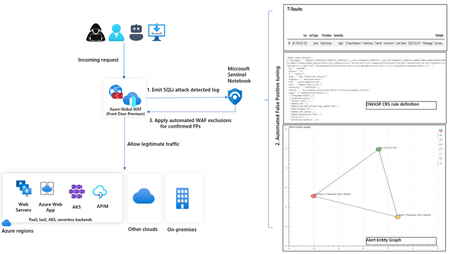
In this blog, we introduce you to the Azure WAF guided investigation Notebook using Microsoft Sentinel, which lets you investigate an Azure WAF triggered SQL injection attack event log. This Azure WAF Notebook queries incidents related to Azure WAF SQL injection events in your Microsoft Sentinel workspace. In addition to guiding you through the Azure WAF SQL injection incidents, the Notebook correlates the incidents with Threat Intelligence, maps them to the Sentinel entity graph, and gives you a complete picture of the attack landscape. Furthermore, it will guide you through an investigation experience to determine if the incident is a true positive, false positive or benign positive using Azure WAF raw logs. Upon confirmation of a false positive, the Azure WAF exclusions are applied automatically using Azure WAF APIs.11KViews2likes2Comments
Microsoft Sentinel & Cyberint Threat Intel Integration Guide
Explore comprehensive guide on "Microsoft Sentinel & Cyberint Threat Intel Integration Guide," to learn how to integrate Cyberint's advanced threat intelligence with Microsoft Sentinel. This detailed resource will walk you through the integration process, enabling you to leverage enriched threat data for improved detection and response. Elevate your security posture and ensure robust protection against emerging threats. Read the guide to streamline your threat management and enhance your security capabilities.10KViews1like1CommentDetect Masqueraded Process Name Anomalies using an ML notebook
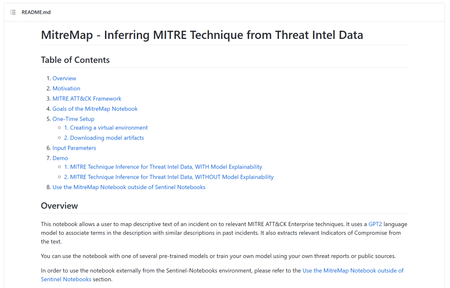
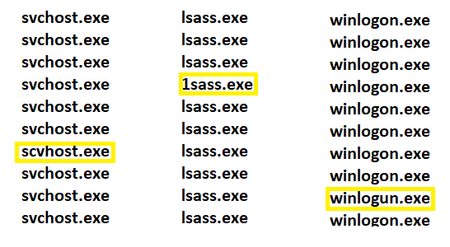
Process Masquerading is an extremely common attack-vector technique. It occurs when the name or the location of a legitimate process is manipulated to avoid detection of its malicious behavior. In this blog, we will find these small differences using a sort of edit distance between two strings.9.5KViews0likes0CommentsAnnouncing Public Preview: New STIX Objects in Microsoft Sentinel
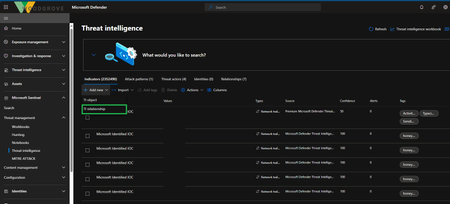
Security teams often struggle to understand the full context of an attack. In many cases, they rely solely on Indicators of Compromise (IoCs) without the broader insights provided by threat intelligence developed on Threat Actors, Attack Patterns, Identities - and the Relationships between each. This lack of context available to enrich their workflows limits their ability to connect the dots, prioritize threats effectively, and respond comprehensively to evolving attacks. To help customers build out a thorough, real-time understanding of threats, we are excited to announce the public preview of new Threat Intelligence (TI) object support in Microsoft Sentinel and in the Unified SOC Platform. In addition to Indicators of Compromise (IoCs), Microsoft Sentinel now supports Threat Actors, Attack Patterns, Identities, and Relationships. This enhancement empowers organizations to take their threat intelligence management to the next level. In this blog, we’ll highlight key scenarios for which your team would use STIX objects, as well as demos showing how to create objects and new relationships and how to use them to hunt threats across your organization Key Scenarios STIX objects are a critical tool for incident responders attempting to understand an attack and threat intelligence analysts seeking more information on critical threats. It is designed to improve interoperability and sharing of threat intelligence across different systems and organizations. Below, we’ve highlighted four ways Unified SOC Platform customers can begin using STIX objects to protect their organization. Ingesting Objects: You can now ingest these objects from various commercial feeds through several methods including STIX TAXII servers, API, files, or manual input. Curating Threat Intelligence: Curate and manage any of the supported Threat Intelligence objects. Creating Relationships: Establish connections between objects to enhance threat detection and response. For example: Connecting Threat Actor to Attack Pattern: The threat actor "APT29" uses the attack pattern "Phishing via Email" to gain initial access. Linking Indicator to Threat Actor: An indicator (malicious domain) is attributed to the threat actor "APT29". Associating Identity (Victim) with Attack Pattern: The organization "Example Corp" is targeted by the attack pattern "Phishing via Email". Hunt and Investigate Threats More Effectively: Match curated TI data against your logs in the unified SOC platform powered by Microsoft Sentinel. Use these insights to detect, investigate, and hunt threats more efficiently, keeping your organization secure. Get Started Today with the new Hunting Model The ability to ingest and manage these new Threat Intelligence objects is now available in public preview. To enable this data in your workspaces for hunting and detection, submit your request here and we will provide further details. Demo and screen shots Demo 1: Hunt and detect threats using STIX objects Scenario: Linking an IOC to a Threat Actor: An indicator (malicious domain) is attributed to the threat actor " Sangria tempest " via the new TI relationship builder. Please note that the Sangria tempest actor object and the IOC are already present in this demo. These objects can be added automatically or created manually. To create new relationship, sign into your Sentinel instance and go to Add new à TI relationship. In the New TI relationship builder, you can select existing TI objects and define how it's related to one or more other TI objects. After defining a TI object’s relationship, click on “Common” to provide metadata for this relationship, such as Description, Tags, and Confidence score: p time, source, and description. Another type of meta data a customer can add to a relationship is the Traffic Light Protocol (TLP). The TLP is a set of designations used to ensure that sensitive information is shared with the appropriate audience. It uses four colors to indicate different levels of sensitivity and the corresponding sharing permissions: TLP:RED: Information is highly sensitive and should not be shared outside of the specific group or meeting where it was originally disclosed. TLP:AMBER: Information can be shared with members of the organization, but not publicly. It is intended to be used within the organization to protect sensitive information. TLP:GREEN: Information can be shared with peers and partner organizations within the community, but not publicly. It is intended for a wider audience within the community. TLP:WHITE: Information can be shared freely and publicly without any restrictions. Once the relationship is created, your newly created relationship can be viewed from the “Relationships” tab. Now, retrieve information about relationships and indicators associated with the threat actor 'Sangria Tempest'. For Microsoft Sentinel customers leveraging the Azure portal experience, you can access this in Log Analytics. For customers who have migrated to the unified SecOps platform in the Defender portal, you can go find this under “Advanced Hunting”. The following KQL query provides you with all TI objects related to “Sangria Tempest.” You can use this query for any threat actor name. let THREAT_ACTOR_NAME = 'Sangria Tempest'; let ThreatIntelObjectsPlus = (ThreatIntelObjects | union (ThreatIntelIndicators | extend StixType = 'indicator') | extend tlId = tostring(Data.id) | extend StixTypes = StixType | extend Pattern = case(StixType == "indicator", Data.pattern, StixType == "attack-pattern", Data.name, "Unkown") | extend feedSource = base64_decode_tostring(tostring(split(Id, '---')[0])) | summarize arg_max(TimeGenerated, *) by Id | where IsDeleted == false); let ThreatActorsWithThatName = (ThreatIntelObjects | where StixType == 'threat-actor' | where Data.name == THREAT_ACTOR_NAME | extend tlId = tostring(Data.id) | extend ActorName = tostring(Data.name) | summarize arg_max(TimeGenerated, *) by Id | where IsDeleted == false); let AllRelationships = (ThreatIntelObjects | where StixType == 'relationship' | extend tlSourceRef = tostring(Data.source_ref) | extend tlTargetRef = tostring(Data.target_ref) | extend tlId = tostring(Data.id) | summarize arg_max(TimeGenerated, *) by Id | where IsDeleted == false); let SourceRelationships = (ThreatActorsWithThatName | join AllRelationships on $left.tlId == $right.tlSourceRef | join ThreatIntelObjectsPlus on $left.tlTargetRef == $right.tlId); let TargetRelationships = (ThreatActorsWithThatName | join AllRelationships on $left.tlId == $right.tlTargetRef | join ThreatIntelObjectsPlus on $left.tlSourceRef == $right.tlId); SourceRelationships | union TargetRelationships | project ActorName, StixTypes, ObservableValue, Pattern, Tags, feedSource You now have all the information your organization has available about Sangria Tempest, correlated to maximize your understanding of the threat actor and its associations to threat infrastructure and activity. Demo 2: Curate and attribute objects We have created new UX to streamline TI object creation, which includes the capability to attribute to other objects, so while you are creating a new IoC, you can also attribute that indicator to a Threat Actor, all from one place. To create a new TI object and attribute it to one or multiple threat actors, follow the steps below: Go to Add new a TI Object. In the Context menu, select any object type. Enter all the required information in the fields on the right-hand side for your selected indicator type. While creating a new TI object, you can do TI object curation. This includes defining the relationship. You can also quickly duplicate TI objects, making it easier for those who create multiple TI objects daily. Please note that we also introduced an “Add and duplicate” button to allow customers to create multiple TI objects with the same metadata to streamline a manual bulk process. Demo 3: New supported IoC types The attack pattern builder now supports the creation of four new indicator types. These enable customers to build more specific attack patterns that boost understanding of and organizational knowledge around threats. These new indicators include: X509 certificate X509 certificates are used to authenticate the identity of devices and servers, ensuring secure communication over the internet. They are crucial in preventing man-in-the-middle attacks and verifying the legitimacy of websites and services. For instance, if a certificate is suddenly replaced or a new, unknown certificate appears, it could indicate a compromised server or a malicious actor attempting to intercept communications. JA3 JA3 fingerprints are unique identifiers generated from the TLS/SSL handshake process. They help in identifying specific applications and tools used in network traffic, making it easier to detect malicious activities For example, if a network traffic analysis reveals a JA3 fingerprint matching that of the Cobalt Strike tool, it could indicate an ongoing cyber attack. JA3S JA3S fingerprints extend the capabilities of JA3 by also including server-specific characteristics in the fingerprinting process. This provides a more comprehensive view of the network traffic and helps in identifying both client and server-side threats For instance, if a server starts communicating with an unknown external IP address using a specific JA3S fingerprint, it could be a sign of a compromised server or data exfiltration attempt. User agent User Agents provide information about the client software making requests to a server, such as the browser or operating system. They are useful in identifying and profiling devices and applications accessing a network For example, if a User Agent string associated with a known malicious browser extension appears in network logs, it could indicate a compromised device. Conclusion: The ability to ingest, curate, and establish relationships between various threat intelligence objects such as Threat Actors, Attack Patterns, and Identities provides a powerful framework for incident responders and threat intelligence analysts. The use of STIX objects not only improves interoperability and sharing of threat intelligence but also empowers organizations to hunt and investigate threats more efficiently. As customers adopt these new capabilities, they will find themselves better equipped to understand the full context of an attack and build robust defenses against future threats. With the public preview of Threat Intelligence (TI) object support, organizations are encouraged to explore these new tools and integrate them into their security operations, taking the first step towards a more informed and proactive approach to cybersecurity.8.1KViews4likes2CommentsWhat’s new: Closer integration between Microsoft Sentinel and Microsoft 365 Defender
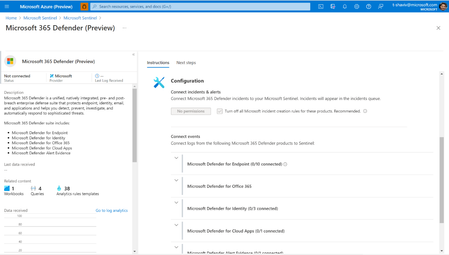
Over a year ago, we first announced the integration between Microsoft Sentinel and Microsoft 365 Defender as part of the Microsoft SIEM and XDR story. Combining the breadth of a SIEM with the depth of XDR to give security professionals the integrated toolset they need to fight against attacks that take advantage of today’s diverse, distributed, and complex environments. Today, we are happy to share several new preview updates8KViews1like1Comment