threat intelligence
29 TopicsWhat’s new in Microsoft Sentinel: May 2026
Welcome to the May edition of What's new in Microsoft Sentinel. This month’s updates focus on unified role-based access control (RBAC), ecosystem breadth, AI-agent security, and high-assurance identity. RBAC and row-level scoping are now generally available, giving security teams a single, granular permissions model across Sentinel and the Microsoft Defender portal and enabling multi-team SOC collaboration. The Sentinel connector catalog has passed 400 connectors, expanding coverage across Microsoft and third-party data sources and helping customers and partners onboard new data faster with the Codeless Connector Framework (CCF). The Agent 365 connector, now in public preview, brings AI agent telemetry into Sentinel data lake as first-class standardized signals so you can monitor agent behavior alongside identity, endpoint, and cloud activity. Finally, Entra Verified ID partner integrations in Microsoft Security Store are now generally available, delivering high‑assurance identity verification that makes account recovery after compromise far safer and significantly reduces the risk of re‑compromise. Read on for the full list of updates across Sentinel in May. Sentinel innovations: Sentinel SIEM Sentinel data lake Microsoft Security Store Sentinel SIEM Unified role-based access controls and row level scoping [Generally available] Sentinel now delivers general availability of two powerful access management capabilities: Unified RBAC and row-level data scoping. Together, these innovations provide a consistent, end-to-end model for controlling who can access data and what actions they can take — extending unified permissions management across the Defender portal while enabling granular, row-level visibility within a single Sentinel workspace. With Unified RBAC, organizations can simplify and centralize permissions across security workloads, reducing operational overhead, while row-level scoping enables secure collaboration across multiple teams by ensuring users only see data aligned to their role or scope. This milestone unlocks more scalable, multi-team SOC operations without the need for workspace segmentation, helping us to advance toward fully unified, granular access control across Microsoft Security. Tenant groups [Public preview] Managing security across multiple tenants just got simpler. Tenant Groups in the Microsoft Defender multi-tenant portal (MTO) give managed security service providers (MSSPs), cloud service partners (CSPs), and multi-tenant security teams a flexible way to organize tenants into logical groupings such as customer segment, geography, or operational priority, and instantly switch views with a single click. This streamlined experience reduces noise, improves investigation focus, and aligns to how teams actually work, all while respecting existing permissions and access controls. Learn more. Out-of-the-box integrations for Sentinel automation [Public preview] Out-of-the-box (OOTB) integrations for Sentinel automation brings a centralized catalog to easily discover, configure, and manage both Microsoft and third-party integrations. With simple, authentication-based setup, users can quickly add integrations and seamlessly incorporate them into playbooks. The experience places OOTB and custom integrations side by side, with enhanced with smart search, recommendations, and duplicate prevention to streamline automation workflows end to end. Learn more. UEBA enhancements [Public preview] Microsoft Sentinel UEBA continues to evolve with improvements that simplify management and expand detection coverage. A dedicated UEBA tab view in the Sentinel settings page consolidates UEBA and behaviors settings, making configuration easier to find and manage. Learn more. UEBA insights and anomalies now support the OktaV2_CL table alongside the existing Okta_CL table, extending anomalous activity and anomalous MFA failures detections to customers using the newer Okta connector format, without requiring new anomaly types. Learn more. UEBA extends GCP Audit Logs coverage with five anomaly detections for login activity, privileged actions, resource deployments, secret/KMS key access, and infrastructure usage. Learn more. Together, these updates make UEBA easier to operate while extending its visibility into identity and behavior signals from additional cloud and identity providers. Read the latest blog from the Microsoft Defender Research Team to learn more about Microsoft Sentinel UEBA and binary feature stacking, which uses clear binary signals to help establish behavioral context and inform investigation and detection decisions. Threat Intelligence – TAXII Export connector [Generally available] Sentinel supports threat intelligence export through the built-in Threat Intelligence – Trusted Automated Exchange of Intelligence Information (TAXII) Export connector, giving customers a standards-based way to share curated Structured Threat Information Expression (STIX) objects with supported TAXII 2.1 platforms. Configured from the Defender portal, the connector handles destination setup and intelligence delivery to external platforms. The capability supports cross-organization intelligence sharing for collective defense and centralized management in multi-tenant environments, with use cases across government, critical infrastructure, and large distributed organizations. Additional enhancements are planned, including more export options and expanded destination support. Learn more. Decision-stage resources for SIEM migration to Sentinel The AI-powered SIEM migration experience helps teams analyze detections, identify required data sources and connectors, and plan a phased move to Sentinel. But, customers still need help turning that analysis into a clear decision. To support that step, we’re introducing two new customer-facing resources: the Sentinel SIEM Migration Decision and Planning Guide, which explains the migration journey, outputs, and decision checkpoints before execution, and the Decision-Stage Customer FAQ, which answers common questions around disruption, cost, dual running, detection coverage, and delivery support. Together, these resources help make migration conversations more concrete and move teams more quickly from evaluation to a clearer, lower-risk next step. Learn more: Read the blog: AI-powered SIEM migration experience announcement Download the guide: Decision and planning guide Download the FAQ: Decision-stage customer FAQ Learn more: SIEM migration experience documentation Register for live AMA (Jun 23 at 9am PT): Live Microsoft Tech Community AMA on SIEM migration Sentinel data lake 400+ Sentinel data connectors The Sentinel connector catalog now includes 400+ connectors, providing broad, ready-to-deploy coverage across Microsoft and third-party data sources. Customers can flexibly ingest security data into Microsoft Sentinel analytics tier or the data lake tier. The Codeless Connector Framework (CCF) and VS code-based connector builder agent enables partners and customers to onboard new data sources faster and scale the catalog. Discover connectors in the Sentinel Content hub within the Defender portal or build custom connectors when needed. Learn more. Agent 365 connector [Public preview] Agent 365 connector streams AI agent telemetry from Agent 365 into Sentinel data lake, giving SOC teams visibility into agent behavior alongside identity, endpoint, and cloud signals. With the Agent 365 connector in place, Sentinel data lake becomes the system of record for agent security, turning activity such as data exposure or access drift into first-class security signals that analysts can correlate, hunt across, and investigate. Telemetry is normalized and to mapped to standard Advanced Security Information Model (ASIM) schemas, ready for analytics and detections, and end-to-end investigations can run through KQL, graph, and MCP-powered workflows. Install the connector with a single click from Sentinel Content Hub in the Defender portal. Learn more. CCF support for Azure Blob Storage [Public preview] Sentinel Codeless Connector Framework (CCF) supports Azure Blob Storage as a data source, providing an ingestion pattern designed for high-volume security data. Partners and customers can build CCF connectors that read from Blob Storage through a durable architecture that buffers spikes, handles backpressure, and reduces data loss risk during outages or throttling, making ingestion more reliable for variable or distributed pipelines. The pattern broadens compatibility with partners already streaming logs to Azure as part of their audit data delivery, with Cloudflare and Netskope as early adopters. App Assure further provides engineering-backed support for designing, validating, and remediating the Azure Blob Storage CCF connector integration. Learn more. Data filtering and splitting [Generally available] At RSAC, we announced built‑in filtering and splitting capabilities in Microsoft Sentinel, which is now generally available. As security teams ingest more data, it is important to optimize security data pipeline by controlling what data is ingested and in which tier. With filtering and splitting natively integrated into the Defender portal, security teams can shape data before it reaches Sentinel, without switching tools or managing custom JSON files. Using simple KQL‑based transformations directly in the UI, you can filter low‑value events and intelligently route data, making ingestion optimization faster, more intuitive, and easier to manage at scale. Filtering at ingest time allows you to remove low‑value or benign events to reduce noise, lower unnecessary processing, and ensure high‑signal data drives detections and investigations. Splitting enables intelligent routing of data between the analytics tier and the data lake tier based on relevance and usage. Together, these capabilities help you balance cost and performance while scaling data ingestion sustainably as your digital estate grows. Learn more. Transition your Sentinel connectors to the Codeless Connector Framework (CCF) [Action required] Azure has announced that the legacy Azure Data Collection API will be deprecated on September 14, 2026. Sentinel recommends customers review existing connectors and upgrade to the latest Codeless Connector Framework (CCF) versions to ensure continued access to the newest Sentinel capabilities. CCF delivers a fully managed SaaS experience with built-in health monitoring, centralized credential management, and improved performance. This enables partners and customers to onboard new data sources faster and at scale. Microsoft Security Store Entra Verified ID partner integrations via Security Store [Generally available] Security Store helps organizations secure one of the most critical steps in incident response: safe account recovery after compromise. Once a SOC team detects and contains a potential account takeover (ATO), restoring access requires high confidence that the user is legitimate. Through partner integrations with IDEMIA, AU10TIX, CLEAR, 1Kosmos, and WhoAmI, customers can extend Entra Verified ID with high-assurance identity verification (such as document and biometric checks) to validate users during recovery, onboarding, or helpdesk workflows. This helps replace weaker fallback methods that attackers often exploit, enabling SOC and IT teams to safely restore access while reducing risk of re-compromise. Learn more. Purview Data Security Triage Agent in Defender [Public preview] Security Store powers how customers discover and activate data security agents across Defender and Microsoft Purview, starting with the Data Security Triage Agent. This capability delivers AI-generated summaries and prioritization of Data Loss Prevention (DLP) alerts directly into Defender XDR, helping security teams reduce noise and focus on the incidents that matter most. By unifying discovery and activation through Security Store, customers can deploy data security agents in fewer steps and enable more integrated workflows across threat and data protection surfaces. Learn more. Additional resources Blogs and documentation: From idea to production: Building Security Store Advisor with an agentic SDLC Upcoming webinars: June 4: End-to-End Security in the Age of Agentic AI June 10: Deploy, optimize, and implement threat protection with Sentinel June 10: Security Foundations for AI Adoption June 24: Modern Security Made Simple: Stay Ahead of Threats with Sentinel Upcoming events: June 2–3: Microsoft Build, San Francisco (and free online) CEO Satya Nadella Day 1 keynote 90+ sessions, Microsoft Security experts onsite Register: build.microsoft.com Stay connected Check back each month for the latest innovations, updates, and events to ensure you’re getting the most out of Microsoft Sentinel. We’ll see you in the next edition!1.3KViews3likes0CommentsTutorial: Get started with Azure WAF investigation Notebook
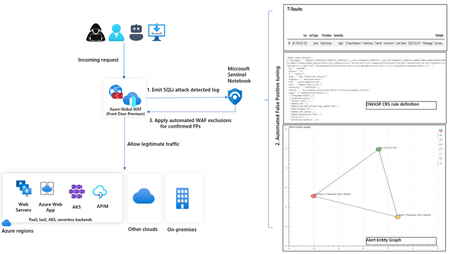
In this blog, we introduce you to the Azure WAF guided investigation Notebook using Microsoft Sentinel, which lets you investigate an Azure WAF triggered SQL injection attack event log. This Azure WAF Notebook queries incidents related to Azure WAF SQL injection events in your Microsoft Sentinel workspace. In addition to guiding you through the Azure WAF SQL injection incidents, the Notebook correlates the incidents with Threat Intelligence, maps them to the Sentinel entity graph, and gives you a complete picture of the attack landscape. Furthermore, it will guide you through an investigation experience to determine if the incident is a true positive, false positive or benign positive using Azure WAF raw logs. Upon confirmation of a false positive, the Azure WAF exclusions are applied automatically using Azure WAF APIs.11KViews2likes2CommentsWhat’s new in Microsoft Sentinel: RSAC 2026
Security is entering a new era, one defined by explosive data growth, increasingly sophisticated threats, and the rise of AI-enabled operations. To keep pace, security teams need an AI-powered approach to collect, reason over, and act on security data at scale. At RSA Conference 2026 (RSAC), we’re unveiling the next wave of Sentinel innovations designed to help organizations move faster, see deeper, and defend smarter with AI-ready tools. These updates include AI-driven playbooks that accelerate SOC automation, Granular Delegated Admin Privileges (GDAP) and granular role-based access controls (RBAC) that let you scale your SOC, accelerated data onboarding through new connectors, and data federation that enables analysis in place without duplication. Together, they give teams greater clarity, control, and speed. Come see us at RSAC to view these innovations in action. Hear from Sentinel leaders during our exclusive Microsoft Pre-Day, then visit Microsoft booth #5744 for demos, theater sessions, and conversations with Sentinel experts. Read on to explore what’s new. See you at RSAC! Sentinel feature innovations: Sentinel SIEM Sentinel data lake Sentinel graph Sentinel MCP Threat Intelligence Microsoft Security Store Sentinel promotions Sentinel SIEM Playbook generator [Now in public preview] The Sentinel playbook generator delivers a new era of automation capabilities. You can vibe code complex automations, integrate with different tools to ensure timely and compliant workflows throughout your SOC and feel confident in the results with built in testing and documentation. Customers and partners are already seeing benefit from this innovation. “The playbook generator gives security engineers the flexibility and speed of AI-assisted coding while delivering the deterministic outcomes that enterprise security operations require. It's the best of both worlds, and it lives natively in Defender where the engineers already work.” – Jaime Guimera Coll | Security and AI Architect | BlueVoyant Learn more about playbook generator. SIEM migration experience [General availability now] The Sentinel SIEM migration experience helps you plan and execute SIEM migrations through a guided, in-product workflow. You can upload Splunk or QRadar exports to generate recommendations for best‑fit Sentinel analytics rules and required data connectors, then assess migration scope, validate detection coverage, and migrate from Splunk or QRadar to Sentinel in phases while tracking progress. “The tool helps turn a Splunk to Sentinel migration into a practical decision process. It gives clear visibility into which detections are relevant, how they align to real security use cases, and where it makes sense to enable or prioritize coverage—especially with cost and data sources in mind.” – Deniz Mutlu | Director | Swiss Post Cybersecurity Ltd Learn more about SIEM migration experience. GDAP, unified RBAC, and row-level RBAC for Sentinel [Public preview, April 1] As Sentinel environments grow for enterprises, MSSPs, hyperscalers, and partners operating across shared or multiple environments, the challenge becomes managing access control efficiently and consistently at scale. Sentinel’s expanded permissions and access capabilities are designed to meet these needs. Granular Delegated Admin Privileges (GDAP) lets you streamline management across multiple governed tenants using your primary account, based on existing GDAP relationships. Unified RBAC allows you to opt in to managing permissions for Sentinel workspaces through a single pane of glass, configuring and enforcing access across Sentinel experiences in the analytics tier and data lake in the Defender portal. This simplifies administration and improves operational efficiency by reducing the number of permission models you need to manage. Row-level RBAC scoping within tables enables precise, scoped access to data in the Sentinel data lake. Multiple SOC teams can operate independently within a shared Sentinel environment, querying only the data they are authorized to see, without separating workspaces or introducing complex data flow changes. Consistent, reusable scope definitions ensure permissions are applied uniformly across tables and experiences, while maintaining strong security boundaries. To learn more, read our technical deep dives on RBAC and GDAP. Sentinel data lake Sentinel data federation [Public preview, April 1] Sentinel data federation lets you analyze security data in place without copying or duplicating your data. Powered by Microsoft Fabric, you can now federate data from Fabric, Azure Data Lake Storage (ADLS), and Azure Databricks into Sentinel data lake. Federated data appears alongside native Sentinel data, so you can use familiar tools like KQL hunting, notebooks, and custom graphs to correlate signals and investigate across your entire digital estate, all while preserving governance and compliance. You can start analyzing data in place and progressively ingest data into Sentinel for deeper security insights, advanced automation, and AI-powered defense at scale. You are billed only when you run analytics on federated data using existing Sentinel data lake query and advanced insights meters. les for unified investigation and hunting Sentinel cost estimation tool [Public Preview, April 9] The new Sentinel cost estimation tool offers all Microsoft customers and partners a guided, meter-level cost estimation experience that makes pricing transparent and predictable. A built-in three-year cost projection lets you model data growth and ramp-up over time, anticipate spend, and avoid surprises. Get transparent estimates into spend as you scale your security operations. All other customers can continue to use the Azure calculator for Sentinel pricing estimates. See the Sentinel pricing page for more information. Sentinel data connectors A365 connector [Public preview, May 5] Bring AI agent telemetry into the Sentinel data lake to investigate agent behavior, tool usage, prompts, reasoning and execution using hunting, graph, and MCP workflows. GitHub audit log connector using API polling [General availability, March 6] Ingest GitHub enterprise audit logs into Sentinel to monitor user and administrator activity, detect risky changes, and investigate security events across your development environment. Google Kubernetes Engine (GKE) connector [General availability, March 6] Collect Google Kubernetes Engine (GKE) audit and workload logs in Sentinel to monitor cluster activity, analyze workload behavior, and detect security threats across Kubernetes environments. Microsoft Entra and Azure Resource Graph (ARG) connector enhancements [Public preview, April 15] Enable new Entra assets (EntraDevices, EntraOrgContacts) and ARG assets (ARGRoleDefinitions) in existing asset connectors, expanding inventory coverage and powering richer, built‑in graph experiences for greater visibility. With over 350 Sentinel data connectors, customers achieve broad visibility into complex digital environments and can expand their security operations effectively. “Microsoft Sentinel data lake forms the core of our agentic SOC. By unifying large volumes of Microsoft and third-party data, enabling graph-based analysis, and supporting MCP-driven workflows, it allows us to investigate faster, at lower cost, and with greater confidence.” – Øyvind Bergerud | Head of Security Operations | Storebrand Learn more about Sentinel data connectors. Sentinel connector builder agent using Sentinel Visual Studio Code extension [Public preview, March 31] Build Sentinel data connectors in minutes instead of weeks using the AI‑assisted Connector Builder agent in Visual Studio Code. This low‑code experience guides developers and ISVs end-to-end, automatically generating schemas, deployment assets, connector UI, secure secret handling, and polling logic. Built‑in validation surfaces issues early, so you can validate event logs before deployment and ingestion. Example prompt in GitHub Copilot Chat: @sentinel-connector-builder Create a new connector for OpenAI audit logs using https://api.openai.com/v1/organization/audit_logs Get started with custom connectors and learn more in our blog. Data filtering and splitting [Public preview, March 30] As security teams ingest more data, the challenge shifts from scale to relevance. With filtering and splitting now built into the Defender portal, teams can shape data before it lands in Sentinel, without switching tools or managing custom JSON files. Define simple KQL‑based transformations directly in the UI to filter low‑value events and intelligently route data, making ingestion optimization faster, more intuitive, and easier to manage at scale. Filtering at ingest time allows you to remove low-value or benign events to reduce noise, cut unnecessary processing, and ensure that high-signal data drives detections and investigations. Splitting enables intelligent routing of data between the analytics tier and the data lake tier based on relevance and usage. Together, these two capabilities help you balance cost and performance while scaling data ingestion sustainably as your digital estate grows. Create workbook reports directly from the data lake [Public preview, April 1] Sentinel workbooks can now directly run on the data lake using KQL, enabling you to visualize and monitor security data straight from the data lake. By selecting the data lake as the workbook data source, you can now create trend analysis and executive reporting. Sentinel graph Custom graphs [Public preview, April 1] Custom graphs let you build tailored security graphs tuned to your unique security scenarios using data from Sentinel data lake as well as non-Microsoft sources. With custom graph, powered by Fabric, you can build, query, and visualize connected data, uncover hidden patterns and attack paths, and help surface risks that are hard to detect when data is analyzed in isolation. These graphs provide the knowledge context that enables AI-powered agent experiences to work more effectively, speeding investigations, revealing blast radius, and helping you move from noisy, disconnected alerts to confident decisions at scale. In the words of our preview customers: “We ingested our Databricks management-plane telemetry into the Sentinel data lake and built a custom security graph. Without writing a single detection rule, the graph surfaced unusual patterns of activity and overprivileged access that we escalated for investigation. We didn't know what we were looking for, the graph surfaced the risk for us by revealing anomalous activity patterns and unusual access combinations driven by relationships, not alerts.” – SVP, Security Solutions | Financial Services organization Custom graph API usage for creating graph and querying graph will be billed starting April 1, 2026, according to the Sentinel graph meter. Creating custom graph Using the Sentinel VS Code extension, you can generate graphs to validate hunting hypotheses, such as understanding attack paths and blast radius of a phishing campaign, reconstructing multi‑step attack chains, and identifying structurally unusual or high‑risk behavior, making it accessible to your team and AI agents. Once persisted via a schedule job, you can access these custom graphs from the ready-to-use section in the graph experience in the Defender portal. Graphs experience in the Microsoft Defender portal After creating your custom graphs, you can access them in the graphs section of the Defender portal under Sentinel. From there, you’ll be able to perform interactive graph-based investigations, such as using a graph built for phishing analysis to help you quickly evaluate the impact of a recent incident, profile the attacker, and trace its paths across Microsoft telemetry and third-party data. The new graph experience lets you run Graph Query Language (GQL) queries, view the graph schema, visualize the graph, view graph results in tabular format, and interactively travers the graph to the next hop with a simple click. Sentinel MCP Sentinel MCP entity analyzer [General availability, April 1] Entity analyzer provides reasoned, out-of-the-box risk assessments that help you quickly understand whether a URL or user identity represents potential malicious activity. The capability analyzes data across modalities including threat intelligence, prevalence, and organizational context to generate clear, explainable verdicts you can trust. Entity analyzer integrates easily with your agents through Sentinel MCP server connections to first-party and third-party AI runtime platforms, or with your SOAR workflows through Logic Apps. The entity analyzer is also a trusted foundation for the Defender Triage Agent and delivers more accurate alert classifications and deeper investigative reasoning. This removes the need to manually engineer evaluation logic and creates trust for analysts and AI agents to act with higher accuracy and confidence. Learn more about entity analyzer and in our blog here. Entity analyzer will be billed starting April 1, 2026, based on Security Compute Units (SCU) consumption. Learn more about MCP billing. Sentinel MCP graph tool collection [Public preview, May 20] Graph tool collection helps you visualize and explore relationships between identities and device assets, threats and activities signals ingested by data connectors and alerted by analytic rules. The tool provides a clear graph view that highlights dependencies and configuration gaps, which makes it easier to understand how content interacts across your environment. This helps security teams assess coverage, optimize content deployment, and identify areas that may need tuning or additional data sources, all from a single, interactive workspace. Executing graph queries via the MCP tools will trigger the graph meter. Claude MCP connector [Public preview, April 1] Anthropic Claude can connect to Sentinel through a custom MCP connector, giving you AI-assisted analysis across your Sentinel environment. Microsoft provides step-by-step guidance for configuring a custom connector in Claude that securely connects to a Sentinel MCP server. With this connection you can summarize incidents, investigate alerts, and reason over security signals while keeping data inside Microsoft's security boundary. Access to large language models (LLMs) is managed through Microsoft authentication and role-based controls, supporting faster triage and investigation workflows while maintaining compliance and visibility. Threat Intelligence CVEs of interest in the Threat Intelligence Briefing Agent [Public preview in April] The Threat Intelligence Briefing Agent delivers curated intelligence based on your organization’s configuration, preferences, and unique industry and geographic needs. CVEs of interest which highlights vulnerabilities actively discussed across the security landscape and assesses their potential impact on your environment, delivering more timely threat intelligence insights. The agent automatically incorporates internet exposure data powered by the Sentinel platform to surface threats targeting technologies exposed in your organization. Together, these enhancements help you focus faster on the threats that matter most, without manual investigation. Microsoft Security Store Security Store embedded in Entra [General availability, March 23] As identity environments grow more complex, teams need to move faster and extend Entra with trusted third‑party capabilities that address operational, compliance, and risk challenges. The Security Store embedded directly into Entra lets you discover and adopt Entra‑ready agents and solutions in your workflow. You can extend Entra with identity‑focused agents that surface privileged access risk, identity posture gaps, network access insights, and overall identity health, turning identity data into clear recommendations and reports teams can use immediately. You can also enhance Entra with Verified ID and External ID integrations that strengthen identity verification, streamline account recovery, and reduce fraud across workforce, consumer, and external identities. Security Store embedded in Microsoft Purview [General availability, March 31] Extending data security across the digital estate requires visibility and enforcement into new data sources and risk surfaces, often requiring a partnered approach. The Security Store embedded directly into Purview lets you discover and evaluate integrated solutions inside your data security workflows. Relevant partner capabilities surface alongside context, making it easier to strengthen data protection, address regulatory requirements, and respond to risk without disrupting existing processes. You can quickly assess which solutions align to data security scenarios, especially with respect to securing AI use, and how they can leverage established classifiers, policies, and investigation workflows in Purview. Keeping integration discovery in‑flow and purchases centralized through the Security Store means you move faster from evaluation to deployment, reducing friction and maintaining a secure, consistent transaction experience. Security Store Advisor [General availability, March 23] Security teams today face growing complexity and choice. Teams often know the security outcome they need, whether that's strengthening identity protection, improving ransomware resilience, or reducing insider risk, but lack a clear, efficient way to determine which solutions will help them get there. Security Store Advisor provides a guided, natural-language discovery experience that shifts security evaluation from product‑centric browsing to outcome‑driven decision‑making. You can describe your goal in plain language, and the Advisor surfaces the most relevant Microsoft and partner agents, solutions, and services available in the Security Store, without requiring deep product knowledge. This approach simplifies discovery, reduces time spent navigating catalogs and documentation, and helps you understand how individual capabilities fit together to deliver meaningful security outcomes. Sentinel promotions Extending signups for promotional 50 GB commitment tier [Through June 2026] The Sentinel promotional 50 GB commitment tier offers small and mid-sized organizations a cost-effective entry point into Sentinel. Sign up for the 50 GB commitment tier until June 30, 2026, and maintain the promotional rate until March 31, 2027. This promotion is available globally with regional variations in pricing and accessible through EA, CSP, and Direct channels. Visit the Sentinel pricing page for details and to get started. Sentinel RSAC 2026 sessions All week – Sentinel product demos, Microsoft Booth #5744 Mon Mar 23, 3:55 PM – RSAC 2026 main stage Keynote with CVP Vasu Jakkal [KEY-M10W] Ambient and autonomous security: Building trust in the agentic AI era Tue Mar 24, 10:30 AM – Live Q&A session, Microsoft booth #5744 and online Ask me anything with Microsoft Security SMEs and real practitioners Tue Mar 24, 11 AM – Sentinel data lake theater session, Microsoft booth #5744 From signals to insights: How Microsoft Sentinel data lake powers modern security operations Tue Mar 24, 2 PM – Sentinel SIEM theater session, Microsoft booth #5744 Vibe-coding SecOps automations with the Sentinel playbook generator Wed Mar 25, 12 PM – Executive event at Palace Hotel with Threat Protection GM Scott Woodgate The AI risk equation: Visibility, control, and threat acceleration Wed Mar 25, 1:30 PM – Sentinel graph theater session, Microsoft booth #5744 Bringing knowledge-driven context to security with Microsoft Sentinel graph Wed Mar 25, 5 PM – MISA theater session, Microsoft booth #5744 Cut SIEM costs without reducing protection: A Sentinel data lake case study Thu Mar 26, 1 PM – Security Store theater session, Microsoft booth #5744 What's next for Security Store: Expanding in portal and smarter discovery All week – 1:1 meetings with Microsoft security experts Meet with Microsoft Defender and Sentinel SIEM and Defender Security Operations Additional resources Sentinel data lake video playlist Explore the full capabilities of Sentinel data lake as a unified, AI-ready security platform that is deeply integrated into the Defender portal Sentinel data lake FAQ blog Get answers to many of the questions we’ve heard from our customers and partners on Sentinel data lake and billing AI‑powered SIEM migration experience ninja training Walk through the SIEM migration experience, see how it maps detections, surfaces connector requirements, and supports phased migration decisions SIEM migration experience documentation Learn how the SIEM migration experience analyzes your exports, maps detections and connectors, and recommends prioritized coverage Accenture collaborates with Microsoft to bring agentic security and business resilience to the front lines of cyber defense Stay connected Check back each month for the latest innovations, updates, and events to ensure you’re getting the most out of Sentinel. We’ll see you in the next edition!12KViews6likes0CommentsExtending Sentinel Data Integration: Azure Blob Storage Support for CCF Connectors
As organizations scale their security operations, the ability to ingest, process, and analyze high volumes of data reliably becomes increasingly critical. Microsoft Sentinel continues to expand its ecosystem through the Codeless Connector Framework (CCF), enabling ISVs to build and deliver integrations with Sentinel faster while simplifying deployment for customers. Today, CCF extends even further with support for Azure Blob Storage, introducing a new pattern for how data can be delivered into Sentinel. Expanding Connector Patterns with Azure Blob Storage CCF has traditionally enabled connectors that integrate directly with partner APIs and data sources. With this latest enhancement, ISVs can now build connectors that read data from Azure Blob Storage—unlocking new flexibility in how security data is collected and delivered. In this model, an ISV writes data to an Azure Blob Storage account. The Sentinel connector then reads from that storage layer, using Azure-native components such as Event Grid and storage queues to process events and forward them through data collection rules (DCR) into Log Analytics workspace. This approach introduces a durable data layer between the data source and Sentinel, enabling more resilient and scalable ingestion scenarios. Why a durable data layer matters By leveraging Azure Blob Storage as part of the ingestion pipeline, CCF connectors gain important operational advantages. This architecture allows data to be buffered and processed asynchronously, helping manage fluctuations in data volume and ensuring consistent delivery. Key benefits include: Resilience: Buffers spikes and handles backpressure to maintain steady ingestion Improved Compatibility: Supports widely adopted Azure Blob-based log streaming, enabling seamless integration with partners that already use Azure for audit data delivery Data protection: Reduces risk of data loss during outages or throttling Scalability: Supports high-volume ingestion scenarios across tenants Flexibility: Enables architectures that can support multiple SIEMs or data consumers Together, these capabilities make CCF Azure Blob Storage based connectors a strong fit for partners managing large, variable, or distributed data pipelines. Partner adoption Early partners are already taking advantage of this capability to modernize their integrations and support evolving customer needs. Cloudflare Cloudflare integrates with Microsoft Sentinel using the Codeless Connector Framework (CCF) to bring Cloudflare log data into centralized security operations workflows. The connector ingests Cloudflare logs—delivered via Logpush to Azure Blob Storage—into Sentinel for analysis, enabling security teams to correlate web, network, and application activity with other security signals. By combining Cloudflare’s global threat visibility with Sentinel analytics and automation, this integration supports more effective threat detection, investigation, and incident response across Cloudflare‑protected environments. Netskope Web Transaction Events Netskope integrates with Microsoft Sentinel to provide detailed visibility into web and cloud activity across users, applications, and SaaS services. The connector ingests Netskope web transaction logs into Sentinel—leveraging Azure Blob Storage as a staging layer for log streaming and ingestion—to enable near real‑time analysis of user behavior, policy violations, and potential threats. By combining Netskope’s inline web inspection with Sentinel’s analytics and correlation capabilities, this integration helps security teams detect risky activity, investigate incidents, and strengthen monitoring across modern cloud environments. These integrations demonstrate how Azure Blob Storage support can simplify ingestion architectures while improving reliability and scalability for customers. Here is what our partners say about the functionality. Cloudflare: Netskope: Get started Developers can begin building CCF Azure Blob Storage -enabled connectors today using the guidance on Microsoft Learn. This documentation provides step-by-step instructions for configuring storage, processing events, and connecting data to Sentinel. In the unlikely event that you encounter any issues in building or updating your connector, App Assure is here to help. We are an engineering-backed team committed to supporting customers and software development companies throughout their journey with Sentinel to streamline integration and accelerate time to market. Reach out to us via our intake form for assistance.1KViews0likes0CommentsWhat’s new in Microsoft Sentinel: April 2026
Welcome to the April 2026 edition of What's new in Microsoft Sentinel. April brings a broad set of updates, with RSAC 2026 announcements rolling out alongside new features. Highlights include cost limit enforcement to prevent runaway query costs, curated open-source intelligence in Threat Analytics, and new data connectors for CrowdStrike, Imperva, AWS, and Logstash. Together, these innovations help security teams control costs, stay ahead of emerging threats, and broaden visibility without added complexity. Read on to learn what's new with Sentinel. What's new OSINT reports in Threat Analytics [Preview] Customers can now consume curated OSINT articles alongside Microsoft-authored Threat Analytics reports, all in one place. (OSINT, or open-source intelligence, is any information readily available to the public.) These OSINT articles come enriched, as detailed in the following list, to help security teams move quickly from awareness to action. What’s included: Curated OSINT articles derived from trusted open-source research Clear summaries with links back to original sources Extracted indicators of compromise (IOCs) Mapped MITRE ATT&CK tactics and techniques Microsoft enrichment, analysis, and recommended actions (when available) By bringing OSINT directly into Threat Analytics, we’re reducing context switching, improving analyst efficiency, and helping customers operationalize open-source intelligence faster within their Defender workflows. Learn more. Cost limit enforcement for KQL queries and notebooks [Preview] Sentinel data lake cost policies do more than just send an alert when usage gets too high. You can set hard limits for KQL queries, jobs, and notebook sessions that block new work once a threshold is exceeded, eliminating surprise bills from runaway queries or heavy workloads. For example, instead of finding out about cost spikes after you run large queries against the data lake tier, enforcement stops further queries before the damage is done. Anything already running still finishes normally, and you get clear messaging about what happened and what to do next. You can lift guardrails temporarily, adjust thresholds, or disable enforcement on the fly. Learn more. Sentinel data connectors With 380 Sentinel data connectors, customers achieve broad visibility into complex digital environments and can expand their security operations effectively. Below are the latest updates. CrowdStrike API Connector [Generally Available] The CrowdStrike API Connector ingests logs from CrowdStrike APIs into Sentinel, fetching details on hosts, detections, incidents, alerts, and vulnerabilities from your CrowdStrike environment. Imperva Cloud WAF [Preview] The Imperva Cloud WAF data connector ingests Imperva logs into Sentinel through AWS S3 buckets, giving you visibility into web application traffic and threats detected by your Imperva deployment for monitoring, investigation, and threat hunting in Sentinel. AWS Elastic Load Balancer (ELB) [Preview] This connector allows you to ingest AWS Elastic Load Balancer (ALB, NLB, and GLB) logs into Sentinel. These logs contain detailed records for requests handled by your load balancers, including client IPs, latencies, request paths, and status codes. These logs are useful for monitoring traffic patterns, investigating anomalies, and ensuring security compliance. Logstash Output Plugin [Preview] For organizations that rely on Logstash to collect from on-premises, legacy, or air-gapped environments, the Sentinel Logstash Output Plugin has been rebuilt in Java to align with Microsoft's Secure Future Initiative (SFI) and provide improved security and long-term maintainability. The plugin uses the Azure Monitor Logs Ingestion API with Data Collection Rules (DCRs), giving you full schema control and the ability to ingest directly into Sentinel data lake as well as standard Sentinel tables. Learn more. Sentinel data federation [Preview] Sentinel data federation enables unified visibility and security analytics across federated and ingested data, without compromising data governance. Security teams can quickly query data in Microsoft Fabric, Azure Data Lake Storage (ADLS) Gen2, and Azure Databricks directly from Sentinel, no data movement required. This approach allows teams to explore data broadly through federation, then selectively ingest what matters most into Sentinel to unlock advanced detections, automation, and AI‑powered analytics. Learn more. Sentinel cost estimation tool [Preview] Customers and partners can confidently estimate Sentinel costs using the cost estimation tool. With meter-level guidance, you can model ingestion across analytics and data lake tiers, compare retention options, and estimate compute costs. Built‑in projections of up to three years offer transparency into spend, making it easier to plan, optimize, and share estimates. Try the Sentinel Cost Estimator. Microsoft Entra and Azure Resource Graph (ARG) connector enhancements [Preview] Enable new Entra assets (EntraDevices, EntraOrgContacts) and ARG assets (ARGRoleDefinitions) in existing asset connectors, expanding inventory coverage and powering richer, built‑in graph experiences for greater visibility. Create workbook reports directly from the data lake [Preview] Sentinel workbooks can directly run on the data lake using KQL, enabling you to visualize and monitor security data straight from the data lake. By selecting the data lake as the workbook data source, you can create trend analysis and executive reporting. Custom graphs [Preview] Custom graphs let you model relationships unique to your organization using data from Sentinel data lake, non-Microsoft sources, and federated data sources, all powered by Fabric. Instead of stitching together dozens of tables manually, you can build graphs that surface blast radius, trace attack paths, map privilege chains, and spot structural outliers like unusually broad access or anomalous email exfiltration. You can generate custom graphs using AI-assisted coding in the Microsoft Sentinel VS Code extension, persist them via a schedule job, and access them in the graphs experience in the Defender portal. Run Graph Query Language (GQL) queries, visualize results, and interactively traverse the graph to the next hop with a single click. These graphs also provide the knowledge context that enables AI-powered agent experiences to work more effectively, speeding investigations and helping you move from disconnected alerts to confident decisions at scale. Custom graph API usage for creating and querying graphs is billed according to the Sentinel graph meter. Learn more. MCP entity analyzer [General availability] Entity analyzer provides reasoned, out-of-the-box risk assessments that help you quickly understand whether a URL or user identity represents potential malicious activity. It analyzes data across threat intelligence, prevalence, and organizational context to generate clear, explainable verdicts you can trust. Entity analyzer integrates with your agents through Sentinel MCP server connections to first-party and third-party AI runtime platforms, or with your SOAR workflows through Logic Apps. It also serves as a trusted foundation for the Defender Triage Agent, delivering more accurate alert classifications and deeper investigative reasoning. Entity analyzer is billed based on Security Compute Units (SCU) consumption. Learn more about entity analyzer and MCP billing. Claude MCP connector [Preview] Anthropic Claude can connect to Sentinel through a custom MCP connector, giving you AI-assisted analysis across your Sentinel environment. Microsoft provides step-by-step guidance for configuring a custom connector in Claude that securely connects to a Sentinel MCP server. With this connection you can summarize incidents, investigate alerts, and reason over security signals while keeping data inside Microsoft's security boundary. Access to large language models (LLMs) is managed through Microsoft authentication and role-based controls, supporting faster triage and investigation workflows while maintaining compliance and visibility. CVEs of interest in the Threat Intelligence Briefing Agent [Preview] The Threat Intelligence Briefing Agent delivers curated intelligence based on your organization’s configuration, preferences, and unique industry and geographic needs. The agent surfaces Common Vulnerabilities and Exposures (CVEs) of interest, highlighting vulnerabilities actively discussed across the security landscape and assessing their potential impact on your environment for more timely threat intelligence insights. The agent automatically incorporates internet exposure data powered by the Sentinel platform to surface threats targeting technologies exposed in your organization. Together, these enhancements help you focus faster on the threats that matter most, without manual investigation. Additional resources Blogs and documentation: Featured blog: App Assure launches its Sentinel Advisory Service Agentic use cases for developers on Microsoft Sentinel The Unified SecOps Transition: Why It Is a Security Architecture Decision, Not Just a Portal Change What's new in Microsoft Defender – April 2026 Webinars and training: Featured webinar: Powering the Agentic SOC with Scott Woodgate, General Manager, Microsoft Threat Protection Featured training: Introducing the Microsoft Sentinel Training Lab. Hands-On Security Operations in Minutes Beyond KQL – Unlocking SOC Insights with Sentinel data lake Jupyter Notebooks Hyper scale your SOC: Manage delegated access and role-based scoping in Microsoft Defender Stay connected Check back each month for the latest innovations, updates, and events to ensure you’re getting the most out of Microsoft Sentinel. We’ll see you in the next edition!1.6KViews2likes0CommentsRSAC 2026: New Microsoft Sentinel Connectors Announcement
Microsoft Sentinel helps organizations detect, investigate, and respond to security threats across increasingly complex environments. With the rollout of the Microsoft Sentinel data lake in the fall, and the App Assure-backed Sentinel promise that supports it, customers now have access to long-term, cost-effective storage for security telemetry, creating a solid foundation for emerging Agentic AI experiences. Since our last announcement at Ignite 2025, the Microsoft Sentinel connector ecosystem has expanded rapidly, reflecting continued investment from software development partners building for our shared customers. These connectors bring diverse security signals together, enabling correlation at scale and delivering richer investigation context across the Sentinel platform. Below is a snapshot of Microsoft Sentinel connectors newly available or recently enhanced since our last announcement, highlighting the breadth of partner solutions contributing data into, and extending the value of, the Microsoft Sentinel ecosystem. New and notable integrations Acronis Cyber Protect Cloud Acronis Cyber Protect Cloud integrates with Microsoft Sentinel to bring data protection and security telemetry into a centralized SOC view. The connector streams alerts, events, and activity data - spanning backup, endpoint protection, and workload security - into Microsoft Sentinel for correlation with other signals. This integration helps security teams investigate ransomware and data-centric threats more effectively, leverage built-in hunting queries and detection rules, and improve visibility across managed environments without adding operational complexity. Anvilogic Anvilogic integrates with Microsoft Sentinel to help security teams operationalize detection engineering at scale. The connector streams Anvilogic alerts into Microsoft Sentinel, giving SOC analysts centralized visibility into high-fidelity detections and faster context for investigation and triage. By unifying detection workflows, reducing alert noise, and improving prioritization, this integration supports more efficient threat detection and response while helping teams extend coverage across evolving attack techniques. BigID BigID integrates with Microsoft Sentinel to extend data security posture management (DSPM) insights into security operations workflows. The solution brings visibility into sensitive, regulated, and critical data across cloud, SaaS, and on‑premises environments, helping security teams understand where high‑risk data resides and how it may be exposed. By incorporating data‑centric risk context into Sentinel, this integration supports more informed investigation and prioritization, enabling organizations to reduce data‑related risk and align security operations with data protection and compliance objectives. Commvault Cloud Commvault Cloud integrates with Microsoft Sentinel to bring data protection and cyber‑resilience telemetry into security operations workflows. The connector ingests security‑relevant signals from Commvault Cloud—such as backup anomalies, malware and ransomware indicators, and other threat‑related events—into Sentinel, enabling centralized detection, investigation, and automated response. By correlating backup intelligence with broader Sentinel telemetry, this integration helps security teams reduce blind spots, validate the scope of incidents, and improve coordination between security and recovery operations. CyberArk Audit CyberArk Audit integrates with Microsoft Sentinel to centralize visibility into privileged identity and access activity. By streaming detailed audit logs - covering system events, user actions, and administrative activity - into Microsoft Sentinel, security teams can correlate identity-driven risks with broader security telemetry. This integration supports faster investigations, improved monitoring of privileged access, and more effective incident response through automated workflows and enriched context for SOC analysts. Cyera Cyera integrates with Microsoft Sentinel to extend AI-native data security posture management into security operations. The connector brings Cyera’s data context and actionable intelligence across multi-cloud, on-premises, and SaaS environments into Microsoft Sentinel, helping teams understand where sensitive data resides and how it is accessed, exposed, and used. Built on Sentinel’s modern framework, the integration feeds context-rich data risk signals into the Sentinel data lake, enabling more informed threat hunting, automation, and decision-making around data, user, and AI-related risk. TacitRed CrowdStrike IOC Automation Data443 TacitRed CS IOC Automation integrates with Microsoft Sentinel to streamline the operationalization of compromised credential intelligence. The solution uses Sentinel playbooks to automatically push TacitRed indicators of compromise into CrowdStrike via Sentinel playbooks, helping security teams turn identity-based threat intelligence into action. By automating IOC handling and reducing manual effort, this integration supports faster response to credential exposure and strengthens protection against account-driven attacks across the environment. TacitRed SentinelOne IOC Automation Data443 TacitRed SentinelOne IOC Automation integrates with Microsoft Sentinel to help operationalize identity-focused threat intelligence at the endpoint layer. The solution uses Sentinel playbooks to automatically consume TacitRed indicators and push curated indicators into SentinelOne via Sentinel playbooks and API-based enforcement, enabling faster enforcement of high-risk IOCs without manual handling. By automating the flow of compromised credential intelligence from Sentinel into EDR, this integration supports quicker response to identity-driven attacks and improves coordination between threat intelligence and endpoint protection workflows. TacitRed Threat Intelligence Data443 TacitRed Threat Intelligence integrates with Microsoft Sentinel to provide enhanced visibility into identity-based risks, including compromised credentials and high-risk user exposure. The solution ingests curated TacitRed intelligence directly into Sentinel, enriching incidents with context that helps SOC teams identify credential-driven threats earlier in the attack lifecycle. With built-in analytics, workbooks, and hunting queries, this integration supports proactive identity threat detection, faster triage, and more informed response across the SOC. Cyren Threat Intelligence Cyren Threat Intelligence integrates with Microsoft Sentinel to enhance detection of network-based threats using curated IP reputation and malware URL intelligence. The connector ingests Cyren threat feeds into Sentinel using the Codeless Connector Framework (CCF), transforming raw indicators into actionable insights, dashboards, and enriched investigations. By adding context to suspicious traffic and phishing infrastructure, this integration helps SOC teams improve alert accuracy, accelerate triage, and make more confident response decisions across their environments. TacitRed Defender Threat Intelligence Data443 TacitRed Defender Threat Intelligence integrates with Microsoft Sentinel to surface early indicators of credential exposure and identity-driven risk. The solution automatically ingests compromised credential intelligence from TacitRed into Sentinel and can support synchronization of validated indicators with Microsoft Defender Threat Intelligence through Sentinel workflows, helping SOC teams detect account compromise before abuse occurs. By enriching Sentinel incidents with actionable identity context, this integration supports faster triage, proactive remediation, and stronger protection against credential-based attacks. Datawiza Access Proxy (DAP) Datawiza Access Proxy integrates with Microsoft Sentinel to provide centralized visibility into application access and authentication activity. By streaming access and MFA logs from Datawiza into Sentinel, security teams can correlate identity and session-level events with broader security telemetry. This integration supports detection of anomalous access patterns, faster investigation through session traceability, and more effective response using Sentinel automation, helping organizations strengthen Zero Trust controls and meet auditing and compliance requirements. Endace Endace integrates with Microsoft Sentinel to provide deep network visibility by providing always-on, packet-level evidence. The connector enables one-click pivoting from Sentinel alerts directly to recorded packet data captured by EndaceProbes. This helps SOC and NetOps teams reconstruct events and validate threats with confidence. By combining Sentinel’s AI-driven analytics with Endace’s always-on, full-packet capture across on-premises, hybrid, and cloud environments, this integration supports faster investigations, improved forensic accuracy, and more decisive incident response. Feedly Feedly integrates with Microsoft Sentinel to ingest curated threat intelligence directly into security operations workflows. The connector automatically imports Indicators of Compromise (IoCs) from Feedly Team Boards and folders into Sentinel, enriching detections and investigations with context from the original intelligence articles. By bringing analyst‑curated threat intelligence into Sentinel in a structured, automated way, this integration helps security teams stay current on emerging threats and reduce the manual effort required to operationalize external intelligence. Gigamon Gigamon integrates with Microsoft Sentinel through a new connector that provides access to Gigamon Application Metadata Intelligence (AMI), delivering high-fidelity network-derived telemetry with rich application metadata from inspected traffic directly into Sentinel. This added context helps security teams detect suspicious activity, encrypted threats, and lateral movement faster and with greater precision. By enriching analytics without requiring full packet ingestion, organizations can reduce noise, manage SIEM costs, and extend visibility across hybrid cloud infrastructure. Halcyon Halcyon integrates with Microsoft Sentinel to provide purpose-built ransomware detection and automated containment across the Microsoft security ecosystem. The connector surfaces Halcyon ransomware alerts directly within Sentinel, enabling SOC teams to correlate ransomware behavior with Microsoft Defender and broader Microsoft telemetry. By supporting Sentinel analytics and automation workflows, this integration helps organizations detect ransomware earlier, investigate faster using native Sentinel tools, and isolate affected endpoints to prevent lateral spread and reinfection. Illumio The Illumio platform identifies and contains threats across hybrid multi-cloud environments. By integrating AI-driven insights with Microsoft Sentinel and Microsoft Graph, Illumio Insights enables SOC analysts to visualize attack paths, prioritize high-risk activity, and investigate threats with greater precision. Illumio Segmentation secures critical assets, workloads, and devices and then publishes segmentation policy back into Microsoft Sentinel to ensure compliance monitoring. Joe Sandbox Joe Sandbox integrates with Microsoft Sentinel to enrich incidents with dynamic malware and URL analysis. The connector ingests Joe Sandbox threat intelligence and automatically detonates suspicious files and URLs associated with Sentinel incidents, returning behavioral and contextual analysis results directly into investigation workflows. By adding sandbox-driven insights to indicators, alerts, and incident comments, this integration helps SOC teams validate threats faster, reduce false positives, and improve response decisions using deeper visibility into malicious behavior. Keeper Security The Keeper Security integration with Microsoft Sentinel brings advanced password and secrets management telemetry into your SIEM environment. By streaming audit logs and privileged access events from Keeper into Sentinel, security teams gain centralized visibility into credential usage and potential misuse. The connector supports custom queries and automated playbooks, helping organizations accelerate investigations, enforce Zero Trust principles, and strengthen identity security across hybrid environments. Lookout Mobile Threat Defense (MTD) Lookout Mobile Threat Defense integrates with Microsoft Sentinel to extend SOC visibility to mobile endpoints across Android, iOS, and Chrome OS. The connector streams device, threat, and audit telemetry from Lookout into Sentinel, enabling security teams to correlate mobile risk signals such as phishing, malicious apps, and device compromise, with broader enterprise security data. By incorporating mobile threat intelligence into Sentinel analytics, dashboards, and alerts, this integration helps organizations detect mobile driven attacks earlier and strengthen protection for an increasingly mobile workforce. Miro Miro integrates with Microsoft Sentinel to provide centralized visibility into collaboration activity across Miro workspaces. The connector ingests organization-wide audit logs and content activity logs into Sentinel, enabling security teams to monitor authentication events, administrative actions, and content changes alongside other enterprise signals. By bringing Miro collaboration telemetry into Sentinel analytics and dashboards, this integration helps organizations detect suspicious access patterns, support compliance and eDiscovery needs, and maintain stronger oversight of collaborative environments without disrupting productivity. Obsidian Activity Threat The Obsidian Threat and Activity Feed for Microsoft Sentinel delivers deep visibility into SaaS and AI applications, helping security teams detect account compromise and insider threats. By streaming user behavior and configuration data into Sentinel, organizations can correlate application risks with enterprise telemetry for faster investigations. Prebuilt analytics and dashboards enable proactive monitoring, while automated playbooks simplify response workflows, strengthening security posture across critical cloud apps. OneTrust for Purview DSPM OneTrust integrates with Microsoft Sentinel to bring privacy, compliance, and data governance signals into security operations workflows. The connector enriches Sentinel with privacy relevant events and risk indicators from OneTrust, helping organizations detect sensitive data exposure, oversharing, and compliance risks across cloud and non-Microsoft data sources. By unifying privacy intelligence with Sentinel analytics and automation, this integration enables security and privacy teams to respond more quickly to data risk events and support responsible data use and AI-ready governance. Pathlock Pathlock integrates with Microsoft Sentinel to bring SAP-specific threat detection and response signals into centralized security operations. The connector forwards security-relevant SAP events into Sentinel, enabling SOC teams to correlate SAP activity with broader enterprise telemetry and investigate threats using familiar SIEM workflows. By enriching Sentinel with SAP security context and focused detection logic, this integration helps organizations improve visibility into SAP landscapes, reduce noise, and accelerate detection and response for risks affecting critical business systems. Quokka Q-scout Quokka Q-scout integrates with Microsoft Sentinel to centralize mobile application risk intelligence across Microsoft Intune-managed devices. The connector automatically ingests app inventories from Intune, analyzes them using Quokka’s mobile app vetting engines, and streams security, privacy, and compliance risk findings into Sentinel. By surfacing app-level risks through Sentinel analytics and alerts, this integration helps security teams identify malicious or high-risk mobile apps, prioritize remediation, and strengthen mobile security posture without deploying agents or disrupting users. Semperis Lightning Semperis Lightning integrates with Microsoft Sentinel to deliver deep visibility into identity‑centric risk across Active Directory and Microsoft Entra environments. The connector ingests identity security telemetry such as indicators of exposure, Tier 0 assets, and attack path insights into Sentinel, enabling security teams to correlate identity risks with broader security signals. By bringing rich identity context into Sentinel analytics, hunting, and investigations, this integration helps organizations detect, prioritize, and respond to identity‑driven attacks more effectively across hybrid identity infrastructures. Synqly Synqly integrates with Microsoft Sentinel to simplify and scale security integrations through a unified API approach. The connector enables organizations and security vendors to establish a bi‑directional connection with Sentinel without relying on brittle, point‑to‑point integrations. By abstracting common integration challenges such as authentication handling, retries, and schema changes, Synqly helps teams orchestrate security data flows into and out of Sentinel more reliably, supporting faster onboarding of new data sources and more maintainable integrations at scale. Versasec vSEC:CMS Versasec vSEC:CMS integrates with Microsoft Sentinel to provide centralized visibility into credential lifecycle and system health events. The connector securely streams vSEC:CMS and vSEC:CLOUD alerts and status data into Sentinel using the Codeless Connector Framework (CCF), transforming credential management activity into correlation-ready security signals. By bringing smart card, token, and passkey management telemetry into Sentinel, this integration helps security teams monitor authentication infrastructure health, investigate credential-related incidents, and unify identity security operations within their SIEM workflows. VirtualMetric DataStream VirtualMetric DataStream integrates with Microsoft Sentinel to optimize how security telemetry is collected, normalized, and routed across the Microsoft security ecosystem. Acting as a high-performance telemetry pipeline, DataStream intelligently filters and enriches logs, sending high-value security data to Sentinel while routing less-critical data to Sentinel data lake or Azure Blob Storage for cost-effective retention. By reducing noise upstream and standardizing logs to Sentinel ready schemas, this integration helps organizations control ingestion costs, improve detection quality, and streamline threat hunting and compliance workflows. VMRay VMRay integrates with Microsoft Sentinel to enrich SIEM and SOAR workflows with automated sandbox analysis and high-fidelity, behavior-based threat intelligence. The connector enables suspicious files and phishing URLs to be submitted directly from Sentinel to VMRay for dynamic analysis, while validated, high-confidence indicators of compromise (IOCs) are streamed back into Sentinel’s Threat Intelligence repository for correlation and detection. By adding detailed attack-chain visibility and enriched incident context, this integration helps SOC teams reduce investigation time, improve detection accuracy, and strengthen automated response workflows across Sentinel environments. XBOW XBOW integrates with Microsoft Sentinel to bring autonomous penetration testing insights directly into security operations workflows. The connector ingests automated penetration test findings from the XBOW platform into Sentinel, enabling security teams to analyze validated exploit activity alongside alerts, incidents, and other security telemetry. By correlating offensive testing results with Sentinel detections, this integration helps organizations identify monitoring gaps, validate detection coverage, and strengthen defensive controls using real‑world, continuously generated attack evidence. Zero Networks Segment Audit Zero Networks Segment integrates with Microsoft Sentinel to provide visibility into micro-segmentation and access-control activity across the network. The connector can collect audit logs or activities from Zero Networks Segment, enabling security teams to monitor policy changes, administrative actions, and access events related to MFA-based network segmentation. By bringing segmentation audit telemetry into Sentinel, this integration supports compliance monitoring, investigation of suspicious changes, and faster detection of attempts to bypass lateral-movement controls within enterprise environments. Zscaler Internet Access (ZIA) Zscaler Internet Access integrates with Microsoft Sentinel to centralize cloud security telemetry from web and firewall traffic. The connector enables ZIA logs to be ingested into Sentinel, allowing security teams to correlate Zscaler Internet Access signals with other enterprise data for improved threat detection, investigation, and response. By bringing ZIA web, firewall, and security events into Sentinel analytics and hunting workflows, this integration helps organizations gain broader visibility into internet-based threats and strengthen Zero Trust security operations. In addition to these solutions from our third-party partners, we are also excited to announce the following connector published by the Microsoft Sentinel team: GitHub Enterprise Audit Logs Microsoft’s Sentinel Promise For Customers Every connector in the Microsoft Sentinel ecosystem is built to work out of the box. In the unlikely event a customer encounters any issue with a connector, the App Assure team stands ready to assist. For Software Developers Software partners in need of assistance in creating or updating a Sentinel solution can also leverage Microsoft’s Sentinel Promise to support our shared customers. For developers seeking to build agentic experiences utilizing Sentinel data lake, we are excited to announce the launch of our Sentinel Advisory Service to guide developers across their Sentinel journey. Customers and developers alike can reach out to us via our intake form. Learn More Microsoft Sentinel data lake Microsoft Sentinel data lake: Unify signals, cut costs, and power agentic AI Introducing Microsoft Sentinel data lake What is Microsoft Sentinel data lake Unlocking Developer Innovation with Microsoft Sentinel data lake Microsoft Sentinel Codeless Connector Framework (CCF) Create a codeless connector for Microsoft Sentinel Public Preview Announcement: Microsoft Sentinel CCF Push What’s New in Microsoft Sentinel Monthly Blog Microsoft App Assure App Assure home page App Assure services App Assure blog App Assure Request Assistance Form App Assure Sentinel Advisory Services announcement App Assure’s promise: Migrate to Sentinel with confidence App Assure’s Sentinel promise now extends to Microsoft Sentinel data lake Ignite 2025 new Microsoft Sentinel connectors announcement Microsoft Security Microsoft’s Secure Future Initiative Microsoft Unified SecOps Editor's Note - April 7th, 2026: This blog was updated to include connector descriptions for BigID, Commvault, Semperis, and XBOW.2.2KViews0likes0CommentsAccelerate Agent Development: Hacks for Building with Microsoft Sentinel data lake
As a Senior Product Manager | Developer Architect on the App Assure team working to bring Microsoft Sentinel and Security Copilot solutions to market, I interact with many ISVs building agents on Microsoft Sentinel data lake for the first time. I’ve written this article to walk you through one possible approach for agent development – the process I use when building sample agents internally at Microsoft. If you have questions about this, or other methods for building your agent, App Assure offers guidance through our Sentinel Advisory Service. Throughout this post, I include screenshots and examples from Gigamon’s Security Posture Insight Agent. This article assumes you have: An existing SaaS or security product with accessible telemetry. A small ISV team (2–3 engineers + 1 PM). Focus on a single high value scenario for the first agent. The Composite Application Model (What You Are Building) When I begin designing an agent, I think end-to-end, from data ingestion requirements through agentic logic, following the Composite application model. The Composite Application Model consists of five layers: Data Sources – Your product’s raw security, audit, or operational data. Ingestion – Getting that data into Microsoft Sentinel. Sentinel data lake & Microsoft Graph – Normalization, storage, and correlation. Agent – Reasoning logic that queries data and produces outcomes. End User – Security Copilot or SaaS experiences that invoke the agent. This separation allows for evolving data ingestion and agent logic simultaneously. It also helps avoid downstream surprises that require going back and rearchitecting the entire solution. Optional Prerequisite You are enrolled in the ISV Success Program, so you can earn Azure Credits to provision Security Compute Units (SCUs) for Security Copilot Agents. Phase 1: Data Ingestion Design & Implementation Choose Your Ingestion Strategy The first choice I face when designing an agent is how the data is going to flow into my Sentinel workspace. Below I document two primary methods for ingestion. Option A: Codeless Connector Framework (CCF) This is the best option for ISVs with REST APIs. To build a CCF solution, reference our documentation for getting started. Option B: CCF Push (Public Preview) In this instance, an ISV pushes events directly to Sentinel via a CCF Push connector. Our MS Learn documentation is a great place to get started using this method. Additional Note: In the event you find that CCF does not support your needs, reach out to App Assure so we can capture your requirements for future consideration. Azure Functions remains an option if you’ve documented your CCF feature needs. Phase 2: Onboard to Microsoft Sentinel data lake Once my data is flowing into Sentinel, I onboard a single Sentinel workspace to data lake. This is a one-time action and cannot be repeated for additional workspaces. Onboarding Steps Go to the Defender portal. Follow the Sentinel Data lake onboarding instructions. Validate that tables are visible in the lake. See Running KQL Queries in data lake for additional information. Phase 3: Build and Test the Agent in Microsoft Foundry Once my data is successfully ingested into data lake, I begin the agent development process. There are multiple ways to build agents depending on your needs and tooling preferences. For this example, I chose Microsoft Foundry because it fit my needs for real-time logging, cost efficiency, and greater control. 1. Create a Microsoft Foundry Instance Foundry is used as a tool for your development environment. Reference our QuickStart guide for setting up your Foundry instance. Required Permissions: Security Reader (Entra or Subscription) Azure AI Developer at the resource group After setup, click Create Agent. 2. Design the Agent A strong first agent: Solves one narrow security problem. Has deterministic outputs. Uses explicit instructions, not vague prompts. Example agent responsibilities: To query Sentinel data lake (Sentinel data exploration tool). To summarize recent incidents. To correlate ISVs specific signals with Sentinel alerts and other ISV tables (Sentinel data exploration tool). 3. Implement Agent Instructions Well-designed agent instructions should include: Role definition ("You are a security investigation agent…"). Data sources it can access. Step by step reasoning rules. Output format expectations. Sample Instructions can be found here: Agent Instructions 4. Configure the Microsoft Model Context Protocol (MCP) tooling for your agent For your agent to query, summarize and correlate all the data your connector has sent to data lake, take the following steps: Select Tools, and under Catalog, type Sentinel, and then select Microsoft Sentinel Data Exploration. For more information about the data exploration tool collection in MCP server, see our documentation. I always test repeatedly with real data until outputs are consistent. For more information on testing and validating the agent, please reference our documentation. Phase 4: Migrate the Agent to Security Copilot Once the agent works in Foundry, I migrate it to Security Copilot. To do this: Copy the full instruction set from Foundry Provision a SCU for your Security Copilot workspace. For instructions, please reference this documentation. Make note of this process as you will be charged per hour per SCU Once you are done testing you will need to deprovision the capacity to prevent additional charges Open Security Copilot and use Create From Scratch Agent Builder as outlined here. Add Sentinel data exploration MCP tools (these are the same instructions from the Foundry agent in the previous step). For more information on linking the Sentinel MCP tools, please refer to this article. Paste and adapt instructions. At this stage, I always validate the following: Agent Permissions – I have confirmed the agent has the necessary permissions to interact with the MCP tool and read data from your data lake instance. Agent Performance – I have confirmed a successful interaction with measured latency and benchmark results. This step intentionally avoids reimplementation. I am reusing proven logic. Phase 5: Execute, Validate, and Publish After setting up my agent, I navigate to the Agents tab to manually trigger the agent. For more information on testing an agent you can refer to this article. Now that the agent has been executed successfully, I download the agent Manifest file from the environment so that it can be packaged. Click View code on the Agent under the Build tab as outlined in this documentation. Publishing to the Microsoft Security Store If I were publishing my agent to the Microsoft Security Store, these are the steps I would follow: Finalize ingestion reliability. Document required permissions. Define supported scenarios clearly. Package agent instructions and guidance (by following these instructions). Summary Based on my experience developing Security Copilot agents on Microsoft Sentinel data lake, this playbook provides a practical, repeatable framework for ISVs to accelerate their agent development and delivery while maintaining high standards of quality. This foundation enables rapid iteration—future agents can often be built in days, not weeks, by reusing the same ingestion and data lake setup. When starting on your own agent development journey, keep the following in mind: To limit initial scope. To reuse Microsoft managed infrastructure. To separate ingestion from intelligence. What Success Looks Like At the end of this development process, you will have the following: A Microsoft Sentinel data connector live in Content Hub (or in process) that provides a data ingestion path. Data visible in data lake. A tested agent running in Security Copilot. Clear documentation for customers. A key success factor I look for is clarity over completeness. A focused agent is far more likely to be adopted. Need help? If you have any issues as you work to develop your agent, please reach out to the App Assure team for support via our Sentinel Advisory Service . Or if you have any other tips, please comment below, I’d love to hear your feedback.777Views2likes0CommentsAgentic Use Cases for Developers on the Microsoft Sentinel Platform
Interested in building an agent with Sentinel platform solutions but not sure where to start? This blog will help you understand some common use cases for agent development that we’ve seen across our partner ecosystem. SOC teams don’t need more alerts - they need fast, repeatable investigation and response workflows. Security Copilot agents can help orchestrate the steps analysts perform by correlating across the Sentinel data lake, executing targeted KQL queries, fetching related entities, enriching with context, and producing an evidence-backed decision without forcing analysts to switch tools. Microsoft Sentinel platform is a strong foundation for agentic experiences because it exposes a normalized security data layer, an investigation surface based on incidents and entities, and extensive automation capabilities. An agent can use these primitives to correlate identity, endpoint, cloud, and network telemetry; traverse entity relationships; and recommend remediation actions. In this blog, I will break down common agentic use cases that developers can implement on Sentinel platform, framed in buildable and repeatable patterns: Identify the investigation scenario Understand the required Sentinel data connectors and KQL queries Build enrichment and correlation logic Summarize findings with supporting evidence and recommended remediation steps Use Case 1: Identity & Access Intelligence Investigation Scenario: Is this risky sign-in part of an attack path? Signals Correlated: Identity access telemetry: Source user, IPs, target resources, MFA logs Authentication outcomes and diversity: Success vs. failure, Geographic spread Identity risk posture: User risk level/state Post-auth endpoint execution: Suspicious LOLBins Correlation Logic: An analyst receives a risky sign-in signal for a user and needs to determine whether the activity reflects expected behavior - such as travel, remote access, or MFA friction - or if it signals the early stage of an identity compromise that could escalate into privileged access and downstream workload impact. Practical Example: Silverfort Identity Threat Triage Agent, which is built on a similar framework, takes the user’s UPN as input and builds a bounded, last-24-hour investigation across authentication activity, MFA logs, user risk posture, and post-authentication endpoint behavior. Outcome: By correlating identity risk signals, MFA logs, sign-in success and failure patterns, and suspicious execution activity following authentication, the agent connects the initial risky sign-in to endpoint behavior, enabling the analyst to quickly assess compromise likelihood, identify escalation indicators, and determine appropriate remediation actions. “Our collaboration with Microsoft Sentinel and Security Copilot underscores the central role identity plays across every stage of attack path triage. By integrating Silverfort’s identity risk signals with Microsoft Entra ID and Defender for Endpoint, and sharing rich telemetry across platforms, we enable Security Copilot Agent to distinguish isolated anomalies from true identity-driven intrusions - while dramatically reducing the manual effort traditionally required for incident response and threat hunting. AI-driven agents accelerate analysis, enrich investigative context, reduce dwell time, and speed detection. Instead of relying on complex queries or deep familiarity with underlying data structures, security teams can now perform seamless, identity-centric reasoning within a single interaction.” - Frank Gasparovic, Director of Solution Architecture, Technology Alliances, Silverfort Use Case 2: Cyber Resilience, Backup & Recovery Investigation Scenario: Are the threats detected on a backup indicative of production impact and recovery risk? Signals Correlated: Backup threat telemetry: Backup threat scan alerts, risk analysis events, affected host/workload, detection timestamps Cross-vendor security alerts: Endpoint, network, and cloud security alerts for the same host/workload in the same time window Correlation Logic: The agent correlates threat signals originating from the backup environment with security telemetry associated with same host/workload to validate whether there is corroborating evidence in the production environment and whether activity aligns in time. Practical Example: Commvault Security Investigation Agent, which is built on a similar framework, takes a hostname as input and builds an investigation across Commvault Threat Scan / Risk Analysis events and third-party security telemetry. By correlating backup-originating detections with production security activity for the same host, the agent determines whether the backup threat signal aligns with observable production impact. Outcome: By correlating backup threat detections with endpoint, network, and cloud security telemetry while validating timing alignment, event spikes, and data coverage, the agent connects a backup originating threat signal to production evidence, enabling the analyst to quickly assess impact likelihood and determine appropriate actions such as containment or recovery-point validation. Use Case 3: Network, Exposure & Connectivity Investigation Scenario: Is this activity indicative of legitimate remote access, or does it demonstrate suspicious connectivity and access attempts that increase risk to private applications and internal resources. Signals Correlated: User access telemetry: Source user, source IPs/geo, device/context, destinations Auth and enforcement outcomes: Success vs. failure, MFA allow/block Behavior drift: new/rare IPs/locations, unusual destination/app diversity. Suspicious activity indicators: Risky URLs/categories, known-bad indicators, automated/bot-like patterns, repeated denied private app access attempts Correlation Logic: An analyst receives an alert for a specific user and needs to determine whether the activity reflects expected behavior such as travel, remote work, or VPN usage, or whether it signals the early stages of a compromise that could later extend into private application access. Practical Example: Zscaler ZIA ZPA Correlation Agent starts with a username and builds a bounded, last-24-hour investigation across Zscaler Internet Access and Zscaler Private Access activity. By correlating user internet behavior, access context, and private application interactions, the agent connects the initial Zscaler alert to any downstream access attempts or authentication anomalies, enabling the analyst to quickly assess risk, identify suspicious patterns, and determine whether Zscaler policy adjustments are required. Outcome: Provides a last‑24‑hour verdict on whether the activity reflects expected access patterns or escalation toward private application access, and recommends next actions—such as closing as benign drift, escalating for containment, or tuning access policy—based on correlated evidence. Use Case 4: Endpoint & Runtime Intelligence Investigation Scenario: Is this process malicious or a legitimate admin action? Signals Correlated: Execution context: Process chain, full command line, signer, unusual path Account & logon: Initiating user, logon type (RDP/service), recent risky sign-ins Tooling & TTPs: LOLBins, credential access hints, lateral movement tooling Network behavior: Suspicious connections, repeated callbacks/beaconing Correlation Logic: A PowerShell alert triggers on a production server. The agent ties the process to its parent (e.g., spawned by a web worker vs. an admin shell), validates the command-line indicators, correlates outbound connections from the same PID to a first-seen destination, and checks for immediate follow-on persistence and any adjacent runtime alerts in the same time window. Outcome: Classifies the activity as malicious vs. admin and produces an evidence pack (process tree, key command indicators, destinations, persistence/tamper artifacts) as well as the recommended containment step (isolate host and revoke/reset initiating credentials). Use Case 5: Exposure & Exploitability Investigation Scenario: What is the likelihood of exploitation and blast radius? Signals Correlated: Asset exposure: Internet-facing status, exposed services/ports, and identity or network paths required to reach the workload Exploit activity: Defender alerts on the resource, IDS/WAF hits, IOC matches, and first seen exploit or probing attempts Risk amplification signals: Internet communication, high privilege access paths, and indicators that the workload processes PII or sensitive data Blast radius: Downstream reachability to crown jewel systems (e.g., databases, key vaults) and trust relationships that could enable escalation Correlation Logic: An analyst receives a Medium/High Microsoft Defender for Cloud alert on a workload and needs to determine whether it’s a standalone detection or an exploitable exposure that can quickly progress into privilege abuse and data impact. The agent correlates exposure evidence signals such as internet reachability, high-privilege paths, and indicators that workload handles sensitive data by analyzing suspicious network connections in the same bounded time window. Outcome: Produces a resource-specific risk analysis that explains why the Defender for Cloud alert is likely to be exploited, based on asset attack surface and effective privileges, plus any supporting activity in the same 24-hour window. Use Case 6: Threat Intelligence & Adversary Context Investigation Scenario: Is this activity aligned with known attacker behavior? Signals Correlated: Behavior sequence: ordered events identity → execution → network. Technique mapping: MITRE ATT&CK technique IDs, typical progression, and required prerequisites. Threat intel match: campaign/adversary, TTPs, IOCs Correlation Logic: A chain of identity compromise, PowerShell obfuscation, and periodic outbound HTTPS is observed. The agent maps the sequence to ATT&CK techniques and correlates it with threat intel that matches a known adversary campaign. Outcome: Surfaces adversary-aligned behavioral insights and TTP context to help analysts assess intrusion likelihood and guide the next investigation steps. Summary This blog is intended to help developers better understand the key use cases for building agents with Microsoft Sentinel platform along with practical patterns to apply when designing and implementing agent scenarios. Need help? If you have any issues as you work to develop your agent, the App Assure team is available to assist via our Sentinel Advisory Service. Reach out via our intake form. Resources Learn more: For a practical overview of how ISVs can move from Sentinel data lake onboarding to building agents, see the Accelerate Agent Development blog - https://aka.ms/AppAssure_AccelerateAgentDev. Get hands-on: Explore the end-to-end journey from Sentinel data lake onboarding to a working Security Copilot agent through the accompanying lab modules available on GitHub Repo: https://github.com/suchandanreddy/Microsoft-Sentinel-Labs.1.3KViews1like0CommentsExtending App Assure’s Sentinel Promise through the Sentinel Advisory Service
At RSAC last year, we introduced the Microsoft Sentinel Promise with a straightforward commitment to our customers: that third-party data ingestion for Sentinel is reliable, predictable, and scalable without the need for complex custom coding and architecting. In other words, your connectors for Sentinel will just work. That promise has guided App Assure’s work ever since, enabling customers to bring data from across their various security solutions into Sentinel to drive clearer insights and stronger protection. Over the past year, that foundation has proven critical. As organizations move from legacy SIEM platforms to Sentinel, consistent access to high-quality third-party data remains essential, not only for detection and response, but increasingly for advanced analytics and AI-driven security experiences. With the introduction of Microsoft Sentinel data lake, customers and partners can now reason over security data cost-effectively and at greater scale. But as many teams are discovering, unlocking those outcomes requires more than simply getting data in the door. At App Assure, we’ve seen a clear pattern emerge. Software companies often revisit connector design and data modeling multiple times as they help our mutual customers move from ingestion to analytics, and then again as they begin building agentic AI solutions, whether through Security Copilot, MCP server integrations, or custom workflows. Each iteration brings new requirements and new questions, often upstream of where teams initially started. That’s why, as an extension of our Sentinel Promise, we’re excited to announce the Sentinel Advisory Service from App Assure. A Natural Evolution The Sentinel Advisory Service builds directly on the work we’ve been doing through the Sentinel Promise and our support for Sentinel data lake. Our commitment to helping customers bring third-party data into the platform remains unchanged. What this new service adds is an expert-guided approach focused on helping software companies design customer solutions and data strategies with downstream outcomes in mind. Rather than addressing ingestion challenges in isolation, the Sentinel Advisory Service is designed to help teams think end-to-end across the Sentinel platform: aligning connector design, data structure, and platform capabilities to support advanced scenarios such as AI agents, analytics jobs, and marketplace-ready solutions. The goal is fewer rebuild cycles, faster progress, and greater confidence as teams move from data ingestion to meaningful security outcomes. What Sentinel Advisory Service Offers The Sentinel Advisory Service is a no-cost program delivered by App Assure in close collaboration with Sentinel engineering to continually make it easier to build and maintain connectors that utilize data lake and facilitate building agentic AI solutions on top of it. Key areas of support include: Technical workshops covering best practices for Sentinel integrations, data lake usage, and agent development Advisory guidance on leveraging Sentinel platform features to support AI-driven security scenarios Code samples and design reviews to unblock development and improve solution quality Break/fix assistance and escalation paths to Microsoft engineers to assist with software development and provide product feedback Early Partner Momentum We’re already seeing strong momentum from software companies participating in early advisory engagements. Partners are working with App Assure to refine Sentinel integrations and explore new agentic AI scenarios built on a solid data foundation. Their work reflects a broader shift across the ecosystem: moving beyond connectivity alone, toward building differentiated, outcome-driven security solutions on Sentinel. Below are some of the partners we’ve already worked with and what they have to say about the experience: Srinivas Chakravarty, VP of Cloud & AI Ecosystem, Gigamon “Through active collaboration with Microsoft Security Engineering and the App Assure team, we quickly created and published our CCF-Push connector to deliver enriched network-derived telemetry from the Gigamon Deep Observability Pipeline into Sentinel data lake. In a parallel sprint, with the introduction of our initial Security Copilot Agent, security teams can apply AI to this network intelligence within Sentinel to uncover threats hidden in encrypted and lateral traffic that might otherwise go undetected.” Mario Espinoza, Chief Product Officer, Illumio "Illumio is proud to partner with Microsoft, proving together that cybersecurity can scale. Microsoft's product management teams collaborated closely with Illumio on several integrations, most recently Illumio Insights Agent for Security Copilot and Illumio for Microsoft Sentinel Data Lake Connector. Together, Illumio and Sentinel solutions empower customers to correlate joint security threat findings and ensure breaches don't become disasters." Duncan Barnes, Director Global Alliances, RSA "The partnership between RSA and Microsoft, exemplified by the RSA Advisor for Admin Threats agent, underscores the value of the Sentinel Advisory Service. It highlights how collaborative innovation drives differentiated, outcome-driven security solutions, ensuring customers can migrate with confidence and harness the full potential of agentic AI to find, prioritize, and resolve threats faster and more efficiently." Vlad Sushitsky, Research Engineer, Semperis “We developed a Security Copilot agent that correlates Tier-0 classifications, identity attack paths, and Indicators of Exposure for any given identity. The correlation is powered by Semperis Lightning telemetry, streamed into the Data Lake through our new data connector. What used to take analysts hours of manually pivoting across multiple tables to piece together an identity's risk profile now happens instantly in a single conversation. This gives our joint customers significantly better visibility into identity threats, faster investigations, and substantial cost savings. Developing the agent on Security Copilot was smooth and fast — thanks to great collaboration with the Microsoft team, we had it up and running in a matter of days.” Harman Kaur, SVP Technology Strategy and AI, Tanium "This partnership with Microsoft represents a new level of AI and security integration. Through the Microsoft Sentinel Advisory Service, Tanium integrated AI agents into Microsoft Security Copilot, including the recently launched Tanium Security Triage Agent with Identity Insights. By unifying Tanium’s real-time endpoint intelligence with identity information from the Microsoft Sentinel data lake and Entra ID, security analysts gain the speed, precision and confidence needed to stop threats before they escalate." Ariel Negrin, Worldwide Head of Partnerships and Alliances, Upwind "Through the Sentinel Advisory Service and the broader App Assure engineering teams, Microsoft has been side‑by‑side with us, from connector and data model design to advanced AI scenarios, helping us architect for high‑quality ingestion, graph‑aware context, and AI security use cases. That level of hands‑on guidance and roadmap alignment means our joint customers get faster time to value, fewer integration rebuilds, and a more intelligent security experience built on top of the Microsoft security stack they already trust." Matthew Payne, Field Engineer, XBOW "The team worked alongside us from the start, not just on ingestion, but on designing how XBOW's penetration testing data should flow into Sentinel to actually drive downstream outcomes. Their engineering guidance helped us build agents for Security Copilot and a Sentinel data connector that turns validated exploit paths into actionable security telemetry. The result is that joint customers can trigger a pentest, see real findings in Sentinel alongside their existing alerts, and investigate and remediate without leaving the Microsoft security console." Paul Lopez, Principal Solutions Architect, Zscaler "Organizations looking to improve visibility across internet and private access activities benefit from integrating these signals. Through collaboration with Microsoft’s App Assure team, Zscaler’s ZIA–ZPA Correlation Agent for Security Copilot leverages data from the Sentinel Data Lake to deliver a single, cohesive view, simplifying investigations and enabling faster response times." Getting Started The Sentinel Advisory Service is available today for developers building on Microsoft Sentinel and Sentinel data lake. If you’re enhancing an existing connector, designing an AI-driven security solution, or planning how to translate data into action on the Sentinel platform, App Assure is here to help. As always, our focus remains on customer confidence, ensuring that as Sentinel evolves, the ecosystem around it can evolve just as reliably. The Sentinel Advisory Service is the next step in delivering on that promise. Reach out to us here.1.1KViews2likes0Comments
Top 5 Microsoft Sentinel Queries for Threat Hunting
Threat hunting in Microsoft Sentinel goes beyond relying on scheduled analytics rules. It’s about proactively asking better questions of your data to uncover stealthy or emerging attacker behavior before it turns into an incident. Effective hunting helps security teams spot activity that may never trigger an alert but still represents meaningful risk. Over time, these proactive hunts strengthen overall detection coverage and improve SOC maturity. In this post, I’ll walk through five high‑value Sentinel hunting queries that security teams can use to uncover suspicious activity across identity, endpoints, and cloud resources. Each example focuses on why the hunt matters and what attacker behavior it can reveal. To make these hunts actionable and measurable, each query is explicitly mapped to MITRE ATT&CK tactics and techniques. This alignment helps teams communicate coverage, prioritize investigations, and evolve successful hunts into repeatable detections. 1. Rare Sign‑In Locations for Privileged Accounts Why it matters Privileged identities are prime targets. A successful sign‑in from an unusual geography may indicate compromised credentials or token theft. What to hunt Look for successful sign‑ins by privileged users from locations they rarely use. // MITRE ATT&CK: T1078 (Valid Accounts), T1078.004 (Cloud Accounts) | Tactic: Initial Access SigninLogs | where ResultType == 0 | where UserPrincipalName has_any ("admin", "svc") | summarize count() by UserPrincipalName, Location | join kind=leftanti ( SigninLogs | where TimeGenerated < ago(30d) | summarize count() by UserPrincipalName, Location ) on UserPrincipalName, Location What to investigate next Conditional Access policies applied MFA enforcement status Correlation with device compliance or impossible travel alerts 2. Multiple Failed Logons Followed by Success Why it matters This pattern often indicates password spraying, brute force activity, or attackers testing credential validity before gaining access. What to hunt // MITRE ATT&CK: T1110 (Brute Force), T1110.003 (Password Spraying), T1110.001 (Password Guessing) | Tactic: Credential Access // Related: T1078 (Valid Accounts) once authentication succeeds SigninLogs | summarize Failed=countif(ResultType != 0), Success=countif(ResultType == 0) by UserPrincipalName, bin(TimeGenerated, 1h) | where Failed > 5 and Success > 0 What to investigate next IP reputation and ASN Whether failures span multiple users (spray behavior) Subsequent mailbox, SharePoint, or Azure activity 3. Unusual Process Execution on Endpoints Why it matters Attackers often use “living off the land” binaries (LOLBins) such as powershell.exe, wmic.exe, or rundll32.exe to evade detection. What to hunt // MITRE ATT&CK: T1059 (Command and Scripting Interpreter), // T1059.001 (PowerShell), T1059.003 (Windows Command Shell) | Tactic: Execution // Related: T1218 (Signed Binary Proxy Execution) when rundll32 and other signed binaries are abused DeviceProcessEvents | where FileName in~ ("powershell.exe", "wmic.exe", "rundll32.exe") | where InitiatingProcessFileName !in~ ("explorer.exe", "services.exe") | project TimeGenerated, DeviceName, FileName, ProcessCommandLine, InitiatingProcessFileName, InitiatingProcessCommandLine What to investigate next Encoded or obfuscated command lines Parent process legitimacy User context and device risk score 4. Newly Created or Modified Service Principals Why it matters Service principals are often abused for persistence or privilege escalation in Azure environments. What to hunt // MITRE ATT&CK: T1098 (Account Manipulation), T1098.001 (Additional Cloud Credentials) | Tactic: Persistence AuditLogs | where OperationName in ("Add service principal", "Update service principal") | project TimeGenerated, InitiatedBy, TargetResources, OperationName What to investigate next Assigned API permissions or directory roles Token usage after creation Correlation with unfamiliar IP addresses 5. Rare Azure Resource Access Patterns Why it matters Attackers exploring your environment often access subscriptions or resource groups they’ve never touched before. What to hunt // MITRE ATT&CK: T1526 (Cloud Service Discovery), T1069.003 (Permission Groups Discovery: Cloud) | Tactic: Discovery AzureActivity | summarize count() by Caller, ResourceGroup | join kind=leftanti ( AzureActivity | where TimeGenerated < ago(30d) | summarize count() by Caller, ResourceGroup ) on Caller, ResourceGroup What to investigate next Role assignments for the caller Whether access aligns with job function Any subsequent configuration changes Summary Table This table summarizes each Sentinel threat hunting query and maps it directly to the corresponding MITRE ATT&CK tactic and technique. By aligning hunts to ATT&CK, security teams can clearly communicate what adversary behaviors are being proactively investigated and identify gaps in coverage. This mapping also makes it easier to prioritize hunts, measure maturity, and transition high‑value hunts into analytics rules over time. Sentinel Hunt MITRE Tactic MITRE Technique Rare privileged sign‑ins Initial Access T1078 – Valid Accounts Failed then successful logons Credential Access T1110 – Brute Force LOLBin execution Execution T1059 / T1218 Service principal changes Persistence T1098.001 Rare resource access Discovery T1526 / T1069.003 Final Thoughts Threat hunting in Microsoft Sentinel is most effective when it’s continuous, hypothesis‑driven, and contextual. These queries are starting points, not finished detections. Tune them based on your environment, enrich them with UEBA insights, and align your hunts to MITRE ATT&CK techniques, as outlined in your existing Sentinel content strategy. If you consistently run hunts like these, you’ll catch suspicious behavior before it triggers an alert or before an attacker reaches their objective.1.6KViews0likes0Comments