threat intelligence
27 TopicsPlanning your move to Microsoft Defender portal for all Microsoft Sentinel customers
In November 2023, Microsoft announced our strategy to unify security operations by bringing the best of XDR and SIEM together. Our first step was bringing Microsoft Sentinel into the Microsoft Defender portal, giving teams a single, comprehensive view of incidents, reducing queue management, enriching threat intel, streamlining response and enabling SOC teams to take advantage of Gen AI in their day-to-day workflow. Since then, considerable progress has been made with thousands of customers using this new unified experience; to enhance the value customers gain when using Sentinel in the Defender portal, multi-tenancy and multi-workspace support was added to help customers with more sophisticated deployments. Our mission is to unify security operations by bringing all your data, workflows, and people together to unlock new capabilities and drive better security outcomes. As a strong example of this, last year we added extended posture management, delivering powerful posture insights to the SOC team. This integration helps build a closed-loop feedback system between your pre- and post-breach efforts. Exposure Management is just one example. By bringing everything together, we can take full advantage of AI and automation to shift from a reactive to predictive SOC that anticipates threats and proactively takes action to defend against them. Beyond Exposure Management, Microsoft has been constantly innovating in the Defender experience, adding not just SIEM but also Security Copilot. The Sentinel experience within the Defender portal is the focus of our innovation energy and where we will continue to add advanced Sentinel capabilities going forward. Onboarding to the new unified experience is easy and doesn’t require a typical migration. Just a few clicks and permissions. Customers can continue to use Sentinel in the Azure portal while it is available even after choosing to transition. Today, we’re announcing that we are moving to the next phase of the transition with a target to retire the Azure portal for Microsoft Sentinel by July 1, 2026. Customers not yet using the Defender portal should plan their transition accordingly. “Really amazing to see that coming, because cross querying with tables in one UI is really cool! Amazing, big step forward to the unified [Defender] portal.” Glueckkanja AG “The biggest benefit of a unified security operations solution (Microsoft Sentinel + Microsoft Defender XDR) has been the ability to combine data in Defender XDR with logs from third party security tools. Another advantage developed has been to eliminate the need to switch between Defender XDR and Microsoft Sentinel portals, now having a single pane of glass, which the team has been wanting for some years.” Robel Kidane, Group Information Security Manager, Renishaw PLC Delivering the SOC of the future Unifying threat protection, exposure management and security analytics capabilities in one pane of glass not only streamlines the user experience, but also enables Sentinel customers to realize security outcomes more efficiently: Analyst efficiency: A single portal reduces context switching, simplifies workflows, reduces training overhead, and improves team agility. Integrated insights: SOC-focused case management, threat intelligence, incident correlation, advanced hunting, exposure management, and a prioritized incident queue enriched with business and sensitivity context—enabling faster, more informed detection and response across all products. SOC optimization: Security controls that can be adjusted as threats and business priorities change to control costs and provide better coverage and utilization of data, thus maximizing ROI from the SIEM. Accelerated response: AI-driven detection and response which reduces mean time to respond (MTTR) by 30%, increases security response efficiency by 60%, and enables embedded Gen AI and agentic workflows. What’s next: Preparing for the retirement of the Sentinel Experience in the Azure Portal Microsoft is committed to supporting every single customer in making that transition over the next 12 months. Beginning July 1, 2026, Sentinel users will be automatically redirected to the Defender portal. After helping thousands of customers smoothly make the transition, we recommend that security teams begin planning their migration and change management now to ensure continuity and avoid disruption. While the technical process is very straightforward, we have found that early preparation allows time for workflow validation, training, and process alignment to take full advantage of the new capabilities and experience. Tips for a Successful Migration to Microsoft Defender 1. Leverage Microsoft’s help: Leverage Microsoft documentation, instructional videos, guidance, and in-product support to help you be successful. A good starting point is the documentation on Microsoft Learn. 2. Plan early: Engage stakeholders early including SOC and IT Security leads, MSSPs, and compliance teams to align on timing, training and organizational needs. Make sure you have an actionable timeline and agreement in the organization around when you can prioritize this transition to ensure access to the full potential of the new experience. 3. Prepare your environment: Plan and design your environment thoroughly. This includes understanding the prerequisites for onboarding Microsoft Sentinel workspaces, reviewing and deciding on access controls, and planning the architecture of your tenant and workspace. Proper planning will ensure a smooth transition and help avoid any disruptions to your security operations. 4. Leverage Advanced Threat Detection: The Defender portal offers enhanced threat detection capabilities with advanced AI and machine learning for Microsoft Sentinel. Make sure to leverage these features for faster and more accurate threat detection and response. This will help you identify and address critical threats promptly, improving your overall security posture. 5. Utilize Unified Hunting and Incident Management: Take advantage of the enhanced hunting, incident, and investigation capabilities in Microsoft Defender. This provides a comprehensive view for more efficient threat detection and response. By consolidating all security incidents, alerts, and investigations into a single unified interface, you can streamline your operations and improve efficiency. 6. Optimize Cost and Data Management The Defender portal offers cost and data optimization features, such as SOC Optimization and Summary Rules. Make sure to utilize these features to optimize your data management, reduce costs, and increase coverage and SIEM ROI. This will help you manage your security operations more effectively and efficiently. Unleash the full potential of your Security team The unified SecOps experience available in the Defender portal is designed to support the evolving needs of modern SOCs. The Defender portal is not just a new home for Microsoft Sentinel - it’s a foundation for integrated, AI-driven security operations. We’re committed to helping you make this transition smoothly and confidently. If you haven’t already joined the thousands of security organizations that have done so, now is the time to begin. Resources AI-Powered Security Operations Platform | Microsoft Security Microsoft Sentinel in the Microsoft Defender portal | Microsoft Learn Shifting your Microsoft Sentinel Environment to the Defender Portal | Microsoft Learn Microsoft Sentinel is now in Defender | YouTube45KViews9likes21CommentsFrom Manual Vetting to Continuous Trust: Automating Publisher Screening with AI
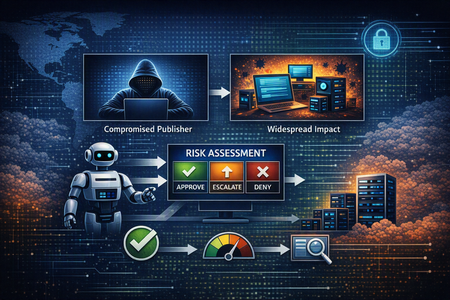
Publisher screening is a software supply-chain reality: if a publisher account is compromised, a single update can reach thousands of machines—and recovery is costly. Microsoft Trust & Security Services applies AI to automate screening at onboarding and keep reassessing publishers as new signals appear. Multiple “checker” agents evaluate identity, reputation, and post-approval behavior, then combine evidence into a consistent risk score and an approve/deny/escalate decision, with an evidence-backed explanation that supports auditability and appeals while reducing operational toil.The Changing Role of Low-Fidelity (LoFi) Signals in the AI Era
Introduction Low-fidelity signals—heuristics that are cheap to compute but often ambiguous—have traditionally been viewed as a necessary annoyance in security operations. In high-volume pipelines, even a modest false-positive rate can translate into operational disruption: unnecessary blocks, costly recoveries, customer frustration, and analyst burnout from constant triage. In the supply chain scanning service, operated by the Trust and Security Services group in Microsoft, LoFi signals include URL and certificate reputation, obfuscation and packer detection, multiple YARA rule families, high-impact API usage (for example, TerminateProcess), and vulnerability detections. Any one of these may be noisy—or may correctly flag perfectly legitimate behavior. The key shift in the AI era is to stop treating LoFi hits as verdicts and start using them as decision points: triggers for deeper, contextual analysis. Two case studies: LoFi signals as routing, not verdicts Case study 1: URL reputation + LLMs—turning noisy signals into zero-day detections Our supply-chain scanning pipeline processes billions of files each day across public package registries. About 150 million files are routed through a URL reputation stage that extracts embedded URLs and evaluates them using threat intelligence plus heuristic rules. At this scale, small error rates become unmanageable: “a little noisy” turns into tens of thousands of daily alerts. Before: Signal overload Heuristic-only URL reputation produced roughly 40,000 blocking detections per day. Although many were genuine threats, the volume made it difficult to distinguish confirmed malware from false positives with confidence. Multiple heuristic layers provided partial signals, but none reliably produced a high-confidence verdict. As a result, analysts spent substantial time triaging files and tuning detection logic, weighing stricter blocking against the risk of disrupting legitimate packages and missing true malware. After: LLM-assisted signal refinement Adding LLM-based contextual analysis on top of URL reputation changed the signal-to-noise ratio. Instead of judging a URL in isolation, the model evaluates how it is used in surrounding code—an install script versus a documentation link, an obfuscated payload download versus a legitimate API call. Outcome: ~2,000× reduction in alerts—down to about 20 high-confidence blocking detections per day—saving substantial analyst time. More importantly, the remaining alerts skew toward true zero-days that other engines in the pipeline were missing. Case study 2: Windows Device Driver scanning pipelines—scaling LoFi signals into actionable detections Beyond supply-chain package scanning, LoFi-driven routing patterns also show up in third-party device driver scanning used for the Windows certification program and post publishing rescan workflows. The pipeline operates at high volume under strict performance and reliability constraints, making “scan everything deeply” unrealistic. The device driver pipeline receives about 70,000 submissions per month (January 2026 reference). From these submissions, roughly 1 million individual files are extracted and scanned. At this scale, even moderately noisy heuristics become unmanageable if treated as high-confidence detections. Before: high-volume, low-confidence heuristics Several LoFi heuristic detectors (primarily YARA rule-based) run in audit (aka telemetry-only) mode in the driver pipeline, including: Presence of network routing/manipulation (for example, network filter drivers): ~19,000 files/month Use of a process-termination API by a driver: ~5,000 files/month Obfuscated or packed driver: ~500 files/month These detectors are fast and inexpensive, but inherently imprecise. Many flagged files reflect legitimate driver behavior (packing, process termination, filtering logic), so turning every hit into enforcement would create an unacceptable volume of false positives. Without refinement, LoFi hits function best as indicators of potential risk—not actionable verdicts. After: selective escalation and targeted analysis Instead of treating every LoFi hit equally, the pipeline escalates only the top 4% of results for deeper inspection. Those samples get additional correlation and malware analyst review, which enables the creation of concrete, high-confidence signatures that can be safely enforced at scale. With this targeted escalation model: An average of ~5 new blocking detections are added per month Each detection typically identifies 10–100 malicious files Confirmed malware is blocked without broadly impacting legitimate driver submissions This approach preserves throughput while focusing scarce expert time on the most suspicious artifacts. In other words, LoFi signals stop being “detections” and become efficient filters that route the right samples into high-cost analysis—where you can then generate durable, high-confidence blocking rules. Key takeaways LoFi is a routing layer. In AI era pipelines, the goal is not to make every cheap heuristic perfectly precise—it is to use it to decide where to spend expensive compute and analyst time. Context beats indicators. LLMs can turn ambiguous URL signals into high-confidence decisions by reasoning about usage and intent, not just matching patterns. Escalate a small fraction, learn continuously. Selecting the top few percent for deeper analysis keeps throughput high and creates a feedback loop that produces enforceable signatures. Measure success by outcomes. The win is reduced alert volume and improved catch quality (for example, zero-days and durable blocking rules) rather than “more detections.” Conclusion As threat actors move faster and zero-days become more common, security systems have to make better decisions under tighter latency and cost constraints. The answer is not to replace LoFi signals with AI everywhere; it is to combine them. Cheap heuristics can cover the full surface area, while AI (and human expertise) is reserved for the small subset of events that truly deserve deeper reasoning. Both case studies illustrate the same pattern. In supply-chain scanning, LLMs transformed a 40,000-per-day alert stream into ~20 high-confidence blocks—surfacing zero-days that were previously lost in the noise. In device driver scanning, selective escalation of the top LoFi hits converts “interesting but unenforceable” heuristics into a steady stream of high-confidence blocking signatures. In practice, the most scalable security posture is a tiered one: LoFi for breadth, AI for context, and analysts for the hardest calls.Graph RAG for Security: Insights from a Microsoft Intern
As a software engineering intern at Microsoft Security, I had the exciting opportunity to explore how Graph Retrieval-Augmented Generation (Graph RAG) can enhance data security investigations. This blog post shares my learning journey and insights from working with this evolving technology.Microsoft Sentinel’s New Data Lake: Cut Costs & Boost Threat Detection
Microsoft Sentinel is leveling up! Already a trusted cloud-native Security Information and Event Management (SIEM) and Security Orchestration, Automation and Response (SOAR) solution, it empowers security teams to detect, investigate, and respond to threats with speed and precision. Now, with the introduction of its new Data Lake architecture, Sentinel is transforming how security data is stored, accessed, and analyzed, bringing unmatched flexibility and scale to threat investigation. Unlike Microsoft Fabric OneLake, which supports analytics across the organization, Sentinel’s Data Lake is purpose-built for security. It centralizes raw structured, semi-structured, and unstructured data in its original format, enabling advanced analytics without rigid schemas. This article is written by someone who’s spent years helping security teams navigate Microsoft’s evolving ecosystem, translating complex capabilities into practical strategies. What follows is a hands-on look at the key features, benefits, and challenges of Sentinel’s Data Lake, designed to help you make the most of this powerful new architecture. Current Sentinel Features To tackle the challenges security teams, face today—like explosive data growth, integration of varied sources, and tight compliance requirements—organizations need scalable, efficient architectures. Legacy SIEMs often become costly and slow when analyzing multi-year data or correlating diverse events. Security data lakes address these issues by enabling seamless ingestion of logs from any source, schema-on-read flexibility, and parallelized queries over massive datasets. This schema-on-read allows SOC analysts to define how data is interpreted at the time of analysis, rather than when it is stored. This means analysts can flexibly adapt queries and threat detection logic to evolving threats, without reformatting historical data making investigations more agile and responsive to change. This empowers security operations to conduct deep historical analysis, automate enrichment, and apply advanced analytics, such as machine learning, while retaining strict control over data access and residency. Ultimately, decoupling storage and compute allows teams to boost detection and response speed, maintain compliance, and adapt their Security Operation Center (SOC) to future security demands. As organizations manage increasing data and limited budgets, many are moving from legacy SIEMs to advanced cloud-native options. Microsoft Sentinel’s Data Lake separates storage from computing, offering scalable and cost-effective analytics and compliance. For instance, storing 500 TB of logs in Sentinel Data Lake can cut costs by 60–80% compared to Log Analytics, due to lower storage costs and flexible retention. Integration with modern tools and open formats enables efficient threat response and regulatory compliance. Microsoft Sentinel data lake pricing (preview) Sentinel Data Lake Use Cases Log Retention: Long-term retention of security logs for compliance and forensic investigations Hunting: Advanced threat hunting using historical data Interoperability: Integration with Microsoft Fabric and other analytics platforms Cost: Efficient storage prices for high-volume data sources How Microsoft Sentinel Data Lake Helps Microsoft Sentinel’s Data Lake introduces a powerful paradigm shift for security operations by architecting the separation of storage and compute, enabling organizations to achieve petabyte-scale data retention without the traditional overhead and cost penalties of legacy SIEM solutions. Built atop highly scalable, cloud-native infrastructure, Sentinel Data Lake empowers SOCs to ingest telemetry from virtually unlimited sources ranging from on-premises firewalls, proxies, and endpoint logs to SaaS, IaaS, and PaaS environments—while leveraging schema-on-read, a method that allows analysts to define how data is interpreted at query time rather than when it is stored, offering greater flexibility in analytics. For example, a security analyst can adapt to the way historical data is examined as new threats emerge, without needing to reformat or restructure the data stored in the Data Lake. From Microsoft Learn – Retention and data tiering Storing raw security logs in open formats like Parquet (this is a columnar storage file format optimized for efficient data compression and retrieval, commonly used in big data processing frameworks like Apache Spark and Hadoop) enables easy integration with analytics tools and Microsoft Fabric, letting analysts efficiently query historical data using KQL, SQL, or Spark. This approach eliminates the need for complex ETL and archived data rehydration, making incident response faster; for instance, a SOC analyst can quickly search for years of firewall logs for threat detection. From Microsoft Learn – Flexible querying with Kusto Query Language Granular data governance and access controls allow organizations to manage sensitive information and meet legal requirements. Storing raw security logs in open formats enables fast investigations of long-term data incidents, while automated lifecycle management reduces costs and ensures compliance. Data Lakes integrate with Microsoft platforms and other tools for unified analytics and security. Machine learning helps detect unusual login activity across years, overcoming previous storage issues. From Microsoft Learn – Powerful analytics using Jupyter notebooks Pros and Cons The following table highlights the advantages and potential opportunities that Microsoft Sentinel Data Lake offers. This follows the same Pay-As-You-Go pricing model as currently available with Sentinel. Pros Cons License Needed Scalable, cost-effective long-term retention of security data Requires adaptation to new architecture Pay-As-You-Go model Seamless integration with Microsoft Fabric and open data formats Initial setup and integration may involve a learning curve Pay-As-You-Go model Efficient processing of petabyte-scale datasets Transitioning existing workflows may require planning Pay-As-You-Go model Advanced analytics, threat hunting, and AI/ML across historical data Some features may depend on integration with other services Pay-As-You-Go model Supports compliance use cases with robust data governance and audit trails Complexity in new data governance features Pay-As-You-Go model Microsoft Sentinel Data Lake solution advances cloud-native security by overcoming traditional SIEM limitations, allowing organizations to better retain, analyze, and respond to security data. As cyber threats grow, Sentinel Data Lake offers flexible, cost-efficient storage for long-term retention, supporting detection, compliance, and audits without significant expense or complexity. Quick Guide: Deploy Microsoft Sentinel Data Lake Assess Needs: Identify your security data volume, retention, and compliance requirements - Sentinel Data Lake Overview. Prepare Environment: Ensure Azure permissions and workspace readiness - Onboarding Guide. Enable Data Lake: Use Azure CLI or Defender portal to activate - Setup Instructions. Ingest & Import Data: Connect sources and migrate historical logs - Microsoft Sentinel Data Connectors. Integrate Analytics: Use KQL, notebooks, and Microsoft Fabric for scalable analysis - Fabric Overview Train & Optimize: Educate your team and monitor performance - Best Practices. About the Author: Hi! Jacques “Jack” here, I’m a Microsoft Technical Trainer at Microsoft. I wanted to share this as it’s something I often asked during my Security Trainings. This improves the already impressive Microsoft Sentinel feature stack helping the Defender Community to secure their environment in this ever-growing hacked world. I’ve been working with Microsoft Sentinel since September 2019, and I have been teaching learners about this SIEM since March 2020. I have experience using Security Copilot and Security AI Agents, which have been effective in improving my incident response and compromise recovery times.Hacking Made Easy, Patching Made Optional: A Modern Cyber Tragedy
In today’s cyber threat landscape, the tools and techniques required to compromise enterprise environments are no longer confined to highly skilled adversaries or state-sponsored actors. While artificial intelligence is increasingly being used to enhance the sophistication of attacks, the majority of breaches still rely on simple, publicly accessible tools and well-established social engineering tactics. Another major issue is the persistent failure of enterprises to patch common vulnerabilities in a timely manner—despite the availability of fixes and public warnings. This negligence continues to be a key enabler of large-scale breaches, as demonstrated in several recent incidents. The Rise of AI-Enhanced Attacks Attackers are now leveraging AI to increase the credibility and effectiveness of their campaigns. One notable example is the use of deepfake technology—synthetic media generated using AI—to impersonate individuals in video or voice calls. North Korean threat actors, for instance, have been observed using deepfake videos and AI-generated personas to conduct fraudulent job interviews with HR departments at Western technology companies. These scams are designed to gain insider access to corporate systems or to exfiltrate sensitive intellectual property under the guise of legitimate employment. Social Engineering: Still the Most Effective Entry Point And yet, many recent breaches have begun with classic social engineering techniques. In the cases of Coinbase and Marks & Spencer, attackers impersonated employees through phishing or fraudulent communications. Once they had gathered sufficient personal information, they contacted support desks or mobile carriers, convincingly posing as the victims to request password resets or SIM swaps. This impersonation enabled attackers to bypass authentication controls and gain initial access to sensitive systems, which they then leveraged to escalate privileges and move laterally within the network. Threat groups such as Scattered Spider have demonstrated mastery of these techniques, often combining phishing with SIM swap attacks and MFA bypass to infiltrate telecom and cloud infrastructure. Similarly, Solt Thypoon (formerly DEV-0343), linked to North Korean operations, has used AI-generated personas and deepfake content to conduct fraudulent job interviews—gaining insider access under the guise of legitimate employment. These examples underscore the evolving sophistication of social engineering and the need for robust identity verification protocols. Built for Defense, Used for Breach Despite the emergence of AI-driven threats, many of the most successful attacks continue to rely on simple, freely available tools that require minimal technical expertise. These tools are widely used by security professionals for legitimate purposes such as penetration testing, red teaming, and vulnerability assessments. However, they are also routinely abused by attackers to compromise systems Case studies for tools like Nmap, Metasploit, Mimikatz, BloodHound, Cobalt Strike, etc. The dual-use nature of these tools underscores the importance of not only detecting their presence but also understanding the context in which they are being used. From CVE to Compromise While social engineering remains a common entry point, many breaches are ultimately enabled by known vulnerabilities that remain unpatched for extended periods. For example, the MOVEit Transfer vulnerability (CVE-2023-34362) was exploited by the Cl0p ransomware group to compromise hundreds of organizations, despite a patch being available. Similarly, the OpenMetadata vulnerability (CVE-2024-28255, CVE-2024-28847) allowed attackers to gain access to Kubernetes workloads and leverage them for cryptomining activity days after a fix had been issued. Advanced persistent threat groups such as APT29 (also known as Cozy Bear) have historically exploited unpatched systems to maintain long-term access and conduct stealthy operations. Their use of credential harvesting tools like Mimikatz and lateral movement frameworks such as Cobalt Strike highlights the critical importance of timely patch management—not just for ransomware defense, but also for countering nation-state actors. Recommendations To reduce the risk of enterprise breaches stemming from tool misuse, social engineering, and unpatched vulnerabilities, organizations should adopt the following practices: 1. Patch Promptly and Systematically Ensure that software updates and security patches are applied in a timely and consistent manner. This involves automating patch management processes to reduce human error and delay, while prioritizing vulnerabilities based on their exploitability and exposure. Microsoft Intune can be used to enforce update policies across devices, while Windows Autopatch simplifies the deployment of updates for Windows and Microsoft 365 applications. To identify and rank vulnerabilities, Microsoft Defender Vulnerability Management offers risk-based insights that help focus remediation efforts where they matter most. 2. Implement Multi-Factor Authentication (MFA) To mitigate credential-based attacks, MFA should be enforced across all user accounts. Conditional access policies should be configured to adapt authentication requirements based on contextual risk factors such as user behavior, device health, and location. Microsoft Entra Conditional Access allows for dynamic policy enforcement, while Microsoft Entra ID Protection identifies and responds to risky sign-ins. Organizations should also adopt phishing-resistant MFA methods, including FIDO2 security keys and certificate-based authentication, to further reduce exposure. 3. Identity Protection Access Reviews and Least Privilege Enforcement Conducting regular access reviews ensures that users retain only the permissions necessary for their roles. Applying least privilege principles and adopting Microsoft Zero Trust Architecture limits the potential for lateral movement in the event of a compromise. Microsoft Entra Access Reviews automates these processes, while Privileged Identity Management (PIM) provides just-in-time access and approval workflows for elevated roles. Just-in-Time Access and Risk-Based Controls Standing privileges should be minimized to reduce the attack surface. Risk-based conditional access policies can block high-risk sign-ins and enforce additional verification steps. Microsoft Entra ID Protection identifies risky behaviors and applies automated controls, while Conditional Access ensures access decisions are based on real-time risk assessments to block or challenge high-risk authentication attempts. Password Hygiene and Secure Authentication Promoting strong password practices and transitioning to passwordless authentication enhances security and user experience. Microsoft Authenticator supports multi-factor and passwordless sign-ins, while Windows Hello for Business enables biometric authentication using secure hardware-backed credentials. 4. Deploy SIEM and XDR for Detection and Response A robust detection and response capability is vital for identifying and mitigating threats across endpoints, identities, and cloud environments. Microsoft Sentinel serves as a cloud-native SIEM that aggregates and analyses security data, while Microsoft Defender XDR integrates signals from multiple sources to provide a unified view of threats and automate response actions. 5. Map and Harden Attack Paths Organizations should regularly assess their environments for attack paths such as privilege escalation and lateral movement. Tools like Microsoft Defender for Identity help uncover Lateral Movement Paths, while Microsoft Identity Threat Detection and Response (ITDR) integrates identity signals with threat intelligence to automate response. These capabilities are accessible via the Microsoft Defender portal, which includes an attack path analysis feature for prioritizing multicloud risks. 6. Stay Current with Threat Actor TTPs Monitor the evolving tactics, techniques, and procedures (TTPs) employed by sophisticated threat actors. Understanding these behaviours enables organizations to anticipate attacks and strengthen defenses proactively. Microsoft Defender Threat Intelligence provides detailed profiles of threat actors and maps their activities to the MITRE ATT&CK framework. Complementing this, Microsoft Sentinel allows security teams to hunt for these TTPs across enterprise telemetry and correlate signals to detect emerging threats. 7. Build Organizational Awareness Organizations should train staff to identify phishing, impersonation, and deepfake threats. Simulated attacks help improve response readiness and reduce human error. Use Attack Simulation Training, in Microsoft Defender for Office 365 to run realistic phishing scenarios and assess user vulnerability. Additionally, educate users about consent phishing, where attackers trick individuals into granting access to malicious apps. Conclusion The democratization of offensive security tooling, combined with the persistent failure to patch known vulnerabilities, has significantly lowered the barrier to entry for cyber attackers. Organizations must recognize that the tools used against them are often the same ones available to their own security teams. The key to resilience lies not in avoiding these tools, but in mastering them—using them to simulate attacks, identify weaknesses, and build a proactive defense. Cybersecurity is no longer a matter of if, but when. The question is: will you detect the attacker before they achieve their objective? Will you be able to stop them before reaching your most sensitive data? Additional read: Gartner Predicts 30% of Enterprises Will Consider Identity Verification and Authentication Solutions Unreliable in Isolation Due to AI-Generated Deepfakes by 2026 Cyber security breaches survey 2025 - GOV.UK Jasper Sleet: North Korean remote IT workers’ evolving tactics to infiltrate organizations | Microsoft Security Blog MOVEit Transfer vulnerability Solt Thypoon Scattered Spider SIM swaps Attackers exploiting new critical OpenMetadata vulnerabilities on Kubernetes clusters | Microsoft Security Blog Microsoft Defender Vulnerability Management - Microsoft Defender Vulnerability Management | Microsoft Learn Zero Trust Architecture | NIST tactics, techniques, and procedures (TTP) - Glossary | CSRC https://learn.microsoft.com/en-us/security/zero-trust/deploy/overviewMicrosoft Defender for Cloud Apps - Ninja Training
Welcome to our Ninja Training for Microsoft Defender for Cloud Apps! Are you trying to protect your SaaS applications? Are you concerned about the posture of the apps you are using? Is shadow IT or AI a concern of yours? Then you are in the right place. The training below will aggregate all the relevant resources in one convenient location for you to learn from. Let’s start here with a quick overview of Microsoft Defender for Cloud Apps’ capabilities. Microsoft Defender for Cloud Apps | Microsoft Security Overview of Microsoft Defender for Cloud Apps and the capability of a SaaS Security solution. Overview - Microsoft Defender for Cloud Apps | Microsoft Learn Understand what Microsoft Defender for Cloud Apps is and read about its main capabilities. Quick Start The basic features of Defender for Cloud Apps require almost no effort to deploy. The recommended steps are to: Connect your apps Enable App Discovery Enable App Governance After enabling these features, all default detections and alerts will start triggering in the Microsoft Defender XDR console, and give you tremendous value with minimal configuration. Simplified SaaS Security Deployment with Microsoft Defender for Cloud Apps | Virtual Ninja Training Step-by-step video on how to quickly deploy Defender for Cloud Apps Get started - Microsoft Defender for Cloud Apps This quickstart describes how to start working with Microsoft Defender for Cloud Apps on the Microsoft Defender Portal. Review this if you prefer text to video Basic setup - Microsoft Defender for Cloud Apps The following procedure gives you instructions for customizing your Microsoft Defender for Cloud Apps environment. Connect apps to get visibility and control - Microsoft Defender for Cloud Apps App connectors use the APIs of app providers to enable greater visibility and control by Microsoft Defender for Cloud Apps over the apps you connect to. Make sure to connect all your available apps as you start your deployment Turn on app governance in Microsoft Defender for Cloud Apps App governance in Defender for Cloud Apps is a set of security and policy management capabilities designed for OAuth-enabled apps registered on Microsoft Entra ID, Google, and Salesforce. App governance delivers visibility, remediation, and governance into how these apps and their users access, use, and share sensitive data in Microsoft 365 and other cloud platforms through actionable insights out-of-the box threat detections, OAuth apps attack disruption, automated policy alerts and actions. It only takes a few minutes to enable and provide full visibility on your users’ Oauth app consents Shadow IT Discovery - Integrate with Microsoft Defender for Endpoint This article describes the out-of-the-box integration available between Microsoft Defender for Cloud Apps and Microsoft Defender for Endpoint, which simplifies cloud discovery and enabling device-based investigation. Control cloud apps with policies Policies in Microsoft Defender for Cloud Apps help define user behavior in the cloud, detect risky activities, and enable remediation workflows. There are various types of policies, such as Activity, Anomaly Detection, OAuth App, Malware Detection, File, Access, Session, and App Discovery policies. These policies help mitigate risks like access control, compliance, data loss prevention, and threat detection. Detect Threats and malicious behavior After connecting your cloud apps in Defender for Cloud Apps, you will start seeing alerts in your XDR portal. Here are resources to learn more about these alerts and how to investigate them. Note that we are constantly adding new built-in detections, and they are not necessarily part of our public documentation. How to manage incidents - Microsoft Defender XDR Learn how to manage incidents, from various sources, using Microsoft Defender XDR. How to investigate anomaly detection alerts Microsoft Defender for Cloud Apps provides detections for malicious activities. This guide provides you with general and practical information on each alert, to help with your investigation and remediation tasks. Note that detections are added on a regular basis, and not all of them will have entries in this guide. Configure automatic attack disruption in Microsoft Defender XDR - Microsoft Defender XDR | Microsoft Learn Learn how to take advantage of XDR capabilities to automatically disrupt high confidence attacks before damage is done. OAuth apps are natively integrated as part of Microsoft XDR. Create activity policies - Microsoft Defender for Cloud Apps | Microsoft Learn In addition to all the built-in detections as part of Microsoft Defender for Cloud Apps, you can also create your own policies, including Governance actions, based on the Activity log captured by Defender for Cloud Apps. Create and manage custom detection rules in Microsoft Defender XDR - Microsoft Defender XDR | Microsoft Learn Learn how to leverage XDR custom detection rules based on hunting data in the platform. CloudAppEvents table in the advanced hunting schema - Microsoft Defender XDR | Microsoft Learn Learn about the CloudAppEvents table which contains events from all connected applications with data enriched by Defender for Cloud Apps in a common schema. This data can be hunted across all connected apps and your separate XDR workloads. Investigate behaviors with advanced hunting - Microsoft Defender for Cloud Apps | Microsoft Learn Learn about behaviors and how they can help with security investigations. Investigate activities - Microsoft Defender for Cloud Apps | Microsoft Learn Learn how to search the activity log and investigate activities with a simple UI without the need for KQL App Governance – Protect from App-to-App attack scenario App governance in Microsoft Defender for Cloud Apps is crucial for several reasons. It enhances security by identifying and mitigating risks associated with OAuth-enabled apps, which can be exploited for privilege escalation, lateral movement, and data exfiltration. Organizations gain clear visibility into app compliance, allowing them to monitor how apps access, use, and share sensitive data. It provides alerts for anomalous behaviors, enabling quick responses to potential threats. Automated policy alerts and remediation actions help enforce compliance and protect against noncompliant or malicious apps. By governing app access, organizations can better safeguard their data across various cloud platforms. These features collectively ensure a robust security posture, protecting both data and users from potential threats. Get started with App governance - Microsoft Defender for Cloud Apps Learn how app governance enhances the security of SaaS ecosystems like Microsoft 365, Google Workspace, and Salesforce. This video details how app governance identifies integrated OAuth apps, detects and prevents suspicious activity, and provides in-depth monitoring and visibility into app metadata and behaviors to help strengthen your overall security posture. App governance in Microsoft Defender for Cloud Apps and Microsoft Defender XDR - Microsoft Defender for Cloud Apps | Microsoft Learn Defender for Cloud Apps App governance overview Create app governance policies - Microsoft Defender for Cloud Apps | Microsoft Learn Many third-party productivity apps request access to user data and sign in on behalf of users for other cloud apps like Microsoft 365, Google Workspace, and Salesforce. Users often accept these permissions without reviewing the details, posing security risks. IT departments may lack insight into balancing an app's security risk with its productivity benefits. Monitoring app permissions provides visibility and control to protect your users and applications. App governance visibility and insights - Microsoft Defender for Cloud Apps | Microsoft Learn Managing your applications requires robust visibility and insight. Microsoft Defender for Cloud Apps offers control through in-depth insights into user activities, data flows, and threats, enabling effective monitoring, anomaly detection, and compliance Reduce overprivileged permissions and apps Recommendations for reducing overprivileged permissions App Governance plays a critical role in governing applications in Entra ID. By integrating with Entra ID, App Governance provides deeper insights into application permissions and usage within your identity infrastructure. This correlation enables administrators to enforce stringent access controls and monitor applications more effectively, ensuring compliance and reducing potential security vulnerabilities. This page offers guidelines for reducing unnecessary permissions, focusing on the principle of least privilege to minimize security risks and mitigate the impact of breaches. Investigate app governance threat detection alerts List of app governance threat detection alerts classified according to MITRE ATT&CK and investigation guidance Manage app governance alerts Learn how to govern applications and respond to threat and risky applications directly from app governance or through policies. Hunt for threats in app activities Learn how to hunt for app activities directly form the XDR console (Microsoft 365 Connector required as discussed in quick start section). How to Protect Oauth Apps with App Governance in Microsoft Defender for Cloud Apps Webinar | How to Protect Oauth Apps with App Governance in Microsoft Defender for Cloud Apps. Learn how to protect Oauth applications in your environment, how to efficiently use App governance within Microsoft Defender for Cloud Apps to protect your connected apps and raise your security posture. App Governance is a Key Part of a Customers' Zero Trust Journey Webinar| learn about how the app governance add-on to Microsoft Defender for Cloud Apps is a key component of customers' Zero Trust journey. We will examine how app governance supports managing to least privilege (including identifying unused permissions), provides threat detections that are able and have already protected customers, and gives insights on risky app behaviors even for trusted apps. App Governance Inclusion in Defender for Cloud Apps Overview Webinar| App governance overview and licensing requirements. Frequently asked questions about app governance App governance FAQ Manage the security Posture of your SaaS (SSPM) One of the key components of Microsoft Defender for Cloud Apps is the ability to gain key information about the Security posture of your applications in the cloud (AKA: SaaS). This can give you a proactive approach to help avoid breaches before they happen. SaaS Security posture Management (or SSPM) is part the greater Exposure Management offering, and allows you to review the security configuration of your key apps. More details in the links below: Transform your defense: Microsoft Security Exposure Management | Microsoft Secure Tech Accelerator Overview of Microsoft Exposure Management and it’s capabilities, including how MDA & SSPM feed into this. SaaS Security Posture Management (SSPM) - Overview - Microsoft Defender for Cloud Apps | Microsoft Learn Understand simply how SSPM can help you increase the safety of your environment Turn on and manage SaaS security posture management (SSPM) - Microsoft Defender for Cloud Apps | Microsoft Learn Enabling SSPM in Defender for Cloud Apps requires almost no additional configuration (as long as your apps are already connected), and no extra license. We strongly recommend turning it on, and monitoring its results, as the cost of operation is very low. SaaS Security Initiative - Microsoft Defender for Cloud Apps | Microsoft Learn The SaaS Security Initiative provides a centralized place for software as a service (SaaS) security best practices, so that organizations can manage and prioritize security recommendations effectively. By focusing on the most impactful metrics, organizations can enhance their SaaS security posture. Secure your usage of AI applications AI is Information technologies’ newest tool and strongest innovation area. As we know it also brings its fair share of challenges. Defender for Cloud Apps can help you face these from two different angles: - First, our App Discovery capabilities give you a complete vision of all the Generative AI applications in use in an environment - Second, we provide threat detection capabilities to identify and alert from suspicious usage of Copilot for Microsoft 365, along with the ability to create custom detection using KQL queries. Secure AI applications using Microsoft Defender for Cloud Apps Overview of Microsoft Defender for Cloud Apps capabilities to secure your usage of Generative AI apps Step-by-Step: Discover Which Generative AI Apps Are Used in Your Environment Using Defender for Cloud Apps Detailed video-guide to deploy Discovery of Gen AI apps in your environment in a few minutes Step-by-Step: Protect Your Usage of Copilot for M365 Using Microsoft Defender for Cloud Apps Instructions and examples on how to leverage threat protection and advanced hunting capabilities to detect any risky or suspicious usage of Copilot for Microsoft 365 Get visibility into DeepSeek with Microsoft Defender for Cloud Apps Understand how fast the Microsoft Defender for Cloud Apps team can react when new apps or new threats come in the market. Discover Shadow IT applications Shadow IT and Shadow AI are two big challenges that organizations face today. Defender for Cloud Apps can help give you visibility you need, this will allow you to evaluate the risks, assess for compliance and apply controls over what can be used. Getting started The first step is to ensure the relevant data sources are connected to Defender for Cloud Apps to provide you the required visibility: Integrate Microsoft Defender for Endpoint - Microsoft Defender for Cloud Apps | Microsoft Learn The quickest and most seamless method to get visibility of cloud app usage is to integrate MDA with MDE (MDE license required). Create snapshot cloud discovery reports - Microsoft Defender for Cloud Apps | Microsoft Learn A sample set of logs can be ingested to generate a Snapshot. This lets you view the quality of the data before long term ingestion and also be used for investigations. Configure automatic log upload for continuous reports - Microsoft Defender for Cloud Apps | Microsoft Learn A log collector can be deployed to facilitate the collection of logs from your network appliances, such as firewalls or proxies. Defender for Cloud Apps cloud discovery API - Microsoft Defender for Cloud Apps | Microsoft Learn MDA also offers a Cloud Discovery API which can be used to directly ingest log information and mitigate the need for a log collector. Evaluate Discovered Apps Once Cloud Discovery logs are being populated into Defender for Cloud Apps, you can start the process of evaluating the discovered apps. This includes reviewing their usage, user count, risk scores and compliance factors. View discovered apps on the Cloud discovery dashboard - Microsoft Defender for Cloud Apps | Microsoft Learn View & evaluate the discovered apps within Cloud Discovery and Generate Cloud Discovery Executive Reports Working with the app page - Microsoft Defender for Cloud Apps | Microsoft Learn Investigate app usage and evaluate their compliance and risk factors Discovered app filters and queries - Microsoft Defender for Cloud Apps | Microsoft Learn Apply granular filtering and app tagging to focus on apps that are important to you Work with discovered apps via Graph API - Microsoft Defender for Cloud Apps | Microsoft Learn Investigate discovered apps via the Microsoft Graph API Add custom apps to cloud discovery - Microsoft Defender for Cloud Apps | Microsoft Learn You can add custom apps to the catalog which can then be matched against log data. This is useful for LOB applications. Govern Discovered Apps Having evaluated your discovered apps, you can then take some decisions on what level of governance and control each of the applications require and whether you want custom policies to help govern future applications: Govern discovered apps using Microsoft Defender for Endpoint - Microsoft Defender for Cloud Apps | Microsoft Learn Setup governance enforcement actions when using Microsoft Defender for Endpoint Govern discovered apps - Microsoft Defender for Cloud Apps | Microsoft Learn Apply governance actions to discovered apps from within the Cloud Discovery area Create cloud discovery policies - Microsoft Defender for Cloud Apps | Microsoft Learn Create custom Cloud Discovery policies to identify usage, alert and apply controls Operations and investigations - Sample AH queries - Tips on investigation - (section for SOC) Advanced Hunting Compromised and malicious applications investigation | Microsoft Learn Investigate anomalous app configuration changes Impersonation and EWS in Exchange | Microsoft Learn Audits impersonate privileges in Exchange Online Advanced Hunting Queries Azure-Sentinel/Solutions/Microsoft Entra ID/Analytic Rules/ExchangeFullAccessGrantedToApp.yaml at master · Azure/Azure-Sentinel · GitHub This detection looks for the full_access_as_app permission being granted to an OAuth application with Admin Consent. This permission provide access to all Exchange mailboxes via the EWS API can could be exploited to access sensitive data by being added to a compromised application. The application granted this permission should be reviewed to ensure that it is absolutely necessary for the applications function Azure-Sentinel/Solutions/Microsoft Entra ID/Analytic Rules/AdminPromoAfterRoleMgmtAppPermissionGrant.yaml at master · Azure/Azure-Sentinel · GitHub This rule looks for a service principal being granted permissions that could be used to add a Microsoft Entra ID object or user account to an Admin directory role. Azure-Sentinel/Solutions/Microsoft Entra ID/Analytic Rules/SuspiciousOAuthApp_OfflineAccess.yaml at master · Azure/Azure-Sentinel · GitHub Offline access will provide the Azure App with access to the listed resources without requiring two-factor authentication. Consent to applications with offline access and read capabilities should be rare, especially as the known Applications list is expanded Best Practice recommendations Common threat protection policies - Microsoft Defender for Cloud Apps | Microsoft Learn Common Defender for Cloud Apps Threat Protection policies Recommended Microsoft Defender for Cloud Apps policies for SaaS apps | Microsoft Learn Recommended Microsoft Defender for Cloud Apps policies for SaaS apps Best practices for protecting your organization - Microsoft Defender for Cloud Apps | Microsoft Learn Best practices for protecting your organization with Defender for Cloud Apps Completion certificate! Click here to get your shareable completion certificate!! Advanced configuration Training Title Description Importing user groups from connect apps This article outlines the steps on how to import user groups from connected apps Manage Admin Access This article describes how to manage admin access in Microsoft Defender for Cloud Apps. Configure MSSP Access In this video, we walk through the steps on adding Managed Security Service Provider (MSSP) access to Microsoft Defender for Cloud Apps. Provide managed security service provider (MSSP) access - Microsoft Defender XDR | Microsoft Learn Provide managed security service provider (MSSP) access Integrate with Secure Web Gateways Microsoft Defender for Cloud Apps integrates with several secure web gateways available in the market. Here are the links to configure this integration. Integrate with Zscaler Integrate with iboss Integrate with Corrata Integrate with Menlo Additional resources Microsoft Defender for Cloud Apps Tech Community This is a Microsoft Defender for Cloud Apps Community space that allows users to connect and discuss the latest news, upgrades, and best practices with Microsoft professionals and peers.Strengthening your Security Posture with Microsoft Security Store Innovations at RSAC 2026
Security teams are facing more threats, more complexity, and more pressure to act quickly - without increasing risk or operational overhead. What matters is being able to find the right capability, deploy it safely, and use it where security work already happens. Microsoft Security Store was built with that goal in mind. It provides a single, trusted place to discover, purchase, and deploy Microsoft and partner-built security agents and solutions that extend Microsoft Security - helping you improve protection across SOC, identity, and data protection workflows. Today, the Security Store includes 75+ security agents and 115+ solutions from Microsoft and trusted partners - each designed to integrate directly into Microsoft Security experiences and meet enterprise security requirements. At RSAC 2026, we’re announcing capabilities that make it easier to turn security intent into action- by improving how you discover agents, how quickly you can put them to use, and how effectively you can apply them across workflows to achieve your security outcomes. Meet the Next Generation of Security Agents Security agents are becoming part of day-to-day operations for many teams - helping automate investigations, enrich signals, and reduce manual effort across common security tasks. Since Security Store became generally available, Microsoft and our partners have continued to expand the set of agents that integrate directly with Microsoft Defender, Sentinel, Entra, Purview, Intune and Security Copilot. Some of the notable partner-built agents available through Security Store include: XBOW Continuous Penetration Testing Agent XBOW’s penetration testing agents perform pen-tests, analyzes findings, and correlates those findings with a customer’s Microsoft Defender detections. XBOW integrates offensive security directly into Microsoft Security workflows by streaming validated, exploitable AppSec findings into Microsoft Sentinel and enabling investigation through XBOW's Copilot agents in Microsoft Defender. With XBOW’s pen-testing agents, offensive security can run continuously to identify which vulnerabilities are actually exploitable, and how to improve posture and detections. Tanium Incident Scoping Agent The Tanium Incident Scoping Agent (In Preview) is bringing real-time endpoint intelligence directly into Microsoft Defender and Microsoft Security Copilot workflows. The agent automatically scopes incidents, identifies impacted devices, and surfaces actionable context in minutes-helping teams move faster from detection to containment. By combining Tanium’s real-time intelligence with Microsoft Security investigations, you can reduce manual effort, accelerate response, and maintain enterprise-grade governance and control. Zscaler In Microsoft Sentinel, the Zscaler ZIA–ZPA Correlation Agent correlates ZIA and ZPA activity for a given user to speed malsite/malware investigations. It highlights suspicious patterns and recommends ZIA/ZPA policy changes to reduce repeat exposure. These agents build on a growing ecosystem of Microsoft and partner capabilities designed to work together, allowing you to extend Microsoft Security with specialized expertise where it has the most impact. Discover and Deploy Agents and Solutions in the Flow of Security Work Security teams work best when they don’t have to switch tools to make decisions. That’s why Security Store is embedded directly into Microsoft Security experiences - so you can discover and evaluate trusted agents and solutions in context, while working in the tools you already use. When Security Store became generally available, we embedded it into Microsoft Defender, allowing SOC teams to discover and deploy trusted Microsoft and partner‑built agents and solutions in the middle of active investigations. Analysts can now automate response, enrich investigations, and resolve threats all within the Defender portal. At RSAC, we’re expanding this approach across identity and data security. Strengthening Identity Security with Security Store in Microsoft Entra Identity has become a primary attack surface - from fraud and automated abuse to privileged access misuse and posture gaps. Security Store is now embedded in Microsoft Entra, allowing identity and security teams to discover and deploy partner solutions and agents directly within identity workflows. For external and verified identity scenarios, Security Store includes partner solutions that integrate with Entra External ID and Entra Verified ID to help protect against fraud, DDoS attacks, and intelligent bot abuse. These solutions, built by partners such as IDEMIA, AU10TIX, TrueCredential, HUMAN Security, Akamai and Arkose Labs help strengthen trust while preserving seamless user experiences. For enterprise identity security, more than 15 agents available through the Entra Security Store provide visibility into privileged activity and identity risk, posture health and trends, and actionable recommendations to improve identity security and overall security score. These agents are built by partners such as glueckkanja, adaQuest, Ontinue, BlueVoyant, Invoke, and Performanta. This allows you to extend Entra with specialized identity security capabilities, without leaving the identity control plane. Extending Data Protection with Security Store in Microsoft Purview Protecting sensitive data requires consistent controls across where data lives and how it moves. Security Store is now embedded in Microsoft Purview, enabling teams responsible for data protection and compliance to discover partner solutions directly within Purview DLP workflows. Through this experience, you can extend Microsoft Purview DLP with partner data security solutions that help protect sensitive data across cloud applications, enterprise browsers, and networks. These include solutions from Microsoft Entra Global Secure Access and partners such as Netskope, Island, iBoss, and Palo Alto Networks. This experience will be available to customers later this month, as reflected on the M365 roadmap. By discovering solutions in context, teams can strengthen data protection without disrupting established compliance workflows. Across Defender, Entra, and Purview, purchases continue to be completed through the Security Store website, ensuring a consistent, secure, and governed transaction experience - while discovery and evaluation happen exactly where teams already work. Outcome-Driven Discovery, with Security Store Advisor As the number of agents and solutions in the Store grow, finding the right fit for your security scenario quickly becomes more important. That’s why we’re introducing the AI‑guided Security Store Advisor, now generally available. You can describe your goal in natural language - such as “investigate suspicious network activity” and receive recommendations aligned to that outcome. Advisor also includes side-by-side comparison views for agents and solutions, helping you review capabilities, integrated services, and deployment requirements more quickly and reduce evaluation time. Security Store Advisor is designed with Responsible AI principles in mind, including transparency and explainability. You can learn more about how Responsible AI is applied in this experience in the Security Store Advisor Responsible AI FAQ. Overall, this outcome‑driven approach reduces time to value, improves solution fit, and helps your team move faster from intent to action. Learning from the Security Community with Ratings and Reviews Security decisions are strongest when informed by real world use cases. This is why we are introducing Security Store ratings and reviews from security professionals who have deployed and used agents and solutions in production environments. These reviews focus on practical considerations such as integration quality, operational impact, and ease of use, helping you learn from peers facing similar security challenges. By sharing feedback, the security community helps raise the bar for quality and enables faster, more informed decisions, so teams can adopt agents and solutions with greater confidence and reduce time to value. Making agents easier to use post deployment Once you’ve deployed your agents, we’re introducing several new capabilities that make it easier to work with your agents in your daily workflows. These updates help you operationalize agents faster and apply automation where it delivers real value. Interactive chat with agents in Microsoft Defender lets SOC analysts ask questions to agents with specialized expertise, such as understanding impacted devices or understanding what vulnerabilities to prioritize directly in the Defender portal. By bringing a conversational experience with agents into the place where analysts do most of their investigation work, analysts can seamlessly work in collaboration with agents to improve security. Logic App triggers for agents enables security teams to include security agents in their automated, repeatable workflows. With this update, organizations can apply agentic automation to a wider variety of security tasks while integrating with their existing tools and workflows to perform tasks like incident triage and access reviews. Product combinations in Security Store make it easier to deploy complete security solutions from a single streamlined flow - whether that includes connectors, SaaS tools, or multiple agents that need to work together. Increasingly, partners are building agents that are adept at using your SaaS security tools and security data to provide intelligent recommendations - this feature helps you deploy them faster with ease. A Growing Ecosystem Focused on Security Outcomes As the Security Store ecosystem continues to expand, you gain access to a broader set of specialized agents and solutions that work together to help defend your environment - extending Microsoft Security with partner innovation in a governed and integrated way. At the same time, Security Store provides partners a clear path to deliver differentiated capabilities directly into Microsoft Security workflows, aligned to how customers evaluate, adopt, and use security solutions. Get Started Visit https://securitystore.microsoft.com/ to discover security agents and solutions that meet your needs and extend your Microsoft Security investments. If you’re a partner, visit https://securitystore.microsoft.com/partners to learn how to list your solution or agent and reach customers where security decisions are made. Where to find us at RSAC 2026? Security Reborn in the Era of AI workshop Get hands‑on guidance on building and deploying Security Copilot agents and publishing them to the Security Store. March 23 | 8:00 AM | The Palace Hotel Register: Security Reborn in the Era of AI | Microsoft Corporate Microsoft Security Store: An Inside Look Join us for a live theater session exploring what’s coming next for Security Store March 26 | 1:00 PM | Microsoft Security Booth #5744 | North Expo Hall Visit us at the Booth Experience Security Store firsthand - test the experience and connect with experts. Microsoft Booth #1843