threat hunting & ti
77 TopicsTurn threat intelligence into informed action with Microsoft Defender
Every new threat raises a familiar set of questions. Is it targeting our industry? Are we exposed? What should we investigate first? Answering those questions takes more than another feed or a longer list of indicators. It takes intelligence that brings the relevant context together and helps your team understand which threats matter to your organization and where to investigate next. With the new Threat Intelligence experience in Microsoft Defender, we're bringing Microsoft threat intelligence, third-party sources, and your team's own insights together around the way you work. Threat Intelligence Overview helps you prioritize the threats most relevant to your organization. Threat Intelligence Explorer gives analysts a centralized experience to search, filter, and investigate the intelligence behind them. Focus on the threats that matter to your organization A threat can be significant globally without being your team's most urgent concern. Your industry, the regions where you operate, and what's happening in your environment all shape what deserves attention. Threat Intelligence Overview puts that context at the center of your starting page. The personalized dashboard brings the external threat landscape together with insights about your organization, highlighting relevant threats, their impact, and your exposure. You can focus on industries and regions of interest, see threats actively affecting your organization, and identify where a closer investigation is needed. For an analyst planning the day's research or a security leader reviewing emerging risks, the starting point is the same: what matters to us right now? From there, you can move into Explorer to examine the intelligence behind a threat. Prioritize threats using a personalized view of the threat landscape, organizational impact, and exposure. Bring Microsoft, third-party, and your own intelligence into the same investigation A Microsoft report may explain how an actor operates. A third-party feed may identify infrastructure associated with that activity. Your own team may have intelligence from a previous investigation. Each contributes a different part of the picture. Threat Intelligence Explorer lets you work with those sources together. Microsoft Research articles and indicators sit alongside connected third-party feeds and intelligence curated by your organization. Start with what you know: an actor's name, a CVE, a domain, or an IP address. Free-text search finds matching intelligence across the types and sources available to your organization. Refine the results by type, industry, geography, or source, then follow relationships to understand how individual findings fit together. Threat Intelligence Explorer covers indicators, threat actors, campaigns, attack patterns, tools, vulnerabilities, and reports. You can move from understanding a threat to examining its associated intelligence, then continue from an indicator's details into the relevant Defender entity page for deeper investigation. Search across intelligence sources and follow relationships from a threat to the evidence you need to investigate. Follow a lead from relevance to investigation Suppose your team is researching Aqua Blizzard. The question is not simply what the actor does, but whether its activity should change your priorities. In Threat Intelligence Overview, you can review threats relevant to your industry and regions alongside available impact and exposure information. In Threat Intelligence Explorer, a search for the actor brings together matching intelligence from Microsoft, your connected feeds, and your organization's repository. From there, you can review a report, filter the results, and follow available relationships to associated intelligence. If an indicator warrants a closer look, continue into its Defender entity page to investigate further. As the picture becomes clearer, you can tag relevant records in your Threat Intelligence Platform and curate intelligence for the team. What began as a question about a threat actor becomes focused research, a deeper investigation where needed, and intelligence your colleagues can build on. Keep the intelligence you rely on Threat Intelligence Overview and Explorer replace the previous Threat Intelligence pages (Threat Analytics, Intel Management) with a personalized starting point and a shared investigation workspace. The Microsoft reports you rely on remain available in full detail (build on convergence of Microsoft Defender Threat Intelligence into Microsoft Sentinel and Defender XDR), and your existing intelligence carries over. The transition is designed to preserve existing threat intelligence capabilities, with the new experience bringing them together through Threat Intelligence Overview and Explorer. Customers with an eligible Microsoft Defender license can access the new experience. For details on eligible licenses, see Microsoft Defender XDR prerequisites. Learn more Explore threat intelligence with Intel Explorer Transition to the new Threat intelligence experience766Views0likes1CommentMDTI is Converging into Microsoft Sentinel and Defender XDR
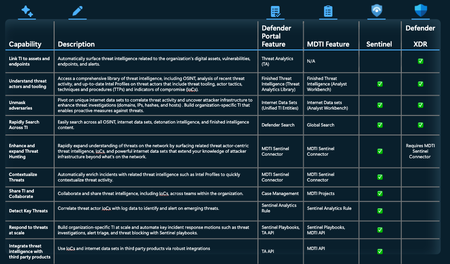
In today’s rapidly evolving threat landscape, organizations need threat intelligence (TI) that is woven seamlessly into every step of their security operations, delivered exactly when and where it matters most. That’s why Microsoft is converging Microsoft Defender Threat Intelligence (MDTI) directly into Defender XDR and Microsoft Sentinel, which will provide world-class, real-time TI within a unified SecOps experience at no additional cost. This convergence will grant customers access to Microsoft’s extensive repository of both raw and finished threat intelligence, developed from 84 trillion daily signals and backed by over 10,000 security professionals, eliminating the need for additional licensing and costly third-party solutions. With comprehensive threat actor-focused TI at every layer of the SecOps workflow, teams gain enhanced visibility, faster detection, and accelerated incident response to outpace threats. Key Features Arriving Soon The convergence of MDTI value into Microsoft Sentinel and Defender XDR will take place over the course of several months and be completed by the first half of next year. Features in the first phase of this convergence, which will be available by October, include: Finished Threat Intelligence: Defender XDR customers will have access to Microsoft’s comprehensive threat intelligence library via threat reports within threat analytics (TA). This includes exclusive analyses of threat activity and the detailed content focused on threat actors, threat tooling, and vulnerabilities found in intel profiles. Customers can connect this intelligence to related incidents and affected assets, revealing endpoint vulnerabilities and recommended actions. The convergence of MDTI’s finished intelligence into threat analytics also introduces threat actor-linked indicators of compromise (IOCs). Security operations and threat intelligence teams can use these IOCs—updated in real time as new evidence emerges from Microsoft researchers—to investigate specific attacker infrastructure and behavior, which supports more effective threat hunting and remediation. Even after their expiration, these IOCs will remain available for historical investigations, enabling analysis of past threats and their organizational impact. This helps security teams proactively uncover new, previously unseen attacker infrastructure beyond the known environment. Additionally, the convergence brings MITRE TTPs (tactics, techniques, and procedures) into threat analytics. Understanding TTPs equips organizations to design detections that specifically target the more persistent methods attackers use. By proactively focusing on TTPs, organizations move beyond simply blocking or alerting on IOCs, which helps achieve stronger, more resilient defenses and a proactive security posture. Sentinel customers will also get access to threat analytics in the Defender portal, granting them the same finished TI with many of the same capabilities. This experience will be available for Sentinel customers soon after Defender XDR customers. Stay tuned to the MDTI Tech Community blog for updates on availability. IoCs in Case Management: Sentinel customers will be able to share threat actor IoCs via Sentinel case management to collaborate and share threat research across teams within their organization. This streamlined sharing not only enhances cross-team collaboration but also accelerates the identification and containment of threats as new intelligence is discovered. By leveraging this workflow within Sentinel, security teams can ensure that actionable threat indicators are promptly distributed and integrated into ongoing investigations, driving smarter and faster responses across the enterprise. What to Expect from the Fully Unified Threat Intelligence Experience Once MDTI is fully converged into Defender XDR and Sentinel, customers' alerts, incidents, and investigations will be automatically enriched with relevant threat context, enabling faster, more precise detection and response to emerging threats. Customers will benefit from the entirety of MDTI’s finished and raw intelligence through the threat analytics blade in the Defender portal—including open-source intelligence (OSINT), in-depth threat articles, and advanced internet data sets. Defender XDR customers will be able to directly link this compendium of intelligence to Defender alerts, endpoints, and vulnerabilities. Sentinel customers will gain unique enhancements of their own, such as automated detection triggers based on the latest IoCs, real-time incident enrichment with current threat actor TTPs, advanced automation features like incident triage, and the ability to enhance third-party intelligence through the Sentinel Threat Intelligence Platform (TIP). For some capabilities, such as alerting on IoCs against log data, Sentinel customers will have to pay a small cost for ingestion of TI (there is no minimum ingestion cost). The first phase of the convergence will be complete by October 2025, with the rest of the features rolling out over time. Reference the table below to see the features and capabilities that will be available after MDTI is fully converged with Defender XDR and Sentinel. For ongoing updates about new MDTI features coming online in Sentinel and Defender XDR, customers should check back-in on the MDTI Tech Community blog. Actions for Existing MDTI Customers Existing MDTI customers will continue to have full access to their current MDTI experience until the product is retired on August 1, 2026. They will be contacted by their account team or partner with guidance on next steps and how to reduce their current license and transition to this new unified threat intelligence experience in Defender XDR or Sentinel at no additional cost. Please do not hesitate to reach out to your account team with any questions. Additional Information Discover how this unified experience simplifies operations, eliminates silos, and helps you see and stop threats faster. Explore the following resources: Read our blog announcing the expanded Sentinel data lake offering Register to join us in September for our next wave of innovation around threat intelligence and Microsoft Sentinel28KViews7likes11Comments
What’s New at Ignite: Powerful Enhancements in Unified Threat Intelligence
At Microsoft Ignite 2025, we’re unveiling transformative upgrades in threat intelligence designed to empower security teams. With the Threat Intelligence Briefing Agent now fully integrated into the Defender portal, defenders can shift from reactive to proactive security strategies, using Microsoft’s global intelligence combined with insights tailored to their organization. Additionally, the latest phase of the integration of Microsoft Defender Threat Intelligence (MDTI) with Defender XDR and Sentinel brings together unified, real-time threat intelligence and advanced analytics, streamlining the SecOps experience and equipping organizations with powerful tools to anticipate and address emerging threats more effectively. Threat Intelligence Briefing Agent in Defender Launched in March, the Threat Intelligence Briefing Agent has already enabled security teams to shift from reactive defense to proactive threat anticipation. At Ignite, we’re excited to announce that this agent is now fully integrated into the Microsoft Defender portal, currently available in Public Preview. It delivers daily, customized briefings, combining Microsoft’s global threat intelligence with insights specific to each organization, in just minutes. Instead of spending hours piecing together information from multiple sources, analysts now receive automated, up-to-date intelligence summaries. These briefings help analysts quickly prioritize actions by providing risk assessments, clear recommendations, and direct links to vulnerable assets, empowering organizations to address exposures proactively. MDTI Convergence into the Defender Portal In July, we announced the integration of Microsoft Defender Threat Intelligence (MDTI) directly into Defender XDR and Microsoft Sentinel. This integration delivers world-class, real-time threat intelligence within a unified SecOps experience, all at no additional cost. We are pleased to share that the first phase of this convergence is now available in Public Preview. It features Microsoft’s comprehensive threat intelligence library within Threat Analytics, and new enhancements making it easier than ever for users to access, understand, and act on this critical information. Threat Intelligence Library in the Defender Portal Defender XDR customers will have access to Microsoft’s comprehensive threat intelligence library via threat reports within threat analytics (TA). This includes exclusive analyses of threat activity and the detailed content focused on threat actors, threat tooling, and vulnerabilities found in intel profiles. Threat reports are automatically correlated with related incidents and affected assets, revealing endpoint vulnerabilities and recommended actions. Threat analytics in Defender enables and empowers customers to get threat insights around emerging threats on a global scale . Threat analytics provides contextual and operational information about the relevance of each threat for an organization, which allows security teams to organize and prioritize their operations and triage processes based on impact, available as in-product reports. Threat reports published in Threat analytics include threat activity such as: Active threat actors and their campaigns Popular and new attack techniques Critical vulnerabilities Common attack surfaces Prevalent malware Threat reports provide analysts with insights into the methods and attack patterns employed by threat actors, along with details on vulnerabilities, zero-day exploits, and potentially harmful tools. These findings are correlated with relevant contextual information from the customer's environment to assess the specific impact each threat may have on their organization. Threat Analytics library now also available to Sentinel-only customers Sentinel-only customers now have access to Microsoft’s threat intelligence library through reports in Threat Analytics (TA), currently in Public Preview. This upgrade, now in Public Preview, brings Microsoft’s world-class threat intelligence and actionable indicators to Sentinel without a Defender XDR license. While incident correlation and automated response remain exclusive to Defender XDR, standalone Sentinel deployments gain improved threat visibility and integrated security options. What’s new in Threat Analytics Threat reports within Threat Analytics have been upgraded with enhanced insights—previously accessible exclusively through an MDTI license—to provide Defender customers with improved context regarding finished intelligence on prevalent threats. The following contextual insights for each report are now available within Threat Analytics: Indicators of Compromise: Each threat report now includes a comprehensive list of indicators attributed to the specific threat. This feature allows customers to review all relevant indicators and access detailed entity information within Defender directly from the report, streamlining navigation to support efficient investigation and triage. MITRE ATT&CK Mapping: By mapping threats’ tactics, techniques, and procedures (TTPs) to the MITRE ATT&CK framework, customers can proactively identify, detect, and mitigate persistent techniques, ultimately enhancing overall security posture. Targeted Industries & Actor Origin: Reports provide insight into targeted industries and threat actor origins, enabling analysts to prioritize intelligence and contextualize motivations and observed TTPs. Related Intelligence & Aliases: Threat Analytics offers links to related intelligence and presents actor or tool aliases, allowing customers to cross-reference reports and understand the alignment between Microsoft Threat Intelligence and broader industry developments. All these additional insights are available in the overview of a threat report Furthermore, finding threat reports is now easier. The reports are systematically organized and can be filtered by Actor, Tool, Technique, Vulnerability, Activity, or Core threat, making it quicker to locate specific reports. Read more about threat analytics report and the information available here. Access to Indicators of Compromise Indicators of Compromise linked to specific threats provide SOC Analysts with valuable insight into the most common risks faced by their organization. For Defender customers, threat analytics now makes it easier to filter this data according to particular threats. Because information about indicators is vital, unauthorized access poses a risk of data theft or exploitation by malicious actors. Recognising its sensitivity, access to Indicators is restricted to verified customers only. Customers who do not have access to indicators will see the following when attempting to access it: In scenarios where access is restricted, customers will have the option to verify themselves by submitting business information to get access on successful verification. Read more about access to indicators. Customers with access to indicators (with or without the need to submit additional verification) will be able to see the entire list. The improvements to Threat analytics described above are designed to deliver a unified threat intelligence experience. By integrating MDTI features into Microsoft Defender and Sentinel, customers will progressively have access to more valuable insights that were previously available only with paid MDTI licenses. Read more about MDTI convergence here. Link Cases to IOCs for Complete Threat Context You can now link a case directly to relevant Indicators of Compromise (IOCs), ensuring investigations and response workflows stay connected. This feature improves visibility and collaboration, enabling faster, more informed decisions during threat investigations. Conclusion The integration of the Threat Intelligence Briefing agent into the Defender Portal and the convergence of MDTI into Microsoft Defender and Sentinel represents a major leap forward for security teams, delivering unified threat intelligence and streamlined workflows. With enhanced access to threat reports, indicators of compromise, and contextual insights, organizations are better equipped to proactively defend against emerging threats and respond with greater speed and confidence. These advancements ensure that valuable intelligence is accessible to all, strengthening security operations and empowering defenders to stay ahead in an ever-evolving threat landscape.2.7KViews2likes0CommentsIntroducing the Threat Intelligence Briefing Agent
As cyber threats rapidly evolve, security teams are overwhelmed by the sheer volume of threat intelligence, making it challenging to deliver timely, targeted briefings. That’s why we’re introducing the Security Copilot Threat Intelligence Briefing Agent—a powerful new tool that slashes the time to produce actionable threat reports from hours or days to just minutes. Now in Public Preview, the agent delivers prioritized insights, mapping the latest adversary activity to your unique attack surface so you know exactly which vulnerabilities demand attention now. Looking ahead, we’re planning even deeper integrations, such as automated remediation, exposure trend analysis, and more, to empower security teams to stay one step ahead of attackers. Analysis at Machine Speed This next evolution in Security Copilot threat intelligence capabilities builds on its powerful ability to correlate Microsoft threat data, real-time signals, and customer telemetry to add critical context to threats. The agent dynamically builds briefings based on the latest threat actor activity from Microsoft security research and both internal and external vulnerability data sourced from Microsoft Defender Vulnerability Management (MDVM) and Microsoft Defender External Attack Surface Management (EASM). It automates the collection, analysis, and summarization of this powerful threat information, delivering continuous, tailored briefings based on factors such your organization’s evolving attack surface, your industry, and geographic location. These briefings, which can be scheduled or run ad-hoc, offer regular executive summaries and technical analysis accessible via the UI or directly to a CISO's inbox. They determine whether a vulnerability is being actively exploited and its potential organizational impact. Instead of sifting through threat feeds and vulnerability reports, security teams receive clear insights aligned with the organization's needs, allowing for effective resource allocation. As a result, cyberthreat intelligence (CTI) analysts gain important data for further research, while CISOs and security leaders get the situational awareness needed to fine-tune their defense strategies. How the Agent Works Setting up the Agent The Threat Intelligence Briefing agent is in the Security Copilot standalone experience. A new area of the product is devoted to agents, where both Microsoft and third parties offer a variety of agents that perform critical tasks to make cybersecurity teams more effective and efficient. CTI analysts can quickly set up the Threat Intelligence Briefing agent to run once for a one-time report or set it to run automatically at an interval of their choosing. Setting up the agent is simple. Customers can choose an identity for the agent using Microsoft’s robust role-based access controls (RBAC): They can then ensure the required plugins are enabled for the agent to run. At the core of this agent is its integration with Microsoft’s extensive threat intelligence ecosystem. It leverages Microsoft Defender Threat Intelligence (MDTI) profiles, articles, and intelligence on threat actors, tools, and techniques, automatically prioritizing content based on the organization's unique profile. Currently, the Threat Intelligence Briefing Agent is best suited for MDEASM and Microsoft Defender for Endpoint (MDE), as it relies on telemetry and insights from these first-party integrations to deliver accurate and context-rich reports. For organizations with E5 licenses, the agent can also incorporate insights from MDVM to highlight potential weaknesses in your internal IT infrastructure. If the organization utilizes MDEASM, the agent further tailors its briefings using external data such as vulnerabilities associated with unmanaged assets (e.g., CVE information): Once set up, the agent is ready to run in the background to generate the briefing: Agent in Action A key benefit of the agent for CISOs and security managers is simplification. The agent runs at regularly scheduled intervals or on-demand: Here, we can see the briefing highlighted potentially significant threats facing the organization, focusing on recent campaigns by the riskiest threat actors. These campaigns involve tactics such as exploiting vulnerabilities in network devices, phishing, and ransomware attacks: The briefings also include the most critical CVEs contextualized with threat intelligence. It also includes links to vulnerable assets for further action: The briefing provides concrete recommendations to enhance defenses, including patching vulnerabilities, strengthening endpoint protection, and implementing attack surface reduction rules. Customers can then review the path the agent took to see how it gathered this real-time intelligence: Here, we can see the path the agent has taken to generate the briefing. At each step of the way, it is making dynamic decisions about the best threat intelligence to include based on its inherent threat intelligence expertise. This path can change each day based on changes in the threat landscape and on the organization’s attack surface. For example, if a CVE gets remediated, threat intelligence associated with that vulnerability will become less of a priority: What’s Next The Threat Intelligence Briefing Agent marks a major step toward AI-driven automation for improving security outcomes, but this is just the beginning. We are continuously listening to our customers and rolling out new updates regularly. This powerful agent will soon be available alongside the rich, continuously updated threat intelligence in the Threat Analytics blade of Defender XDR to enable Defender customers to create these briefings with the click of a button. Learn More Threat Intelligence Briefing Agent offers a strategic way to reduce complexity, optimize security decision-making, and expedite the identification of the most relevant vulnerabilities and threats impacting your organization. By automating and prioritizing threat intelligence—the same intelligence that previously took hours or days to assemble—this agent provides clear, actionable insights that enhance overall security readiness. To learn more about this agent and the rest of the first and third-party agents now available, watch our Microsoft Secure digital event. For a closer look at this agent, watch our deep dive in the Microsoft Security Copilot Content Hub. Read this blog to learn more about Security Copilot agents at RSA.6.3KViews1like0CommentsNew at Ignite: TI Guided Experience in Security Copilot
The Security Copilot team is consistently improving the threat intelligence (TI) experience for customers. At Microsoft Ignite 2024, we're thrilled to unveil two out-of-the-box promptbooks that create guided experiences for cyberthreat intelligence and SOC analysts for investigating and responding to threats affecting their organization, simplifying complex workflows and making difficult, repetitive tasks easier to do for all experience levels. Below, we’ll cover each of these promptbooks in more detail: Threat 'Intelligence 360' report on MDTI article With Security Copilot able to tap into powerful threat intelligence from more sources, customers get a much more holistic view of threats, better understand how they impact the organization, have more recommendations and guidance to respond faster and more effectively. This promptbook shows customers the full impact a threat covered in a Microsoft Defender Threat Intelligence article has on their organization to streamline and accelerate response. These prompts help map content from the article back to CVE and vulnerability data related to their organization’s attacks surface, surface related incidents, and provide recommendations for remediation. Below, we’ll examine what an analyst sees when they run the 'Threat Intelligence 360 Report' promptbook for the MDTI article “Attack Abuses Victim Resources to Reap Rewards from Titan Network.” The first step of the promptbook pulls up all indicators of compromise (IoCs) added to the article by Microsoft researchers. Below, you can see the prompt return a list of IoCs that includes two IP addresses and several URLs: The next step of the promptbook asks Security Copilot to create a KQL query to hunt across the organization’s network for activity related to the indicators from the article. In the example below, Security Copilot created a query for IPV4 indicators in the article returned by Security Copilot. The promptbook will create KQL queries for every indicator type and return all relevant intelligence. The promptbook will then search for Defender incidents related to the article. In this example, it returns four incidents that contain indicators or tactics, techniques, and procedures (TTPs) that are covered in the article. Grouping the incidents by activity make them easy to reference for incident responders and provide important context and a clear path forward for cyberthreat intel analysts' investigation. Finally, the promptbook shows the analyst details of the CVEs listed in the articles and its impact to the organization by listing their organization's vulnerable assets and resources to help them understand how their attack surface is exposed and the steps they need to take to address and remediate the vulnerabilities: Overall, this information rapidly summarizes a threat analyzed in a threat intelligence article so analysts can quickly and efficiently understand the nuances of the threat and its impact to the organization. Impact of external article This promptbook shows analysts the impact of an external threat intelligence article from a third-party source (not found in Microsoft products) on their organization. This promptbook extracts indicators from the article to check against all Microsoft’s intelligence to show all relevant information and the impact on the organization. Below, the analyst deploys this promptbook to better understand a threat intelligence article from a third-party source about the latest campaigns leveraging the 'Silent Skimmer': Next, the promptbook takes the indicators extracted from the article and queries Microsoft's compendium of threat intelligence to show all related content and data to give analysts a broader understanding of the threat activity. Below, the promptbook checks each IoC's reputation against Microsoft Threat Intelligence. The analyst can see that several of the indicators from the article are known to be malicious to Microsoft and are associated with several Microsoft threat intelligence articles in MDTI: After uncovering related intelligence, the promptbook asks Security Copilot to create KQL queries to automatically hunt across the network for the malicious indicators from the article, as well as the ones newly surfaced in Microsoft threat intelligence. In the example below, it’s searching for the file hashes listed in the article: Finally, the promptbook asks Security Copilot to create a table showing any reference in Microsoft threat intelligence to the indicators mentioned in the article, as well as any devices in the customer organization that are affected by CVEs listed in the article based on Threat Analytics data: These powerful new promptbooks will create guided experiences for a variety of personas, simplifying complex workflows and making difficult, repetitive tasks easier to do. Conclusion Microsoft delivers leading threat intelligence built on visibility across the global threat landscape made possible protecting Azure and other large cloud environments, managing billions of endpoints and emails, and maintaining a continuously updated graph of the internet. By processing an astonishing 78 trillion security signals daily, Microsoft can deliver threat intelligence in Copilot for Security providing an all-encompassing view of attack vectors across various platforms, ensuring customers have comprehensive threat detection and remediation. If you are interested in learning more about MDTI and how it can help you unmask and neutralize modern adversaries and cyberthreats such as ransomware, and to explore the features and benefits of MDTI please visit the MDTI product web page. To learn more about Security Copilot, visit the Tech Community page here. Learn more about Microsoft Security Copilot in Microsoft Defender Threat Intelligence here. Learn more about other Microsoft threat intelligence innovations launching at Ignite here. Also, be sure to contact our sales team to request a demo or a quote. Learn how you can begin using MDTI with the purchase of just one Security Copilot SCU here.898Views1like0CommentsNew Security Copilot Plugin Name Reflects Broader Capabilities
The Copilot for Security team is continuously enhancing threat intelligence (TI) capabilities in Copilot for Security to provide a more comprehensive and integrated TI experience for customers. We're excited to share that the Copilot for Security threat Intelligence plugin has broadened beyond just MDTI to now encapsulate data from other TI sources, including Microsoft Threat Analytics (TA) and Microsoft file and URL intelligence, with even more sources becoming available soon.3.7KViews0likes0CommentsIntroducing the MDTI Home Page Widget and Article Digest
The MDTI team is excited to introduce the MDTI Article Digest, a new way for customers to stay up to speed with the latest analysis of threat activity observed across more than 78 trillion daily threat signals from Microsoft's interdisciplinary teams of experts worldwide.2KViews0likes0CommentsIntroducing the MDTI Premium Data Connector for Sentinel
The MDTI and Unified Security Operations Platform teams are excited to introduce an MDTI Premium data connector available in the Unified Security Operations Platform and standalone Sentinel experiences. This connector enables customers to apply the powerful raw and finished threat intelligence in MDTI, including high-fidelity indicators of compromise (IoCs), across their security operations to detect and respond to the latest threats.More Threat Intelligence Content In MDTI, TA Enables Better Security Outcomes
Microsoft threat intelligence empowers our customers to keep up with the global threat landscape and understand the threats and vulnerabilities most relevant to their organization. We are excited to announce that we have recently accelerated the speed and scale at which we publish threat intelligence, giving our customers more critical security insights, data, and guidance than ever before.7.4KViews1like0Comments