terraform
38 Topics
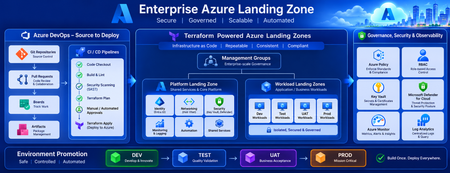
Building a Fully Automated Azure Landing Zone Deployment Using Azure DevOps and Terraform
Discover how to build a fully automated Azure Landing Zone using Azure DevOps and Terraform. This article walks through real-world Git workflows, CI/CD automation, environment promotion strategies, and governance integration to create secure, scalable, and enterprise-ready Azure environments.1.2KViews1like0Comments
Building Production-Ready Pipelines in Azure DevOps: Beyond the Documentation Examples
Hi everyone, When moving from basic Azure DevOps tutorials to enterprise production environments, we all quickly realize that documentation examples don't always cover real-world complexities. Handling multi-stage dependencies, keeping Terraform state secure, and managing secrets across environments requires a highly strategic approach. To help DevOps engineers bridge this gap, I recently put together a deep-dive architecture breakdown detailing how to build a resilient, multi-stage YAML pipeline from scratch. Here is a quick look at the core enterprise architecture I focus on: - Multi-Stage Lifecycle: Safe progression flows through Build, Dev, QA, UAT, and Production stages. - Infrastructure Automation: Clean integration with Terraform, including state and secrets management using Azure Key Vault. - Security Gates: Implementation of SAST scanning, Workload Identity, and automated approval policies. - Team Alignment: Connecting Azure DevOps with project tools like Asana to streamline cross-platform tracking. I wanted to share this pattern here to get some community feedback on the YAML structure. Before I post the full configuration snippets, I would love to hear how your teams handle environment gates and approvals. What are the biggest bottlenecks you run into with multi-stage YAML pipelines? Let's discuss in the comments below! Best regards, Abdullah Shahid129Views0likes0CommentsTerraform AzureRM provider 5.0 now generally available
The Terraform AzureRM provider serves as the bridge between Terraform configurations and Azure, giving teams a consistent, scalable, and secure way to define and manage Azure infrastructure as code. Today we're announcing general availability of Terraform AzureRM Provider 5.0. This major release gives users more control over how the provider interacts with Azure subscriptions, introduces opt-in Azure preflight validation, and removes resources and properties deprecated across previous releases. With AzureRM 5.0, we continue to evolve the provider around how customers use Azure today, with clearer provider behavior, earlier feedback during infrastructure workflows, and a cleaner foundation for future Azure services and features. Highlights in AzureRM 5.0 AzureRM 5.0 includes a broad set of breaking changes and behavioral updates. Here are some of the most important changes for existing users. More control over Resource Provider registration: Previous versions of the provider automatically checked and attempted to register a legacy set of approximately 60 Azure Resource Providers during initialization. This could add startup time, create permission errors in restricted environments, and register services a team did not intend to use. In version 5.0, no Resource Providers are registered by default. Users can register only the Resource Providers required by their configuration, retain the legacy behavior, or manage registration outside the provider. This gives platform teams more control over Azure subscription configuration and the permissions assigned to Terraform. Optional Azure preflight validation: AzureRM 5.0 adds opt-in support for the Azure Preflight Validation API. For supported resources, the provider can make a live API call to Azure during terraform plan and surface certain policy violations, quota breaches, and invalid property values before an apply begins. Preflight validation currently supports a subset of AzureRM resources and requires valid Azure credentials and access to Azure services during planning. Values that Terraform does not know until apply cannot be included in the validation request, so this is an additional checkpoint rather than a replacement for apply-time validation. Still, it is generally preferable to detect Azure configuration issues before an apply operation begins, rather than during deployment. Updated validation defaults: Validation of Azure locations and Azure Resource Provider names through the Azure Metadata Service is now disabled by default. Users who want these checks during planning can enable them through the enhanced_validation feature block. Removal of deprecated provider surfaces: As expected with a major release, AzureRM 5.0 removes resources, data sources, and properties that have already completed the provider’s deprecation cycle. This includes the older App Service and Function App resources, which have been superseded by the Linux and Windows-specific resources, along with resources for retired or replaced Azure services. The release also continues the move toward using Azure resource IDs instead of separate resource names across several schemas. Some configurations previously embedded inside larger resources have moved to dedicated resources, including Storage Account queue properties and static website configuration. Migrating to AzureRM 5.0 AzureRM 5.0 is a major release, so users should review their configurations carefully before upgrading. The complete AzureRM 5.0 upgrade guide documents the provider-level changes, removed resources and data sources, and breaking schema changes included in the release. When planning the upgrade, we recommend that users: Review the resources and properties used by their configurations and modules. Decide how Azure Resource Provider registration should be managed in their environment. Decide whether to enable location, Azure Resource Provider, or preflight validation. Test the upgrade in a non-production environment and review the resulting terraform plan. Pin the provider version while validating and rolling out the upgrade. The amount of migration work will depend on which resources, data sources, and properties your configurations and modules use. The upgrade guide includes the detailed mappings and examples needed to identify and plan those changes. Getting started The Terraform AzureRM provider 5.0 is now available in the Terraform Registry. For the complete list of updates in version 5.0, refer to the AzureRM 5.0 changelog. To learn the basics of using Terraform with Azure, explore the Terraform on Azure tutorials on our developer education platform. This release would not have been possible without the work of the HashiCorp AzureRM maintainers, Azure Terraform engineering team, community contributors, and users who continue to provide feedback through GitHub issues and pull requests. If you'd like to join a community of Terraform on Azure practitioners, join our community calls! This is a cross-post of HashiCorp's blog post.3.5KViews3likes0Comments
Mult-subscription Terraform deployment and Azure DevOps Service Connections
While it is understood that Terraform templates can facilitate multi-subscription deployment through the 'alias' concept, as outlined in the documentation https://registry.terraform.io/providers/hashicorp/azurerm/latest/docs/resources/subscription#example-usage---creating-a-new-alias-and-subscription-for-an-enrollment-account, how does this integration function within the framework of Azure DevOps pipelines? To illustrate, consider the scenario where you aim to execute the 'terraform apply' command for a template using AZ CLI, deploying resources across multiple subscriptions. AZ CLI requires a service connection object mapped to a specific Azure subscription, leading to deployment failures in other subscriptions, even if the same service connection has access. Is there a better approach to address this issue or what is the recommendation in terms of creating service connections so that such template deployment could work?2.3KViews0likes5CommentsFrom Prompt to Production: Open in VS Code for Terraform in Azure Copilot
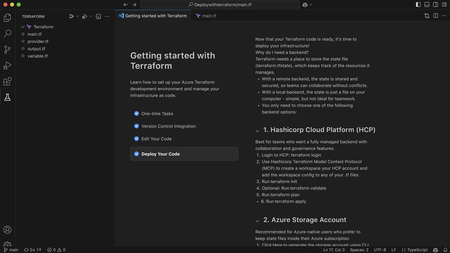
We’re excited to introduce a new step in the Terraform on Azure experience: Open in VS Code, now available directly from Azure Copilot in the Azure Portal. This capability helps you move seamlessly from AI‑generated Terraform code to real Azure deployments - within a connected, guided workflow designed for enterprise scenarios. Why This Matters Infrastructure as Code with Terraform is powerful, but moving from generated configuration to a deployed environment typically involves multiple tools and handoffs. Teams need to understand Terraform state, work with remote backends, and integrate their code into version‑controlled CI/CD pipelines - often backed by Terraform Cloud or Azure‑native backends in enterprise environments. Open in VS Code brings these steps together. It bridges the gap between AI‑assisted authoring in the Azure Portal and the real‑world workflows required to validate, manage state, and deploy infrastructure with confidence. Continue Your Workflow in VS Code With Azure Copilot, you can describe your infrastructure in natural language and generate Terraform configurations in seconds. For example: “Create an Azure Container App using Terraform with a managed environment, Log Analytics enabled, and a system‑assigned managed identity to securely pull images from Azure Container Registry.” Copilot generates the Terraform configuration for you. From there, you can select Open full view to enter a full‑screen Terraform editor, and then choose Open in VS Code to launch the configuration in an Azure‑hosted VS Code environment. There’s no need to download files or set up a local development environment. VS Code for the web opens with Azure authentication already configured, along with commonly used extensions, so you can immediately focus on refining, validating, and preparing your infrastructure for deployment. Built‑in Guidance for Real Deployments Beyond editing, the VS Code experience includes built‑in, step‑by‑step guidance to help you deploy your Terraform configuration into your own Azure environment - whether you’re experimenting or preparing for production. Because Terraform relies on state management, the workflow starts by helping you choose and configure a backend. Backend Options Option 1: Azure Storage Account as a remote backend A natural fit for Azure‑native and enterprise environments. The experience guides you through creating or selecting a storage account and configuring Terraform to store state securely in Azure. Option 2: HCP Terraform (Terraform Cloud) as a remote backend Ideal for teams already using Terraform Cloud. The guided flow helps you authenticate, connect to an existing organization and workspace, and generate the required backend configuration directly into your Terraform files. Option 3: Temporary workspace for quick validation Designed for learning and experimentation. You can run terraform plan and terraform apply directly in the Azure workspace with temporary state, without committing to a long‑term backend - ideal for quick validation, but not intended for production use. Each option includes an end‑to‑end walkthrough, so you can complete backend setup and run Terraform commands without leaving the VS Code environment or searching through external documentation. Connecting Code, State, and Deployment This experience connects three essential parts of the Terraform workflow: AI‑assisted code generation in Azure Portal Copilot Interactive editing and guided execution in VS Code for the web Flexible backend options for managing Terraform state Together, these pieces make it easier to move from idea to infrastructure in a structured, supported way—whether you’re new to Terraform or managing production workloads with established CI/CD pipelines. Available Now - and What’s Next The Open in VS Code experience for Terraform is now public preview in Azure Portal Copilot. We’re continuing to invest in this workflow, including clearer deployment guidance, future integration with GitHub Actions and other CI/CD pipelines, and deeper enhancements to the full‑screen Terraform editor experience. If you haven’t tried it yet, generate a Terraform configuration with Azure Copilot and open it in VS Code to go from prompt to production end to end in one connected workflow.1.3KViews0likes0CommentsAzure Landing Zones Accelerators for Bicep and Terraform. Announcing General Availability!
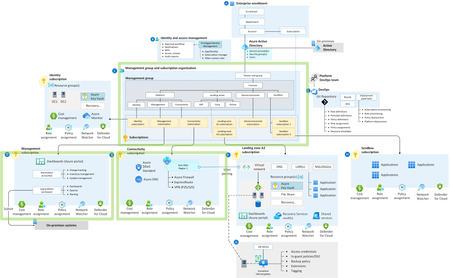
Azure Landing Zones Accelerators are designed to simplify the process of onboarding your Infrastructure as Code into a robust CI / CD pipeline with Azure DevOps or GitHub. Learn more about what the Accelerator can do for you and why you should be using it.33KViews12likes5CommentsAccelerating Infrastructure as Code: Introducing Game-Changing Terraform Features for Azure
We're thrilled to announce a suite of powerful new features from the Terraform on Azure Team that will revolutionize how you build, manage, and deploy infrastructure. These enhancements deliver an unprecedented end-to-end experience that makes Terraform on Azure more accessible, intelligent, and comprehensive than ever before. Seamless Code Generation to Deployment Experience Public Preview: October 2025 Say goodbye to starting from scratch. Our new integrated workflow transforms how you create and deploy Terraform configurations through a streamlined journey that begins right in the Azure portal. With Copilot in Azure, you can now describe your infrastructure requirements in natural language and watch as production-ready Terraform code materializes before your eyes. This AI-powered assistant understands your intent and generates optimized HCL code that follows best practices—no more hunting through documentation or wrestling with syntax. The experience seamlessly transitions to VS Code for the web, where you can view, refine, and iterate on your generated code in a familiar development environment. Make adjustments, test configurations, and collaborate with your team—all without leaving your browser. When you're satisfied with your infrastructure definition, deploy with confidence using either HCP Terraform or Azure for state management, ensuring your infrastructure remains consistent and trackable. Unified VS Code Extension: Your Complete Terraform Toolkit Public Preview: Available Now We've consolidated the Terraform development experience into a single, powerful VS Code extension from Microsoft that serves as your command center for all things Terraform from Microsoft. IntelliSense support for all Microsoft providers brings intelligent code completion, parameter hints, and inline documentation directly to your fingertips, dramatically reducing errors and accelerating development. No more context switching to check resource schemas or argument names—everything you need appears as you type. Jump-start your projects with Code Samples that provide fully functional, production-ready templates for common Azure architectures. Whether you're building a microservices platform, data pipeline, or enterprise network, these samples give you a solid foundation to build upon. The game-changing Export Terraform feature allows you to reverse-engineer your existing Azure infrastructure into clean HCL code directly from VS Code. This bridges the gap between manually created resources and Infrastructure as Code, making it easier than ever to adopt Terraform for existing environments. Perhaps most importantly, the Policy/Preflight validation capability goes beyond traditional terraform plan by leveraging Azure's preflight system. This advanced validation catches configuration issues, policy violations, and potential deployment problems before they impact your environment. Validate against organizational policies, compliance requirements, and Azure best practices—all before a single resource is created. MS Graph Provider: Extending Terraform Beyond Infrastructure Public Preview: Available Now Infrastructure doesn't exist in isolation, and neither should your Terraform configurations. The new MS Graph provider brings the same declarative power you love about the Azure provider to the entire Microsoft ecosystem. Built with an AzAPI-like architecture for day-zero support of new features, this provider enables you to manage resources across the Microsoft platform including Microsoft 365 configurations, Windows settings, Enterprise Mobility + Security policies, and Dynamics 365 customizations. Manage users, groups, applications, and security policies alongside your Azure infrastructure—all in the same Terraform configuration. This unified approach means you can now define your entire organizational IT landscape as code, from the Azure resources powering your applications to the Microsoft 365 settings governing user productivity and security policies protecting your data. Ready to Transform Your Infrastructure Journey? These features represent our commitment to making Terraform a first class tool for managing Azure and Microsoft resources. Whether you're new to Infrastructure as Code or a seasoned practitioner, these enhancements will accelerate your workflow and expand what's possible with Terraform. Get started today by updating your VS Code extension and exploring the new Copilot experience in the Azure portal. The future of infrastructure automation on Azure is here—and it's more powerful than ever. Visit our documentation to learn more and join our community to share feedback and connect with other Terraform on Azure users. Together, we're building the future of cloud infrastructure. Terraform on Azure Product Group2.4KViews5likes2CommentsAnnouncing MSGraph Provider Public Preview and the Microsoft Terraform VSCode Extension
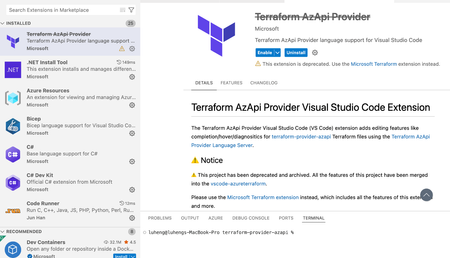
We are thrilled to announce two exciting developments in the Microsoft ecosystem for Terraform infrastructure-as-code (IaC) practitioners: the public preview of the Terraform Microsoft Graph (MSGraph) provider and the release of the Microsoft Terraform Visual Studio Code (VSCode) extension. These innovations are designed to streamline your workflow, empower your automation, and make managing Microsoft cloud resources easier than ever. Public Preview: Terraform Microsoft Graph (MSGraph) Provider The Terraform MSGraph provider empowers you to manage Entra APIs like privileged identity management as well as M365 Graph APIs like SharePoint sites from day 0 by leveraging the power and flexibility of HashiCorp Configuration Language (HCL) in Terraform. resource "msgraph_resource" "application" { url = "applications" body = { displayName = "My Application" } response_export_values = { all = "@" app_id = "appId" } } output "app_id" { value = msgraph_resource.application.output.app_id } output "all" { // it will output the whole response value = msgraph_resource.application.output.all } Historically, Terraform users could utilize the `azuread` provider to manage Entra features like users, groups, service principals, and applications. The new `msgraph` provider also supports these features and extends functionality to all beta and v1 Microsoft Graph endpoints. Querying role assignments for a service principal The below example shows how to use the `msgraph` provider to grant app permissions to a service principal: locals { MicrosoftGraphAppId = "00000003-0000-0000-c000-000000000000" # AppRoleAssignment userReadAllAppRoleId = one([for role in data.msgraph_resource.servicePrincipal_msgraph.output.all.value[0].appRoles : role.id if role.value == "User.Read.All"]) userReadWriteRoleId = one([for role in data.msgraph_resource.servicePrincipal_msgraph.output.all.value[0].oauth2PermissionScopes : role.id if role.value == "User.ReadWrite"]) # ServicePrincipal MSGraphServicePrincipalId = data.msgraph_resource.servicePrincipal_msgraph.output.all.value[0].id TestApplicationServicePrincipalId = msgraph_resource.servicePrincipal_application.output.all.id } data "msgraph_resource" "servicePrincipal_msgraph" { url = "servicePrincipals" query_parameters = { "$filter" = ["appId eq '${local.MicrosoftGraphAppId}'"] } response_export_values = { all = "@" } } resource "msgraph_resource" "application" { url = "applications" body = { displayName = "My Application" requiredResourceAccess = [ { resourceAppId = local.MicrosoftGraphAppId resourceAccess = [ { id = local.userReadAllAppRoleId type = "Scope" }, { id = local.userReadWriteRoleId type = "Scope" } ] } ] } response_export_values = { appId = "appId" } } resource "msgraph_resource" "servicePrincipal_application" { url = "servicePrincipals" body = { appId = msgraph_resource.application.output.appId } response_export_values = { all = "@" } } resource "msgraph_resource" "appRoleAssignment" { url = "servicePrincipals/${local.MSGraphServicePrincipalId}/appRoleAssignments" body = { appRoleId = local.userReadAllAppRoleId principalId = local.TestApplicationServicePrincipalId resourceId = local.MSGraphServicePrincipalId } } SharePoint & Outlook Notifications With your service principals properly configured, you can set up M365 endpoint workflows such an outlook notification template list as shown below. The actual service principal setup has been omitted from this code sample for the sake of brevity, but you will need Sites.Manage.All, Sites.ReadWrite.All, User.Read, and User.Read.All permissions for this example to work: data "msgraph_resource" "sharepoint_site_by_path" { url = "sites/microsoft.sharepoint.com:/sites/msgraphtest:" response_export_values = { full_response = "@" site_id = "id || ''" } } resource "msgraph_resource" "notification_templates_list" { url = "sites/${msgraph_resource.sharepoint_site_by_path.output.site_id}/lists" body = { displayName = "DevOps Notification Templates" description = "Centrally managed email templates for DevOps automation" template = "genericList" columns = [ { name = "TemplateName" text = { allowMultipleLines = false appendChangesToExistingText = false linesForEditing = 1 maxLength = 255 } }, { name = "Subject" text = { allowMultipleLines = false appendChangesToExistingText = false linesForEditing = 1 maxLength = 500 } }, { name = "HtmlBody" text = { allowMultipleLines = true appendChangesToExistingText = false linesForEditing = 10 maxLength = 10000 } }, { name = "Recipients" text = { allowMultipleLines = true appendChangesToExistingText = false linesForEditing = 3 maxLength = 1000 } }, { name = "TriggerConditions" text = { allowMultipleLines = true appendChangesToExistingText = false linesForEditing = 5 maxLength = 2000 } } ] } response_export_values = { list_id = "id" list_name = "displayName" web_url = "webUrl" } } The MSGraph provider is to AzureAD as the AzAPI provider is to AzureRM. Since support for resource types is automatic, you can access the latest features and functionality as soon as they're released via the provider. AzureAD will continue to serve as the convenience layer implementation of a subset of Entra APIs. We invite you to try the new provider today: - Deploy your first msgraph resources - Check out the registry page - Visit the provider GitHub Introducing the Microsoft Terraform VSCode Extension The new official Microsoft Terraform extension for Visual Studio Code consolidates AzureRM, AzAPI, and MSGraph VSCode support into a single powerful extension. The extension supports exporting Azure resources as Terraform code, as well as IntelliSense, syntax highlighting, and code sample generation. It replaces the Azure Terraform and AzAPI VSCode extensions and adds some new features. Installation & Migration New users can install the extension by searching “Microsoft Terraform” within Visual Studio Marketplace or their “Extensions” tab. Users can also click this link to the Visual Studio marketplace. Users of the “Azure Terraform” extension can navigate to “Extensions” tab and selecting the old extension. Select the “Migrate” button to move to the new extension. Users of the “Terraform AzAPI Provider” extension will be directed to the new extension: New Features Export Azure Resources As Terraform This feature allows you to export existing Azure resources as Terraform configuration blocks using Azure Export for Terraform. This helps you migrate existing Azure resources to Terraform-managed infrastructure. Open the Command Palette (Command+Shift+P on macOS and Ctrl+Shift+P on Windows/Linux). Search for and select the command Microsoft Terraform: Export Azure Resource as Terraform. Follow the prompts to select the Azure subscription and resource group containing the resources you want to export. Select the azurerm provider or the azapi provider to export the resources. The extension will generate the Terraform configuration blocks for the selected resources and display them in a new editor tab. Support for MSGraph The new extension comes fully equipped with intellisense, code completion, and code samples just like the AzAPI provider. See the next section for recorded examples of these features within the AzureRM & AzAPI providers. Preexisting Features Intelligent Code Completion: Benefit from context-aware suggestions, like property names or resource types. Code Samples: Quickly insert code samples for your resources: Paste as AzAPI: Copy your existing resource JSON or ARM Templates into VSCode with the Microsoft Terraform extension, and it will automatically convert your code into AzAPI. The below example takes a resource JSON from the Azure Portal and pastes it into VSCode as AzAPI: Migrate AzureRM to AzAPI: Move existing AzureRM code to the AzAPI provider whenever you wish to. Read more in the Guide to migrate AzureRM resources to AzAPI Feedback We value your feedback! You can share your experience with the Microsoft Terraform extension by running the command Microsoft Terraform: Show Survey from the Command Palette. Your input helps us improve the extension and better serve your needs. Conclusion Whether you are managing traditional Azure resources, modern Microsoft Graph environments, or a combination of both, the new MSGraph provider and Microsoft Terraform VS Code extension are designed to help you deliver robust, reliable infrastructure—faster and with greater confidence. Stay tuned for further updates, workshops, and community events as we continue to evolve these offerings. Your feedback and participation are invaluable as we build the next generation of infrastructure automation together.5.4KViews5likes2CommentsTerraform Azure Verified Modules for Platform Landing Zone (ALZ) Migration Guidance and Tooling
We are very pleased to announce that migration guidance and tooling to aid Terraform import is now moving from public preview to being generally available. Where to find it Head over to aka.ms/alz/tf/migrate to read our guidance and find our tooling. What does it do The migration guidance talks you through the procedure to migrate Terraform state from the classic CAF Enterprise Scale module to the Terraform Azure Verified Modules for Platform Landing Zone (ALZ) modules. The guidance and tooling helps you generate a set of Terraform import blocks to import the state of your existing platform landing zones into the Azure Verified Modules (AVM). Once those blocks have been generated, you can raise a pull request, test and merge then apply with your continuous delivery tool to import the state. From there forwards, you will be managing the platform landing zone with the AVM. How does it work The migration tool aids in mapping your deployed Microsoft Azure resources against the Azure Verified Modules. It maps on name or other available attributes. The tool follows a 3 stage process: Setup Resource Mapping Resource Attribute Mapping Setup This stage involves you configuring the target Terraform module by using the ALZ IaC Accelerator or composing your own module for advanced use cases. You will also need to identify your existing management group hierarchy and platform subscriptions in this stage. Resource Mapping During this stage you will run the migration tool. The tool will attempt to match all resources in the target subscriptions and / or management groups against the Azure Verified Module planned resources. For anything it can't match on, it will provide details in a file called issues.csv. You'll review issues.csv and correct any resource names in the target module to ensure they match your existing resource names. You'll then run the tool again and repeat until you have matched everything you can. We provide example tfvars files and lib folder to make this easier, they are commented with things you'll likely need to change. Once you have updated all the names you can, if you still have any issues left in issues.csv, you'll need to specify what you want to do with them. You can either: Ignore them Destroy and Recreate them Destroy them You'll add the action against each row in the CSV and then save the CSV file as resolved-issues.csv ready for the next stage. Resource Attribute Mapping Now you've mapped the resources themselves, you'll need to check that the attributes of the resources also match your existing configuration where they need to. To help with this you'll run the tool again, this time supplying your resolved-issues.csv as an input. This will prompt the tool to generate the Terraform import blocks and run a Terraform plan. The tool outputs a simplified plan file that only includes the changes you need to care about, namely update and destroy and recreate. You'll review the simplified plan file and determine if anything in there requires an update to your target module. If it does, you can update it and re-run the tool. You can repeat this until all unwanted changes are handled. You'll run the tool one last time to generate the final set of imports and now you are ready to apply the Terraform via your standard CI / CD process. Limitations At this time our guidance only supports resources that can be deployed by the classic CAF Enterprise Scale module. The tooling can technically support importing any resources, but we don't provide support or guidance for that scenario. The documentation of the tool for advanced scenarios is currently limited and we assume usage for this use case only at this time. Tooling This migration guidance uses a generic tool called Terraform State Importer . This tool can be used to migrate state for any Azure Resource Manager Terraform resources to a new Terraform module. We provide specific configuration files and settings for this use case, but you could modify them for more advanced scenarios. The tool does not look at any existing module or Terraform state file, it directly queries Azure using KQL queries to identify your deployed resources, as such it could also be used to import resources deployed via ClickOps, ARM or Bicep too. Thanks Thanks to the following people for making this happen: Matt White and Jack Tracey for technical guidance and validation Paul Grimley and Charlie Grabiaud for keeping it on track Haflidi Fridthjofsson (Microsoft) and Aidan Hughes (Servent) for the comprehensive and very valuable testing and feedback4.9KViews6likes1CommentAzure Verified Modules: Support Statement & Target Response Times Update
We are announcing an update to the Azure Verified Modules (AVM) support statement. This change reflects our commitment to providing clarity alongside timely and effective support for our community and AVM module consumers. These changes are in preparation to allow us to enable AVM modules to be published as V1.X.X modules (future announcement on this soon 🥳 sign up to the next AVM Community Call on July 1st 2025 to learn more). What is the new support statement? You can find the support statement on the AVM website here: https://azure.github.io/Azure-Verified-Modules/help-support/module-support/#support-statements For bugs/security issues 5 business days for a triage, meaningful response, and ETA to be provided for fix/resolution by module owner (which could be past the 5 days) For issues that breach the 5 business days, the AVM core team will be notified and will attempt to respond to the issue within an additional 5 business days to assist in triage. For security issues, the Bicep or Terraform Product Groups may step in to resolve security issues, if unresolved, after a further additional 5 business days. For feature requests 15 business days for a meaningful response and initial triage to understand the feature request. An ETA may be provided by the module owner if possible. Key changes from the previous support statement In short its two items: Increasing response time targets from: 3 to 5 business days for issues And from 3 to 5 business days for AVM core team escalation Handling bugs/security issues separately from feature requests Feature requests now have a 15 business day target response time The previous support statement outlined a more rigid structure for issue triage and resolution. It required module owners/contributors to respond within 3 business days, with the AVM core team stepping in if there was no response within a further 24 hours. In the event of a security issue being unaddressed after 5 business days, escalation to the product group (Bicep/Terraform) would occur to assist the AVM core team. There was also no differentiation between bugs/security issues and feature requests, which there now is. You can view the git diff of the support statement here Why the changes? Being honest, we weren't meeting the previous support statement 100% of the time, which we are striving for, across all the AVM modules. And we heard from you that, that wasn't ideal and we agree whole heartedly. Therefore, we took a step back, reflected, looked at the data available and huddled together to redefine what the new AVM support statement and targets should be. "Yeah, but why can't you just meet the previous support statement and targets?" This is a very valid question that you may have or be wondering. And we want to be honest with you so here are the reasons why this isn't possible today: Module owners are not 100% dedicated to only supporting their AVM modules; they also have other daily roles and responsibilities in their jobs at Microsoft. Sometimes this also means conflicting priorities for module owners and they have to make a priority call. We underestimated the impact of holidays, annual leave, public holidays etc. The AVM core teams responsibility is not to resolve all module issues/requests as they are smaller team driving the AVM framework, specs, tooling and tests. They will of course step in when needed, as they have done so far today 👍 We don't get as many contributions from the open-source community as we expected and would still love to see 😉 For clarity we always love to see a Pull Request to help us add new features or resolve bugs and issues, even for simple things like typos. It really does help us go faster 🏃➡️ "How are you going to try and avoid changing (increasing) the support statement and targets in the future?" Again another very valid ask! And we reflected upon this when making these changes to the support statement we are announcing here. To avoid this potential risk we are also taking the following actions today: Building new internal tooling and dashboards for module owners to discover, track and monitor their issues and pull requests across various modules they may own, across multiple languages. (already complete and published 👍) This tooling will also help the AVM core team track issues and report on them more easily to help module owners avoid non-compliance with the targets. Continue to push for, promote, and encourage open-source community contributions Prevent AVM modules being published as V1.X.X if they are unable to prove compliance with the new support statement and targets (sneak peek into V1.X.X requirements) Looking further into the future we are also investigating the following: Building a dedicated AVM team, separate from the AVM core team, that will triage, work on, and fix/resolve issues that are nearing or breaching the support statement and targets. Also they will look into feature requests as and where time allows or are popular/upvoted heavily where module owners are unable to prioritize in the near future due to other priorities. Seeing where AI and other automation tooling can assist with issue triage and resolution to reduce module owner workload. Summary We hope that this provides you with a clear understanding of the changes to the AVM support statement and targets and why we are making these. We also hope you appreciate our honesty on the situation and can see we are taking action to make things better while also reflecting and amending our support statements to be more realistic based on the past 2 years of launching and running AVM to date. Finally we just want to reassure everyone that we remain committed to AVM and have big plans for the rest of the calendar year and beyond! 😎 And with this in mind we want to remind you to sign up to the next AVM Community Call on July 1st 2025 to learn more and ask any questions on this topic or anything else AVM related with the rest of the community 👍 Thanks The AVM Core Team2.1KViews4likes0Comments