teams meeting
12 Topics
Mine and the other participant's camera doesn't show up for the host
Hi, I attempted to host a meeting as a test today, and I was unable to see both my camera and the camera view of the other person. However, the other person can see mine. When looking at where my own camera should be, it's a grey rectangle. Where the other person's camera should be, it shows their initials in a circle. When that person shares their screen, it also does not come up. Instead also coming up as their initials in a circle. Upon further testing, this is only happening on our Windows 11 PCs when they are the host. So far I have tested several things, including: - Checking for updates, - Gone back to previous versions, - Checked drivers, - Checked task manager for anything that could be using the camera - Checked the camera privacy settings - Checked the Teams settings - Checked the cache for TeamsSolved5.1KViews0likes14Comments
Teams Issues --> Share screen and call notifications
Hi there, There are some issues that has been reported by some of our customers site. 1- For a couple of users in one customer site, when they are sharing content through Teams, people that see the content has the share windows flickering, it's happening for several users and I was wondering if there are some issues these last weeks that has been reported to you. 2- second issue reported, is that when they receive a call, there is no notification appearing and when they respond, the call close automatically after less then 5 second without be able to hearing the person calling. 3- And some Teams application that won't open, and after a couple of reboot, it's working, In these cases I have already test with them the shared screen issue and call notification and reinstalled Teams, it's resolving the issue temporarly, later in the day they reported again that it's happening. can you help me with that ? Thank you1.7KViews0likes1Comment
Forms not working in Teams Meetings
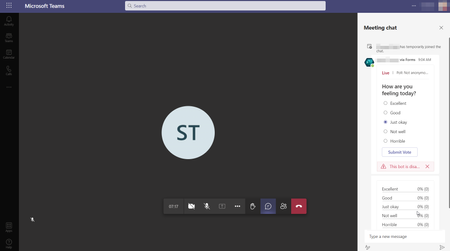
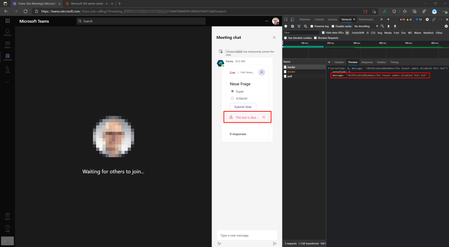
We are doing a lot of tutoring vids with partners and customers and therefor would love to use the feedback option which Forms can provide. Unfortunately it still seems that the feature is not fully rolled out or buggy as hell. I'm still getting as a external invited meeting participant (joining via chrome browser) this error message: "This bot is disabled. Contact your IT admin for more information." UPDATE: It's the same error on the Teams desktop client.2.3KViews0likes1Comment
Security and privacy Live Captions Teams Meeting
Dear Microsoft, In our company we would like to enable live captions for our users since the Dutch language became available. However, from security and privacy perspective, I need some more information on where the audio gets translated from speech to text (where does the data go). Also I would like to have some information on who has access to this audio and speech while the data is in transit. I would imagine that the audio gets processed in Azure somewhere and maybe Microsoft engineers have access to it. Do you have more information on encryption of speech to text (specifically for live captions in Teams meetings), where this gets processed (europe/US etc.) and who has access (from Microsoft perspective) etc.? This would help me to ease our security officers and enable the feature for our users. Thank you in advance for your help! Sylvester5.8KViews1like3CommentsPhysical prescence in teams meeting
Hi, We're going step by step back to the office and our team of 8 persons are using teams all day long. But with half of the people at their desk in the office and half of them at home, we encounter the problem of hearing people double, live and via the teams call. You also hear yourself speaking trough the mic of a neighbor. I have a change request for the Microsoft Teams application that could eliminate this problem. Add an icon next to the mute button indicating that you are physically present at the office and only want the hear the sounds of a teams meeting participant that isn't. Should be feasible, right? Thanks1.4KViews0likes1CommentExternal attendees cannot use forms in normal Teams meetings
We played around with Forms in internal Teams meetings and it works perfectly. Of course it only works for people with Microsoft Forms licensed and also enabled in the Teams App permissions. But what about external people? I actually get this error message <BotDisabledByAdmin>The tenant admin disabled this bot when I try to use it with external people in my meeting 😞Solved2.3KViews0likes4Comments
Mac Desktop Sharing freezes for Chrome web participant when a window is maximized
I now several times encountered a frozen desktop sharing video when the presenter using MacOS maximizes a window. Audio is not affected. Other participants using native clients on MacOS do not encounter this issue. I for myself am participating in a Chrome Web Session (Version 83.0.4103.106 on Linux).Solved1.3KViews0likes1Comment