tabs
49 TopicsDuplicating windows regression with 143.0.3638.1
Has anyone else ran into this issue lately in 143.0.3638.1 where merely clicking links (e.g, links from Windows 11 applications) spawns duplicate windows of all your existing tabs in addition to the new tab (rather than re-using the existing window?) Windows 11 25H2 143.0.3638.1 Example: Open Settings in Windows 11, Windows Update, click the Learn More link. If it doesn't work the first time, it will happen on the second. A duplicate second window open with all your tabs in Edge (minus pinned tabs). What a weird regression.339Views0likes3Comments
How to disable confirmation pop-up in Edge Browser when opening many tabs
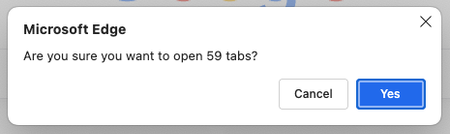
I have bookmarks arranged in multiple folders, varying from 10 to 500 or more links per folder. Whenever I try to click on the bookmark folder to open all of them at once, I always get this Pop-up, which is very annoying to me (I was ignoring that pop-up for more than a year). Is there any built-in setting to disable or increase the limit? P.S: FYI, I am on a very high-end laptop(M4 pro with increased RAM & SSD) and due to my use case, I have to regularly, almost every day open many links128Views0likes0CommentsEdge only restore one window with tabs
Edge do not restore all windows and tabs, only a single windows with all tabs from only that window. After more than year, not gonna lie I'm starting to lose it Video https://www.youtube.com/watch?v=7jhNKi-kLV8&ab_channel=VirgilFabre Also your forum is broken I tried to post, didn't work due to an iframe not support, so I tried again once it was fixed, "Post flooding detected"... No comment2.5KViews1like4Comments
Add tab/page to group on other page
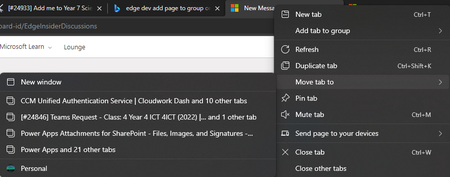
Classification: TABS PRIORITY IN MY OPINION: 5 on a scale from 1 (low) to 10 (high) At the moment, it is great that tabs can be moved to a new window, other windows in profile and other profiles. There is also an option to add tabs to groups. However, this only applies within the current window. It would be ideal to be able to move tabs to another group on a different window (but in the same profile).864Views0likes0Comments
You get Tabs and you get Tabs! Everybody get Tabs!!
While I appreciate that "Users can move Vertical Tabs to the right side of the screen" is planned in recent post here Re: Top Feedback Summary for December - Microsoft Tech Community I think that Edge Team can go a step further and allow for tabs to be available on all four sides of the window. This is very useful for power user, or even one who want to separate some tabs into individual zone/segment. Eg. right tabs for social media and emails, left tabs for work related, top tabs for casual/once-off page browsing, maybe bottom for banks, financials, etc. I think this makes sense nowadays in the era of ultrawide and big screen monitor. Bringing the idea further or sideways, since multi-monitor setup is very common now, maybe the ability to have multi-window browser with each saved tabs would be good too. So say, having one window with many tabs relating to work on left side of an ultrawide monitor, and another group of tabs on another window on the right side of the ultrawide, then another window on second monitor with another group of tabs and these states and tabs are saved persistently so that restart or closing the browser would not be a problem and still start the next day with the same setup, now that would be a banger. Hopefully these two ideas are considered and implemented.725Views1like0Comments[Suggestion] Tab Groups act like Containers
Love tab groups for staying organised when I use Edge, but I feel they would be more useful if they acted like containers in Firefox. Let them have their own cookies and add a context option to open link in a tab group or set a domain to always open in a tab group. Of course, this would require the browser to remember tab groups when closed. See; https://addons.mozilla.org/en-US/firefox/addon/containerise/ (addon which allows you to set domain patterns to always open in specific containers) https://addons.mozilla.org/en-US/firefox/addon/temporary-containers/ (addon which creates a temporary container that deletes when the last tab with that container is closed - it will delete history and cookies)1.5KViews1like0Comments
Feature Request: Pinned Tabs - Favicon should be shown even if audio is playing
This is a usability improvement feature request So currently if you pin a tab & audio is playing you get a large Speaker icon, However on hover you only get Text to say what the Tab relates too. Feature request: on pin tab playing audio hover should show both Audio icon/Favicon or an option to briefly show favicon over Audio to give you an indication of what tab refers too. this becomes an issue when you have multiple pinned tabs and audio is playing across multiple tabs. I believe this would help the visually impaired844Views0likes1CommentScrollable tab strip
Have you ever worked with a large number of tabs? It seems you have and the tab strip is usually completely overwhelmed with tabs as it is not able to fit all of them. In contrast to Firefox or Safari, Edge browser doesn't make the tab strip scrollable — tabs just keep getting smaller until the only favicon is visible. The most horrible thing is that rightmost tabs even start disappearing at some point. Edge tabs behave in a strange way Firefox tabs look okay Chrome tabs look okay However, recently Google has introduced a fix to this problem that makes the tab strip scrollable in Chrome, which makes it very easy to manage tons of tabs. Since Edge is a Chromium-based browser, this feature is hidden in MS Edge too. The only thing that is left is to add appropriate flags to enable it. This is a request to add the next options to edge://flags: 1. #scrollable-tabstrip - Tab Scrolling: Tabs do not shrink Tabs shrink to a large width Tabs shrink to a medium width Tabs shrink to a pinned tab width 2. #scrollable-tabstrip-buttons - Tab Scrolling Buttons These options will allow the Edge browser to fix a tab problem. To see how it works in Chrome: 1) go to chrome://flags 2) Search for flags #scrollable-tabstrip and #scrollable-tabstrip-buttons, and enable them. 3) Observe the behaviour of the tab strip.20KViews12likes6CommentsEdge Windows Search Integration - possible Windows 10 Timeline integration?
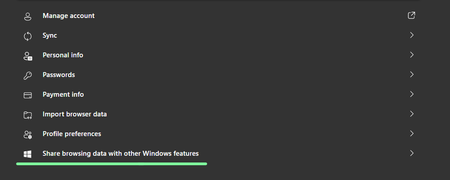
Microsoft Edge Version 91.0.831.0 (Official build) canary (64-bit) it's a Controlled Feature Rollout Share browsing data with other Windows features When turned on, Microsoft Edge will connect local browsing data from this profile with the rest of Windows. Turning this feature on will help you find information from your history, favorites, top sites and recent tabs more easily using features such as Windows search box. If you turn off this feature Microsoft Edge will remove the data shared with Windows on the device and stop sharing any new browsing data from this profile. Learn more I'm on the latest Windows 10 insider Dev build and latest Edge insider canary, so far I couldn't see any sign of this feature working, it's very new, just added to Edge canary. so eager to find out more about this. I personally would love to see Edge history appear in Windows 10 timeline, just like Edge legacy's did. It's very interesting, I submitted a feedback for the exact same thing 2 months ago.2.2KViews2likes2CommentsWhat if Edge automatically switched to Vertical tabs when too many tabs in horizontal tab strip?
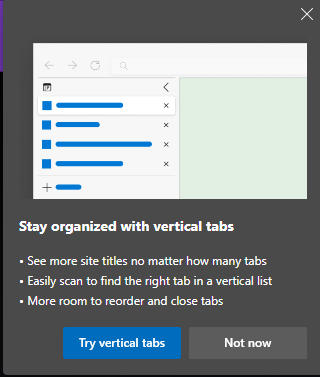
Vertical tabs is great, no denying it, but it's useful the most when you have more than just a couple of tabs open, that way you can easily scroll through them, view their titles, resize the panel etc. without any compromise or tabs shrinking. so what if there was an option when you turned it on, Edge would automatically switch to vertical tab strip when open tabs reach a certain number? normally you will use horizontal tab strip, but once you have 10 open tabs, Edge automatically switches to vertical tabs. Edge already suggests this when the number of open tabs in horizontal mode reaches 10. so I'm thinking it'd be good if this happened automatically (optional), instead of user switching between modes manually.3.3KViews2likes7Comments