suse
13 TopicsAnnouncing the Open-Source Release of ML Video Codec (MLVC)
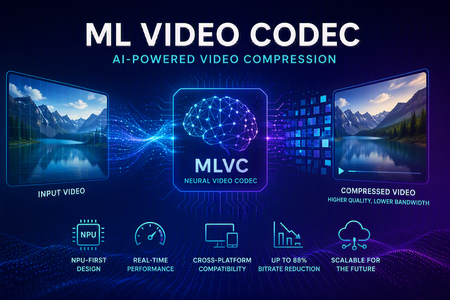
Video codecs compress video for transmission or storage, reducing bandwidth and storage requirements. MLVC is a modern machine-learning-based codec that uses substantially less bandwidth than conventional codecs, improving streaming and video-call quality—especially on constrained or unreliable networks—while lowering delivery and storage costs. MLVC is the product iteration of DCVC (Deep Contextual Video Compression) family of NVC (Neural Video Codec), open sourced by Microsoft Research since 2021, with improved compression efficiency, real-time performance on commodity Neural Processing Units (NPUs), and cross-platform support. We recently published this work in the paper MLVC: Multi-platform Learned Video Codec for Real-World Deployment. We are releasing the source code because we believe the next generation of video coding will be built openly, and we want the broader community — researchers, video codec engineers, platform vendors, product teams, as well as general developer community — to build it with us. Why MLVC Traditional video codecs (e.g., H.264/AVC, H.265/HEVC) have served the industry for a long time, but each generation requires enormous engineering effort for incremental gains and needs dedicated hardware which takes years to become commonly available. MLVC replaces conventional primitives — motion estimation, transforms, entropy modeling — with end-to-end learned neural compression, trained directly against rate-distortion objectives, and run on general-purpose NPU devices. The table below compares MLVC to popular video codecs, showing its lower bitrate and resulting savings in bandwidth and storage. Resolution vs H.264 vs H.265 360p 87.8% 75.5% 540p 82.7% 65.4% For example, for 360p video at 30 fps, where H.264 requires 1 Mbps, MLVC requires roughly 122 kbps for equivalent quality — about one-eight the bitrate under real-time conditions. The inference compute was kept approximately equal for the 360p and 540p resolutions. These results are based on a P.910 subjective test and are based on the Video Conferencing Dataset (VCD) dataset that we developed and also recently released as an open-source project. The following video demo illustrates the extent of quality enhancement achieved by MLVC relative to H.265/HEVC at the same bitrate of 200kbps (please watch by opening in a new window for better demonstration) \ Beyond video compression efficiency, MLVC also offers: NPU-first design. MLVC is built to run almost entirely on the AI accelerators already shipping in modern devices — Apple Neural Engine, Qualcomm and Intel NPUs — at no more than 50% NPU utilization, leaving NPU headroom for the rest of the system. Real-time execution at the targeted operating points. Demonstrated 540p at 30 fps on Apple, Intel, and Qualcomm hardware. A scaling-law trajectory. Empirically, MLVC's coding efficiency improves with increased model capacity and additional training compute. Content-adaptive behavior out of the box, without hand-tuned Rate Distortion Optimization heuristics. Already running in Microsoft Teams MLVC is more than just a research concept for Microsoft. We are currently rolling it out in Microsoft Teams, where it is being validated on real peer-to-peer video calls with active telemetry and A/B testing. The integration runs alongside fallback to conventional video codecs for hardware or reliability constraints — the kind of mixed-environment deployment that real products need. The scaling and reliability insights from this rollout are shaping the codec and its roadmap. We welcome your contributions We can not cover every use case, every device class, or every content domain by ourselves. That is why we are open sourcing MLVC. If you work on: Streaming, Video On Demand (VOD), or live broadcast Real-time communication and conferencing Cloud gaming or remote rendering Surveillance, drones, or robotics Mobile capture, Augmented Reality (AR) / Virtual Reality (VR), or volumetric video Codec hardware, NPUs, or inference runtimes We would love your help. Contributions of all kinds are welcome, including model improvements, training recipes, new platform ports and conversion targets, runtime backends, domain-specific fine-tunes, evaluation tooling, bug reports, and feedback on what is missing for your scenario. We particularly welcome platform ports that expand NPU coverage and efficiency improvements that push the rate-distortion frontier. What's in the release The MLVC repository is available at https://github.com/microsoft/mlvc and shared under the MIT License. It includes: MLVC model source code of the full network architecture. Trained model weights ready to run. Training scripts used to produce shipping models. Training data collection documentation to help reproduce and improve MLVC. Platform conversion scripts to target different NPUs and runtimes. Issues and pull requests will be open from day one. A follow-up release will add a C++ codec library, simplifying integration into real-world applications. Where we're heading Our long-term goal with MLVC is to create an open, learned video codec that meets or exceeds the coding efficiency of the best conventional codecs across the full range of video content, runs efficiently on the AI hardware already shipping in client and cloud devices, scales with compute the way modern ML systems do, and evolves in the open at the pace of the ML community rather than the pace of standardization cycles. In the near term that means stabilizing 540p real-time performance, expanding hardware coverage, and improving loss resilience. In the medium term: higher resolution, e.g., 1080p, and broader streaming scenarios. In the long term: an open video codec ecosystem that meaningfully replaces legacy stacks where it makes sense to. We can't create the future of MLVC alone. We're glad you're here, and we are looking forward to building the next-generation video codec with you. Who are we MLVC is brought to you by the following awesome folks working on the project at Microsoft: Ross Cutler, Ando Saabas, Tanel Pärnamaa, Ardi Loot, Haiyan Xie, Lauri Ehrenpreis, Andrei Znobishchev, Martin Lumiste, Evgenii Indenbom, Yan Lu, Bin Li, Jiahao Li, Naba Kumar, Babak Naderi, Juhee Cho, Badal Yadav, Jinxin Zhou, Tianyu Ding, Patrick Gregory. — The MLVC Team, Microsoft16KViews0likes5CommentsFrom Policy to Practice: Built-In CIS Benchmarks on Azure - Flexible, Hybrid-Ready
Security is more important than ever. The industry-standard for secure machine configuration is the Center for Internet Security (CIS) Benchmarks. These benchmarks provide consensus-based prescriptive guidance to help organizations harden diverse systems, reduce risk, and streamline compliance with major regulatory frameworks and industry standards like NIST, HIPAA, and PCI DSS. In our previous post, we outlined our plans to improve the Linux server compliance and hardening experience on Azure and shared a vision for integrating CIS Benchmarks. Today, that vision has turned into reality. We're now announcing the next phase of this work: Center for Internet Security (CIS) Benchmarks are now available on Azure for all Azure endorsed distros, at no additional cost to Azure and Azure Arc customers. With today's announcement, you get access to the CIS Benchmarks on Azure with full parity to what’s published by the Center for Internet Security (CIS). You can adjust parameters or define exceptions, tailoring security to your needs and applying consistent controls across cloud, hybrid, and on-premises environments - without having to implement every control manually. Thanks to this flexible architecture, you can truly manage compliance as code. How we achieve parity To ensure accuracy and trust, we rely on and ingest CIS machine-readable Benchmark content (OVAL/XCCDF files) as the source of truth. This guarantees that the controls and rules you apply in Azure match the official CIS specifications, reducing drift and ensuring compliance confidence. What’s new under the hood At the core of this update is kompli - a lightweight, open-source module developed by the Azure Core Linux team. It evaluates Linux systems directly against industry-standard benchmarks like CIS, supporting both audit and, in the future, auto-remediation. This enables accurate, scalable compliance checks across large Linux fleets. Here you can read more about kompli. Dynamic rule evaluation The new compliance engine supports simple fact-checking operations, evaluation of logic operations on them (e.g., anyOf, allOf) and Lua based scripting, which allows to express complex checks required by the CIS Critical Security Controls - all evaluated natively without external scripts. Scalable architecture for large fleets When the assignment is created, the Azure control plane instructs the machine to pull the latest Policy package via the Machine Configuration agent. kompli is integrated as a light-weight library to the package and called by Machine Configuration agent for evaluation – which happens every 15-30minutes. This ensures near real-time compliance state without overwhelming resources and enables consistent evaluation across thousands of VMs and Azure Arc-enabled servers. Future-ready for remediation and enforcement While the Public Preview starts with audit-only mode, the roadmap includes per-rule remediation and enforcement using technologies like eBPF for kernel-level controls. This will allow proactive prevention of configuration drift and runtime hardening at scale. Please reach out if you interested in auto-remediation or enforcement. Extensibility beyond CIS Benchmarks The architecture was designed to support other security and compliance standards as well and isn’t limited to CIS Benchmarks. The compliance engine is modular, and we plan to extend the platform with STIG and other relevant industry benchmarks. This positions Azure as a platform for a place where you can manage your compliance from a single control-plane without duplicating efforts elsewhere. Collaboration with the CIS This milestone reflects a close collaboration between Microsoft and the CIS to bring industry-standard security guidance into Azure as a built-in capability. Our shared goal is to make cloud-native compliance practical and consistent, while giving customers the flexibility to meet their unique requirements. We are committed to continuously supporting new Benchmark releases, expanding coverage with new distributions and easing adoption through built-in workflows, such as moving from your current Benchmark version to a new version while preserving your custom configurations. Certification and trust We can proudly announce that kompli has met all the requirements and is officially certified by the CIS for Benchmark assessment, so you can trust compliance results as authoritative. Minor benchmark updates will be applied automatically, while major version will be released separately. We will include workflows to help migrate customizations seamlessly across versions. Key Highlights Built-in CIS Benchmarks for Azure Endorsed Linux distributions Full parity with official CIS Benchmarks content and certified by the CIS for Benchmark Assessment Flexible configuration: adjust parameters, define exceptions, tune severity Hybrid support: enforce the same baseline across Azure, on-prem, and multi-cloud with Azure Arc Reporting format in CIS tooling style Supported use cases Certified CIS Benchmarks for all Azure Endorsed Distros - Audit only (L1/L2 server profiles) Hybrid / On-premises and other cloud machines with Azure Arc for the supported distros Compliance as Code (example via Github -> Azure OIDC auth and API integration) Compatible with GuestConfig workbook What’s next? Our next mission is to bring the previously announced auto-remediation capability into this experience, expand the distribution coverage and elevate our workflows even further. We’re focused on empowering you to resolve issues while honoring the unique operational complexity of your environments. Stay tuned! Get Started Documentation link for this capability Enable CIS Benchmarks in Machine Configuration and select the “Official Center for Internet Security (CIS) Benchmarks for Linux Workloads” then select the distributions for your assignment, and customize as needed. In case if you want any additional distribution supported or have any feedback for kompli – please open an Azure support case or a Github issue here Relevant Ignite 2025 session: Hybrid workload compliance from policy to practice on Azure Connect with us at Ignite Meet the Linux team and stop by the Linux on Azure booth to see these innovations in action: Session Type Session Code Session Name Date/Time (PST) Theatre THR 712 Hybrid workload compliance from policy to practice on Azure Tue, Nov 18/ 3:15 PM – 3:45 PM Breakout BRK 143 Optimizing performance, deployments, and security for Linux on Azure Thu, Nov 20/ 1:00 PM – 1:45 PM Breakout BRK 144 Build, modernize, and secure AKS workloads with Azure Linux Wed, Nov 19/ 1:30 PM – 2:15 PM Breakout BRK 104 From VMs and containers to AI apps with Azure Red Hat OpenShift Thu, Nov 20/ 8:30 AM – 9:15 AM Theatre THR 701 From Container to Node: Building Minimal-CVE Solutions with Azure Linux Wed, Nov 19/ 3:30 PM – 4:00 PM Lab Lab 505 Fast track your Linux and PostgreSQL migration with Azure Migrate Tue, Nov 18/ 4:30 PM – 5:45 PM PST Wed, Nov 19/ 3:45 PM – 5:00 PM PST Thu, Nov 20/ 9:00 AM – 10:15 AM PST1.7KViews0likes0CommentsNow Generally Available: Built-in CIS Benchmark Auditing for Linux on Azure
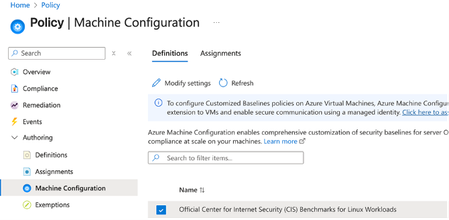
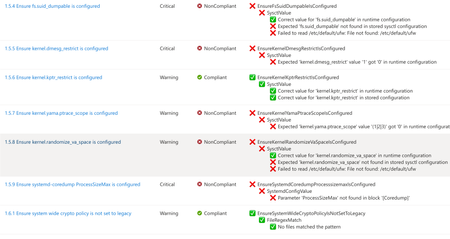
A few months ago, in From Policy to Practice: Built-in CIS Benchmarks on Azure – Flexible, Hybrid-Ready, we introduced a new way to bring Center for Internet Security (CIS) Benchmarks to your Linux estate using Azure Policy with Machine Configuration. It builds on the broader customizable security baseline policies in Machine Configuration capability. Today we're excited to share the next milestone: the audit capability for CIS Benchmarks on Linux is now Generally Available (GA). This release is officially powered by kompli - our native Linux compliance and hardening engine for CIS, STIG, and custom baselines. kompli is the evolution of the engine that drove the preview, now established as the dedicated home for this capability going forward. What "GA" means for you The audit experience is now ready for production use. You can continuously assess your Linux workloads against official, CIS-certified benchmarks - at scale, across Azure and hybrid environments through Azure Arc - and get clear, CIS-style compliance reporting directly in Azure Policy and Azure Resource Graph. If you've read the previous post, the how hasn't changed, so we'll keep this one short: Automated compliance assessment - continuously monitor Linux systems against official CIS benchmarks. Tailored benchmarks - customize evaluations with exceptions and custom parameters, no code changes required. Compliance reporting - detailed, CIS-style reports across your fleet. Hybrid-ready - the same baselines apply to Azure VMs and Arc-enabled servers on-premises or in other clouds. All supported benchmarks are CIS Benchmark Assessment Certified and stay in parity with the content published on the CIS website. Supported distributions and benchmark versions With this release, audit is GA across the following distributions, covering Level 1 + Level 2 Server profiles: Distribution CIS Benchmark Version(s) Profiles Audit Ubuntu 20.04 / 22.04 / 24.04 LTS + Pro v3.0.0 / v2.0.0 + v3.0.0 / v1.0.0 L1 + L2 Server ✓ Red Hat Enterprise Linux 8 / 9 / 10 v3.0.0 + v4.0.0 / v2.0.0 / v1.0.1 L1 + L2 Server ✓ AlmaLinux 8 / 9 v3.0.0 + v4.0.0 / v2.0.0 L1 + L2 Server ✓ Rocky Linux 8 / 9 v2.0.0 + v3.0.0 / v2.0.0 L1 + L2 Server ✓ Oracle Linux 8 / 9 v3.0.0 + v4.0.0 / v2.0.0 L1 + L2 Server ✓ Debian 11 / 12 v2.0.0 / v1.1.0 L1 + L2 Server ✓ SUSE Linux Enterprise 12 / 15 v3.2.1 / v2.0.1 L1 + L2 Server ✓ AKS Optimized Azure Linux 3 v1.0.0 L1 + L2 Server ✓ This GA covers the audit (assessment) capability. Looking ahead, STIG benchmarks are coming next, followed by a granular per-rule auto-remediation capability with dynamic scope assignments. You can run these benchmarks against your own hardened images, against CIS hardened images, and against custom images built on top of vanilla distros — as long as /etc/os-release retains its original content. We're also working with vendors to minimize deviations. Getting started Open Azure Policy in the Azure portal. Under Authoring, select the new Machine Configuration blade. Choose Official Center for Internet Security (CIS) Benchmarks for Linux Workloads, then Modify Settings to pick the distributions you want to assess. Full documentation, including per-distribution rule details, supported parameters, and any known deviations from the official CIS toolset, is available here: Overview: CIS Security Benchmarks for Linux Workloads Per-distribution references: AlmaLinux, Azure Linux, Debian, Oracle Linux, Red Hat Enterprise Linux, Rocky Linux, SUSE Linux Enterprise, and Ubuntu - all linked from the overview page. We're building this with you As part of this GA release, we've also expanded the set of exposed rule parameters compared to the preview - giving you more out-of-the-box customization across rules and distributions. That said, our customer-driven approach still stands: we keep the experience clean by enabling parameters based on real demand, so if there's a rule, benchmark version, or distribution you'd like parameters enabled for - or any feedback on rules, evaluations, or distro coverage - let us know: Open a GitHub issue in the kompli repository Open an Azure support case Try it out, tell us what you think, and help shape what we build next.551Views1like0CommentsIntroducing kars - an Agent Reference Stack for Kubernetes
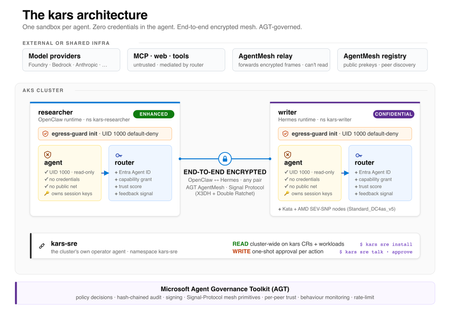
kars is an open-source, Kubernetes-native runtime for AI agents on Azure. It treats every agent as untrusted code - per-pod kernel isolation, zero credentials in the agent process, and an end-to-end encrypted inter-agent mesh - and governs agents on any framework with one set of Kubernetes policies via the Microsoft Agent Governance Toolkit. kars dev runs a governed agent on your laptop in minutes.2.7KViews1like2CommentsWhat IT teams need to know about Linux Secure Boot certificates expiring in 2026
If your organization does not use UEFI Secure Boot on Linux systems, this transition does not affect your boot path. You can stop reading now. If you do use Secure Boot, here is what you need to know. The Microsoft Corporation UEFI CA (Certificate Authority) 2011 expires on June 27, 2026 (June 26 local time in some time zones). Expiration alone does not stop anything from booting and does not render a system insecure. Existing 2011-signed shims keep working on systems that still trust the 2011 CA. The real risk is narrower: once an operating system vendor ships a shim signed only by the Microsoft UEFI CA 2023, any system whose firmware does not already trust the 2023 CA will fail to boot. The work for you is to confirm, before that update reaches your systems, that your systems trust the 2023 CA. If you want the history of why a Microsoft certificate sits in the Linux Secure Boot path at all, skip to the end. Terms used in this post You may see three Microsoft Secure Boot certificate authorities discussed in 2026 guidance. This post focuses on the Microsoft UEFI CA 2011, which is the CA used for third-party UEFI boot applications such as the Linux shim. The other expiring Microsoft Secure Boot certificates are the Microsoft Corporation KEK CA 2011, which is used to authorize updates to Secure Boot databases, and the Microsoft Windows Production PCA 2011, which is used for Windows boot components. Windows systems have a separate update path for those certificates; this post covers only the Linux boot chain. The 2023 update also separates two uses that were both covered by the Microsoft UEFI CA 2011. The Microsoft UEFI CA 2023 is for third-party UEFI boot applications, including the Linux shim. The Microsoft Option ROM UEFI CA 2023 is for third-party option ROMs, such as firmware on some add-in cards. This post is about the Linux bootloader path, but physical systems that rely on signed option ROMs may need to check that path too. Microsoft began returning 2023-signed Linux shim binaries to operating system vendors in October 2025, and since then a submitted shim comes back signed by both the 2011 CA and the 2023 CA. Once the 2011 CA expires, Microsoft can only sign with the 2023 CA. In UEFI Secure Boot terminology, db is the allowed signature database, dbx is the forbidden or revoked signature database, and KEK contains keys that can authorize updates to db and dbx . SBAT is a shim ecosystem mechanism for revoking boot components by generation. SBAT is related to Secure Boot revocation, but it is separate from the CA expiration itself. For brevity, the rest of this post uses operating system vendor to include Linux distributions and other vendors that ship and support Linux boot components. Microsoft returns signed shims to that submitting operating system vendor. It does not push shim updates to end users or IT departments. Those reach systems through the normal operating system, package, image, or platform update channels. What is not happening Expiration is not revocation, and it does not cause an immediate boot failure. The 2011 CA expiring does not make existing 2011-signed shims stop booting on June 27, 2026. UEFI Secure Boot validates a signature against the trust database and revocation state, not against the certificate's validity period. The image-validation process in the UEFI specification bases the decision on whether the image's hash or signing certificate is present in the authorized database ( db ) and absent from the forbidden database ( dbx ). It does not check whether the certificate has expired. Firmware bugs are always possible, but expiration by itself should not invalidate an already-signed shim. There is also no current plan to revoke the Microsoft UEFI CA 2011. Expiration means Microsoft can no longer sign new binaries with that certificate. Revocation would mean telling systems not to trust binaries signed with it. Revocation is not the plan. For the same reason, do not remove the 2011 CA from a system's Secure Boot db . Removing it strips that trust path. Removal is not required for this transition, and existing boot components may still depend on the 2011 CA. No operating system vendor has to move to a 2023-signed shim on the expiration date. An operating system vendor may keep shipping a 2011-signed shim (if one is available), ship a 2023-only shim, or ship one carrying both signatures. That decision belongs to the operating system vendor. What can break The failure case is a mismatch between the shim signature and the firmware trust database. The moment to worry about is not the expiration date. It is when a system first receives a 2023-only shim. That leaves a remediation window: the time between the expiration date and the first 2023-only shim reaching a given system. How long it lasts depends on your operating system vendor's packaging decisions, any security fix that forces a new shim release, and how easily you can update firmware or VM Secure Boot state on the affected platforms. The transition comes down to one table: Firmware trust database 2011-only shim 2023-only shim Dual-signed shim 2011 CA only Boots, but depends on continued 2011 trust Does not boot Should boot 2023 CA only Does not boot Boots Should boot Both 2011 and 2023 CAs Boots Boots Boots The table is deliberately simple. Real systems also have dbx revocations, SBAT policy, firmware bugs, operating system vendor packaging choices, and platform-specific update paths. But this is the core compatibility problem. Dual-signed shims help bridge the transition, because the same shim can validate through either CA. However, they are not a guarantee. Some firmware mishandles multiple signatures and evaluates only one of them, revocation and vendor support still apply, and the operating system vendor decides whether to ship and support a dual-signed shim at all. This kind of failure happens early, before the operating system loads. Recovery means restoring a trusted boot path or following your operating system, hardware, or platform vendor's recovery guidance. It is not a package rollback inside a running system. Who should pay closest attention This transition matters most where the operating system, firmware, and update path may not move together. If you run a maintained operating system on maintained hardware or a maintained virtualization platform, the normal vendor update path may handle most of it. Closer attention is worthwhile where that path is missing, delayed, customized, or hard to validate. Older hardware is the first case. Some systems need a firmware update before they can trust the 2023 CA, and support can vary by model even within one hardware vendor's portfolio. Check each model you operate rather than assuming one answer covers the fleet. Long-lived virtual machines are the second. VM firmware is still firmware. A VM's Secure Boot state depends on when it was created, which platform firmware it uses, and which UEFI variables have changed since. Firmware is not just another package update, so a long-lived VM may never have received the relevant firmware or database updates unless the administrator or platform applied them. Your cloud or virtualization provider should be able to say how the 2023 CA is handled for new VMs, existing VMs, and imported or custom images. For Azure Trusted Launch and Confidential VMs specifically, Microsoft has published guidance on identifying and updating affected instances. Older operating system releases need more careful validation. Some lack current Secure Boot tooling, current fwupd daemon behavior, or a supported path for updating UEFI trust databases. A command that works on one release may not be supported on another. Custom fleets are their own category: systems built from custom images, frozen package mirrors, pinned bootloader versions, or local Secure Boot policy changes. The more an environment differs from the vendor's default update path, the more you need to verify the actual firmware trust database and installed shim directly. Smaller operating system vendors and long-tail distributions are worth checking too, especially if they submit shim updates infrequently or have not finished their 2023 signing transition. No single authoritative public list tells you which releases have completed this work. Who is responsible for what There is no single Linux Secure Boot owner who can make every system safe for the transition. The operating system vendor controls which shim and boot components it ships. It also controls whether its update process checks the firmware trust database before installing a 2023-only shim. The Linux community runs a community-driven shim-review process for shim submissions. That process is the primary review gate before an operating system vendor requests a Microsoft signature. It is not a support channel for individual systems or fleets. The hardware vendor, firmware vendor, or virtual machine platform controls which trust anchors are present by default and how firmware updates are delivered. In a physical machine, that may mean a BIOS or firmware update. In a VM, it may mean platform firmware defaults, guest-visible UEFI variables, or a provider-specific remediation process. Microsoft controls the Microsoft UEFI signing service and the Microsoft UEFI CAs. After shim-review approval, Microsoft verifies the submitter's relationship to the operating system vendor, runs some additional checks, signs submitted shims, and returns the signed artifacts to the submitting operating system vendor. Microsoft does not choose when each operating system vendor ships a new shim to its customers. Your organization controls the systems it administers. In practice, that means checking whether Secure Boot is enabled, checking which certificates are trusted, following guidance from the relevant operating system vendor, and following guidance from the hardware vendor or VM provider. This is why the right answer for any specific system depends on its operating system vendor, hardware vendor, and platform. This post explains the model. Only those vendors can tell you what is supported for your systems. What to check The exact commands vary by operating system vendor, package set, and platform. Treat the examples below as illustrations, not guaranteed instructions for every Linux system. IT departments should validate commands against vendor documentation before using them in production automation. At fleet scale, the useful starting point is an inventory rather than a one-time manual check. Useful fields include whether Secure Boot is enabled, which Microsoft UEFI CAs are present in the firmware trust database, which CA signed the installed shim, the operating system release, the hardware model or VM platform, the update channel, and whether the system comes from a custom image or vendor image. Set up representative canary systems before any broad rollout. A canary set should cover the differences that matter in your fleet: hardware model, VM platform, operating system release, image lineage, and update channel. The aim is to avoid discovering a firmware or shim mismatch for the first time during a broad production update, not to build a new certification program. First, check whether Secure Boot is enabled: sudo mokutil --sb-state If Secure Boot is disabled, this certificate transition does not affect that system's current boot path. Next, check which Microsoft UEFI CAs are in the firmware trust database: sudo mokutil --db Look for entries such as: Microsoft Corporation UEFI CA 2011 Microsoft UEFI CA 2023 If both are present, the system is prepared for a future 2023-signed shim. If only the 2011 CA is present, check guidance from the relevant operating system vendor and platform provider before accepting a 2023-only shim update. On physical systems, also check whether the platform relies on signed third-party option ROMs. Those may require the Microsoft Option ROM UEFI CA 2023 in addition to the Microsoft UEFI CA 2023 used for boot applications. This is another reason hardware guidance can vary by model. Administrators can also inspect the signature on the shim currently installed on a system. On Enterprise Linux and related distributions, pesign is often used: sudo dnf install pesign sudo pesign -S -i /boot/efi/EFI/<vendor-or-distribution>/shimx64.efi On Debian, Ubuntu, and related distributions, sbverify from sbsigntools is often used: sudo apt install sbsigntools sudo sbverify --list /boot/efi/EFI/<vendor-or-distribution>/shimx64.efi The path to shim may differ. Some systems use a different EFI path, a different architecture suffix, or a different bootloader arrangement. Vendor documentation is the right source for exact commands. How updates may be delivered Many operating system vendors use the Linux Vendor Firmware Service (LVFS) and fwupd for firmware-related updates, including some UEFI Secure Boot database updates. Not every vendor enables the same tooling, and not every platform supports the same update mechanism. Common examples include: sudo fwupdmgr update sudo fwupdmgr security sudo fwupdmgr get-devices Some systems may require a firmware update from the hardware vendor. Some may support a standalone UEFI database update. Some may not support a safe standalone update at all. Some hardware and firmware vendors block standalone database updates because earlier failures showed that the update could break systems. Updating the Secure Boot allowed signature database ( db ) also depends on authorization from keys in KEK . That is one reason these updates often require cooperation from the firmware, hardware, or VM platform vendor. Administrators should not assume that possession of a certificate file is enough to update a system safely. Do not force a Secure Boot database update just because a command exists. Follow the guidance for the specific hardware, VM platform, or operating system vendor. Forcing an update can force a physical reboot of a machine or destroy the system. After the first inventory pass, keep watching the operating system vendor's security advisories and bootloader package updates. Questions for your vendors The right questions depend on the system, but these are the kinds of answers IT departments should look for from operating system vendors, hardware vendors, and VM providers: Does this operating system release currently ship a 2011-signed, 2023-signed, or dual-signed shim? If the vendor plans to ship a 2023-only shim, will the update process check whether the system trusts the 2023 CA before installing it? How is the Microsoft UEFI CA 2023 delivered for this hardware model, VM platform, or image? Is a standalone Secure Boot database update supported, or must the update arrive through a firmware update? Does support vary by hardware model, firmware version, VM generation, image type, or operating system release? What should administrators monitor for shim, GRUB, SBAT, db , KEK , or dbx updates related to this transition? What is the recommended validation path before broad deployment? What is the supported recovery path if a system receives an incompatible shim or firmware update and fails to boot? What to do now If an IT department administers Linux systems that use Secure Boot, the useful work is straightforward: Use the checks above to inventory Secure Boot state, trusted CAs, and installed shim signatures across representative systems. Identify the parts of the fleet most likely to diverge from default vendor paths, including older hardware, long-lived VMs, older operating system releases, custom images, and pinned bootloader packages. Read operating system, hardware, and VM provider guidance before accepting 2023-only shim updates or applying firmware and Secure Boot database updates. Test representative canary systems before rolling out shim or firmware changes broadly. Monitor operating system vendor advisories for shim and bootloader updates related to the transition. Avoid forcing low-level firmware or UEFI variable updates unless vendor guidance says to do so. How Linux got here UEFI Secure Boot was introduced to let firmware verify boot components before executing them. The firmware contains a trust database. If a bootloader is signed by a trusted certificate and is not blocked by revocation policy, the firmware can execute it. In the PC ecosystem, Microsoft has long operated the signing infrastructure used by Windows and by many third-party UEFI boot components. Linux operating system vendors do not have Microsoft sign the Linux kernel directly. Instead, they use a small first-stage bootloader called shim. The Linux shim is signed by Microsoft so firmware will start it. The shim then validates the next boot component, usually GRUB or another vendor-controlled bootloader, using keys controlled by the operating system vendor, not Microsoft. That structure lets Linux operating system vendors participate in the UEFI Secure Boot ecosystem while keeping control over their own boot chains. The shim code is developed publicly, and shim signing uses the community-run shim-review process before the Microsoft signing step. That split is important. The Linux community reviews shim submissions, and Microsoft operates the signing service that applies a signature firmware will trust. The certificate rotation affects this first handoff. Firmware must trust the CA that signed shim. If a future shim is signed only by the 2023 CA, the firmware needs the 2023 CA in its trust database. A system that keeps booting with a 2011-signed shim is not automatically broken or insecure on the expiration date. A system that moves to a 2023-signed shim needs to trust the 2023 CA; plan for that transition.2.4KViews2likes0CommentsFour open source projects to explore at Microsoft Build
Open source is where developers experiment, collaborate, and turn new ideas into tools that others can build on. At Microsoft Build, we’re creating a dedicated space for that energy: the Open Source Zone. This year, the Open Source Zone will bring together maintainers, contributors, and developers working on some of the most interesting open source projects in AI. Whether you’re building agents, experimenting with local models, exploring prompt workflows, or looking for practical ways to bring AI into your development process, this is a place to meet the people behind the projects and see what they’re building. The Open Source Zone is inspired by similar community spaces we’ve hosted at GitHub Universe: hands-on, conversation-driven, and centered on the people and projects moving open source forward. Meet the projects OpenClaw OpenClaw, originally Clawbot, formerly Clawdbot and briefly Moltbot,before landing on its current name (because naming is hard), is a personal AI assistant project built for developers who want more control over how AI agents run across tools, devices, and workflows. Its repository describes it as “your own personal AI assistant” across operating systems and platforms, with support for agent workspaces, skills, and device nodes. It has also become one of the fastest-growing open source projects on GitHub, with over 370,000 stars to date. At the Open Source Zone, attendees can learn how OpenClaw approaches personal agents, extensibility, and local-first experimentation. AutoGPT AutoGPT is one of the best-known open source projects in the autonomous agent space. The project’s mission is to make AI accessible for everyone to use and build on, with tools for building, testing, and delegating work to agents. Visit AutoGPT in the Open Source Zone to learn how the project is evolving agent development, benchmarking, frontend experiences, and practical workflows for building agent-powered applications. Come for the autonomous agents; stay for the very human maintainers. AutoGPT is also a member of GitHub’s Secure Open Source Fund, with a goal of enhancing AI security across the open source ecosystem. Open WebUI Open WebUI is a self-hosted, extensible AI platform for working with large language models. The project supports Ollama and OpenAI-compatible APIs and includes built-in RAG capabilities, making it a strong option for developers and organizations exploring local, private, or provider-flexible AI experiences. At Build, the Open WebUI team will show how developers can run, customize, and extend AI interfaces for their own environments. prompts.chat prompts.chat, formerly Awesome ChatGPT Prompts, is a curated collection of prompt examples for AI chat models. The project is designed to help people discover, share, and build better prompts for modern AI assistants. Created by Fatih Kadir Akın, a GitHub Star from Istanbul, prompts.chat reflects his work at the intersection of open source, developer education, and AI-assisted development. Fatih leads Developer Relations at Teknasyon, has authored books on JavaScript and prompt engineering, and is active in the community as a speaker, organizer, and contributor. Stop by to explore prompt libraries, prompt engineering resources, self-hosting options, and ways the community is making prompting more reusable and collaborative. Register for Microsoft Build Microsoft Build takes place June 2–3, 2026, in San Francisco and online. In-person passes are available, and online registration is free for livestreamed keynote and select session access. Register for Microsoft Build and come visit the Open Source Zone to meet the teams behind OpenClaw, AutoGPT, Open WebUI, and prompts.chat. We’ll see you there. <3949Views0likes0Comments
Getting Started with the SUSE Multi-Linux Manager MCP Server and GitHub Copilot
Enterprise Linux environments are heterogeneous. That's not a problem statement - it's just the truth. SUSE, Ubuntu, RHEL, and their downstream variants coexist in every data center I've seen, and increasingly across Azure subscriptions too. AI assistants like GitHub Copilot can already connect to these machines, run commands, troubleshoot issues, apply patches one box at a time. But if you're managing a fleet of hundreds or thousands of systems across distributions, the gap isn't whether AI can touch your infrastructure. It's whether it can work through the centralized management tooling where your inventory, patch orchestration, RBAC, and audit trails actually live. SUSE just took a meaningful step to close that gap. Their Multi-Linux Manager MCP Server, built on the open source Uyuni project gives AI agents like GitHub Copilot a structured, authenticated interface to your existing management platform. Not the individual boxes. The management plane where your centralized inventory, CVE auditing, cross-distribution patch scheduling, and RBAC already live. Not a rip-and-replace. Not a new console to learn. A way to talk to the infrastructure management you've already built. This post walks through what the MCP server does, why it matters in an Azure context, and how to get it wired up with GitHub Copilot so you can start working with it today. The Model Context Protocol (MCP) is an open standard that defines how AI models connect to external tools and data sources. Think of it as the USB-C of AI integrations - a common interface so that different clients (GitHub Copilot, Claude Desktop, Gemini CLI) can talk to different servers (Azure, SUSE, databases, APIs) without bespoke glue code for every combination. Why This Matters for Azure Customers If you are running Linux workloads on Azure - whether for SAP, HPC, or traditional enterprise applications - the Multi-Linux Manager MCP server provides a conversational interface for your infrastructure without requiring you to change tools. Management-plane depth, not just infrastructure inventory. Azure and Copilot already give you fleet-wide visibility into your VMs. The SUSE MCP server adds the layer underneath: patch scheduling state, erratum tracking, cross-distribution CVE audits, and system group management that lives in your Multi-Linux Manager instance. A single pane of glass. Pair this with the Azure MCP Server and your AI assistant can move between Azure resource operations and OS-level fleet management in one conversation, across the distributions Multi-Linux Manager supports, without switching tools or contexts. What You Can Actually Do With It The MCP server exposes over 20 practical tools for day-to-day infrastructure operations. Instead of relying on a generic knowledge base, Copilot queries your actual infrastructure. Inventory and Inspection: You can list active systems across your fleet or pull detailed event histories for specific machines. Patch Management and CVE Response: Copilot can rapidly audit all systems for pending updates or identify specific machines vulnerable to a new CVE. Operational Actions: You can list system groups, register new systems, or schedule server reboots. The Security Model: Human-in-the-Loop Letting an AI agent touch production infrastructure raises the obvious question: what keeps it from doing something destructive? SUSE has been deliberate about this by designing the MCP server with a default "human-in-the-loop" security model. Read-Only by Default: The server ships with all write actions disabled (UYUNI_MCP_WRITE_TOOLS_ENABLED=false). Explicit Confirmation: If you enable write tools, Copilot is required to ask for your explicit confirmation before executing state-changing actions like applying patches or scheduling reboots. Enterprise Authentication: The server supports OAuth 2.0, ensuring the AI agent authenticates through your identity provider. Layered Governance: Combined with Multi-Linux Manager’s role-based access control (RBAC) and the principle of least privilege for the service account, you get layered governance without bolting on a separate approval system. AI-assisted operations that bypass human judgment won't get adopted in enterprises. AI-assisted operations that make the human faster while keeping them in control, that's the model that actually ships. Architecture on Azure Here's the topology we're working with: SUSE Multi-Linux Manager - Running on an Azure VM, managing your Linux fleet across distributions. This is the control plane for your systems - inventory, patching, configuration. Available on Azure Marketplace. MCP Server - Runs as a container (Docker/Podman), either locally alongside your dev environment or as a standalone HTTP service. The MCP Server container is available in SUSE Registry and is backed by a secure, trusted software supply chain. GitHub Copilot - In VS Code or the CLI. Configured to use the MCP server as a tool source. Sends natural language requests, receives structured responses from your infrastructure. Your Linux fleet on Azure - Whatever Multi-Linux Manager manages for you. The MCP server doesn't care about the distribution mix; that's the whole point of Multi-Linux Manager. Getting Started: Step by Step Prerequisites A running SUSE Multi-Linux Manager instance managing your Linux estate Docker or Podman installed on your workstation (for local deployment) or network access to a remote MCP server instance GitHub Copilot with agent mode enabled (VS Code or CLI) Step 1: Stand up the MCP Server For local deployment, pull the container and point it at your Multi-Linux Manager instance following the project documentation. For remote/team deployments, your administrator can run the server as a standalone HTTP service with OAuth 2.0. Step 2: Configure GitHub Copilot In VS Code, open the Command Palette and type GitHub Copilot: Configure MCP Servers. Add your server to the config: { "mcpServers": { "suse-multi-linux-manager": { "type": "http", "url": "https://your-mcp-server.example.com/mcp" } } } Step 3: Verify the Connection Open GitHub Copilot and try a read-only query: "List all active systems managed by my SUSE Multi-Linux Manager." If your fleet inventory appears, you're connected. Step 4: Start Operating "Are any of my systems affected by CVE-2026-XXXX?" "Show me all systems that have pending but unscheduled security patches." "Which systems need a reboot?" Getting Involved The SUSE Multi-Linux Manager MCP server is open source under the Apache 2.0 license, built on the Uyuni project. The current v0.5 is a tech preview. Feedback goes to uyuni-project/uyuni#10562, bugs to GitHub Issues. The gap in AI-assisted Linux operations was never whether AI could reach your infrastructure. It was whether it could work through the management tooling where your fleet-scale decisions actually get made. SUSE built the bridge to that layer. GitHub Copilot is the conversational interface. Your fleet is already there. Go connect them.524Views0likes0CommentsAzure Image Testing for Linux (AITL)
As cloud and AI evolve at an unprecedented pace, the need to deliver high-quality, secure, and reliable Linux VM images has never been more essential. Azure Image Testing for Linux (AITL) is a self-service validation tool designed to help developers, ISVs, and Linux distribution partners ensure their images meet Azure’s standards before deployment. With AITL, partners can streamline testing, reduce engineering overhead, and ensure compliance with Azure’s best practices, all in a scalable and automated manner. Let’s explore how AITL is redefining image validation and why it’s proving to be a valuable asset for both developers and enterprises. Before AITL, image validation was largely a manual and repetitive process, engineers were often required to perform frequent checks, resulting in several key challenges: Time-Consuming: Manual validation processes delayed image releases. Inconsistent Validation: Each distro had different methods for testing, leading to varying quality levels. Limited Scalability: Resource constraints restricted the ability to validate a broad set of images. AITL addresses these challenges by enabling partners to seamlessly integrate image validation into their existing pipelines through APIs. By executing tests within their own Azure subscriptions prior to publishing, partners can ensure that only fully validated, high-quality Linux images are promoted to production in the Azure environment. How AITL Works? AITL is powered by LISA, which is a test framework and a comprehensive opensource tool contains 400+ test cases. AITL provides a simple, yet powerful workflow run LISA test cases: Registration: Partners register their images in AITL’s validation framework. Automated Testing: AITL runs a suite of predefined validation tests using LISA. Detailed Reporting: Developers receive comprehensive results highlighting compliance, performance, and security areas. All test logs are available to access. Self-Service Fixes: Any detected issues can be addressed by the partner before submission, eliminating delays and back-and-forth communication. Final Sign-Off: Once tests pass, partners can confidently publish their images, knowing they meet Azure’s quality standards. Benefits of AITL AITL is a transformative tool that delivers significant benefits across the Linux and cloud ecosystem: Self-Service Capability: Enables developers and ISVs to independently validate their images without requiring direct support from Microsoft. Scalable by Design: Supports concurrent testing of multiple images, driving greater operational efficiency. Consistent and Standardized Testing: Offers a unified validation framework to ensure quality and consistency across all endorsed Linux distributions. Proactive Issue Detection: Identifies potential issues early in the development cycle, helping prevent costly post-deployment fixes. Seamless Pipeline Integration: Easily integrates with existing CI/CD workflows to enable fully automated image validation. Use Cases for AITL AITL designed to support a diverse set of users across the Linux ecosystem: Linux Distribution Partners: Organizations such as Canonical, Red Hat, and SUSE can validate their images prior to publishing on the Azure Marketplace, ensuring they meet Azure’s quality and compliance standards. Independent Software Vendors (ISVs): Companies providing custom Linux Images can verify that their custom Linux-based solutions are optimized for performance and reliability on Azure. Enterprise IT Teams: Businesses managing their own Linux images on Azure can use AITL to validate updates proactively, reducing risk and ensuring smooth production deployments. Current Status and Future Roadmap AITL is currently in private preview, with five major Linux distros and select ISVs actively integrating it into their validation workflows. Microsoft plans to expand AITL’s capabilities by adding: Support for Private Test Cases: Allowing partners to run custom tests within AITL securely. Kernel CI Integration: Enhancing low-level kernel validation for more robust testing and results for community. DPDK and Specialized Validation: Ensuring network and hardware performance for specialized SKU (CVM, HPC) and workloads How to Get Started? For developers and partners interested in AITL, following the steps to onboard. Register for Private Preview AITL is currently hidden behind a preview feature flag. You must first register the AITL preview feature with your subscription so that you can then access the AITL Resource Provider (RP). These are one-time steps done for each subscription. Run the “az feature register” command to register the feature: az feature register --namespace Microsoft.AzureImageTestingForLinux --name JobandJobTemplateCrud Sign Up for Private Preview – Contact Microsoft’s Linux Systems Group to request access. Private Preview Sign Up To confirm that your subscription is registered, run the above command and check that properties.state = “Registered” Register the Resource Provider Once the feature registration has been approved, the AITL Resource Provider can be registered by running the “az provider register” command: az provider register --namespace Microsoft.AzureImageTestingForLinux *If your subscription is not registered to Microsoft.Compute/Network/Storage, please do so. These are also prerequisites to using the service. This can be done for each namespace (Microsoft.Compute, Microsoft.Network, Microsoft.Storage) through this command: az provider register --namespace Microsoft.Compute Setup Permissions The AITL RP requires a permission set to create test resources, such as the VM and storage account. The permissions are provided through a custom role that is assigned to the AITL Service Principal named AzureImageTestingForLinux. We provide a script setup_aitl.py to make it simple. It will create a role and grant to the service principal. Make sure the active subscription is expected and download the script to run in a python environment. https://raw.githubusercontent.com/microsoft/lisa/main/microsoft/utils/setup_aitl.py You can run the below command: python setup_aitl.py -s "/subscriptions/xxxx" Before running this script, you should check if you have the permission to create role definition in your subscription. *Note, it may take up to 20 minutes for the permission to be propagated. Assign an AITL jobs access role If you want to use a service principle or registration application to call AITL APIs. The service principle or App should be assigned a role to access AITL jobs. This role should include the following permissions: az role definition create --role-definition '{ "Name": "AITL Jobs Access Role", "Description": "Delegation role is to read and write AITL jobs and job templates", "Actions": [ "Microsoft.AzureImageTestingForLinux/jobTemplates/read", "Microsoft.AzureImageTestingForLinux/jobTemplates/write", "Microsoft.AzureImageTestingForLinux/jobTemplates/delete", "Microsoft.AzureImageTestingForLinux/jobs/read", "Microsoft.AzureImageTestingForLinux/jobs/write", "Microsoft.AzureImageTestingForLinux/jobs/delete", "Microsoft.AzureImageTestingForLinux/operations/read", "Microsoft.Resources/subscriptions/read", "Microsoft.Resources/subscriptions/operationresults/read", "Microsoft.Resources/subscriptions/resourcegroups/write", "Microsoft.Resources/subscriptions/resourcegroups/read", "Microsoft.Resources/subscriptions/resourcegroups/delete" ], "IsCustom": true, "AssignableScopes": [ "/subscriptions/01d22e3d-ec1d-41a4-930a-f40cd90eaeb2" ] }' You can create a custom role using the above command in the cloud shell, and assign this role to the service principle or the App. All set! Please go through a quick start to try AITL APIs. Download AITL wrapper AITL is served by Azure management API. You can use any REST API tool to access it. We provide a Python wrapper for better experience. The AITL wrapper is composed of a python script and input files. It calls “az login” and “az rest” to provide similar experience like the az CLI. The input files are used for creating test jobs. Make sure az CLI and python 3 are installed. Clone LISA code, or only download files in the folder. lisa/microsoft/utils/aitl at main · microsoft/lisa (github.com). Use the command below to check the help text. python -m aitl job –-help python -m aitl job create --help Create a job Job creation consists of two entities: A job template and an image. The quickest way to get started with the AITL service is to create a Job instance with your job template properties in the request body. Replace placeholders with the real subscription id, resource group, job name to start a test job. This example runs 1 test case with a marketplace image using the tier0.json template. You can create a new json file to customize the test job. The name is optional. If it’s not provided, AITL wrapper will generate one. python -m aitl job create -s {subscription_id} -r {resource_group} -n {job_name} -b ‘@./tier0.json’ The default request body is: { "location": "westus3", "properties": { "jobTemplateInstance": { "selections": [ { "casePriority": [ 0 ] } ] } } } This example runs the P0 test cases with the default image. You can choose to add fields to the request, such as image to test. All possible fields are described in the API Specification – Jobs section. The “location” property is a required field that represents the location where the test job should be created, it doesn’t affect the location of VMs. AITL supports “westus”, “westus2”, or “westus3”. The image object in the request body json is where the image type to be used for testing is detailed, as well as the CPU architecture and VHD Generation. If the image object is not included, LISA will pick a Linux marketplace image that meets the requirements for running the specified tests. When an image type is specified, additional information will be required based on the image type. Supported image types are VHD, Azure Marketplace image, and Shared Image Gallery. - VHD requires the SAS URL. - Marketplace image requires the publisher, offer, SKU, and version. - Shared Image Gallery requires the gallery name, image definition, and version. Example of how to include the image object for shared image gallery. (<> denotes placeholder): { "location": "westus3", “properties: { <...other properties from default request body here>, "image": { "type": "shared_gallery", "architecture": "x64", "vhdGeneration": 2, "gallery": "<Example: myAzureComputeGallery>", "definition": "<Example: myImage1>", "version": "<Example: 1.0.1>" } } } Check Job Status & Test Results A job is an asynchronous operation that is updated throughout the job’s lifecycle with its operation and ongoing tests status. A job has 6 provisioning states – 4 are non-terminal states and 2 are terminal states. Non-terminal states represent ongoing operation stages and terminal states represent the status at completion. The job’s current state is reflected in the `properties.provisioningState` property located in the response body. The states are described below: Operation States State Type Description Accepted Non-Terminal state Initial ARM state describing the resource creation is being initialized. Queued Non-Terminal state The job has been queued by AITL to run LISA using the provided job template parameters. Scheduling Non-Terminal state The job has been taken off the queue and AITL is preparing to launch LISA. Provisioning Non-Terminal state LISA is creating your VM within your subscription using the default or provided image. Running Non-Terminal state LISA is running the specified tests on your image and VM configuration. Succeeded Terminal state LISA completed the job run and has uploaded the final test results to the job. There may be failed test cases. Failed Terminal state There was a failure during the job’s execution. Test results may be present and reflect the latest status for each listed test. Test results are updated in near real-time and can be seen in the ‘properties.results’ property in the response body. Results will begin to get updated during the “Running” state and the final set of result updates will happen prior to reaching a terminal state (“Completed” or “Failed”). For a complete list of possible test result properties, go to the API Specification – Test Results section. Run below command to get detailed test results. python -m aitl job get -s {subscription_id} -r {resource_group} -n {job_name} The query argument can format or filter results by JMESquery. Please refer to help text for more information. For example, List test results and error messages. python -m aitl job get -s {subscription_id} -r {resource_group} -n {job_name} -o table -q 'properties.results[].{name:testName,status:status,message:message}' Summarize test results. python -m aitl job get -s {subscription_id} -r {resource_group} -n {job_name} -q 'properties.results[].status|{TOTAL:length(@),PASSED:length([?@==`"PASSED"`]),FAILED:length([?@==`"FAILED"`]),SKIPPED:length([?@==`"SKIPPED"`]),ATTEMPTED:length([?@==`"ATTEMPTED"`]),RUNNING:length([?@==`"RUNNING"`]),ASSIGNED:length([?@==`"ASSIGNED"`]),QUEUED:length([?@==`"QUEUED"`])}' Access Job Logs To access logs and read from Azure Storage, the AITL user must have “Storage Blob Data Owner” role. You should check if you have the permission to create role definition in your subscription, likely with your administrator. For information on this role and instructions on how to add this permission, see this Azure documentation. To access job logs, send a GET request with the job name and use the logUrl in the response body to retrieve the logs, which are stored in Azure storage container. For more details on interpreting logs, refer to the LISA documentation on troubleshooting test failures. To quickly view logs online (note that file size limitations may apply), select a .log Blob file and click "edit" in the top toolbar of the Blob menu. To download the log, click the download button in the toolbar. Conclusion AITL represents a forward-looking approach to Linux image validation bringing automation, scalability, and consistency to the forefront. By shifting validation earlier in the development cycle, AITL helps reduce risk, accelerate time to market, and ensure a reliable, high-quality Linux experience on Azure. Whether you're a developer, a Linux distribution partner, or an enterprise managing Linux workloads on Azure, AITL offers a powerful way to modernize and streamline your validation workflows. To learn more or get started with AITL or more details and access to AITL, reach out to Microsoft Linux Systems Group1.2KViews0likes0CommentsMicrosoft at SUSECON 2025: Join us!
Microsoft Azure is thrilled to participate in SUSECON 2025, where we look forward to sharing insights, learning, and collaborating with everyone attending. Discover why Microsoft Azure is a trusted and proven cloud platform and explore the benefits of Azure-optimized solutions co-developed by Microsoft and SUSE for your business-critical Linux workloads. Here's what you can look forward to: Engaging Sessions: Microsoft experts will be delivering both in-person and virtual in-depth sessions on a variety of topics, including SAP, SQL Server, Kubernetes, AI and more. Keynote session | Wednesday, March 12 th @ 9:00 AM Technical breakout session | Tuesday, March 11 th @ 1:30 PM EDT : Unlocking Synergies: SUSE & Microsoft High Availability Innovations for SAP solutions Technical breakout session | Thursday, March 13 th @ 11:00 AM EDT Harnessing SQL Server 2025 and SUSE Rancher for a Unified Data Platform Across Containers, Physical, and Virtual Machines with DH2i's DxOperator Virtual session: How to Build a Secure and Resilient Production Environment for Your AI Applications Virtual session: Streamlining SAP Workloads on Azure using openQA Meet the Experts: Take advantage of the opportunity to interact with Azure experts at our booth. Discuss your unique challenges and explore the best practices for maximizing the potential of your SUSE workloads in Azure. Interactive Demos: Visit our booth (#9-12) to see live demos of the latest technologies and solutions for running business-critical SUSE workloads on Azure. Xbox Raffle and Swag: Visit our booth or attend one of our in-person sessions to enter our raffle for a chance to win an Xbox Series. Plus, don’t miss out on the opportunity to grab some great swag at the booth! Also, there’s still time to take advantage of the Linux promotional offer! With the offer, you can save up to 15% in addition to the existing one-year Azure Reserved VM Instances discount for select Linux VMs for a limited period. Read the blog to learn more. We look forward to seeing you at SUSECON! Learn more Open Source at Microsoft Linux on Azure SUSE on Azure291Views0likes0CommentsLinux and Open Source on Azure Quarterly Update - February 2025
As we venture into 2025, it's exhilarating to reflect on the astonishing strides we've made in the domain of Linux and Open Source Software (OSS) on Azure. Let us dive into another edition of the quarterly update to learn more! Microsoft Ignite 2024 Linux on Azure took center stage at Microsoft Ignite 2024 with dedicated session and a meet-up booth. Our breakout session, theater session, and lab session drew over 500 attendees. This engagement is a testament to the enthusiasm and interest in Linux-based solutions on Azure. Check out the on-demand recording available on the Ignite website: What’s new in Linux: How we’re collaborating to help shape its future We announced that the Azure security baseline through Azure Policy and Machine Configuration for Linux has moved to public preview, and we are expanding the capabilities with built-in auto-remediation feature (limited public preview). Red Hat on Azure announcements at Ignite are captured here. Linux Promotional Offer The promotional offer for the latest Linux VMs in Azure is currently live. For a limited time, you can save an additional 15% on one-year Azure Reserved Virtual Machine (VM) Instances for the latest Linux VMs. This means you could save up to 56% compared to running an Azure VM on a PAYG (pay-as-you-go) basis. This offer is available until March 31, 2025. To learn more, read the blog and refer to the terms and conditions. Azure Linux 3.0 in preview on Azure Kubernetes Service v1.31 We are excited to announce that Azure Linux 3.0, the next major version release of the Azure Linux container host for Azure Kubernetes Service (AKS), is now available in preview on AKS version 1.31. Azure Linux 3.0 offers increased package availability and versions, an updated kernel, and improvements to performance, security, and tooling and developer experience. SUSE LTSS on Azure Marketplace Many of our customers rely on SUSE Linux Enterprise Server (SLES) for running their mission-critical SAP and HPC (high-performance computing) workloads on Azure. We’re excited to share that SUSE Long Term Service Pack Support (LTSS) is available in the Azure Marketplace, providing customers with options for managing the support lifecycle of their SUSE images in Azure. The blog announcement is here. Linux VM Image Quality on Azure In the continuously evolving landscape of cloud computing and AI, the quality and reliability of virtual machines (VMs) plays a vital role for businesses running mission-critical workloads. With over 65% of Azure workloads running Linux, our commitment to delivering high-quality Linux VM images and platforms remains unwavering. Find out how Microsoft ensures the quality of Linux VM images and platform experiences on Azure. Learn how LISA (an open-source tool) enhances the testing and validation processes for Linux kernels and guest OS images on Azure. MIT Technology Review Article We recently commissioned a sponsored article in collaboration with AMD on the topic of “Accelerating AI innovation through application modernization” published on MIT Technology Review. The article delves into AI driving new requirements for application modernization. Red Hat Summit Connects Microsoft’s sponsorship of the Red Hat Summit Connect global event series proved to be a resounding success. Spanning cities from Melbourne to Mexico City, we engaged with over 6,500 attendees. By partnering with key organizations, we reinforced the strength of our strategic alliance with Red Hat. What’s coming up next Migrate to Innovate Summit This event aims to showcase how cloud migration and modernization can build a platform for AI innovation. In 2.5 hours, the event will feature thought leaders and experts from Microsoft and Intel who will share their perspectives, present real-world case studies, and showcase product demonstrations to help customers accelerate their cloud journey. The event will be live on March 11, 2025. Register to check out the great content! SUSECON 2025 We will be at SUSECON 2025, which will take place in Orlando, Florida, from March 10th – 14th, 2025. We look forward to sharing insights, learning, and collaborating with everyone attending. Discover why Microsoft Azure is a trusted and proven cloud platform and explore the benefits of Azure-optimized solutions co-developed by Microsoft and SUSE for your business-critical Linux workloads. Check out one of the Microsoft sessions and meet with us at our booth. We recently published a recap covering some of Microsoft partners’ latest offerings on Linux and PGSQL. Stay tuned for more updates and thank you for being a part of this journey!779Views0likes0Comments