surface pro 4
20 Topics
Worst experience with surface pro 4 device (It has happened with lumia phone and now with surface)
Hi, This is Adesh Gupta. I find Microsoft's hardware is the worst in the world. Years back, I felt Lumia's worst experience. Now with surface pro 4. I got the screen replaced 4 months back for a screen flickering problem and now it is showing touch issues. Microsoft doesn't give the exchange option for upgradation. So you are stuck with the **bleep** head machines. The only option is left to change the brand because it is a waste to keep putting money into faulty devices.495Views0likes0Comments
Surface Pro 4 with mouse/touch bubbles in the screen
I have a Surface Pro 4 that was working just fine until yesterday, when it started showing some kinds of "bubbles" (the same they appear when you touch the screen with your finger) in the screen, several in the same line, like I was touching the screen in all those points. When they appear, I cannot use the touchscreen, and mouse pointer keeps going to those bubbles. I'm not sure if it is a hardware or software problem, but if anyone could give my advice, I'd be pleased. Thanks in advance.13KViews0likes6Comments
Big circular dots on the touch screen
Hi, I have been using surface pro since 2019. Not sure, if it is Surface pro 4 but in the Surface app it shows Surface Pro 5th Gen. Yesterday is noticed the overheating and suddenly i saw many touch points as circular dots in the screen due to which usb mouse and touchpad both stopped working. It seems that the touchscreen got frozen by these touch dots. (Image attached) I shut it down using shortcut keys. Re-started after a while, then everything found fine. Worked for a while and again dots reappeared today. I don't know if it is display problem or touchscreen drivers problem. I hardly use touchscreen because i use a keyboard and mouse for all the tasks. Please help!!! Thank you!2.1KViews0likes1Comment
Battery Full Charge Capacity Drop And Increase
Hi all I'm posting here since I couldn't find specific information on this problem and I hope that someone can point me in the right direction for a solution. From time to time my Surface Pro 4 (3 years old) runs out of battery and just turns off without any warning. As can be seen from the two pics of the battery report, the full charge capacity drops to a ridiculous low number and can jump back up after charging. The problem occurred first in January 2020 and then a couple of times over the months since. I didn't install any major Windows updates (Version 1903) and haven't updated the firmware. IMHO it is a software problem as I expect a hardware issue to be permanent. I appreciate any suggestions on how to resolve the problem, insight or link to a resource with further information. Thank you all! U.-P.2KViews0likes0Comments
Surface pro4 burn spots.
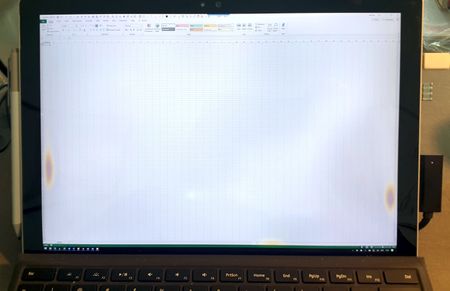
I have my Surface Pro 4 (512 i7, SSD, 16GB, 1800 euro ex vat.) for 2 years and 8 months. A month ago I got two burning marks, left and right in the screen. Now, there is another one at the bottom. I contacted Microsoft in Amsterdam, and although they were very friendly and helpful, they could not put this under extended warranty. (I also have an Asus laptop, 7 years old, never off, half the price, and no screen issue at all) The only offer Microsoft could make is to replace my SP4 for a refurbished one, for 450 Euro, with 3 months warranty. This means in principle this could start again in a few month, if that machine was refurbished for another reason than the screen. Although it was mentioned that only 1% of the machines have this issue (of course mine), I have read several cases of this problem, which gets worse very fast. I think a machine of this caliber and price should not have such a problem.4.7KViews0likes4CommentsAnnoying Screen Issue: Phantom Touches?
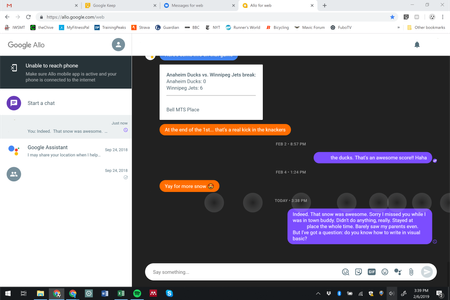
Hey Guys! Got a replacement Surface (I'm running a Surface Pro 4) about 4 months ago for a screen flicker issue. Over the last week or so, I've started to get this odd problem which is not only annoying but interrupting work flow. It's not constant, but once it starts it won't go away for a while. It acts like someone is touching the screen in the lower-right portion. The mouse won't really work, the rest of the touchscreen goes haywire (like someone is holding onto multiple spots on that lower area). I get these weird bubbles popping up (managed a screenshot): It will go away for a while once I hit the power button (sleep mode and then back on); sometimes 10-20 minutes, other times longer. The only change I've made recently was installing Esri ArcGIS 10.6, but I ran 10.5 on my last Surface with no issues so I don't think there would be issues with the new version. Anyone else having this issue?2.3KViews2likes3Comments
Drawboard PDF image ghosting
We use Drawboard PDF on a Surface Pro 4 in our production facility. Recently we have started seeing a transparent image of the most recently used Drawboard PDF document remaining on the display, even if Drawboard PDF is not running. Other programs can be opened and used but the Drawboard image makes it difficult to see the program screens. Oddly, the image does not immediately go away when restarting the Surface. After restarting and signing-in, the middle of the Surface screen shows no sign of the image but closer to the edges of the Surface the image can still be seen. After a few minutes the image is completely gone. Any ideas on how to resolve this issue?912Views0likes1Comment