surface pro 3
13 Topics
Surface pro 3 SSD corrupted and does not reinstal Win10. How to load windows from external SD slot?
The surface SSD is corrupted and a could not reestablish partitions, it seems that it is gone. A- Is there a specific tool to force partitions? B- Is it posible to use the external SD slot instead of the SSD? C- or the only way is to open up tha surface and replace de SSD?372Views0likes0Comments
Surface Pro 3 unable to connect to Optus home WIFI
Has anyone else had this problem? My surface pro 3 will connect to any other wifi except for the home Optus wifi that i have just signed up. I have done a complete system reset and recover and it still won't connect. The optus wifi help desk don't know how to fix it and say its a problem with my lap top, i went into the store with the lap top and could sign in to the in-store wifi. The microsoft help desk walked me through the full restore and now that's done and the problem still remains, they also don't know how to fix it and say its a problem with the wifi. Can anyone help?2KViews0likes3Comments
Microsoft Authenticator App...
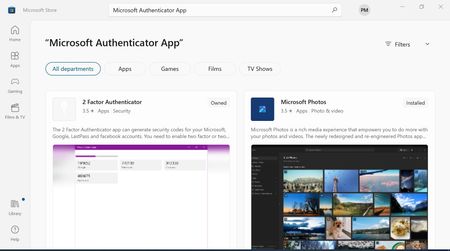
Hello Members... I need to download the Microsoft Authenticator App... Locked - out of my account ! Have tried... https://support.microsoft.com/en-gb/account-billing/download-and-install-the-microsoft-authenticator-app-351498fc-850a-45da-b7b6-27e523b8702a https://www.microsoft.com/en-us/security/mobile-authenticator-app#primaryR3 I have Microsoft and Google Authenticator Apps on my Android phone (by other means)... Tried the store but no results picture enclosed... How do I download and install it lol... Best Paul...937Views0likes0CommentsTask bar is mis - behaving...
Hello Community Members... When keyboard is attached I have no scroll bar on the task bar This is the way I like it... When keyboard is detached I have a scroll bar on the task bar... All help VALUED and I Thank You for your help & time in advance Best Paul...Solved728Views0likes1Comment
Surface Pro 3 Sign-In Hello it's not available on Win10
Hi there On my Surface Pro 3 the sign-in option "Hello" it's not available, the camera for app is allowed and it works. It's really not available? SKU: Surface Pro 3 i5 (EU) Version Information Embedded controller: 38.14.80.0 System aggregator: 3.9.850.0 UEFI: 3.11.2550.0 Thank you in advance for your reply, Cheers, Francesco773Views0likes0CommentsDriver unavailable for fingerprint recognition
Dear all, A few days ago I bought a new keyboard with the fingerprint recognition. I have attached the new keyboard to my Surface pro 3, the typing works, however, I am not able to set up the fingerprint recognition. When looking through the devices, the message "driver is unavailable" is visible under the device. I have everything updated and uninstalled & restarted (through devices and device manager) my computer several times. Has anyone encountered the same problem or knows if I can download the driver separately on the internet? Looking forward to your reply and thank you in advance, Sara2.7KViews0likes1CommentSurface Pro 3 Screen Issue
Hello everyone, Tried Searching, and Googled several possible variants of what could describe my issue, but none have been found which has brought me to sign up here and post this. Thank you in advance to those who read and provide input, as I fear the worst and that my Surface Pro 3 - which I haven't used rigorously, or frequently - has failed me. The issue is simply the fact that when I touch the screen, or tap the screen using the pen... the screen flickers and turns off. I press the power button and it comes back on to the lock screen, and i swipe up to get rid of the random picture to reveal the desktop, and the moment I touch or tap with my finger or pen, it turns off again. I've tried desktop and tablet screen modes to no avail. I've tried removing the keyboard and using it as a tablet to no avail. the only way it works is if I strictly use the keyboard without pen or touch input, and use ALT+TAB, TAB order, and ALT KEY combinations, to navgiate all the windows and dialog boxes to accomplish things. If there is a known issue with this, please englighten me as to a Microsoft white paper, or whether this is covered under some defective recall? I have already resigned myself to the fact that this is totally hooped and in order to fix it, I'll have to replace the entire screen which is no doubt will be expensive to deem it unworthy of ressurection. In any case, I look forward to any and all input, and hope that there is a way to save the day. Thank you so much everyone, and Happy 4th to our neighbors to the south (I am Canadian). Cheers!2.6KViews0likes1Comment- 4.2KViews0likes4Comments