submissions
12 Topics
Microsoft Defender AMSI false positive — private evidence submission guidance
We're seeking guidance on the official private review process for a suspected Microsoft Defender Antivirus AMSI false-positive detection. Detection: HackTool:PowerShell/ApexToolkit.A The detection occurred during an authorized PowerShell-based .NET development/testing workflow. The original AMSI payload is unavailable. We've collected the official Microsoft Defender diagnostic CAB, but it contains personal and internal system information, along with unrelated security history. Microsoft Support referred us to Tech Community because the consumer support channel could not escalate the investigation directly. Our question: Is there an official private channel for submitting sanitized incident records for initial classification review, or obtaining guidance about secure handling of the full diagnostic CAB? We want to maintain Defender protections and avoid posting sensitive diagnostic evidence publicly. Thank you for any guidance on the appropriate Microsoft review process.21Views0likes0CommentsXDR advanced hunting region specific endpoints
Hi, I am exploring XDR advanced hunting API to fetch data specific to Microsoft Defender for Endpoint tenants. The official documentation (https://learn.microsoft.com/en-us/defender-xdr/api-advanced-hunting) mentions to switch to Microsoft Graph advanced hunting API. I had below questions related to it: 1. To fetch the region specific(US , China, Global) token and Microsoft Graph service root endpoints(https://learn.microsoft.com/en-us/graph/deployments#app-registration-and-token-service-root-endpoints ) , is the recommended way to fetch the OpenID configuration document (https://learn.microsoft.com/en-us/entra/identity-platform/v2-protocols-oidc#fetch-the-openid-configuration-document) for a tenant ID and based on the response, the region specific SERVICE/TOKEN endpoints could be fetched? Since using it, there is no need to maintain different end points for tenants in different regions. And do we use the global service URL https://login.microsoftonline.com to fetch OpenID config document for a tenantID in any region? 2. As per the documentation, Microsoft Graph Advanced hunting API is not supported in China region (https://learn.microsoft.com/en-us/graph/api/security-security-runhuntingquery?view=graph-rest-1.0&tabs=http). In this case, is it recommended to use Microsoft XDR Advanced hunting APIs(https://learn.microsoft.com/en-us/defender-xdr/api-advanced-hunting) to support all region tenants(China, US, Global)?361Views0likes1Comment
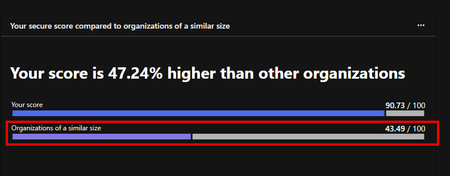
Secure score not improving after implementing ASR
I need some help on the following; Improving secure score for one of our customers. For example, the secure score is improving for identity. I implemented user risk and sign in risk CA policies on the 14th and on the 18th defender is increasing the secure score However i also implemented ASR rules 23rd of september but it still says ASR are recommended actions. Etcetera. I powershelled into one of the targeted endpoints and confirmed the ASR rules are active on the machine. Connector is on The are using Crowdstrike as primary AV. Can the 2 AVs work together so the score gets updated for device? Would i need to manually create exeptions for every rule? I hope not.. Thank you in advance. Regards, Andrew600Views0likes1Comment
"Something went wrong. Primary and secondary data missing" when viewing email submission
Does anyone know what causes the "Something went wrong. Primary and secondary data missing" error when viewing an email submission in Microsoft Defender? It happens sporadically, but on I would guess 5% - 10% of our submissions.Solved519Views0likes4Comments
User Reported Spam/Phishing Messages Not Showing in Submission Portal
This happens every so often, where users using the report message option in Outlook don't have their submissions ever show up on the User Reported Tab in the Submissions Portal. (or often time there are large delays of an hour or more before messages will show up). I have the report message button set to copy an internal mailbox as well, and I see submissions go there. I see in the message trace logs, messages are being sent to the equivalent office365.microsoft.com address (email address removed for privacy reasons for example). Last time I opened a case for this, and it was a very frustrating experience because we only have standard support, so they never would really look into the issue to far. Well, it's happening again since yesterday afternoon, and while it's not a total security issue, it's annoying because our end users have come to expect the responses on their submission, and it's easier to submit these to Microsoft if they show up in the submission portal than having to manually upload them from the internal mailbox these get sent to as well. No service health issues posted in our tenant, but last time we had this support said they don't post issues for things like this typically even if it's a known service side issue processing these. I don't know if that's true or not. Anyone else seeing this issue?5.5KViews1like8Comments
User reported messages data table
Hi, I'm using the "Submissions" page on Defender to reply (with custom messages) to our users who report some email as phishing. On the portal, I can see if the report has been already replied or not on the field "Marked as", which has the value "Doesn't apply" whenever no one replied yet. I want to extract some metrics daily to check if all reported messages have had a reply for example. But I don't know where can I get this data from. Do you know in which table I can find this data to create some hunting queries? Thanks1.7KViews0likes5Comments
Feedback: Email Quarantine UI needs improvement re: reporting sender as safe/unsafe
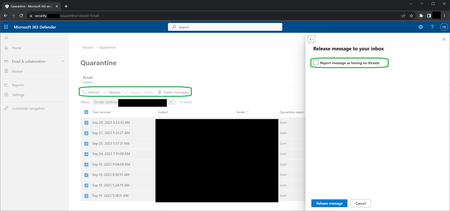
This is feedback for Microsoft 365 Defender (part of my organization's Office 365). I can't use the Feedback link within the site (security.[tenant info]/homepage) because of my organization's network security settings. When Outlook tells me I have emails in Quarantine and I'm sent to the site, the UI just has options focused on releasing or deleting the quarantined emails. The algorithm often blocks legitimate emails and I want to provide feedback to the algorithm so it will improve, but since I'm rarely on the site I waste time looking for ways to report an email safe/unsafe. I clearly have to do this reporting before* releasing/deleting an email because then the email will no longer be in the quarantine system to reference. However, once I give up looking, select all the legit emails and then click release - only then is there a pop-up sidebar which includes a "Report message as having no threats" checkbox as a final step of the release process. This is counterintuitive (reference * above). When looking at the Review > Quarantine window, before choosing an action there should be clear UI options for "mark safe and release" and "report and delete".1.1KViews0likes0Comments
Strengthen your Security with the New Reporting Suspicious Messages feature in Microsoft Defender
Yay! The long wait is over! Recently, Microsoft announced the enhancements in reporting message feature in Outlook Web App. Now, Microsoft 365 users can report messages from any Exchange Online mailbox, irrespective of their type. This is absolutely great and it helps security admins and cybersecurity experts to defend against crucial phishing and spoofing attacks. Check out the blog below to know more about the new enhancements and how it works. https://blog.admindroid.com/reporting-suspicious-messages-in-m365-shared-and-delegated-mailboxes/1KViews0likes0Comments