sqlserversecurity
166 Topics
How to create Linked server from SQL Server to Azure SQL Database
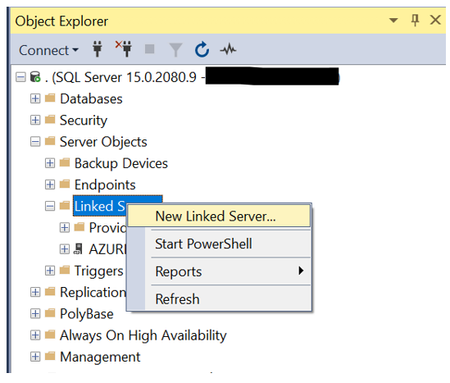
Here in this blog, we are going to demo how to configure Linked server from on-prem SQL Server instance to Azure SQL database. I will have a reference to this blog in my subsequent blogs that will soon be available for Dynamic Data Masking & Cross database/server queries. We have taken example of two databases, Database1 (Copy of AdventureWorks 2019) as Azure SQL database & Database2 hosted in On-prem SQL Server Instance. In this demo we will be querying Database1 tables in the context of Database2. Database1: Azure SQL database Database2: SQL Server Instance on-prem Here is the sequence of steps that you need to follow to configure Linked Server using SSMS tool. Step-1: Connect to SQL Server Instance in SSMS tool and go to Object Explorer. Expand the Server Objects, right click on Linked Server and create a New Linked Server. Step-2: Go to General tab in the new Linked Server window. Under the Server type section, choose the Other data source option. Give a suitable name to the Linked Server as per your choice in the Linked Server section. Choose the “Microsoft OLE DB Provider SQL Server” in the Provider dropdown. In the Data source section, specify the Azure database logical server name for e.g., logicalservername.database.windows.net. You just need to change the logicalservername to the actual Azure server name which you can get from the Azure portal. Enter the Azure database name that you want to create the linked server to in the catalog field. Step-3: Now go to Security tab and choose the option “Be made using this security context”. Enter the SQL login credentials which is already present on the Azure DB server and has access to Database1. Please note this option is the least secure way to address the security configuration of Linked Server as any user who uses the Linked Server will be authenticated on the remote server using credentials provided here. Use of this option should be limited to testing environment. Step-4: Once the Linked Server is successfully created you can see it when you expand Linked Server section in Object Explorer and expand it further to view the list of tables. Step-5: Open a new query window in SSMS and switch to Database2 context on the on-prem SQL Server. Run the SELECT query to fetch data using the Linked Server that you just created in the previous steps. select * from [AZURE DATABASE DDMTEST].[Database1].[Person].[PersonPhone] Hope you find the blog helpful. Please share your questions or feedback.63KViews4likes5CommentsIntro - SQL Server Transparent Data Encryption and Extensible Key Management Using Azure Key Vault
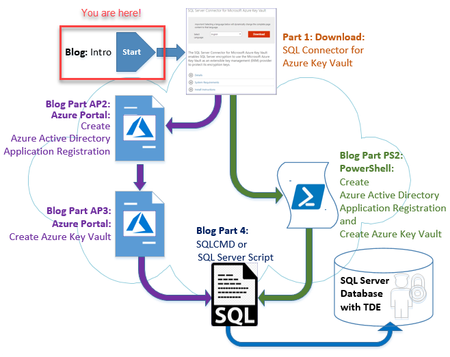
Part - Intro of a 4-part blog series: Setting up Transparent Data Encryption (TDE) and EKM (Extensible Key Management) to use Azure Key Vault (AKV) can be a complex process which has been made even more challenging due to limited documentation, cryptic instructions and multiple steps using 4 different products: SQL Server Connector for Microsoft Azure Key Vault (aka: SQL Server Connector) Azure Active Directory (aka: AAD) Azure Key Vault (aka: AKV) SQL Server (SQL Server 2008 or later) However, this blog will attempt to make it easy to setup TDE and EKM using Azure Key Vault via either the Azure Portal or PowerShell and of course SQL Server (TSQL).9.1KViews4likes0CommentsIntroducing Pacemaker HA Agent v2 for SQL Server on Linux (In Preview)
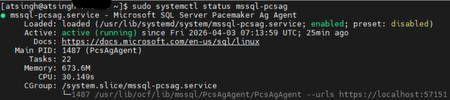
We are excited to introduce the next generation of high availability (HA) Agent for SQL Server on Linux: Pacemaker HA Agent v2. This release is a major step forward, designed to reduce planned and unplanned failover times, compared to the previous agent, based on internal engineering improvements. Why Pacemaker Is Required for SQL Server HA on Linux For users new to Linux, it’s important to understand how high availability works on this platform. On Windows Server, Always On availability groups use an underlying Windows Server Failover Cluster (WSFC) to: Monitor node health Detect failures Orchestrate automatic failovers Always On availability groups on Linux rely on an external cluster orchestrator for health monitoring and failover coordination, with Pacemaker HA Agent being one of the cluster orchestrators, responsible for: Monitoring node and application health Coordinating failover decisions Helping mitigate split‑brain scenarios through improved write‑lease evaluation Managing resources such as availability groups and listeners The Pacemaker HA Agent is the integration layer that allows Pacemaker to understand SQL Server health and manage availability groups safely. Evolution of the SQL Server Pacemaker HA Agent With SQL Server 2025 CU3 and later, Pacemaker HA Agent v2 is available in preview for Red Hat Enterprise Linux and Ubuntu through the mssql-server-ha package. Pacemaker HA agent v2 uses a service‑based architecture. The agent runs as a dedicated system service named mssql-pcsag, which is responsible for handling SQL Server–specific high availability operations and communication with Pacemaker. You can manage mssql-pcsag service by using standard system service controls to start, restart, status and stop this service by using the operating system's service manager (for example, systemctl). # Start the mssql-pcsag service sudo systemctl start mssql-pcsag # Restart the mssql-pcsag service sudo systemctl restart mssql-pcsag # Check the status of the mssql-pcsag service sudo systemctl status mssql-pcsag # Stop the mssql-pcsag service sudo systemctl stop mssql-pcsag Limitations of Pacemaker HA Agent v1 While the original agent enabled SQL Server HA on Linux, customers running production workloads encountered several challenges: Failover delays of 30 seconds to 2 minutes during planned or unplanned events Limited health detection, missing conditions such as I/O stalls and memory pressure Rigid failover behavior, unlike the flexible policies available on Windows (WSFC) Incomplete write‑lease handling, requiring custom logic No support for TLS1.3 for Pacemaker and SQL Server communications How Pacemaker HA Agent v2 Addresses These Gaps Pacemaker HA Agent v2 is a ground‑up improvement, designed to improve the reliability characteristics of SQL Server HA on Linux. 1. Faster & Smarter Failover Decisions The new agent introduces a service‑based health monitoring architecture, moving beyond basic polling. This allows SQL Server to report detailed diagnostic signals - improving detection speed and helping reduce failover delays in supported configurations. 2. Flexible Automatic Failover Policies inspired by the WSFC health model Pacemaker HA Agent v2 supports failure‑condition levels (1–5) and health‑check timeout model aligned with those available in Always On availability groups on Windows. This provides: Fine‑grained control over failover sensitivity, allowing administrators to tune when failover should occur. Improved detection of internal SQL Server conditions, such as memory pressure, internal deadlocks, orphaned spinlocks, and other engine‑level failures. Failover decisions are now driven by detailed diagnostics from sp_server_diagnostics, enabling faster and more accurate response to unhealthy states and providing enhanced resiliency capabilities for SQL Server AG on Linux. You can configure the failure condition level and health check timeout using the following commands: -- Setting failure condition level ALTER AVAILABILITY GROUP pacemakerag SET (FAILURE_CONDITION_LEVEL = 2); -- Setting health check timeout ALTER AVAILABILITY GROUP pacemakerag SET (HEALTH_CHECK_TIMEOUT = 60000); After applying the configuration, validate the setting using the sys.availability_groups DMV: 3. Robust Write Lease Validity Handling To prevent split‑brain scenarios, SQL Server on Linux uses an external write‑lease mechanism. In v1, lease information was not fully integrated into failover decisions. In v2, the agent actively evaluates the write-lease validity, before initiating transitions. This supports controlled role changes and improved data consistency behavior during failover events, depending on cluster configuration. 4. TLS 1.3 Support Pacemaker HA agent v2 includes design updates to support TLS 1.3–based communication for health checks and failover operations, when TLS 1.3 is enabled. Supported Versions & Distributions Pacemaker HA Agent v2 supports: SQL Server 2025 CU3 or later RHEL 9 or later Ubuntu 22.04 or higher. Preview upgrade & migration guidance for non-production environments New or existing non-prod deployments running SQL Server 2025 (17.x) can migrate from Pacemaker HA Agent v1 to v2 using following approach: Drop the existing AG resource sudo pcs resource delete <NameForAGResource> This temporarily pauses AG synchronization but does not delete the availability group (AG). After the resource is recreated, Pacemaker resumes management and AG synchronization automatically. Create a new AG resource using the v2 agent (ocf:mssql:agv2) sudo pcs resource create <NameForAGResource> ocf:mssql:agv2 ag_name=<AGName> meta failure-timeout=30s promotable notify=true Validate cluster health sudo pcs status Resume normal operations References Create and Configure an Availability Group for SQL Server on Linux - SQL Server | Microsoft Learn Thank You, Engineering: David Liao Attinder Pal Singh572Views2likes3CommentsMicrosoft.Data.SqlClient 7.0 Is Here: A Leaner, More Modular Driver for SQL Server
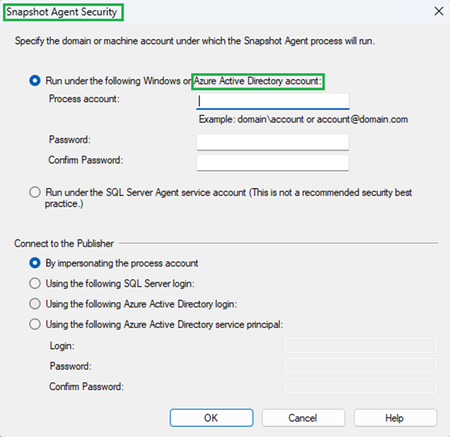
Today we're shipping the general availability release of Microsoft.Data.SqlClient 7.0, a major milestone for the .NET data provider for SQL Server. This release tackles the single most requested change in the repository's history, introduces powerful new extensibility points for authentication, and adds protocol-level features for Azure SQL Hyperscale, all while laying the groundwork for a more modular driver architecture. If you take away one thing from this post: the core SqlClient package is dramatically lighter now. Azure dependencies have been extracted into a separate package, and you only pull them in if you need them. dotnet add package Microsoft.Data.SqlClient --version 7.0.0 The #1 Request: A Lighter Package For years, the most upvoted issue in the SqlClient repository asked the same question: "Why does my console app that just talks to SQL Server pull in Azure.Identity, MSAL, and WebView2?" With 7.0, it doesn't anymore. We've extracted all Azure / Microsoft Entra authentication functionality into a new Microsoft.Data.SqlClient.Extensions.Azure package. The core driver no longer carries Azure.Core, Azure.Identity, Microsoft.Identity.Client, or any of their transitive dependencies. If you connect with SQL authentication or Windows integrated auth, your bin folder just got dramatically smaller. For teams that do use Entra authentication, the migration is straightforward. Add one package reference and you're done: dotnet add package Microsoft.Data.SqlClient.Extensions.Azure No code changes. No configuration changes. You can also now update Azure dependency versions on your own schedule, independent of driver releases. This is something library authors and enterprise teams have been asking for. Pluggable Authentication with SspiContextProvider Integrated authentication in containers and cross-domain environments has always been a pain point. Kerberos ticket management, sidecar processes, domain trust configuration: the workarounds were never simple. Version 7.0 introduces a new public SspiContextProvider API on SqlConnection that lets you take control of the authentication handshake. You provide the token exchange logic; the driver handles everything else. var connection = new SqlConnection(connectionString); connection.SspiContextProvider = new MyKerberosProvider(); connection.Open(); This opens the door to scenarios the driver never natively supported: authenticating across untrusted domains, using NTLM with explicit credentials, or implementing custom Kerberos negotiation in Kubernetes pods. A sample implementation is available in the repository. Async Read Performance: Packet Multiplexing (Preview) One of the most community-driven features in 7.0 is packet multiplexing, a change to how the driver processes TDS packets during asynchronous reads. Originally contributed by community member Wraith2, this work delivers a significant leap in async read performance for large result sets. Packet multiplexing was first introduced in 6.1 and has been refined across the 7.0 preview cycle with additional bug fixes and stability improvements. In 7.0, it ships behind two opt-in feature switches so we can gather broader real-world feedback before making it the default: AppContext.SetSwitch("Switch.Microsoft.Data.SqlClient.UseCompatibilityAsyncBehaviour", false); AppContext.SetSwitch("Switch.Microsoft.Data.SqlClient.UseCompatibilityProcessSni", false); Setting both switches to false enables the new async processing path. By default, the driver uses the existing (compatible) behavior. We need your help. If your application performs large async reads (ExecuteReaderAsync with big result sets, streaming scenarios, or bulk data retrieval), please try enabling these switches and let us know how it performs in your environment. File your results on GitHub Issues to help us move this toward on-by-default in a future release. Enhanced Routing for Azure SQL Azure SQL environments with named read replicas and gateway-based load balancing can now take advantage of enhanced routing, a TDS protocol feature that lets the server redirect connections to a specific server and database during login. This is entirely transparent to your application. No connection string changes, no code changes. The driver negotiates the capability automatically when the server supports it. .NET 10 Ready SqlClient 7.0 compiles and tests against the .NET 10 SDK, so you're ready for the next major .NET release on day one. Combined with continued support for .NET 8, .NET 9, .NET Framework 4.6.2+, and .NET Standard 2.0 (restored in 6.1), the driver covers the full spectrum of active .NET runtimes. ActiveDirectoryPassword Is Deprecated: Plan Your Migration As Microsoft moves toward mandatory multifactor authentication across its services, we've deprecated SqlAuthenticationMethod.ActiveDirectoryPassword (the ROPC flow). The method still works in 7.0, but it's marked [Obsolete] and will generate compiler warnings. Now is the time to move to a stronger alternative: Scenario Recommended Authentication Interactive / desktop apps Active Directory Interactive Service-to-service Active Directory Service Principal Azure-hosted workloads Active Directory Managed Identity Developer / CI environments Active Directory Default Quality of Life Improvements Beyond the headline features, 7.0 includes a collection of improvements that make the driver more reliable and easier to work with in production. Better retry logic. The new SqlConfigurableRetryFactory.BaselineTransientErrors property exposes the built-in transient error codes, so you can extend the default list with your own application-specific codes instead of copy-pasting error numbers from source. More app context switches. You can now set MultiSubnetFailover=true globally, ignore server-provided failover partners in Basic Availability Groups, and control async multi-packet behavior, all without modifying connection strings. Better diagnostics on .NET Framework. SqlClientDiagnosticListener is now enabled for SqlCommand on .NET Framework, closing a long-standing observability gap. Connection performance fix. A regression where SPN generation was unnecessarily triggered for SQL authentication connections on the native SNI path has been resolved. Performance improvements. Allocation reductions across Always Encrypted scenarios, SqlStatistics timing, and key store providers. Upgrading from 6.x For most applications, upgrading is a package version bump: dotnet add package Microsoft.Data.SqlClient --version 7.0.0 If you use Microsoft Entra authentication, also add: dotnet add package Microsoft.Data.SqlClient.Extensions.Azure If you use ActiveDirectoryPassword, you'll see a compiler warning. Start planning your migration to a supported auth method. Review the full release notes in release-notes/7.0 for the complete list of changes across all preview releases. Thank You to Our Contributors Open-source contributions are central to SqlClient's development. We'd like to recognize the community members who contributed to the 7.0 release: edwardneal · ErikEJ · MatthiasHuygelen · ShreyaLaxminarayan · tetolv · twsouthwick · Wraith2 What's Next We're continuing to invest in performance, modularity, and modern .NET alignment. Stay tuned for updates on the roadmap, and keep the feedback coming. Your issues and discussions directly shape what we build. NuGet: Microsoft.Data.SqlClient 7.0.0 GitHub: dotnet/SqlClient Issues & Feedback: github.com/dotnet/SqlClient/issues Docs: Microsoft.Data.SqlClient on Microsoft Learn4.2KViews2likes5CommentsSQL Server 2025 - AI ready enterprise database from ground to cloud
The new version of SQL Server is designed to be an AI-ready enterprise database platform, integrating seamlessly from ground to cloud to Fabric. In this blog, we will explore the key features and enhancements that make SQL Server 2025 a game-changer for developers, database administrators, and organizations. The new capabilities build upon more than three decades of SQL Server innovation in performance, availability, reliability, and security, adding a host of new features that empower developers, protect data, and enable seamless analytics through the Microsoft Fabric integration. AI integration SQL Server 2025 offers features to support enterprise applications. This version integrates AI with customer data using AI capabilities within the SQL engine, ensuring that AI models remain isolated securely. The built-in vector data type allows hybrid AI vector searches, combining vectors with SQL data for efficient and accurate data retrieval. This integration facilitates AI application development and retrieval-augmented generation (RAG) patterns, and AI Agents using the familiar T-SQL syntax. The new vector data type stores vector embeddings alongside relational data, enabling semantically related searches within SQL Server. New vector functions perform operations on vectors in binary format, enabling applications to store and manipulate vectors directly within the SQL database engine. SQL Server 2025 includes T-SQL functions that provide the necessary tools for working with embeddings, without requiring detailed knowledge of their usage. Vectors enable AI models to identify similar data using the K-Nearest Neighbors (KNN) algorithm, with metrics like dot product or cosine similarity. To enhance scalability, SQL Server 2025 incorporates Approximate Vector Index and Vector Search, leveraging Approximate Nearest Neighbors (ANN) for faster, resource-efficient, and accurate results. SQL Server 2025 introduces advanced AI model management capabilities designed to enhance the efficiency and security of interacting with Azure OpenAI and other AI models. SQL Server 2025 provides options for deploying AI models either on-premises or in the cloud, with compatibility for Azure OpenAI, OpenAI endpoints, and Ollama. With all these capabilities, SQL Server 2025's hybrid search represents a paradigm shift in how organizations access and utilize data. Through a blend of keyword and vector searches, businesses can unlock deeper insights, improve customer satisfaction, and harness the full potential of their data assets. Our customer, Kramer & Crew GmbH & Co, who participated in our Early Adoption Program (EAP) aka private preview shared us below. "Joining the EAP was a great opportunity to explore the new AI, security, performance, Fabric, and Azure Arc features! With the new semantic search and RAG capabilities in SQL Server 2025, we can empower existing GenAI solutions with data embeddings to create next-generation, more intelligent AI applications. By connecting systems (e.g., ITSM, CRM, ERP, and others), we deliver a seamless, natural conversational experience across enterprise environments." Markus Angenendt, Data Platform Infrastructure Lead, Kramer & Crew GmbH & Co. KG Developer productivity SQL Server 2025 introduces several exciting developer features designed to enhance developer productivity. New GitHub Copilot: GitHub Copilot transforms coding with AI-driven suggestions, streamlining workflows and enhancing efficiency. Its agent mode proposes edits, tests, and validates changes, enabling developers to focus on complex tasks. SQL Server Management Studio (SSMS) 21: Releasing SQL Server Management Studio (SSMS) 21, for general availability (GA). SSMS 21 includes support for SQL Server 2025. The Copilot in SSMS – now available in preview. New Python Driver: The Python driver for SQL Server and Azure SQL offers efficient, asynchronous connectivity across platforms like Windows, Linux, and macOS. It's designed to simplify development and enhance performance for data-driven applications. Standard Developer Edition: SQL Server 2025 Standard Developer Edition is a free edition licensed for development and test purposes. The intent is to enable all features of SQL Server Standard Edition to facilitate the development and testing of new applications that use the Standard Edition in production. This edition complements the existing Enterprise Developer Edition. JSON data type and aggregates: SQL Server 2025 includes a native JSON data type, allowing for more efficient storage and manipulation of JSON data up to 2GB storage per JSON document. This type supports various JSON aggregate functions to facilitate the aggregation of JSON data. Queries over JSON documents can be optimized by creating a JSON index and using JSON functions and methods to modify and search data natively. Regular expressions (RegEx): SQL Server 2025 introduces support for Regular Expressions (RegEx), providing powerful tools for developers to efficiently query and manipulate text data, better matching pattern than “LIKE” operator. External REST endpoint invocation: The sp_invoke_external_rest_endpoint stored procedure allows for the native invocation of any REST endpoints directly from within T-SQL, enabling seamless integration with external web services. Change event streaming (CES): Enables real-time data integration by streaming data changes directly from SQL Server to Azure Event Hubs with Kafka compatibility, facilitating near real-time analytics and event-driven architecture based on Transaction log. Consider using Change Event Streaming for CDC as it eliminates the need for I/O operations, offering a more efficient and streamlined solution for developers. New T-SQL functions: Several new T-SQL functions introduced to simplify complex queries and increase workload performance. For example, the PRODUCT() aggregate function calculates the product of a set of values. New Chinese collations: Support for GB18030-2022 collation standard. Overall, these developer-centric enhancements in SQL Server 2025 streamline the process of building modern, AI powered and data-rich applications. They reduce the need for custom code and encourage a more declarative, in-database approach to data processing, which can lead to simpler architecture and better performance. “The introduction of the new PRODUCT() aggregate function in SQL Server 2025 has streamlined this process, reducing code complexity while improving computational efficiency by over 30%. This enhancement accelerates key economic calculations, including the computation of the U.S. Gross Domestic Product (GDP), and also strengthens organizations’ ability to deliver timely, accurate data to policymakers and to the public." -- David Rozenshtein and Sandip Mehta, IT Modernization Architects, Omnicom Consulting Group” Secure by default SQL Server 2025 delivers a range of advanced security features designed to enhance data protection, authentication, and encryption. Here are the key security enhancements. Stop using client secrets and passwords: SQL Server 2025 supports managed identity authentication enabled by Azure Arc. This feature allows secure authentication for outbound connections to Azure resources and inbound connections for external users. For example, backup to Azure Blob Storage can now use SQL Server managed identity for authentication. Stronger encryption: To protect the key material of a symmetric key SQL Server stores the key material in encrypted form. Historically, this encryption utilized PKCS#1 v1.5 padding mode; Optimized starting with SQL Server 2025, the encryption uses Optimal Asymmetric Encryption Padding (OAEP) for encryption by certificate or asymmetric key. Stronger password encryption: To store a SQL user password we use an iterated hash algorithm, RFC2898, also known as a password-based key derivation function (PBKDF). This algorithm uses SHA-512 hash but hashes the password multiple times (100,000 iterations), significantly slowing down brute-force attacks. This change enhances password protection in response to evolving security threats and helps customers comply with NIST SP 800-63b guidelines. Strict connection encryption: The implementation of Extended TDS 8.0 support and TLS 1.3 for stringent encryption protocols enhances the security of internal component communications within SQL Server 2025. Optimized security cache: When security cache entries are invalidated, only those entries belonging to the impacted login are affected. This minimizes the impact on non-cache permissions validation for unaffected login users. In summary, SQL Server 2025 continues the product’s legacy of top-notch security by incorporating modern identity and encryption practices. By embracing Azure AD, managed identities, and stronger cryptography by default, it helps organizations avoid vulnerabilities and meet compliance requirements more easily, protecting data both at rest and in motion. Mission critical database engine SQL Server 2025 introduces significant performance and reliability enhancements designed to optimize workload efficiency and reduce troubleshooting efforts. Utilize insights gained from prior executions of expressions within queries enhance the performance of future executions. Optional parameter plan optimization helps SQL Server choose the optimal execution plan based on runtime parameter values, reducing performance issues caused by parameter sniffing. Optimized locking improves concurrency by avoiding blocking and lock escalation and reduces lock memory usage. Enhancements in batch mode processing and columnstore indexes further improve SQL Server as a mission-critical database for analytical workloads. Query Store for readable secondaries allows you to monitor and adjust the performance of read-only workloads executing against secondary replicas. In SQL Server 2025 this is enabled by default. Persisted temporary statistics for readable secondaries are now saved to the primary replica, ensuring permanence and avoiding recreation after restarts, which could degrade performance. A new query hint blocks future execution of problematic queries, such as nonessential queries affecting application performance. Optimized Halloween protection reduces tempdb space consumption and improves performance of data modification queries. Tempdb space resource governance improves reliability by restricting workloads from consuming excessive tempdb space. Accelerated database recovery in tempdb provides instantaneous transaction rollback and aggressive log truncation for transactions in tempdb. Fast failover for persistent health issues: The Windows Failover Cluster (WSFC) can be configured to failover the availability group resource promptly upon detection of a persistent health issue for example long I/O . Enhancements have been made to the undo-of-redo process during disaster recovery failover to asynchronous replicas, improving synchronization performance. Internal synchronization mechanisms have been improved to reduce network saturation when the global primary and forwarder replicas are in asynchronous commit mode. Improved health check time-out diagnostics. Configure a distributed availability group between two contained availability groups. The new backup compression algorithm, ZSTD, provides significant enhancements in compression efficiency while utilizing fewer resources. You can now offload FULL, DIFFERENTIAL, and T-LOG backups to a secondary replica in an Always On Availability Group, freeing your primary replica to handle production workloads. Fabric integration and Analytics Database mirroring to Fabric can continuously replicate data from a database in a SQL Server 2025 instance, on-premises or in virtual machines. A mirrored database item is a read-only, continuously replicated copy of your SQL Server database data in OneLake. SQL Server now natively supports querying CSV, Parquet, and Delta files using OPENROWSET, CREATE EXTERNAL TABLE, or CREATE EXTERNAL TABLE commands, without needing PolyBase Query Service. SQL Server on Linux tmfs filesystem is supported for tempdb in SQL Server 2025 on Linux. This enhancement can improve performance for tempdb-heavy workloads by utilizing memory (RAM) instead of disk-based filesystems. Custom password policy enforces a custom password policy for SQL authentication logins in SQL Server on Linux. PolyBase in SQL Server for Linux can now connect to ODBC data sources. Discontinued services Data Quality Services (DQS) is discontinued in this version of SQL Server. We continue to support DQS in SQL Server 2022 (16.x) and earlier versions. Master Data Services (MDS) is discontinued in this version of SQL Server. We continue to support MDS in SQL Server 2022 (16.x) and earlier versions. Get started SQL Server 2025 is not just an iterative update; it’s a substantial upgrade that bridges the worlds of databases and AI, on-premises and cloud. It retains full support for existing applications and T-SQL code, so upgrades can be done with minimal changes. By adopting SQL Server 2025, organizations can answer new questions with their data, serve applications at a greater scale, and integrate more closely with modern data platforms – all while relying on the familiar, reliable foundation that SQL Server has provided for years. Ready to try it out? Get started today: aka.ms/getsqlserver2025. Learn more Microsoft Build 2025: SQL Server 2025: The Database Developer Reimagined Docs: aka.ms/Build/sql2025docs Announcement blog: aka.ms/sqlserver2025 SQL Server homepage: https://www.microsoft.com/en-us/sql-server MSSQL Extension for Visual Studio Code with GitHub Copilot: https://aka.ms/vscode-mssql-copilot14KViews2likes4CommentsSQL Server 2022 Common Criteria EAL4 Certification
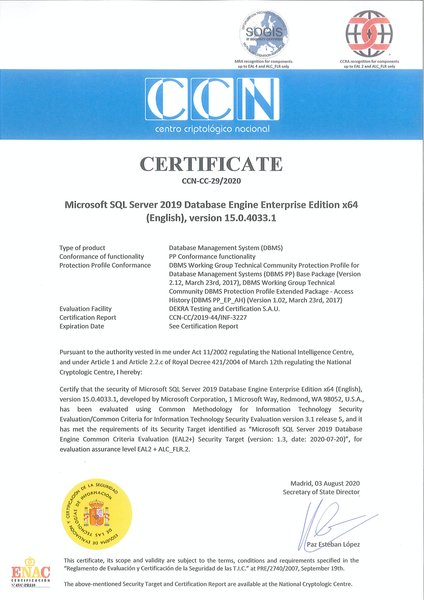
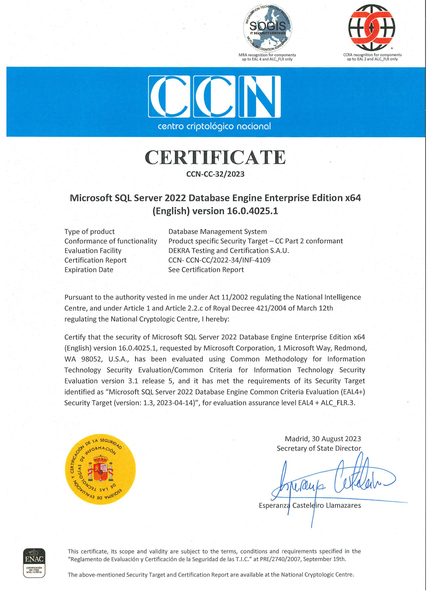
In light of Microsoft's commitment to optimize the security and assurance of its products and services, we are excited to announce that Microsoft SQL Server 2022 has been awarded a Common Criteria, Evaluation Assurance Level 4 certificate.5.6KViews2likes1Comment