sqlserverperformance
42 TopicsAnnouncing the release of Microsoft OLE DB Driver 19.4.2 for SQL Server
We're pleased to announce the general availability (GA) release of Microsoft OLE DB Driver 19.4.2 for SQL Server. This is a maintenance update to the 19.4 line that improves TLS handling, raises a long-standing connection redirection limit, refreshes the bundled authentication library, and fixes accessibility issues in the UDL dialog. Download x64 / Arm64 installer x86 installer The 64-bit MSI continues to install the appropriate binary (x64 or Arm64) automatically based on the OS platform. MSOLEDBSQL 19 installs side by side with MSOLEDBSQL 18. Prerequisite: the Microsoft Visual C++ Redistributable must be installed before running the driver installer. What's new in 19.4.2 Features added Feature Details SSL/TLS improvements Improved SSL/TLS handling for better security and performance. 10 redirects per connection The driver no longer caps connection redirections at 2, which removes a long-standing failure mode for workloads that hit redirection-heavy topologies (for example, certain Azure SQL routing scenarios). Bugs fixed Fix Details UDL accessibility defects Fixed accessibility issues in the Universal Data Link (UDL) dialog. Updated authentication library Microsoft SQL Driver Authentication library (mssql-auth.dll) updated to version 1.1.3. mssql-auth.dll is the ADAL replacement introduced in 19.4.1 and is installed as part of the driver setup. Supported languages 19.4.2 is available in: Chinese (Simplified), Chinese (Traditional), Czech, English (United States), French, German, Italian, Japanese, Korean, Polish, Portuguese (Brazil), Russian, Spanish, and Turkish. Direct per-language download links are available in the Release notes and the Download page. Upgrading If you're on 19.4.1 or earlier in the 19.x line, an in-place upgrade is supported. As always, we recommend validating in a non-production environment first, especially if your application depends on the redirection or TLS behaviors touched in this release. Feedback Please file issues and feature requests on the Microsoft OLE DB Driver for SQL Server feedback site or via your usual support channel. Thanks to everyone who reported the UDL accessibility and redirection-limit issues that drove this release.759Views0likes0Comments
Query plan regressions got you down? Here's how Automatic Plan Correction can turn it around.
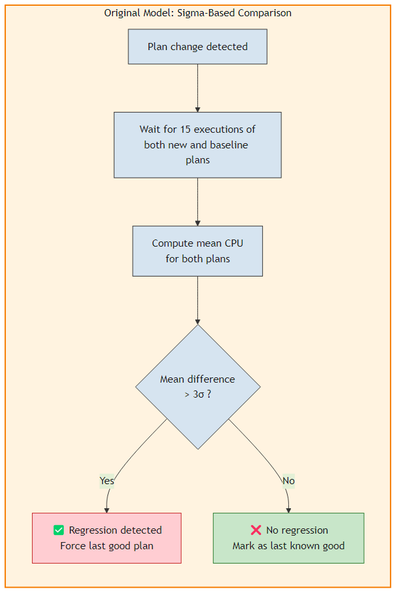
Automatic Plan Correction (APC) is one of the features that I find myself talking about quite a bit with customers, support engineers, and the broader SQL community. It is part of the Automatic Tuning family and has been quietly doing its job since SQL Server 2017, detecting query plan regressions and automatically forcing a previously known good plan to restore performance. But one of the questions that comes up often is: how does APC actually decide whether a regression has occurred? And how confident is it in that decision? With SQL Server 2022 CU4 and continuing into SQL Server 2025, we have made significant improvements to the statistical model that APC uses for regression detection. This blog post walks through what changed, why it matters, and how you can take advantage of it. ⚙️ Two Ways to Detect a Regression APC supports two statistical models for determining whether a query plan has regressed. Both analyze execution statistics captured by Query Store (such as CPU time) to compare the performance of a current plan against a previously known good plan. The original model: sigma-based comparison The original regression detection model uses a sigma-based comparison (commonly associated with the "three-sigma rule"). It computes whether the difference in average CPU time between the current plan and the last known good plan exceeds a threshold of 3 standard deviations. This approach works well when execution times follow a normal distribution with consistent variance. However, we found some limitations with this approach over time: High variance can mask regressions. If CPU times vary widely for a given plan (which is common in real workloads), the standard deviation becomes large. A regression where the mean CPU time doubles might still fall within the 3-sigma band, causing APC to miss it. It assumes equal variance. The model treats the variance of both the current and baseline plan populations as comparable. When they differ significantly (for example, the regressed plan has highly variable execution times while the good plan was stable), the comparison loses precision. It requires more executions. The model needs at least 15 executions of the current plan before it makes a determination. 🆕 The newer model: Welch's t-test The newer regression detection model uses the Welch's t-test, a well-established statistical hypothesis test designed specifically for comparing two populations that may have unequal variances and unequal sample sizes. If you are not familiar with the Welch's t-test, you can think of it as a more robust way to answer the question: "are these two sets of numbers actually different, or is the difference just noise?" Key improvements over the original model: Better accuracy with high-variance workloads. The Welch's t-test explicitly accounts for different variances between the current plan and the baseline plan. It won't be fooled by a plan that sometimes runs fast and sometimes runs very slow. It can still detect that the distribution has shifted unfavorably. Faster reaction time. APC can begin evaluating a plan after as few as 3 executions of the new plan, compared to 15 with the original model. When the performance difference is statistically significant, APC can detect and correct a regression much sooner. Adaptive sample sizing. If the initial sample of 3 executions produces an "uncertain" result, APC doesn't give up. It progressively increases the number of executions required before rechecking, until enough execution statistics have been gathered to make a confident determination. Multiple checks before final determination. The Welch's t-test model performs more than one check over the lifecycle of a potential regression. It re-evaluates as more data arrives, reducing the chance of both false positives and false negatives. With the Welch's t-test model, we have significantly improved both the accuracy of regression detection and the reaction time that APC takes with correcting a regression. 🧭 Enabling the Welch's t-test model The Welch's t-test model is the default regression detection model in: Azure SQL Database, SQL Database in Microsoft Fabric, Azure SQL Managed Instance (enabled by default, no action required) SQL Server 2025 (enabled by default, no action required) For SQL Server 2022, enable it with trace flag 12618 (available starting with CU4): -- Enable globally (startup trace flag) DBCC TRACEON (12618, -1); -- Or add as a startup parameter: -T12618 The original sigma-based model remains as a fallback and is used when trace flag 12618 is not enabled on SQL Server 2022 CU4+. As always, we strongly recommend applying the latest Cumulative Updates for SQL Server. 🧪 Handling long-running and timed-out queries Both regression detection models share a common bias that I want to call out: APC checks are triggered after a certain number of query executions complete. This means APC inherently evaluates the fastest-completing executions first and may miss regressions where the symptom is queries running for minutes or timing out entirely. Let me paint a picture of what this looks like. Imagine a situation where the overall CPU utilization on a server goes from an average of 10% to 100% unexpectedly and you find out that there had been a plan change for a particular query. The extended events may show that the query had executed a few times quickly, say 15 executions that completed in milliseconds. However, during your analysis you notice that there were a lot of other query executions that were running longer, maybe for a few minutes. Some of those longer running queries completed successfully, but others were timing out. By the time those slow executions finish and their statistics reach Query Store, APC has already made its regression decision based on the fast executions and concluded there was no regression. Trace flag 12656 addresses this by enabling a time-based delayed recheck. When enabled, APC schedules an additional check 5 minutes after a plan change is first detected. This delayed check re-evaluates the query using execution statistics that now include the slower and timed-out executions, providing a more complete picture. -- Enable globally DBCC TRACEON (12656, -1); Like trace flag 12618, trace flag 12656 is also available starting with SQL Server 2022 CU4. Per-query timed recheck with sp_configure_automatic_tuning While trace flag 12656 applies this recheck globally, you can also enable it on a per-query basis using the sp_configure_automatic_tuning stored procedure with the FORCE_LAST_GOOD_PLAN_EXTENDED_CHECK option. This is especially useful in Azure SQL Database, SQL Database in Microsoft Fabric, and Azure SQL Managed Instance where the global trace flag is not available. It provides the same 5-minute delayed recheck that trace flag 12656 enables, but scoped to only the queries you choose: -- Enable timed recheck for a specific query EXEC sp_configure_automatic_tuning @option = 'FORCE_LAST_GOOD_PLAN_EXTENDED_CHECK', @option_value = 'ON', @type = 'QUERY', @type_value = <query_id>; -- Disable timed recheck for a specific query EXEC sp_configure_automatic_tuning @option = 'FORCE_LAST_GOOD_PLAN_EXTENDED_CHECK', @option_value = 'OFF', @type = 'QUERY', @type_value = <query_id>; This allows you to target specific queries that are known to have long-running or timeout-prone execution patterns without imposing the overhead of timed rechecks on every query in the database. The following table summarizes the scope differences: Method Scope Where available Trace flag 12656 All queries on the instance (global) SQL Server 2022 CU4 and later versions (including SQL Server 2025 and later versions) sp_configure_automatic_tuning FORCE_LAST_GOOD_PLAN_EXTENDED_CHECK Individual queries (per-query) SQL Server 2022 CU4 and later versions, SQL Server 2025, Azure SQL Database, SQL Database in Microsoft Fabric, and Azure SQL Managed Instance 🔍 Monitoring APC decisions The illustration below can be used as a mental map of all of the phases that the automatic plan correction feature takes which can be monitored. sys.dm_db_tuning_recommendations The sys.dm_db_tuning_recommendations DMV can be used to see any actions that APC has taken if it is enabled and will also be populated if the feature is disabled, showing the action that it would have taken if it were enabled. The result set is in JSON format, so a query similar to the one below can be used to parse the output: SELECT JSON_VALUE([state], '$.currentValue') AS [state], script = JSON_VALUE(details, '$.implementationDetails.script'), planForceDetails.* FROM sys.dm_db_tuning_recommendations CROSS APPLY OPENJSON(Details, '$.planForceDetails') WITH ( [query_id] int '$.queryId', regressedPlanId int '$.regressedPlanId', recommendedPlanId int '$.recommendedPlanId', regressedPlanErrorCount int, recommendedPlanErrorCount int, regressedPlanExecutionCount int, regressedPlanCpuTimeAverage float, recommendedPlanExecutionCount int, recommendedPlanCpuTimeAverage float ) AS planForceDetails; ⚠️ Note: Data in sys.dm_db_tuning_recommendations is not persisted across Database Engine restarts. 📋 Extended events for deeper analysis It may also be a good idea to capture some of the APC extended events for additional insight and analysis. For general APC observability, the key events are: Extended event When it fires automatic_tuning_plan_regression_detection_check_completed APC finishes evaluating a plan for regression. Shows whether a regression was detected and corrected. automatic_tuning_plan_regression_verification_check_completed APC finishes validating a previously forced plan. automatic_tuning_check_abandoned APC abandons a check (for example, only one plan exists). automatic_tuning_recommendation_expired APC backs off from a forced plan that isn't helping. automatic_tuning_diagnostics Periodic health summary with check counts, detection counts, and correction counts. For analyzing the Welch's t-test model specifically, there is a dedicated event (not currently available for Azure SQL Database and SQL Database in Microsoft Fabric): Extended event When it fires automatic_tuning_wtest_details Fires during the Welch's t-test evaluation with detailed statistical information about the test. ⚠️ Note: The automatic_tuning_wtest_details event can be chattier than the other events. It is one way to validate the effects of having trace flag 12618 enabled if you are interested in comparing results in a workload between the old and new regression detection models, but consider the overhead before enabling it in production. Additionally, this event is not available in database-scoped sessions in Azure SQL Database and SQL Database in Microsoft Fabric. Here is a sample script to create a session that captures the key events: CREATE EVENT SESSION [APC_Welch_Monitor] ON SERVER ADD EVENT qds.automatic_tuning_plan_regression_detection_check_completed ( ACTION (sqlserver.database_id, sqlserver.database_name) ), ADD EVENT qds.automatic_tuning_plan_regression_verification_check_completed ( ACTION (sqlserver.database_id, sqlserver.database_name) ), ADD EVENT qds.automatic_tuning_wtest_details ( ACTION (sqlserver.database_id, sqlserver.database_name) ), ADD EVENT qds.automatic_tuning_diagnostics ( ACTION (sqlserver.database_id, sqlserver.database_name) ) ADD TARGET package0.event_file ( SET filename = N'APC_Welch_Monitor.xel', max_file_size = 50, max_rollover_files = 5 ) WITH ( MAX_MEMORY = 4096 KB, EVENT_RETENTION_MODE = ALLOW_SINGLE_EVENT_LOSS, MAX_DISPATCH_LATENCY = 5 SECONDS, STARTUP_STATE = OFF ); GO ALTER EVENT SESSION [APC_Welch_Monitor] ON SERVER STATE = START; 📊 Summary The table below provides a quick comparison between the two regression detection models. If you are on SQL Server 2022, I would encourage you to try trace flag 12618 and see how it improves APC's responsiveness for your workloads. If you are on SQL Server 2025 or Azure SQL Database SQL Database in Microsoft Fabric, or Azure SQL Managed Instance, the Welch's t-test model is already active by default. Regression detection models Aspect Original model (sigma-based) Welch's t-test model Statistical method 3-sigma threshold on mean CPU difference Welch's t-test (unequal variance t-test) Handles unequal variance No (assumes similar variance) Yes (explicitly models different variances) Min executions to evaluate 15 (current plan) As few as 3 (current plan), adapts exponentially Adaptive sample sizing No Yes (progressively increases required executions on uncertain results) Multiple checks Single check Multiple re-evaluations as data accumulates Default in Azure SQL DB, SQL Database in Microsoft Fabric, Azure SQL Managed Instance No (fallback) Yes Enable on SQL Server Default on SQL Server 2022 Default on SQL Server 2025; trace flag 12618 required for SQL Server 2022 CU4+ As we continue to make Automatic Plan Correction more reliable and more robust, I hope you find this blog helpful. We are always looking to hear from the community, so please continue to share your feedback and experiences at https://aka.ms/sqlfeedback. 📚 Learn More Automatic tuning sys.dm_db_tuning_recommendations Query Store overview1.3KViews5likes0CommentsAnnouncing Microsoft.Data.SqlClient 6.1.5
We are pleased to announce the release of Microsoft.Data.SqlClient 6.1.5, the latest servicing update to the 6.1 line. This update focuses on connection performance, error propagation, and vector type metadata correctness. Install or update from NuGet: dotnet add package Microsoft.Data.SqlClient --version 6.1.5 Full release notes: 6.1.5 Release Notes What's in this release Faster connection opens for non-integrated authentication on native SNI A regression caused SPN (Service Principal Name) generation to run for non-integrated authentication modes, such as SQL authentication, on the native SNI path. That triggered unnecessary DNS lookups and could significantly slow down connection opens. This fix restores the expected behavior for affected .NET applications on Windows. (#3523, #3946) ExecuteScalar now propagates post-row server errors ExecuteScalar could previously hide errors when SQL Server returned row data followed by an error token. In those cases, errors such as conversion failures during WHERE clause evaluation were consumed during SqlDataReader.Close() instead of being thrown to the caller, which could leave transactions unexpectedly zombied. This fix ensures the error is surfaced correctly to application code. (#3736, #3947) Correct metadata type for vector float32 columns SqlDataReader.GetFieldType() and GetProviderSpecificFieldType() now return the correct type, SqlVector<float>, for vector float32 columns. Previously these APIs returned metadata that did not match the type-resolution behavior used by GetValue(). (#4104, #4151) Getting started If you are new to Microsoft.Data.SqlClient, check out the introduction documentation. For users of System.Data.SqlClient, please move migrate to Microsoft.Data.SqlClient now. See the porting cheat sheet. If you encounter any issues, please report them on the GitHub repository.446Views0likes0Commentsmssql-python 1.6: Unblocking Your Threads
The last two mssql-python releases shipped big features: Bulk Copy in 1.4 for high-throughput data loading, and Apache Arrow in 1.5 for zero-copy analytics. Version 1.6 is about what happens next: you take those features into production, scale up your thread pool, and find out where the driver was quietly holding you back. This release unblocks your threads during connection setup, fixes crashes and incorrect results in common cursor patterns, and hardens security for passwords with special characters and log file paths. pip install --upgrade mssql-python Your threads can run while connections are opening If you're running mssql-python behind Flask, FastAPI, Django, or any WSGI/ASGI server with thread-based workers, this one matters. Opening a database connection is slow. There's DNS resolution, a TCP handshake, TLS negotiation, and SQL Server authentication. In previous versions, every other Python thread in your process was frozen while that happened, because the driver held the Global Interpreter Lock (GIL) during the entire operation. One thread opening a connection meant no other thread could serve requests, process data, or do anything at all. Version 1.6 releases the GIL during connect and disconnect. Your other threads keep running while the network round-trip completes. If you have a multi-threaded web server handling concurrent requests, this removes a serialization bottleneck you may not have realized you had. The connection pool was also reworked to stay safe under this change. Previously, the pool held an internal lock while calling connect, which would have created a deadlock now that connect releases the GIL. The pool now reserves a slot first, connects outside the lock, and rolls back the reservation if the connection fails. Decimal parameters work with setinputsizes If you use cursor.setinputsizes() to declare parameter types for performance-sensitive batch inserts, you may have hit a crash when specifying SQL_DECIMAL or SQL_NUMERIC. This is fixed. Decimal values now bind correctly whether you're using execute() or executemany(): cursor.setinputsizes([ (mssql_python.SQL_WVARCHAR, 100, 0), (mssql_python.SQL_INTEGER, 0, 0), (mssql_python.SQL_DECIMAL, 18, 2), ]) cursor.executemany( "INSERT INTO Products (Name, CategoryID, Price) VALUES (?, ?, ?)", [ ("Widget", 1, Decimal("19.99")), ("Gadget", 2, Decimal("29.99")), ], ) Iterating catalog results with fetchone() If you've used cursor.tables(), cursor.columns(), or other catalog methods and tried to walk the results with fetchone(), you may have gotten incorrect data. Row tracking was broken for catalog result sets. This now works the way you'd expect: cursor.tables(tableType="TABLE") while True: row = cursor.fetchone() if row is None: break print(row.table_name) This also applies to primaryKeys(), foreignKeys(), statistics(), procedures(), and getTypeInfo(). Reusing prepared statements without reset If you call cursor.execute() with reset_cursor=False to reuse a prepared statement across calls, this no longer raises an "Invalid cursor state" error. Passwords with special characters stay masked in logs If your SQL Server password contains semicolons, braces, or other ODBC-special characters (e.g., PWD={Top;Secret}), previous versions could accidentally leak part of it in sanitized log output. The password masking logic has been rewritten to correctly handle all ODBC connection string formats. If the connection string can't be parsed at all, the entire string is now redacted rather than partially exposed. The logging system also now rejects log file paths that attempt directory traversal, preventing setup_logging(log_file_path="../../somewhere/else.log") from writing outside the intended directory. Better type checker support for executemany If your type checker flagged executemany() when you passed dictionaries as parameter rows, that warning is gone. The type annotations now correctly accept Mapping types, matching the DB API 2.0 spec for named parameters. Get started pip install --upgrade mssql-python For questions or issues, file them on GitHub or email mssql-python@microsoft.com.355Views0likes0Commentsmssql-python 1.5: Apache Arrow, sql_variant, and Native UUIDs
We're excited to announce the release of mssql-python 1.5.0, the latest version of Microsoft's official Python driver for SQL Server, Azure SQL Database, and SQL databases in Fabric. This release delivers Apache Arrow fetch support for high-performance data workflows, first-class sql_variant and native UUID support, and a collection of important bug fixes. pip install --upgrade mssql-python Apache Arrow fetch support If you're working with pandas, Polars, DuckDB, or any Arrow-native data framework, this release changes how you get data out of SQL Server. The new Arrow fetch API returns query results as native Apache Arrow structures, using the Arrow C Data Interface for zero-copy handoff directly from the C++ layer to Python. This is a significant performance improvement over the traditional fetchall() path, which converts every value through Python objects. With Arrow, columnar data stays in columnar format end-to-end, and your data framework can consume it without any intermediate copies. Three methods for different workflows cursor.arrow() fetches the entire result set as a PyArrow Table: import mssql_python conn = mssql_python.connect( "SERVER=myserver.database.windows.net;" "DATABASE=AdventureWorks;" "UID=myuser;PWD=mypassword;" "Encrypt=yes;" ) cursor = conn.cursor() cursor.execute("SELECT * FROM Sales.SalesOrderDetail") # Get the full result as a PyArrow Table table = cursor.arrow() # Convert directly to pandas - zero-copy where possible df = table.to_pandas() # Or to Polars - also zero-copy import polars as pl df = pl.from_arrow(table) cursor.arrow_batch() fetches a single RecordBatch of a specified size, useful when you want fine-grained control over memory: cursor.execute("SELECT * FROM Production.TransactionHistory") # Process in controlled chunks while True: batch = cursor.arrow_batch(batch_size=10000) if batch.num_rows == 0: break # Process each batch individually process(batch.to_pandas()) cursor.arrow_reader() returns a streaming RecordBatchReader, which integrates directly with frameworks that accept readers: cursor.execute("SELECT * FROM Production.TransactionHistory") reader = cursor.arrow_reader(batch_size=8192) # Write directly to Parquet with streaming - no need to load everything into memory import pyarrow.parquet as pq pq.write_table(reader.read_all(), "output.parquet") # Or iterate batches manually for batch in reader: process(batch) How it works under the hood The Arrow integration is built directly into the C++ pybind11 layer. When you call any Arrow fetch method, the driver: Allocates columnar Arrow buffers based on the result set schema Fetches rows from SQL Server in batches using bound column buffers Converts and packs values directly into the Arrow columnar format Exports the result via the Arrow C Data Interface as PyCapsule objects PyArrow imports the capsules with zero copy Every SQL Server type maps to the appropriate Arrow type: INT to int32, BIGINT to int64, DECIMAL(p,s) to decimal128(p,s), DATE to date32, TIME to time64[ns], DATETIME2 to timestamp[us], UNIQUEIDENTIFIER to large_string, VARBINARY to large_binary, and so on. LOB columns (large VARCHAR(MAX), NVARCHAR(MAX), VARBINARY(MAX), XML, UDTs) are handled transparently by falling back to row-by-row GetData fetching while still assembling the result into Arrow format. Community contribution The Arrow fetch support was contributed by @ffelixg. This is a substantial contribution spanning the C++ pybind layer, the Python cursor API, and comprehensive tests. Thank you, Felix Graßl, for an outstanding contribution that brings high-performance data workflows to mssql-python. sql_variant type support SQL Server's sql_variant type stores values of various data types in a single column. It's commonly used in metadata tables, configuration stores, and EAV (Entity-Attribute-Value) patterns. Version 1.5 adds full support for reading sql_variant values with automatic type resolution. The driver reads the inner type tag from the sql_variant wire format and returns the appropriate Python type: cursor.execute(""" CREATE TABLE #config ( key NVARCHAR(50) PRIMARY KEY, value SQL_VARIANT ) """) cursor.execute("INSERT INTO #config VALUES ('max_retries', CAST(5 AS INT))") cursor.execute("INSERT INTO #config VALUES ('timeout', CAST(30.5 AS FLOAT))") cursor.execute("INSERT INTO #config VALUES ('app_name', CAST('MyApp' AS NVARCHAR(50)))") cursor.execute("INSERT INTO #config VALUES ('start_date', CAST('2026-01-15' AS DATE))") cursor.execute("SELECT value FROM #config ORDER BY key") rows = cursor.fetchall() # Each value comes back as the correct Python type assert rows[0][0] == "MyApp" # str assert rows[1][0] == 5 # int assert rows[2][0] == date(2026, 1, 15) # datetime.date assert rows[3][0] == 30.5 # float All 23+ base types are supported, including int, float, Decimal, bool, str, date, time, datetime, bytes, uuid.UUID, and None. Native UUID support Previously, UNIQUEIDENTIFIER columns were returned as strings, requiring manual conversion to uuid.UUID. Version 1.5 changes the default: UUID columns now return native uuid.UUID objects. import uuid cursor.execute("SELECT NEWID() AS id") row = cursor.fetchone() # Native uuid.UUID object - no manual conversion needed assert isinstance(row[0], uuid.UUID) print(row[0]) # e.g., UUID('550e8400-e29b-41d4-a716-446655440000') UUID values also bind natively as input parameters: my_id = uuid.uuid4() cursor.execute("INSERT INTO Users (id, name) VALUES (?, ?)", my_id, "Alice") Migration compatibility If you're migrating from pyodbc and your code expects string UUIDs, you can opt out at three levels: # Module level - affects all connections mssql_python.native_uuid = False # Connection level - affects all cursors on this connection conn = mssql_python.connect(conn_str, native_uuid=False) When native_uuid=False, UUID columns return strings as before. Row class export The Row class is now publicly exported from the top-level mssql_python module. This makes it easy to use in type annotations and isinstance checks: from mssql_python import Row cursor.execute("SELECT 1 AS id, 'Alice' AS name") row = cursor.fetchone() assert isinstance(row, Row) print(row[0]) # 1 (index access) print(row.name) # "Alice" (attribute access) Bug fixes Qmark false positive fix The parameter style detection logic previously misidentified? characters inside SQL comments, string literals, bracketed identifiers, and double-quoted identifiers as qmark parameter placeholders. A new context-aware scanner correctly skips over these SQL quoting contexts: # These no longer trigger false qmark detection: cursor.execute("SELECT [is this ok?] FROM t") cursor.execute("SELECT 'what?' AS col") cursor.execute("SELECT /* why? */ 1") NULL VARBINARY parameter fix Fixed NULL parameter type mapping for VARBINARY columns, which previously could fail when passing None as a binary parameter. Bulkcopy auth fix Fixed stale authentication fields being retained in the bulk copy context after token acquisition. This could cause Entra ID-authenticated bulk copy operations to fail on subsequent calls. Explicit module exports Added explicit __all__ exports from the main library module to prevent import resolution issues in tools like mypy and IDE autocompletion. Credential cache fix Fixed the credential instance cache to correctly reuse and invalidate cached credential objects, preventing unnecessary re-authentication. datetime.time microseconds fix Fixed datetime.time values incorrectly having their microseconds component set to zero when fetched from TIME columns. The road to 1.5 Release Date Highlights 1.0.0 November 2025 GA release - DDBC architecture, Entra ID auth, connection pooling, DB API 2.0 compliance 1.1.0 December 2025 Parameter dictionaries, Connection.closed property, Copilot prompts 1.2.0 January 2026 Param-as-dict, non-ASCII path handling, fetchmany fixes 1.3.0 January 2026 Initial BCP implementation (internal), SQLFreeHandle segfault fix 1.4.0 February 2026 BCP public API, spatial types, Rust core upgrade, encoding & stability fixes 1.5.0 April 2026 Apache Arrow fetch, sql_variant, native UUIDs, qmark & auth fixes Get started today pip install --upgrade mssql-python Documentation: github.com/microsoft/mssql-python/wiki Release notes: github.com/microsoft/mssql-python/releases Roadmap: github.com/microsoft/mssql-python/blob/main/ROADMAP.md Report issues: github.com/microsoft/mssql-python/issues Contact: mssql-python@microsoft.com We'd love your feedback. Try the new Arrow fetch API with your data workflows, let us know how it performs, and file issues for anything you run into. This driver is built for the Python data community, and your input directly shapes what comes next.660Views1like0CommentsMicrosoft ODBC Driver 18.6.2 for SQL
What Is the Microsoft ODBC Driver for SQL? The Microsoft ODBC Driver for SQL provides native connectivity from Windows, Linux, and macOS applications to SQL Server, Azure SQL Database, Azure SQL Managed Instance, and Microsoft Fabric. It is the recommended driver for new application development using the ODBC API, and it supports , Always Encrypted, distributed transactions, and modern authentication methods including Microsoft Entra ID (formerly Azure Active Directory). Whether you're building high-throughput data pipelines, managing enterprise databases, or developing cloud-native applications on Microsoft Fabric, the ODBC driver is a foundational component of the SQL Server connectivity stack. What's New in 18.6.2 Improved Vector Parameter Handling for Prepared Statements Version 18.6.2 improves the handling of output and input/output vector parameters when using prepared statements. This enhancement benefits applications that rely on parameterized queries with array bindings — a common pattern in batch processing and high-performance data access layers. Microsoft Fabric Redirection Support (Up to 10 Redirections) The driver now allows up to 10 server redirections per connection attempt, up from previous limits. This change directly supports Microsoft Fabric redirection scenarios, where connections may be transparently routed through multiple endpoints before reaching the target workspace. If your applications connect to Fabric SQL endpoints, this update ensures more reliable connectivity in complex routing topologies. Alpine Linux Packaging Improvements Architecture detection and packaging have been improved for Alpine Linux environments, making it easier to deploy the driver in lightweight, container-based workloads that use Alpine as a base image. Bug Fixes This release addresses several important issues reported by the community and identified through internal testing: Parameter Array Processing SQL_ATTR_PARAMS_PROCESSED_PTR accuracy — Fixed an issue where the number of processed parameter sets was not reported correctly when executing parameter arrays. Applications that inspect SQL_ATTR_PARAMS_PROCESSED_PTR after batch execution will now see the correct count. SQL_PARAM_IGNORE handling — Fixed SQL_ATTR_PARAMS_PROCESSED_PTR and row counting when SQL_PARAM_IGNORE is used within parameter arrays, ensuring that ignored parameters are accounted for properly. Crash Fixes SQLNumResultCols segmentation fault — Resolved a segfault that occurred when calling SQLNumResultCols in describe-only scenarios where no parameter bindings are present. Table-valued parameter (TVP) NULL handling — Fixed a segmentation fault triggered by NULL values in TVP arguments. Applications passing TVPs with nullable columns should no longer experience unexpected crashes. bcp_bind Consecutive Field Terminators (Known Issue from 18.6.1) bcp_bind fix — Corrected bcp_bind to properly handle consecutive field terminators without misinterpreting them as empty fields. This resolves a known issue introduced in version 18.6.1, where consecutive terminators were incorrectly interpreted as NULL values instead of empty strings. If you deferred upgrading to 18.6.1 because of this issue, 18.6.2 is the recommended target version. Linux Packaging Debian EULA acceptance — Fixed Debian package installation to correctly honor EULA acceptance and complete successfully, eliminating a friction point for automated deployments. RPM side-by-side installation — Fixed RPM packaging rules to allow installing multiple driver versions side by side, which is important for environments that need to maintain backward compatibility or perform staged rollouts. Distributed Transactions XA recovery — Fixed XA recovery to compute transaction IDs correctly, avoiding scenarios where recoverable transactions could be missed during the recovery process. This is a critical fix for applications using distributed transactions with XA transaction managers. Upgrading from Older Versions If you are upgrading from a version prior to 18.6.1, you will also benefit from the features introduced in that release: Vector data type support — Native support for the vector data type (float32), enabling AI and machine learning scenarios directly through ODBC. ConcatNullYieldsNull property — Connection-level control over null concatenation behavior. New platform support — Azure Linux 3.0 ARM, Debian 13, Red Hat 10, and Ubuntu 25.10. Version 18.6.2 builds on these additions with the stability and correctness fixes described above. Download & Installation Windows Platform Download Link x64 Download x86 Download ARM64 Download Linux & macOS Installation packages for supported Linux distributions and macOS are available on Microsoft Learn: Download ODBC Driver for SQL Server (Linux/macOS) Documentation & Release Notes For the full list of changes, platform support details, and known issues, see the official release notes: Windows Release Notes Linux & macOS Release Notes Bug Fixes Get Started We encourage all users to upgrade to version 18.6.2.1 to take advantage of the fixes and improvements in this release — particularly if you are using parameter arrays, table-valued parameters, bcp operations, or connecting to Microsoft Fabric endpoints. As always, we welcome your feedback. If you encounter issues, please report them through the SQL Server feedback channel or open an issue on the Microsoft ODBC Driver GitHub repository. Happy coding!1.6KViews0likes0CommentsMicrosoft.Data.SqlClient 7.0 Is Here: A Leaner, More Modular Driver for SQL Server
Today we're shipping the general availability release of Microsoft.Data.SqlClient 7.0, a major milestone for the .NET data provider for SQL Server. This release tackles the single most requested change in the repository's history, introduces powerful new extensibility points for authentication, and adds protocol-level features for Azure SQL Hyperscale, all while laying the groundwork for a more modular driver architecture. If you take away one thing from this post: the core SqlClient package is dramatically lighter now. Azure dependencies have been extracted into a separate package, and you only pull them in if you need them. dotnet add package Microsoft.Data.SqlClient --version 7.0.0 The #1 Request: A Lighter Package For years, the most upvoted issue in the SqlClient repository asked the same question: "Why does my console app that just talks to SQL Server pull in Azure.Identity, MSAL, and WebView2?" With 7.0, it doesn't anymore. We've extracted all Azure / Microsoft Entra authentication functionality into a new Microsoft.Data.SqlClient.Extensions.Azure package. The core driver no longer carries Azure.Core, Azure.Identity, Microsoft.Identity.Client, or any of their transitive dependencies. If you connect with SQL authentication or Windows integrated auth, your bin folder just got dramatically smaller. For teams that do use Entra authentication, the migration is straightforward. Add one package reference and you're done: dotnet add package Microsoft.Data.SqlClient.Extensions.Azure No code changes. No configuration changes. You can also now update Azure dependency versions on your own schedule, independent of driver releases. This is something library authors and enterprise teams have been asking for. Pluggable Authentication with SspiContextProvider Integrated authentication in containers and cross-domain environments has always been a pain point. Kerberos ticket management, sidecar processes, domain trust configuration: the workarounds were never simple. Version 7.0 introduces a new public SspiContextProvider API on SqlConnection that lets you take control of the authentication handshake. You provide the token exchange logic; the driver handles everything else. var connection = new SqlConnection(connectionString); connection.SspiContextProvider = new MyKerberosProvider(); connection.Open(); This opens the door to scenarios the driver never natively supported: authenticating across untrusted domains, using NTLM with explicit credentials, or implementing custom Kerberos negotiation in Kubernetes pods. A sample implementation is available in the repository. Async Read Performance: Packet Multiplexing (Preview) One of the most community-driven features in 7.0 is packet multiplexing, a change to how the driver processes TDS packets during asynchronous reads. Originally contributed by community member Wraith2, this work delivers a significant leap in async read performance for large result sets. Packet multiplexing was first introduced in 6.1 and has been refined across the 7.0 preview cycle with additional bug fixes and stability improvements. In 7.0, it ships behind two opt-in feature switches so we can gather broader real-world feedback before making it the default: AppContext.SetSwitch("Switch.Microsoft.Data.SqlClient.UseCompatibilityAsyncBehaviour", false); AppContext.SetSwitch("Switch.Microsoft.Data.SqlClient.UseCompatibilityProcessSni", false); Setting both switches to false enables the new async processing path. By default, the driver uses the existing (compatible) behavior. We need your help. If your application performs large async reads (ExecuteReaderAsync with big result sets, streaming scenarios, or bulk data retrieval), please try enabling these switches and let us know how it performs in your environment. File your results on GitHub Issues to help us move this toward on-by-default in a future release. Enhanced Routing for Azure SQL Azure SQL environments with named read replicas and gateway-based load balancing can now take advantage of enhanced routing, a TDS protocol feature that lets the server redirect connections to a specific server and database during login. This is entirely transparent to your application. No connection string changes, no code changes. The driver negotiates the capability automatically when the server supports it. .NET 10 Ready SqlClient 7.0 compiles and tests against the .NET 10 SDK, so you're ready for the next major .NET release on day one. Combined with continued support for .NET 8, .NET 9, .NET Framework 4.6.2+, and .NET Standard 2.0 (restored in 6.1), the driver covers the full spectrum of active .NET runtimes. ActiveDirectoryPassword Is Deprecated: Plan Your Migration As Microsoft moves toward mandatory multifactor authentication across its services, we've deprecated SqlAuthenticationMethod.ActiveDirectoryPassword (the ROPC flow). The method still works in 7.0, but it's marked [Obsolete] and will generate compiler warnings. Now is the time to move to a stronger alternative: Scenario Recommended Authentication Interactive / desktop apps Active Directory Interactive Service-to-service Active Directory Service Principal Azure-hosted workloads Active Directory Managed Identity Developer / CI environments Active Directory Default Quality of Life Improvements Beyond the headline features, 7.0 includes a collection of improvements that make the driver more reliable and easier to work with in production. Better retry logic. The new SqlConfigurableRetryFactory.BaselineTransientErrors property exposes the built-in transient error codes, so you can extend the default list with your own application-specific codes instead of copy-pasting error numbers from source. More app context switches. You can now set MultiSubnetFailover=true globally, ignore server-provided failover partners in Basic Availability Groups, and control async multi-packet behavior, all without modifying connection strings. Better diagnostics on .NET Framework. SqlClientDiagnosticListener is now enabled for SqlCommand on .NET Framework, closing a long-standing observability gap. Connection performance fix. A regression where SPN generation was unnecessarily triggered for SQL authentication connections on the native SNI path has been resolved. Performance improvements. Allocation reductions across Always Encrypted scenarios, SqlStatistics timing, and key store providers. Upgrading from 6.x For most applications, upgrading is a package version bump: dotnet add package Microsoft.Data.SqlClient --version 7.0.0 If you use Microsoft Entra authentication, also add: dotnet add package Microsoft.Data.SqlClient.Extensions.Azure If you use ActiveDirectoryPassword, you'll see a compiler warning. Start planning your migration to a supported auth method. Review the full release notes in release-notes/7.0 for the complete list of changes across all preview releases. Thank You to Our Contributors Open-source contributions are central to SqlClient's development. We'd like to recognize the community members who contributed to the 7.0 release: edwardneal · ErikEJ · MatthiasHuygelen · ShreyaLaxminarayan · tetolv · twsouthwick · Wraith2 What's Next We're continuing to invest in performance, modularity, and modern .NET alignment. Stay tuned for updates on the roadmap, and keep the feedback coming. Your issues and discussions directly shape what we build. NuGet: Microsoft.Data.SqlClient 7.0.0 GitHub: dotnet/SqlClient Issues & Feedback: github.com/dotnet/SqlClient/issues Docs: Microsoft.Data.SqlClient on Microsoft Learn4.2KViews2likes5CommentsAnnouncing the General Availability of Microsoft JDBC Driver 13.4 for SQL Server
We are excited to announce the General Availability (GA) of Microsoft JDBC Driver 13.4 for SQL Server. This release incorporates all improvements delivered across the 13.3.x preview cycle (13.3.0, 13.3.1, and 13.3.2) and represents a significant step forward in performance observability, AI/vector workload readiness, SQL Server 2025 compatibility, and security posture. You can download the driver from Maven Central, Microsoft Learn, or from GitHub Releases. As with previous releases, two JAR variants are available: jre8 for Java 8 and jre11 for Java 11 and above. Highlights Vector (FLOAT16) Subtype Support Building on the native VECTOR data type support introduced earlier, version 13.4 adds FLOAT16 subtype support with full IEEE-754 compliant serialization and deserialization between Java Float[] and the half-precision wire format. This enables efficient float16 vector storage and transmission for AI, embeddings, and vector search workloads—reducing memory footprint and network payload without changing the Java programming model. Performance Logger: Connection and Statement-Level Metrics A new performance logging framework gives developers and operators visibility into driver-level latencies. In 13.4, the logger covers: Connection metrics: prelogin, login, and token acquisition timing via the com.microsoft.sqlserver.jdbc.PerformanceMetrics.Connection logger. Statement metrics: granular execution phases including REQUEST_BUILD, FIRST_SERVER_RESPONSE, PREPARE, PREPEXEC, and EXECUTE for both Statement and PreparedStatement. An extensible callback infrastructure is included for custom telemetry integration. New prepareMethod Options Two new prepareMethod connection property values provide fine-grained control over how the driver executes prepared statements: prepareMethod=none — Forces literal parameter substitution with SQL batch execution, bypassing server-side prepared statement handles (sp_prepexec / sp_prepare). Only recommended for applications that require Sybase-style compatibility with DYNAMIC_PREPARE=false behavior. prepareMethod=scopeTempTablesToConnection — This option applies the prepareMethod=none behavior only to prepared statements with references to temporary table creation. This behavior ensures temporary tables created by a prepared statement persist on the connection after the prepared statement finishes. Other prepared statements will use prepareMethod=prepexec behavior. This option is only recommended for existing applications that require this temporary table behavior. Both options leave the default behavior unchanged. ADAL Removed - Entra (Azure Active Directory) Integrated Authentication Modernized The legacy ADAL dependency (`adalsql.dll`/`adal.dll`) has been fully removed. Entra ID Integrated Authentication (`Authentication=ActiveDirectoryIntegrated`) now uses mssql-auth.dll, a component installed by the latest Microsoft ODBC Driver 18 for SQL Server and Microsoft OLE DB Driver 19 for SQL Server. Java 25 (LTS) Support Official support for Java 25 (LTS) has been added, while non-LTS Java versions 22–24 have been removed from build configurations. This simplifies maintenance and ensures the driver is tested against the Java versions that matter most for production workloads. SQL Server 2025 Readiness DatabaseMetaData.getColumns() now prefers sp_columns_170 on SQL Server 2025 for accurate metadata on newer types such as VECTOR and enhanced JSON, with automatic fallback to sp_columns_100 for older versions. Combined with expanded test coverage, the driver is fully validated against SQL Server 2025. Security Updates Transitive dependencies have been upgraded to address multiple CVEs: azure-identity → 1.18.2 msal4j → 1.23.1 Netty → 4.1.130.Final Reactor Netty → 1.2.13 Nimbus JOSE JWT → 10.0.1 These updates resolve CVE-2025-59250, CVE-2025-67735, CVE-2025-53864, CVE-2025-58056, CVE-2025-58057, CVE-2025-55163, CVE-2025-24970, CVE-2025-22227, and CVE-2025-25193, with no breaking API changes. Additionally, RFC 5280–compliant IP address validation has been added to SSL certificate SAN checks, removing the need for hostname workarounds when connecting via IP over TLS. Bug Fixes Version 13.4 includes a substantial number of stability and correctness fixes accumulated across the preview cycle: Area Fix Cross-database stored procedures sp_sproc_columns is now fully qualified with database.sys, fixing metadata lookup failures with named parameters across databases and eliminating schema name-squatting risks. Nested stored procedure errors Multiple nested RAISERROR calls now surface correctly via SQLException.getNextException() through lazy exception chaining. Geography parsing Scientific notation in coordinates (e.g., negative exponents in WKT) no longer causes NumberFormatException. Bulk copy: SQL functions Automatic fallback to standard batch execution when SQL functions like len(?) are used with useBulkCopyForBatchInsert. Bulk copy: computed columns Destination column validation now correctly ignores computed persisted columns, preventing false "invalid column mapping" errors. Bulk copy: InputStream setBinaryStream() now works correctly with Bulk Copy for Batch Insert into VARBINARY(MAX) columns. Bulk copy: isolated quotes Tab-delimited data with isolated quotes no longer causes IndexOutOfBoundsException. getIndexInfo() collation Collation conflicts in mixed-collation environments are resolved by applying COLLATE DATABASE_DEFAULT consistently. getSchemas() catalog Built-in schemas (dbo, sys, etc.) now return correct TABLE_CATALOG values instead of NULL. Statement.execute() update counts Valid update counts are no longer silently lost after an error in mixed batch execution. PreparedStatement update counts Accurate counts are now returned for multi-value INSERT statements with triggers. Fatal error handling TDS DONE tokens with fatal severity (25+) are properly detected and propagated, preventing silent failures. TVP metadata getParameterMetaData() no longer crashes when called on statements using Table-Valued Parameters. supportsIntegrityEnhancementFacility Now correctly returns true, reflecting SQL Server's full constraint support. Azure Synapse serverless getIndexInfo() falls back to sys.indexes when sp_statistics is unavailable. Testing and Quality Improvements This release reflects a significant investment in test infrastructure and coverage: State-machine testing framework — A lightweight, seed-reproducible framework for randomized JDBC state exploration in JUnit 5, improving edge-case detection with reproducible failures. Migrated FX regression tests — 37 legacy regression scenarios covering statement execution, ResultSet behavior, batching, cursors, and transaction flows have been migrated to JUnit with full behavioral parity. Expanded unit test coverage — Key components including SQLServerCallableStatement, SQLServerDatabaseMetaData, SQLServerPreparedStatement, and SQLServerResultSet now have greater test coverage. Mockito integration — Added as a test dependency for better unit test isolation and control. AI-assisted development context — ARCHITECTURE.md, GLOSSARY.md, and PATTERNS.md have been added to guide contributors using AI coding assistants. Getting Started Maven: <dependency> <groupId>com.microsoft.sqlserver</groupId> <artifactId>mssql-jdbc</artifactId> <version>13.4.0.jre11</version> </dependency> Gradle: implementation 'com.microsoft.sqlserver:mssql-jdbc:13.4.0.jre11' Replace jre11 with jre8 if you are on Java 8. Breaking Changes There are no breaking API changes in this release. The removal of the ADAL dependency for Entra ID Integrated Authentication is transparent. The only difference from previous releases is `Authentication=ActiveDirectoryIntegrated` now has a requirement that the latest Microsoft ODBC Driver 18 for SQL Server or Microsoft OLE DB Driver 19 for SQL Server be installed. Feedback We value your input. Please report issues or feature requests on our GitHub Issues page and take our survey to let us know how we're doing. Thank you to all the contributors and community members who helped shape this release! — The Microsoft JDBC Driver for SQL Server Team566Views2likes0CommentsAnnouncing GA of SQL Server 2025 on RHEL 10 and Ubuntu 24.04, with additional enhancements for Linux deployments
We are excited to announce the General Availability (GA) of SQL Server 2025 on Red Hat Enterprise Linux (RHEL) 10 and Ubuntu 24.04, starting with the CU1 release. This milestone empowers enterprises to deploy SQL Server 2025 on the latest Linux distributions, ensuring robust compatibility, enhanced security, and optimal performance for mission-critical workloads. The GA reinforces our commitment to delivering a modern, secure, and AI-ready database platform across diverse Linux environments. CU1 Release Highlights Key Features: Production-Ready Support: GA support for RHEL 10 and Ubuntu 24.04, enabling production deployments on the newest Linux platforms. Important: Update your SQL Server repository To ensure you are installing the production-ready GA version of SQL Server 2025, it is essential to update your repository from mssql-server-preview.repo to mssql-server-2025.repo. Continuing to use the preview repository may result in installing pre-release builds that are not intended for production workloads. You can proceed with the installation steps as described in the official documentation: RHEL: Install SQL Server on Linux Ubuntu: Install SQL Server on Linux Enable database creation or restoration in Contained Availability Group sessions You can now use the session context key 'allow_cag_create_db' set via the existing stored procedure sp_set_session_contex to enable database creation and restoration directly within a contained availability group (CAG) session through the CAG listener. Only users with the dbcreator role can create databases in a CAG session, and only users with the db_owner or sysadmin role can restore databases. Example: EXEC sp_set_session_context @key = N'allow_cag_create_db', @value = 1; This command enables the feature for your session. To disable it, set @value = 0. Enhanced Observability: SQL Server 2025 on Linux introduces new Dynamic Management Views (DMVs) that provides comprehensive, system-level insights. These DMVs collect and expose metrics from the underlying operating system, allowing administrators to monitor and diagnose not only SQL Server’s performance, but also the impact of other processes running on the same host. This holistic visibility helps distinguish between issues caused by SQL Server and those originating from other workloads or infrastructure bottlenecks, enabling more effective troubleshooting and optimization for mission-critical deployments. sys.dm_os_linux_cpu_stats: Enables users to identify CPU saturation, investigate I/O waits, analyze system responsiveness, and correlate SQL Server performance with broader OS activity, helping to separate database-specific bottlenecks from infrastructure-wide challenges. sys.dm_os_linux_disk_stats: Facilitates detection of log flush slowness, assessment of checkpoint or read-heavy workloads, and identification of external I/O pressure from noisy neighbors on shared hosts, helping teams optimize storage tiers and queue settings. sys.dm_os_linux_net_stats: Provides real-time visibility into network interface statistics, enabling proactive monitoring and troubleshooting of connectivity and throughput issues. Collectively, these DMVs equip database professionals with actionable, OS-level metrics to maintain stability, optimize performance, and ensure reliability in mission-critical Linux deployments. References What’s New in SQL Server 2025 Contained Availability Group You can share your feedback using any of the following methods: Submit your ideas on Azure Ideas (Use the SQL Server on Linux Group on the left side of the page) Alternatively, you can open issues: Issues · microsoft/mssql-docker (github.com) on GitHub. We hope you give SQL Server 2025 CU1 on RHEL10 or Ubuntu 24.04 a try - and we look forward to hearing what you think!877Views1like1Comment
Announcing SQLCon 2026: Better Together with FabCon!
We’re thrilled to unveil SQLCon 2026, the premier Microsoft SQL Community Conference, co-located with the Microsoft Fabric Community Conference (FabCon) from March 16–20, 2026! This year, we’re bringing the best of both worlds under one roof—uniting the vibrant SQL and Fabric communities for a truly next-level experience. Whether you’re passionate about SQL Server, Azure SQL, SQL in Fabric, SQL Tools, migration and modernization, database security, or building AI-powered apps with SQL, SQLCon 2026 has you covered. Dive into 50+ breakout sessions and 4 expert-led workshops designed to help you optimize, innovate, and connect. Why are SQLCon + FabCon better together? One registration, double the value: Register for either conference and get full access to both—mix and match sessions, keynotes, and community events to fit your interests. Shared spaces, shared energy: Enjoy the same expo hall, registration desk, conference app, and community lounge. Network with peers across the data platform spectrum. Unforgettable experiences: Join us for both keynotes at the State Farm Arena and celebrate at the legendary attendee party at the Georgia Aquarium. Our goal is to reignite the SQL Community spirit—restoring the robust networks, friendships, and career-building opportunities that make this ecosystem so special. SQLCon is just the beginning of a renewed commitment to connect at conferences, user groups, online, and at regional events. Early Access Pricing Extended! Register by November 14th and save $200 with code SQLCMTY200. Register Now! Want to share your expertise? The Call for Content is open until November 20th for both conferences! Let’s build the future of data—together. See you at SQLCon + FabCon!7.8KViews8likes1Comment