sqlservermachinelearning
102 Topicsmssql-python 1.4: Bulk Copy Arrives - Load Millions of Rows at Native Speed
We're excited to announce the release of mssql-python 1.4.0, the latest version of Microsoft's official Python driver for SQL Server, Azure SQL Database, and SQL databases in Fabric. This release delivers one of our most-requested features, Bulk Copy (BCP), alongside spatial type support, important bug fixes, and developer experience improvements. pip install --upgrade mssql-python The headline: Bulk Copy is here If you're moving large volumes of data into SQL Server, whether you're building ETL pipelines, loading data warehouse staging tables, ingesting IoT telemetry, or seeding databases for testing, the new bulkcopy() API is purpose-built for you. It provides the same high-throughput data loading capability that tools like bcp.exe and SqlBulkCopy in .NET have offered for years, now available natively from Python. Why bulk copy matters Traditional row-by-row inserts, even batched with executemany(), carry per-statement overhead: parsing, plan compilation, and individual round-trips for each row or batch. Bulk copy uses SQL Server's native bulk insert protocol (TDS bulk load), which: Streams rows directly into the target table with minimal protocol overhead Bypasses query parsing - there's no SQL statement to compile Batches intelligently - you control the batch size, or let the server optimize it Supports server-side options like table locks, constraint checking, trigger firing, and identity preservation For large datasets, the performance difference can be dramatic. How it works The API lives on the cursor object, so it fits naturally into the DB API 2.0 workflow you already know: import mssql_python conn = mssql_python.connect( "SERVER=myserver.database.windows.net,1433;" "DATABASE=mydb;" "UID=myuser;PWD=mypassword;" "Encrypt=yes;" ) cursor = conn.cursor() # Your data - any iterable of tuples or lists rows = [ (1, "Alice", "alice@example.com"), (2, "Bob", "bob@example.com"), (3, "Carol", "carol@example.com"), # ... millions more ] result = cursor.bulkcopy("dbo.Users", rows) print(f"Loaded {result['rows_copied']} rows " f"in {result['batch_count']} batches " f"({result['elapsed_time']:.2f}s)") That's it. Three lines of code to bulk-load your data. Full control when you need it The bulkcopy() method exposes the full range of SQL Server bulk copy options: result = cursor.bulkcopy( table_name="dbo.Users", data=rows, batch_size=10000, # 10k rows per batch (0 = server optimal) timeout=120, # Configurable timeout for large loads allows you to avoid premature cancellations while still failing due to blocking and other issues column_mappings=["UserID", "FirstName", "Email"], # Explicit column targeting keep_identity=True, # Preserve identity values from source check_constraints=True, # Enforce constraints during load table_lock=True, # Table-level lock for maximum throughput keep_nulls=True, # Preserve NULLs instead of column defaults fire_triggers=True, # Execute INSERT triggers use_internal_transaction=True, # Transaction per batch for recoverability ) Column mappings support two formats. The simple format maps columns by position: # Position in list = source column index column_mappings=["UserID", "FirstName", "Email"] The advanced format uses explicit index-to-column tuples, which lets you skip or reorder source columns: # (source_index, target_column_name) - skip index 2, reorder freely column_mappings=[(0, "UserID"), (1, "FirstName"), (3, "Email")] Powered by Rust under the hood The bulk copy engine is implemented in mssql-py-core, a companion Rust library that handles the TDS bulk load protocol. When you call bulkcopy(), the driver: Parses your existing connection string and translates it for the Rust layer Opens a dedicated connection through mssql-py-core (separate from your DDBC query connection) Acquires an Entra ID token if needed Streams your data iterator directly to the Rust bulk copy engine Returns a result dictionary with rows_copied, batch_count, and elapsed_time The Python logging integration is performance-aware: the logger is only passed to the Rust layer when debug logging is active, so there's zero overhead in production. Security is built-in: credentials are scrubbed from memory in the finally block, and error messages are sanitized to prevent credential leakage in stack traces. Spatial type support: geography, geometry, and hierarchyid Version 1.4 adds support for SQL Server's spatial and hierarchical types: geography, geometry, and hierarchyid. These CLR user-defined types are now handled natively by the driver. Reading spatial data Spatial columns are returned as bytes (the raw CLR binary representation). To get human-readable output, use SQL Server's built-in conversion methods: # Insert a geography point (WGS 84) cursor.execute( "INSERT INTO Locations (point) VALUES (geography::STGeomFromText(?, 4326))", "POINT(-122.349 47.651)" ) # Read as WKT text cursor.execute("SELECT point.STAsText() FROM Locations") row = cursor.fetchone() # row[0] = "POINT (-122.349 47.651)" # Use spatial methods server-side cursor.execute(""" SELECT a.point.STDistance(b.point) AS distance_meters FROM Locations a CROSS JOIN Locations b WHERE a.id = 1 AND b.id = 2 """) Writing spatial data The driver auto-detects WKT (Well-Known Text) geometry strings. If a parameter value starts with POINT, LINESTRING, or POLYGON, it's automatically mapped to the correct SQL type: # All standard WKT types are supported cursor.execute( "INSERT INTO Routes (path) VALUES (geography::STGeomFromText(?, 4326))", "LINESTRING(-122.349 47.651, -122.340 47.660, -122.330 47.670)" ) cursor.execute( "INSERT INTO Zones (boundary) VALUES (geometry::STGeomFromText(?, 0))", "POLYGON((0 0, 100 0, 100 100, 0 100, 0 0))" ) HierarchyId for tree structures hierarchyid is SQL Server's built-in type for representing tree/graph hierarchies: org charts, file systems, bill-of-materials structures: # Insert a node cursor.execute( "INSERT INTO OrgChart (node, name) VALUES (hierarchyid::Parse(?), ?)", "/1/2/3/", "Engineering Lead" ) # Query the hierarchy cursor.execute("SELECT node.ToString(), node.GetLevel(), name FROM OrgChart") # ("/1/2/3/", 3, "Engineering Lead") # Find ancestors cursor.execute("SELECT node.GetAncestor(1).ToString() FROM OrgChart WHERE name = 'Engineering Lead'") # "/1/2/" Output converters For advanced use cases, you can register custom converters to automatically transform the raw binary representation: def parse_geography(value): """Convert CLR binary to a shapely geometry (example).""" if value is None: return None # Your deserialization logic here return shapely.wkb.loads(value) conn.add_output_converter(bytes, parse_geography) # Now all bytes columns are automatically converted cursor.execute("SELECT point FROM Locations") row = cursor.fetchone() # row[0] is now a shapely geometry object Bug fixes VARCHAR encoding fix VARCHAR columns would fail to fetch when the data length exactly equaled the column size and the data contained non-ASCII characters in the CP1252 code page. This was a subtle edge case that could surface with European-language text (accented characters, currency symbols, etc.) in fixed-length string columns. Segmentation fault fix Resolved a segfault that occurred when interleaving fetchmany() and fetchone() calls on the same cursor. This affected patterns like: batch = cursor.fetchmany(100) # ... process batch ... next_row = cursor.fetchone() # Previously could segfault This is now safe to use in all combinations. Date/time type code alignment Aligned date/time type code mappings with the ODBC 18 driver source, correctly mapping SQL_SS_TIME2 (-154) and SQL_SS_DATETIMEOFFSET (-155). This improves compatibility with tools and frameworks that inspect cursor.description type codes. Developer experience improvements PEP 561 type checking support The driver now ships with a py.typed marker file, enabling full static type checking in tools like mypy, Pyright, and IDE type inspectors. Combined with the existing .pyi stub file, you get accurate autocompletion and type validation for the entire mssql-python API. Devcontainer for contributors A new devcontainer configuration makes it easy to spin up a fully configured development environment for contributing to the driver. Just open the repo in VS Code or GitHub Codespaces and you're ready to go. Azure SQL Database in CI The PR validation pipeline now tests against Azure SQL Database in addition to on-premises SQL Server, ensuring that every change is validated against the Azure SQL service before merge. The road to 1.4 For context, here's how the driver has evolved over its GA releases: Release Date Highlights 1.0.0 November 2025 GA release - DDBC architecture, Entra ID auth, connection pooling, DB API 2.0 compliance 1.1.0 December 2025 Parameter dictionaries, Connection.closed property, Copilot prompts 1.2.0 January 2026 Param-as-dict, non-ASCII path handling, fetchmany fixes 1.3.0 January 2026 Initial BCP implementation (internal), SQLFreeHandle segfault fix 1.4.0 February 2026 BCP public API, spatial types, Rust core upgrade, encoding & stability fixes BCP was introduced as an internal implementation in 1.3 and has been hardened, expanded, and promoted to a fully public API in 1.4, with Entra ID support, explicit parameters, column mappings, logging integration, and comprehensive validation. What's next Looking ahead, the roadmap includes: Asynchronous query execution with asyncio support Vector datatype support for SQL Server's native vector type Table-Valued Parameters (TVPs) for passing tabular data to stored procedures Get started pip install --upgrade mssql-python Documentation: github.com/microsoft/mssql-python/wiki Release notes: github.com/microsoft/mssql-python/releases Roadmap: github.com/microsoft/mssql-python/blob/main/ROADMAP.md Report issues: github.com/microsoft/mssql-python/issues Contact: mssql-python@microsoft.com We'd love your feedback. Try the new bulk copy API, let us know how it performs on your workloads, and file issues for anything you run into. This driver is built for the Python data community, and your input directly shapes what comes next.966Views1like0Comments
Step by Step Guide to Setup LDAPS on Windows Server
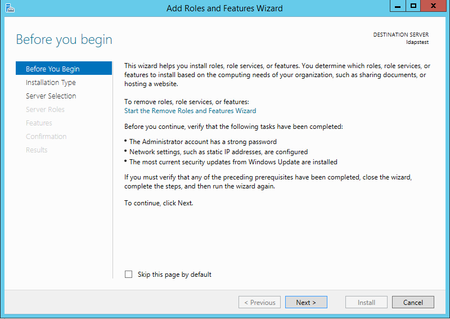
First published on MSDN on Apr 10, 2017 Step-by-step guide for setting up LDAPS (LDAP over SSL)The guide is split into 3 sections : Create a Windows Server VM in Azure Setup LDAP using AD LDS (Active Directory Lightweight Directory Services) Setup LDAPS (LDAP over SSL)NOTE : The following steps are similar for Windows Server 2008, 2012, 2012 R2 , 2016.787KViews5likes15CommentsDockerizing R and Python Web Services
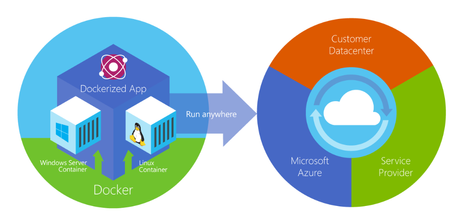
First published on MSDN on Jul 26, 2018 Containerization is an approach to software development in which an application or service, its dependencies, and its configuration (abstracted as deployment manifest files) are packaged together as a container image.2.2KViews0likes2CommentsInference of ML Models in SQL Server via External Languages
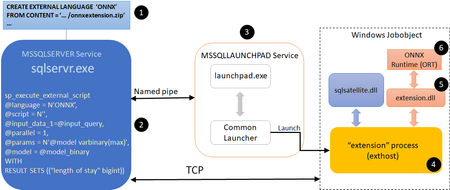
In this blog post, we describe our work on enabling machine learning (ML) inference (aka scoring) of previously trained ML models using the newly introduced language extensions of SQL Server 2019. By implementing a set of APIs, users can interface SQL Server with an external process (such as an ML runtime in our scenario) in order to move data and results between the main execution engine and the external process (which will perform the model scoring). As we will show in this post, this method is more efficient and more intuitive than performing model scoring using SQL Server's ML Services capability via Python scripts. To ground the description of such an external language implementation for model scoring with a concrete example, we will discuss scoring for ONNX models, as well as models that can be converted to ONNX (e.g., TensorFlow, PyTorch, scikit-learn). However, the technique described here is generic and can be used to invoke any other ML runtime. Implementing ONNX as an external language allows users of any existing SQL Server 2019 installation to score ONNX models. There are several benefits to this approach: Users can take advantage of faster times for scoring ONNX models over data in SQL Server compared to implementations using SQL Server’s Python capabilities. As we will show, example prediction queries (invoking logistic regressions and decision trees) are about 1.3--2x faster when compared to the Python implementation. They are also much easier to express in a few lines of code, as opposed to a few tens of lines for the Python case. Following an implementation as the one we describe in this blog post for ONNX, users can create other external languages for efficiently invoking any other ML runtime of their choice, such as PyTorch or TensorFlow. Note that we will not release our implementation at this point, but interested users can perform a similar implementation following the design in this blog post. Given the extensibility framework has a C++ interface, users can directly embed any custom C/C++ code for model scoring just by implementing the API methods we describe below. Note that another alternative is SQL Server’s native scoring capability using the PREDICT keyword for scoring ONNX models. Although this capability is available on Azure SQL Edge and Azure SQL Managed Instance (in preview), it is not yet present in all SQL Server flavors, including on-premises versions. Example Usage 1. Language Registration The first step to use ONNX as an external language is to register that language in SQL Server with the following command. CREATE EXTERNAL LANGUAGE ONNX FROM (CONTENT=N'onnxextension.zip', FILE_NAME=N'onnxextension.dll') To perform the language registration, we point to the onnxextension.zip file that contains the onnxextension.dll. This dll includes our implementation of the extensibility framework C++ APIs, as we will describe later. 2. Stored Procedure Creation Next, the user can create a stored procedure that uses the ONNX external language we registered above to perform model scoring of a model over some data using the sp_execute_external_script capability. The procedure takes as input the ID of the model to be used for scoring (the model is stored as a binary object in a SQL Server table and is identified by that ID) and a SQL query that defines the data to be used. CREATE OR ALTER PROCEDURE dbo.sp_onnx_scoring (@model_id int, @input_query nvarchar(max)) AS BEGIN DECLARE @model_binary varbinary(max) = (SELECT Data FROM models WHERE id = @model_id); EXECUTE sp_execute_external_script @language = N'ONNX', @script = N'', @input_data_1=@input_query, @parallel = 1, @params = N'@model varbinary(max)', @model = @model_binary WITH RESULT SETS (("length of stay" bigint)) END; The example stored procedure declares (by setting the @language variable) that it is using the ONNX external language extension (created earlier). The input data is read into the @input_data_1 variable and the model is read into the @model_binary and @model variables. The ‘EXECUTE sp_execute_external_script’ invokes execution of the language extension. The setting of @parallel to 1 enables parallel (multi-threaded) execution of the language extension. The ‘WITH RESULT SETS’ directive specifies the return types of the results. In this case, the model returns an integer. In general, the type of the result returned by the model should match or be able to be implicitly converted to the type specified in the ‘RESULT SETS’ clause. 3. Model Scoring The stored procedure needs to be saved once and can then be invoked later for scoring different models with input data as follows. EXEC sp_onnx_scoring <model num>, “SELECT <feature list> FROM dbo.patients_table" The ‘EXEC’ command in the example invokes the stored procedure with a model number and a T-SQL query string that specifies the input data consisting of all rows and a subset of columns (used as features for the model) from a database table (patients_table). The model number identifies a model that is stored as a binary string (along with other models) in another table in the database. High-Level Architecture Fig. 1. High-level architecture diagram of ONNX extension for SQL Server Figure 1 shows a high-level architecture of the implementation of ONNX as external language in SQL Server. The steps/components marked with a numbered circle are briefly described below. User registers an external language named ONNX with SQL Server. We describe the creation of this language extension in the Extension Implementation section later in this blog post. Our implementation is packaged in the file ‘onnxextension.zip’ shown in Figure 1. User executes a T-SQL query that invokes sp_execute_external_script with ONNX as the language. SQL Server communicates with the Launchpad service to launch the exthost external process (4). The exthost process loads the extension dll (5) that was registered for ONNX in step 1. The extension dll loads the ONNX runtime dll (6). The ONNX runtime dll provides the functionality for scoring the ONNX models. Extension Implementation As we mentioned earlier, SQL Server 2019 introduced the extensibility framework that users can exploit to create their own language extension and invoke execution in that language through T-SQL queries. This framework consists of a set of C++ APIs that users can implement to copy data and parameters from SQL Server, perform operations on that data, and return results and performance telemetry to SQL Server. Reference implementations of Java, R, and Python using this extensibility framework have been open-sourced. We now briefly discuss how some of the APIs of the SQL Server language extensibility framework can be implemented to support ONNX as an external language. The implementation is compiled into a dll that can then be registered with SQL Server for this external language (step 1 in the architecture description shown earlier). The Windows and SQL Server data types used in the code snippets below for the implementation are the same as those used in the other open-sourced reference implementations for the extensibility framework, e.g., in Java as an external language. Init: This is called by exthost when the dll associated with the language extension is loaded. Our implementation of ONNX as an external language loads the ONNX runtime (ORT for short) dll in Init. ORT provides the functionality to score ONNX models. The code snipped below shows how the ORT dll can be loaded. LPCWSTR onnxDllPath = L"onnxruntime.dll"; std::wstring fullPath = wstr.get(); fullPath += L"\\onnxruntime.dll"; auto load_result = LoadLibraryExW(fullPath.c_str(), NULL, 0); const OrtApi *api = OrtGetApiBase()->GetApi(ORT_API_VERSION); …… return SQL_SUCCESS; Note that the ONNX extension dll needs to be built with the delay load dlls option set for linker input properties, with the ORT dll specified as the dll to be delay loaded. The OrtApi type definition is provided by the ORT C runtime API. The ORT_API_VERSION is set to the value corresponding to the ORT version, e.g., 4 for ORT v1.4. We will call methods provided by the ORT by dereferencing the ‘api’ pointer. In Init, we call the api->CreateEnv(…) method provided by the ORT to create the runtime environment. The call to Init and its execution corresponds to steps 4 and 5 of the architecture description shown earlier. GetInterfaceVersion: This is called by exthost to get the version number of the extensibility API implemented by the extension. For example, the value returned would be 2 for Version 2 of the API. return EXTERNAL_LANGUAGE_EXTENSION_API; InitSession: This is called by exthost once per inference session. The ONNX extension should copy the values of the function arguments to variables in the extension that can be retrieved by the other functions implemented by the extension. For example, the variables can be part of a class, an object of which is allocated on the heap during Init, and then this object is used by the rest of the functions. InitColumn: This is called by exthost once per column (attribute) of the input data on which the model scoring will be done in this inference session. The ONNX extension should copy and save the values of the function arguments. InitParam: This is called by exthost to pass other arguments of the sp_execute_external_script command for this inference session. One of the arguments is the “@model” string along with its value, which was set by the user script to the binary string of the model. The ONNX extension should copy and save this model, e.g., using memcpy as shown in the code snippet below. if (!strcmp(reinterpret_cast<const char *>(ParamName), "@model")) { SQLPOINTER m_modelPtr = new unsigned char[StrLen_or_Ind]; std::memcpy(m_modelPtr, ArgValue, StrLen_or_Ind); } …… return SQL_SUCCESS; Execute: This is called by exthost to score the model on the input data for this inference session. There are several steps that are executed in the function. Map Types: First, the ONNX extension maps the SQL types (enums) of the input data to the types understood by the ORT. This can be done by looking up a mapping table that tells how to do the translation. Create Context: Then, it creates a context for scoring the model by calling ORT methods, e.g., api->CreateSessionOptions(…), api->SetIntraOpNumThreads(…), api-> SetInterOpNumThreads(…), api->SetSessionGraphOptimizationLevel(…), api->CreateSessionFromArray(…), etc. Score Model: Then it scores the model by calling ORT methods, e.g., api->CreateTensorWithDataAsOrtValue(…), api->Run(…) Save Results: It then saves the predictions returned by the ORT. Return number of output columns: Finally, it returns the number of columns in the output of the predictions by setting the ‘*OutputSchemaColumnsNumber’ parameter of the Execute function. The return value of the Execute function is SQL_SUCCESS. GetResultColumn: This is called by exthost for each of the columns for the prediction results. The number of columns has been returned by the Execute function as described above. The ONNX extension returns the data type and size for the corresponding column. GetResults: This is called by exthost once for the inference session to get the results of the model predictions. The code snippet below shows that the number of rows in the results as well as the results are returned. Here variable DataBuffer is of type BYTE* and it holds the prediction results obtained during the Execute function call as described above. *RowsNumber = elemCount; *Data = reinterpret_cast<SQLPOINTER *>(&(DataBuffer)); …… return SQL_SUCCESS; CleanupSession: This is called by exthost once for the inference session. The ONNX extension deallocates variables that is allocated for this inference session. Performance Comparisons We evaluated the performance of the following three different ways of scoring ONNX models with SQL Server. We used a SQL Server 2019 installation. PREDICT: This uses SQL Server’s built-in PREDICT keyword for scoring ONNX models using the ONNX Runtime. It is currently publicly available only in Azure SQL Edge and Azure SQL Managed Instance (in preview). Ext. C++: This uses the ONNX as external language capability described in this blog post. Ext. Python: This uses SQL Server’s capability to invoke Python as an external process for invoking the ONNX Runtime to score ONNX models. We used an input dataset ranging in size from 10K rows to approx. 3M rows. We measure end-to-end query runtimes, that include the total prediction time over all the rows in the particular table, with scoring for two ML models, namely a Decision Tree and a Logistic Regression. We average the runtimes over five executions of the same query. Fig. 2. Query execution times with inference using different input sizes and models. Figure 2 shows the average query run times as a function of the number of rows in the input data set, which is also equal to the number of predictions done with the models. We make the following two observations from these experimental results. Ext. Python is significantly slower (2.7x--30.5x, depending on the model and number of input rows) than PREDICT. As an example, for 3M rows, Ext. Python takes about 2.9x (Decision Tree) to 2.7x (Logistic Regression) as much time as PREDICT. Ext. C++ results in query run times that are in between PREDICT (1.9x--22.4x slower than PREDICT) and Ext. Python (which is 2.7x--30.5x slower than PREDICT), leading to 1.3--2.1x speedups when compared to Ext. Python. For example, for 3M rows, Ext. C++ takes about 1.9x as much time as PREDICT in contrast to the 2.7x--2.9x time taken by Ext. Python. For approximately 0.3M rows and Decision Tree model, Ext. C++ takes about 2.6x whereas Ext. Python takes about 5.4x as much time as PREDICT, resulting in Ext. C++ being about 2x faster than Ext. Python for scoring the given model on the same input dataset. Fig. 3. Query slowdowns, relative to in-process PREDICT, for different input sizes and models. Figure 3 shows the average query run times relative to that with PREDICT with the same number of input rows. At small number of input rows, the computation for the model scoring is small. So, the overheads of setting up the external execution environment dominates. At larger input sizes, the slowdown values become smaller. In all cases, the slowdowns with Ext. C++ are smaller than with Ext. Python. Summary SQL Server 2019’s C++ extensibility framework offers a powerful capability to users for calling a wide range of ML model scoring engines to score corresponding ML models on tabular data provided by SQL Server. Our implementation enables users to perform scoring of ONNX models faster and more intuitively than with the existing Python execution. This blog post also provided an overview of how users can write their own ML engine interfacing extensions with the new extensibility framework. Acknowledgments We thank Ivan Popivanov, Jasraj Dange, Michelle Wallig, Carlo Curino, and members of the SQL Server extensibility team for their help and feedback on this work. References SQL Server 2019 Native scoring using the PREDICT T-SQL function with SQL machine learning Machine learning and AI with ONNX in SQL Edge Machine Learning Services in Azure SQL Managed Instance (preview) Extensibility architecture in SQL Server Machine Learning Services Python language extension in SQL Server Machine Learning Services R language extension in SQL Server Machine Learning Services sp_execute_external_script Extending Relational Query Processing with ML Inference SQL Server Language Extensions CREATE EXTERNAL LANGUAGE (Transact-SQL) Extensibility architecture in SQL Server Language Extensions Extensibility Framework API for SQL Server SQL Server Language Extensions project ONNX Runtime ONNX Runtime C API5.6KViews0likes0CommentsBuild Intelligent Web App with Machine Learning Service
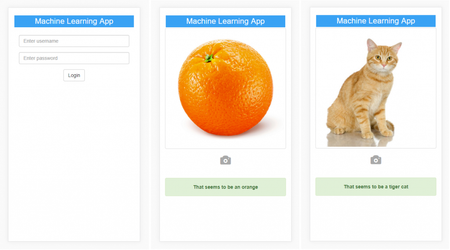
First published on MSDN on Aug 21, 2018 In an earlier article: How to operationalize TensorFlow models in Microsoft Machine Learning Server, we showed how you can deploy a TensorFlow image classification model pre-trained using ImageNet as service in Machine Learning Server, and download a Swagger specification of the service as a JSON file, which can be passed on to app developers who will use it to generate a client for consuming the service.884Views0likes0Comments