sqlserverdrivers
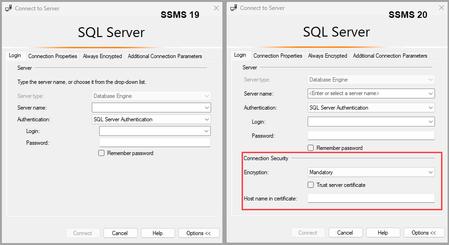
290 TopicsUpcoming changes for SQL Server Management Studio (SSMS) - Part 2
This is the second post in a series of three about SQL Server Management Studio, and upcoming changes to the SSMS 20 connection dialog. This post also announces the SSMS 20 Preview 1 build, which is available to download.18KViews7likes7Commentsgo-sqlcmd v1.0 - Create, Connect to, and Query SQL Server
If you’re reading this, you’ve probably used sqlcmd to connect to a SQL Server or Azure SQL Database and query it. Chances are you’ve also used a modern CLI like Azure az or Kubernetes kubectl to create and manage resources. Our open-source sqlcmd combines both into one amazing tool, and today we are announcing v1.0!9.3KViews6likes0CommentsAnnouncing the Public Preview of mssql-python
We’re excited to announce the public preview of the mssql-python driver with new platform support and powerful features for Microsoft SQL Server and the Azure SQL family, now available on GitHub: mssql-python. Join us and contribute in shaping the future of Python connectivity with SQL Server! MacOS Support The mssql-python driver is now compatible with macOS ARM-based systems, expanding support for developers using Apple Silicon (M-Series) devices. This adds to our growing cross-platform story, and we’re not done yet — Linux support is coming soon! Connection Pooling We’ve built a robust, configurable connection pooling system to help boost performance and optimize resource usage. Key highlights: Connection Reuse: Reuses existing alive connections instead of creating new ones, improving performance. Max Pool Size Limit: Enforces a configurable maximum number of connections per pool to limit resource consumption. Idle Connection Pruning: Automatically disconnects and removes connections idle beyond a configurable timeout to free resources. Multiple Pools by Connection String: Maintains separate pools keyed by connection string, supporting multiple distinct databases/endpoints. Thread Safety: Uses mutex locking for safe concurrent access in multi-threaded environments. Connection Health Checking: Validates connections are alive before reuse and discards dead ones. Explicit Connection Reset: Resets connections before reuse to clear session state and ensure clean context. Configurable Global Pool Settings: Provides a singleton manager to configure default max pool size and idle timeout for all pools. Simple Global API: Exposes easy-to-use functions to configure pooling and acquire pooled connections. Logging: Outputs console logs for major events like creation, acquisition, release, pruning, and errors for easy debugging. Note: This feature is currently available on Windows only. macOS and Linux support is in progress. What's Next Here’s a sneak peek at what we’re working on for upcoming releases: Linux Support Connection Pooling for macOS and Linux Support for Bulk Copy for accelerated data transfer Microsoft Entra ID (formerly Azure AD) Authentication for macOS and Linux Try It and Share Your Feedback! Ready to test the latest features? We invite you to: Try it out: Check-out the mssql-python driver and integrate it into your projects. Share your thoughts: Open issues, suggest features, and contribute to the project. Join the conversation: GitHub Discussions | SQL Server Tech Community. We look forward to your feedback and collaboration!1.4KViews4likes0CommentsAnnouncing General Availability of the mssql-python Driver
We’re thrilled to announce that the mssql-python driver is now Generally Available! 🎉 This milestone marks a major step forward in delivering a modern, high-performance, and developer-friendly experience for Python developers working with SQL Server, Azure SQL and SQL databases in Fabric. Why mssql-python? The mssql-python driver is a DB-API 2.0 compliant driver designed from the ground up to provide speed, simplicity, and security for Python applications connecting to SQL Server. We think data and devops engineers, analysts, and developers who use Python for configuration, analysis or AI will all find something they like. Here’s what makes it stand out: 🚀 Fast and Cross-platform The mssql-python driver is built on an optimized C++ core that delivers high performance and a consistent API across operating systems. Internal benchmarks show that the mssql-python driver performs well across common SQL operations such as SELECT, INSERT, UPDATE, and DELETE. Complex queries, joins, and stored procedures also perform well, making it ideal for both transactional and analytical workloads. 📦 One-Line Installation Whether you are just getting started or sharing scripts you have written, the mssql_python driver makes it easier than ever. Install the driver with a single command: pip install mssql-python No extra dependencies on Windows, no complicated configurations - just install and start coding. 🔐 Simplified Entra ID Authentication Security shouldn’t be hard. The mssql-python driver offers built-in support for Microsoft Entra ID (formerly Azure AD) authentication, reducing complexity and eliminating the need for custom token handling. This makes it easier to build secure, enterprise-grade applications without extra overhead. The mssql-python driver supports Active Directory Default authentication across all operating systems, making it easier to remove credentials from your code while still allowing you to share a script that just works. Key Highlights Cross-Platform Support: Works seamlessly on Windows, Linux, and macOS (including Apple Silicon). Connection Pooling: Efficient, configurable pooling for high-performance applications. Modern Python Experience: Clean APIs, better diagnostics, and improved error handling. Get Started Today Upgrade your Python data workflows with the new mssql-python driver: pip install mssql-python Check out the GitHub repository for documentation, examples, and to join the community. You can also go directly to our PyPI page to download the latest release. Visit the aka.ms/mssql-python#get-started to view more quickstarts. What’s Next? We’re committed to continuous improvement. Upcoming releases will focus on bulk insert optimizations, ORM integrations, and community-driven enhancements. Stay tuned for updates and share your feedback on GitHub!5.1KViews3likes0CommentsIntroducing mssql-python alpha
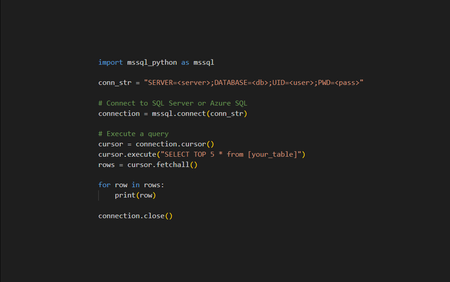
We’re thrilled to announce the alpha release of our new open-source Python driver for Microsoft SQL Server and the Azure SQL family, now available on GitHub: mssql-python. Built from the ground up, this driver offers Python developers a robust, efficient, and fully open-source solution for connecting to SQL Server and Azure SQL. Whether you're building data-driven applications, automating workflows, or leveraging advanced analytics, mssql-python is designed to provide a seamless and high-performance experience. This is just the beginning—we’re excited to build this driver together with the community and would love your feedback! Documentation | Release Notes | Roadmap Join us in shaping the future of Python connectivity with SQL Server! Key Features Supported Platforms: Windows only (macOS and Linux support is coming soon) Support for Microsoft Entra ID Authentication Fully compliant with the DB API 2.0 specification. Key aspects include: Connection Objects: Establishing and managing connections to the database. Cursor Objects: Executing SQL commands and retrieving results. Transaction Management: Supporting commit and rollback operations to ensure data integrity. Error Handling: Providing a consistent set of exceptions for handling database errors. Parameter Substitution: Allowing the use of placeholders in SQL queries to prevent SQL injection attacks. What's Next? We’re committed to continuously enhancing the mssql-python driver and value feedback from the community. Here's what the team is working on next: Cross-Platform Support: MacOS and Linux Distributions We are committed to providing cross-platform support for our Python driver. In the next few months, we will release versions compatible with MacOS and various Linux distributions. Support for macOS (Issue #11) Support for major Linux distributions (Issue #10) Asynchronous Query Execution Execute queries without blocking the main thread, perfect for applications requiring high concurrency and low latency. True async query execution (Issue #9) Connection Pooling Improve performance by reusing existing connections rather than establishing new ones for every query. Async built-in connection pool (Issue #8) Try It and Share Your Feedback! As this is an alpha release, your feedback is crucial. We invite you to: Try it out: Check-out the mssql-python driver and integrate it into your projects. Share your thoughts: Open issues, suggest features, and contribute to the project. Join the conversation: GitHub Discussions | SQL Server Tech Community. We look forward to your feedback and collaboration!2.1KViews3likes1Comment