sqlserver2022
119 TopicsAnnouncing flexible provisioning for SQL Server on Linux Azure VMs (Public Preview)
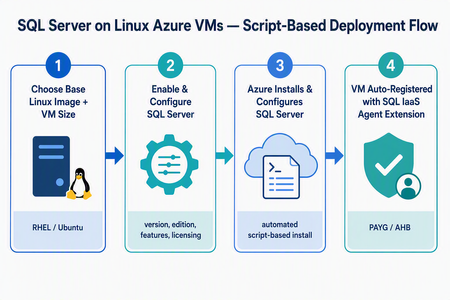
What’s changing We’re introducing a new script-based deployment experience for provisioning SQL Server on Linux Azure Virtual Machines (VMs). This experience replaces the earlier model that relied on pre-created SQL Server on Linux Marketplace images, which have been deprecated. Pre-created SQL Server on Linux Marketplace images are no longer available for new provisioning through the Azure portal, the Azure SQL hub, Azure CLI, or PowerShell. Instead, SQL Server is now installed and configured during VM provisioning using a flexible, automated, script-based workflow. The result is a more adaptable and supportable deployment model that keeps SQL Server on Linux Azure VMs fully supported, reduces image-maintenance overhead, and makes it easier to adopt the latest Linux distributions, VM families, and configuration options - all while giving you more control over your SQL Server setup. Why the new model matters Greater flexibility and control — choose your Linux distribution, SQL Server version, edition, and even bring your own mssql.conf to tailor the configuration. Faster access to innovation — new Linux versions and Azure capabilities are picked up automatically, without waiting for a new baked image to be published. Automatic registration built in — every VM is registered with the SQL IaaS Agent extension by default, unlocking licensing flexibility, compliance, and richer visibility. A dynamic, guided UI — the portal enables or disables options based on supported operating system, SQL Server, and licensing combinations, so you only see valid choices. Supported Linux distributions The script-based deployment experience supports the following distributions, and future versions are picked up automatically as they become supported — no manual intervention required: Distribution Supported versions Red Hat Enterprise Linux (RHEL) RHEL 9, RHEL 10 (and future versions) Ubuntu Ubuntu 22.04, Ubuntu 24.04, Ubuntu 26.04 (and future versions) Automatic registration applies to both Red Hat Enterprise Linux and Ubuntu, across all their supported versions. Automatic registration with the SQL IaaS Agent extension SQL Server on Linux VMs deployed through this experience are automatically registered with the SQL Server IaaS Agent extension. Registration creates a SQL virtual machine resource in Azure (separate from the VM resource) and unlocks: Licensing flexibility — choose Pay-As-You-Go (PAYG) or Azure Hybrid Benefit (AHB), and switch between them anytime with no downtime. Compliance — a simplified way to meet Azure Hybrid Benefit product-term requirements without per-resource registration forms. Visibility and telemetry — clear license-type visibility, subscription-level tracking, and better operational insight from the Azure portal, CLI, or PowerShell. Note: Automatic registration is enabled by default during deployment. You can unregister or re-register a VM after deployment through the Azure portal, Azure CLI, or PowerShell. The end-to-end flow at a glance Experience: The “Create a virtual machine” tab Use this flow if you’re starting from the familiar VM creation experience in the Azure portal. In the Azure portal, go to Virtual machines (or Create a resource → Virtual machine) and select Create. On the Basics tab, select your project details (subscription, resource group), instance details, and a supported Linux base image — RHEL 9, RHEL 10, Ubuntu 22.04, or Ubuntu 24.04. Choose your VM size, authentication, and inbound ports as usual. Go to the Advanced tab and select the Install SQL Server checkbox. This enables SQL Server provisioning on the VM. A new SQL Server settings tab becomes available. Open it to configure your SQL Server deployment: SQL Server version — e.g., SQL Server 2025 or SQL Server 2022. Edition — Enterprise, Standard, Developer, Express, and Evaluation editions (options adjust to the selected version). Licensing model — Pay-As-You-Go (PAYG, default) or Azure Hybrid Benefit (AHB). Advanced configuration — Upload a custom mssql.conf file to set SQL connectivity, Azure Key Vault integration, and the tuned performance profile. Select Review + create, review the configuration summary, and select Create. Azure provisions the VM, then automatically installs and configures SQL Server and registers the VM with the SQL IaaS Agent extension. Managing licensing after deployment Because your VM is registered with the SQL IaaS Agent extension, you can change the licensing model anytime — with no downtime and no restart of the VM or SQL Server service. Azure portal: Go to the SQL virtual machine resource → Settings → SQL Server configuration → Manage. Azure CLI az sql vm update -n <VM_NAME> -g <RESOURCE_GROUP> --license-type AHUB Azure PowerShell: Set-AzSqlVM -Name <VM_NAME> -ResourceGroupName <RESOURCE_GROUP> -LicenseType AHUB Note: Switching between PAYG and AHB is immediate, incurs no additional cost, and does not restart the VM or the SQL Server service. Wrapping up The move to script-based deployment modernizes how you provision SQL Server on Linux Azure VMs. By replacing deprecated pre-created Marketplace images with a flexible, automated, script-based flow — and by registering every VM with the SQL IaaS Agent extension automatically — you get more choice, faster access to new Linux and SQL Server versions, and a cleaner path to licensing flexibility, compliance, and visibility. Whether you start from the Create a virtual machine tab or the Azure SQL hub, you get the same guided experience across RHEL 9, RHEL 10, Ubuntu 22.04, Ubuntu 24.04, and future versions. Ready to try it? Head to a Create a virtual machine option in the Azure portal. We’d love your feedback — let us know how the new experience works for your workloads in the comments.88Views0likes0Commentsmssql-django 2.0: Now with mssql-python
mssql-django 2.0 is on PyPI. This release adds Microsoft's new mssql-python driver as a second way to connect, moves the supported Python, Django, and SQL Server versions forward, and fixes several connection and query bugs that production teams hit. pip install --upgrade mssql-django Pick your driver, one database at a time Until now, mssql-django spoke to SQL Server through pyodbc and an ODBC driver you installed yourself. That still works, and it's still the default. Version 2.0 adds a second path: mssql-python, Microsoft's Python driver for SQL Server. You choose per database alias. Add one option to the alias you want to move: DATABASES = { "default": { "ENGINE": "mssql", "NAME": "appdb", "HOST": "contoso.database.windows.net", "PORT": "1433", "OPTIONS": { "python_driver": "mssql_python", "extra_params": "Encrypt=yes", }, }, "reporting": { # No python_driver, so this alias stays on pyodbc. "ENGINE": "mssql", "NAME": "reportdb", "HOST": "contoso.database.windows.net", "PORT": "1433", "OPTIONS": { "driver": "ODBC Driver 18 for SQL Server", }, }, } ENGINE doesn't change. Remove the option and the alias is back on pyodbc. That's the whole rollback plan, which is the point: you can try the new driver on one database, run your test suite, and leave everything else alone. The mssql-python path covers the day-to-day work: connections, pooling, retries, transactions and savepoints, datetimeoffset values, introspection, and Microsoft Entra ID authentication. One practical difference worth calling out. On the mssql-python path, pip also installs the mssql-python-odbc companion package, which supplies Microsoft ODBC Driver 18 for SQL Server. There's no separate driver install, which takes a step out of container images and App Service deployments. Know what changes before you switch The two drivers aren't identical, and the differences are the reason we made this per alias instead of a global switch. The mssql-python path ignores driver, dsn, host_is_server, and unicode_results. There's no ODBC Driver 17 fallback. It validates extra_params against an allowlist and rejects pyodbc-only keywords such as ColumnEncryption, APP, and Connect Timeout, so use the connection_timeout option instead of the last one. It also doesn't enable MARS, which means QuerySet.iterator() reads the full result into memory before yielding rows so a nested query can reuse the connection. On a large queryset, that memory is real. Budget for it. Stay on pyodbc if you depend on a named DSN, FreeTDS, MARS, Always Encrypted through ColumnEncryption, or an ODBC driver version you manage yourself. We cleaned up the version matrix This is something we've wanted to get to for a while. mssql-django 2.0 supports Python 3.10 through 3.14, Django 5.2 through 6.1, and SQL Server 2017 through 2025, plus Azure SQL Database, Azure SQL Managed Instance, and SQL database in Microsoft Fabric. Django 6.0 and 6.1 need Python 3.12 or later. Python 3.8 and 3.9 and Django 3.2 through 5.1 are no longer supported. The compatibility code is still in the tree, so nothing breaks the moment you upgrade, but those combinations aren't tested or listed. Fixes MARS settings are honored. If you set MARS_Connection=no in extra_params, the backend used to overwrite it with the Windows default and the connection failed. That's the bug frederiksoftware reported when connecting an on-premises Django app to a Microsoft Fabric Warehouse. The explicit value now wins, case-insensitively, so those connections work. To be clear about scope: this fixes the connection, it doesn't add full Warehouse support for migrations or other SQL Server features. Bracket wildcards are escaped in F() expression lookups. A pattern lookup comparing two fields, such as filter(name__contains=F("code")), didn't escape the SQL Server [ wildcard, so bracket characters in your data were treated as wildcard syntax and matched the wrong rows. Thanks to @Khan3K for the fix. Quotes are escaped in inspectdb schema names. inspectdb --schema produced malformed T-SQL for a schema name containing a single quote. An empty HOST connects to localhost on the mssql-python path. Omitting HOST in Django settings leaves it as an empty string, which mssql-python rejected. It now resolves to localhost, matching the pyodbc behavior for local instances. pytz is gone Time zone handling moved to the standard library zoneinfo module, with the tzdata package supplying the IANA database where the operating system doesn't ship one: Windows, and minimal container images. This fixes offsets for zones with negative daylight saving offsets, and it drops a dependency. Before you upgrade mssql-python is a required dependency in 2.0 even when every alias uses pyodbc. That means mssql-django 2.0 installs only on platforms that have a compatible mssql-python distribution: Windows x64, Windows ARM64 with Python 3.11 and later, macOS 15 and later on Intel or Apple silicon, and Linux x64 or ARM64 with glibc 2.28 or later or musl 1.2 or later. SUSE Linux on ARM64 isn't supported. If you're outside that list, stay on 1.8.0. Upgrade now pip install --upgrade mssql-django Release notes Documentation Report an issue Thanks to @Khan3K and @frederiksoftware for the contributions in this release.209Views0likes0CommentsMove to Modern SQL Server Licensing with Confidence
Why eligible customers should move to pay-as-you-go licensing (PAYG) For eligible SQL Server workloads, PAYG should be the preferred licensing approach when moving away from licenses and Software Assurance. It aligns billing with measured usage, adapts as the estate changes, and reduces the operational burden of managing fixed license quantities. The transition requires deliberate resource-configuration updates, but the result is a more flexible and manageable licensing model. Align cost with measured usage: Adopt consumption-based billing for eligible SQL Server resources instead of maintaining fixed license allocations. Scale without repeated license true-ups: Let billing adjust as workloads are added, removed, migrated, resized, or used intermittently. Manage licensing through Azure: Use Azure-based controls to review resource-level licensing and improve visibility across the estate. Reduce license administration: Spend less time tracking fixed quantities and aligning individual resources with license inventory. Optimize committed consumption: After establishing stable PAYG usage, evaluate applicable Azure savings plans or reservations to help reduce costs. Guidance for transitioning your resource settings Once your organization decides to adopt PAYG for eligible SQL Server workloads, update the license configuration on each resource so billing reflects that decision. A commercial or licensing change alone does not update resource-level settings. Plan this configuration work as part of the transition rather than treating it as a follow-up. Starting early gives teams time to validate security, networking, Azure Arc connectivity, billing, and operational processes before switching the broader estate. Automate the transition to pay-as-you-go SQL licensing at scale Choose the transition approach that fits your estate PowerShell for a controlled bulk change Use PowerShell when you need a targeted transition across a defined tenant, subscription, resource group, or resource scope. Discover and review resources before making changes. Test the transition with a limited scope. Update eligible resources in bulk when the organization is ready. Validate the resulting license configuration and billing signals. Azure Policy for ongoing governance Use Azure Policy to transition existing SQL resources to PAYG and continuously enforce the desired licensing configuration. Azure Policy helps identify configuration drift, maintain compliance, and automatically remediate non-compliant resources at scale. Define the approved license configuration for eligible resources. Assign policy at the appropriate subscription or resource group scope. Monitor compliance through centralized Azure views. Remediate resources that drift from the approved configuration. Recommended path to PAYG Commit to the PAYG target. Confirm which eligible workloads will move and identify the teams responsible for licensing, Azure, security, networking, and SQL operations. Prepare the estate. For SQL Server running outside of Azure, connect to Azure Arc. Inventory eligible SQL resources and confirm that Azure Arc connectivity and required organizational approvals are in place. Prove the transition. Test resource updates and billing behavior in a limited resource group or subscription. Move at scale. Use PowerShell for a controlled bulk transition, then apply Azure Policy for ongoing governance where appropriate. Verify and operate. Review the resulting configuration, monitor compliance, and reassess as the SQL estate grows or changes. Evaluate commitment-based savings. After establishing a stable PAYG usage pattern, assess whether an applicable Azure savings plan or reservation could reduce costs. Review eligibility, coverage, and commitment terms with your Microsoft representative. Learn more Automate the transition to pay-as-you-go SQL licensing at scale Manage licensing and billing of SQL Server enabled by Azure Arc Pricing guidance for SQL Server on Azure VMs Azure SQL Database pricing Eligibility, billing treatment, prerequisites, and available licensing options vary by resource and licensing arrangement. Review the applicable Microsoft terms and product guidance, and consult your Microsoft representative or licensing specialist as needed.710Views0likes2Comments
Cumulative Update #27 for SQL Server 2022 RTM
The 27th cumulative update release for SQL Server 2022 RTM is now available for download at the Microsoft Downloads site. Please note that registration is no longer required to download Cumulative updates. To learn more about the release or servicing model, please visit: CU27 KB Article: https://support.microsoft.com/help/5104824 Starting with SQL Server 2017, we adopted a new modern servicing model. Please refer to our blog for more details on Modern Servicing Model for SQL Server Microsoft® SQL Server® 2022 RTM Latest Cumulative Update: https://www.microsoft.com/download/details.aspx?familyid=105013 Update Center for Microsoft SQL Server: https://learn.microsoft.com/en-us/troubleshoot/sql/releases/download-and-install-latest-updates273Views0likes0CommentsSecurity Update for SQL Server 2022 RTM CU26
The Security Update for SQL Server 2022 RTM CU26 is now available for download at the Microsoft Download Center and Microsoft Update Catalog sites. This package cumulatively includes all previous security fixes for SQL Server 2022 RTM CUs, plus it includes the new security fixes detailed in the KB Article. Security Bulletins: CVE-2026-67378 - Security Update Guide - Microsoft - Microsoft SQL Server Denial of Service Vulnerability Security Update of SQL Server 2022 RTM CU26 KB Article: KB5122768 Microsoft Download Center: https://www.microsoft.com/download/details.aspx?familyid=d682ec86-56e1-45c3-a0fa-552f89f6e51e Microsoft Update Catalog: https://www.catalog.update.microsoft.com/Search.aspx?q=5122768 Latest Updates for Microsoft SQL Server: https://learn.microsoft.com/en-us/troubleshoot/sql/releases/download-and-install-latest-updates266Views0likes0CommentsSecurity Update for SQL Server 2022 RTM
The Security Update for SQL Server 2022 RTM GDR is now available for download at the Microsoft Download Center and Microsoft Update Catalog sites. This package cumulatively includes all previous security fixes for SQL Server 2022 RTM, plus it includes the new security fixes detailed in the KB Article. Security Bulletins: CVE-2026-67378 - Security Update Guide - Microsoft - Microsoft SQL Server Denial of Service Vulnerability Security Update of SQL Server 2022 RTM GDR KB Article: KB5122771 Microsoft Download Center: https://www.microsoft.com/download/details.aspx?familyid=7ce0ba48-9a1e-4298-b300-79f251385092 Microsoft Update Catalog: https://www.catalog.update.microsoft.com/Search.aspx?q=5122771 Latest Updates for Microsoft SQL Server: https://learn.microsoft.com/en-us/troubleshoot/sql/releases/download-and-install-latest-updates176Views0likes0CommentsMicrosoft Drivers for PHP for SQL Server 5.13.3: PIE support on every platform
Version 5.13.3 of the Microsoft Drivers for PHP for SQL Server is now available on PIE, the PHP Installer for Extensions, the official replacement for the deprecated PECL installer. You can now install SQLSRV and PDO_SQLSRV on Linux, macOS, and Windows through the same Composer-style tooling you already use for your PHP dependencies. This release completes the PIE rollout that started in 5.13.2. That release also carried two PDO_SQLSRV security fixes, so we recommend upgrading regardless of how you install. Install with PIE After installing PIE, install either or both drivers with their Packagist package names: pie install microsoft/sqlsrv pie install microsoft/pdo_sqlsrv The drivers require PHP 8.3 or later and the Microsoft ODBC Driver 17 or 18 for SQL Server. PDO_SQLSRV also requires the PDO extension, which is included with PHP by default. PIE itself needs PHP 8.1 or later to run, and it can target any other PHP version you have installed. On Linux and macOS, PIE builds the extension from source and will offer to install any missing build tools first. On Windows, PIE downloads a prebuilt DLL matching your PHP version, thread-safety mode, and architecture, so no build toolchain is needed. Windows support arrived in 5.13.3. If you tried pie install on Windows with 5.13.2 and hit This extension does not support the "windows" operating system family, upgrading resolves it. PECL still works You don't have to switch today. Version 5.13.3 is published to PECL as usual, alongside the downloadable release archives, so pecl install sqlsrv and pecl install pdo_sqlsrv continue to work. PIE is where we recommend new installations start. Security updates Version 5.13.2 included two PDO_SQLSRV security fixes, both carried forward in 5.13.3: PDO::lastInsertId($name) now uses a parameterized query when looking up a sequence name. This prevents the supplied name from changing the query and also fixes lookups for sequence names containing non-ASCII characters. Binary parameters containing embedded NUL (0x00) bytes are no longer silently truncated when PDO emulated prepares are used with PDO::SQLSRV_ENCODING_BINARY. If your application uses PDO_SQLSRV and you are on 5.13.1 or earlier, upgrade. Additional fixes 5.13.2 also: Fixes a Windows thread-safe shared-build linker failure. Clears stale unixODBC INI cache data when the module shuts down on Linux and macOS. Fixes an AddressSanitizer One Definition Rule violation when SQLSRV and PDO_SQLSRV are loaded together. Addresses CodeQL static-analysis findings. Get version 5.13.3 Install SQLSRV from Packagist with PIE. Install PDO_SQLSRV from Packagist with PIE. Download the 5.13.3 release packages. Review the full changelog. Read the Microsoft Drivers for PHP for SQL Server documentation. Please report issues and share feedback in the msphpsql GitHub repository.213Views0likes0Commentsmssql-django 1.8.0: Django 6.1 Support within 48 Hours of Django 6.1 GA
Django 6.1 GA'd on August 5. mssql-django 1.8.0 was on PyPI within 48 hours. This is the first time the backend has shipped support for a new Django release in lockstep with Django itself. If you run SQL Server, Azure SQL, or SQL database in Microsoft Fabric, you can move to 6.1 today without code changes. pip install --upgrade mssql-django Django How it shipped this fast The work started in June, against the 6.1 beta. The beta went into the full CI matrix weeks before GA, we knew about every backend API break in June. Fixes were developed on an integration branch and validated on live CI against real 6.1 builds on SQL Server 2025. By GA day, the release was tested and ready to publish. What's new Django 6.1 changed several parts of the database backend API. Every change here is version-gated, so earlier Django versions are unaffected. Query compilation for 6.1's sliced and offset queries. Django 6.1 deprecated SQLCompiler.quote_name_unless_alias() in favor of SQLCompiler.quote_name(); sliced querysets and OFFSET ... FETCH now compile without Django 7.0 deprecation warnings. Database introspection. get_relations() returns 6.1's expanded shape, including the database-level ON DELETE rule, so inspectdb keeps working. Upfront errors for the 6.1 features SQL Server cannot support. Regression tests, CI, and packaging for 6.1 on Windows and Linux with Python 3.12, 3.13, and 3.14. What doesn't work on 6.1 Two 6.1 features are unavailable: Database-level referential actions (DB_CASCADE, DB_SET_NULL, DB_SET_DEFAULT). SQL Server disallows multiple cascade paths to the same table, and that is still true in SQL Server 2025. Using one fails Django's system checks with fields.E324; use Django's on_delete handling instead. Bitwise aggregates (BitAnd, BitOr, BitXor). SQL Server has no native bitwise aggregate function, and the backend doesn't emulate one yet, so these raise NotSupportedError. If this is important to you, drop a comment on issue #572 with your use case. Supported versions Component Supported versions Django 3.2, 4.0, 4.1, 4.2, 5.0, 5.1, 5.2, 6.0, 6.1 Python 3.8 through 3.14; Django 6.0 and 6.1 require Python 3.12+ SQL Server All supported versions Azure SQL Azure SQL Database and Azure SQL Managed Instance Microsoft Fabric SQL database in Microsoft Fabric This matrix is wider than it should be. Django 5.1 and earlier and Python 3.9 and earlier are already past end of life upstream. A separate upcoming release will narrow this list to the versions their own projects still support. Upgrading pip install --upgrade mssql-django Django 1.8.0 release notes: https://github.com/microsoft/mssql-django/releases/tag/1.8.0 README: https://github.com/microsoft/mssql-django#supportability Django 6.1 release notes: https://docs.djangoproject.com/en/6.1/releases/6.1/ PyPI: https://pypi.org/project/mssql-django/ Issues: https://github.com/microsoft/mssql-django/issues228Views0likes0Commentsmssql-django 1.7.4 Released
mssql-django 1.7.4 is now available on PyPI. This release focused on two fixes in raw and annotated GROUP BY query handling. What is fixed 1) Escaped %% handling in GROUP BY params GROUP BY queries that mixed escaped %% literals with real params could raise IndexError. In 1.7.4, placeholder rewriting now only touches %% and %s in the intended paths. These queries now execute correctly instead of failing. Example: from django.db import connection sql = """ SELECT LEFT(name, %s) AS prefix, COUNT(*) FROM testapp_customer_name WHERE notes LIKE 'promo%%' GROUP BY LEFT(name, %s) """ params = [3, 3] with connection.cursor() as cursor: cursor.execute(sql, params) rows = cursor.fetchall() Before 1.7.4: this pattern could raise IndexError when escaped %% and %s placeholders appeared together. In 1.7.4: the query executes and returns grouped rows as expected. 2) IntegerChoices in raw GROUP BY queries Passing IntegerChoices values into raw GROUP BY queries could raise NotImplementedError. In 1.7.4, type checks use isinstance, so IntegerChoices params are handled correctly while bool and plain int behavior stays consistent. Example: from django.db import connection from django.db.models import IntegerChoices class Priority(IntegerChoices): LOW = 1, "Low" HIGH = 2, "High" sql = """ SELECT priority, COUNT(*) FROM testapp_choice_question WHERE priority = %s GROUP BY priority """ with connection.cursor() as cursor: cursor.execute(sql, [Priority.HIGH]) rows = cursor.fetchall() Before 1.7.4: passing Priority.HIGH could raise NotImplementedError. In 1.7.4: IntegerChoices values bind correctly in raw GROUP BY queries. Tests This release also adds regression coverage for: Escaped %% and unescaped % GROUP BY paths IntegerChoices in raw GROUP BY queries Compatibility mssql-django 1.7.4 remains a backward-compatible patch release with no breaking changes. Thank you Thanks to everyone using mssql-django, especially those that reported these issues. Your reports and repros help improve reliability with every patch. If you hit an issue, please open one here: https://github.com/microsoft/mssql-django/issues PyPI: https://pypi.org/project/mssql-django/ Release notes: https://github.com/microsoft/mssql-django/releases/tag/1.7.4179Views0likes0Comments