sqlreleases
435 Topics
Cumulative Update #10 for SQL Server 2025 RTM
The 10th cumulative update release for SQL Server 2025 RTM is now available for download at the Microsoft Downloads site. Please note that registration is no longer required to download Cumulative updates. To learn more about the release or servicing model, please visit: CU10 KB Article: https://support.microsoft.com/en-us/servicing/sql/sql-server-2025/cumulative-update/kb5125471-cu10 Starting with SQL Server 2017, we adopted a new modern servicing model. Please refer to our blog for more details on Modern Servicing Model for SQL Server Microsoft® SQL Server® 2025 RTM Latest Cumulative Update: https://www.microsoft.com/en-us/download/details.aspx?id=108788 Update Center for Microsoft SQL Server: https://learn.microsoft.com/en-us/troubleshoot/sql/releases/download-and-install-latest-updates269Views1like0CommentsSecurity Update for SQL Server 2025 RTM CU9
The Security Update for SQL Server 2025 RTM CU9 is now available for download at the Microsoft Download Center and Microsoft Update Catalog sites. This package cumulatively includes all previous security fixes for SQL Server 2025 RTM CUs, plus it includes the new security fixes detailed in the KB Article. Security Bulletins: CVE-2026-32176 - Security Update Guide - Microsoft - Microsoft SQL Server Denial of Service Vulnerability Security Update of SQL Server 2025 RTM CU9 KB Article: KB5126967 Microsoft Download Center: https://www.microsoft.com/download/details.aspx?familyid=6d582614-a5b0-4cfa-b1f5-ef5c74f5d252 Microsoft Update Catalog: https://www.catalog.update.microsoft.com/Search.aspx?q=5126967 Latest Updates for Microsoft SQL Server: https://learn.microsoft.com/en-us/troubleshoot/sql/releases/download-and-install-latest-updates316Views1like0CommentsSecurity Update for SQL Server 2025 RTM
The Security Update for SQL Server 2025 RTM GDR is now available for download at the Microsoft Download Center and Microsoft Update Catalog sites. This package cumulatively includes all previous security fixes for SQL Server 2025 RTM, plus it includes the new security fixes detailed in the KB Article. Security Bulletins: CVE-2026-32176 - Security Update Guide - Microsoft - Microsoft SQL Server Denial of Service Vulnerability Security Update of SQL Server 2025 RTM GDR KB Article: KB5128492 Microsoft Download Center: https://www.microsoft.com/download/details.aspx?familyid=05d38ba3-f609-4011-b045-d56a9eb0bccb Microsoft Update Catalog: https://www.catalog.update.microsoft.com/Search.aspx?q=5128492 Latest Updates for Microsoft SQL Server: https://learn.microsoft.com/en-us/troubleshoot/sql/releases/download-and-install-latest-updates201Views0likes0CommentsSecurity Update for SQL Server 2022 RTM CU27
The Security Update for SQL Server 2022 RTM CU27 is now available for download at the Microsoft Download Center and Microsoft Update Catalog sites. This package cumulatively includes all previous security fixes for SQL Server 2022 RTM CUs, plus it includes the new security fixes detailed in the KB Article. Security Bulletins: CVE-2026-32176 - Security Update Guide - Microsoft - Microsoft SQL Server Denial of Service Vulnerability Security Update of SQL Server 2022 RTM CU27 KB Article: KB5126934 Microsoft Download Center: https://www.microsoft.com/download/details.aspx?familyid=a96e87d9-4786-4b4e-9274-8619b01ef73a Microsoft Update Catalog: https://www.catalog.update.microsoft.com/Search.aspx?q=5126934 Latest Updates for Microsoft SQL Server: https://learn.microsoft.com/en-us/troubleshoot/sql/releases/download-and-install-latest-updates269Views0likes0CommentsSecurity Update for SQL Server 2022 RTM
The Security Update for SQL Server 2022 RTM GDR is now available for download at the Microsoft Download Center and Microsoft Update Catalog sites. This package cumulatively includes all previous security fixes for SQL Server 2022 RTM, plus it includes the new security fixes detailed in the KB Article. Security Bulletins: CVE-2026-32176 - Security Update Guide - Microsoft - Microsoft SQL Server Denial of Service Vulnerability Security Update of SQL Server 2022 RTM GDR KB Article: KB5128493 Microsoft Download Center: https://www.microsoft.com/download/details.aspx?familyid=82f92ae1-1cf3-4c27-9938-0b44f5a0a296 Microsoft Update Catalog: https://www.catalog.update.microsoft.com/Search.aspx?q=5128493 Latest Updates for Microsoft SQL Server: https://learn.microsoft.com/en-us/troubleshoot/sql/releases/download-and-install-latest-updates183Views0likes0CommentsSecurity Update for SQL Server 2019 RTM CU32
The Security Update for SQL Server 2019 RTM CU32 is now available for download at the Microsoft Download Center and Microsoft Update Catalog sites. This package cumulatively includes all previous security fixes for SQL Server 2019 RTM CUs, plus it includes the new security fixes detailed in the KB Article. Security Bulletins: CVE-2026-32176 - Security Update Guide - Microsoft - Microsoft SQL Server Denial of Service Vulnerability Security Update of SQL Server 2019 RTM CU32 KB Article: KB5128494 Microsoft Download Center: https://www.microsoft.com/download/details.aspx?familyid=b86faf06-5605-4095-bbc6-df92fe14509d Microsoft Update Catalog: https://www.catalog.update.microsoft.com/Search.aspx?q=5128494 Latest Updates for Microsoft SQL Server: https://learn.microsoft.com/en-us/troubleshoot/sql/releases/download-and-install-latest-updates210Views0likes0CommentsSecurity Update for SQL Server 2019 RTM
The Security Update for SQL Server 2019 RTM GDR is now available for download at the Microsoft Download Center and Microsoft Update Catalog sites. This package cumulatively includes all previous security fixes for SQL Server 2019 RTM, plus it includes the new security fixes detailed in the KB Article. Security Bulletins: CVE-2026-32176 - Security Update Guide - Microsoft - Microsoft SQL Server Denial of Service Vulnerability Security Update of SQL Server 2019 RTM GDR KB Article: KB5128495 Microsoft Download Center: https://www.microsoft.com/download/details.aspx?familyid=74110cdf-6dca-400d-a186-0047a061a1a1 Microsoft Update Catalog: https://www.catalog.update.microsoft.com/Search.aspx?q=5128495 Latest Updates for Microsoft SQL Server: https://learn.microsoft.com/en-us/troubleshoot/sql/releases/download-and-install-latest-updates206Views0likes0CommentsSecurity Update for SQL Server 2017 RTM CU31
The Security Update for SQL Server 2017 RTM CU31 is now available for download at the Microsoft Download Center and Microsoft Update Catalog sites. This package cumulatively includes all previous security fixes for SQL Server 2017 RTM CUs, plus it includes the new security fixes detailed in the KB Article. Security Bulletins: CVE-2026-32176 - Security Update Guide - Microsoft - Microsoft SQL Server Denial of Service Vulnerability Security Update of SQL Server 2017 RTM CU31 KB Article: KB5128496 Microsoft Download Center: https://www.microsoft.com/download/details.aspx?familyid=b6413b5c-ab8e-4bd7-9793-72f5e805e83b Microsoft Update Catalog: https://www.catalog.update.microsoft.com/Search.aspx?q=5128496 Latest Updates for Microsoft SQL Server: https://learn.microsoft.com/en-us/troubleshoot/sql/releases/download-and-install-latest-updates179Views0likes0CommentsSecurity Update for SQL Server 2017 RTM
The Security Update for SQL Server 2017 RTM GDR is now available for download at the Microsoft Download Center and Microsoft Update Catalog sites. This package cumulatively includes all previous security fixes for SQL Server 2017 RTM, plus it includes the new security fixes detailed in the KB Article. Security Bulletins: CVE-2026-32176 - Security Update Guide - Microsoft - Microsoft SQL Server Denial of Service Vulnerability Security Update of SQL Server 2017 RTM GDR KB Article: KB5128497 Microsoft Download Center: https://www.microsoft.com/download/details.aspx?familyid=25e555b8-beb6-43b5-ada2-1fa002e95f1b Microsoft Update Catalog: https://www.catalog.update.microsoft.com/Search.aspx?q=5128497 Latest Updates for Microsoft SQL Server: https://learn.microsoft.com/en-us/troubleshoot/sql/releases/download-and-install-latest-updates177Views0likes0CommentsAnnouncing flexible provisioning for SQL Server on Linux Azure VMs (Public Preview)
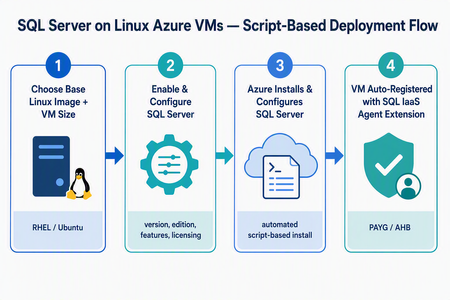
What’s changing We’re introducing a new script-based deployment experience for provisioning SQL Server on Linux Azure Virtual Machines (VMs). This experience replaces the earlier model that relied on pre-created SQL Server on Linux Marketplace images, which have been deprecated. Pre-created SQL Server on Linux Marketplace images are no longer available for new provisioning through the Azure portal, the Azure SQL hub, Azure CLI, or PowerShell. Instead, SQL Server is now installed and configured during VM provisioning using a flexible, automated, script-based workflow. The result is a more adaptable and supportable deployment model that keeps SQL Server on Linux Azure VMs fully supported, reduces image-maintenance overhead, and makes it easier to adopt the latest Linux distributions, VM families, and configuration options - all while giving you more control over your SQL Server setup. Why the new model matters Greater flexibility and control — choose your Linux distribution, SQL Server version, edition, and even bring your own mssql.conf to tailor the configuration. Faster access to innovation — new Linux versions and Azure capabilities are picked up automatically, without waiting for a new baked image to be published. Automatic registration built in — every VM is registered with the SQL IaaS Agent extension by default, unlocking licensing flexibility, compliance, and richer visibility. A dynamic, guided UI — the portal enables or disables options based on supported operating system, SQL Server, and licensing combinations, so you only see valid choices. Supported Linux distributions The script-based deployment experience supports the following distributions, and future versions are picked up automatically as they become supported — no manual intervention required: Distribution Supported versions Red Hat Enterprise Linux (RHEL) RHEL 9, RHEL 10 (and future versions) Ubuntu Ubuntu 22.04, Ubuntu 24.04, Ubuntu 26.04 (and future versions) Automatic registration applies to both Red Hat Enterprise Linux and Ubuntu, across all their supported versions. Automatic registration with the SQL IaaS Agent extension SQL Server on Linux VMs deployed through this experience are automatically registered with the SQL Server IaaS Agent extension. Registration creates a SQL virtual machine resource in Azure (separate from the VM resource) and unlocks: Licensing flexibility — choose Pay-As-You-Go (PAYG) or Azure Hybrid Benefit (AHB), and switch between them anytime with no downtime. Compliance — a simplified way to meet Azure Hybrid Benefit product-term requirements without per-resource registration forms. Visibility and telemetry — clear license-type visibility, subscription-level tracking, and better operational insight from the Azure portal, CLI, or PowerShell. Note: Automatic registration is enabled by default during deployment. You can unregister or re-register a VM after deployment through the Azure portal, Azure CLI, or PowerShell. The end-to-end flow at a glance Experience: The “Create a virtual machine” tab Use this flow if you’re starting from the familiar VM creation experience in the Azure portal. In the Azure portal, go to Virtual machines (or Create a resource → Virtual machine) and select Create. On the Basics tab, select your project details (subscription, resource group), instance details, and a supported Linux base image — RHEL 9, RHEL 10, Ubuntu 22.04, or Ubuntu 24.04. Choose your VM size, authentication, and inbound ports as usual. Go to the Advanced tab and select the Install SQL Server checkbox. This enables SQL Server provisioning on the VM. A new SQL Server settings tab becomes available. Open it to configure your SQL Server deployment: SQL Server version — e.g., SQL Server 2025 or SQL Server 2022. Edition — Enterprise, Standard, Developer, Express, and Evaluation editions (options adjust to the selected version). Licensing model — Pay-As-You-Go (PAYG, default) or Azure Hybrid Benefit (AHB). Advanced configuration — Upload a custom mssql.conf file to set SQL connectivity, Azure Key Vault integration, and the tuned performance profile. Select Review + create, review the configuration summary, and select Create. Azure provisions the VM, then automatically installs and configures SQL Server and registers the VM with the SQL IaaS Agent extension. Managing licensing after deployment Because your VM is registered with the SQL IaaS Agent extension, you can change the licensing model anytime — with no downtime and no restart of the VM or SQL Server service. Azure portal: Go to the SQL virtual machine resource → Settings → SQL Server configuration → Manage. Azure CLI az sql vm update -n <VM_NAME> -g <RESOURCE_GROUP> --license-type AHUB Azure PowerShell: Set-AzSqlVM -Name <VM_NAME> -ResourceGroupName <RESOURCE_GROUP> -LicenseType AHUB Note: Switching between PAYG and AHB is immediate, incurs no additional cost, and does not restart the VM or the SQL Server service. Wrapping up The move to script-based deployment modernizes how you provision SQL Server on Linux Azure VMs. By replacing deprecated pre-created Marketplace images with a flexible, automated, script-based flow — and by registering every VM with the SQL IaaS Agent extension automatically — you get more choice, faster access to new Linux and SQL Server versions, and a cleaner path to licensing flexibility, compliance, and visibility. Whether you start from the Create a virtual machine tab or the Azure SQL hub, you get the same guided experience across RHEL 9, RHEL 10, Ubuntu 22.04, Ubuntu 24.04, and future versions. Ready to try it? Head to a Create a virtual machine option in the Azure portal. We’d love your feedback — let us know how the new experience works for your workloads in the comments.342Views1like0Comments