sql
17 TopicsUncover the latest cloud data security capabilities from Microsoft Defender for Cloud
Learn about the latest multicloud data security capabilities from Microsoft Defender for Cloud to strengthen your data security posture and protect your cloud data estate against data breaches and malware distribution.6.7KViews9likes0CommentsModern Database Protection: From Visibility to Threat Detection with Microsoft Defender for Cloud
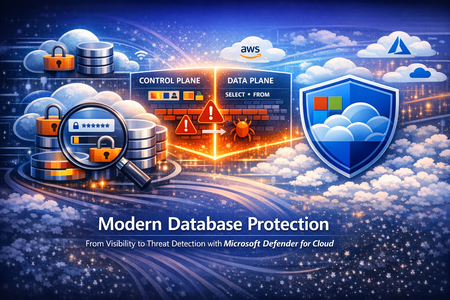
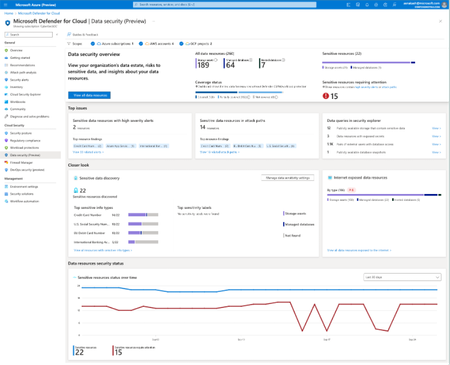
Databases sit at the heart of modern businesses. They support everyday apps, reports and AI tools. For example, any time you engage a site that requires a username and password, there is a database at the back end that stores your login information. As organizations adopt multi-cloud and hybrid architectures, databases are generated all the time, creating database sprawl. As a result, tracking and managing every database, catching misconfigurations and vulnerabilities, knowing where sensitive information lives, all becomes increasingly difficult leaving a huge security gap. And because companies store their most valuable data, like your login information, credit card and social security numbers, in databases, databases are the main target for threat actors. Securing databases is no longer optional, yet getting started can feel daunting. Database security needs to address the gaps mentioned above – help organizations see their databases to help them monitor for misconfigurations and vulnerabilities, sensitive information and any suspicious activities that occur within the database that are indicative of an attack. Further, database security must meet customers where they are – in multi-cloud and hybrid environments. This five part blog series will introduce and explore database-specific security needs and how Defender for Cloud addresses the gaps through its deep visibility into your database estate, detection of misconfiguration, vulnerabilities and sensitive information, threat protection with alerts and Integrated security platform to manage it all. This blog, part one, will begin with an overview of today’s database infrastructure security needs. Then we will introduce Microsoft Defender for Cloud’s unique database protection capabilities to help address this gap. Modern Database Architectures and Their Security Implications Modern databases can be deployed in two main ways: on your own infrastructure or as a cloud service. In an on-premises or IaaS (Infrastructure as a Service) setup, you manage the underlying server or virtual machine. For example, running a SQL Server on a self-managed Windows server—whether in your data center or on a cloud VM in Azure or AWS—is an IaaS deployment (Microsoft Defender for Cloud refers to these as “SQL servers on machines”) that require server maintenance. The other approach is PaaS (Platform as a Service), where a cloud provider manages the host server for you. In a PaaS scenario, you simply use a hosted database service (such as Azure SQL Database, Azure SQL Managed Instance, Azure Database for PostgreSQL, or Amazon RDS) without worrying about the operating system or server maintenance. In either case, you need to secure both the database host (the server or VM) and the database itself (the data and database engine). It’s also important to distinguish between a database’s control plane and data plane. The control plane includes the external settings that govern your database environment—like network firewall rules or who can access the system. The data plane involves information and queries inside the database. An attacker might exploit a weak firewall setting on the control plane or use stolen credentials to run malicious queries on the data plane. To fully protect a database, you need visibility into both planes to catch suspicious behavior. Effective database protection must span both IaaS and PaaS environments and monitor both the control plane and data plane because they are common targets for threat actors. Security teams can then detect suspicious activity such as SQL injections, brute-force attempts, and lateral movement through your environment. A Unified Approach to Database Protection Built for Multicloud Modern database environments are fragmented across deployment models, database ownership, and teams. Databases run across IaaS and PaaS, span control and data planes, and in multiple clouds, yet protection is often pieced together from disconnected point solutions Microsoft Defender for Cloud is a cloud native application protection platform (CNAPP) solution that provides a unified, cloud-native approach to database protection—bringing together discovery, posture management, and threat detection across SQL (Iaas and Paas), open-source relational databases (OSS), and Cosmos DB databases. Defender for Cloud’s database protection uses both agent-based and agentless solutions to protect database resources on-premises, hybrid, multi-cloud and Azure. A lightweight agent-based solution is used for SQL servers on Azure virtual machines or virtual machines hosted outside Azure and allows for deeper inspection, while an agentless approach for managed databases stored in Azure or AWS RDS resources provide protection with seamless integration. Additionally, Defender for Cloud brings in other signals from the cloud environment, surfacing a secure score for security posture, an asset inventory, regulatory compliance, governance capabilities, and a cloud security graph that allows for proactive risk exploration. The value of database security in Defender for Cloud starts with pre and post breach visibility. Vulnerability assessment and data security posture management helps security admins understand their database security posture and, by following Defender for Cloud’s recommendations, security admins can harden their environment proactively. Vulnerability assessments scans surface remediation steps for configurations that do not follow industry’s best practices. These recommendations may include enabling encryption when data is at rest where applicable or database server should restrict public access ranges. Data security posture management in Defender for Cloud automatically helps security admins prioritize the riskiest databases by discovering sensitive data and surfacing related exposure and risk. When databases are associated with certain risks, Defender for Cloud will provide its findings in three ways: risk-based security recommendations, attack path analysis with Defender CSPM and the data and AI dashboard. The risk level is determined by other context related to the resource like, internet exposure or sensitive information. This way, Security admins will have a solid understanding of their database environment pre-breach and will have a prioritized list of resources to remediate based on risk or posture level. While we can do our best to harden the environment, breaches can still happen. Timely post-breach response is just as important. Threat detection capabilities within Defender for Cloud will identify anomalous activity in near real time so SOC analytes can take action to contain the attack immediately. Defender for Cloud monitors both the control and the data plane for any anomalous activity that indicates a threat, from brute force attack detections to access and query anomalies. To provide a unified security experience, Defender for Cloud natively integrates with the Microsoft Defender Portal. The Defender portal brings signals from Defender for Cloud to provide a single cloud-agnostic security experience, equipping security teams with tools like secure score for security posture, attack paths, and incidents and alerts. When anomalous activities occur in the environment, time is of the essence. Security teams must have context and tools to investigate a database resource, both in the control plan and the data plane, to remediate and mitigate future attacks quickly. Defender for Cloud and the Defender portal brings together a security ecosystem that allows SOC analysts to investigate, correlate activities and incidents with alerts, contain and respond accordingly. Take Action: Close the Database Blind Spot Today Modern database environments demand more than isolated controls or point solutions. As databases span hybrid and multiple clouds, security teams need a unified approach that delivers visibility, context, and actionable protection where the data lives. Microsoft Defender for Cloud provides organizations the visibility into all of your databases in a centralized Defender portal using its unique control and data plane findings so that security teams can identify misconfigurations. prioritize them based on cloud-context risk-based recommendations or proactively identify other attack scenarios using the attack path analysis while SOC analysts can investigate alerts and act quickly. Follow this story for part two. We’ll go into Defender for Cloud’s unique visibility into database resources to find misconfiguration gaps, sensitive information exposure, and contextual risks that may exist in your environment. Resources: Get started with Defender for Databases. Learn more about SQL vulnerability assessment. Learn more about Data Security Posture Management Learn more about Advanced Threat Protection Reviewers: YuriDiogenes, lisetteranga, talberdah
Microsoft Defender for Open-Source Relational Databases Now Supports Multicloud (AWS RDS)
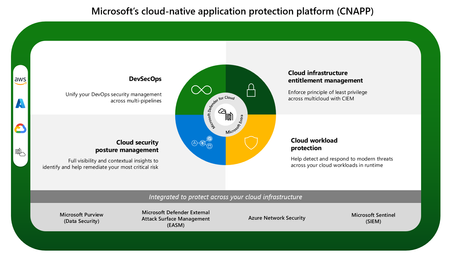
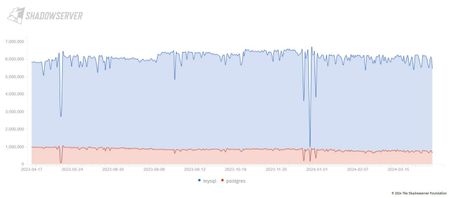
Introduction: Many organizations use multiple cloud providers today, which makes security misconfigurations more likely due to the solution scale and complexity. Moreover, different practices and concepts among each cloud provider’s implementation create bigger internal knowledge gaps. No matter how many cloud providers an organization uses, a database is the core of each application, storing the organization’s most valuable data: PII, financial and payment information, medical information, and other sensitive data. This makes databases the most attractive attack target for any threat actor – from inside or outside. Even though there is more awareness of exposure misconfigurations (thanks to cybersecurity education and posture management products that reveal these issues), public datasets show that the most risky database misconfiguration - exposing databases to the internet is not going down. This fact emphasizes the importance of threat protection that will act as a last line of defense and help detect, in near real-time, attacks that endanger databases and the critical data they contain. Internet exposed databases count through time. (Source: Time series · General statistics · The Shadowserver Foundation) Announcement: Microsoft Defender for open-source relational databases have been long focusing on providing comprehensive protection for Azure databases. Today, we're excited to announce another significant milestone in our cloud database security journey: Microsoft Defender for open-source relational databases plans now extend their protection to multicloud environments, starting with Amazon RDS on AWS. The workloads supported in AWS RDS are: Aurora PostgreSQL Aurora MySQL PostgreSQL MySQL MariaDB This release includes full parity with the alert types of support for managed Azure OSS databases: Anomalous database access and query patterns - For example, a logon from a suspicious location or from a domain not seen in the past 60 days. Suspicious database activities - For example, a user accessing a database service from a breached computer which communicated with a crypto-mining C&C server. Brute-force attacks – With the ability to separate simple brute force attempt from a successful brute force. Under public preview, you can turn on the Defender for open-source relational databases plan for AWS RDS at no cost. This marks a pivotal moment in our commitment to securing your business-critical data across cloud environments. This announcement makes Microsoft the sole major security provider offering multicloud database protection, a significant step forward in building an end-to-end multicloud & Cloud native application protection platform (CNAPP). Defender for Cloud stands out with its comprehensive approach, covering a diverse range of databases and leveraging Microsoft's dual role as a cloud and security provider. This integration enables us to provide unparalleled scanning depth and real-time threat detection capabilities, enhancing security across multicloud environments. This multicloud database protection announcement is part of Microsoft's commitment to build a comprehensive Cloud Native Application Protection Platform (CNAPP). CNAPP integrates advanced data threat intelligence, , and data threat protection to provide in depth cloud data security insight and breadth of data security protection across various cloud platforms. Microsoft's CNAPP infographic Features You will now have full flexibility to mix and match the protection on your multicloud databases: Protection layers for multicloud database protection Foundational CSPM – Free out of the box (OOTB) control plane recommendations are generated once you connect your account to Microsoft Defender for Cloud. Recommendations are evaluated and generated OOTB for all connected cloud environments. Advanced posture management with Defender CSPM (DCSPM) - Discovers your databases, what types of sensitive data they contain and assesses risk to that data based on context gathered across all the clouds in the customer’s scope. Misconfigurations and sensitive data are discovered and displayed as part of an attack path Advanced threat protection with Defender for open-source relational databases – Provides threat protection by generating near real-time alerts based on suspicious and anomalous access patterns to your databases. Attack path also highlights active attack on the vulnerable resources MDC lists the alert history on the resource we can see brute force attacks, connections from harmful applications and more Brute force attack detected from an IP that was reported as a Tor exit node Finally, Microsoft Defender for Cloud offers seamless integration with Defender XDR, which offers enhanced threat detection and response capabilities. It's crucial for organizations to adopt both Defender for Cloud and Defender XDR personas to effectively manage and mitigate security risks across their multicloud environments. Defender XDR identified an incident where the same IP tried to brute force cloud databases in AWS and Azure Sensitive data discovery is built-in! Defender for open-source databases on AWS will be the first database threat protection plan to bundle sensitive data discovery as part of its core value, without depending on other plans (such as DCSPM) or incur additional costs. Once the plan is enabled the discovery process will be scheduled weekly and you will be able to consume the findings in all the main MDC experiences: Alerts - filter alerts by resources with findings, alert page enrichment Inventory – filter resources with findings Resource health – enrichment with findings Security explorer (new!) – You will also be able to query the findings using security explorer even without enabling DCSPM. Only findings’ data will be queryable – other pieces of context require enabling DCSPM. Conclusion In conclusion, Microsoft Defender for open-source relational databases now support multicloud database protections in AWS RDS environments. This change signifies a pivotal advancement in cloud security. Through its holistic approach embodied by CNAPP, Microsoft empowers organizations to safeguard their critical data assets consistently across diverse cloud platforms. Resources: To learn more about Defender for Cloud, click here. Read about Defender for open-source relational databases documentation here. Read about sensitive data discovery. Defender for open-source relational databases alerts reference. Start free trial here.3.9KViews2likes0Comments
Unleashing the Power of Microsoft Defender for Cloud – Unique Capabilities for Robust Protection
So you have implemented a non-native Cloud Security Posture Management solution but there are security gaps that you might not have considered. How Defender for Cloud is uniquely positioned to secure your cloud attack surface.New express configuration for Vulnerability Assessment in Microsoft Defender for SQL- Public Preview
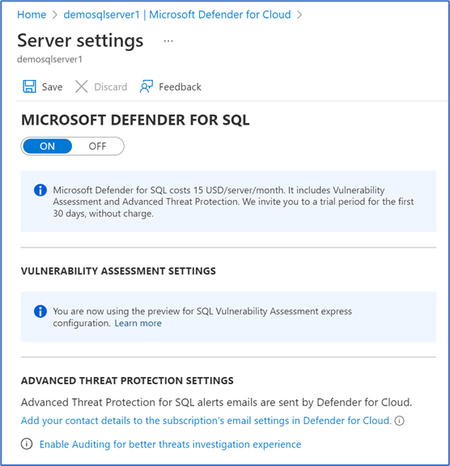
Users of Microsoft Defender for SQL can enjoy full database protection from two components: Advanced Threat Protection (ATP) for real-time detection of attacks and Vulnerability Assessment (VA) that scans, flags, and reports on database misconfigurations that may result in vulnerabilities for attackers to exploit. We are pleased to announce the public preview of the new express configuration experience for Vulnerability Assessment in Microsoft Defender for SQL that provides security teams with streamlined configuration experience on Azure SQL Databases and Azure Synapse Dedicated SQL Pools (formerly SQL DW). Benefits of Microsoft Defender for SQL Vulnerability Assessment express configuration Until now, the Vulnerability Assessment within Defender for SQL requires a customer-managed Azure storage account for correct configuration to store scan results and baseline settings. With the new express configuration experience for vulnerability assessments, security teams can: Configure vulnerability assessment with one click (within the SQL resource UI in Defender for Cloud blade), without any additional settings or dependencies on customer-managed storage accounts. Microsoft Defender for SQL Settings Blade • Apply baselines without rescanning a database - once you select “Add all results as baseline”, the status of that finding will change from Unhealthy to Healthy immediately Status becomes healthy immediately • Set baselines at scale (multiple rules at once, can also be based on latest scan results) • Enable the vulnerability assessment capability for all Azure SQL Servers when turning on the Microsoft Defender for SQL bundle at the subscription-level Get Started The new configuration experience is available through the Microsoft Defender for Cloud blade under your Azure SQL Server resource at no extra cost for Microsoft Defender for SQL customers, or when configuring the Defender for SQL bundle at the subscription level. For the purpose of the public preview, express configuration will only support server-level policies on logical servers containing: Azure SQL Databases and Azure Synapse Dedicated SQL Pools (formerly SQL DW). Express configuration will be applied in the following scenarios: The Microsoft Defender for SQL plan is enabled on the SQL Server (this is the new default configuration for vulnerability assessment). Microsoft Defender for SQL plan was turned on the subscription level after the public preview release date (available December 22). Customer chose to switch from the SQL Server/Database Microsoft Defender for Cloud blade or the server settings blade. Microsoft Defender for Cloud blade: SQL vulnerability assessment is not configured warning Settings blade: SQL vulnerability assessment is not configured warning in Settings blade Common Questions Q: What else do I need to know before switching to express configuration? A: Not all classic configuration features are available in express configuration so please review the full comparison in the official documentation. Also, be aware that switching from classic to express configuration during the preview will not migrate existing baselines and scan history. Q: What happens to the Azure storage accounts currently configured for VA after switching to express configuration? A: Express configuration doesn’t change the data in the storage accounts, it just stops writing baselines and scan results to those accounts. You are not required to maintain these files for SQL vulnerability assessment to work after switching to express configuration, but you may want to keep your old baseline definitions in case you’ll need them for reference in the future. Q: Where are the scan results and baselines stored now with the express configuration of VA? A: On internal storage accounts that comply with our data residency standards. Customers will no longer have direct access to these files. Q: Does express configuration change scan behaviour? A: No, express configuration provides the same scanning behaviour and performance. Q: Does express configuration have any effect on pricing? A: Enabling or switching to express configuration comes at no extra cost. Since you are no longer required to maintain a storage account, you will no longer have to pay additional storage fees (if you choose to delete old scan and baseline data) Additional Resources Microsoft Docs: SQL vulnerability assessment - Azure SQL Database & SQL Managed Instance & Azure Synapse Analytics | Microsoft Docs Supplemental Terms of Use for Microsoft Azure Previews Huge thanks to the reviewers of this post: @Dick Lake, Senior Product Manager, Microsoft Defender for Cloud @Linnet Kariuki, Program Manager, Microsoft Defender for CloudMicrosoft Defender for Cloud PoC Series – Microsoft Defender for SQL
[Post updated on 8/22/2024] by Yura Lee Introduction This article is a continuation of Microsoft Defender PoC Series which provides you guidelines on how to perform a proof of concept for a specific Microsoft Defender plan. For a more holistic approach where you need to validate Microsoft Defender for Cloud, please read How to Effectively Perform a Microsoft Defender for Cloud PoC article. There can be many security vulnerabilities in databases that are sometimes taken advantage of by malicious actors. According to the Github 2020 report, a vulnerability typically goes undetected for 218 weeks (just over four years) before being disclosed and fixed. Injection attacks, such as those on SQL and NoSQL, are among the most popular types of cyberattacks for web applications (as per OWASP Top 10). SQL Injection attacks, brute-force attacks, SQL shell OS attacks leading to crypto-mining and ransomware, can be detected and remediated by the Microsoft Defender for SQL plan. Microsoft Defender for SQL has two main capabilities that together will protect your SQL environments from cyberattacks. These capabilities are: Vulnerability Assessment, which is a service that helps you identify and remediate vulnerabilities in your database environments to improve your security posture Advanced Threat Protection, which detects suspicious activities related to your databases and alerts you with details and recommended actions. There are other types of databases that will be protected via the advanced threat protection feature. Planning So, what actually gets protected through Microsoft Defender for SQL? There are two Microsoft Defender plans that are comprised as part of Microsoft Defender for SQL: Microsoft Defender for Azure SQL database servers protects: Azure SQL Database Azure SQL Managed Instance Dedicated SQL pool in Azure Synapse. Microsoft Defender for SQL servers on machines extends the protections for your to fully support hybrid environments and protects SQL servers hosted in Azure, other cloud environments, and even on-premises machines. It does this by protecting: SQL Server on Virtual Machines, On-premises SQL servers of Azure Arc enabled SQL Server SQL Server running on Windows machines without Azure Arc There is a third plan called Microsoft Defender for open-source relational databases that brings threat protection for: Azure Database for PostgreSQL Azure Database for MySQL Azure Database for MariaDB The final plan, Defender for Cosmos DB provides advanced threat detection capabilities for: Azure Cosmos DB, NoSQL API. Preparation You will need to first enable Microsoft Defender for SQL, and for this you need to have the role of Security Admin. For more information about roles and privileges, visit this article. You can enable the three plans for Microsoft for SQL (for Azure SQL database servers, SQL servers on machines, and open-source relational databases) by following the instructions here. If you are conducting this PoC in partnership with the SOC Team, make sure they are familiar with the alerts that may appear once you enable this plan. Review all alerts available at our Alerts Reference Guide. From the readiness perspective, make sure to review the following resources to better understand Microsoft Defender for SQL: Microsoft Defender for SQL Documentation Defender for SQL and the Vulnerability Assessment | Defender for Cloud in the Field #1 Microsoft Defender for Cloud webinar: Microsoft Defender for SQL Anywhere (new!) Enhancements in Defender for SQL Vulnerability Assessment | Defender for Cloud in the Field #24 - YouTube Special Note for Defender for SQL servers on machines Microsoft Defender for SQL servers on machines requires Azure Montior Agent (AMA) installed, as well as a SQL Iaas extension for discovery and registration and it should report to a workspace to hold data collection rules (DCR). This workspace can be specified or you can allow MDC to create a default one for you. For machines that are not in Azure, all the above are required in addition to Arc installation. Read more about Arc-enabled servers here. Workspace configuration and automatic SQL server instance registration (recommended) can be done in Settings & monitoring. Make sure that Log analytics deployment is turned OFF, and AMA for SQL server on machines is turned ON. Implementation and Validation There are two ways to validate alerts. First, you can use the out of box sample alert feature to validate. To create these sample alerts, you will need to have the role Security Admin or Subscription Contributor. To create sample alerts for Defender for SQL, go to Microsoft Defender for Cloud in the Security alerts section, click Sample alerts. Select your subscription, choose Azure SQL Database and SQL Server on machines on the Microsoft Defender plans, and click Create sample alerts. The other way is to run simulations against the server itself. Instructions for this is available on Github, as part of MDC labs here. Prevention Microsoft Defender for SQL allows you to remediate SQL vulnerabilities and prevent SQL incidents and alerts using SQL vulnerability assessment. To configure it on your Azure SQL databases and Azure SQL Managed Instance, go to the Recommendations page in Microsoft Defender for Cloud, and select one of the following recommendations under the control Remediate security configurations: For Azure SQL databases, select the recommendation Vulnerability assessment should be enabled on your SQL servers. For Azure SQL Manage Instances, select the recommendation Vulnerability assessment should be enabled on your SQL managed instances. When Microsoft Defender for SQL is enabled on your SQL Server on machines, SQL vulnerability assessment does not require initial configuration, as it is included with SQL Server. In this article, we will demo SQL vulnerability assessment for Azure SQL database. Select the recommendation SQL servers should have vulnerability assessment configured. From here, select the unhealthy resource that you’d like to configure vulnerability assessment on, and click Fix. In the pane that appears, click Fix 1 resource. Next, to remediate vulnerability findings from your SQL databases and SQL Server on machines, go to the Recommendations page in Microsoft Defender for Cloud. Under the control Remediate security configurations, select one of the following recommendations: For Azure SQL databases and Azure SQL Manage Instances, select the recommendation SQL databases should have vulnerability findings resolved. For SQL Server on machine, select the recommendation SQL servers on machines should have vulnerability findings resolved. In this article, we will demo SQL databases should have vulnerability findings resolved. From here, select any of the unhealthy resources. Then select the finding you wish to remediate. In this example, we’ll be selecting Auditing should be enabled at the server level. Then select the database. Once again, click the finding you wish to remediate, which in our case is Auditing should be enabled at the server level. Select Click here to remediate. Alternatively, you may decide that this finding does not pose a security risk for your environment. In this case, you should create an acceptable baseline, which is essentially a customisation that tells the Vulnerability Assessment what is expected in your environment. To do this, select Approve as Baseline, and follow the subsequent instructions. Vulnerability Assessment recurring scans in your environment, and in upcoming scans after this, any results that match the baseline you established are considered as passes. Only reports on deviations from this baseline will appear as findings in the Vulnerability Assessment dashboard. This allows you to focus your attention only on the relevant issues. Learn more about this here. Continue remediating and/or setting baselines across all the findings and databases to improve your SQL security posture. Automations Instead of following the manual process above to remediate recommendations on SQL databases, you can use the automated ways to remediate recommendations related to SQL like, Vulnerability assessment should be enabled on your SQL servers, Enable auditing on SQL server, Enable transparent data encryption on SQL databases and many more like these in our Microsoft Defender for Cloud Github repository. This repository gives you access to numerous sample security playbooks that will help in automating remediation for a recommendation. You can also utilize workflow automation feature in Microsoft Defender for Cloud which can trigger Logic Apps on Security alerts, recommendations, and changes to regulatory compliance. For example, when Microsoft Defender for Cloud detects a brute force attack, you may want this to be automatically taken care off, you can use this playbook as a starting point. To understand how to remediate security alerts using Microsoft Defender, make sure you check out this chapter from SC-200 certification exam learning guide. You can also create an automatic response to a specific security alert using an ARM template, read more about it in our documentation. Further Resources How Microsoft Defender for SQL can protect SQL servers anywhere - YouTube (new!) Defender for Open-Source Relational Databases Multicloud | Defender for Cloud in the Field #51 (youtube.com) Latest Updates (new!) Microsoft Defender for Open-Source Relational Databases Now Supports Multicloud (AWS RDS) (new!)Microsoft Defender for Cloud Adds Full Coverage for Azure Open-Source Relational Databases - Microsoft Community Hub (new!) Better Together = Defender CSPM + Database Protections - Microsoft Community Hub (new!) Microsoft Defender for SQL is now available on the SQL Virtual Machine blade. - Microsoft Tech Community Conclusion By the end of this PoC you should be able to determine the value proposition of Microsoft Defender for SQL and the importance to have this level of threat detection to your workloads. Stay tuned for more Microsoft Defender for Cloud PoC Series! P.S. Subscribe to our Microsoft Defender for Cloud Newsletter to stay up to date on helpful tips and new releases and join our Tech Community where you can be one of the first to hear the latest Microsoft Defender for Cloud news, announcements and get your questions answered by Azure Security experts. Reviewers Special Thanks to Yuri Diogenes, Safeena Begum, David Trigano and Michael Makhlevich for reviewing this article.Microsoft Defender for Cloud Customer Newsletter
*This will be the last monthly MDC newsletter. To keep up with the latest, please visit: What's new in MDC What's new in Defender for Cloud? Multiple container security features are now Generally Available: Container-level misconfiguration recommendations for Kubernetes, Upgrade AKS version recommendations, VA for runtime-discovered container images on EKS and GKE, Kubernetes notes VA for EKS and GKE, scanning support for Docker hardened container images. For more information, see this page here. Database-level recommendations for SQL VA now GA The SQL vulnerability assessment recommendations created as part of the transition from grouped to individual recommendations are now generally available. Each SQL vulnerability assessment rule is surfaced as its own recommendation, reported directly on the affected SQL database resource. For more details, please refer to this documentation . Blogs of the month In July, our team published the following blog posts we would like to share: 1. Built to Protect: The Architecture Behind Codename MDASH Customer journey Discover how other organizations successfully use Microsoft Defender for Cloud to protect their cloud workloads. This month we are featuring NTT Data. NTT Data, a top global IT services provider, leverages Azure, OpenAI and Microsoft Defender to launch their AI agents, adopting secure by design principles, to help enhance, competitiveness organization change and data usage. Defender for AI, and Defender CSPM, as part of the Defender family, address the emerging risks and threats like prompt injection and data poisoning that come with generative AI. Join our community! We offer several customer connection programs within our private communities. By signing up, you can help us shape our products through activities such as reviewing product roadmaps, participating in co-design, previewing features, and staying up-to-date with announcements. Sign up at aka.ms/JoinCCP. We greatly value your input on the types of content that enhance your understanding of our security products. Your insights are crucial in guiding the development of our future public content. We aim to deliver material that not only educates but also resonates with your daily security challenges. Whether it’s through in-depth live webinars, real-world case studies, comprehensive best practice guides through blogs, or the latest product updates, we want to ensure our content meets your needs. Please submit your feedback on which of these formats do you find most beneficial and are there any specific topics you’re interested in https://aka.ms/PublicContentFeedback. Note: If you want to stay current with Defender for Cloud and receive updates in your inbox, please consider subscribing to our monthly newsletter: https://aka.ms/MDCNewsSubscribeMicrosoft Defender for Cloud Customer Newsletter
Check out monthly news for the rest of the MTP suite here! What's new in Defender for Cloud? Now in public preview, Defender for Cloud provides threat protection for AI agents built with Foundry, as part of the Defender for AI Services plan. Learn more about this in our documentation. Defender for Cloud’s Defender for SQL on machines plan provides a simulated alert feature to help validate deployment and test prepared security team for detection, response and automation workflows. For more details, please refer to this documentation. Check out other updates from last month here. Blogs of the month In February, our team published the following blog post we would like to share: Extending Defender's AI Threat Protection to Microsoft Foundry Agents Defender for Cloud in the field Revisit the announcement on the new Secure Score model and the enhancements available in the Defender Portal. New Secure Score model and Defender portal enhancements GitHub Community Module 12 in Defender for Cloud’s lab has been updated to include alert simulation! Database protection lab - module 12 Customer journey Discover how other organizations successfully use Microsoft Defender for Cloud to protect their cloud workloads. This month we are featuring ContraForce. ContraForce, a cybersecurity startup, built its platform on Microsoft’s robust security and AI ecosystem. Contraforce, while participating in Microsoft for Startup Pegasus program, addressed the issue of traditional, complex, and siloed security stacks by leveraging Microsoft Sentinel, Defender XDR, Entra ID and Microsoft Foundry. ContraForce was able to deliver enterprise-grade protection at scale, without the enterprise-level overhead. As a result, measured key outcomes like 90%+ incident automation, 93% reduced cost per incident, and 60x faster incident response. Join our community! We offer several customer connection programs within our private communities. By signing up, you can help us shape our products through activities such as reviewing product roadmaps, participating in co-design, previewing features, and staying up-to-date with announcements. Sign up at aka.ms/JoinCCP. We greatly value your input on the types of content that enhance your understanding of our security products. Your insights are crucial in guiding the development of our future public content. We aim to deliver material that not only educates but also resonates with your daily security challenges. Whether it’s through in-depth live webinars, real-world case studies, comprehensive best practice guides through blogs, or the latest product updates, we want to ensure our content meets your needs. Please submit your feedback on which of these formats do you find most beneficial and are there any specific topics you’re interested in https://aka.ms/PublicContentFeedback. Note: If you want to stay current with Defender for Cloud and receive updates in your inbox, please consider subscribing to our monthly newsletter: https://aka.ms/MDCNewsSubscribe